
HDMI KVM Switch 3 Monitors 2 Computers 4K@60Hz
4.5Editor score
4K@60Hz resolution capability
4 USB 3.0 ports included
Simple button and remote switching
This guide compares ten top KVM switches for triple monitors to help you find the perfect setup for seamless switching between multiple computers and displays.
Finding the right KVM switch for triple monitors can transform your workspace efficiency. It allows you to share peripherals across multiple systems without constant cable swapping. This guide explores the best options available today.
We analyzed numerous models based on resolution support, connectivity options, and ease of use. Our selection includes units for budget-conscious buyers and those needing high performance. Each product offers unique features tailored to different workflows and needs.
Each pick highlights key strengths, drawbacks, and ideal use cases. You will see detailed reviews and a comparison table for quick reference. Note that availability and pricing may change frequently over time. Always check current listings before purchasing your ideal device.
4.5Editor score

4.9Editor score

4.2Editor score
Here is a detailed side-by-side comparison of the top ten KVM switches designed for triple monitor setups. We examine resolution limits, port counts, and special features to help you choose quickly.




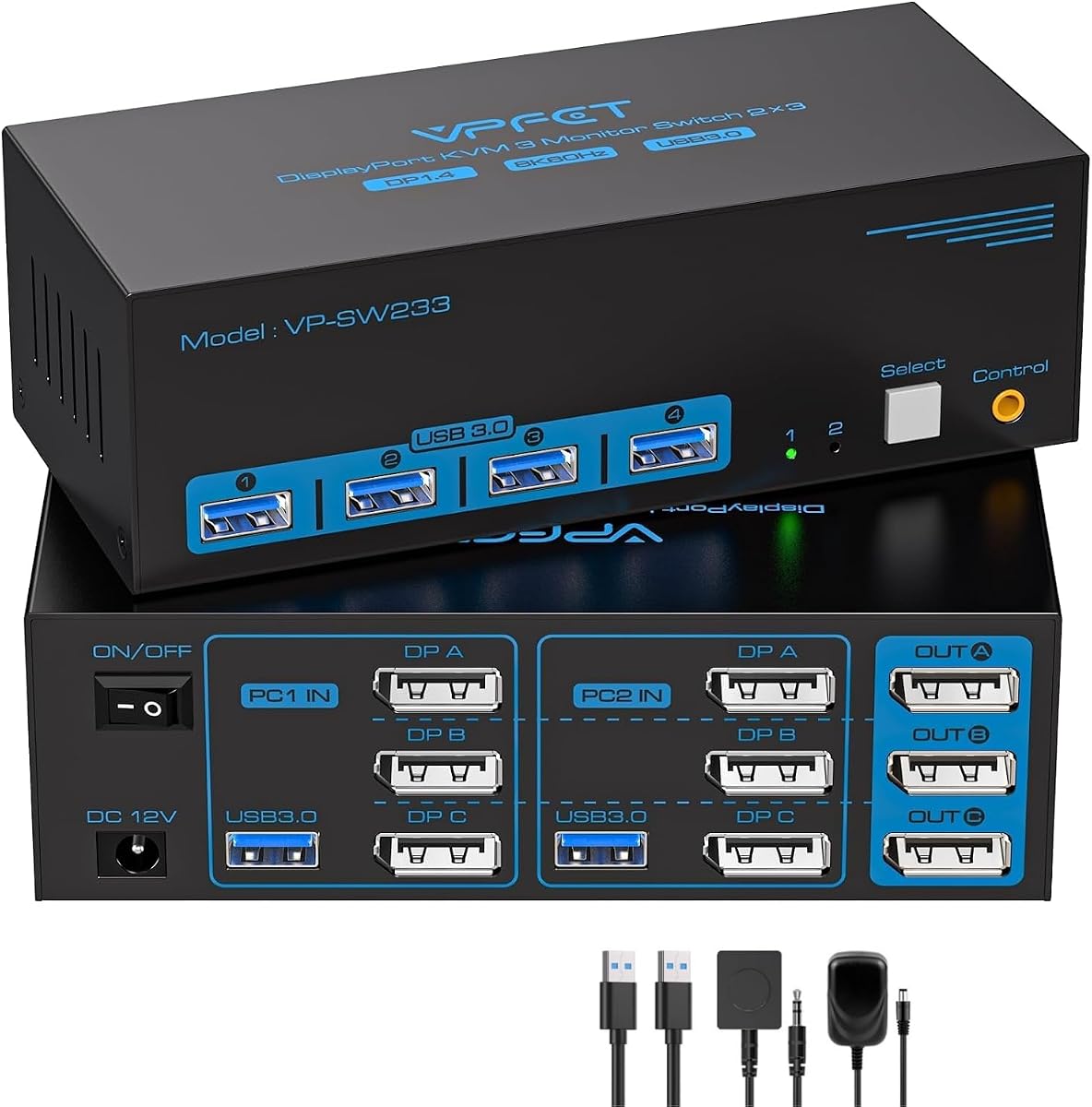

This AV Access model stands out as a top choice for users needing robust connectivity. It offers exceptional resolution support up to 8K@60Hz for desktops and handles triple monitor setups effortlessly.
We may earn a commission when you buy through this link, at no additional cost to you.
The docking station capabilities are a major strength. You can charge laptops up to 100W via USB C while sharing peripherals. This reduces desk clutter significantly and keeps your workspace organized.
Trade-offs include the need to source cables separately and Mac limitations. However, the benefits of network sharing and high-speed data transfer outweigh these minor inconveniences for most professionals.
Ideal for home office professionals and creators. It replaces multiple devices with one streamlined solution ensuring reliable performance across different systems and display configurations daily.
The ability to manage both video and data streams ensures seamless workflows. You switch computers without disconnecting networks or charging cables.
Support for high refresh rates and resolutions makes it suitable for gaming and design work. Visuals remain crisp and responsive across all monitors.
We may earn a commission when you buy through this link, at no additional cost to you.
This HDMI unit is ideal for budget-conscious buyers needing triple monitor support. It allows two computers to share screens and USB devices without complexity or expensive extra equipment.
We may earn a commission when you buy through this link, at no additional cost to you.
The support for 4K@60Hz ensures sharp visuals for standard workflows. USB 3.0 ports handle peripherals efficiently, and the external power adapter ensures stable operation even with demanding devices.
Limitations like missing hotkey support are acceptable given the price. The included remote button provides a convenient alternative for managing your desktop environment easily.
Best for general office work or home users. It delivers essential functionality at a reasonable cost making triple monitor setups accessible to everyone.
You get full triple monitor capability without spending much. It simplifies sharing keyboards and mice between two systems effectively.
The external power supply ensures consistent performance. This prevents dropouts or flickering when multiple USB devices are active.
We may earn a commission when you buy through this link, at no additional cost to you.
This premium KVM docking station offers top-tier performance for high demand environments. It supports refresh rates up to 480Hz making it perfect for competitive gaming.
We may earn a commission when you buy through this link, at no additional cost to you.
Features like SD card readers and audio jacks add significant value. The single cable setup for laptops streamlines the workspace and reduces clutter on your desk.
Trade-offs include higher cost and some MacBook restrictions. However, power users will appreciate the extensive features and reliable build quality for daily use.
Ideal for gamers and creative professionals. It delivers a complete ecosystem for switching and connecting peripherals without compromising on speed or quality.
Additional ports like SD readers simplify workflows for content creators. You can transfer files quickly without extra hubs or adapters.
High refresh rates ensure smooth motion during gameplay. This eliminates tearing and provides a superior visual experience for gamers.
We may earn a commission when you buy through this link, at no additional cost to you.
This KVM switch offers a unique 4 computer configuration ideal for multi user environments. It supports high resolutions and refresh rates ensuring quality visuals for all connected devices.
We may earn a commission when you buy through this link, at no additional cost to you.
The included cables and remote simplify the installation process significantly. You can start using it immediately without buying extra accessories or worrying about compatibility issues.
Complexity in setup is the main drawback for non technical users. However, once configured it performs reliably for demanding workflows involving multiple machines simultaneously.
Best for small businesses or IT labs. It allows sharing one set of monitors across four workstations efficiently without constant physical reconnections needed.
Supporting four inputs expands possibilities for shared workspaces. It optimizes desk space by reducing redundant monitor sets.
Receiving all cables included saves time and money. It ensures you have everything needed for a seamless installation process quickly.
We may earn a commission when you buy through this link, at no additional cost to you.
This switch delivers strong performance with 8K resolution support. It combines DP and HDMI inputs to suit various monitor types and configurations easily.
We may earn a commission when you buy through this link, at no additional cost to you.
USB 3.0 ports ensure peripherals and storage run smoothly. The power switch feature is useful for resetting connections without unplugging everything manually.
Using short cables is key for maximizing resolution. While a minor detail it ensures the best visual quality and signal stability during daily use.
Ideal for users needing high definition visuals. It bridges the gap between older and newer display standards effectively for modern workspaces.
Supporting both HDMI and DP allows flexibility. You can mix different monitor types without needing specialized adapters or hubs.
Fast USB speeds improve workflow efficiency. Transferring files between computers happens quickly and without noticeable delays.
We may earn a commission when you buy through this link, at no additional cost to you.
This unit offers impressive refresh rates for smooth visuals. It supports 4K@120Hz making it suitable for both productivity and gaming needs.
We may earn a commission when you buy through this link, at no additional cost to you.
The inclusion of a wired controller keeps your desk tidy. You can hide the button and still switch easily without cluttering your workspace.
Cable length matters significantly for 8K performance. Keeping cables short ensures you get the best signal quality and stability for your setup.
Best for users wanting balanced performance. It handles high speed needs well while providing solid connectivity for everyday peripherals.
High refresh rates reduce motion blur. This is beneficial for gaming and fast paced content creation tasks.
No drivers needed means instant use. Simply connect and switch without software configuration or technical knowledge.
We may earn a commission when you buy through this link, at no additional cost to you.
This model allows three computers to share one triple monitor setup. It supports high resolution and refresh rates for demanding tasks and professional use.
We may earn a commission when you buy through this link, at no additional cost to you.
The package includes necessary USB cables to simplify setup. You can start using it right away without needing extra purchases for functionality.
Attention to USB connections is critical for operation. If not connected properly devices may not work which adds a step to configuration.
Ideal for users needing multi computer access. It offers flexibility for switching between multiple systems efficiently without hardware swapping.
Sharing monitors across three PCs optimizes space. It is great for testing or collaborative environments with multiple machines.
Included cables mean you can start immediately. This convenience saves time and effort for initial setup tasks.
We may earn a commission when you buy through this link, at no additional cost to you.
This DP KVM switch is built for stability and performance. It supports 4K@144Hz ensuring smooth visuals for gaming or creative work.
We may earn a commission when you buy through this link, at no additional cost to you.
The wired controller allows easy switching between systems. It is perfect for professionals needing reliable and consistent daily workflow performance.
Requires DisplayPort outputs which may limit users with HDMI only setups. However, for those with compatible hardware it delivers excellent results.
Best for home offices and professionals. It provides a clean efficient way to manage dual systems and multiple displays easily.
Designed for demanding environments it minimizes signal loss. You get a consistent experience without flickering or dropouts.
The one button switch reduces effort. You can manage multiple PCs without complex software or physical connection changes.
We may earn a commission when you buy through this link, at no additional cost to you.
This KVM switch comes with all essential cables. It simplifies the setup process significantly and ensures you have everything needed for operation.
We may earn a commission when you buy through this link, at no additional cost to you.
The 1-year warranty adds peace of mind. It shows the manufacturer stands behind the product quality and reliability for long term use.
Requires specific PC support for triple screens. Check your graphics card capabilities before purchasing to ensure compatibility with the switch.
Ideal for users wanting a ready to use solution. It offers high performance and convenience with minimal hassle during installation.
Getting all cables included saves time and money. You avoid extra trips to the store for missing components quickly.
A full year warranty provides security. It ensures you can resolve issues quickly if they arise during use.
We may earn a commission when you buy through this link, at no additional cost to you.
This unit features a durable aluminum build. It supports high resolution and refresh rates ensuring quality visuals for modern displays and systems.
We may earn a commission when you buy through this link, at no additional cost to you.
The desktop controller allows flexible placement for switching. It keeps your workspace tidy while maintaining easy access to controls during daily use.
EDID emulation is not supported which can limit compatibility. This means some systems may struggle with auto detecting monitor settings automatically.
Best for users needing robust build quality. It offers high performance and reliability for professional and gaming environments effectively.
Aluminum housing ensures longevity and heat dissipation. It feels solid on your desk and resists wear over time.
Support for VRR and G-Sync reduces tearing. This enhances the visual experience significantly during fast motion.
We may earn a commission when you buy through this link, at no additional cost to you.
Selecting the right KVM switch involves evaluating technical specifications against your specific workflow requirements.
Ensure the switch supports your monitor capabilities. Look for 4K@60Hz or higher depending on your display needs.
Higher resolutions require HDMI 2.1 or DP 1.4 for best results.
Check input counts to match your computers. Most options support two PCs but some allow three or four inputs.
Selecting the right number avoids future upgrade costs.
USB 3.0 is essential for peripherals. It provides faster data transfer for printers and drives.
Ensure enough ports exist for your devices.
Choose between physical buttons and wired controllers. Wired controllers allow placing switches remotely.
Consider desk layout for best placement.
External power adapters ensure stability. They prevent dropouts during high load usage.
Check if a power adapter is included.
Many switches exclude cables. Verify if HDMI or DP cables are included in the package.
Buying cables separately adds to the cost.
Some switches work better with Windows than Mac. Ensure it supports your OS without driver issues.
Check system requirements before buying.
Metal casings offer durability. They dissipate heat better than plastic alternatives.
Check weight and material for quality.
Connect video cables from each computer to inputs. Ensure each computer matches your display requirements for triple output.
Plug in USB cables for peripherals. This ensures keyboard and mouse functions work correctly across systems.
Use the remote or button to switch. Verify LED indicators show the correct active computer before working.
Yes each computer must support three simultaneous displays. Without this only one or two monitors will work correctly.
HDMI 2.1 and DP 1.4 are recommended for high resolutions. Check if the package includes these cables before buying.
Yes USB 3.0 ports allow sharing keyboards and mice. Ensure USB cables connect to both systems for proper function.
Some models include audio jacks for headphones. Others rely on USB devices for audio output functions.
Most models are plug and play without drivers. This simplifies setup and avoids software compatibility issues.
Yes but keep total cable lengths short. Long cables may reduce signal quality for 4K resolution.
Yes high refresh rates like 144Hz are supported. Check model specs for specific refresh rate capabilities.
Resolutions may drop or screens may not activate. Stay within supported limits for reliable performance.
This guide highlights top performers like AV Access for versatility. These options balance high resolution support with convenient connectivity.
Prioritize USB and video specs based on needs. Ensure your computers meet display requirements before purchasing any model.
Check current listings for latest availability. Prices and stock fluctuate regularly so verify details before buying.