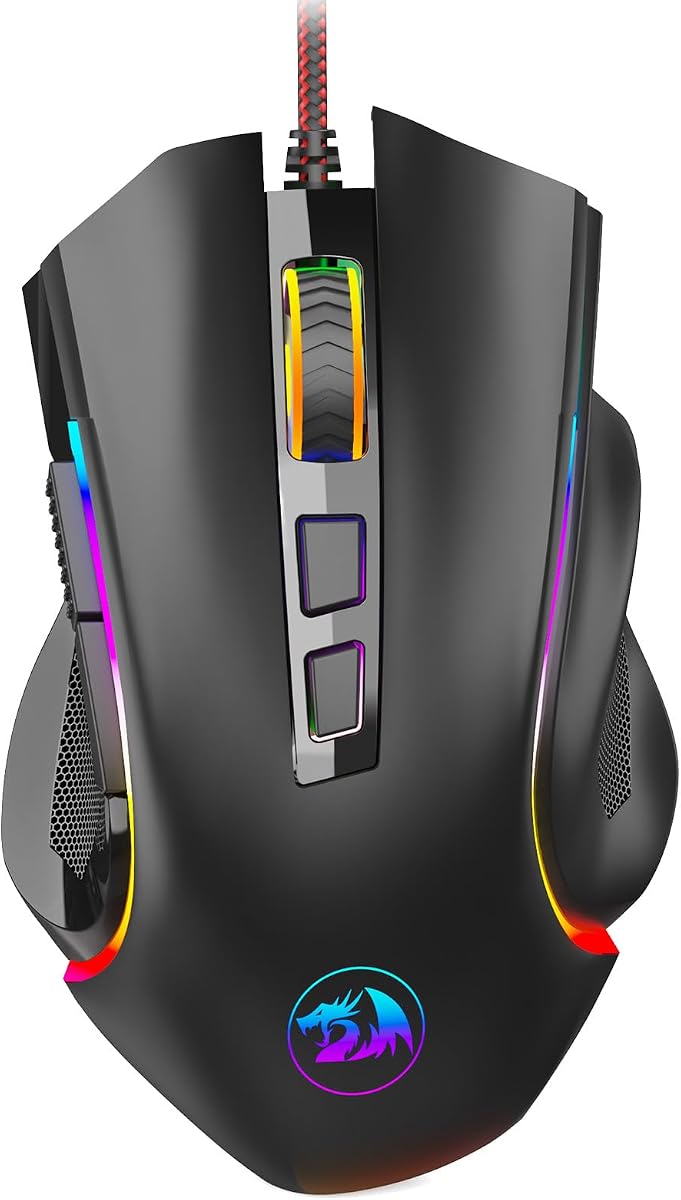
Redragon M602 Gaming Mouse
4.6Editor score
7200 adjustable DPI sensor
9 programmable buttons
Ergonomic RGB design
Find the best gaming mouse for Diablo 4 with our expert guide comparing top mice for precision, macros, and comfort in this action RPG title.
Choosing the right gaming mouse for Diablo 4 can significantly enhance your gameplay experience by improving precision and reducing fatigue during long sessions.
We compared ten top-rated mice based on sensor accuracy, button programmability, ergonomic design, and overall value to help you find the perfect match for your playstyle.
Each pick highlights key features and real-world performance notes so you can make an informed decision while keeping in mind that prices and availability may change over time.
4.6Editor score

4.6Editor score

4.2Editor score
This side-by-side comparison highlights the key specifications and features of each mouse to help you quickly identify which model fits your specific gaming needs.






The Logitech G502 Hero stands out as a top choice for Diablo 4 players due to its exceptional HERO sensor and highly customizable button layout.
We may earn a commission when you buy through this link, at no additional cost to you.
Its 11 programmable buttons allow for complex macro setups essential for managing skills and inventory quickly during intense dungeon runs and boss fights.
While the mouse is heavier than some ultra-light options, the adjustable weight system lets you fine-tune the balance to match your personal grip preference.
This mouse is ideal for gamers who value precision and customization, making it a reliable companion for both casual play and competitive scenarios.
The HERO sensor delivers sub-micron tracking accuracy ensuring your cursor moves exactly as intended without any smoothing or acceleration interference.
With 11 programmable buttons you can map frequently used abilities and items directly to the mouse reducing reliance on keyboard shortcuts.
We may earn a commission when you buy through this link, at no additional cost to you.
The Razer Naga V3 Pro offers unmatched versatility with swappable side plates allowing you to adapt the mouse layout for different game genres.
We may earn a commission when you buy through this link, at no additional cost to you.
Diablo 4 players can utilize the 12-button plate for quick skill access or switch to fewer buttons for more comfort during long sessions.
Wireless freedom is achieved with low-latency HyperSpeed technology while the battery lasts over 155 hours ensuring minimal interruptions during gameplay.
This mouse is best suited for enthusiasts who want premium features and adaptability, justifying the investment with its advanced functionality and build.
Three magnetic side plates with 12 6 or 2 buttons let you tailor the mouse to your specific playstyle without needing multiple devices.
HyperSpeed Wireless delivers lag-free performance comparable to wired mice while Bluetooth offers an alternative for extended battery efficiency.
We may earn a commission when you buy through this link, at no additional cost to you.
The Redragon M602 proves you do not need to spend a lot to get a capable gaming mouse that handles Diablo 4 requirements effectively.
We may earn a commission when you buy through this link, at no additional cost to you.
Its 9 programmable buttons allow for essential macro mappings while the ergonomic shape ensures comfort even during extended gaming sessions.
While the sensor max DPI is lower than premium models it remains highly accurate for typical gameplay distances and movements required in the game.
This mouse is perfect for budget-conscious gamers who still want reliable performance and customization options without breaking the bank.
At a fraction of the cost of high-end models the M602 delivers consistent tracking and button responsiveness suitable for everyday gaming.
The shape is designed to fit naturally in the hand reducing strain and fatigue during long periods of continuous play.
We may earn a commission when you buy through this link, at no additional cost to you.
The Razer Basilisk V3 combines speed and versatility with its Focus+ sensor and optical switches ensuring fast and accurate response times.
We may earn a commission when you buy through this link, at no additional cost to you.
Players can switch between free-spin and tactile scroll modes making it easy to navigate inventory or aim quickly depending on the situation.
The 11 programmable buttons offer ample room for macro creation while the optical switches provide durability and crisp tactile feedback.
This model is recommended for gamers who prefer a wired connection for zero latency and want a mouse that excels in both precision and comfort.
The HyperScroll wheel allows you to choose between fast free-spin scrolling or precise tactile notches depending on your immediate needs.
Gen 2 optical switches provide a blistering 0.2ms actuation speed and up to 70 million clicks ensuring long-term durability.
We may earn a commission when you buy through this link, at no additional cost to you.
The Logitech G305 Lightspeed is an excellent choice for those who value portability and battery life without sacrificing sensor performance.
We may earn a commission when you buy through this link, at no additional cost to you.
Its HERO sensor delivers high efficiency and accuracy while the wireless connection remains stable with zero noticeable latency during gameplay.
With up to 250 hours of battery life on a single AA battery you can game for months without worrying about frequent recharges or replacements.
This mouse is best for players who prefer a simple lightweight design and want a reliable wireless mouse for gaming or everyday use.
The sensor and wireless tech are optimized to minimize power draw extending battery life significantly compared to other wireless mice.
Weighing only 99 grams the G305 is easy to carry and comfortable for users with smaller hands or palm grip styles.
We may earn a commission when you buy through this link, at no additional cost to you.
The Corsair Scimitar RGB Elite features a unique side button layout that can be adjusted to fit your hand perfectly for maximum comfort.
We may earn a commission when you buy through this link, at no additional cost to you.
With 17 programmable buttons you can map extensive macros and skills essential for complex builds in Diablo 4 and other RPGs.
The PixArt sensor ensures precise tracking while the Omron switches provide durability for the high volume of clicks typical in MMO gaming.
This mouse is ideal for dedicated MMO players who need extensive button access and appreciate the ability to customize the side panel position.
The patented key slider system lets you reposition the 12 side buttons closer or further from your thumb to reduce strain.
17 buttons total provide enough space to map most complex ability combinations without relying heavily on keyboard modifiers.
We may earn a commission when you buy through this link, at no additional cost to you.
The UtechSmart Venus Pro Wireless brings the convenience of wireless technology to the traditional MMO button layout preferred by many RPG players.
We may earn a commission when you buy through this link, at no additional cost to you.
Sixteen programmable buttons allow for detailed macro setups while the wireless connection remains stable enough for responsive gameplay.
Its 16000 DPI sensor offers a wide adjustment range ensuring you can find the exact sensitivity that suits your play style.
This mouse is a great option for gamers who want an MMO button count but also value the freedom of a wireless connection.
The combination of wireless connectivity and 16 side buttons is rare in this price range offering great versatility for different game types.
A 1000mAh battery supports up to 70 hours of wireless use ensuring you can play for days before needing to recharge.
We may earn a commission when you buy through this link, at no additional cost to you.
The Redragon M901K offers an impressive array of features including 19 programmable buttons and a weight tuning kit at an affordable price.
We may earn a commission when you buy through this link, at no additional cost to you.
You can map complex macros to the 12 side buttons which is extremely useful for managing numerous abilities and potions in Diablo 4.
Adjustable weights let you customize the feel of the mouse while RGB lighting adds a visual flair to your gaming setup.
This mouse is perfect for players who want maximum customization options without spending a fortune on high-end gaming peripherals.
With 19 buttons you can eliminate almost all reliance on keyboard shortcuts for skill activation and inventory management.
Eight removable weights allow you to adjust the total mass and balance of the mouse to match your preferred feel.
We may earn a commission when you buy through this link, at no additional cost to you.
The Corsair NIGHTSWORD RGB features a unique smart tuning system that automatically detects and adjusts the center of gravity for optimal balance.
We may earn a commission when you buy through this link, at no additional cost to you.
This innovation allows you to fine-tune the mouse weight between 119g and 141g ensuring perfect stability during precise aiming or quick movements.
With 10 programmable buttons and a PixArt sensor it offers strong performance for both FPS and MOBA gaming needs.
This mouse is recommended for gamers who prioritize comfort and balance over raw button count and want a premium feel.
The weight system offers 120 different configurations allowing you to find the exact balance point that suits your hand.
High-performance rubber grips and a contoured shape fit your hand naturally reducing fatigue during long gaming sessions.
We may earn a commission when you buy through this link, at no additional cost to you.
The Razer DeathAdder Essential is a classic choice that focuses on core ergonomics and reliability without unnecessary extra features.
We may earn a commission when you buy through this link, at no additional cost to you.
Its 6400 DPI sensor provides accurate tracking for most players while the mechanical switches ensure a satisfying tactile click.
With 5 programmable buttons you have enough room for essential macros without overwhelming the mouse with too many keys.
This mouse is perfect for those who want a simple comfortable mouse that performs well without the cost of premium models.
The design is optimized for right-handed users and supports various grip styles ensuring comfort over long periods of use.
Despite being a budget model it delivers consistent sensor performance and durable switches suitable for everyday gaming.
We may earn a commission when you buy through this link, at no additional cost to you.
Choosing the right mouse depends on your play style hand size and the level of customization you need.
For Diablo 4 precise aiming and tracking are essential. Look for mice with optical sensors that support high DPI settings to ensure your movements are accurate.
A good sensor eliminates jitter and ensures smooth tracking even during rapid movements in combat scenarios.
Diablo 4 requires frequent activation of skills and items. Mice with multiple programmable buttons allow you to map these functions for quick access.
More buttons mean less reliance on keyboard shortcuts enabling faster reaction times during intense fights.
Gaming sessions can last hours so comfort is vital. Choose a mouse shape that fits your hand size and grip style to prevent fatigue.
Ergonomic designs reduce strain on your wrist and hand ensuring you can play comfortably for extended periods.
The weight of a mouse affects control and speed. Adjustable weight systems let you customize the balance to suit your preference.
A well-balanced mouse improves stability and reduces unnecessary hand movement during precise actions.
Wired mice offer zero latency while wireless models provide freedom from cables. Modern wireless tech has largely closed the latency gap.
Choose based on your preference for cable management versus absolute minimal input lag.
Durability matters for long-term use. Look for mice with high click ratings and sturdy materials to withstand extended gaming.
Quality construction ensures the mouse remains functional even after thousands of clicks and daily use.
Customizing buttons and DPI settings requires software. Ensure the mouse comes with reliable software that supports your operating system.
Good software makes it easier to create macros and profiles tailored to Diablo 4 specifically.
Gaming mice range from affordable to premium. Determine which features are essential for you before deciding on a price point.
You do not need the most expensive mouse to enjoy a great experience if it meets your core needs.
To get the best performance download the official software and create a profile specifically for Diablo 4 to map skills and macros efficiently.
Keep the sensor clean by wiping it gently with a soft cloth to avoid tracking issues caused by dust or debris accumulation.
Regularly check for firmware updates from the manufacturer to ensure optimal performance and bug fixes for compatibility.
Yes a higher DPI sensor allows for greater precision and smoother tracking. This helps in aiming and navigating the game world with accuracy especially during fast-paced combat sequences.
Absolutely MMO mice with many buttons are excellent for Diablo 4. They allow you to map multiple skills and potions for quick access improving your efficiency and reaction time.
Modern wireless mice are highly reliable with low latency that rivals wired options. They offer freedom of movement without compromising performance making them suitable for competitive play.
Choose an ergonomic mouse that fits your hand well and take regular breaks. Proper posture and wrist positioning also help reduce strain during extended gaming sessions.
Premium mice offer better build quality sensors and customization options. If you play frequently they can improve comfort and performance significantly justifying the extra cost.
Most players find that mice with 10 to 12 programmable buttons offer the best balance. This allows enough room for essential skills without overwhelming the layout.
We reviewed ten top mice offering a variety of shapes sizes and features to suit different player needs from budget picks to premium wireless options.
Prioritize ergonomics sensor precision and button programmability when selecting a mouse that will enhance your gameplay and comfort.
Prices and availability may fluctuate so check the latest listings to ensure you get the best deal on your chosen model.