
ASRock 970A-G/3.1
4.2Editor score
Affordable AM3+ Support
Includes M.2 Slot
Solid USB 3.1 Integration
This guide compares the top Asrock AM3 Motherboard models for performance, compatibility, and value to help you find the right legacy AMD platform.
Choosing the right Asrock AM3 Motherboard is essential for building or upgrading a legacy AMD system that relies on older Phenom II or Athlon processors. These boards offer robust support for DDR3 memory and provide a cost-effective path for users who still have compatible hardware or need specific I/O features.
We evaluated ten distinct models based on their chipset capabilities, expansion slot configurations, and overall build quality. Our analysis focuses on real-world usability, compatibility with various AM3 and AM3+ CPUs, and the presence of modern connectors like SATA3 and USB3.0 where available.
Each pick highlights specific strengths ranging from budget-friendly options to feature-rich enthusiasts boards. Please note that pricing and availability can fluctuate rapidly for older hardware, so checking current listings before purchasing is highly recommended for the best deal.
4.2Editor score

3.8Editor score

5.0Editor score
The following table provides a side-by-side overview of the ten selected Asrock AM3 Motherboard models. It highlights key specifications including chipset, form factor, and connectivity options to assist in quick decision-making.



This motherboard represents one of the most capable platforms for legacy AMD AM3+ users seeking maximum performance. With the AMD 990FX chipset, it supports high-end Phenom II processors and offers extensive multi GPU capabilities for enthusiasts who need raw power from older hardware configurations.
We may earn a commission when you buy through this link, at no additional cost to you.
Key strengths include its ability to handle Quad SLI and Quad CrossFireX setups which is rare for boards in this class. The power delivery is designed to support CPUs up to 140W ensuring that high TDP chips run cool and stable under heavy load.
Trade-offs primarily involve the age of the platform which limits modern connectivity like NVMe support natively without adapters. However for users building a budget home theater PC or a retro gaming rig these limitations are often acceptable given the cost savings.
It is ideal for builders who need a durable ATX board with extensive expansion slots. We recommend this for those looking to squeeze every drop of performance out of a high-end AM3+ CPU.
The board supports both AMD Quad CrossFireX and NVIDIA Quad SLI allowing for serious graphical performance using older cards.
With support for up to 140W processors it ensures stable operation for high TDP CPUs like the Phenom II X6.
We may earn a commission when you buy through this link, at no additional cost to you.
For budget conscious builders this board stands out by offering modern features like USB 3.1 and M.2 support on an older AM3+ platform. It bridges the gap between legacy CPUs and newer peripherals making it a unique find in the current market.
We may earn a commission when you buy through this link, at no additional cost to you.
The inclusion of a M.2 slot is a significant advantage allowing for faster storage options that can significantly improve system responsiveness even with older processors. The USB 3.1 Type A and Type C ports also future proof the build somewhat against older standards.
While the audio and expansion options are not as extensive as premium boards the core functionality is solid. It supports Quad CrossFireX which is a nice bonus for gamers who want to utilize dual graphics cards without spending a fortune.
We recommend this for anyone needing a reliable AM3+ board that doesn't compromise on essential modern connectivity. It is the top choice for cost effective gaming or office upgrades.
The M.2 slot supports PCIe 2.0 x4 allowing for faster SSDs that can boost load times significantly.
USB 3.1 ports ensure that you can connect modern peripherals at high speeds without bottlenecks.
We may earn a commission when you buy through this link, at no additional cost to you.
This model holds a perfect rating from users which speaks to its reliability and feature set. The AMD 890FX chipset is one of the most capable for the AM3 socket offering extensive bandwidth for multi GPU and storage configurations.
We may earn a commission when you buy through this link, at no additional cost to you.
It stands out due to its dual SATA controllers which provide better throughput for multiple drives compared to standard southbridges. The inclusion of IEEE 1394 FireWire ports makes it uniquely suited for legacy creative equipment that still relies on this interface.
Although it is an older product it remains a top choice for enthusiasts who need specific connectivity options. The build quality is solid ensuring longevity even if the platform is not new to the market.
Buyers seeking the best possible legacy experience should prioritize this board. It combines performance with niche features that are hard to find elsewhere.
Dual controllers allow for better data throughput when connecting multiple hard drives or optical drives.
FireWire ports are essential for users still using older audio interfaces or camcorders.
We may earn a commission when you buy through this link, at no additional cost to you.
This compact board is designed for small form factor builds that still require AM3+ compatibility. It supports 8-core processors which is impressive for its size and allows for decent multitasking performance in limited space environments.
We may earn a commission when you buy through this link, at no additional cost to you.
The integrated graphics are adequate for basic display needs or light media playback. AMD Overdrive support allows for some tuning which adds value for users looking to optimize performance without investing in discrete graphics.
The lack of SATA3 is a limitation but for standard HDDs it is acceptable. The board is reliable for basic office or home theater systems where high speed storage is not the primary focus.
We recommend it for those needing a simple cheap solution for a mini PC build. It maximizes utility within a smaller footprint.
The MicroATX layout allows for installation in compact cases that standard ATX boards cannot fit.
Support for 8-core CPUs ensures that even older workloads are handled efficiently.
We may earn a commission when you buy through this link, at no additional cost to you.
Combining the powerful 970 chipset with a MicroATX form factor this board offers a great balance for compact gaming systems. It supports Quad CrossFireX which is rare for smaller boards allowing for better graphics performance in limited cases.
We may earn a commission when you buy through this link, at no additional cost to you.
The presence of SATA3 and USB3.0 ensures that storage and peripherals can run at decent speeds. This makes it a viable option for builders who want a smaller case without sacrificing data transfer rates.
It is a reliable choice for home theater PCs where space is at a premium. The board handles heat well due to its chipset design which keeps internal temperatures manageable.
Buyers looking for a gaming capable compact AM3 board should consider this model. It offers more performance than typical micro ATX legacy boards.
CrossFireX support allows for dual GPU setups in smaller chassis which is a significant advantage.
SATA3 and USB3.0 prevent bottlenecks when using modern SSDs or external drives.
We may earn a commission when you buy through this link, at no additional cost to you.
This board provides a solid entry point into the AM3+ ecosystem with a focus on essential connectivity. The eSATA3 port is particularly useful for external storage users who need high speed connections without internal ports.
We may earn a commission when you buy through this link, at no additional cost to you.
It supports RAID configurations which adds flexibility for data management. This is a key feature for users who need redundancy or performance from multiple hard drives in a legacy system.
The board is sturdy and offers enough expansion slots for standard needs. It is a straightforward choice for those who want reliability without unnecessary bloat.
We recommend it for general purpose desktops or light servers. It handles everyday tasks well and supports common storage setups effectively.
eSATA3 allows for fast external drive connections which is great for backups.
Support for RAID 0 1 5 and 10 offers data security and performance options.
We may earn a commission when you buy through this link, at no additional cost to you.
This microATX board is tailored for efficient small systems. It uses solid capacitors for power stability which extends the lifespan of the motherboard under continuous use in tight spaces.
We may earn a commission when you buy through this link, at no additional cost to you.
The XBoost technology optimizes memory and USB performance to maximize the limited bandwidth available on older chipsets. This ensures that the system remains responsive even when using legacy peripherals.
It is suitable for office builds or media centers where space is limited. The board is reliable and does not require complex setups to function correctly.
We suggest it for budget builds where space efficiency is the priority. It delivers consistent performance for basic computing tasks.
XBoost enhances system responsiveness by tuning memory and USB subsystems for better throughput.
Solid capacitors ensure stable voltage delivery which reduces the risk of electrical failure over time.
We may earn a commission when you buy through this link, at no additional cost to you.
This board stands out for its integrated graphics capabilities making it ideal for systems without a dedicated GPU. The AMD 880G chipset includes HD4250 graphics which can handle basic media playback and light 2D tasks.
We may earn a commission when you buy through this link, at no additional cost to you.
Hybrid CrossFireX allows the integrated graphics to work alongside a discrete card for improved performance. This was a notable feature at the time and still provides utility for those upgrading old systems.
The inclusion of USB 3.0 was a big step forward for connectivity at its launch. It ensures that external drives can transfer data at reasonable speeds compared to USB 2.0.
We recommend it for basic office PCs or media players where a separate graphics card is not needed. It saves power and cost while providing display output.
Built in graphics eliminate the need for a GPU in budget office or media setups.
Hybrid CrossFireX can boost frame rates when used with specific AMD discrete graphics cards.
We may earn a commission when you buy through this link, at no additional cost to you.
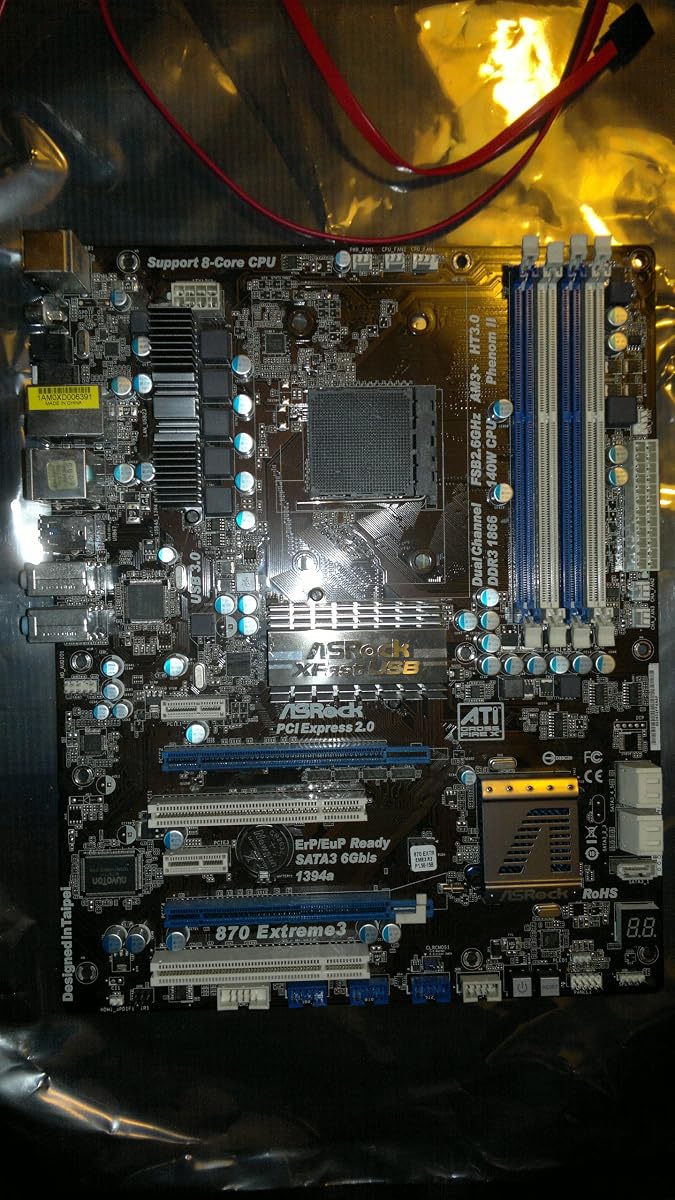
This board brings the 870 chipset to a feature-rich ATX package. It supports Quad CrossFireX making it a strong candidate for gamers who want to use multiple older GPUs in a budget setup.
We may earn a commission when you buy through this link, at no additional cost to you.
The inclusion of IEEE 1394 FireWire ports is a standout feature for legacy professional users. It allows for connection of video cameras and audio interfaces that rely on this specific standard.
Power delivery is robust which supports high-end AM3+ CPUs effectively. This ensures that users can upgrade their processors without worrying about power delivery limits.
We suggest this for users with specific legacy connectivity needs who also want gaming potential. It bridges the gap between office and gaming requirements effectively.
FireWire support is essential for users who maintain older studio or production equipment.
Quad CrossFireX allows for scaling performance across multiple AMD graphics cards.
We may earn a commission when you buy through this link, at no additional cost to you.
This board is designed with legacy industrial or specific compatibility needs in mind. The inclusion of a serial port is rare in modern boards and useful for connecting older peripherals or diagnostic tools.
We may earn a commission when you buy through this link, at no additional cost to you.
It features a PCIe 3.0 x16 slot which is a step ahead of its chipset generation providing better bandwidth for newer cards. This helps future proof the system slightly for AM3+ users.
USB 3.0 support is present allowing for decent external drive speeds. The mix of SATA2 and SATA3 offers flexibility for storage upgrades without requiring all new drives.
We recommend it for specialized builds that require serial ports or legacy industrial interfaces. It is a practical choice for niche applications.
The serial port allows connection to older industrial devices that do not support USB.
PCIe 3.0 slot improves data transfer for graphics cards or capture cards.
We may earn a commission when you buy through this link, at no additional cost to you.
Selecting the right AM3 board involves checking chipset features physical size and modern connectivity options.
The chipset determines how many USB and SATA ports your system has as well as support for multi GPU setups. Higher end chipsets like 990FX and 890FX offer more lanes for expansion which is crucial for users with multiple GPUs or cards.
Always match the chipset to your usage needs to avoid paying for features you will not use or missing ones you require for specific tasks.
Choose between ATX and MicroATX based on your case size. MicroATX boards are better for compact builds but often have fewer expansion slots which can limit future upgrades.
Ensure your case supports the chosen form factor to avoid physical installation issues during assembly.
Verify that the board supports your specific CPU model as some boards have BIOS limitations for higher end CPUs. Most AM3+ boards support CPUs up to 140W but checking the CPU support list is recommended.
A BIOS update might be required to run newer AM3+ processors so check the manufacturer site before buying.
Look for boards with SATA3 and USB3.0 support to ensure your storage and peripherals run at full speed. Older boards with only SATA2 and USB2.0 can bottleneck performance on newer drives.
Prioritize boards with at least USB3.0 and SATA3 for a better user experience with modern peripherals.
If you plan to use multiple graphics cards ensure the board supports CrossFireX or SLI. Some lower end boards only allow one GPU which limits gaming potential.
Check the number of PCIe slots and the lane configuration to ensure stable multi GPU performance.
A good VRM design ensures stable power delivery to the CPU which is vital for high TDP processors. Look for boards with solid capacitors and robust power phases for longevity.
Higher wattage CPUs require better power delivery to avoid system instability during heavy loads.
Most AM3 boards come with standard audio codecs which are sufficient for general use. However premium boards may offer higher quality audio or better network controllers for low latency.
For typical home use standard audio and network are adequate but audiophiles should look for boards with premium codecs.
Check the rear panel for ports like PS/2 serial or FireWire if you need them for older devices. Modern boards usually omit these but niche options still exist for legacy support.
Make sure the rear ports match your device needs to avoid buying adapters.
When installing the board ensure all standoffs match the screw holes to prevent short circuits. Use anti-static wrist straps during assembly to protect sensitive electronic components from damage.
Keep your BIOS updated to the latest version to ensure CPU compatibility and stability. Visit the ASRock support page for your specific model to download updates and drivers.
Regularly clean dust from the motherboard to prevent overheating. Use compressed air to remove debris from fans and slots without touching the components directly.
No AM3 motherboards are not compatible with new Ryzen or Athlon CPUs as they use different sockets. They are limited to older Phenom II and Athlon II processors which are legacy models.
Officially no because they lack TPM 2.0 required for Windows 11. However some users install it unofficially using workarounds though this may void support or cause instability.
Yes most AM3 boards support SATA III SSDs which provide fast storage. For M.2 NVMe SSDs you need an adapter or a specific board like the 970A-G/3.1 that has a slot.
Most AM3+ boards support up to 32GB or 64GB of DDR3 RAM. Check the specific board manual for maximum capacity per slot and supported speeds.
Sometimes yes if the CPU is newer than the motherboard manufacturing date. Check the CPU support list on the ASRock website for BIOS version requirements.
No the chipset is fixed on the motherboard and cannot be changed. You must buy a new motherboard with the desired chipset for better features.
Yes for budget gaming with older cards they offer decent performance. However they lack PCIe 3.0 support which limits modern GPU performance.
AM3 boards are often cheaper for specific use cases. They are ideal for those upgrading from AM2 systems or needing legacy ports that modern boards lack.
The Asrock AM3 Motherboard lineup offers a variety of choices from budget friendly options to premium feature-rich boards. Selecting the right one depends on your specific hardware needs and budget constraints.
Prioritize boards with modern connectivity like USB3 and SATA3 for better performance. Consider form factor carefully to ensure it fits your intended case size.
Prices and availability vary frequently for legacy hardware so verify current listings before purchase. These boards remain a viable solution for specific retro or budget builds.