
Qanba N3 Drone 2
4.5Editor score
Affordable Official License
Qanba OV7 Joystick
Full Control Panel
This expert guide compares the top arcade sticks for PS5 including licensed models from HORI, Nacon, and more to help you choose the best fightstick.
Finding the perfect arcade stick for PS5 is crucial for serious fighting game enthusiasts. A high-quality fightstick enhances precision and comfort during intense matches. You need reliable components like Sanwa parts for durability and responsive input.
We evaluated ten top-rated arcade sticks based on compatibility, build quality, and user feedback. Our selection includes officially licensed options and versatile controllers supporting multiple platforms. Each product offers unique features tailored to different play styles and budgets.
Each pick highlights key strengths, pros, and cons to help you decide. Prices and availability can change frequently so always check current listings. This guide ensures you find the right tool to dominate your favorite fighting titles.
4.5Editor score

4.6Editor score

4.6Editor score
Here is a side-by-side comparison of all ten arcade sticks to highlight their unique specifications and compatibility options for PS5 players.




This tournament-grade stick is a top choice for serious PS5 players. It boasts a 4.6 rating and is officially licensed by Sony ensuring full compatibility. The design focuses on durability and precision for competitive play.
We may earn a commission when you buy through this link, at no additional cost to you.
The inclusion of HORI's proprietary Hayabusa joystick and buttons provides a premium feel. These components are known for their crisp response and long lifespan. The top panel opens easily allowing quick maintenance or artwork changes.
While the price is higher than budget options the quality justifies the cost. Users appreciate the secure connection and lack of lag during intense matches. It is a reliable tool for climbing leaderboards.
If you want the best experience on PS5 this stick is highly recommended. It balances build quality with official licensing perfectly. The ease of customization ensures it stays fresh for years.
The top panel is designed to open easily for users who want to customize their look or maintain internal parts.
Being officially licensed by Sony guarantees seamless integration with PS5 games without extra setup or drivers.
We may earn a commission when you buy through this link, at no additional cost to you.
The Nacon Daija is designed with pro gamers in mind and features Sanwa components. It has a 4.2 rating and offers extensive customization via dedicated software. The bundle includes multiple accessories to enhance your setup immediately.
We may earn a commission when you buy through this link, at no additional cost to you.
You can switch between two joystick heads to find your perfect grip. The button mapping software allows detailed profile creation for different games. A lock function prevents accidental presses during intense moments.
The textured palm rest adds comfort during long sessions. However the software can take time to configure fully. The weight ensures stability but might be less portable than lighter models.
This stick is ideal for players who want granular control over inputs. It supports a wide range of fighting titles effectively. The audio jack makes it easy to connect headsets directly.
Two different joystick heads are included allowing you to choose between different shapes and resistances for optimal control.
The intuitive software helps you create game profiles and configure buttons easily on PC or Mac systems.
We may earn a commission when you buy through this link, at no additional cost to you.
This elite version brings premium Sanwa components and wireless freedom to the table. With a 4.6 rating it is a top contender for those who want to cut the cord. It includes an anti-slip mat to secure the stick during use.
We may earn a commission when you buy through this link, at no additional cost to you.
The wireless modes include Bluetooth and 2.4G receiver options for flexibility. Sanwa buttons and joystick ensure the response you expect from high-end gear. Turbo functions allow for rapid fire attacks easily.
Wireless play can introduce slight latency but this model minimizes it well. The rubber mat keeps the device stable on any surface. It is a versatile choice for PC and console users alike.
If you prioritize comfort and convenience this stick stands out. It bridges the gap between wired performance and wireless ease. The build quality supports intense gaming sessions reliably.
Supports Bluetooth and 2.4G wireless connections giving you the freedom to play without cable clutter on your desk.
Uses high-quality Sanwa buttons and joystick ensuring responsive and reliable inputs that competitive players trust.
We may earn a commission when you buy through this link, at no additional cost to you.
The Qanba N3 Drone 2 offers excellent value while keeping official Sony licensing. It has a 4.5 rating and is a solid entry point for newcomers. The components are reliable for standard competitive play.
We may earn a commission when you buy through this link, at no additional cost to you.
It features Qanba's own buttons and an OV7 joystick for good feel. The full control panel includes touchpad support and a mic input. The design is straightforward without unnecessary frills.
While it lacks advanced features like wireless it performs well. The mic input is useful for chat during online matches. It is a robust stick that holds up over time.
For those on a budget this is a smart choice. It delivers the core experience you need for fighting games. The official license ensures compatibility with all PS5 titles.
This model provides an officially licensed Sony peripheral experience at a very competitive price point compared to rivals.
Includes a 3.5mm microphone input with mute control so you can communicate easily during online matches.
We may earn a commission when you buy through this link, at no additional cost to you.
This versatile stick supports PS5 and many other systems via Bluetooth or wired. It has a 4.5 rating and is great for multi-platform gamers. The 2.4G receiver has a hidden compartment for storage.
We may earn a commission when you buy through this link, at no additional cost to you.
It supports turbo functions with different speed settings for combos. The firmware can be updated to support new devices like Switch 2. Wired headsets work well for chat and music output.
While not compatible with Xbox Series X it covers most other platforms. The receiver storage keeps your desk tidy. It is a flexible choice if you own multiple consoles.
If you need a stick that works everywhere this fits well. The wireless capabilities are convenient for casual play. The build quality is solid for the price range.
The included 2.4G receiver fits in a special hidden compartment so you can store it safely when not in use.
Update to the latest firmware to ensure compatibility with new devices like Switch 2 via Bluetooth.
We may earn a commission when you buy through this link, at no additional cost to you.
The F500 is a budget option that works on Xbox and PlayStation with Magic Boots. It has a 4.0 rating and is ideal for cross-platform gamers. The adapter makes it easy to use without extra controllers.
We may earn a commission when you buy through this link, at no additional cost to you.
It supports both D-input and X-input modes for PC. Turbo functions allow for rapid attacks. It is a great choice for those with mixed console collections.
For Xbox One or 360 you need a wired controller attached. This can be a slight inconvenience but works well overall. The build is functional but not premium.
If you own Xbox consoles this is a rare find. It bridges the gap between PlayStation and Xbox stick usage. The versatility makes it worth the lower price.
Includes Magic Boots to use on PS5 and PS4 without needing an original controller plugged in constantly.
Supports both X input and D input when being used on a PC for maximum flexibility with various PC games.
We may earn a commission when you buy through this link, at no additional cost to you.
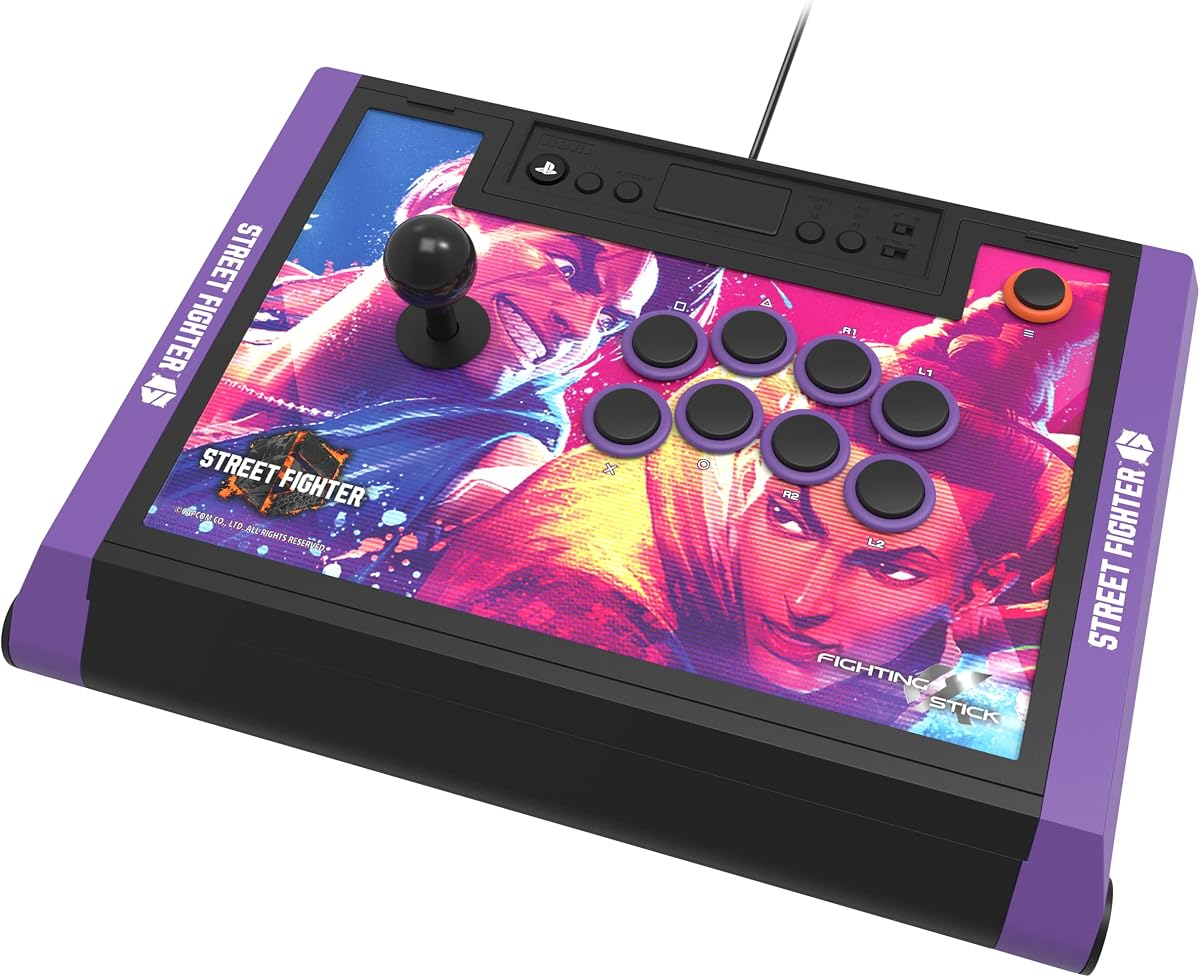
This version is a special edition tailored for Street Fighter 6 fans. It has a 4.5 rating and includes 18 downloadable hi-res images. The internals are identical to the standard Alpha but with themed art.
We may earn a commission when you buy through this link, at no additional cost to you.
The artwork makes it a collector's item for SF6 players. It maintains the tournament-ready quality of the original Alpha. The open top allows you to change the panel easily.
If you prefer this theme over the standard design it is great. The download link provides variety without buying new boards. It is a premium look for your desk setup.
This is perfect for dedicated SF6 enthusiasts. It brings the game's aesthetic to your physical setup. The build quality ensures it lasts through many matches.
Features special Street Fighter 6 artwork that appeals directly to fans of the latest entry in the series.
Includes a link to 18 downloadable hi-res images of your favorite characters for top-panel customization options.
We may earn a commission when you buy through this link, at no additional cost to you.
The Q7 Obsidian 2 offers a touchpad for easy navigation and mode switching. It has a 4.3 rating and includes swappable JLF joystick tops. The design is modern and fits well with PS5 aesthetics.
We may earn a commission when you buy through this link, at no additional cost to you.
You can switch between PS5 PS4 and PC with a toggle. The touchpad helps with system menus efficiently. It uses OBSF buttons for a distinct tactile feel.
The ability to swap joystick tops adds value to the purchase. You can customize the stick height to your preference. It is a solid middle-tier option.
For players who need touch navigation this is excellent. The build quality supports heavy use well. The switch feature makes it versatile for different setups.
Has a dedicated switch to change between PS5 PS4 and PC modes without needing to restart your console.
Includes swappable Sanwa JLF joystick tops so you can adjust the height and feel of the joystick.
We may earn a commission when you buy through this link, at no additional cost to you.
This edition targets Tekken 8 fans with specific top panel artwork. It has a 4.6 rating and includes downloadable alternate artwork options. The internals are the same premium Hayabusa components as the standard model.
We may earn a commission when you buy through this link, at no additional cost to you.
It supports Tekken 8 natively with themed visuals. The open top design allows for easy maintenance. It is a tournament-ready stick that looks great on your desk.
While pricey the artwork adds unique value for Tekken players. The quality ensures longevity for competitive matches. It is a solid investment for fans of the series.
If you love Tekken this stick is worth it. It combines high performance with official themed aesthetics. The customization options keep it fresh long after release.
Features TEKKEN 8 top panel artwork that is officially licensed by Sony and Bandai Namco Entertainment.
Includes downloadable alternate artwork to print so you can change the look of your stick regularly.
We may earn a commission when you buy through this link, at no additional cost to you.
The GK-18 is a leverless controller with 18 keys for precision. It has a 4.3 rating and features RGB lighting and an OLED screen. The switches are Kailh Choc for a smooth typing and hitting feel.
We may earn a commission when you buy through this link, at no additional cost to you.
It reduces input errors by using buttons for movement. The OLED screen displays your mode and layout clearly. You can hot-swap switches and keycaps without soldering.
For PS4 and PS5 you need an additional converter. This is a limitation for console users. However the low latency is great for competitive play.
This is ideal for tech-savvy gamers wanting unique control. The customization options are extensive. It offers a fresh take on traditional fightsticks.
Uses four-direction movement buttons instead of a joystick to reduce input errors and offer precise button actions.
The switches and keycaps support hot swapping which allows easy replacement and remapping without any soldering.
We may earn a commission when you buy through this link, at no additional cost to you.
Selecting the right fightstick requires understanding compatibility features and build quality. Here are key factors to consider.
Ensure the stick supports PS5 specifically. Officially licensed products are safer bets. Avoid sticks that need extra adapters.
Check for PS5 compatibility labels before purchasing.
Choose between lever-style or leverless. Sanwa components are standard for quality. Leverless suits precise button inputs.
Select the style that matches your preferred play style.
High-quality buttons prevent accidental presses. Look for Sanwa or Hayabusa options. These ensure reliable response over time.
Durable buttons are essential for long gaming sessions.
Open top designs allow easy maintenance. Swap panels or buttons easily. This extends the stick's lifespan.
Customizable sticks offer better long-term value.
Wired sticks offer minimal latency. Wireless provides desk flexibility. Ensure stable wireless connection for fighting games.
Prioritize wired if competitive accuracy is your goal.
Solid wood or heavy plastic bases help stability. Avoid lightweight sticks that slide easily. Look for anti-slip mats.
A stable base is crucial during intense matches.
Microphone ports and turbo buttons add utility. Check for headphone jacks. Extra buttons can map macros.
Evaluate extras based on your gameplay needs.
Premium sticks cost more but last longer. Budget options are good for beginners. Invest in quality if you play often.
Match your budget to your commitment level.
Connect your stick directly to the PS5 USB port. Ensure no other adapters block the connection. Turn on your console to recognize the device.
Clean the joystick and buttons regularly with a soft cloth. Avoid liquids near the internal components. Dust can affect the performance of sensors.
Store your stick in a cool dry place. Avoid direct sunlight to prevent fading. Keep it upright to avoid stress on the cable.
Yes several models in this guide are officially licensed by Sony. This ensures full compatibility and access to all game features without extra configuration.
Most modern arcade sticks work with PC as well. Check if they support Xinput or Dinput modes for best performance on Windows systems.
Sanwa JLF or Seimitsu LS-32 are industry standards. They offer precise movements and durability. Many pro players prefer these brands.
Some models like the F700 Elite support Bluetooth. Wired connections remain more stable. Wireless can introduce slight latency.
Open the top panel to access internal parts. Remove the mounting plate and swap the joystick. Ensure it is securely tightened.
A turbo button automates rapid repeated inputs. It helps with combos in games like Street Fighter. It is adjustable via settings.
Most PS5 sticks do not work natively on Xbox. Use a model like F500 with Magic Boots or a dedicated Xbox adapter for compatibility.
The HORI PlayStation 5 Fighting Stick Alpha leads the list for quality. It balances performance and durability for tournament play. It is a safe top pick.
Consider your budget and play style before buying. Wireless options offer flexibility while wired sticks offer stability. Look at customization features carefully.
Check current prices and availability before ordering. Prices fluctuate and some models sell out quickly. Make an informed decision based on your needs.