
RedThunder One Handed Gaming Keyboard
4.4Editor score
35 Anti-ghosting Keys
Macro Recording Support
Ergonomic Wrist Rest
This expert guide compares the top ten gaming keypads for performance and ergonomics to help you choose the perfect one-handed controller for your setup.
Gaming keypads offer a compact solution for gamers who want to free up desk space and optimize their hand positioning. These specialized devices focus on essential keys and macros, allowing for faster access to abilities and commands during intense sessions without needing a full keyboard.
We evaluated ten top-rated models based on switch type, layout, connectivity, and customization options. Our analysis covers budget-friendly mechanical options, high-performance analog switches, and versatile wireless designs to ensure you find a unit that matches your specific gaming genre and budget.
Each pick highlights unique strengths like rapid trigger technology, programmable macros, and ergonomic thumbsticks. While pricing fluctuates frequently, these selections represent the best value and performance available right now for players seeking a dedicated off-hand controller experience.
4.4Editor score

4.3Editor score

4.2Editor score
The following table provides a side-by-side comparison of the ten selected gaming keypads. It highlights key specifications like switch technology, key count, and connectivity options to help you quickly identify the model that fits your specific needs and budget.




The Razer Tartarus V2 stands out as a top contender in the gaming keypad market with its robust feature set and ergonomic design. Rated highly by users, it offers a perfect balance of performance and comfort for long gaming sessions. The inclusion of a dedicated thumbpad sets it apart from many competitors who rely solely on keyboard keys.
We may earn a commission when you buy through this link, at no additional cost to you.
Its mecha-membrane switches provide tactile feedback similar to mechanical keyboards while maintaining a softer touch for extended use. The 32 programmable keys allow for complex macro sequences that can streamline gameplay in RPGs and MMOs. Razer Chroma support enables seamless integration with other peripherals for a unified aesthetic experience.
One trade-off is the reliance on software for full customization which may take time to learn for new users. The price is also higher than budget options but justified by the build quality and feature depth. For those wanting a premium one-handed experience this device delivers consistently.
This keypad is ideal for competitive gamers and content creators who need reliable macro execution and ergonomic support. If you value customization and durability the Tartarus V2 is a strong recommendation for your setup. It remains a staple choice for those investing in specialized input devices.
The 8-way directional thumbpad offers natural movement controls preferred by console players transitioning to PC gaming. This feature reduces strain on the fingers during extended sessions and improves overall control precision.
Razer Hypershift allows for deep customization of key combinations enabling complex commands to be executed with a single press. This enhances gameplay efficiency and reduces the need to fumble for multiple keys.
We may earn a commission when you buy through this link, at no additional cost to you.
The Redragon K585 offers exceptional value for gamers looking to add a keypad without breaking the bank. With a 42-key layout and seven macro keys it covers most gaming needs effectively. Users appreciate the hot-swappable switch feature which allows for easy modification of the tactile feel without soldering.
We may earn a commission when you buy through this link, at no additional cost to you.
Its USB pass-through port adds convenience by letting you plug in a mouse directly to the keypad reducing cable clutter. The magnetic wrist rest can be detached to save space when needed. RGB lighting adds a vibrant touch to your setup with multiple modes available for customization.
While it lacks wireless capability the included port offsets this by streamlining desk management. The software allows for deeper customization but may require an initial learning curve for optimal use. Overall it is a highly functional device for the price.
This model is perfect for budget-conscious gamers who still want high customization and quality build. The ability to swap switches makes it versatile for different preferences. It is a smart entry point into one-handed gaming peripherals.
Users can upgrade or change switches easily without tools allowing for a tailored typing and gaming experience. This flexibility extends the device lifespan and adapts to evolving user preferences.
The USB pass-through allows direct connection of a mouse reducing desk clutter and improving cable management. This is particularly useful for setups with limited space or complex cabling needs.
We may earn a commission when you buy through this link, at no additional cost to you.
The Redragon K585 PRO brings wireless convenience to the popular 42-key layout making it ideal for flexible setups. It retains the hot-swappable switch feature allowing users to customize their tactile experience. With a battery life of 15 to 20 hours it supports long sessions without frequent charging.
We may earn a commission when you buy through this link, at no additional cost to you.
The detachable wrist rest and vibrant RGB lighting ensure comfort and style are maintained. Users benefit from the same macro and customization options as the wired version. The wireless connectivity via BT or 2.4GHz offers stable performance without lag.
While the price is higher than the wired model the added freedom justifies the cost for many users. The weight is slightly higher due to the battery but remains manageable. It is a strong choice for those who dislike cables.
This keypad is recommended for wireless enthusiasts and streamers who need clean desk aesthetics. The long battery and customizable switches make it versatile for various gaming genres. It offers a premium experience at a reasonable price point.
The device supports both Bluetooth and 2.4GHz connections allowing seamless switching between devices for optimal versatility and setup flexibility.
With up to 20 hours of continuous play the battery ensures uninterrupted sessions without worrying about frequent recharging or downtime.
We may earn a commission when you buy through this link, at no additional cost to you.
The AZERON Gaming Keypad is a powerhouse for gamers seeking maximum control and customization. Its Hall Effect thumbstick offers analog movement eliminating stick drift and supporting WASD or 360-degree motion. The 30 programmable inputs allow for deep integration into various game genres.
We may earn a commission when you buy through this link, at no additional cost to you.
Designed for adjustability it ensures a perfect fit for right-handed gamers with medium-sized hands. The software allows for detailed customization of dead zones and sensitivity. The modular board allows for future updates and enhancements.
While the price is significantly higher than others the unique features justify the investment for enthusiasts. Calibration is required but ensures optimal performance. It is a specialized tool for serious competitive play.
This device is best for FPS and MOBA players who want precise analog control on one hand. The lack of drift and high customizability make it a standout choice. It represents the future of ergonomic gaming peripherals.
The Hall Effect thumbstick enables 360-degree movement without stick drift providing superior control in compatible games and reducing input lag significantly.
Adjustable parts ensure a perfect fit for different hand sizes reducing fatigue during extended gaming sessions and improving overall comfort and usability.
We may earn a commission when you buy through this link, at no additional cost to you.
The RedThunder One Handed Gaming Keyboard is a budget-friendly option focused on speed and simplicity. With a built-in game chip it delivers a 3ms response speed for fluent gameplay. The 35 anti-ghosting keys ensure accurate input during intense gaming sessions.
We may earn a commission when you buy through this link, at no additional cost to you.
Its portable design saves space and makes it easy to carry for LAN parties. The macro recording feature allows simple automation without complex software. The ergonomic wrist rest provides comfort for extended use.
While it lacks advanced software the simplicity makes it easy to use. The lighting is basic but effective. It is a solid choice for those needing essential features at a low cost.
This device is ideal for casual gamers or students who need a space-saving solution. The fast response and comfort features make it a great value. It offers essential functionality without unnecessary complexity.
The built-in game chip provides a 3ms response speed ensuring smooth gameplay and reducing lag during fast-paced action scenarios.
Simple key combinations allow users to record macros easily without installing additional software making automation accessible to everyone.
We may earn a commission when you buy through this link, at no additional cost to you.
The Keychron C0 HE is a high-performance keypad built for competitive FPS players. Its 8K polling rate and Rapid Trigger Hall Effect switches offer ultra-low latency and instant reset for precise control. The magnetic switches adjust actuation with 0.01 mm precision.
We may earn a commission when you buy through this link, at no additional cost to you.
Web-based customization means no software installation is needed saving storage space. It works seamlessly on Windows and macOS allowing flexible setup. The layout is efficient for MMOs and MOBAs keeping essential commands within reach.
While expensive the performance is tournament-grade. The lack of driver installation is a plus for privacy and convenience. It is ideal for users needing maximum responsiveness and reliability.
This keypad is best for competitive gamers and power users who need speed and accuracy. The web-based tools and cross-platform support make it versatile. It sets a new standard for one-handed gaming performance.
Rapid Trigger allows instant reset on lift-off enabling faster movement and counter-strafing in competitive titles without waiting for full reset.
The web-based configurator allows full customization without installing drivers making it easy to use on any computer with a browser.
We may earn a commission when you buy through this link, at no additional cost to you.
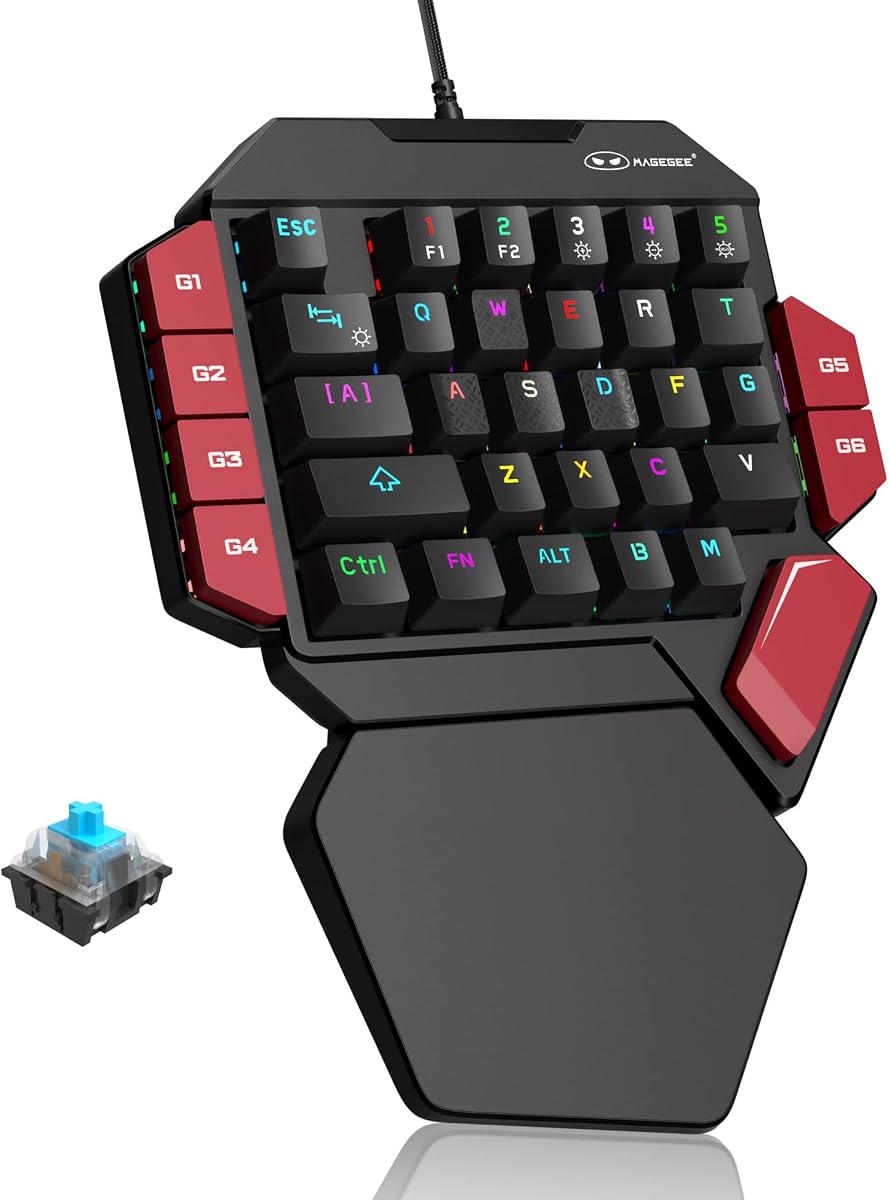
The MageGee One Handed Professional Gaming Keyboard focuses on classic mechanical feedback with blue switches. It offers a crisp paragraph feeling and strong mechanical feedback suitable for gaming and typing. The 6 macro recording keys allow for simple automation tasks.
We may earn a commission when you buy through this link, at no additional cost to you.
RGB lighting modes add a cool visual touch to your setup. The design is ergonomic with a big palm rest to reduce hand fatigue. It is plug and play ensuring compatibility with most systems.
The loud click sound may be distracting in quiet environments. The software is basic but sufficient for core functions. It is a good choice for tactile enthusiasts.
This keypad is ideal for gamers who prefer mechanical tactile feedback and simplicity. The durability and lighting options add value. It is a reliable option for regular use.
Blue switches provide a distinct click and tactile bump that enhances precision for both gaming and typing tasks.
Six macro keys allow quick binding of commands reducing complexity for basic automation needs without requiring complex software.
We may earn a commission when you buy through this link, at no additional cost to you.
The AJAZZ AK029 features Hall Effect switches for zero dead zone and instant registration. Its 8KHz polling rate delivers a 0.125ms response time for tournament-grade performance. The 29-key design saves space while maintaining versatility for gaming and editing.
We may earn a commission when you buy through this link, at no additional cost to you.
The aluminum-reinforced build and gasket mount design provide a stable yet cushioned feel. Web-based driver allows easy customization without installing software. RGB modes and double-shot PBT keycaps ensure lasting durability.
The compact layout may limit complex macro setups compared to larger models. However the build quality and performance are top-tier. It is ideal for users needing high speed.
This device is best for competitive gamers who value speed and reliability. The web tools and aluminum build make it a premium choice. It offers excellent value for performance-focused users.
Hall Effect switches ensure every tap registers instantly without debounce delay or dead zones for consistent high-level performance.
A rigid internal aluminum plate with gasket mount delivers a stable and durable build that withstands intense gaming sessions.
We may earn a commission when you buy through this link, at no additional cost to you.
The Razer Tartarus V2 continues to be a reliable choice for one-handed gaming. Its mecha-membrane switches offer soft comfort with tactile feedback. The 32 programmable keys allow for deep customization for any game genre.
We may earn a commission when you buy through this link, at no additional cost to you.
RGB Chroma support enables syncing with other hardware for a cohesive look. The ergonomic design reduces strain during long play. It is compatible with many popular software platforms.
The software requirement may be a barrier for some users but ensures full functionality. Price is higher but matches the quality. It remains a solid option for dedicated players.
This keypad is ideal for those who value comfort and ecosystem integration. The macro capabilities and build quality make it a durable choice. It is a premium option for serious gamers.
Mecha-membrane switches combine mechanical feedback with soft cushioning for a comfortable experience during extended sessions.
Full sync with popular games and hardware creates an immersive gaming atmosphere with vibrant lighting effects.
We may earn a commission when you buy through this link, at no additional cost to you.
The Redragon RM104 offers a multifunctional approach with its smart control knob for volume and RGB. Tri-mode wireless connectivity allows seamless switching between Bluetooth and 2.4GHz. The 4000mAh battery supports long sessions without frequent charging.
We may earn a commission when you buy through this link, at no additional cost to you.
Programmable software support allows customization of every button for specific needs. The anti-ghosting ensures accurate inputs during gameplay. Its compatibility across systems makes it versatile for various setups.
It is not a dedicated one-handed keypad but serves well as a compact companion. The battery life and connectivity are strong points. It is a great choice for general users.
This keyboard is ideal for those who want wireless flexibility and simple customization. The smart knob adds convenience for media control. It is a reliable and affordable option for any desk.
The multifunction knob controls audio and lighting easily reducing reliance on keyboard shortcuts and enhancing user convenience.
Support for Bluetooth 2.4GHz and USB-C ensures flexible wireless or wired connection options for any setup.
We may earn a commission when you buy through this link, at no additional cost to you.
Selecting the right gaming keypad depends on understanding your specific needs and preferences. This guide outlines key factors to consider when making your decision.
Switch type determines the tactile and auditory feedback you experience. Mechanical switches provide a distinct click while membrane options are softer and quieter. Hall Effect switches offer adjustable actuation and rapid trigger capabilities for high-performance gaming.
Choose a switch that matches your preference for feedback and noise level during play.
Key count ranges from compact 29 keys to broader 42-key layouts. More keys allow for extensive macro storage while fewer keys save desk space. Consider the number of commands you need to access frequently without moving your hand.
Opt for a layout that balances space-saving with sufficient key availability for your game genre.
Wired connections ensure zero latency while wireless options offer flexibility and cable freedom. Tri-mode devices allow switching between Bluetooth 2.4GHz and USB-C for maximum adaptability. Ensure the connection method suits your system setup and mobility needs.
Select wired for competitive play and wireless for a clean desk or flexible setup.
The ability to program macros is crucial for MMOs and MOBAs. Look for onboard memory storage to save profiles without requiring software. Advanced software allows deep customization of key mappings and lighting effects.
Choose a device with macro tools that match your automation complexity requirements.
Ergonomic design reduces strain during long sessions. Wrist rests and thumbpads contribute to comfort and control. Adjustable features ensure a fit that matches your hand size and playing style.
Prioritize models with ergonomic features to prevent fatigue over extended use.
Materials like aluminum plates and double-shot keycaps ensure longevity. Check for anti-ghosting capabilities and robust switches that withstand high-frequency inputs. Durable construction is essential for long-term reliability.
Look for reinforced builds and high-quality materials to ensure lasting performance.
Web-based configuration saves storage space while dedicated apps offer more features. Compatibility with Windows macOS and consoles expands versatility. Ensure the software is intuitive and does not require complex installation.
Select devices with user-friendly software and broad system compatibility.
RGB lighting adds a customizable visual element to your setup. Sync capabilities allow matching with other peripherals for a unified look. Consider the number of lighting modes and brightness levels available.
Choose RGB options that complement your gaming environment and personal style.
Begin by connecting the keypad to your PC via USB or wireless receiver. Install any required software or access web-based tools to configure key mappings. Test the macro recording functions to ensure proper setup before gaming.
Clean the keypad regularly using a soft brush or compressed air to remove dust from switches. Avoid exposing the device to moisture or extreme temperatures. Store it in a protective case if transporting frequently.
Update firmware or software regularly to ensure optimal performance and security. Check battery levels frequently for wireless models and charge as needed to prevent unexpected interruptions during play.
Gaming keypads are versatile but particularly effective for MMOs MOBAs and FPS games that rely on macros and quick key access. They are less essential for genres that do not require extensive command customization or one-handed control.
Most devices offer a macro recording mode via software or dedicated keys. Press the record button perform the sequence of actions you want to save and press stop. The sequence is then saved to a key or profile for easy access.
Some gaming keypads support console compatibility particularly if they use basic USB HID protocols. However advanced features like macros may be limited depending on console restrictions. Check the product description for confirmed console support before purchase.
Wired keypads offer consistent zero-latency performance ideal for competitive gaming. Wireless keypads provide flexibility and cable-free setups with varying latency levels. Choose wired for stability and wireless for convenience and desk aesthetics.
Battery life varies by model but ranges from 15 hours to several weeks on a single charge. Usage of RGB lighting and polling rates affects duration. Regular charging and moderate settings help extend battery performance.
Hall Effect switches offer adjustable actuation and rapid trigger features that enhance precision and speed. For competitive players the benefits are significant but casual gamers may find standard switches sufficient. Consider your performance needs before deciding.
Many keypads work plug-and-play but full customization often requires software. Web-based tools reduce the need for installation while dedicated apps offer advanced features. Always check the specific software requirements for your model.
Use a soft brush or compressed air to remove debris from between keys. Avoid using liquid cleaners directly on the keys to prevent damage. A damp microfiber cloth can wipe the surface safely without affecting internal components.
The top picks for gaming keypads include the Razer Tartarus V2 for premium ergonomics the Redragon K585 for budget-friendly value and the Keychron C0 HE for competitive performance. Each offers distinct advantages tailored to different gaming needs.
Prioritize factors like switch type connectivity and macro capabilities when deciding. A device that matches your playstyle will improve your efficiency and comfort. Consider your budget and whether wireless features are essential for your setup.
Always verify current prices and availability as they fluctuate frequently. These models represent the best options available in October 2026 for players seeking specialized input devices. Invest in a keypad that aligns with your long-term gaming goals.