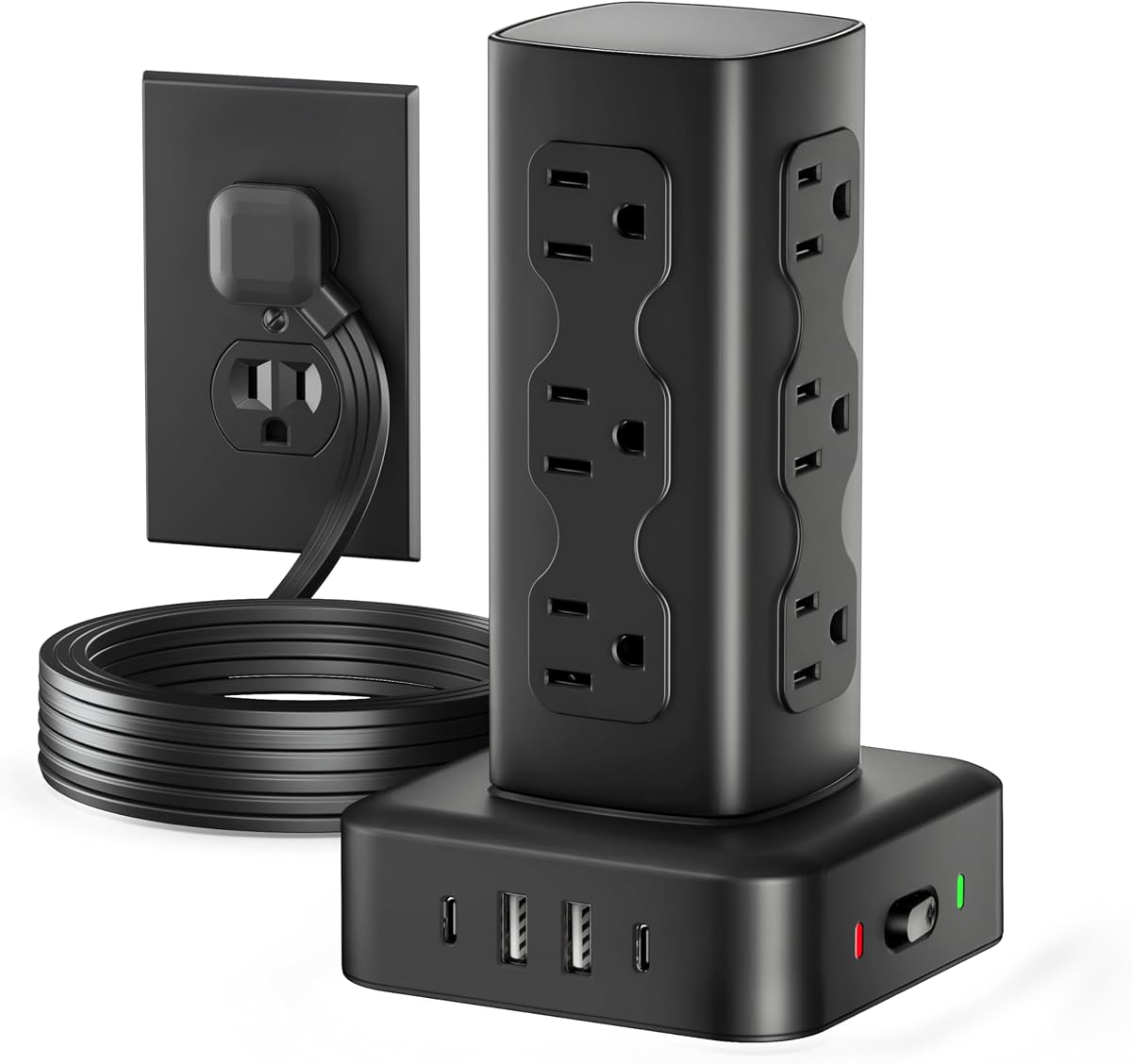
Power Strip Tower with 12 AC Outlets
4.7Editor score
2000-joule surge protection rating
Ultra-thin 0.31-inch flat plug
12 AC and 4 USB ports included
This comprehensive guide compares the top charging towers for home and office, evaluating outlet count, USB fast charging speeds, surge protection, and
Finding the right charging solution can transform your workspace from cluttered to organized. A charging tower consolidates multiple outlets into a vertical footprint, saving valuable desk space while keeping cables neatly arranged. Whether you need power for laptops, phones, or office peripherals, the right tower streamlines your setup significantly.
We evaluated ten top-rated charging towers based on outlet configuration, USB port speeds, safety certifications, and physical design. Our analysis focuses on real-world usability, including cord length, plug thickness, and surge protection ratings. This list helps you identify models that balance capacity with safety and style for modern environments.
Each pick below highlights specific strengths like retractable cords, high-wattage USB-C ports, or flat plugs for tight spaces. We also note trade-offs such as limited USB power distribution or base stability. Prices and availability change frequently, so verify current details before purchasing to ensure you get the best value today.
4.7Editor score

4.7Editor score

4.7Editor score
This side-by-side comparison evaluates all ten selected charging towers across key specifications including outlet counts, USB capabilities, cord lengths, and safety features. Use this table to quickly identify which model aligns with your specific power needs and spatial constraints.


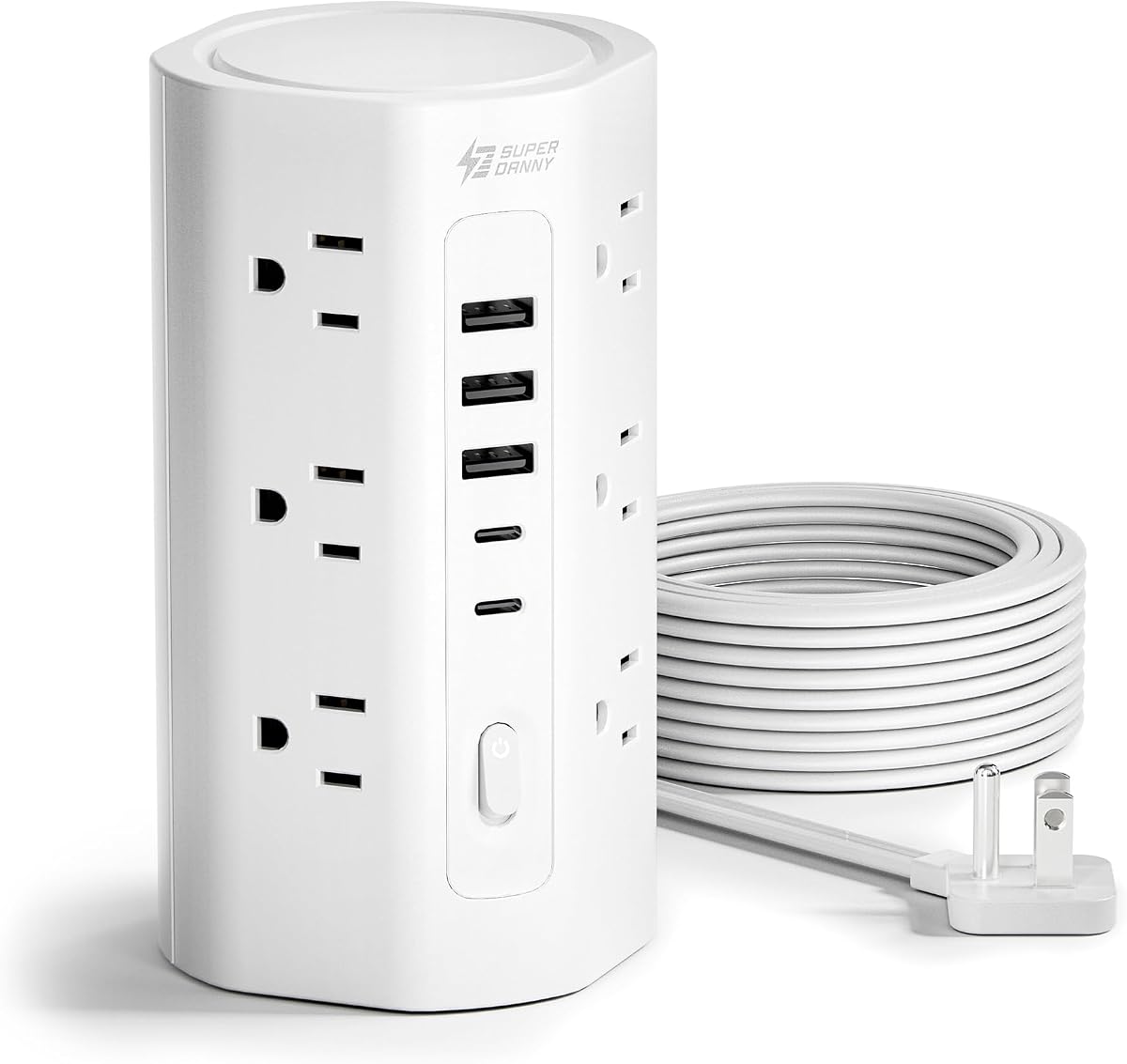
The JACKYLED Power Strip Tower stands out as a top contender for organizing dense charging setups. With a 4.7-star rating from thousands of users, it delivers reliable performance through its 18-in-1 configuration. The tower combines robust AC capacity with smart USB integration to handle virtually all your electronic needs in one vertical unit.
We may earn a commission when you buy through this link, at no additional cost to you.
Key strengths include independent switches for every layer, allowing precise power management without unplugging devices. The 2.2-inch spacing between AC outlets prevents bulky adapters from blocking neighbors. Smart charging technology optimizes power delivery across six USB ports, ensuring devices charge safely at their intended speeds without needing external adapters.
Trade-offs involve a 1050J surge rating that is lower than some competitors offering 2000J protection. Additionally, the tower's height might be problematic for low-profile desks or under-cabinet installations. These limitations remain acceptable given the extensive port count and superior cable management via the retractable base design.
Ideal for users managing complex setups like gaming stations or home offices with numerous peripherals. The combination of wide spacing, individual switches, and retractable cord makes it a versatile choice for those prioritizing organization and convenience. We recommend it for anyone needing maximum device support in a compact vertical footprint.
Independent switches let you control power to specific layers, reducing energy waste when devices are idle. Indicator lights within each switch confirm active status instantly without needing to check connected devices manually.
Built-in smart charging detects connected devices to deliver optimal current safely. This prevents overcharging and ensures compatible devices receive up to 2.4A on USB-A or 3A on USB-C ports respectively.
We may earn a commission when you buy through this link, at no additional cost to you.
This Power Strip Tower offers exceptional value with 12 AC outlets and robust safety features at a competitive cost. Its 4.7-star rating reflects consistent performance and reliability across diverse household applications. Users appreciate the high surge protection rating and flat plug design that fits tight spaces effortlessly.
We may earn a commission when you buy through this link, at no additional cost to you.
The 2000-joule surge protection provides strong defense against voltage spikes, safeguarding expensive electronics better than budget alternatives. The 0.31-inch flat plug sits flush against walls, preventing interference with adjacent outlets. Wide spacing ensures bulky adapters don't block neighboring sockets, maintaining full utility across all outlets.
Limitations include standard USB-A and USB-C ports lacking high-wattage power delivery capabilities. Additionally, the absence of individual switches requires turning off the master switch to unplug specific devices. These factors are manageable for most users prioritizing cost efficiency and surge safety over advanced USB charging speeds.
Best suited for dorm rooms, home offices, or living rooms where basic charging needs dominate. The combination of high surge protection and space-saving design makes it an ideal entry-level choice. We recommend it for buyers seeking reliable power distribution without premium pricing.
The 2000J rating exceeds typical budget models, offering superior defense against electrical surges. This protects sensitive electronics like laptops and monitors from damage during unexpected power fluctuations.
The ultra-thin 0.31-inch plug design fits snugly against walls without blocking lower outlets. This vertical clearance allows additional adapters to be used directly below the tower base comfortably.
We may earn a commission when you buy through this link, at no additional cost to you.
The Anker Desktop Charger redefines premium charging with its compact form and high-wattage USB-C capabilities. Rated 4.7 stars by users seeking quality, it balances performance with aesthetic appeal. This model is ideal for professional settings where desktop organization and fast laptop charging are priorities over raw outlet count.
We may earn a commission when you buy through this link, at no additional cost to you.
Its standout feature is dual 100W USB-C ports that support fast charging for high-power laptops like MacBook Pro or Dell XPS. The 8-point safety system ensures reliable operation without overheating risks. Despite fewer AC outlets, the high-speed USB capabilities often reduce the need for extra adapters significantly.
Trade-offs include limited AC capacity compared to larger towers and a higher price point reflecting premium materials and engineering. The lower 300J surge rating suits desktop environments rather than exposed power grids. These compromises are acceptable for users prioritizing speed and build quality over maximum port variety.
Perfect for professionals and creatives needing reliable power for laptops and monitors directly from the desktop. The stable weight prevents tipping while keeping the setup neat and minimal. We recommend it for those willing to invest in premium charging convenience and safety.
Dual 100W USB-C ports enable full-speed charging for most modern laptops without separate brick adapters. This consolidates desk clutter by merging charger and power strip functions into one unit.
Constructed with durable materials to handle daily use without degradation. The 560g weight ensures stability during heavy plugging and unplugging cycles without wobbling.
We may earn a commission when you buy through this link, at no additional cost to you.
This kakyanill Charging Station delivers high device capacity with nine AC outlets and eight USB ports in one tower. It achieves a 4.5-star rating through reliable power distribution and smart cord management. Users benefit from the retractable base that reduces clutter without permanent wire extensions.
We may earn a commission when you buy through this link, at no additional cost to you.
The 0.35-inch slim plug allows placement behind furniture while maintaining access to other outlets. 1.5-inch spacing between AC sockets supports bulky chargers like power bricks without blocking. The 1875W circuit breaker safeguards against overloads common in high-demand setups like printers or mini-fridges.
Limitations include standard USB ports lacking dedicated Power Delivery for fast laptop charging. Frequent cord rotation might lead to wear over time compared to fixed extension cables. These drawbacks are balanced by the exceptional outlet count and flexible cord management for tight spaces.
Best for home offices needing extensive peripheral power without excessive cables. The retractable design suits desks where length varies based on device usage patterns. We recommend it for users prioritizing outlet density and cord organization over specialized USB power delivery.
The retractable base lets you rotate to store excess cord length neatly. This feature reduces floor hazards and allows adjustable reach for devices placed at different distances.
The 1875W circuit breaker and fire-resistant ABS shell protect against overheating or short circuits. These safeguards ensure safe operation even when powering high-wattage appliances simultaneously.
We may earn a commission when you buy through this link, at no additional cost to you.
This Kakyanill charging station distinguishes itself with 115W total USB output supporting faster device charging across multiple ports. It holds a 4.5-star rating reflecting solid performance for mixed device setups. Users appreciate the retractable cord for maintaining clean workspaces while accessing power remotely.
We may earn a commission when you buy through this link, at no additional cost to you.
Two USB-C ports deliver up to 65W each for rapid laptop charging, while two others provide 20W for smaller devices. The 115W total capacity ensures simultaneous charging without significant speed drops. The anti-slip rubber feet maintain stability during frequent plugging without tipping risks.
Trade-offs include varying power delivery across different USB ports requiring specific port selection for high-power devices. Additionally, the warning to remove phone cases during charging adds an extra step for some users. These are minor inconveniences relative to the high USB power capacity offered.
Ideal for users needing to charge laptops and smartphones simultaneously with dedicated USB power. The compact four-sided tower minimizes desk footprint while organizing multiple cables. We recommend it for those prioritizing USB charging speed alongside AC outlet availability.
Six USB-C ports allow simultaneous fast charging for laptops and mobile devices. Up to 65W on primary ports supports modern laptops that rely on USB-C power delivery.
Four rubber feet prevent sliding even when plugging heavy adapters. The 4-sided layout separates cords effectively keeping desks organized without extra clips.
We may earn a commission when you buy through this link, at no additional cost to you.
This TenTrend Power Strip Tower excels with 230W total USB charging capacity for high-demand setups. It achieves a 4.5-star rating through reliable multi-device power delivery. Users appreciate its compact footprint and flat cord design that minimizes trip hazards on office floors.
We may earn a commission when you buy through this link, at no additional cost to you.
Dual orange USB-C ports provide 65W max charging for laptops while green and blue ports support mobile devices. This 230W total output ensures rapid charging without adapter clutter. The compact 3.15-inch width keeps desks open while supporting 14 devices simultaneously effectively.
Limitations include only six AC outlets limiting high-wattage appliance support compared to 12-outlet towers. The 5FT cord may restrict placement options in large rooms compared to 10FT alternatives. These trade-offs are acceptable for desktop environments prioritizing USB power over outlet count.
Best for creative professionals needing rapid laptop charging alongside phone and tablet power. The flat cord reduces floor clutter while maintaining reliable connectivity. We recommend it for users focused on high-power USB charging needs primarily.
Dual 65W orange USB-C ports charge laptops rapidly without separate brick adapters. This integrates laptop charging into the tower reducing cable clutter significantly on desks.
The flat 5FT cord sits flush with surfaces preventing tripping hazards during use. This design suits busy walk areas where traditional round cords pose safety risks.
We may earn a commission when you buy through this link, at no additional cost to you.
This TenTrend Flat Plug Power offers impressive reach with its 10-foot extension cord and ultra-thin plug design. It earns a 4.7-star rating for value and placement flexibility across various environments. Users benefit from dual 20W USB-C ports for fast phone charging alongside ample AC outlets.
We may earn a commission when you buy through this link, at no additional cost to you.
The 10FT pure copper cord delivers reliable current capacity reaching distant outlets without signal loss. The 0.27-inch ultra-thin plug hides behind furniture effortlessly preventing obstruction of lower outlets. Fire-resistant ABS plus PC material ensures safe operation even with prolonged high-use periods.
Trade-offs involve 40W total USB charging which may not suffice for laptops needing higher wattage. Lightweight construction aids travel but lacks the stability of heavier models on active desks. These features suit users prioritizing cord length and mobility over maximum USB charging speeds.
Ideal for RV travelers or dorm residents needing long cord reach to distant wall outlets. The lightweight portable design makes it easy to move between rooms as needed. We recommend it for users prioritizing flexible placement and travel convenience.
The 10FT pure copper cord reaches distant outlets reliably without degradation. This flexibility suits bedrooms or offices where wall sockets are far from workspaces.
Small dimensions allow easy packing for trips or relocation between rooms. Rubber feet prevent sliding even on smooth surfaces during transport or use.
We may earn a commission when you buy through this link, at no additional cost to you.
This 10FT Tower Power Strip combines extended reach with dedicated PD charging capabilities for modern devices. It maintains a 4.5-star rating through consistent performance and safety. Users appreciate the flat cord design that prevents tripping while supporting up to 17 devices simultaneously.
We may earn a commission when you buy through this link, at no additional cost to you.
A dedicated 20W USB-C PD port charges iPhones quickly reaching 50% in 30 minutes. The 1800J surge protection guards electronics against power fluctuations in older buildings. The weighted non-slip base ensures stability during heavy plugging cycles without tipping over accidentally.
Limitations include standard USB-A ports with lower power delivery compared to newer PD-focused towers. The weighted base adds stability but may increase overall footprint slightly compared to slimmer models. These are manageable trade-offs for users needing reliable long cord reach and basic fast charging.
Best for households needing flexible placement across rooms without short cord constraints. The combination of long cord and wide-spaced outlets supports diverse device types easily. We recommend it for users prioritizing reach and stability over maximum USB charging speed.
The dedicated 20W USB-C PD port enables rapid charging for phones and tablets. This reduces wait times significantly compared to standard 5W charging methods.
1.5-inch outlet spacing accommodates bulky adapters without blocking neighboring sockets. This layout maximizes usable capacity across all twelve AC outlets simultaneously.
We may earn a commission when you buy through this link, at no additional cost to you.
This 6FT Power Strip Tower balances compact design with robust surge protection for safe daily use. It holds a 4.7-star rating reflecting reliability and performance consistency. Users benefit from 12 wide-spaced AC outlets that accommodate bulky adapters while keeping desks organized.
We may earn a commission when you buy through this link, at no additional cost to you.
The 1800J surge protection exceeds basic requirements protecting sensitive electronics from voltage spikes effectively. The 0.30-inch flat plug allows placement behind furniture without blocking lower outlets. Four anti-slip rubber feet prevent sliding ensuring stability during heavy plugging or unplugging cycles safely.
Limitations include 3.4A total USB output which suits phones and tablets but not laptops needing higher power. Lack of individual switches means power must be cut globally rather than selectively. These features suit budget-conscious users prioritizing protection and organization over advanced USB capabilities.
Ideal for home offices or dorms needing reliable protection and compact storage. The flat design and anti-slip base ensure stable setup on various surfaces. We recommend it for users prioritizing safety and space efficiency primarily.
The 3.15×3.15×5.79-inch dimensions take less space than traditional strips. This compact footprint leaves more room for devices on limited desk areas.
The 1800J rating protects against damaging voltage spikes effectively. This safety feature prevents costly hardware damage during power grid fluctuations.
We may earn a commission when you buy through this link, at no additional cost to you.
This 10Ft Tower Power Strip offers exceptional reach with its 10-foot flat cord and robust safety features. It achieves a 4.7-star rating for reliability and placement flexibility across rooms. Users appreciate the 12 wide-spaced AC outlets accommodating diverse plug types without blocking neighbors.
We may earn a commission when you buy through this link, at no additional cost to you.
The 10FT flat cord tucks neatly along walls preventing tripping hazards in walkways. 1700J surge protection combined with 1382°F fire-retardant casing ensures comprehensive device safety. Wide-spaced outlets maintain accessibility even with bulky plugs ensuring no outlet goes unused accidentally.
Limitations include standard USB ports lacking Power Delivery for high-power devices like laptops. Absence of individual switches requires turning off the entire tower to cut power selectively. These trade-offs suit users prioritizing cord length and surge protection over USB charging speeds.
Best for large rooms where wall outlets are distant from workspaces. The combination of long cord and safety protections makes it versatile for various setups. We recommend it for users prioritizing reach and safety over specialized USB features.
The 10FT flat cord reaches distant outlets while tucking neatly along walls. This eliminates trip hazards and maintains clean cable management across large spaces.
1700J surge protection and fire-retardant casing shield devices from electrical hazards effectively. The 3-year warranty adds long-term peace of mind for daily use.
We may earn a commission when you buy through this link, at no additional cost to you.
Selecting the ideal charging tower requires evaluating outlet counts, USB capabilities, safety certifications, and physical dimensions. Use this guide to match product features with your specific workspace constraints and device requirements.
Determine how many AC and USB ports you need simultaneously. Look for wide-spaced outlets (around 1.5 inches) that prevent bulky adapters from blocking neighbors, ensuring all ports remain functional regardless of plug size.
Prioritize towers with at least 12 AC outlets and multiple USB-C ports if you manage numerous devices daily.
Check USB port specifications including voltage and amperage. USB-C ports with Power Delivery (PD) support 65W or higher are essential for laptop charging, while 5V/2.4A ports suffice for phones and tablets.
Ensure total USB wattage meets your combined device needs without significant speed reductions.
Surge protection measured in joules (J) defends electronics from voltage spikes. Ratings above 1000J are recommended for high-value devices, while 2000J provides robust protection for entire setups.
Always verify the joule rating matches your investment in connected electronics for maximum safety.
Assess required cord length based on room layout. 6-foot cords suit proximity setups while 10-foot cords allow distant placement. Flat cords reduce tripping hazards and simplify tucking along walls or under rugs.
Select cord length that avoids stretching or coiling while maintaining a neat appearance.
Measure available desk or floor space. Compact towers (under 6 inches wide) fit tight corners while ultra-thin flat plugs (under 0.35 inches) avoid blocking lower outlets or furniture placement.
Prioritize anti-slip rubber feet for stability on smooth surfaces.
Verify UL, FCC, or equivalent certifications ensuring electrical safety standards compliance. Fire-resistant materials like ABS or PC prevent overheating and reduce fire risks during prolonged use.
Choose models with built-in overload protection and individual switches for enhanced control.
Retractable cords or built-in cable organizers keep excess wire hidden. These features minimize floor hazards and simplify storage when not in use.
Look for towers with vertical cord routing to maintain a clean workspace aesthetic.
Check manufacturer warranty terms ranging from one to three years. Responsive customer support ensures troubleshooting assistance and quick replacements if defects arise.
Prioritize brands with established reputations for quality service.
Place the tower on a flat, stable surface away from moisture sources or high-traffic floor areas. Ensure the flat plug sits flush against the wall to prevent obstruction of adjacent outlets.
Plug devices gradually to avoid overloading the circuit breaker. Distribute high-wattage appliances across available ports to maintain balanced power usage.
Regularly inspect cords for wear or damage. Dust the tower surface with a dry cloth and unplug before cleaning internal vents to prevent overheating.
Yes, most towers support 1250W to 1875W depending on the circuit breaker rating. Ensure your specific tower meets the wattage requirements of appliances like mini-fridges or printers before connecting.
Only towers with USB-C Power Delivery ports supporting 65W or higher can fast charge modern laptops. Standard USB-A ports typically provide 2.4A maximum which is sufficient for phones but not laptops.
Measure the distance from your power source to your workspace. Add extra length for routing around furniture to avoid stretching. Choose 6FT for proximity or 10FT for distant placement scenarios.
Most towers use standard US three-prong outlets. Ensure your wall outlet is grounded and matches the plug configuration. Using adapters may compromise safety ratings if not certified.
No, daisy-chaining multiple towers or extension cords increases fire risks and violates electrical safety standards. Connect all devices directly to a single tower or wall outlet to avoid hazards.
Quality towers last five to ten years with proper use. Factors include build quality, frequency of use, and surge exposure. Regularly check for signs of wear on cords or plugs.
The JACKYLED Power Strip Tower leads our list with its balanced 18-in-1 configuration and retractable cord system. For budget-conscious buyers, the Power Strip Tower with 12 AC Outlets offers impressive surge protection at an accessible price point.
Prioritize USB-C Power Delivery if you need to charge laptops directly without adapters. Otherwise, focus on total outlet count and surge ratings based on your device ecosystem and workspace constraints.
Verify current pricing and availability before purchasing as features and costs fluctuate. Select the model that aligns with your long-term needs rather than immediate discounts.