
Rongta Bluetooth Shipping Label Printer
4.0Editor score
Wireless Bluetooth connection
Automatic label ID
Affordable price point
This guide compares the top 10 label printers for Pirate Ship users, analyzing connectivity, speed, compatibility, and value to help you choose the right
Finding the right label printer for Pirate Ship can streamline your shipping workflow significantly. A good printer ensures accurate, fast, and clear labels that integrate seamlessly with your chosen platform to reduce errors and save time daily.
We compared ten highly rated thermal printers based on connectivity options, print speed, platform compatibility, and ease of setup. Each product was evaluated for its ability to handle Pirate Ship workflows while maintaining cost efficiency for small businesses.
Each pick highlights specific strengths like Bluetooth flexibility or commercial durability to match different operational needs. Please note that pricing and availability fluctuate frequently so verify current details before making your final purchasing decision online.
4.0Editor score

4.6Editor score

4.4Editor score
The following table provides a side-by-side comparison of all ten printers including key specifications to help you quickly identify which model best fits your Pirate Ship shipping requirements and budget constraints.






The Nelko Bluetooth Thermal Shipping Label Printer offers a balanced mix of speed and connectivity suitable for Pirate Ship users. With a 4.3 rating it stands out for its ability to print clear labels quickly without needing ink or toner for daily operations.
We may earn a commission when you buy through this link, at no additional cost to you.
Its dual connectivity options allow you to print via Bluetooth from your phone or USB from your computer which is ideal for flexible shipping environments. The 150 mm per second speed ensures you can keep up with high volume orders during peak seasons easily.
While it works well with most major platforms like Amazon and Shopify users on Mac should note that Bluetooth printing requires using the specific app rather than direct system pairing. This minor limitation is outweighed by the overall efficiency and cost savings it provides.
This printer is recommended for small businesses seeking a reliable workhorse that integrates smoothly with Pirate Ship workflows. Its compact size and thermal efficiency make it a practical choice for home offices or commercial shipping setups alike.
Bluetooth connectivity allows you to print labels directly from your smartphone or tablet using the Nelko app for ultimate mobility.
Thermal direct technology eliminates ink and toner costs saving you money on every label printed over the long term.
We may earn a commission when you buy through this link, at no additional cost to you.
This Thermal Shipping Label Printer delivers impressive customization capabilities through its FlashLabel Pro app which is perfect for branding alongside Pirate Ship shipping tasks. The high rating reflects user satisfaction with its crisp print quality and user friendly interface for quick setup.
We may earn a commission when you buy through this link, at no additional cost to you.
With over 1800 customizable templates and 300 fonts you can create professional looking labels for various needs beyond just shipping addresses. The offline capability ensures you can keep working even if your internet connection is unstable during busy shipping periods.
The printer supports both Bluetooth and USB connections giving you flexibility depending on your hardware setup. However the Bluetooth functionality requires using the app which may add a slight step for some users but it is manageable for most workflows.
Ideal for entrepreneurs who want a balance of speed and creative control this printer handles Pirate Ship labels efficiently. The included starter labels and durable build make it ready to use right out of the box for immediate shipping needs.
Access thousands of templates and fonts to create branded labels that match your business style while shipping orders.
Store designs locally to print without cloud dependency ensuring uninterrupted workflow during peak shipping times.
We may earn a commission when you buy through this link, at no additional cost to you.
JADENS brings a reliable thermal printer to the market that is particularly strong in platform compatibility and after sale service. Users appreciate the high tech Japanese printhead that delivers clean clear labels essential for accurate scanning by carriers like USPS or UPS.
We may earn a commission when you buy through this link, at no additional cost to you.
The setup process is streamlined to take about one minute with drivers and videos provided on a U-Disk for easy troubleshooting. This attention to detail helps new users get printing quickly without frustration when integrating with Pirate Ship or other e-commerce platforms.
While it supports many shipping platforms including ShipStation and eBay users should be aware that Bluetooth printing on mobile devices requires the specific app. The one year warranty adds peace of mind for small businesses investing in hardware for daily operations.
This model is a strong candidate for those who prioritize reliable support and seamless integration with multiple marketplaces. Its performance and ease of use make it well suited for growing online stores using Pirate Ship to manage their logistics.
Get up and running in minutes with included driver videos and clear instructions on the provided U-Disk.
Compatible with major carriers and marketplaces ensuring your Pirate Ship labels print accurately every time.
We may earn a commission when you buy through this link, at no additional cost to you.
The Rollo USB Shipping Label Printer is widely recognized for its commercial grade durability and consistent performance under heavy use. With a high 4.6 rating it is often the top recommendation for businesses that need a printer that can handle hundreds of labels daily without failure.
We may earn a commission when you buy through this link, at no additional cost to you.
Its complimentary Rollo Ship app provides exclusive shipping rates and streamlined integration which can reduce costs for high volume shippers. The print speed of one label per second ensures that your workflow stays efficient even during the busiest holiday shipping seasons.
Unlike many competitors this model relies on USB connectivity which offers a stable interference free connection for desktop setups. While it lacks Bluetooth the stability it provides is often preferred in commercial environments where reliability is more critical than mobility.
Investing in Rollo is advisable for serious entrepreneurs who prioritize longevity and cost savings on shipping rates. Its robust build and efficient thermal technology make it a workhorse for Pirate Ship users needing a dependable daily printing solution.
Built to withstand heavy daily use ensuring consistent performance for businesses with high shipping volumes.
Access exclusive shipping rates through the Rollo Ship app to lower operational costs significantly.
We may earn a commission when you buy through this link, at no additional cost to you.
KNAON offers a stylish and portable thermal printer that combines speed with user friendly app features for modern sellers. Its 4.4 rating highlights user satisfaction with the device's ability to print quickly and clearly while fitting neatly into small workspaces.
We may earn a commission when you buy through this link, at no additional cost to you.
With a speed of up to 180 mm per second this printer is one of the faster options available in its price range. The compact dimensions make it easy to store on a desk or in a drawer when not in use keeping your workspace organized.
The FlashLabel Pro app provides extensive design tools including over 3000 templates and icons which are great for customizing product labels alongside shipping ones. However like many portable units it requires using the app for Bluetooth connections on all devices for consistency.
This printer is excellent for small businesses that need a mobile friendly solution without sacrificing performance. It integrates smoothly with Pirate Ship and other platforms ensuring you can print labels efficiently from anywhere in your workspace.
High print speeds keep your workflow moving quickly even when processing large batches of orders daily.
Compact size allows for flexible placement in home offices or small retail environments.
We may earn a commission when you buy through this link, at no additional cost to you.
Rongta provides an affordable entry point for those needing a reliable thermal printer without a high upfront investment. Despite its lower price point it delivers standard performance features like automatic label identification that simplify the loading process for new users.
We may earn a commission when you buy through this link, at no additional cost to you.
The automatic label detection feature eliminates the need for manual adjustments which can save time and reduce frustration during setup. Wireless Bluetooth connectivity allows you to print directly from mobile devices using the RONGTA app which is great for flexible working environments.
While the build quality is basic compared to premium models it remains functional for standard shipping tasks. The compact design ensures it fits easily on most desks making it accessible for small businesses with limited workspace available for equipment.
This printer is recommended for startups or seasonal sellers who want to keep costs low while maintaining efficiency. It handles Pirate Ship labels adequately and integrates with major platforms providing a cost effective solution for essential shipping needs.
The printer detects label size automatically reducing setup time and manual calibration needs.
Print from any compatible mobile device using Bluetooth for greater flexibility in your workspace.
We may earn a commission when you buy through this link, at no additional cost to you.
The Westinghouse Thermal Shipping Label Printer stands out with Ethernet capability allowing for networked printing in shared offices. This commercial grade device is built for reliability and high volume output making it suitable for larger operations using Pirate Ship for logistics management.
We may earn a commission when you buy through this link, at no additional cost to you.
With a print speed of up to 6 inches per second it is among the fastest options available for 4×6 labels. The optimized print quality ensures sharp text and graphics which are critical for scanning accuracy and professional presentation on all packages.
While it lacks Bluetooth connectivity the Ethernet option provides a stable and robust connection for dedicated workstations. Users should note that the Ethernet cable is sold separately but the functionality allows multiple users to access the printer on the same network easily.
This model is ideal for businesses needing a reliable networked solution for high volume shipping tasks. Its robust design and fast performance make it a solid investment for ensuring uninterrupted workflows during peak shipping periods.
Ethernet support allows multiple users to share the printer seamlessly across your office network.
High speed printing ensures you can clear backlogs quickly during busy order processing times.
We may earn a commission when you buy through this link, at no additional cost to you.
MUNBYN offers unique flexibility with specialty label support including gradient and glitter options for businesses that want branded shipping materials. The web based editor allows for easy design without installing additional software which simplifies the workflow for occasional users.
We may earn a commission when you buy through this link, at no additional cost to you.
With over 3500 elements and multi language support this printer accommodates diverse business needs effectively. It is trusted by over 80000 entrepreneurs indicating a high level of satisfaction with its reliability and performance across different use cases.
The printer ensures optimal results when used with genuine MUNBYN paper which helps maintain crisp print quality for barcodes and text. While this adds a small constraint the overall versatility in design options makes it attractive for creative entrepreneurs.
This is an excellent choice for sellers who want to stand out with custom branding on their shipping labels. Its compatibility with major platforms ensures smooth integration with Pirate Ship while offering design freedom for personalization.
Access gradient and glitter label options to create unique packaging that enhances brand identity.
Use the Google Chrome editor to design labels instantly without downloading complex software.
We may earn a commission when you buy through this link, at no additional cost to you.
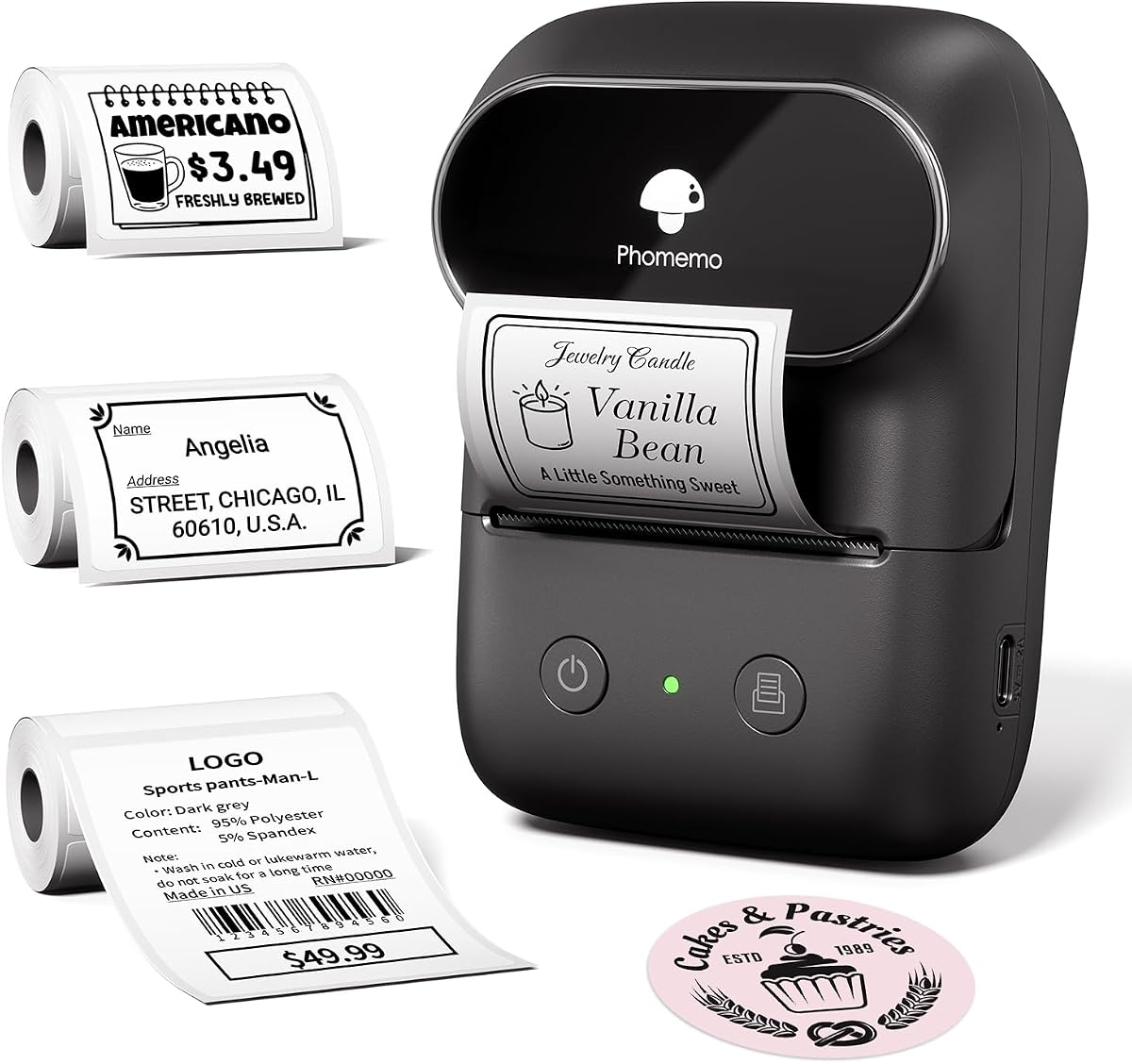
Phomemo distinguishes itself with a dedicated professional support team that offers live chat and remote desktop assistance for troubleshooting. This level of service is valuable for businesses needing immediate help to keep their shipping workflows running smoothly without downtime.
We may earn a commission when you buy through this link, at no additional cost to you.
The printer uses advanced thermal direct technology to produce clear and professional looking labels quickly. With a speed of 150 mm per second it keeps pace with standard shipping volumes and ensures your packages are labeled efficiently every day.
Users can enjoy consistent print quality with genuine Phomemo labels designed to resist fading and smudging over time. While it requires using the Labelife app for Bluetooth printing the simplicity of the interface makes it easy for mobile users to operate daily.
This printer is recommended for users who value responsive customer service alongside reliable performance. It integrates well with Pirate Ship and other platforms making it a solid choice for maintaining organized and professional shipping operations.
Access live chat and remote help to quickly resolve setup issues and keep your business moving.
Engineered labels resist fading ensuring your shipments remain readable throughout the delivery process.
We may earn a commission when you buy through this link, at no additional cost to you.
This Phomemo thermal label maker is designed primarily for organizational tasks rather than full size shipping labels. Its lightweight design and long battery life make it perfect for labeling inventory or boxes before printing shipping labels on a larger printer.
We may earn a commission when you buy through this link, at no additional cost to you.
The device includes three rolls of tape and features smart OCR technology that recognizes text from images quickly. Voice input further simplifies creation allowing for hands free labeling which is helpful in busy environments or multitasking scenarios.
While it does not support full 4×6 shipping labels it complements larger shipping printers by handling smaller identification needs. The broad template and icon library in the app allows for custom labels that help keep your workspace organized and efficient.
This tool is ideal for small business owners looking to improve inventory management alongside shipping tasks. It offers a compact and easy to use solution for labeling small items efficiently without needing a full desktop printer setup.
Rechargeable battery delivers thousands of prints per charge ensuring uninterrupted labeling sessions anywhere.
OCR technology quickly recognizes text from images to streamline the label creation process.
We may earn a commission when you buy through this link, at no additional cost to you.
Selecting the right thermal printer for Pirate Ship requires balancing performance features with your specific shipping volume and workspace constraints.
Bluetooth connectivity offers flexibility for mobile printing which is useful if you move around your warehouse or office. USB connections provide stable interference free performance which is often preferred for dedicated desktop workstations.
Choose Bluetooth if you need to print from a phone or tablet frequently. Choose USB if you prioritize a steady connection for high volume desktop printing.
Print speeds range from 150 mm per second to faster options depending on the model. A minimum of 150 mm per second ensures you can keep up with standard order volumes during normal operations effectively.
Look for 203 DPI resolution for clear barcodes and text. This ensures reliable scanning by carriers and maintains professionalism on every package you ship.
Ensure the printer works seamlessly with Pirate Ship and other platforms you use like Amazon or Shopify. Most thermal printers support PDF import which allows you to print labels saved from any logistics platform easily.
Verify that the device supports standard 4×6 label sizes. This is the industry standard for shipping packages and ensures labels fit correctly on most parcels.
Thermal printers eliminate ink and toner costs which significantly reduces ongoing expenses compared to standard inkjet printers. Initial hardware cost is higher but long term savings on consumables make them cost effective.
Consider the price of replacement labels. Using high quality thermal labels ensures longevity and prevents issues like fading which can compromise delivery tracking.
Commercial grade printers are built to withstand heavy use over extended periods without overheating or breaking down. For businesses shipping hundreds of labels daily a robust build is essential for reliability.
Look for features like printhead protection and reinforced coatings. These elements extend the lifespan of your device and reduce maintenance needs.
Quick setup is vital to minimize downtime when starting a new printer. Look for devices that come with clear instructions drivers on USB or online resources for fast installation.
User friendly apps and automatic label detection features simplify the process significantly. These reduce the learning curve for new users in your shipping team.
Many thermal printers support different label sizes beyond 4×6 such as 2×2 or 1×1 for barcodes. This versatility allows you to print inventory tags and address labels on the same device.
Check the maximum and minimum label width supported by the printer. Ensuring it handles the sizes you need avoids the need for multiple hardware purchases.
Reliable customer support can save you time when technical issues arise. Brands offering phone email or live chat support provide peace of mind for small business operations.
Look for models with warranty coverage. A one year or longer warranty indicates the manufacturer stands behind the product quality and durability.
Start by loading your thermal label rolls correctly by aligning them with the guides and closing the cover securely. Ensure the printer recognizes the label size by pressing the feed button until the correct length is detected to avoid jams.
Connect your printer to your computer or mobile device using the chosen method whether USB or Bluetooth. Install necessary drivers or download the dedicated app and pair the device ensuring it is ready to receive print commands.
Clean the printhead regularly with a soft lint free cloth to remove dust that can cause faded or missing marks. Avoid touching the heating elements directly with bare hands to maintain optimal performance and extend the device lifespan.
Most printers support standard 4×6 thermal labels but you should check the specific brand recommendations. Using genuine labels often ensures better longevity and print quality over time.
They work indirectly by allowing you to print PDF labels downloaded from Pirate Ship. You save the logistics label as a PDF then import it into the printer app for printing.
Thermal printheads usually last thousands of labels depending on usage frequency. With proper care they often last years before needing replacement.
USB is generally more reliable for continuous high volume printing. Bluetooth is convenient for flexibility but may occasionally disconnect in crowded wireless environments.
No these thermal printers only print in black and white. For color labels you would need specialty thermal papers though most shipping labels do not require color.
Regular cleaning of the rollers and printhead using a lint free cloth helps maintain performance. Avoid dust exposure and store the printer in a dry place.
Yes most support Mac via USB but Bluetooth on Mac may require using a specific app instead of direct system pairing. Check manufacturer notes for Mac compatibility details.
Most manufacturers provide free apps like FlashLabel Pro or Labelife for mobile and desktop control. These apps offer templates and tools for editing labels easily.
We have explored ten excellent options ranging from budget friendly to commercial grade models to suit various business needs. The Rollo and Nelko models stand out for their reliability and compatibility with Pirate Ship workflows.
Prioritize connectivity and speed based on your workflow volume and workspace setup. If you need mobile flexibility choose Bluetooth while USB offers stability for stationary desktop setups.
Always verify current availability and pricing before purchasing as these details can change frequently. Investing in the right thermal printer will streamline your shipping process and improve overall operational efficiency.