
Quick Release Desk Mount
4.7Editor score
Quick release clamp design
Aluminum alloy construction
Fits desk thickness 0 to 2.36 inches
This guide compares the top ten Joystick Hotas Mounts available in October 2026, evaluating stability compatibility and ergonomics for serious flight sim
Finding the right Joystick Hotas Mounts is essential for immersive flight simulation. A good mount elevates your controls to a natural position, reducing strain during long sessions and freeing up valuable desktop space for your setup.
We compared ten popular models based on stability, adjustability, and build quality. Our analysis focuses on how well each mount secures heavy controllers while allowing easy installation and removal for flexible cockpit configurations.
Each pick highlights unique strengths and potential trade-offs to help you choose. Keep in mind that stock and pricing fluctuate, so verify current details before purchasing to ensure the best deal for your specific needs.
4.7Editor score

4.4Editor score

4.6Editor score
The following table provides a side-by-side comparison of the top ten Joystick Hotas Mounts. Use this overview to quickly identify key specifications and compatibility details for each model.


The Hikig 2 Set Desk Mount is a robust solution for flight sim enthusiasts seeking stability and wide compatibility. It supports nearly all major hand-control devices including Logitech X56 and Thrustmaster T.16000M, making it a versatile choice for diverse cockpits.
We may earn a commission when you buy through this link, at no additional cost to you.
Its standout feature is the strong 91N.m force clamp which ensures minimal wobble during intense maneuvering. The adjustable height range from minus 175mm to plus 175mm allows you to tailor the mount to your specific seating ergonomics.
While the installation is straightforward, users with very thick desks might find the clamp limits reach. However, the trade-off is a secure hold that keeps your equipment stable without slipping over long sessions.
This mount is ideal for users who value adaptability and steady performance. Whether you are building a new station or upgrading existing gear, it delivers reliable support for immersive flight simulation experiences.
This mount supports almost all flight game hand-control devices ensuring seamless integration with your current hardware.
The powerful clamp force provides a stable base that prevents movement during aggressive flight maneuvers.
We may earn a commission when you buy through this link, at no additional cost to you.
RACGTING offers a premium take on desk mounting with its foldable 2-pack solution. Designed for immersion it positions controls naturally while keeping your workspace organized. The near-zero-wobble stability is a key highlight for serious simmers.
We may earn a commission when you buy through this link, at no additional cost to you.
The aluminum clamp system locks firmly onto desks between 0.2 and 5.7 inches thick. Adjustability in height and reach ensures comfort during long sessions. Quick setup under five minutes means less time configuring and more time flying.
A minor trade-off is the higher cost compared to basic models, but the build quality justifies it. It is best for users with shared desks or offices who need a portable yet robust mounting solution.
If you prioritize a clean desk transition and stable control, this mount delivers. It bridges the gap between permanent installs and temporary setups effectively.
Adjustable height and reach allow you to customize your setup for maximum comfort and realism.
The foldable nature allows for quick removal and storage keeping your desk clear when not in use.
We may earn a commission when you buy through this link, at no additional cost to you.
DIWANGUS delivers exceptional value with a 2-pack foldable mount set. It clears your desktop by moving controls to the edge which reduces clutter significantly. The fit for flat desk edges from 0.4 to 7 inches is particularly accommodating.
We may earn a commission when you buy through this link, at no additional cost to you.
Each mount is independent so you can position joystick and throttle separately for a natural reach. The design is 90% preassembled which minimizes setup time. You simply attach crossbars and bolt on controls.
While the construction uses iron and aluminum rather than premium metals it remains sturdy for most setups. The foldable design allows easy storage after flying which is ideal for shared spaces.
This is the best choice for those seeking functionality without breaking the bank. It effectively balances cost convenience and ergonomics for home offices and smaller rooms.
Separate positions at the desk edge free up central desktop space for other essentials.
Most of the assembly is done at the factory so you can start flying quickly.
We may earn a commission when you buy through this link, at no additional cost to you.
Reashy combines lightweight aluminum with exquisite craftsmanship to offer a durable mount. It supports desktop thickness from 0.2 to 5.7 inches and includes anti-slip pads to protect your desk surface during use.
We may earn a commission when you buy through this link, at no additional cost to you.
The clamp features a high pitch design for easy installation disassembly and storage. You unfold the mount and install the bar type bracket to begin using it quickly. The adjustable height ensures proper positioning for joystick control.
Some users may find the size constraints limiting if they have very thick edges. However for standard desks it provides a rock-solid platform for gaming. The pre-assembly saves time and effort during setup.
This mount is perfect for gamers who want a clean look and reliable performance. It simplifies setup while delivering the stability needed for realistic flight simulation.
High quality aluminum ensures the mount is both lightweight and durable for long-term use.
The high pitch clamp design makes installation and removal simple without tools.
We may earn a commission when you buy through this link, at no additional cost to you.
SILVIP provides a two-pack solution that avoids placing joysticks on the desktop. While it supports many systems like Thrustmaster and VKB note that Logitech X56 is not yet supported. It improves gaming experiences by organizing your cockpit layout.
We may earn a commission when you buy through this link, at no additional cost to you.
The product requires a certain level of hands-on ability for assembly which helps save on transportation costs. It works across PC Windows Xbox and PlayStation platforms making it versatile for console gamers too.
If you already own compatible hardware this set offers great utility for a low cost. The only current limitation is the X56 compatibility which may be updated in future versions.
Buyers should verify their control compatibility before purchasing. For supported devices it delivers a clean setup that enhances immersion without cluttering your workspace.
Compatibility extends to PC Xbox and PlayStation ensuring flexibility for various gaming systems.
Raising controls off the desktop creates a more realistic and organized flight station.
We may earn a commission when you buy through this link, at no additional cost to you.
Meza targets serious simmers with a set of two mounts designed for Thrustmaster Warthog and WinWing Orion 2. The heavy-duty metal construction ensures your setup stays rock-solid even during intense combat maneuvers or high-G turns.
We may earn a commission when you buy through this link, at no additional cost to you.
The reinforced structure uses sturdy metal plates and aluminum profile columns for strong load-bearing. This helps prevent flex and wobble which is critical for heavy HOTAS systems. Adjustment allows optimal positioning for comfort.
While it comes at a higher cost the durability is evident. It is ideal for home cockpit builds where stability is non-negotiable. The package includes mounts only so ensure you have compatible controls.
If you own high-end hardware this mount is worth the investment. It transforms your desk into a professional-grade station with unmatched stability.
Reinforced metal structure handles the weight of premium flight controllers with ease.
Two mounts allow separate placement of joystick and throttle for realistic cockpit arrangement.
We may earn a commission when you buy through this link, at no additional cost to you.
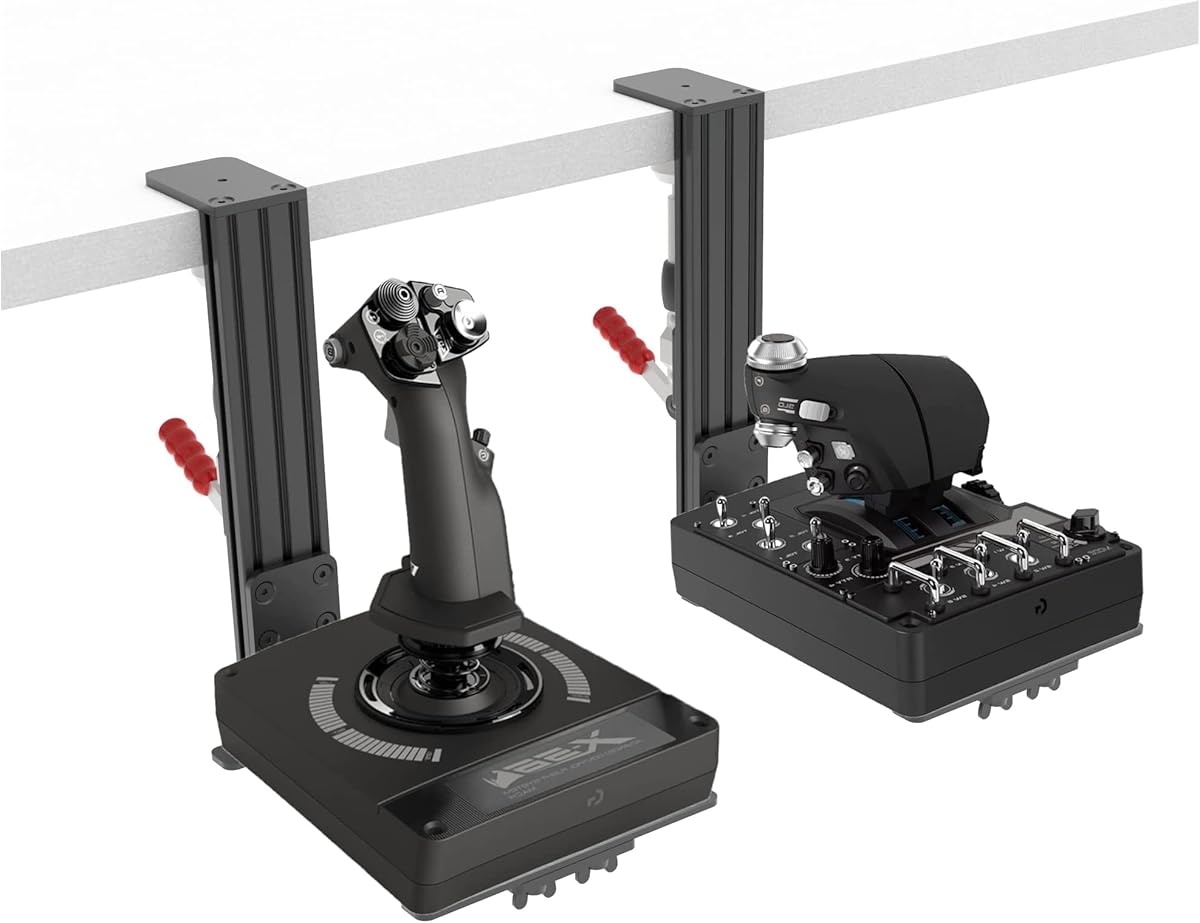
This Quick Release Desk Mount offers a sleek all-metal solution for popular joysticks like Logitech G Extreme 3D Pro. It supports desks from 0 to 2.36 inches thick and includes all necessary screws and a screwdriver for tool-free installation.
We may earn a commission when you buy through this link, at no additional cost to you.
The quick-release design allows you to clamp and remove the mount rapidly. Its ergonomic shape saves valuable desktop space while enhancing immersion by raising the joystick off the surface.
A limitation is the maximum thickness limit of 2.36 inches so check your desk before buying. However for standard desks it provides a stable platform for your controller.
Ideal for users with limited desk space or lighter controls this mount delivers convenience and style. It ensures your joystick stays steady without occupying too much room.
Quick-release clamping enables you to secure the mount in seconds without specialized tools.
The design saves desk space while placing the joystick in a comfortable operating position.
We may earn a commission when you buy through this link, at no additional cost to you.
This two-piece set uses an upgraded dual-clamp design to secure stands firmly from the top. The anti-slip pads are optional to enhance grip. It fits tables up to 2.36 inches thick and supports vertical height adjustment.
We may earn a commission when you buy through this link, at no additional cost to you.
It is compatible with Logitech X52 Pro X55 and Thrustmaster T.16000M. Note that it only supports listed models so check the description carefully. The clamping ensures stability during intense gameplay.
While it has a lower thickness limit than some options it offers excellent stability for standard desks. Users should check their desk edge before purchasing to ensure compatibility.
A solid pick for those seeking a no-frills dual mount solution. It keeps controls steady and organized without extra complexity.
The top-secured dual clamp provides outstanding stability throughout your gaming sessions.
Vertical adjustments allow you to find the perfect ergonomic position for your controls.
We may earn a commission when you buy through this link, at no additional cost to you.
Hikig offers a 2-pack desk mount with a push-pull quick clamp for fast loading and unloading. The holding capacity reaches up to 386kg ensuring excellent stability if installed correctly. It supports 0.2 to 5.3 inch thick desktops.
We may earn a commission when you buy through this link, at no additional cost to you.
The non-slip feet protect your desk surface while ensuring a better grip. A dual-handed system allows positioning for left- or right-handed users. Quick and easy removal means it does not stand in your way when unused.
Proper installation is key to feel the excellent stability promised. If mounted well it makes you feel as if you are in a real cockpit situation.
Ideal for those wanting reliable support for most flight hand-control devices. It balances stability with ease of use for immersive gaming.
The robust clamp supports heavy equipment stably in the best position for gaming.
Dual-handed and push-pull features ensure quick setup and comfortable positioning for all users.
We may earn a commission when you buy through this link, at no additional cost to you.
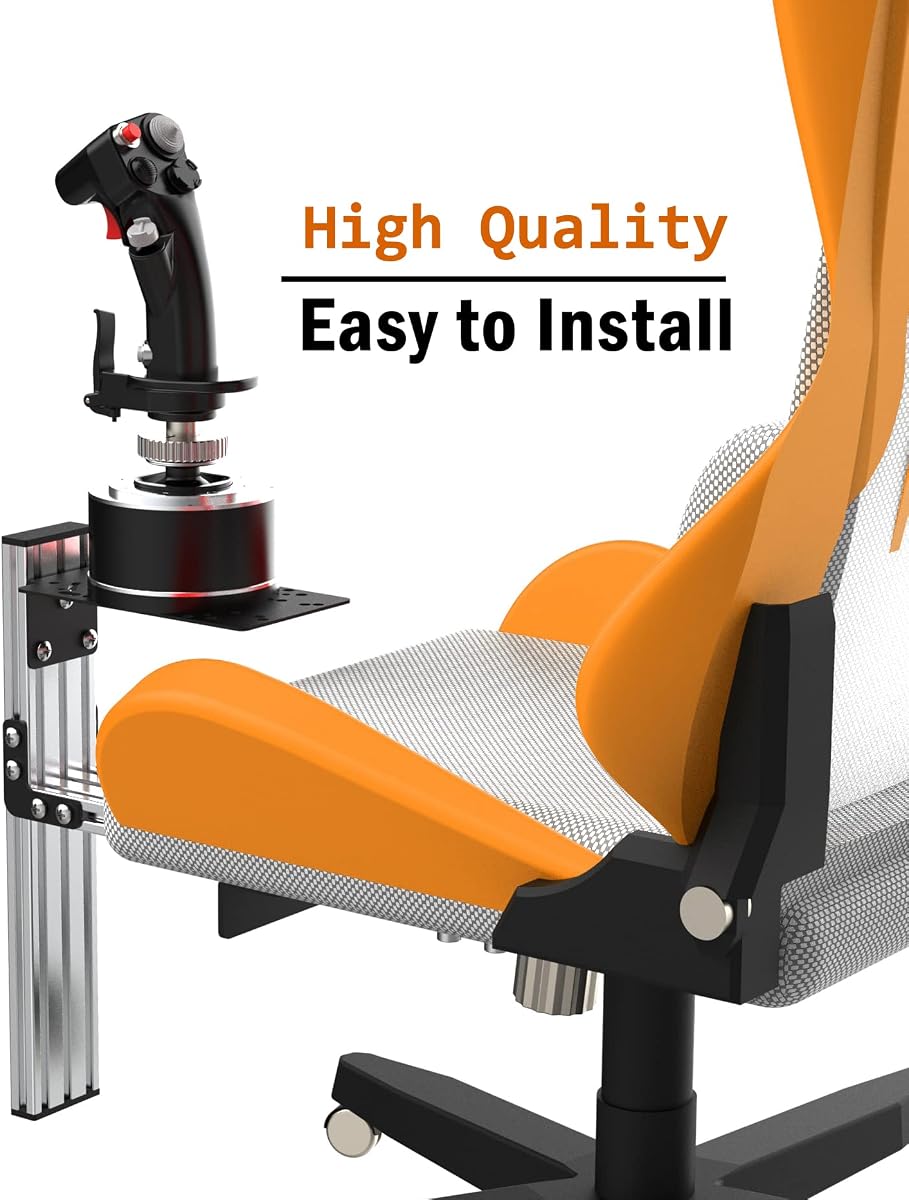
Fosiya offers a center chair mount designed to attach directly to your chair for ultimate immersion. It supports various devices like T16000M FCS and Warthog. M8 heavy duty screws fix the mount firmly with capacity up to 300kg.
We may earn a commission when you buy through this link, at no additional cost to you.
Ergonomic adjustments allow vertical height changes and left-right movement by 8cm each. The non-slip flange nut fixing system preserves chair appearance. It is easy to disassemble if not in use.
Assembly follows manual steps which may be complex but ensures a tight fit. It offers stability and realism for those wanting a true cockpit feel.
This mount is perfect for dedicated simmers looking to integrate controls into their chair. It brings the experience closer to reality while keeping your desk free for other uses.
Mounting to the chair brings controls closer for a realistic and immersive flight experience.
M8 screws provide a strong stable hold that keeps the joystick steady during intense action.
We may earn a commission when you buy through this link, at no additional cost to you.
Selecting the right Joystick Hotas Mounts requires evaluating build quality compatibility and adjustability to match your flight sim setup needs.
Premium mounts use aluminum or metal to resist warping and ensure stability during intense maneuvers. Look for sturdy clamps and anti-slip pads to protect your desk.
Higher quality materials provide long-term durability and reduce wobble during gameplay.
Check that the mount supports your specific joystick or throttle models. Some mounts target specific systems while others offer broad compatibility.
Verify device compatibility to ensure a secure fit and avoid returns.
Mounts vary in the thickness of desk they can secure. Ensure the clamp range matches your desk edge from 0.2 to 7 inches.
Choose a clamp that fits your desk thickness for maximum stability.
Adjustable height and reach allow you to position controls ergonomically. Look for mounts with vertical and horizontal adjustment options.
Proper adjustability reduces strain during long flight sessions.
Some mounts are preassembled while others require tools. Quick-release mechanisms make removal easier for shared spaces.
Simpler installation saves time and effort when setting up.
Heavy controllers need mounts with higher load-bearing limits. Check the maximum weight capacity before purchasing.
Adequate weight capacity ensures the mount supports your gear securely.
Foldable designs allow easy storage when not in use. This is ideal for users who need to clear their desk daily.
Portability features keep your workspace organized and flexible.
Reading customer feedback reveals real-world stability and durability. Look for common issues mentioned by other flight sim enthusiasts.
Reviews help confirm product performance beyond the manufacturer claims.
Secure the mount on a clean flat desk edge and tighten the clamp until the mount does not shift. Ensure the non-slip pads are in place to protect your desk surface.
Position the joystick or throttle at a comfortable height and reach. Test the stability by applying gentle pressure before starting a flight session.
Clean the metal surfaces with a soft cloth regularly to prevent dust buildup. If the mount has adjustable parts check the bolts periodically to maintain stability.
Yes many models are built with heavy-duty metal and high clamping force to support heavy controllers. Check the weight capacity specifications to ensure it meets your needs.
Most mounts require a solid edge to clamp securely. Glass desks without a solid edge may not be suitable. Verify the clamp design fits your desk type.
Many designs allow positioning on either side of the desk. Look for dual-handed systems or adjustable positioning for flexibility.
Generally you clamp the mount to the desk edge and secure the controller with bolts. Follow the included manual for specific steps.
Thickness limits vary by model ranging from 0.2 to 7 inches. Check the product details to confirm your desk fits.
Some models feature foldable designs for easy storage. This is useful for users who need to clear their desk frequently.
The top picks highlight versatile options like the RACGTING foldable set and the Meza heavy-duty mount. Each offers unique benefits for different cockpit needs.
Prioritize compatibility and stability to ensure a smooth flight experience. Selecting a mount that fits your desk and controller is crucial.
Remember to check current availability before purchasing as models may vary. Investing in a quality mount enhances your flight simulation setup.