
Ranked G65 Guardian 65%
4.6Editor score
Hot swappable switches
Solid aluminum frame
Lubricated stabilizers
Discover the top low profile mechanical keyboards for fast paced games. This guide compares ten models on speed, latency, and ergonomics for gamers.
Gamers need keyboards that register inputs instantly without fatiguing wrists during long sessions. Low profile mechanical keyboards offer shorter travel distances and sleek designs that suit competitive play perfectly.
We evaluated ten real products based on switch actuation, wireless latency, build quality, and customization options. Our analysis focuses on features that directly impact performance in fast paced gaming environments.
Each pick highlights specific strengths like macro support or multi-device connectivity. Remember that prices and stock vary by retailer and time so check current listings before deciding on your next upgrade.
4.6Editor score

4.7Editor score
3.9Editor score
This side-by-side comparison summarizes the core attributes of each model so you can quickly identify which keyboard matches your specific gaming needs and budget constraints.


The Keychron K1 Ultra 8K stands out as a top contender for competitive gaming due to its support for 8K polling rates in wired mode. This ensures minimal latency which is critical for fast paced games where every millisecond counts. With a 4.7 rating users appreciate the build quality and responsiveness of this mechanical keyboard.
We may earn a commission when you buy through this link, at no additional cost to you.
Its tri-mode connectivity allows seamless switching between wired USB-C wireless 2.4GHz and Bluetooth 5.2 connections. You can maintain a high performance wired link for gaming while keeping Bluetooth active for secondary devices like phones or tablets. The open-source ZMK firmware combined with the Launcher Web App gives you endless possibilities for remapping keys and creating complex macros.
While the keyboard offers premium features it does come with a higher price tag compared to budget options. The reliance on firmware customization might require some initial setup time for users who prefer plug-and-play simplicity. However for serious gamers the ability to fine-tune input latency and key behavior is worth the extra effort.
This keyboard is ideal for gamers who demand the highest precision and also value a compact 80% layout. It serves well for both gaming and productivity tasks thanks to its multi-system support and durable materials. We recommend it for those willing to invest in a tool that evolves with their needs over time.
The 8K polling rate ensures your actions are registered instantly providing a competitive edge in fast-paced online matches.
Hot-swappable switches and ZMK firmware allow you to tailor the tactile feel and function of every key without soldering.
We may earn a commission when you buy through this link, at no additional cost to you.
The Ranked G65 Guardian offers an impressive combination of build quality and features at a very accessible price point. With a 4.6 rating it is a favorite for gamers seeking a durable mechanical keyboard without breaking the bank. Its full aluminum frame provides a solid typing experience that rivals more expensive models.
We may earn a commission when you buy through this link, at no additional cost to you.
Key features include hot swappable switches which let you change or upgrade key switches easily without soldering. The lubricated stabilizers ensure minimal rattle during heavy key presses and the low profile design speeds up your input registration. It supports both Mac and Windows systems making it versatile for different setups.
The main trade-off is the compact 65% layout which removes the numpad and some navigation keys. This can be limiting if you rely on those keys for work or specific software shortcuts. However for gaming where speed and space savings matter it is a very efficient design choice.
We recommend this keyboard for budget-conscious gamers who want a premium feel and customization options. It is perfect for students or casual players who need a reliable tool for fast-paced games. Check current prices and availability as stock may vary by region.
The matte aluminum metal case adds durability and style while keeping the keyboard lightweight and portable for on-the-go gaming.
Included tools and hot-swap sockets make it simple to swap out switches or clean the keyboard whenever you need a refresh.
We may earn a commission when you buy through this link, at no additional cost to you.
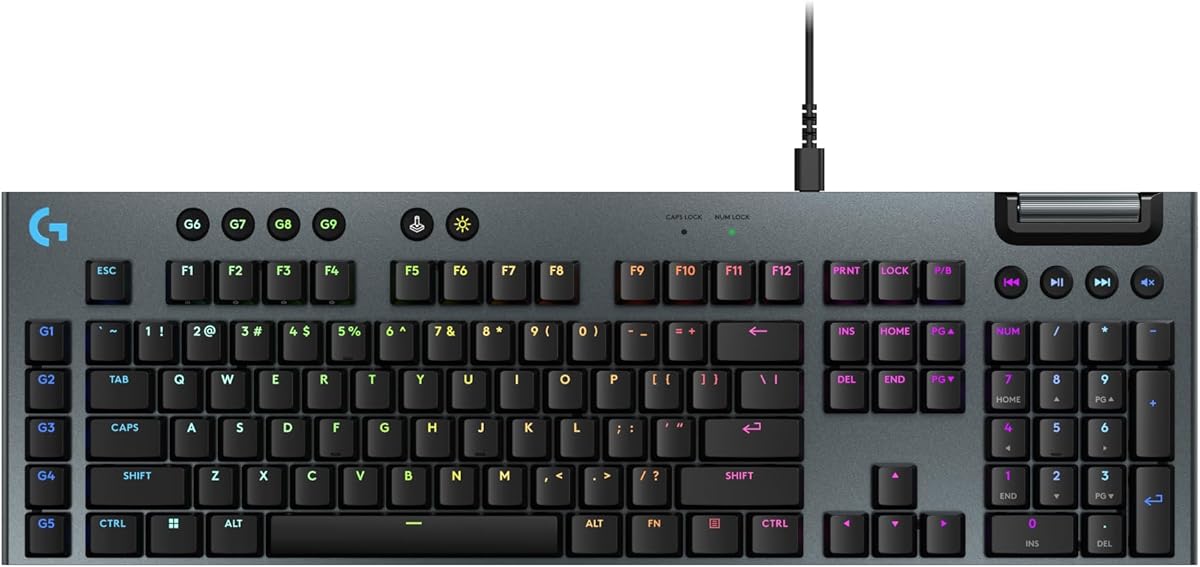
The Logitech G915 X represents the cutting edge of low-profile gaming keyboard technology with innovations designed for speed and comfort. While the rating is 3.9 it offers unique features like KEYCONTROL that allow up to 15 functions per key. This transforms the keyboard into a personalized command center for complex gameplay.
We may earn a commission when you buy through this link, at no additional cost to you.
Its low-profile GL mechanical switches provide a 1.3 mm actuation point which is ideal for rapid inputs in fast paced games. The double-shot PBT keycaps and sand-blasted aluminum top plate ensure long-term durability and a premium tactile feel. LIGHTSYNC RGB integration lets you sync lighting effects with other Logitech G gear.
The high price tag and the specific focus on wired performance might not suit everyone. Some users may find the lack of wireless options in this specific variant limiting compared to other models. However the build quality and customization potential are top-tier for those invested in the Logitech ecosystem.
This keyboard is best suited for professionals and hardcore gamers who prioritize precision and advanced macro capabilities. If you need a robust tool for intensive gaming sessions this model delivers professional-grade performance. Verify current product specs before purchasing to ensure it meets your wireless needs.
Designed to elevate performance levels the sleek engineering reduces strain and increases control during extended gaming marathons.
With up to 15 functions per key you can execute complex sequences instantly keeping your hands focused on the action.
We may earn a commission when you buy through this link, at no additional cost to you.
The Keychron K5 Version 2 is a versatile option for those who need a full 100% layout without sacrificing the benefits of a low profile design. It scores 4.6 for its balance of comfort speed and wireless reliability. The inclusion of QMK firmware opens up extensive customization options for power users.
We may earn a commission when you buy through this link, at no additional cost to you.
You can switch between up to three devices via Bluetooth 5.2 or use a USB-C connection for a blistering 1000 Hz polling rate. The keyboard features layered acoustic foams that dampen noise while maintaining a crisp stroke feel. With up to 105 hours of battery life it supports long sessions without interruption.
The full size means it takes up more desk space compared to compact boards. Additionally configuring QMK firmware can be daunting for beginners who prefer simple plug-and-play setups. However for those who need a numpad and full navigation keys it offers a professional solution.
This model is recommended for gamers who also use their keyboard for data entry or office work. The ability to adapt the board perfectly to your workflow makes it a strong long-term investment. Check if the included keycaps match your preferred operating system before finalizing your purchase.
The rechargeable lithium-polymer battery ensures you can game through weekends without hunting for a charging cable or outlet.
Open-source firmware allows you to remap keys and create layers so the keyboard adapts to any software or game you play.
We may earn a commission when you buy through this link, at no additional cost to you.
The Razer BlackWidow V4 Low Profile brings premium gaming features to a wireless form factor with Hyperspeed wireless technology. Its 4.2 rating reflects strong performance in minimizing lag while maintaining the tactile feedback gamers expect. The low profile green switches offer a 1.2 mm actuation point for precise inputs.
We may earn a commission when you buy through this link, at no additional cost to you.
Multi-device support allows you to pair a Razer mouse to the same dongle and toggle between three Bluetooth devices effortlessly. A magnetic roller and dedicated control buttons streamline media management without interrupting your gameplay. The keyboard is built with a solid aluminum top case and textured PBT keycaps for longevity.
The weight of the keyboard is substantial which adds to stability but reduces portability. Users may also find the Razer Synapse software complex if they only want basic functionality. However for those invested in the Razer ecosystem the integration is seamless and rewarding.
We recommend this for gamers who want a wireless setup without compromising on speed or build quality. It suits users who value premium materials and advanced control options. Ensure your desk space accommodates the full size and weight before buying.
Hyperspeed wireless ensures a lag-free connection that feels as responsive as a wired keyboard during intense competitive matches.
Ultra-low front height and neutral wrist positioning reduce strain during long gaming sessions and improve overall comfort levels.
We may earn a commission when you buy through this link, at no additional cost to you.
The Razer Ornata V3 TKL offers a compact Tenkeyless layout that balances cost and performance for fast paced gaming. With a 4.6 rating it features Mecha-Membrane switches that blend mechanical feedback with membrane familiarity. This design offers precision without the typical noise or actuation force of full mechanical keys.
We may earn a commission when you buy through this link, at no additional cost to you.
Snap Tap technology prioritizes the latest input between assigned keys for responsive in-game movement when enabled via Synapse. The keyboard includes UV-coated keycaps for fade resistance and an integrated magnetic wrist rest for support. Eight zones of Chroma RGB lighting allow for dynamic customization across different games.
Users seeking a true mechanical click might find the hybrid switches less satisfying than full mechanical alternatives. The software dependency for features like Snap Tap also means you need to keep Razer Synapse active. However for a budget-friendly TKL option it delivers excellent value.
This keyboard is ideal for gamers who need a compact footprint and a comfortable typing experience without high costs. It suits those who prefer a lighter touch and need extra desk space for mouse movement. Check if the TKL layout fits your specific gaming and typing habits.
Snap Tap feature allows rapid key switching that enhances movement precision in fast-paced shooters and strategy games.
UV-coated keycaps resist wear and tear ensuring legends stay sharp even after hours of daily use and gaming.
We may earn a commission when you buy through this link, at no additional cost to you.
The Razer Ornata V3 full size keyboard provides a comfortable solution for those who need all the keys without extra cost. Rated at 4.5 it uses Mecha-Membrane switches to give a snappy yet smooth feel. This makes it a reliable choice for long gaming sessions where comfort is paramount.
We may earn a commission when you buy through this link, at no additional cost to you.
Dedicated media keys allow quick control over volume and playback without leaving the game. The UV-coated keycaps and magnetic soft-touch wrist rest protect the surface and support your wrists during use. It is designed to reduce strain while maintaining a low profile for natural hand positioning.
The weight of the keyboard can be significant making it less portable than compact models. Some gamers may prefer a distinct mechanical actuation point over the hybrid membrane feel. But for a full layout with essential media controls it remains a solid performer.
We recommend this for gamers who need a numpad and dedicated media controls on a budget. It is great for those prioritizing comfort and reliability over extreme customization. Verify the layout matches your needs before purchasing to ensure a good fit.
Slimmer keycaps and shorter switches ensure natural hand positioning for long hours of use with little wrist strain.
Backlit media keys let you configure pause play and skip functions for ultimate convenience during gameplay or work.
We may earn a commission when you buy through this link, at no additional cost to you.
The Cherry MX 10.0N is an ultra-thin keyboard designed for those who prioritize speed and style. With a profile of just 0.87 inches it combines functionality with a sleek aesthetic that suits modern setups. Rated 4.3 it uses MX Low Profile Speed switches which are linear quiet and responsive.
We may earn a commission when you buy through this link, at no additional cost to you.
The aluminum housing provides a sturdy and durable construction that feels premium on the desk. RGB backlighting allows for customizable colors and effects to match your theme. An integrated stand offers fold-out support for ergonomic typing positions that improve comfort.
Software options may be limited compared to competitors with deeper customization ecosystems. The price point might be higher than standard plastic boards. However for a build focused on speed and minimalism it offers a refined experience.
This model is recommended for gamers who value a clean look and fast actuation. It suits users who need a keyboard that is quiet yet responsive enough for competitive play. Check current listings to ensure it meets your specific connectivity needs.
MX Low Profile Speed switches provide a linear and responsive experience ideal for rapid keystrokes in competitive gaming.
Sturdy aluminum construction ensures the keyboard withstands daily wear while maintaining a sleek modern appearance.
We may earn a commission when you buy through this link, at no additional cost to you.
The Keychron K3 Version 2 is a compact 75% layout built for productivity and tactile typing. With a 4.4 rating it offers a great balance of portability and performance. The QMK firmware and built-in AI assistant make customization accessible even for non-technical users.
We may earn a commission when you buy through this link, at no additional cost to you.
Connectivity includes stable Broadcom Bluetooth 5.1 allowing you to switch between up to three devices seamlessly. The reinforced aluminum body ensures durability while keeping the weight low for travel. It includes extra keycaps for both Windows and Mac systems ensuring full compatibility across platforms.
The compact layout means fewer navigation keys which can be a hurdle for some workflows. The AI assistant is in beta so some features might evolve over time. However for a wireless mechanical board it delivers impressive versatility.
We recommend this for gamers who need a compact keyboard for mobile setups or small desks. It is perfect for those who value customization and multi-device switching. Verify the layout compatibility with your OS before buying to avoid remapping issues.
The AI assistant simplifies key remapping and shortcut creation using plain language instructions for easy setup.
Connect up to three devices via Bluetooth and switch between them quickly for seamless multitasking across platforms.
We may earn a commission when you buy through this link, at no additional cost to you.
The Redragon K618 PRO is an ultra-thin wireless gaming keyboard offering macro control without software setup. Rated 4.1 it features a dedicated 4×5 macro zone and media scroll for instant adjustments. The linear switches provide smooth and responsive feedback suitable for gaming or typing.
We may earn a commission when you buy through this link, at no additional cost to you.
Tri-mode connectivity lets you jump between USB-C Bluetooth and 2.4GHz wireless with zero lag. A one-touch Win/Mac switch simplifies OS transitions and the stock Red switches offer great speed. You can also use Pro Software for deeper customization if you need infinite keybinding combinations.
Build quality and software complexity may vary compared to higher-end brands. Some users might find the RGB programming intuitive while others prefer simpler interfaces. But for a budget-friendly option with robust features it delivers strong value.
This model is ideal for gamers who want quick macros and fast wireless switching. It works well for those who need a slim keyboard that supports multiple devices. Verify your preferred connectivity mode before purchasing for optimal performance.
Record combos or adjust volume instantly using the dedicated macro zone without installing any software first.
Switch devices without re-pairing thanks to tri-mode support that jumps between USB-C Bluetooth and 2.4GHz wireless.
We may earn a commission when you buy through this link, at no additional cost to you.
Choosing the right keyboard involves understanding how various features affect performance and comfort. This guide breaks down the key factors to consider before making a purchase.
Low profile mechanical keyboards use switches with shorter travel distances than traditional keys. Linear switches are often preferred for gaming because they offer smooth keystrokes without tactile bumps or clicks that may slow you down. Look for actuation points under 1.5 mm for maximum speed in fast paced games.
Prioritize switches with low actuation force and short total travel to improve your actions per minute rate.
Wireless keyboards can introduce input lag but modern tech like 2.4GHz dongles minimizes this delay. If possible choose models with high polling rates like 1000 Hz or 8K for wired options. Always verify if the keyboard supports Bluetooth for secondary devices but keep 2.4GHz for gaming.
Always check for dedicated low-latency wireless modes to ensure your inputs are registered instantly during play.
Layouts range from full size to 65% and 80% TKL. A smaller layout saves desk space for mouse movement but removes numpads and navigation keys. Consider how much space you need for specific keys and whether the low profile design suits your wrist position.
Select a layout that balances space savings with the keys you actually need for your games and applications.
Materials like aluminum frames and PBT keycaps increase longevity and resistance to wear. A solid build prevents flex and rattle during intense use. UV coatings and double-shot legends ensure the keyboard looks and feels good over time.
Invest in models with metal cases and durable keycaps to withstand daily gaming wear and tear.
Wireless keyboards need reliable battery life to avoid interruptions. Look for models with at least 100 hours of battery life at moderate brightness. Some keyboards feature power-saving modes that extend usage significantly between charges.
Check the mAh rating and battery estimates to ensure the keyboard can last through your longest gaming sessions.
Good software lets you remap keys create macros and adjust lighting without extra hardware. Open-source firmware like QMK offers deep customization but may require a learning curve. Ensure the software supports your operating system and is easy to navigate.
Choose a keyboard with intuitive software that allows easy remapping to fit your unique gaming workflow.
Features like magnetic wrist rests and ergonomic angles reduce strain during long sessions. The low profile design naturally lowers your hands but additional support can help maintain neutral wrist positioning. Look for keyboards that offer detachable or adjustable supports.
Prioritize keyboards with included wrist rests or ergonomic features to protect your hands during marathon gaming.
To start place the keyboard on a stable flat surface and connect it via USB-C or wireless dongle. If you are using a wired connection ensure your system recognizes the device before launching your game. For Bluetooth pairing follow the manufacturer instructions to link with your PC or laptop.
Regularly clean the keyboard using a soft brush or compressed air to remove dust and debris. Avoid liquid spills and use a microfiber cloth for surface maintenance. This helps preserve the low profile switches and keycaps from buildup that might affect performance.
Update firmware periodically to access new features and performance improvements. Use the provided software to remap keys for your preferred gaming layout. Keeping your keyboard updated ensures optimal speed and compatibility with the latest games.
Yes low profile mechanical keyboards often have shorter actuation points which can lead to faster input registration. The reduced travel distance means keys respond quicker helping your actions in fast-paced games. However the difference is marginal and depends on your specific switch type.
Low profile keyboards have a shallower key travel which many find closer to a laptop feel. The tactile feedback can be smoother and quieter compared to standard mechanical switches. Some gamers enjoy this lighter feel while others prefer the deeper bump of traditional keys.
Modern wireless low profile keyboards with 2.4GHz connectivity offer near-wired latency making them suitable for competitive play. Always use the dedicated dongle instead of Bluetooth for the lowest lag. Check reviews to confirm low latency performance before buying.
Use compressed air to blow out dust from between the keys. You can remove keycaps carefully if the switch design allows and wipe the surface with a dry cloth. Avoid using water or harsh chemicals to protect the electronic components.
Many modern low profile keyboards are hot-swappable allowing you to change switches without soldering. Check product specs to see if the model supports hot-swap sockets. This feature lets you customize the feel without buying a new keyboard.
TKL layouts remove the numpad giving you more room for mouse movement. This space is vital for low sensitivity games where you need large sweeps. It keeps your hands closer together which can improve comfort during long sessions.
Basic typing works without software but macros and lighting customization require vendor apps. Open-source firmware boards need a web app or local tool for remapping. Most keyboards come with free software accessible via their official website.
Low profile keyboards offer a smooth and light typing experience similar to laptops. They can reduce finger fatigue due to shorter travel distances. However some typists prefer the tactile feedback of standard mechanical keys.
Choosing the right keyboard can elevate your gaming performance and comfort during competitive sessions. The top picks like the Keychron K1 Ultra 8K and Ranked G65 Guardian cover a wide range of budgets and needs. Whether you prioritize speed customization or wireless freedom there is a model that fits.
Prioritize features like actuation point and connectivity latency to ensure your keyboard keeps up with fast-paced games. Comfort factors such as wrist support and layout size are also crucial for long-term satisfaction. Don't overlook build quality as durability ensures your investment lasts.
Remember that product availability and pricing can change so always check current listings before buying. Verify that the keyboard supports your specific OS and preferred connectivity modes. With careful selection you can find the perfect tool for your gaming setup.