
Logitech G305 Lightspeed Wireless Gaming Mouse – Black
4.6Editor score
10000 DPI HERO sensor
250 hours battery life
Ultrafast 1 ms response
This guide compares the best lightweight mouse options for gaming and productivity based on sensor performance weight build quality and battery life features.
A lightweight mouse is essential for gamers and professionals who need speed and precision without hand fatigue. These devices reduce strain during long sessions and offer quick movement across the screen. Finding the right balance between weight and durability is key to selecting the perfect device for your needs.
We evaluated ten top-rated models from leading brands like Logitech and Redragon to bring you this comprehensive list. Each product was assessed based on sensor accuracy, wireless performance, ergonomic design, and overall value. Our goal is to help you find a mouse that enhances your workflow or gaming setup effectively.
Each pick in this guide highlights specific strengths such as battery life, click speed, or portability. You will see detailed specs and pros cons to make an informed decision easily. Please note that prices and availability can change over time so check the latest offers before purchasing.
4.6Editor score

4.5Editor score
4.3Editor score
The following table provides a side-by-side comparison of all ten lightweight mice featured in this guide. You can quickly compare key specifications like sensor type, weight, connectivity, and battery life to find the best match for your setup.





The Logitech G305 Lightspeed Wireless Gaming Mouse stands out as a top contender for those seeking a reliable and lightweight gaming mouse without breaking the bank. With a high rating from users, it delivers consistent performance that rivals more expensive models. Its standout quality lies in its efficient power usage and robust wireless connectivity.
We may earn a commission when you buy through this link, at no additional cost to you.
Equipped with the next-generation optical HERO sensor, this mouse offers incredible precision with up to 12000 DPI sensitivity. The ultrafast LIGHTSPEED wireless technology ensures a lag-free experience with a 1 ms report rate, making it suitable for competitive gaming. Additionally, the battery life is impressive, offering up to 250 hours of continuous gameplay on a single AA battery.
While the G305 is highly efficient, it does rely on a replaceable AA battery which some users might prefer to avoid. Also, the lack of RGB lighting might not appeal to gamers who prioritize aesthetics. However, these trade-offs are acceptable given the price and performance balance it provides.
This mouse is ideal for budget-conscious gamers who need a durable and responsive tool for their setup. Whether you are using a gaming laptop or a desktop, its compact design makes it a great travel companion. We recommend it for anyone looking for high performance at an accessible price point.
The mouse features an efficient lightweight mechanical design that maximizes battery usage allowing for extended play sessions without frequent changes.
Its built-in nano receiver storage ensures you never lose the dongle making it easy to pack and use with laptops on the go.
We may earn a commission when you buy through this link, at no additional cost to you.
The white variant of the Logitech G305 offers the same exceptional performance as the black version but with a clean and modern look. It maintains the high rating and reliable features that made the original a favorite. This color option is perfect for users who want their setup to look sleek and coordinated.
We may earn a commission when you buy through this link, at no additional cost to you.
With the next-gen 12000 DPI HERO optical sensor, this mouse ensures unrivaled gaming performance and accuracy. The advanced LIGHTSPEED wireless technology provides super-fast 1 ms response time which is faster than many wired options. The ultra-long battery life ensures you can game for hours without interruption on a single AA battery.
One downside is that the white finish may show dirt or smudges more easily than darker colors requiring more frequent cleaning. Additionally, it often comes at a slightly higher price point than the black version. Despite this, the design appeal and performance make it a solid choice for style-focused buyers.
This mouse is best suited for gamers who value aesthetics without compromising on quality. It fits well in minimalist or bright setups. We recommend this variant for those who want the reliability of the G305 with a distinctive look.
The classic shape is designed for maximum maneuverability and comfort ensuring you can move freely during intense gaming sessions.
Built-in storage for the USB wireless receiver keeps your desk organized and ensures you always have the connection tool handy.
We may earn a commission when you buy through this link, at no additional cost to you.
The Logitech G PRO X Superlight 2 Wireless Gaming Mouse is a championship-winning device that sets a new standard for esports performance. With a rating that reflects its quality, it is engineered to win in collaboration with top pros. Its standout feature is the combination of extreme lightness and cutting-edge sensor technology.
We may earn a commission when you buy through this link, at no additional cost to you.
Featuring the HERO 2 sensor this mouse tracks over 888 IPS and up to 44000 DPI with zero smoothing or acceleration. The LIGHTFORCE hybrid switches deliver pro-level precision and reliability with a tactile click feel. Additionally, the mouse glides smoothly thanks to Zero-Additive PTFE mouse feet ensuring a seamless connection to your game.
While the performance is top-tier, the premium price might be a barrier for casual users. The battery life is around 95 hours which is good but shorter than some competitors. However, the ability to charge via USB-C and use POWERPLAY makes up for this for serious competitors.
This mouse is designed for serious gamers who need every advantage to win. It is perfect for those who value speed and precision above all else. We recommend it for anyone looking to upgrade to a pro-level lightweight gaming mouse.
Collaborating with leading esports pros ensures the design meets the highest standards of performance and reliability for competitive play.
The Zero-Additive PTFE feet reduce friction and wear allowing for effortless movement that feels smooth over long sessions.
We may earn a commission when you buy through this link, at no additional cost to you.
The Logitech G PRO X2 SUPERSTRIKE Wireless Gaming Mouse is designed alongside the world's best esports athletes to deliver the fastest fully customizable click. With a high rating, it represents the pinnacle of wireless gaming mouse technology. Its standout quality is the Haptic Inductive Trigger System which provides real-time feedback.
We may earn a commission when you buy through this link, at no additional cost to you.
This mouse dominates with industry-leading speed offering clicks that are 30 ms faster for peak performance. Precision is ensured by the HERO 2 sensor tracking at over 888 IPS with up to 44000 DPI. The battery life supports play for 60 to 90 hours with LIGHTSPEED Wireless for uninterrupted focus.
The advanced features like haptic feedback require the Logitech G HUB Software which adds a layer of complexity. The high cost may not be justified for casual users. However, the durability with a 0.7 mm thin-wall case makes it a robust investment for pros.
This mouse is ideal for competitive players who need every edge in their setup. It is perfect for those who want to customize their clicks extensively. We recommend it for serious esports enthusiasts ready to invest in top-tier gear.
The HITS system gives real-time feedback enhancing the gaming experience by connecting you deeper to every game scenario.
10-level actuation points and 5-level rapid trigger reset allow you to tailor the click to your specific play style.
We may earn a commission when you buy through this link, at no additional cost to you.
The Redragon M612 Wired RGB Optical Gaming Mouse is a fantastic option for those seeking high performance without the price tag. It features a strong rating and is geared with 5 redefinable DPI levels for flexibility. Its standout quality is the comfort it provides with its ergonomic design.
We may earn a commission when you buy through this link, at no additional cost to you.
With 11 programmable buttons this mouse offers full customizable control over your gameplay. The skin-friendly frosted coating ensures a comfortable grip while rubber textures on the left side strengthen friction for better control. The dynamic RGB backlit vibe adds a visually appealing element to your gaming setup.
The main drawback is that it is a wired mouse which limits mobility compared to wireless options. The maximum DPI of 8000 is lower than high-end wireless models. However, for most gamers this level of performance is more than sufficient.
This mouse is perfect for budget gamers who prioritize comfort and customization. It is great for extended sessions due to its fatigue-killer design. We recommend it for anyone wanting reliable features at a low cost.
The frosted coating and rubber textures provide the most enjoyable fingerprint-free tactility ensuring control during intense use.
Five decent backlit modes create a hyped dynamic RGB vibe that never lets you down when decorating your space.
We may earn a commission when you buy through this link, at no additional cost to you.
The Logitech G502 Hero Wired Gaming Mouse is a classic choice for gamers who value precision and customization. It carries a strong rating and delivers tracking up to 25600 DPI with zero smoothing. Its standout quality is the adjustable weight system that allows for a personalized feel.
We may earn a commission when you buy through this link, at no additional cost to you.
Equipped with 11 programmable buttons and a dual mode hyper-fast scroll wheel this mouse gives you full control. The mechanical switch button tensioning ensures a crisp and clean click feel with rapid feedback. LIGHTSYNC technology provides customizable RGB lighting that syncs with your gaming activity.
This mouse is heavier than typical lightweight models due to its metal construction which some may find less portable. Being wired it limits movement range. However, the adjustability and sensor performance make it a versatile tool for many setups.
This mouse is best for users who want a heavy feel with precise control. It is suitable for desktops where mobility is not a primary concern. We recommend it for gamers who prioritize ergonomics and customization over portability.
Arrange up to five 3.6 g weights to match your playing style ensuring a personalized weight and balance configuration.
The next gen sensor can detect movements at the sub-micron level offering pinpoint accuracy for every game.
We may earn a commission when you buy through this link, at no additional cost to you.
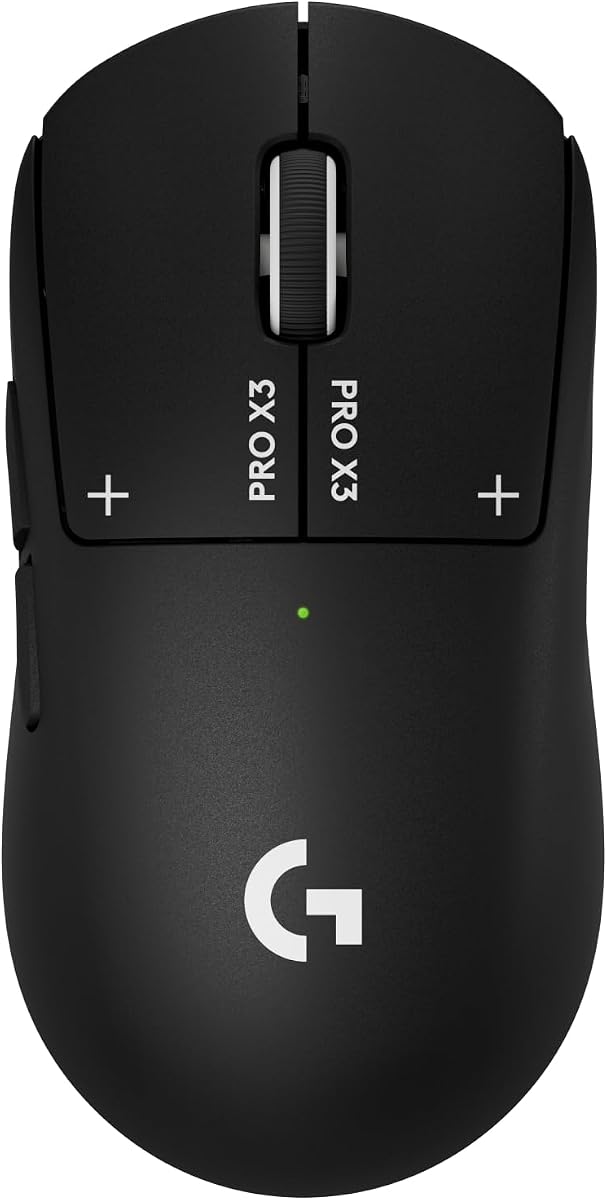
The Logitech G PRO X3 SUPERSTRIKE Gaming Mouse brings true click innovation with its Haptic Inductive Trigger system. It is designed alongside world-class esports athletes to deliver the fastest and most customizable click available. Its standout feature is the electromagnetic field replacing standard switches for better actuation.
We may earn a commission when you buy through this link, at no additional cost to you.
Tracking is incredibly precise with the HERO 2 sensor capable of over 930 IPS and up to 48000 DPI. The LIGHTSPEED wireless technology operates at up to 8 kHz polling for zero lag. You can play continuously with up to 135 hours of battery life on a single charge via USB-C.
The high price point may be a barrier for average users. Advanced features require the Logitech G HUB Software which adds complexity. Despite this the durability and smooth glide make it a worthy choice for those seeking the best tech.
This mouse is ideal for professionals who demand the highest specs. It fits perfectly into tournament-grade PC gaming setups. We recommend it for serious gamers who want the ultimate wireless performance.
The Haptic Inductive Trigger system delivers 10 actuation points to your programmable mouse for true click innovation.
Built with a 0.7 mm thin-wall case and extra-large UHMWPE feet ensuring smooth movement during marathon sessions.
We may earn a commission when you buy through this link, at no additional cost to you.
The Logitech M185 Compact Ambidextrous 2.4 GHz Wireless Mouse is designed for comfort and productivity in small workspaces. It features a comfortable shape that feels great in either right or left hand. Its standout quality is the compact size making it suitable for tight workspaces or offices.
We may earn a commission when you buy through this link, at no additional cost to you.
This USB wireless mouse features a line-by-line scroll wheel and up to 1 year of battery life thanks to a smart sleep mode function. It works with Windows PC Mac or laptops ensuring universal compatibility. The nano USB receiver stays in your computer for plug and play simplicity.
It is not optimized for gaming due to basic scroll and sensor specs. The shape is simple which may not suit palm grip users for gaming. However, for work and travel it is an efficient and reliable companion.
This mouse is perfect for travelers and office workers who need a dependable tool. It is great for laptops and shared spaces. We recommend it for anyone prioritizing simplicity and portability.
Users who chose this mouse over a touchpad were 50% more productive and worked 30% faster according to studies.
The compact size and smooth cursor control make this mouse suitable for small to medium hands and busy desktops.
We may earn a commission when you buy through this link, at no additional cost to you.
The Logitech M330 Silent Plus Full Size 2.4 GHz Wireless Mouse offers a quiet and comfortable experience for office work. Its SilentTouch Technology reduces over 90 percent of clicking sounds ensuring a quieter working environment. Its standout quality is the balance of comfort and functionality.
We may earn a commission when you buy through this link, at no additional cost to you.
Crafted for comfort with naturally shaped contoured plastic grips this mouse is built for long-lasting use. It features a long battery life of 18 months and an auto-sleep mode. The advanced optical tracking ensures high-performance precision on most surfaces with a wireless range up to 33 feet.
It is designed primarily for right-handed users which limits use for left-handed individuals. The full size may be too large for small hands or tight desks. Despite this, the productivity and comfort it brings to work is significant.
This mouse is best for office workers who need a quiet and reliable mouse. It is ideal for shared workspaces where noise is a concern. We recommend it for those prioritizing silence and comfort in their daily tasks.
Logitech's SilentTouch Technology reduces over 90 percent of clicking sounds ensuring top performance in a quieter environment.
High-performance precision and smart cursor control on most surfaces help you get more done during your workday.
We may earn a commission when you buy through this link, at no additional cost to you.
The Logitech MX Master 4 Ergonomic Wireless Mouse brings a new dimension of productivity with its Haptic Sense Panel. This device allows for customizable haptic feedback on specific actions enhancing your workflow. Its standout quality is the seamless blend of comfort and advanced tech.
We may earn a commission when you buy through this link, at no additional cost to you.
You can access favorite tools with the Actions Ring which adapts to each app for efficient navigation. The MagSpeed scroll wheel allows you to scroll 1000 lines per second with pixel precision. It supports advanced connectivity with USB-C dongle or Bluetooth and features quiet clicks to reduce noise.
The high price point makes it an investment rather than a casual purchase. It is designed for productivity so it is not ideal for gaming. However, for professionals working long hours the ergonomic tilt and stress reduction are valuable.
This mouse is perfect for professionals who use complex software daily. It is great for designers and developers who need precision. We recommend it for those looking to upgrade their productivity tools.
The Haptic Sense Panel provides customizable haptic feedback on specific actions and notifications enhancing productivity on this wireless mouse.
The MagSpeed scroll wheel is Logitech's fastest and most precise allowing you to scroll thousands of lines per second.
We may earn a commission when you buy through this link, at no additional cost to you.
Choosing the right lightweight mouse involves looking at several key factors that impact your daily workflow or gaming sessions. This guide breaks down the most important aspects to consider.
The sensor is the heart of the mouse and determines how well it tracks movement. Look for models with high DPI options and zero acceleration or smoothing to ensure your hand movements translate precisely on screen. This is critical for gaming where even slight errors can affect performance.
Wireless mice rely on battery power so longevity is key to uninterrupted use. Check the rated battery life and whether it uses AA batteries or a rechargeable pack. Long life reduces the hassle of constant charging or replacement ensuring you stay productive.
Decide between wired and wireless based on your needs. Wireless offers freedom of movement but requires battery management while wired offers consistent connection. Look for low-latency wireless tech if you choose that path to avoid lag during critical tasks.
A lightweight mouse reduces fatigue but the right size matters too. Ensure the dimensions fit your hand comfortably to avoid strain. Some models come with adjustable weights to help you find the perfect balance for your grip style.
Durability ensures your mouse lasts through intensive use. Look for sturdy materials like thin-wall cases or high-quality plastics. Check for good reviews on durability to ensure the mouse will survive drops or daily wear over time.
Set a budget and compare features within that range. High-end models offer more tech but mid-range options often provide excellent performance. Consider what features you actually need versus those that are just extras that drive up the cost.
Keep the mouse surface clean to maintain smooth movement. Dust and debris can interfere with the sensor or feet so wipe it down regularly with a soft cloth.
For wireless models charge or replace batteries when levels drop to avoid disconnection. Store the receiver inside the mouse or in a safe spot to prevent losing it.
Customize buttons and DPI settings using the provided software to match your tasks. This helps you access common functions quickly and improves overall productivity.
Yes lightweight mice are excellent for gaming as they allow quick movements and reduce wrist strain. Their fast response times and high precision sensors make them ideal for competitive play.
Wireless mice vary in battery life with some lasting over a year on a single charge. It depends on usage patterns and features like lighting. It is wise to check the spec before purchasing.
Most modern mice work on many surfaces but optical sensors may struggle on reflective or glass surfaces. Using a mouse pad often ensures the best tracking performance for any device.
Some models are ambidextrous while others are designed for right-handed use. Check the shape details to find one that supports your dominant hand comfortably for long sessions.
Higher DPI allows faster cursor movement but may not be necessary for everyone. It is better to find a range that matches your screen resolution and usage style for control.
Use a soft cloth to wipe the exterior and clean the sensor with compressed air. Avoid liquids near the switches or battery compartments to prevent damage to the internal components.
We hope this guide helps you find the perfect lightweight mouse for your needs. Our top picks offer a range of options from budget to premium so you can choose based on priorities.
Prioritize features like sensor quality and battery life to ensure a reliable experience. Whether you are gaming or working a lightweight design can greatly improve your comfort and focus.
Remember that prices and availability change so always check current offers before buying. Finding the right mouse takes time but the investment in better performance is worth it.