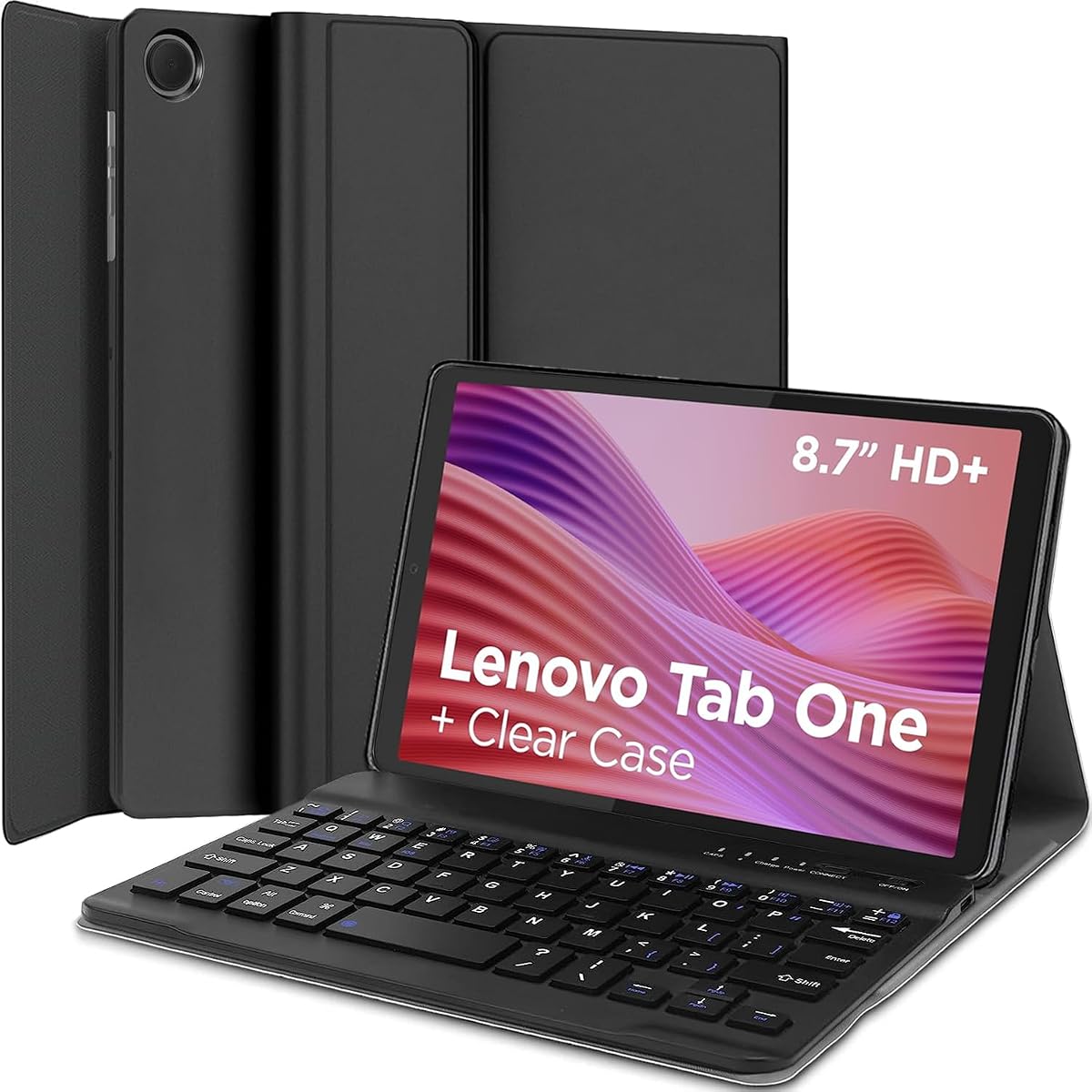
Case with Keyboard for Lenovo Tab One
5.0Editor score
Magnetically detachable keyboard
Long battery life
Premium leather protection
Finding the right keyboard for your Lenovo Tab One can transform your tablet into a powerful productivity tool. Whether you need a case with a built-in keyboard or a standalone Bluetooth model, the options vary widely in features and comfort.
We have carefully evaluated ten top-rated products based on compatibility, build quality, typing experience, and additional features like trackpads or backlighting. Our analysis ensures you get a reliable accessory that matches your specific usage needs and budget requirements.
Each product in this list highlights key strengths and potential trade-offs to help you make an informed decision. Please note that availability and pricing may change frequently, so check the latest details before finalizing your purchase online.
5.0Editor score

4.8Editor score

4.3Editor score
As an Amazon Associate we earn from qualifying purchases.
The following comparison table provides a side-by-side overview of the key specifications and features for each of the ten selected keyboard solutions for the Lenovo Tab One and compatible models.


This keyboard case stands out as the top recommendation for users seeking a complete typing solution for the Lenovo Tab One. With a high rating and excellent compatibility, it offers a seamless blend of protection and productivity features.
We may earn a commission when you buy through this link, at no additional cost to you.
The seven-color backlight system allows you to personalize your typing environment while ensuring visibility in low-light conditions. The detachable design lets you remove the keyboard to use the tablet as a standalone device or book.
While the backlight enhances usability, it can reduce battery life when enabled for long periods. However, the rechargeable battery supports up to ninety hours of use without the backlight, which is sufficient for most daily tasks.
This product is ideal for students and professionals who need a reliable keyboard that doubles as a protective case. Its ease of use and premium build quality make it a strong choice for everyday productivity.
The keyboard features a magnetic attachment that ensures stability during typing, reducing fatigue during long work sessions.
You can adjust brightness levels and select from seven colors to match your mood or workspace lighting conditions.
We may earn a commission when you buy through this link, at no additional cost to you.
This option is a standout for budget-conscious buyers who still demand high quality and reliability. It achieves a perfect rating from users who appreciate its durable build and functional design for daily use.
We may earn a commission when you buy through this link, at no additional cost to you.
The keyboard is made from high-end ABS material, providing a tactile response that mimics a laptop experience. Its magnetic detachment allows for quick transitions between typing and media consumption modes.
Lack of backlighting may be a drawback for users who type in dark environments frequently. However, the energy-efficient sleep mode extends battery life significantly, supporting up to one hundred hours of use.
If you prioritize value and longevity over advanced lighting features, this keyboard case is an excellent investment. It delivers a robust typing experience that keeps your tablet safe and productive.
The wood grain leather exterior offers robust protection against drops and scratches while maintaining a professional aesthetic.
Automatic sleep mode activates when the keyboard is idle, preserving battery life for travel or extended use without recharging.
We may earn a commission when you buy through this link, at no additional cost to you.
This official Lenovo keyboard pack is designed for the Idea Tab Pro, offering a seamless integration with your device. It features a large trackpad and ergonomic keys that enhance productivity significantly.
We may earn a commission when you buy through this link, at no additional cost to you.
The Pogo pin connection ensures instant data and power transfer without the need for Bluetooth pairing or separate charging. This reduces clutter and simplifies setup for immediate use.
Users should verify their tablet model compatibility carefully as it does not fit the Idea Tab Pro Gen 2. Additionally, ensuring proper alignment with the Pogo pins is crucial for a stable connection.
For users of the Idea Tab Pro, this keyboard delivers a premium, integrated experience that rivals laptop performance. The built-in trackpad and kickstand make it versatile for various working scenarios.
Snap-on technology provides instant connectivity, eliminating the hassle of Bluetooth pairing and battery management.
The spacious trackpad supports gestures for multitasking, making cursor control intuitive and precise.
We may earn a commission when you buy through this link, at no additional cost to you.
This wireless keyboard is perfect for users who manage multiple devices and need a portable typing solution. Its multi-device connectivity allows smooth switching between phones, tablets, and laptops effortlessly.
We may earn a commission when you buy through this link, at no additional cost to you.
With a slim profile and low travel keys, it offers a comfortable typing experience suitable for long work sessions. The inclusion of USB-C connectivity adds flexibility for those who prefer wired options.
As a standalone keyboard, it requires a separate case for your tablet. However, its portability and robust feature set make it a valuable addition to any mobile workspace setup.
For professionals needing a versatile keyboard that adapts to different environments, this model is a top choice. It balances premium build quality with practical functionality for diverse workflows.
Switch between up to three devices with a single button press, streamlining your workflow across platforms.
Choose between Bluetooth or USB-C for reliable connections that fit your specific device requirements.
We may earn a commission when you buy through this link, at no additional cost to you.
This keyboard case is tailored for the larger 11-inch Lenovo Idea Tab, offering both typing functionality and screen protection. The inclusion of a tempered glass protector is a significant value add for screen safety.
We may earn a commission when you buy through this link, at no additional cost to you.
The PU leather case ensures your tablet is protected from drops and dust while providing a comfortable feel. You can detach the keyboard to use the tablet standalone for media or reading.
While the added protection increases weight slightly, the durability justifies the trade-off for travelers. The seven backlight colors allow customization for different lighting conditions during work.
Ideal for users who prioritize screen safety alongside typing convenience, this case is a comprehensive solution. It ensures your investment is protected while delivering a productive typing experience.
The tempered glass protector provides optical clarity and scratch resistance without interfering with touch sensitivity.
Premium PU shell locks the tablet in place, absorbing shock from accidental drops effectively.
We may earn a commission when you buy through this link, at no additional cost to you.
This keyboard case distinguishes itself with an integrated multi-touch trackpad, offering enhanced control over cursor navigation. The three-zone backlight adds a unique visual element to the typing experience.
We may earn a commission when you buy through this link, at no additional cost to you.
The all-in-one design combines a stand, case, and keyboard for convenient travel and daily use. You can detach the keyboard to enjoy the tablet as a standalone device easily.
Some users have reported inconsistencies with the trackpad responsiveness. However, for those who value the convenience of having a built-in pointing device, this option remains appealing.
If you want a compact solution that mimics a laptop interface with a trackpad, this case is worth considering. Just be aware of potential variability in trackpad performance compared to standalone models.
Scroll, click, and swipe effortlessly with the integrated trackpad that supports various gestures for easier control.
Adjust backlight zones to highlight specific keys or set a mood that suits your environment.
We may earn a commission when you buy through this link, at no additional cost to you.
This keyboard case offers a stylish alternative with unique color choices like Pink, appealing to users who value aesthetics. It provides essential protection and typing functionality in a slim package.
We may earn a commission when you buy through this link, at no additional cost to you.
The detachable magnetic keyboard ensures stability during use while allowing easy removal for other tasks. Type-C charging ensures the keyboard stays powered without needing a proprietary cable.
Lack of backlighting means it may be less suitable for low-light typing. However, the waterproof and dustproof PU leather makes it easy to maintain and clean over time.
For users looking for a visually distinct and practical case, this model is a strong contender. It balances portability with essential features for a productive mobile office experience.
Available in varied colors to match your personal style while maintaining a professional look.
Type-C connection ensures fast and compatible charging for the keyboard battery.
We may earn a commission when you buy through this link, at no additional cost to you.
This case enhances productivity by including a wireless mouse, providing precise control for design or navigation tasks. It also features a dedicated slot for your S Pen, keeping all tools organized.
We may earn a commission when you buy through this link, at no additional cost to you.
The ultra-thin cover protects your tablet without adding bulk. The backlight allows for comfortable typing in various lighting conditions throughout the day.
The mouse is functional but basic compared to dedicated external models. However, for casual use, it complements the keyboard well for general navigation.
If you need a complete workspace package that includes a mouse and pen holder, this is an excellent choice. It offers a comprehensive set of features in a single accessory.
The included mouse enhances navigation precision, especially useful for detailed tasks on the tablet.
Built-in pen slot ensures your stylus is always within reach and securely stored during transit.
We may earn a commission when you buy through this link, at no additional cost to you.
This standalone keyboard is designed for maximum portability, fitting easily into bags for travel. Its slim profile and lightweight build make it ideal for users on the go.
We may earn a commission when you buy through this link, at no additional cost to you.
The customizable LED backlight enhances visibility and adds a personal touch to your setup. Bluetooth 3.0 ensures quick connection to your tablet for immediate typing.
Since it is a standalone keyboard, you will need a separate case for your device. Also, Bluetooth 3.0 is reliable but newer versions might offer slightly better power efficiency.
For travelers or commuters who need a small keyboard that packs a punch, this model is highly suitable. It keeps your device lightweight while adding essential typing capabilities.
Lightweight construction ensures you can carry it effortlessly without adding bulk to your daily load.
Fast pairing process lets you start typing immediately after connecting to your device.
We may earn a commission when you buy through this link, at no additional cost to you.
This keyboard features chiclet-style keys that offer a familiar and comfortable typing experience. Its ultra-thin design makes it easy to slide into pockets or bags.
We may earn a commission when you buy through this link, at no additional cost to you.
The power-efficient functionality helps conserve battery life during use and idle time. Reliable pairing ensures you spend less time connecting and more time working.
Lack of backlight limits use in dark environments. However, for daylight or well-lit spaces, the clarity and tactile feel are sufficient for accurate typing.
Users who prefer a simple, functional keyboard without extra frills will appreciate this model. It focuses on core typing performance and portability for consistent daily use.
Chiclet-style keys provide a spacious layout that reduces fatigue during extended typing sessions.
At just 3/16 inch thick, it tucks away easily, making it perfect for travel or casual use.
We may earn a commission when you buy through this link, at no additional cost to you.
Selecting the right keyboard involves weighing compatibility, features, and usability. This guide breaks down essential factors to consider before making a purchase.
Ensure the keyboard explicitly supports your exact tablet model and year. Many products are tailored for specific variants like TB305FU or TB-336ZU, so double-check your settings before ordering.
Always verify the model number listed in your tablet settings to avoid purchasing incompatible accessories.
Detachable keyboards allow you to use the tablet independently without the keyboard attached. Integrated designs like Pogo pin connections offer seamless setup but limit standalone usage.
Choose detachable options for versatility and integrated ones for simplicity and stability during heavy use.
Backlighting enhances visibility in dim environments and adds customization through color options. However, it can drain battery faster if used continuously.
If you work at night often, prioritize models with multiple brightness levels to balance visibility and power consumption.
A built-in trackpad can simplify navigation compared to relying on touch gestures. It makes multitasking and document editing more intuitive.
Look for trackpads that support common gestures to improve usability without needing an extra mouse.
Bluetooth offers wireless freedom, while Pogo pin or USB-C ensures stable data and power transfer without separate charging. Choose based on your need for convenience versus reliability.
For a clutter-free setup, Bluetooth is ideal, but Pogo pins ensure the keyboard never runs out of power.
Battery performance varies significantly between models. Some offer up to one hundred hours of use on a single charge with energy-saving sleep modes.
Prioritize models with auto-sleep functions if you use the keyboard intermittently to maximize runtime.
Keyboard cases provide full protection for your tablet against drops and scratches. Ensure the case material is durable and covers all ports effectively.
Look for anti-slip interiors and robust exteriors to ensure long-term safety for your device.
If you travel frequently, a slim and lightweight keyboard is essential. Bulkier cases may be cumbersome when you need to move quickly.
Select options with thin profiles that add minimal weight to your daily carry.
Before first use, charge the keyboard fully using the provided cable. Most models support USB-C or proprietary chargers depending on the manufacturer.
Connect the keyboard via Bluetooth or attach it physically to the tablet. Follow the pairing prompts in your tablet settings for a stable connection.
Clean the keyboard regularly with a dry cloth and avoid using liquids directly on the keys. Store the device in a cool place to maintain battery health.
Most third-party cases use Bluetooth for wireless connectivity. Only official Lenovo packs or specific models support Pogo pin connections for power and data.
No. Keyboard cases are designed for specific models like the Tab One 2025 series. Using them on older tablets will not fit the ports or dimensions.
Most keyboards charge fully in two to four hours depending on battery capacity. Check the product specs for exact charging times before purchase.
Most PU leather cases are water-resistant but not waterproof. Wipe spills quickly to prevent damage to the keyboard circuitry.
No. The battery is built-in and not user-replaceable. Over time, battery life may degrade as it is a sealed component inside the keyboard.
Most keyboards work plug-and-play with standard Bluetooth pairing. Specific shortcut keys might require app installation but generally function out of the box.
This guide has reviewed ten distinct options ranging from affordable cases to premium standalone keyboards. Each choice offers unique benefits suited for different typing and protection needs.
Prioritize features like backlighting and trackpads if you require advanced productivity. Simpler models remain perfect for casual use and travel.
Always verify current pricing and availability before purchase. Your ideal keyboard might change as new models are released to meet evolving tablet standards.