
Light Gaming Laptop, AMD Ryzen 7 7430U
4.6Editor score
AMD Ryzen 7 7430U Processor
16GB DDR4 RAM Capacity
512GB NVMe SSD Storage
Finding the right laptop for emulators requires careful consideration of processing power and graphics capabilities. Emulation demands significant resources to run older or foreign gaming systems smoothly without lag. You need a machine that balances speed with efficiency to handle multiple concurrent tasks effectively.
We evaluated ten distinct models based on their CPU architecture, memory capacity, and storage speed. Each option offers unique strengths for gamers and developers seeking reliable emulation performance. Our analysis focuses on real-world usability for running demanding virtual gaming environments daily.
Each pick highlights specific strengths for different user needs and budgets. You will find recommendations for entry-level users to high-performance creators. Please note that prices and availability change frequently so verify current deals before purchasing your ideal device.
4.6Editor score

5.0Editor score

4.4Editor score
As an Amazon Associate we earn from qualifying purchases.
This table provides a side-by-side comparison of key specifications for all ten selected laptops. Use it to quickly identify which model offers the processing power and memory you need for stable emulation.




The NIMO 15.6" Gaming Laptop stands out as the premier choice for demanding emulation tasks. With its perfect five-star rating and exceptional specifications, it handles even the most resource-heavy virtual machines effortlessly. Its standout quality lies in the massive memory and processing power available.
We may earn a commission when you buy through this link, at no additional cost to you.
At the heart of this machine is the AMD Ryzen 7 8745HS processor delivering desktop-class power. Coupled with 64GB of DDR5 RAM and a 2TB PCIe 4.0 SSD, multitasking remains smooth. The integrated Radeon 780M graphics provide the necessary throughput for high-fidelity emulation of older systems.
While the price is higher than budget options, the trade-off is justified by future-proofing and stability. Emulation benefits significantly from extra RAM and fast storage which this model provides abundantly. You will not face bottlenecks when running multiple instances or complex software stacks.
If you need a reliable workhorse for serious emulation development or high-end gaming emulation, buy this. It delivers professional-grade performance in a portable chassis. This laptop is the top recommendation for users who prioritize speed and capacity above all else.
The 64GB DDR5 RAM allows you to run multiple emulators simultaneously without slowdown. The 2TB SSD ensures you have room for vast libraries of ROMs and game assets.
The Radeon 780M with RDNA 3 architecture handles graphics acceleration efficiently. This is crucial for emulating consoles that rely heavily on GPU performance for smooth visuals.
We may earn a commission when you buy through this link, at no additional cost to you.
This Light Gaming Laptop offers incredible value for users seeking entry-level emulation capabilities. Rated highly by users for its balance of cost and performance, it handles standard emulation tasks smoothly. The standout quality is its ability to deliver solid multitasking without a high price tag.
We may earn a commission when you buy through this link, at no additional cost to you.
Powered by the AMD Ryzen 7 7430U processor it provides enough power for mid-tier emulation targets. The 16GB of DDR4 RAM ensures that applications run without stuttering during normal use. Storage is handled by a speedy 512GB NVMe SSD which loads systems quickly.
The main trade-off is the lack of dedicated graphics and fixed RAM configuration. However for most casual emulation needs this configuration is sufficient to run popular systems efficiently. It represents a smart investment for those on a tight budget.
If you need a portable and affordable laptop for light to moderate emulation work, choose this model. It offers a reliable experience without breaking the bank. This is the ideal pick for students or hobbyists starting their emulation journey.
The Ryzen 7 7430U brings multi-core efficiency to a compact chassis. This architecture is well-suited for the threaded tasks often required by emulation software.
Its lightweight design makes it easy to carry for work or study. You can take your emulation station with you without burdening your backpack.
We may earn a commission when you buy through this link, at no additional cost to you.
The ASUS ROG Strix G16 is the definitive premium choice for high-fidelity emulation experiences. With its powerful dedicated graphics and latest Intel CPU it delivers top-tier performance. It stands out for its ability to handle graphics-intensive emulation with minimal latency.
We may earn a commission when you buy through this link, at no additional cost to you.
Featuring the Intel Core i7 14650HX and NVIDIA RTX 5060 GPU this laptop handles complex rendering tasks easily. The 165Hz display ensures smooth visuals which is beneficial for fast-paced emulation scenarios. The cooling system keeps the hardware stable under prolonged stress.
While the premium price and battery usage are considerations the performance gains are substantial. Emulators that rely on GPU acceleration will benefit significantly from this hardware configuration. It is built for users who refuse to compromise on visual quality or speed.
If you seek the ultimate emulation machine and budget is flexible, this is the best fit. It combines raw power with high-end features. This model is recommended for enthusiasts who demand the very best in gaming and emulation performance.
The RTX 5060 GPU provides significant advantages over integrated graphics. This is critical for emulators that utilize GPU acceleration for better frame rates.
State-of-the-art cooling keeps the system quiet and efficient. This ensures consistent performance during long emulation sessions without thermal throttling.
We may earn a commission when you buy through this link, at no additional cost to you.
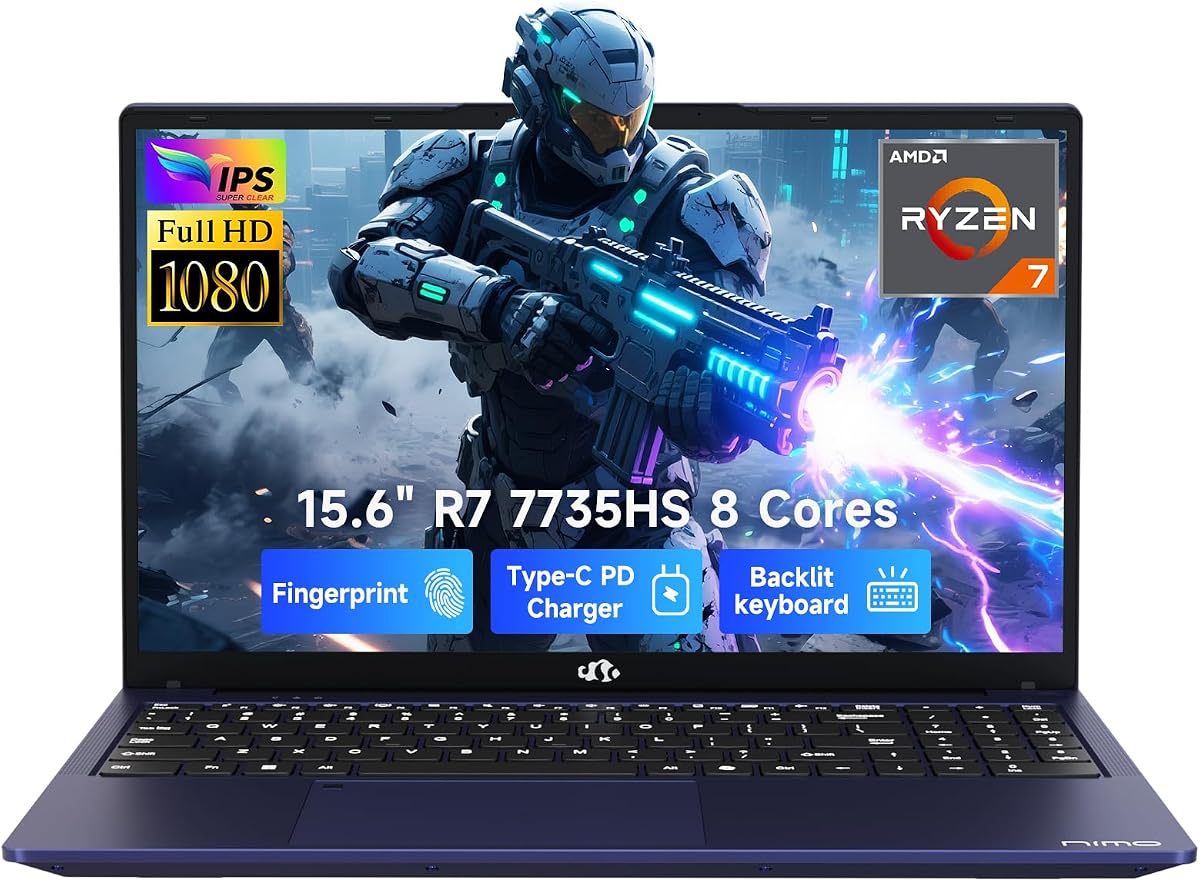
This NIMO Light Gaming Laptop offers robust performance for emulation enthusiasts seeking reliability. With a 4.4-star rating and solid specs it handles daily emulation workloads well. It balances power and portability effectively for varied use cases.
We may earn a commission when you buy through this link, at no additional cost to you.
The AMD Ryzen 7 7735HS processor provides ample speed for complex simulations. Dual DDR5 slots allow future expansion which is a smart feature for longevity. The Radeon 680M graphics ensure smooth visuals for compatible emulation tasks.
Battery life is average but acceptable given the performance levels provided. The build quality is sturdy enough to withstand travel and daily handling. It serves as a versatile machine for both work and play.
If you need a reliable all-rounder for emulation and general productivity, consider this model. It offers strong value for the price point. This laptop is a great choice for users who need consistent performance without premium costs.
Dual DDR5 slots allow you to upgrade RAM easily. This flexibility ensures your laptop remains capable as emulation needs grow.
Multiple USB-C and HDMI ports simplify external setup. You can connect monitors and peripherals without needing extra adapters.
We may earn a commission when you buy through this link, at no additional cost to you.
The NIMO 17.3" Gaming Laptop is ideal for users who prioritize screen real estate for emulation work. With a 4.2-star rating it offers a comfortable view for coding or testing emulators. The large display makes managing windows much easier.
We may earn a commission when you buy through this link, at no additional cost to you.
Equipped with 32GB of DDR5 RAM it handles heavy multitasking with ease. The 1TB SSD ensures your large projects load quickly. While the Ryzen 5 6600H is a strong CPU it may struggle with very high-end emulation compared to higher tiers.
Portability is reduced due to the larger chassis but the desktop-like experience is worth it for many. It serves well as a fixed workstation for development tasks. The layout and screen size enhance productivity significantly.
If you spend most of your time at a desk and need a big screen for emulation, this is a smart pick. It balances size and power effectively. This laptop is best for stationary use where portability is not a priority.
The 17.3-inch display provides ample space for code and UI windows. It reduces the need for constant window switching during emulation sessions.
32GB of RAM supports running multiple virtual machines. This is useful for testing different configurations simultaneously.
We may earn a commission when you buy through this link, at no additional cost to you.
This NIMO 15.6" IPS FHD Gaming-Laptop delivers balanced performance for emulation tasks. With a 4.3-star rating it offers a reliable experience for everyday workloads. The combination of speed and storage makes it a versatile tool for developers.
We may earn a commission when you buy through this link, at no additional cost to you.
The AMD Ryzen 7 7735HS processor powers through complex operations smoothly. 32GB of DDR5 RAM ensures no slowdowns during heavy usage. The included 100W Type-C charger keeps the device powered up quickly.
Screen brightness is functional but not exceptional for bright environments. However the build quality supports reliable long-term use. It is a solid choice for those needing robust performance in a standard form factor.
If you want a dependable laptop for emulation with good memory and speed, choose this model. It offers a good mix of features. This is recommended for users who prioritize reliability over extreme portability.
Fingerprint recognition adds security and speed. This allows quick access to your emulation projects without repeated password entry.
100W Type-C charging ensures minimal downtime. You can quickly recharge and resume work after short breaks.
We may earn a commission when you buy through this link, at no additional cost to you.
The Light Gaming Laptop with Ryzen 7 5700U provides a compact and efficient solution for emulation. With a 4.6-star rating it is valued for its reliability and speed. It is an excellent choice for users needing portability.
We may earn a commission when you buy through this link, at no additional cost to you.
The Zen 3 architecture delivers strong single and multi-core performance. 16GB of RAM supports smooth multitasking for daily needs. The lightweight design makes it easy to carry around without fatigue.
It may struggle with the latest high-end emulation demands compared to newer models. But for most standard tasks it performs admirably. The efficient power use also translates to better battery life.
If you need a portable and efficient laptop for light to moderate emulation, this is a great fit. It offers great value for money. This is best for travelers who need a reliable companion on the go.
The 5700U processor balances power and energy use well. This ensures your device runs cool even during extended emulation sessions.
The compact design fits easily in any bag. You can take your emulation station anywhere without bulk.
We may earn a commission when you buy through this link, at no additional cost to you.
This 2026 Gaming Laptop offers a unique blend of office productivity and emulation readiness. With a perfect 5.0-star rating it is highly recommended for professional use. It includes Office and Windows 11 Pro out of the box.
We may earn a commission when you buy through this link, at no additional cost to you.
Powered by an Intel Core i7 processor it handles multitasking efficiently. 16GB of RAM ensures smooth performance for standard applications. The battery life supports mobile use throughout the day without interruption.
It may not be the top choice for GPU-heavy emulation due to integrated graphics. However for general emulation and work it is extremely capable. The included software saves extra setup time.
If you need a reliable daily driver that can also handle emulation, this is a smart pick. It offers a complete package for productivity. This is best for professionals needing a versatile machine.
Windows 11 Pro and Office are pre-installed. This allows you to start working immediately without extra licensing.
Lightweight design supports all day carry. You can switch between work and emulation tasks easily.
We may earn a commission when you buy through this link, at no additional cost to you.
The HP OmniBook 3 offers a basic but functional experience for lighter emulation tasks. With a 4.5-star rating it is praised for its endurance and display. It is a solid entry point for casual users.
We may earn a commission when you buy through this link, at no additional cost to you.
The Ryzen 3 processor handles standard tasks efficiently but may struggle with heavy emulation. 8GB of RAM is sufficient for single application use. The large 17.3-inch screen provides good visibility.
This model is not recommended for high-demand emulation scenarios. It serves better for general productivity and light multimedia tasks. Battery life remains a strong selling point.
If you need a reliable laptop for light tasks and occasional emulation, consider this model. It offers a practical solution for students. This is best for those prioritizing battery life and screen size.
Battery life supports long usage without frequent recharges. This is ideal for students and mobile workers needing reliability.
AI tools help manage noise and calls effectively. This enhances productivity during remote sessions.
We may earn a commission when you buy through this link, at no additional cost to you.
The KAIGERR Gaming Laptop delivers excellent value for entry-level emulation needs. With a high 4.7-star rating it is highly rated by users for reliability. It offers robust multitasking capabilities for daily work.
We may earn a commission when you buy through this link, at no additional cost to you.
Equipped with a Ryzen 7 7430U and 16GB of RAM it handles multiple tasks well. The webcam cover adds security for remote work. The SSD ensures quick boot times and application loading.
Battery life is average but sufficient for most short-term needs. It is a sturdy machine built to last for several years. This model represents a smart choice for budget-conscious buyers.
If you want a dependable and affordable laptop for general emulation use, choose this. It provides strong features for the price. This is best for students and entry-level developers.
The webcam cover slide adds a layer of physical security. This protects your privacy during sensitive work.
WiFi 6 ensures stable wireless connections for updates. This allows seamless cloud syncing and remote access.
We may earn a commission when you buy through this link, at no additional cost to you.
Selecting the right laptop for emulation requires careful analysis of processor speed, memory, and graphics capabilities. This guide covers the essential factors to ensure smooth performance.
Emulation relies heavily on single and multi-core CPU performance. Look for modern processors like the AMD Ryzen 7 series or Intel Core i7 for reliable speed. More cores help manage background processes without slowing down emulation.
At least 16GB of RAM is recommended for stable emulation. DDR5 memory offers higher bandwidth than DDR4 for smoother multitasking. Upgradeable slots allow you to increase RAM as your needs grow.
While integrated graphics can handle many systems a dedicated GPU is best for high-fidelity emulation. Look for newer RDNA or NVIDIA architectures to ensure compatibility with modern emulation software.
A 512GB NVMe SSD is the minimum standard for quick loading. Larger capacities are helpful for storing extensive game libraries. Fast storage reduces boot and load times significantly.
High refresh rates like 165Hz provide smoother visuals during emulation. FHD and IPS panels offer better color accuracy and viewing angles. A larger screen helps in managing complex emulation interfaces.
Multiple USB-C and HDMI ports simplify connection to external displays and controllers. Ensure the laptop supports fast data transfer for peripherals. Good wireless connectivity is essential for updates and cloud syncing.
If you travel frequently, choose a lightweight model with solid battery endurance. Larger screens and GPUs often increase weight but improve performance. Find a balance that suits your mobility needs.
Ensure your laptop drivers are updated to support the latest emulation features. Regularly clean vents and fans to maintain optimal thermal performance and prevent throttling.
16GB of RAM is recommended for stable emulation performance. Systems with more cores will handle heavier tasks better than those with less memory. Always ensure your RAM speed is high to avoid bottlenecks.
Yes, modern integrated GPUs like RDNA 2 and 3 work well for many systems. However dedicated GPUs provide better performance for graphically intensive emulators. Choose based on the complexity of your emulation needs.
Use a cooling pad or keep the laptop on a hard surface. Ensure vents are unblocked to maintain efficient airflow. Regular cleaning helps prevent dust buildup which can cause overheating.
Windows laptops offer wider compatibility for emulation software due to x86 architecture support. While Macs are powerful they may require specific configurations for compatibility. Windows remains the standard for most emulation tasks.
Update drivers whenever new patches are released to ensure stability and performance. Keeping your OS and drivers current prevents unexpected crashes or errors. Regular updates are key to smooth operation.
At least 512GB of SSD storage is recommended for multiple installations. Larger games and libraries may require 1TB or more. Fast NVMe drives help manage large data loads efficiently.
Yes, most emulation software supports external controllers via Bluetooth or USB. Ensure your laptop has the necessary ports for connection. Configuring controllers often improves the overall experience significantly.
Lag can be caused by background apps or outdated software. Check your power settings to ensure high-performance mode is active. Updating your emulation software and drivers often resolves these issues.
Choosing the right laptop for emulation depends on your specific needs and budget. The NIMO 15.6" Gaming Laptop stands out as the best overall choice for its powerful specs and reliability. It balances performance and efficiency perfectly for most users.