
Vaydeer Vertical Laptop Stand Holder Organizer
4.6Editor score
3-in-1 vertical design
Adjustable width slots
Lightweight ABS material
Finding the right laptop rack for desk can transform your workspace into a more efficient and organized environment. A quality stand elevates your device, improves airflow, and reduces neck strain during long work sessions.
We evaluated ten top-rated products based on build quality, adjustability, and compatibility with various laptop models. Our comparison highlights key features like stability, heat dissipation, and space-saving designs for different desk setups.
Each pick offers unique benefits, from vertical storage to under-desk mounting solutions. Prices and availability may change, so verify current details before purchasing to ensure you get the best value for your needs.
4.6Editor score

4.8Editor score

4.6Editor score
As an Amazon Associate we earn from qualifying purchases.
This side-by-side comparison highlights the key specifications of each laptop rack for desk to help you decide which model fits your workspace needs and budget best.





The OMOTON Dual Vertical Desk Laptop Stand Holder ranks top with a 4.8 rating. Its dual dock design allows simultaneous storage for two laptops, making it ideal for users with multiple devices.
We may earn a commission when you buy through this link, at no additional cost to you.
Constructed from anodized aluminum, this stand offers durability and a premium look. Non-slip silicone mats on slots and base prevent scratches and slipping. Adjustable width accommodates laptops from 0.55 to 1.65 inches thick.
While it excels in stability and material quality, it is strictly a vertical stand without extra hooks. Some users may prefer horizontal options for active typing setups instead of storage-only use.
Buy this if you need reliable dual vertical storage. It suits professionals or students managing several laptops who prioritize sleek design and device protection over typing functionality.
Holds two laptops at once, reducing clutter and maximizing space efficiency for multi-device workflows.
Anodized aluminum resists scratches and offers a sturdy feel comparable to Apple products.
We may earn a commission when you buy through this link, at no additional cost to you.
The Vaydeer Vertical Laptop Stand Holder Organizer offers exceptional value with a 4.6 rating. Its 3-in-1 design accommodates one laptop vertically and a phone or tablet, saving significant desk space.
We may earn a commission when you buy through this link, at no additional cost to you.
Made from high-quality ABS plastic, it is lightweight yet stable. Adjustable width fits laptops from 0.55 to 1.69 inches. Soft silicone mats protect against scratches and improve grip on smooth surfaces.
The plastic construction means it lacks the heft of aluminum stands, potentially shifting on slippery desks. However, this is a minor trade-off for the price point and versatility it provides.
Choose this for budget-conscious buyers needing versatile storage. It works well for students or home office users who want organization without spending much on premium materials.
Vertical orientation clears desktop area for more workspace while keeping devices accessible.
Adjustable slots accommodate a broad range of laptop sizes and brands securely.
We may earn a commission when you buy through this link, at no additional cost to you.
The Elestoria 5-Slot Vertical Laptop Stand leads the premium category with a 4.6 rating. Its 5-slot capacity allows docking up to 4 laptops and one tablet, ideal for shared workspaces.
We may earn a commission when you buy through this link, at no additional cost to you.
Crafted from solid aluminum alloy, it offers heavy-duty stability. Sliding brackets adjust tool-free for laptops 0.5 to 1.5 inches thick. Closed design enhances cooling and protects devices from spills.
The higher cost may deter casual users, but for teams needing robust organization, it justifies the investment. Precise measurement ensures proper fit, but initial setup requires care.
Invest in this for high-volume storage needs. It suits offices or families with multiple devices seeking a professional, durable solution that maximizes desk efficiency.
Store multiple devices in one footprint, reducing cable clutter and improving accessibility.
Closed vertical design promotes airflow while protecting internal components from dust.
We may earn a commission when you buy through this link, at no additional cost to you.
The NODOCA 2-Slot Laptop Storage for Desk offers a 4.6 rating with unique desk-side installation. It mounts on the side of the desk to save surface area while holding two laptops vertically.
We may earn a commission when you buy through this link, at no additional cost to you.
Made from high-strength carbon steel, it is durable and stable. A built-in headphone holder adds utility. Adjustable slots fit laptops from Air to gaming models comfortably.
Installation depends on desk thickness and depth, which may limit compatibility with some furniture. It is not ideal if your desk lacks the required structural support.
Opt for this if your desk is crowded. It suits users wanting to reclaim surface space while keeping devices organized within arm's reach for quick access.
Clips to the side, freeing up central workspace for active tasks.
Integrated hook keeps headphones or controllers handy without clutter.
We may earn a commission when you buy through this link, at no additional cost to you.
The BYMECOST No Drill Under Desk Laptop Mount achieves a 4.5 rating by storing devices underneath. It is ideal for maintaining a clean desk surface without sacrificing device access.
We may earn a commission when you buy through this link, at no additional cost to you.
Made of powder-coated metal, it supports up to 44 lbs. Three openings manage cables, and anti-scratch pads protect surfaces. Installation clips to the desk frame without tools.
Compatibility depends on table structure; crossbars prevent proper mounting. Users must measure their desk dimensions carefully to ensure the tray fits correctly.
Buy this for minimalists needing hidden storage. It works best for those with compatible desks who want a clutter-free look and robust hardware support.
Stores devices out of sight, promoting a tidy workspace appearance.
Designed with openings to organize cords and reduce tangling issues.
We may earn a commission when you buy through this link, at no additional cost to you.
The Adjustable Laptop Stand for Desk earns a 4.6 rating for its ergonomic versatility. Metal construction supports up to 17.6 lbs, ensuring stability for active typing setups.
We may earn a commission when you buy through this link, at no additional cost to you.
Ventilation holes improve heat dissipation, keeping devices cool. It folds flat for easy portability. Adjustable angles help align screens to eye level to reduce fatigue.
The design is straightforward without extra storage features. It focuses purely on viewing ergonomics rather than complex organizational needs.
Choose this for flexible workspace needs. It suits travelers or office workers needing a reliable, adjustable riser to improve posture while typing or viewing.
Adjust height and angle to align screens and reduce neck strain.
Folds compactly to fit in backpacks for on-the-go usage.
We may earn a commission when you buy through this link, at no additional cost to you.
The LOXP Adjustable Laptop Stand achieves a 4.6 rating with its unique 360-degree rotating base. Fiber metal construction ensures durability compared to standard aluminum stands.
We may earn a commission when you buy through this link, at no additional cost to you.
You can rotate the laptop for collaborative work. The base is non-slip and adjustable angles maintain eye level. It folds flat for easy travel between home and office.
The rotating mechanism may add bulk or slight wobble on uneven surfaces. It fits devices up to 16 inches, which may exclude larger gaming laptops.
Buy this for shared workspaces. It suits teams needing to rotate screens for discussions while maintaining ergonomic comfort and portable convenience.
Rotate the laptop easily for group viewing without moving the entire stand.
Fiber metal offers enhanced stability and longevity over standard alloys.
We may earn a commission when you buy through this link, at no additional cost to you.
The BESIGN LS03 Aluminum Laptop Stand holds a 4.8 rating for ergonomic design. It elevates laptops by 6 inches to improve posture and reduce neck strain significantly.
We may earn a commission when you buy through this link, at no additional cost to you.
The detachable design makes assembly quick and storage simple. Open aluminum design ensures airflow to prevent overheating. Rubber grips on arms and base stabilize the device securely.
Height is fixed at 6 inches which may not suit all sitting positions. Assembly steps might seem minimal but require attention to ensure stability.
Select this for ergonomic focus. It suits users needing a sturdy, lightweight solution to align screens comfortably while keeping devices cool and stable.
Raises screen to eye level to reduce neck fatigue during long work.
Disassembles easily for compact storage or travel without losing parts.
We may earn a commission when you buy through this link, at no additional cost to you.
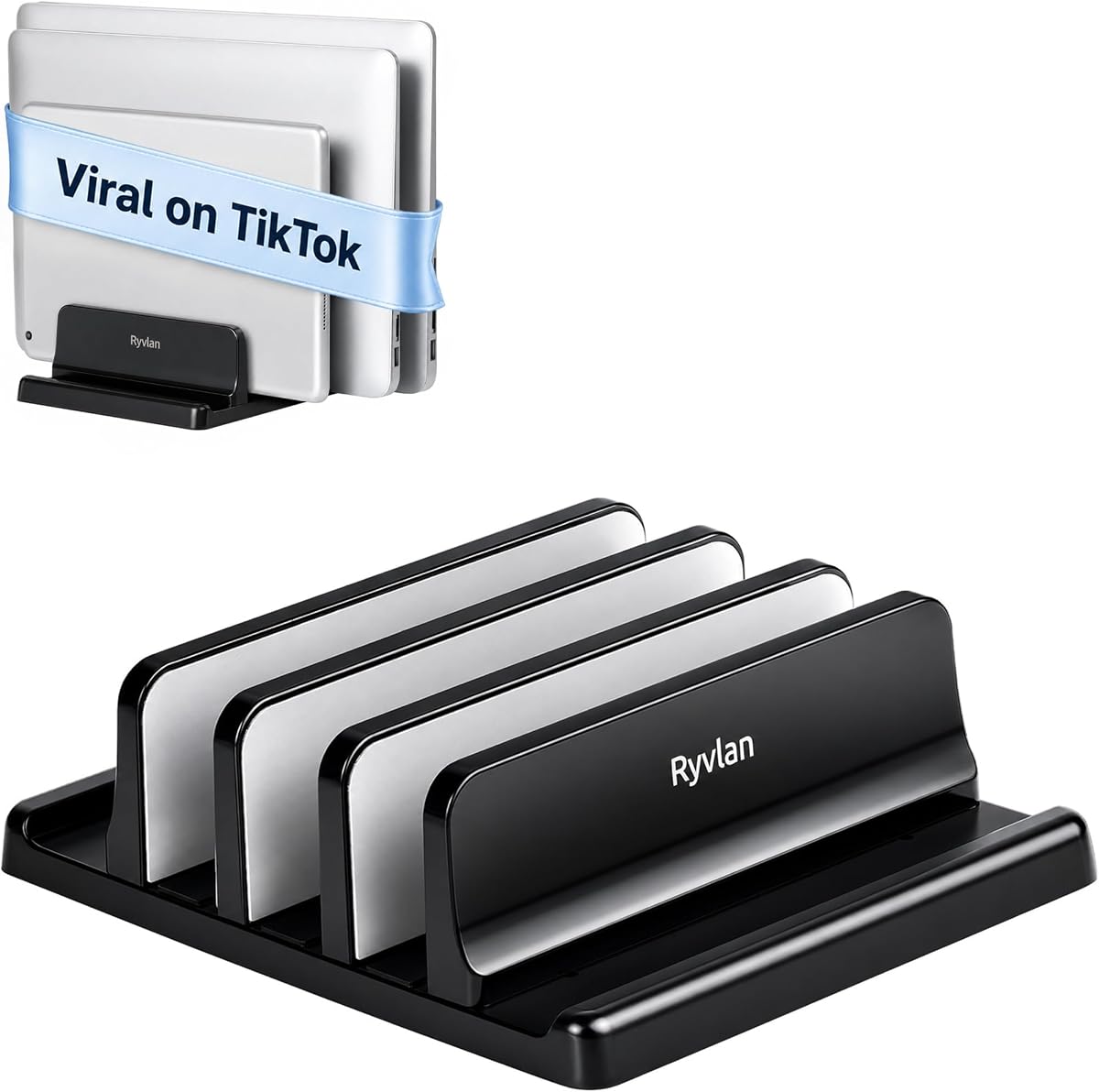
The Ryvlan Vertical Laptop Stand gets a 4.6 rating for multi-device capacity. Its 3-slot design holds laptops plus two tablets, making it a versatile organizer for mixed setups.
We may earn a commission when you buy through this link, at no additional cost to you.
Slots adjust from 0.47 to 1.2 inches to fit various thicknesses. ABS material with silicone padding protects devices. The compact footprint fits well on smaller desks or shared workstations.
The plastic build lacks the premium feel of metal options. Assembly requires a provided wrench but takes minimal time to secure slots properly.
Pick this for mixed device users. It suits families or offices managing multiple laptops and tablets needing a single organized storage point on a desk.
Accommodates laptops and tablets in one unit for simplified organization.
Tighten or loosen slots to match specific device thicknesses securely.
We may earn a commission when you buy through this link, at no additional cost to you.
The WALI Computer Monitor Stand for Desk achieves a 4.7 rating with its large platform. It supports up to 44 lbs, accommodating laptops, printers, or monitors easily.
We may earn a commission when you buy through this link, at no additional cost to you.
Vented holes prevent overheating. The open space below stores accessories to reduce clutter. Height adjustments from 3.9 to 5.5 inches create comfortable viewing angles.
Its footprint is larger than specialized laptop stands. This works best for setups needing heavy-duty support or dual monitor compatibility rather than minimal desk use.
Buy this for heavy-duty support. It suits workstations requiring robust lifting capacity for multiple devices while improving airflow and workspace organization.
Holds up to 44 lbs ensuring stability for larger devices.
Open space below allows storage for keyboards or accessories.
We may earn a commission when you buy through this link, at no additional cost to you.
Selecting the right laptop rack requires understanding material durability, device compatibility, and workspace needs.
Aluminum and steel offer superior durability and heat dissipation compared to plastic. Heavy-duty metal stands provide better stability for active typing, while plastic may suffice for lightweight storage.
Prioritize metal for longevity and cooling; choose plastic only if portability and budget are primary concerns.
Check width and thickness limits to ensure your laptop fits securely. Some stands accommodate up to 17.3 inches, while others may be limited to 15.6 inches.
Verify dimensions of your device against slot specs to prevent instability or damage.
Ergonomic stands elevate screens to eye level reducing neck strain. Look for adjustable angles or fixed height options around 6 inches for optimal posture.
Choose adjustable designs for flexible working conditions and fixed options for static setups.
Folding or detachable designs are essential for frequent travelers. Compact footprints and lightweight materials help in moving stands between home and office.
Select foldable models if you move your workspace often to maintain convenience.
Open designs with holes or mesh prevent overheating by improving airflow. Closed vertical stands must still allow air circulation to avoid heat buildup.
Ensure the stand promotes cooling to maintain device performance during long use.
Vertical stands sit on the desk, under-desk mounts hide below, and side clips save space. Consider your desk structure to determine mounting feasibility.
Measure desk thickness and depth before buying to ensure your chosen installation method is possible.
Look for headphone hooks, cable management openings, or extra tablet slots. These features enhance organization beyond just holding a laptop.
Choose stands with added utility to maximize desk efficiency and reduce clutter.
Prices vary by material and features. Budget plastic models save money but premium aluminum stands last longer and offer better aesthetics.
Balance upfront cost against long-term durability to find the best value for your needs.
Place the stand on a stable, level surface to ensure maximum stability. Adjust the width or height according to your device and ergonomic preferences.
Clean the stand regularly with a soft cloth to remove dust and debris. Avoid harsh chemicals that may damage silicone pads or metal finishes.
Inspect mounting clips or screws periodically to ensure the stand remains secure. Replace protective pads if they wear out to prevent device scratches.
Most racks accommodate 10 to 17.3 inch laptops. Check specific slot dimensions to confirm compatibility with your device's width and thickness.
Vertical stands are designed for storage rather than active typing. Use ergonomic horizontal stands if you need to type directly on the laptop.
Use a dry or slightly damp microfiber cloth to wipe the surface. Avoid abrasive cleaners to preserve the finish and prevent scratches.
Open designs with ventilation holes promote airflow which helps prevent overheating compared to flat desk placement.
Many multi-slot stands support both laptops and tablets. Check the width limits to ensure your tablet fits securely in the designated slots.
Most under-desk mounts use a clip-on system requiring no drilling. Follow instructions to ensure a secure fit without damaging your desk.
Choosing the right laptop rack for desk depends on your storage needs and workspace layout. Our top picks highlight diverse options including dual vertical, budget-friendly, and premium heavy-duty solutions.
Prioritize material quality and device compatibility to ensure stability and longevity. Ergonomics and ventilation features also contribute to a healthier and more efficient workspace.
Verify current prices and availability before purchasing as they may change frequently. Investing in a reliable stand improves organization and protects your devices for years to come.