
Redragon K512 RGB Membrane Gaming Keyboard, 6 Macro Keys & Easy Media Wheel
4.5Editor score
Six onboard macro keys without software required
Twenty-six anti-ghosting keys for gaming
Detachable wrist rest and fade-resistant keycaps
This guide compares ten key keyboards with macro keys for gamers and professionals, evaluating features like switch types, software customization, and build
Finding the right keyboard with macro keys can significantly boost your productivity and gaming performance. Whether you need complex command sequences for work or quick combos for games, having dedicated programmable keys saves time and reduces errors during critical moments.
We have carefully evaluated ten top models based on their macro capabilities, build quality, switch types, and overall value. Our comparison looks at both mechanical and membrane options, considering factors like customization software, durability, and ergonomics to help you find the perfect fit.
Each selection below highlights specific strengths and ideal use cases so you can make an informed decision. Please note that availability and pricing may change over time, so verify current details on the product pages before making your final purchase decision today.
4.5Editor score

4.1Editor score
4.3Editor score
The following comparison table provides a quick overview of the key specifications and features for each of the ten keyboards reviewed in this guide, helping you contrast their macro capabilities and design elements at a glance.


The VSD K1 Pro stands out as a powerhouse for users needing deep macro customization and streaming capabilities. With a rating reflecting strong user satisfaction, it combines mechanical precision with unique LCD features that streamline workflows and gaming setups effectively.
We may earn a commission when you buy through this link, at no additional cost to you.
Its standout quality lies in the full-key programmable on-board system allowing you to record and edit macros directly through the web-based interface or VSD Craf software. You can assign complex multi-step operations to any key, making it ideal for content creators and power users who need rapid access to frequently used commands.
While the keyboard offers incredible flexibility, it does require software installation for certain features like screen image calibration and date/time settings. Additionally, the need for a wired connection during setup might be inconvenient for some wireless-focused setups, but this trade-off ensures stability during critical tasks.
This keyboard is best suited for gamers, streamers, and professionals who want a single device to handle both typing and complex command execution. If you value customization and want an integrated streaming deck without buying separate hardware, the VSD K1 Pro is a compelling recommendation.
The integrated streaming deck function allows unlimited switchable pages with LCD keys and knobs, letting you assign actions for apps, media, and game combos seamlessly.
With hot-swappable switches and a gasket mount design, the keyboard delivers a smooth, creamy typing feel with reduced noise and optimized resilience for long sessions.
We may earn a commission when you buy through this link, at no additional cost to you.
The Redragon K512 offers exceptional value for those seeking macro functionality without breaking the bank. With a high user rating, it proves that budget-friendly options can still deliver reliable performance for gaming and everyday tasks effectively.
We may earn a commission when you buy through this link, at no additional cost to you.
Its key strength is the ability to record and reassign six macro keys on the fly without needing any software installation. This instant accessibility makes it perfect for casual gamers who want quick access to combos or shortcuts without navigating complex configuration menus first.
However, the membrane switch design may not satisfy enthusiasts who prefer the tactile feedback and durability of mechanical switches. While it supports up to twenty-six anti-ghosting keys, the lack of deep customization without software might limit power users seeking highly specific keybindings.
For students, casual gamers, or anyone on a tight budget needing reliable macro keys, this keyboard is a top choice. It balances cost and functionality well, ensuring you get essential features without overspending on unnecessary extras.
Record combos instantly using onboard keys G1-G6 without installing drivers, making it easy to set up for immediate use in games or productivity apps.
The magnetic detachable wrist rest adds comfort, while double-shot injection molded keycaps resist fading, ensuring the keyboard looks great even after years of daily use.
We may earn a commission when you buy through this link, at no additional cost to you.
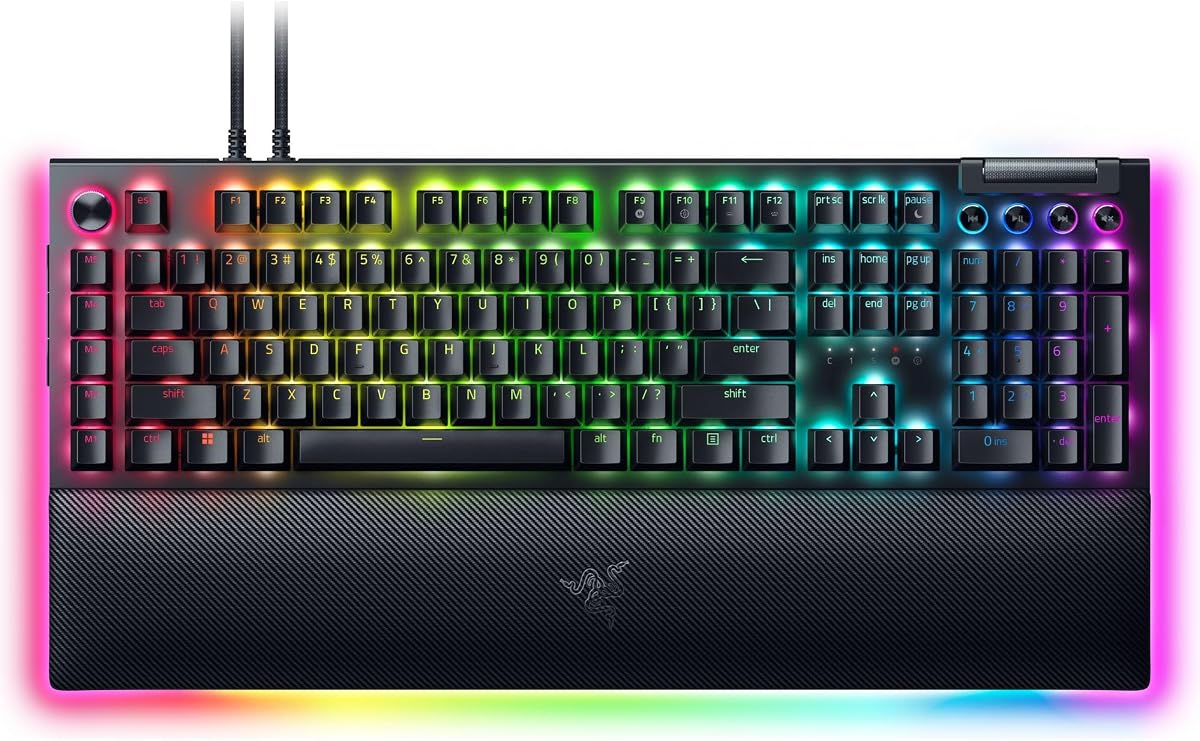
The Razer BlackWidow V4 Pro represents a premium offering with extensive macro capabilities and superior build quality. Its rating highlights strong user appreciation for its tactile performance and comprehensive customization options tailored for serious gamers.
We may earn a commission when you buy through this link, at no additional cost to you.
Key strengths include eight dedicated macro keys combined with a programmable command dial, offering unparalleled control over complex functions. The immersive underglow and per-key lighting create a visually stunning setup that syncs with games for an enhanced gaming atmosphere.
The trade-off involves a higher investment compared to other options, which may not suit every budget. Additionally, fully unlocking RGB features requires Razer software, which some users might find cumbersome if they prefer simpler, driver-free setups.
If you demand top-tier performance, extensive macro options, and premium aesthetics, this keyboard is an excellent choice. It is ideal for enthusiasts who want a keyboard that performs exceptionally and enhances their overall battlestation experience.
Assign custom functions to the command dial alongside eight macro keys, giving you granular control over gameplay and applications without leaving your typing position.
Sync per-key lighting with 3-side underglow when paired with the wrist rest, creating a cohesive and immersive visual experience that complements modern gaming setups.
We may earn a commission when you buy through this link, at no additional cost to you.
The Corsair K55 RGB PRO delivers dependable macro performance in a membrane design that balances cost and utility. It is well-rated for its ease of use and robust protection against spills and dust during intense use.
We may earn a commission when you buy through this link, at no additional cost to you.
Its strengths include six dedicated macro keys that can be set up quickly through iCUE software or used for instant streaming commands via Elgato Stream Deck. This integration makes it a strong contender for streamers looking for affordable macro solutions without extra hardware.
While reliable, the membrane switch type might not offer the same tactile feedback or longevity as mechanical switches. Users seeking long-term durability might prefer a mechanical alternative, but for casual gaming and general productivity, this keyboard holds up well.
This model is best for budget-conscious users who value spill resistance and media control. If you need a reliable keyboard that handles daily tasks and gaming without worrying about accidents, the K55 RGB PRO is a solid pick.
Use instant streaming commands through Elgato Stream Deck software or set up macros via iCUE, providing flexibility for content creators without additional devices.
The IP42-rated protection guards against spills and dust, ensuring your keyboard remains functional and clean even during messy gaming sessions or work environments.
We may earn a commission when you buy through this link, at no additional cost to you.
The Redragon K580 offers a solid mechanical experience with five dedicated macro keys that support quick recording of combos without software. It is rated highly for its balance of tactile feedback and practical macro usability.
We may earn a commission when you buy through this link, at no additional cost to you.
Its standout features include hot-swappable switches allowing you to customize feel without soldering, and quiet tactile brown switches that are less noisy than clicky alternatives. The full anti-ghosting matrix ensures accurate inputs during fast-paced gaming scenarios.
While powerful, the limited number of macro keys might restrict complex setups compared to models with ten or twelve options. Additionally, while basic use is software-free, unlocking deeper macro profiles requires companion software which adds a slight complexity step.
This keyboard suits gamers wanting mechanical feedback at a reasonable price. If you prefer quiet tactile switches and value durability, the K580 provides a reliable platform for both gaming and productivity tasks.
Swap switches easily with the upgraded socket accepting almost any switch, allowing you to tailor the keyboard feel to your personal preference without tools.
Full anti-ghosting ensures up to 104 keys register accurately simultaneously, preventing input loss during rapid multi-key combinations in competitive games.
We may earn a commission when you buy through this link, at no additional cost to you.
The Redragon K550 stands out with twelve onboard macro keys providing extensive command options for gamers and power users. It is rated for solid build quality and reliable performance during daily tasks and gaming sessions.
We may earn a commission when you buy through this link, at no additional cost to you.
Key strengths include the durable aluminum top plate that adds stability, and twelve programmable macro keys that work on the fly. The extra USB pass-through port is a useful feature for connecting devices like mice without cluttering your workspace.
However, the custom clicky purple switches might generate significant noise which could be disruptive in quiet environments. Additionally, while basic macros are accessible without software, advanced configurations require accessing the dedicated software for full customization.
Ideal for users needing many macro keys and a sturdy build, this model offers great value. If you want a mechanical keyboard with ample programmable options and robust construction, the K550 is a strong contender.
Twelve onboard macro keys allow you to perform a variety of different macros to suit diverse gaming needs or productivity shortcuts efficiently.
The built-in USB pass-through port lets you connect mice or wireless receivers easily, helping maintain a clutter-free and organized desk setup.
We may earn a commission when you buy through this link, at no additional cost to you.
The Razer BlackWidow V4 X offers efficient linear performance with six dedicated macro keys ideal for quick command execution. It is rated for its smooth typing experience and reliable durability for daily use.
We may earn a commission when you buy through this link, at no additional cost to you.
Strengths include yellow mechanical linear switches that allow instant rapid-fire inputs with minimal force and sound dampeners that reduce noise. Chroma RGB per-key lighting provides extensive customization options to match your setup aesthetics.
Trade-offs include less macro depth compared to the Pro version without a command dial. Additionally, while basic macros work without software, deep customization relies on Razer Synapse which may be less convenient for some users.
Best suited for gamers prioritizing speed and quiet operation, this keyboard delivers strong performance. If you want a balance of macro utility and streamlined design, the V4 X is a compelling option.
Zero distance between actuation and reset points at 1.2mm ensures instant, rapid-fire inputs ideal for competitive gaming scenarios.
Built-in sound dampeners and lubricated stabilizers minimize noise, ensuring a typing experience that sounds as satisfying as it feels.
We may earn a commission when you buy through this link, at no additional cost to you.
The Redragon K618 PRO delivers versatility with twenty on-the-fly macro keys and tri-mode connectivity for seamless device switching. It is rated for its portability and responsiveness in wireless configurations.
We may earn a commission when you buy through this link, at no additional cost to you.
Key strengths include the ability to record combos instantly without software installation and low-profile design that shortens travel distance for quicker actuation. The one-touch Win/Mac switch makes it ideal for multi-device workflows.
However, the ultra-thin profile may feel less substantial compared to standard mechanical keyboards, and wireless latency might vary depending on the connection mode. For competitive gaming, wired connections may be preferred over wireless modes.
Perfect for users needing a portable keyboard with extensive macro capabilities across devices. If you value flexibility and wireless convenience, the K618 PRO is a reliable choice for productivity and gaming.
Tri-mode connectivity jumps between USB-C, Bluetooth, and 2.4GHz wireless so you can move from PC to laptop without sacrificing speed.
Low-profile design throughout switches and keycaps shortens travel distance so keystrokes register quicker and typing feels lighter on wrists.
We may earn a commission when you buy through this link, at no additional cost to you.
The Logitech G213 Prodigy is a full-sized keyboard designed for gaming and productivity with reliable macro programming capabilities. It is rated for its durability and comfortable design suited for long sessions.
We may earn a commission when you buy through this link, at no additional cost to you.
Strengths include five customizable lighting zones and a durable spill-resistant construction that keeps the keyboard protected. The anti-ghosting gaming matrix ensures all inputs register accurately during intense gaming or work scenarios.
However, macro programming relies on Logitech G HUB software which may not appeal to users preferring immediate onboard macros. Additionally, the membrane switch design lacks the tactile feedback of mechanical keyboards.
Best for users seeking a comfortable, reliable keyboard with integrated media controls. If you need a keyboard that handles spills well and offers solid durability, the G213 Prodigy is a practical choice.
Integrated palm rest and adjustable feet ensure comfort during long gaming sessions while keeping hands in a natural typing position.
Dedicated media controls allow instant play, pause, and mute functions so you can adjust music or skip tracks without leaving your game.
We may earn a commission when you buy through this link, at no additional cost to you.
The Razer BlackWidow V4 offers robust performance with six dedicated macro keys and striking two-side underglow lighting. It is rated for its solid build quality and immersive visual effects.
We may earn a commission when you buy through this link, at no additional cost to you.
Strengths include per-key RGB lighting that syncs with games and a magnetic plush leatherette wrist rest that ensures comfort during intense gaming marathons. The multi-function roller provides convenient volume and brightness adjustments.
Trade-offs include the absence of a command dial found on higher-end models and reliance on software for advanced RGB sync features. However, these limitations are minor for users focused on solid macro functionality and aesthetics.
This keyboard is ideal for gamers seeking a balance of style and performance. If you want a durable keyboard with strong macro capabilities and attractive lighting, the V4 is a great choice.
Two-side underglow highlights the keyboard from more angles enhancing immersion and syncing with integrated games for dynamic visual effects.
Six dedicated macro keys expand your command arsenal, allowing programming for preferred playstyle and essential keybinds without extra devices.
We may earn a commission when you buy through this link, at no additional cost to you.
Selecting the ideal keyboard with macro keys depends on several key factors including switch type, software features, build quality, and intended use case. This guide breaks down what to consider before making your purchase.
Switch types significantly influence typing feel and sound. Mechanical switches offer durability and tactile feedback with options like tactile, clicky, or linear. Membrane switches provide a quieter, cushioned feel and are more affordable but may lack long-term durability.
Choose mechanical switches for gaming and heavy typing, or membrane if you prefer quiet operation and cost savings.
Some keyboards allow recording macros directly without software, which is convenient for gamers. Others require companion software for deeper customization and profiles. Consider whether you prefer immediate access or advanced editing capabilities.
Onboard macro recording is ideal for quick setup, while software-driven systems offer greater flexibility for complex workflows.
Look for keyboards with sturdy frames and durable keycaps like doubleshot ABS that resist wear. Gasket mounts and sound-dampening layers can enhance typing experience and longevity. Check ratings for keystroke endurance to ensure long-term use.
Prioritize models with robust construction and high keystroke ratings to withstand daily use over years.
Decide between wired and wireless options. Wired connections offer zero latency for gaming while wireless provides cleaner setups with USB-C or Bluetooth. Some models include multiple connectivity modes for device switching.
Select wired for competitive gaming and wireless for versatile multi-device use or portability.
Ergonomic designs with wrist rests and adjustable stands reduce strain during long sessions. Keycap textures and ergonomic angles can also improve comfort. Consider size—full-size, tenkeyless, or compact—based on your desk space.
Invest in ergonomic features like wrist rests and adjustable stands to prevent fatigue and maintain healthy posture.
RGB lighting adds aesthetics and can help identify macro keys visually. Look for customizable zones or per-key lighting options that sync with software. Some models allow animation and image display on integrated screens.
Choose RGB systems that balance visual appeal with functionality to enhance both look and usability.
Budget-friendly options offer essential macro features without extra frills while premium models provide advanced control and build. Determine which features you truly need to avoid overspending.
Balance your budget with feature requirements to get the best value for your specific needs.
Ensure the keyboard works seamlessly with your operating system—Windows, Mac, or Linux. Some models offer easy OS switching and dedicated keys for system shortcuts that improve productivity.
Verify OS compatibility and switching features to avoid setup issues and maximize workflow efficiency.
To use macro keys effectively, start by identifying tasks you perform frequently. Use the onboard recording feature or software to assign complex sequences to single keys for quick access during gaming or work.
Clean your keyboard regularly with compressed air to remove dust and debris between keys. For deeper cleaning, remove keycaps with a puller and wipe surfaces gently with a soft cloth to maintain responsiveness.
Store your keyboard in a dry environment away from direct sunlight to prevent material degradation. If using wireless models, charge batteries regularly and keep firmware updated for optimal performance and security.
Many keyboards with macro keys support both Mac and Windows through software or onboard profiles. Some models offer dedicated OS switching buttons to streamline compatibility across systems. Always verify the product specifications for specific operating system support before purchasing.
Not all macro keyboards require software. Several models allow direct recording and assignment of macros without drivers for instant access. However, advanced customization often benefits from companion software. Check if your desired model supports onboard programming.
The ideal number varies based on gameplay style. Models with six to twelve macro keys provide flexibility for complex combos without overwhelming users. Some keyboards include additional programmable keys or dials for expanded control options.
Absolutely, macro keys can automate repetitive tasks like text insertion or launching apps to save time. This functionality is valuable in creative and data-intensive work environments. Many models support custom profiles for different applications.
Regular cleaning with compressed air and gentle wiping prevents dust buildup that can affect key responsiveness. Periodic calibration through software ensures macros execute correctly. Avoid exposing the keyboard to liquids or harsh chemicals.
Some mechanical macro keyboards feature hot-swappable PCBs allowing easy switch replacement without soldering. This adds customization potential for personalized feel. Non-hot-swappable boards require soldering and are less flexible for upgrades.
The ten keyboards reviewed here offer a range of options to suit different budgets and needs. From the versatile VSD K1 Pro to the affordable Redragon K512, each model delivers macro functionality tailored for gaming and productivity.
When choosing, prioritize factors like switch type, macro convenience, and build quality that align with your usage. Consider whether you need wireless connectivity, extra software features, or specific ergonomic designs for comfort.
Keep in mind that pricing and availability may fluctuate so always verify current details before buying. Investing in the right keyboard with macro keys can significantly enhance your workflow and enjoyment long-term.