
Lenovo Smartcard Wired Keyboard II US English
4.4Editor score
Affordable secure input solution
Reliable wired USB connection
Compact standard layout design
This guide compares the top keyboards with smart card readers for secure authentication including Dell Adesso Cherry Lenovo HP and Kensington models for
Securing your digital workspace often requires more than just a strong password. A keyboard with a smart card reader integrates secure authentication directly into your typing experience. This allows you to log into systems and access sensitive data using a physical card combined with a PIN. It is a critical tool for enterprises government agencies and healthcare providers.
We have evaluated ten real models available on the market today. Each device was selected based on its security compliance certifications ergonomics and build quality. We looked at factors like TAA compliance FIPS approval and reader protocols. Our goal is to help you find the right hardware that balances high security with daily usability.
Each pick below shows a specific strength from budget friendly options to enterprise grade security. You will find details on switch types connectivity and specialized features. Please note that prices and stock levels change frequently. Always check the current listing before making a purchase decision to ensure you get the best value available now.
4.4Editor score
4.6Editor score

4.6Editor score
The table below provides a side by side view of all ten keyboards we reviewed. It highlights key specifications and security standards to help you compare options quickly.


The Dell KB813 is a reliable workhorse for secure environments. With a strong rating it combines standard typing functions with essential smart card authentication. It is designed for users who need a plug and play solution for secure login.
We may earn a commission when you buy through this link, at no additional cost to you.
Its standout feature is the integrated smartcard reader which enhances security seamlessly. The spill resistant design adds durability for busy offices. The detachable palm rest ensures comfort during long shifts while the keys remain quiet.
Trade-offs include the lack of mechanical switches or advanced macros. However these are acceptable for a secure workstation where reliability is key. It does not offer extra multimedia keys but focuses on core tasks.
This keyboard is ideal for government or enterprise users needing TAA compliant devices. It balances security and comfort well. We recommend it for general secure office use.
The built-in reader allows for direct smart card insertion without external hardware. This reduces clutter and potential points of failure in your secure setup.
Spill resistance is crucial in shared environments. This keyboard protects against accidental liquid damage ensuring long term reliability for your investment.
We may earn a commission when you buy through this link, at no additional cost to you.
The Adesso TruForm is designed for users who prioritize ergonomics alongside security. It features a split design to reduce wrist strain. The smart card reader supports various international standards making it versatile.
We may earn a commission when you buy through this link, at no additional cost to you.
Key strengths include TAA compliance which is vital for government procurement. The included hotkeys offer quick access to internet and media tools. The palm rest aids in maintaining a natural hand position.
Users report mixed ratings compared to simpler models likely due to the split layout learning curve. It is bulkier on the desk which might not suit small workspaces. However the ergonomic benefits are significant for long term use.
Choose this if you need TAA certified hardware with ergonomic features. It is suitable for agencies requiring specific compliance standards alongside secure login capabilities.
This model meets TAA and ISO7816 standards. This ensures it can be used in regulated environments without compatibility issues with secure networks.
The 13 hotkeys streamline your workflow. You can access web tools and media controls instantly without leaving the secure environment.
We may earn a commission when you buy through this link, at no additional cost to you.
The Cherry KC 1000 is a robust choice for security-focused environments. It carries strong approvals including FIPS 201 and EMV 2000 level 1. This makes it highly trusted for sensitive data handling.
We may earn a commission when you buy through this link, at no additional cost to you.
The integrated chip card terminal supports multiple protocols like T=0 and T=1. Its thin design keeps the desk clear while the one-handed operation adds convenience. Secure PIN entry is built-in to prevent keystroke logging.
Trade-offs involve limited documentation compared to mass-market brands. Some users find the membrane keys basic. However for compliance heavy roles the security protocols justify the choice.
This is a top pick for banking or secure enterprise systems. It is a professional-grade tool for those who need verified hardware standards.
Supporting multiple protocols ensures broad compatibility with secure smart cards. The FIPS approval is a critical badge of trust for government use.
The low contacting unit allows for a thin profile. This is beneficial for tight workspaces where every millimeter counts.
We may earn a commission when you buy through this link, at no additional cost to you.
The Adesso EasyTouch 130SB brings mechanical keyboard features to secure environments. It includes red switches for tactile feedback and a dedicated Copilot AI hotkey. This is rare for a smart card model.
We may earn a commission when you buy through this link, at no additional cost to you.
Security is maintained with EMV and FIPS certifications. The large print keys improve visibility for users with low light or vision needs. It supports multiple standards for interoperability.
Trade-offs include the higher price and the tactile click of mechanical switches. In a quiet office this noise might be an issue. The large print keys also take up slightly more space.
We recommend this for developers or power users needing security and performance. The Copilot key adds modern utility to a secure workflow.
The Copilot key grants instant access to coding and creative tools. It integrates modern AI workflows into a secure input device.
Large print keycaps ensure high contrast. This helps users who struggle with small text during extended typing sessions.
We may earn a commission when you buy through this link, at no additional cost to you.
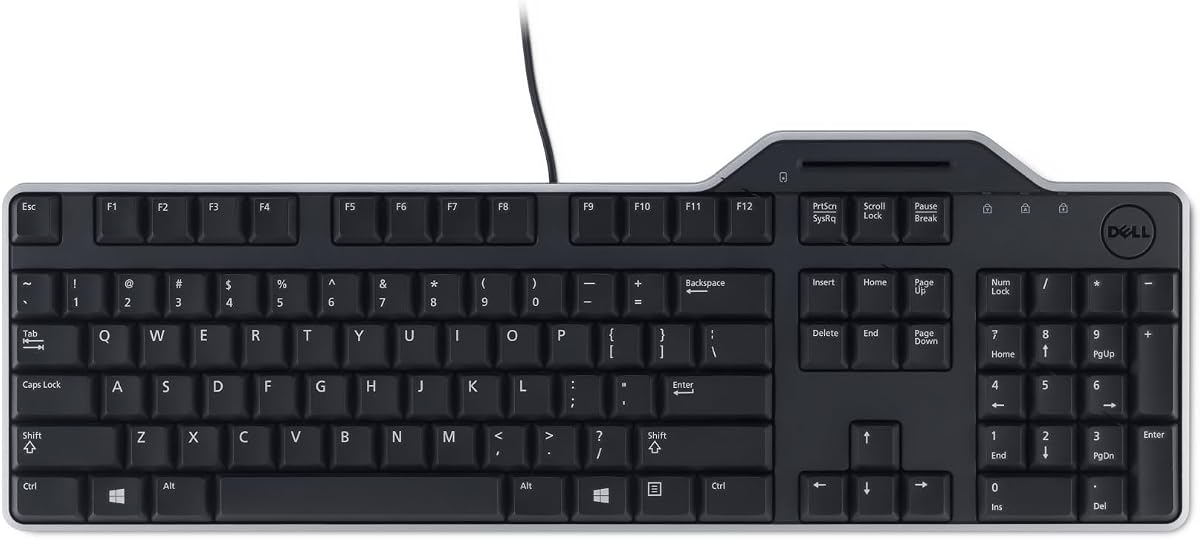
This Dell model focuses on core functionality with a high rating. It offers a full-size layout with a numeric keypad. The smart card reader allows for secure logins without extra clutter.
We may earn a commission when you buy through this link, at no additional cost to you.
Key strengths include the quiet membrane switches and spill resistance. The detachable palm rest adds comfort. It is a solid choice for budget-conscious offices needing reliable security.
Trade-offs are limited to standard features. There are no multimedia hotkeys or ergonomic splits. However the high rating suggests users appreciate its simplicity and durability.
This is a great pick for general administrative tasks. It is a no-fuss secure keyboard for daily work.
The quiet keys reduce noise in shared spaces. This helps maintain focus and comfort during long hours of typing.
A full size layout with a numeric keypad supports data entry needs. It ensures compatibility with standard software requirements.
We may earn a commission when you buy through this link, at no additional cost to you.
The Kensington KB201C is built for federal government compliance. It supports CAC and PIV cards with FIPS 201 certification. It is a direct solution for agencies needing TAA approved hardware.
We may earn a commission when you buy through this link, at no additional cost to you.
Key strengths include the quiet click and the 3-year warranty. The full size layout supports standard productivity. The reader ensures robust data protection for sensitive systems.
Users report a lower rating likely due to basic build quality. Some find the keys less comfortable than ergonomic models. However the compliance certifications make it essential for specific buyers.
This model is for US Federal institutions primarily. It meets strict government standards for sourcing and security.
Meets TAA and FIPS standards. This ensures eligibility for US government procurement without issues.
Supports CAC and PIV cards directly. This provides robust authentication for secure network access.
We may earn a commission when you buy through this link, at no additional cost to you.
This Lenovo option provides basic secure input at a low cost. It is lightweight and fits well in smaller setups. The smart card reader enables secure logins for corporate systems.
We may earn a commission when you buy through this link, at no additional cost to you.
Key strengths are its affordability and simplicity. It supports standard protocols and is easy to plug in. The US layout matches standard expectations.
Trade-offs include the lack of extra ergonomic features. It is a utilitarian device. However for tight budgets this is a practical solution.
We recommend this for budget deployments in secure offices. It is functional and reliable for standard tasks.
Priced lower than other premium models. This makes it accessible for large scale departmental deployments.
Plug and play USB connectivity. No driver software is typically required for basic functions.
We may earn a commission when you buy through this link, at no additional cost to you.
The HP USB Business Slim is designed for a clean desk look. It is low profile and includes a spill drain system. The LED indicators provide clear status feedback for key locks.
We may earn a commission when you buy through this link, at no additional cost to you.
It offers standard 104 keys and membrane switches for quiet operation. The 6ft cable allows flexible desk placement. The smart card reader is integrated for security.
Trade-offs include lack of ergonomic wrist support. Users must rely on the thin design for comfort. However the spill protection is a strong practical benefit.
This is a good fit for corporate environments needing sleek gear. It balances style with secure functionality.
The built-in drain system directs liquids away from internal components. This extends the life of the keyboard in busy areas.
LED indicators show Caps Lock and Num Lock status. This prevents errors during secure data entry tasks.
We may earn a commission when you buy through this link, at no additional cost to you.
The Cherry Secure Board 1.0 supports both contact and contactless cards. It includes RF and NFC interfaces for tags and cards. This flexibility is rare in standard smart card keyboards.
We may earn a commission when you buy through this link, at no additional cost to you.
It offers secure authentication and encryption modes. CCID compatibility ensures broad system support. The keyboard is designed for secure clients and sensitive access.
Trade-offs involve the complexity of setup. It requires understanding of ISO 14443. However for secure physical access control this is a key feature.
This model is best for specialized security teams. It handles both traditional smart cards and contactless tags.
Supports ISO 14443 cards and tags. This allows for versatile authentication options beyond standard chips.
Built-in encryption for data protection. Ensures that authentication data is handled securely.
We may earn a commission when you buy through this link, at no additional cost to you.
This Dell OEM model is a standard secure replacement for legacy systems. It offers a black finish and USB connectivity. The smart card reader ensures you maintain secure login protocols.
We may earn a commission when you buy through this link, at no additional cost to you.
Key strengths are compatibility with Dell systems and standard layout. It is designed for straightforward integration without extra setup. The smart card reader slot is functional and reliable.
Trade-offs include limited extra features or ergonomics. It is a utilitarian model. However for system replacements it is a direct fit.
We recommend this for IT departments maintaining older fleets. It ensures consistent secure access across devices.
Designed for Dell ecosystems. This ensures seamless integration with existing management policies.
Maintains secure access protocols. The reader supports standard smart cards for authentication.
We may earn a commission when you buy through this link, at no additional cost to you.
Choosing the right keyboard with a smart card reader requires careful evaluation of your security needs and workflow. We break down the key factors to help you decide.
Look for certifications like FIPS 201 or TAA compliance especially for government work. These ensure the device meets strict security standards for authentication. Without these you may not pass procurement or security audits.
Always check the product specs for FIPS or TAA compliance. This guarantees the device will work in regulated environments.
Ensure the reader supports ISO standards like ISO7816 or PC/SC. These protocols determine which smart cards the keyboard can read. If your organization uses specific tokens this is critical.
Verify the supported protocols against your card requirements before buying to avoid incompatibility.
Mechanical switches offer durability and feel but may be louder. Membrane switches are quieter and often cheaper. For secure workstations noise levels may matter in open offices.
Choose membrane for quiet zones or mechanical if you prefer tactile feedback and longevity.
Security workstations often operate in busy environments. Look for spill resistant designs or built-in drain systems. This protects the internal smart card reader from accidental damage.
Prioritize spill protection to ensure long-term reliability for your secure hardware.
Wired USB is standard for these devices to avoid interference or battery issues. Wireless models are rare due to security concerns. Ensure your ports match the keyboard cable.
Stick to wired USB connections for maximum security and reliability.
Secure login can take time so comfort matters. Look for detachable rests or split designs. A full-size layout ensures access to numeric data entry keys.
Balance ergonomics with desk space needs to prevent strain.
Some keyboards include multimedia keys or AI shortcuts. These can boost productivity in secure workflows. However they add cost and complexity. Evaluate if they suit your specific workflow.
Choose based on whether extra hotkeys improve your specific secure workflow.
Insert your smart card gently into the reader slot. You will usually hear a click or see a light. Ensure your card is aligned with the icon on the keyboard before you push it in.
Keep the surface clean with a soft cloth to avoid dust buildup in the reader slot. Do not spray liquids directly on the keyboard. A slightly damp cloth for the keys is enough to maintain hygiene.
For secure login plug the USB cable into your PC and insert the card. Enter your PIN when prompted. This two-factor method ensures that even if someone guesses your password they cannot access your system without the physical card.
Most models support common standards like ISO7816 or PC/SC. However specific enterprise tokens may need specific drivers. Always check the product specs against your organization's card types to ensure compatibility before purchasing.
Yes many models are TAA compliant and carry FIPS 201 approval. This ensures they meet federal standards for security and sourcing. It is safe for use in US government agencies.
Absolutely the smart card reader is designed for secure logins. You insert the card and enter a PIN to verify your identity. This is a common method for secure access in enterprises.
Many keyboards have spill resistant designs or drain systems. This directs liquid away from the electronics. However you should still clean it thoroughly to prevent corrosion over time.
Most plug and play via USB but check your OS requirements. Windows and Mac often support standard CCID drivers out of the box. Verify support for your specific operating system before setup.
Mechanical switches offer durability and tactile feel but are louder. In secure environments quiet membrane switches are often preferred to maintain focus. Choose based on your office noise policies.
Most have lifecycles rated for millions of keystrokes. The reader mechanism is robust when kept free of dust. Proper care extends the life of both keys and the slot significantly.
Some models explicitly list macOS compatibility like the Cherry KC 1000. Always verify the supported operating systems in the product specs before buying to ensure full functionality with Apple devices.
We have reviewed ten top keyboards that balance security with daily use. From the Dell KB813 to the Adesso EasyTouch 130SB there are options for every need. Whether you want ergonomics or simple compliance we have covered the key choices.
Prioritize compliance like FIPS 201 or TAA if you work in government. For standard office use the Dell or Lenovo models offer great value. Consider switch type and spill resistance for long-term comfort.
Always check current prices and stock levels before buying. Security hardware is often discounted during enterprise sales. Stay informed and pick the model that fits your secure workflow best.