
NZXT H5 Flow
4.7Editor score
Perforated PSU shroud design
Ultra-fine mesh panels
Supports 360mm radiator
This guide compares the top high airflow PC cases for 2026, evaluating cooling performance, design, and features to help you choose the best system enclosure.
Choosing the right enclosure is critical for system stability. High airflow PC cases maximize thermal performance by allowing cool air to enter and hot air to exit efficiently. This ensures your components run safely under load.
We evaluated ten top models based on fan support, mesh design, and cable management. Each product offers unique advantages for builders seeking optimal cooling without sacrificing aesthetics or build ease in the modern market.
Each pick highlights key strengths and potential trade-offs for specific use cases. Remember that product availability and pricing can change quickly, so always verify current details before making your final purchasing decision today.
4.7Editor score

4.8Editor score

4.8Editor score
The following table provides a side-by-side comparison of all ten products to help you quickly identify the best fit for your specific build requirements and budget constraints.





The MONTECH AIR 903 MAX stands out as a top contender with an impressive 4.8 rating. It combines high airflow design with robust component support right out of the box.
We may earn a commission when you buy through this link, at no additional cost to you.
Its four pre-installed 140mm fans provide immediate cooling power without requiring extra purchases. The mesh front panel ensures unrestricted air intake, keeping your GPU and CPU temperatures low during intense workloads.
While the cable management could be slightly more spacious given the size, the overall build quality and cooling efficiency are hard to beat. The included RGB fans allow for customizable lighting without cluttering the budget.
This case is ideal for gamers and creators who prioritize cooling performance and component compatibility. With support for E-ATX motherboards and large GPUs, it offers a solid foundation for a high-performance system build.
The large 140mm fans and perforated front create a highly efficient airflow path that cools even high-end parts effectively.
Whether you choose an E-ATX board or a massive graphics card, this chassis has the physical space to accommodate future upgrades easily.
We may earn a commission when you buy through this link, at no additional cost to you.
The NZXT H5 Flow offers exceptional value with a 4.7 rating, making it a favorite for budget-conscious builders. Its compact design fits well in smaller spaces while maintaining strong thermal capabilities.
We may earn a commission when you buy through this link, at no additional cost to you.
Unique perforations on the PSU shroud allow air to flow directly to the GPU, ensuring critical components stay cool. The ultra-fine mesh on all sides filters dust while maximizing intake efficiency for better longevity.
Although the compact size limits massive component compatibility, it is perfect for standard ATX builds. The included fans provide decent silent operation, though adding more may be necessary for extreme setups.
For those seeking a cost-effective solution without sacrificing airflow, this case is a top pick. It balances aesthetics, cooling, and price perfectly for a wide range of typical PC building projects.
The perforated PSU shroud design channels air specifically toward the graphics card, ensuring it receives the cooling it needs without hot air recirculation.
Even with its smaller footprint, the design supports a 360mm radiator in the front, allowing for significant liquid cooling potential in a tighter space.
We may earn a commission when you buy through this link, at no additional cost to you.
The Cooler Master HAF II 500 is a powerhouse with a 4.8 rating, designed for users who demand the absolute best cooling performance. Its unique fan configuration sets it apart from standard mid-towers.
We may earn a commission when you buy through this link, at no additional cost to you.
Equipped with massive 220mm intake fans and a large 180mm exhaust, this case moves air with minimal resistance. This design ensures that heat generated by high-end components is rapidly expelled from the chassis interior.
While the large physical size and price might be prohibitive for some, the flexibility it offers is unmatched. The MasterRail system allows you to position fans exactly where you need them for custom cooling loops.
This case is ideal for enthusiasts building a high-performance workstation or gaming rig. If you have the space and budget, it provides superior airflow that future-proofs your system against future component upgrades.
The large diameter fans move significantly more air than standard 120mm units, reducing noise while increasing total airflow through the case.
With a split-level cable management system and dual-mode GPU holder, you can organize cables neatly while supporting heavy graphics cards securely.
We may earn a commission when you buy through this link, at no additional cost to you.
The LIAN LI LANCOOL 216 delivers impressive cooling with two massive 160mm front fans and one rear 140mm fan. This configuration ensures high volume airflow for demanding components.
We may earn a commission when you buy through this link, at no additional cost to you.
The modular I/O design allows you to adjust the motherboard position to optimize airflow for air or liquid cooling setups. This flexibility is rare in standard cases and greatly benefits custom builds.
While the tempered glass looks great, it can slightly restrict front intake compared to full mesh. However, the performance remains strong for most users. The build quality is solid and durable.
This case is perfect for builders needing support for the latest massive graphics cards. Its balance of aesthetic appeal, airflow, and structural quality makes it a strong contender in the mid-range market.
The 160mm fans spin slower than smaller fans while moving more air, resulting in quieter operation and better cooling performance overall.
Support for multiple SSDs and HDDs ensures you can expand your storage easily without sacrificing airflow or cable management space inside the build.
We may earn a commission when you buy through this link, at no additional cost to you.
The Antec Flux Pro stands out with a unique combination of metal, glass, and wood for a premium texture. With a 4.7 rating, it delivers powerful cooling with six included fans.
We may earn a commission when you buy through this link, at no additional cost to you.
Its multi-directional vent design allows for extensive cooling configuration. The case supports simultaneous installation of 420mm and 360mm radiators, making it ideal for extreme liquid cooling setups.
Installation may take more time due to the complex mounting systems like the iShift PSU mount. However, the result is a highly optimized thermal environment. The included fans ensure you start building immediately.
This full-tower is best for enthusiasts who want maximum flexibility and aesthetics. It offers a rare blend of traditional materials with modern cooling tech, appealing to those who value style alongside function.
You can mount massive radiators on both the top and front simultaneously, allowing for complex loop designs that keep water temperatures exceptionally low.
The combination of different materials creates a sophisticated look that stands out from typical all-steel or all-glass cases available on the market today.
We may earn a commission when you buy through this link, at no additional cost to you.
The CORSAIR 3500X RS offers a stunning panoramic view of your build with its wraparound glass design. Despite the glass, it maintains excellent cooling potential for standard ATX configurations.
We may earn a commission when you buy through this link, at no additional cost to you.
It supports up to ten 120mm fans across various mounting points, ensuring you can configure airflow as needed. The removable glass panels make it easy to access components for maintenance.
While glass limits airflow compared to full mesh, the internal design compensates with strong airflow paths. This is ideal for users who prioritize aesthetics without completely sacrificing thermal performance.
For those wanting a modern look that showcases their RGB components, this case is a strong choice. The balance of style and cooling makes it a versatile option for mid-tower enthusiasts.
The wraparound glass design provides a clear view of your components from multiple angles, enhancing the visual appeal of your desktop setup.
With support for up to ten fans, you have the flexibility to create a powerful air cooling system that matches the high-end visuals of the case.
We may earn a commission when you buy through this link, at no additional cost to you.
The Lian Li V100 is a highly efficient compact case with a 4.8 rating. It comes with four pre-installed 120mm ARGB fans and an integrated LED strip for a complete lighting setup.
We may earn a commission when you buy through this link, at no additional cost to you.
It supports back-connect motherboards for cleaner cable management, making it a modern choice. The tool-less mounting mechanism allows for easy access to components and quick installation.
While it is limited to standard ATX, the airflow is well-optimized. The case ensures your components receive adequate cooling without compromising on the visual aesthetics of the build.
This case is perfect for users seeking a compact build without losing airflow efficiency. The included fans and lighting mean you can start building immediately without extra purchases.
Support for modern motherboards means you can eliminate most cables on the back of your build, leading to a much cleaner and more organized look.
With four fans and an RGB strip included, you get a high-end look out of the box without needing to buy additional lighting components separately.
We may earn a commission when you buy through this link, at no additional cost to you.
The NZXT H9 Flow features a dual-chamber design that separates the PSU from the motherboard, improving thermal performance. With a 4.7 rating, it balances airflow and aesthetics effectively.
We may earn a commission when you buy through this link, at no additional cost to you.
Its panoramic glass allows for a stunning view of your system components. The case includes three F140Q fans and supports back-connect motherboards for a cleaner look.
While the glass restricts some airflow, the design ensures optimized paths for cooling. The ten-fan capacity allows for extensive customization if you need extra cooling power.
This case is ideal for modern builds that prioritize a sleek look alongside solid cooling. It is perfect for users who want a clean aesthetic without compromising on thermal performance.
By separating the PSU from the main components, hot air is exhausted more efficiently, preventing heat soak in the CPU and GPU areas.
Compatibility with back-connect motherboards ensures a cable-free rear look, improving airflow and aesthetics significantly for a professional finish.
We may earn a commission when you buy through this link, at no additional cost to you.
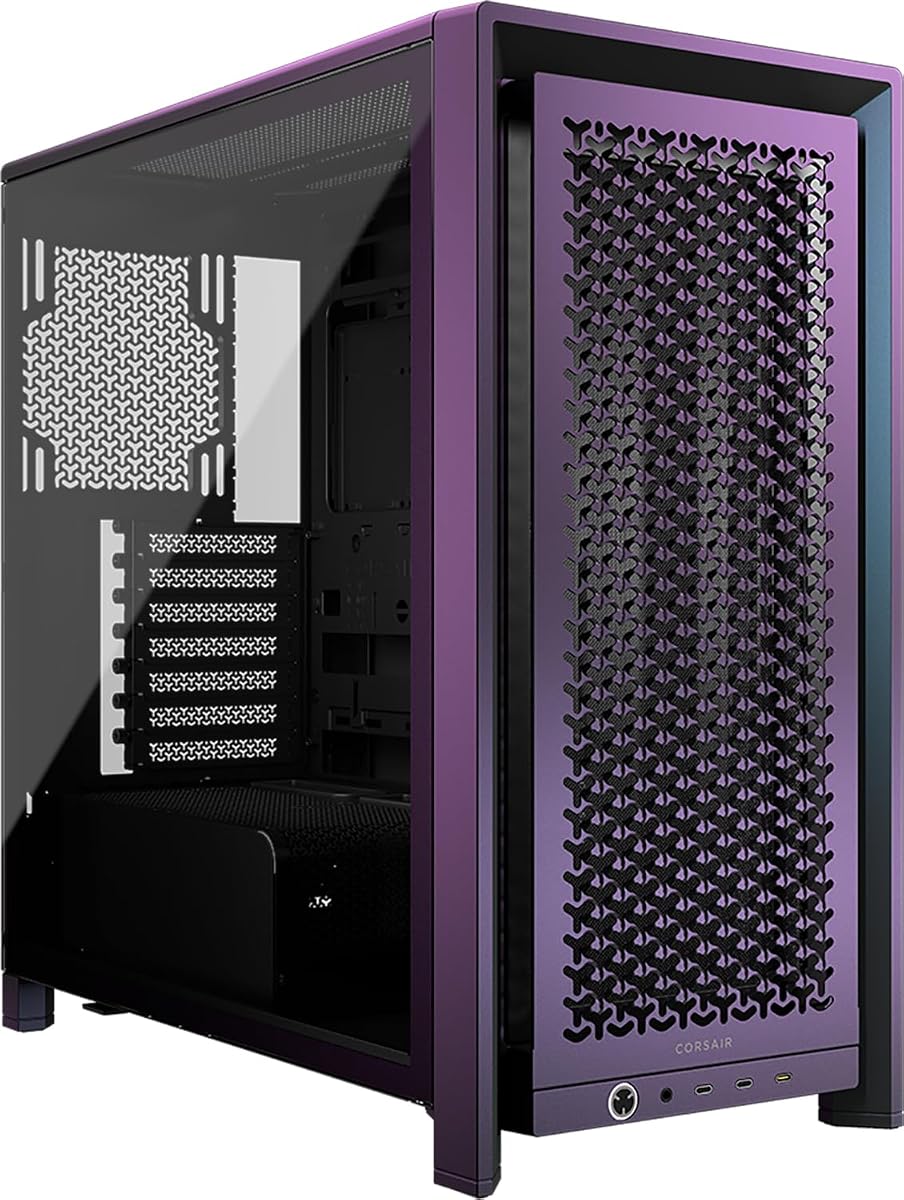
The CORSAIR Frame 4000D Vault Series is a limited edition collectible with a unique Galaxy finish. It offers high airflow through its InfiniRail system and dual 360mm radiator support.
We may earn a commission when you buy through this link, at no additional cost to you.
The modular FRAME system allows you to swap panels or trays for customization. This makes it a unique choice for those who value exclusivity and flexibility in their builds.
While the price is higher and availability is limited, the build quality and cooling features are excellent. The Y-Pattern Airflow Panel ensures low restriction for cool air intake.
This case is for enthusiasts who want a standout build. It combines premium features with exclusivity, making it a perfect centerpiece for a high-end custom PC setup.
You can upgrade or swap parts like the motherboard tray easily, allowing you to evolve your case setup as your needs change over time.
Support for three 360mm radiators means you can build a massive cooling loop that keeps temperatures low even under extreme workloads.
We may earn a commission when you buy through this link, at no additional cost to you.
The CORSAIR 4000D RS is a reliable mid-tower option with a 4.7 rating. It features three pre-installed RS ARGB fans and a Y-Pattern Airflow Panel for efficient cooling.
We may earn a commission when you buy through this link, at no additional cost to you.
The InfiniRail mounting system offers flexibility in fan configuration. You can choose between clean cable management or increased cooling by removing the side panel.
While it is a standard mid-tower, the design ensures good airflow. The cable cover option allows for a clean look, though it may limit airflow slightly.
This case is a safe and reliable choice for most builders. It balances performance, price, and aesthetics effectively, making it a popular option for mid-range builds.
The three-dimensional Y-pattern perforation ensures that air flows through with minimal restriction, keeping your components cool during demanding tasks.
The InfiniRail system allows you to slide and position fans easily, giving you flexibility in how you configure your cooling setup.
We may earn a commission when you buy through this link, at no additional cost to you.
Selecting a high airflow PC case requires balancing cooling performance with build constraints. This guide covers essential factors to help you make an informed decision.
Mesh panels are essential for unrestricted airflow. Look for full mesh designs on the front and top to allow cool air to enter easily.
A mesh front panel is crucial for maintaining low internal temperatures during intense computing tasks.
Check the maximum number of fans supported by the case. More mounting points allow you to create powerful intake and exhaust configurations.
Ensure the case supports the fan sizes you prefer for optimal cooling performance.
Verify GPU and motherboard support to avoid physical conflicts. Large GPUs require ample vertical clearance inside the case.
Always check the physical dimensions before purchasing to ensure your components fit properly.
Look for cases with ample routing channels and hooks. Proper cable management helps maintain airflow paths inside the chassis.
Good cable management keeps your build organized and prevents airflow restriction.
Dust filters are vital for protecting internal components. Fine mesh filters reduce dust accumulation without blocking airflow.
High-quality filters extend the lifespan of your system components.
Steel frames provide durability and stability. Glass panels add style but may restrict airflow compared to mesh.
Balancing aesthetics with thermal performance is key when selecting materials.
Liquid cooling users need radiator support. Ensure the case supports the size of radiators you plan to install.
Check both front and top radiator mount options for maximum flexibility.
Convenient front panel ports improve usability. Look for USB Type-C ports for modern connectivity.
Front I/O options make it easier to connect peripherals regularly.
Install fans in a positive pressure configuration to reduce dust accumulation. This typically involves more intake fans than exhaust fans to push dust out through filters.
Regularly clean dust filters with compressed air or a soft brush to maintain airflow efficiency. Neglecting dust filters can eventually lead to higher system temperatures.
Ensure all side panels are securely mounted to maintain airflow balance. Loose panels can disrupt airflow paths and create noise due to vibrations.
The standard airflow direction involves drawing cool air in from the front and exhausting hot air out from the rear and top. This creates a linear path that efficiently cools components.
Modern high airflow cases now balance performance with aesthetics. Many models feature sleek designs with glass panels that do not sacrifice thermal efficiency significantly.
Three to five fans generally provide excellent airflow for standard builds. The exact number depends on your component heat output and cooling requirements.
Mesh panels offer superior airflow compared to glass. Glass may be preferred for aesthetics, but it restricts airflow and increases internal temperatures slightly.
Most high airflow cases support liquid cooling radiators. Check the maximum radiator size supported before purchasing to ensure compatibility with your system.
It is recommended to clean dust filters every two to three months. Regular cleaning prevents dust buildup and maintains optimal cooling performance.
Choosing the right case depends on your specific thermal needs and aesthetic preferences. The top picks offer excellent cooling performance across various price points.
Consider your component compatibility and future upgrade path when making a decision. A case that supports larger GPUs and motherboards ensures longevity.
Always verify current stock and specifications before purchasing as models may change. Stay informed to get the best deal for your high-performance build.