
HDMI Extender Over Ethernet HT202P
4.4Editor score
1080P 60Hz support
PoC power technology
EDID copy function
This guide compares the top ten HDMI over Ethernet extenders for long distance video transmission across home, office, and professional AV environments.
When you need to send high definition video signals over long distances, HDMI over Ethernet extenders provide a reliable solution that avoids signal degradation.
We compared ten top rated models based on resolution support, cable distance capabilities, power options, and additional features like IR control and loop out ports.
Each pick highlights specific strengths for different use cases while noting that prices and availability may change over time so verify details before purchasing.
4.4Editor score

4.6Editor score
4.2Editor score
The following table provides a side by side comparison of all ten extenders including their key technical specifications and maximum supported distances.


This OREI extender delivers strong performance for most residential and office setups requiring reliable video transmission over longer cable runs.
We may earn a commission when you buy through this link, at no additional cost to you.
It supports 4K resolution at 30Hz and includes practical features like a loop out port for local monitoring while sending signal remotely.
While it does not support 4K at 60Hz or IP based networking it maintains stable visuals and clear audio over Cat5e and Cat6 cables.
Ideal for users needing straightforward point to point extension without complex network configurations or higher bandwidth demands.
The HDMI loop out port allows you to connect a local display to the transmitter so you can monitor the source while extending to a remote screen.
Power over cable technology sends power from the transmitter to the receiver through the Ethernet cable reducing the need for multiple power outlets.
We may earn a commission when you buy through this link, at no additional cost to you.
An excellent choice for budget conscious buyers needing reliable 1080P extension up to 164 feet without sacrificing audio or video stability.
We may earn a commission when you buy through this link, at no additional cost to you.
It uses power over cable to simplify cabling and includes EDID copy to ensure compatibility between source and display devices automatically.
Although it lacks 4K support it delivers crisp Full HD visuals and clear audio making it suitable for office displays and classroom setups.
Best for applications where 1080P is sufficient and cost effectiveness is a primary consideration for deployment.
Setup requires no software or drivers just connect the source to the transmitter and run the Ethernet cable to the receiver for immediate operation.
Built in EDID copy reads display information to help the transmitter select the correct resolution and avoid handshake issues.
We may earn a commission when you buy through this link, at no additional cost to you.
This OREI model stands out with 4K 60Hz support over 230 feet and HDR10 Plus making it ideal for high fidelity home theater installations.
We may earn a commission when you buy through this link, at no additional cost to you.
It uses HDMI 2.0a and HDCP 2.2 to ensure compatibility with modern sources and supports uncompressed video for smooth playback.
The rugged metal housing helps dissipate heat and supports long term reliability while the compact design fits neatly in AV racks.
Best for users who need higher bandwidth performance and HDR support without moving to expensive HDBaseT solutions.
Supports HDR10 and HDR10 Plus to deliver richer contrast and more vivid colors when connected to compatible displays and sources.
18Gbps bandwidth ensures uncompressed 4K 60Hz with YUV 4:4:4 chroma for sharp text and detailed visuals.
We may earn a commission when you buy through this link, at no additional cost to you.
Perfect for conference rooms or digital signage setups needing one HDMI source to feed multiple displays simultaneously over Ethernet.
We may earn a commission when you buy through this link, at no additional cost to you.
It distributes signals to four displays up to 230 feet away with power over cable so receivers do not need their own power adapters.
A local loop out on the transmitter allows monitoring at the source while remote displays mirror or extend as required.
Best for commercial AV installations requiring reliable multi screen distribution without complex matrix switchers.
One transmitter with four outputs can send the same HDMI signal to four displays over a single Cat6 network cable each.
Power over cable sends power from the transmitter to all receivers through the Ethernet cables removing the need for extra adapters.
We may earn a commission when you buy through this link, at no additional cost to you.
Delivers premium 4K 60Hz performance with 18Gbps bandwidth and HDMI 2.1 features for smooth high frame rate video playback.
We may earn a commission when you buy through this link, at no additional cost to you.
It supports HDR and high fidelity audio formats while including a loop out port for local viewing during setup or monitoring.
One way IR pass-through lets you control source devices from the remote location making it ideal for hidden rack configurations.
Best for home theaters or gaming rooms needing high performance short to medium distance extension with clear audio.
Supports LPCM, Dolby TrueHD, and DTS-HD audio formats for immersive sound without losing quality over the Ethernet cable.
Built-in EDID management optimizes resolution compatibility between source and display devices to avoid handshake failures.
We may earn a commission when you buy through this link, at no additional cost to you.
An affordable option for users needing 4K 30Hz or 1080P at 60Hz over distances up to 230 feet with minimal setup.
We may earn a commission when you buy through this link, at no additional cost to you.
Power over cable reduces clutter and IR cables let you control source devices from the remote location easily.
Loop out on the transmitter enables real-time monitoring while EDID management ensures compatibility with various display devices.
Best for budget friendly long range extension where 4K 60Hz is not strictly required.
Included IR cables let you control streaming devices or media players from the receiver location without moving the source.
EDID management helps maintain synchronized video and audio during presentations or live monitoring tasks.
We may earn a commission when you buy through this link, at no additional cost to you.
Adds keyboard and mouse extension to video transmission allowing you to control a PC remotely while sending 4K video over Ethernet.
We may earn a commission when you buy through this link, at no additional cost to you.
It supports HDR and Dolby Vision with HDMI 2.0b and includes a 3.5mm audio output for speakers or headphones at the receiver.
Loop out on the transmitter lets you connect a local display while maintaining full HDCP 2.2 compliance for protected content.
Best for workstations or control rooms needing remote PC control and high resolution video in one package.
Keyboard and mouse signals extend via the receiver end allowing full control of the source PC from a remote location.
3.5mm stereo audio output lets you connect analog speakers or headphones directly to the receiver unit.
We may earn a commission when you buy through this link, at no additional cost to you.
Designed for easy wall or rack mounting with patented holes while delivering stable 4K 30Hz over distances up to 230 feet.
We may earn a commission when you buy through this link, at no additional cost to you.
Loop-out and IR support make it versatile for dual-screen setups and remote control without needing physical access to the source.
Power over cable simplifies wiring and EDID cloning ensures compatibility with different display devices smoothly.
Best for installations requiring secure mounting and flexible placement in classrooms or conference rooms.
Patented mounting holes on the transmitter and receiver allow secure wall or rack installation without extra brackets.
Supports both mirroring and extended display modes for flexible dual-screen configurations as needed.
We may earn a commission when you buy through this link, at no additional cost to you.
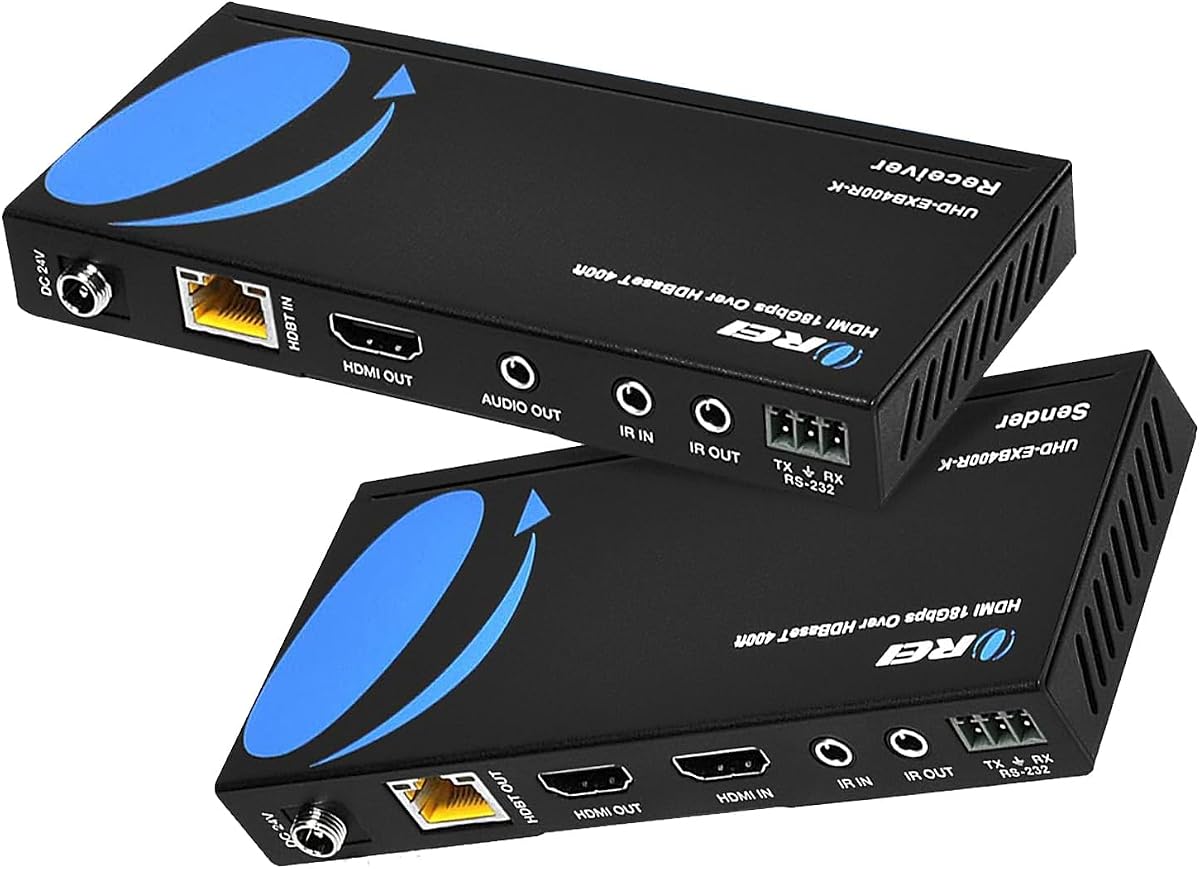
This professional grade extender uses HDBaseT to deliver lossless 4K 60Hz up to 400 feet with advanced control features.
We may earn a commission when you buy through this link, at no additional cost to you.
Two-way IR and RS-232 support enable full device control and command capabilities from the remote location.
It requires matching transmitter and receiver units but ensures consistent performance and zero latency for critical installations.
Best for large venues, churches, or commercial spaces needing extended range and robust control options.
HDBaseT ensures lossless lag-free video and audio transmission over long cable runs without compression artifacts.
Includes an RS-232 command port for integrating with advanced control systems and automation platforms.
We may earn a commission when you buy through this link, at no additional cost to you.
Offers reliable 4K 30Hz or 1080P 60Hz extension up to 230 feet with easy installation and included mounting hardware.
We may earn a commission when you buy through this link, at no additional cost to you.
Loop-out allows local preview while IR remote control lets you manage source devices from the receiver location.
Power over cable simplifies cabling and ensures a clean setup for home or office environments.
Best for users prioritizing straightforward installation and essential features without advanced control requirements.
Setup requires no software or drivers just connect the HDMI sources to the transmitter and receivers to displays.
Included IR cables let you change channels or adjust volume on source devices from the remote viewing area.
We may earn a commission when you buy through this link, at no additional cost to you.
Selecting the right HDMI over Ethernet extender depends on several technical factors that affect performance and compatibility in your setup.
Check the maximum resolution and refresh rate the extender supports whether you need 1080P at 60Hz or 4K at 60Hz affects your choice significantly.
Choose models supporting your source and display resolution to avoid reduced quality or compatibility issues.
Determine the distance between your source and display since extenders support different ranges from 165 feet to 400 feet.
Ensure the model you select covers the full distance with margin for cable routing without signal loss.
Power over cable lets the receiver draw power from the transmitter through the Ethernet cable reducing outlet needs at the remote display.
Look for PoC support if you want cleaner installation without extra power adapters near mounted displays.
IR pass-through or IR control cables allow you to operate source devices from the remote location without physical access.
Two-way IR provides more control options while one-way IR covers basic commands for most setups.
A loop out port on the transmitter lets you connect a local monitor for setup and monitoring while sending signal remotely.
This feature is valuable for debugging and dual display scenarios.
EDID management ensures the source detects the connected display correctly preventing resolution or handshake issues.
Models with EDID copy or clone function simplify compatibility across different screens.
If high fidelity audio matters verify that the extender supports formats like Dolby TrueHD or DTS-HD without compression loss.
Basic extenders may support PCM only so check if multichannel audio is required for your use case.
Some models include mounting holes or brackets for wall or rack mounting while others rely on desktop placement.
Choose based on your installation environment to ensure secure and tidy setup.
Connect the HDMI source to the transmitter and plug the Ethernet cable into the transmitter and receiver before powering the transmitter.
Allow a few seconds for handshake then test the display resolution and IR controls before finalizing placement.
Use high quality Cat6 or Cat7 cables for best performance and avoid running cables near strong power sources to prevent interference.
Most standard HDMI over Ethernet extenders use direct point to point connections and are not compatible with network switches or routers unless specifically stated as IP based extenders.
4K 30Hz extenders are cheaper and sufficient for static content while 4K 60Hz models support smoother motion and are better for gaming or video playback.
Cat5e can work for 1080P or short 4K runs but Cat6 or higher is recommended for reliable 4K over long distances.
Check that cables are securely connected the transmitter has power and the EDID settings match your display resolution.
Use the included IR cables connected to the IR inputs and outputs to pass commands from the remote location to the source device.
PoC simplifies installation by reducing power cables but if unavailable you can power transmitter and receiver separately with adapters.
Whether you need budget friendly 1080P extension or premium 4K 60Hz with advanced controls there is a suitable model among these ten picks.
Prioritize resolution, distance, and power options based on your environment to avoid overpaying or underdelivering performance.
Always confirm current availability and compatibility details since specifications can change or new versions may be released.