
SANSUI 24 Inch Curved 160Hz Gaming Monitor
4.4Editor score
160Hz High Refresh Rate
1500R Curved Screen
Freesync Compatible
Gaming without a dedicated desktop setup is now more accessible thanks to portable monitors designed for consoles and laptops. These screens offer high refresh rates and connectivity options that eliminate the need for a traditional PC tower.
We analyzed ten top-rated models based on resolution, portability, and compatibility with devices like PS5, Xbox, and Switch. Our comparison focuses on performance metrics that matter most for immersive gameplay and productivity alike.
Each pick highlights key features, pros, and cons to help you find the right screen. Prices and availability change frequently, so verify details on the product page before purchasing your next display.
4.4Editor score

4.4Editor score

4.4Editor score
As an Amazon Associate we earn from qualifying purchases.
This side-by-side comparison highlights key specifications across all ten selected monitors to help you quickly identify the best fit for your gaming setup.



This portable gaming monitor stands out with its impressive 2K QHD resolution and 180Hz refresh rate, delivering crisp visuals and smooth motion for console gaming without a PC.
We may earn a commission when you buy through this link, at no additional cost to you.
The Fast IPS panel ensures accurate colors and wide viewing angles, while FreeSync and HDR eliminate tearing for an immersive experience. The adjustable stand supports multiple orientations for flexible setups.
While it offers excellent performance, it relies on external power which may limit portability slightly. The weight is also higher than ultra-slim options, but the screen quality justifies it.
Ideal for gamers using PS5 or Xbox, this monitor provides a reliable second screen that enhances productivity and entertainment. It balances performance and versatility exceptionally well.
The 100% sRGB coverage and ∆E<2 accuracy ensure vibrant, true-to-life colors perfect for both competitive games and creative work on the go.
With dual Type-C and HDMI ports, this monitor connects effortlessly to laptops, phones, and consoles, supporting plug-and-play setup without drivers.
We may earn a commission when you buy through this link, at no additional cost to you.
The EVICIV Portable Monitor is designed for users who prioritize portability without sacrificing gaming performance. Its 120Hz refresh rate and 1ms response time make it ideal for fast-paced competitive titles.
We may earn a commission when you buy through this link, at no additional cost to you.
Boundless smart space design with ultra-thin bezels creates an immersive experience, while the included travel sleeve protects the screen during transit. The VESA mount and 360 adjustable bracket offer versatile positioning.
Although the screen is smaller at 18.5 inches, the high color gamut ensures vivid imagery. The lack of speakers means you'll need headphones, but this keeps the unit light and compact.
This monitor is perfect for travelers and students needing an extra screen. It delivers responsive gameplay and solid build quality in a highly portable form factor.
Multi-layer shock absorption foam in the sleeve case protects against drops and scratches, ensuring your monitor stays safe during daily commutes or flights.
Universal VESA 75x75mm support lets you mount it on walls or monitor arms, freeing up desk space and enabling vertical or landscape setups.
We may earn a commission when you buy through this link, at no additional cost to you.
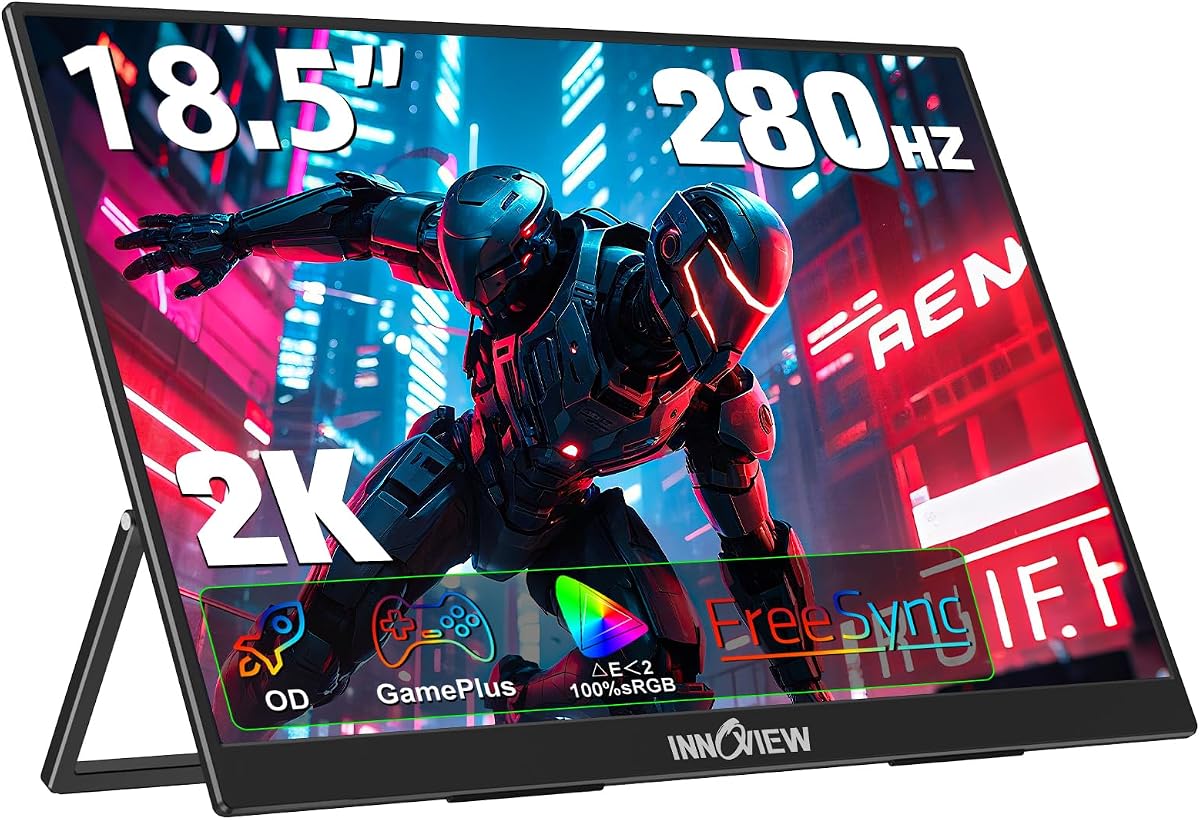
InnoView pushes limits with a 280Hz refresh rate, offering lightning-fast motion clarity for competitive gamers. The 2K QHD panel delivers sharp visuals, while HDR enhances contrast and detail in dark scenes.
We may earn a commission when you buy through this link, at no additional cost to you.
GamePlus features like customizable crosshairs and FPS modes improve aim and immersion. The adjustable stand and wall-mount options allow flexible placement for any environment, from desks to beds.
To achieve 280Hz, your device must support it, and power requirements are high to prevent flickering. These constraints are acceptable given the performance leap for supported setups.
This monitor is a top choice for PC enthusiasts and console gamers seeking smooth gameplay. It combines high-end specs with portability for a versatile gaming screen.
Customizable crosshairs and FPS game modes provide tactical advantages, helping players react faster and track targets with precision.
The 16:9 ratio offers extra vertical space for documents and coding, making it suitable for both gaming and professional tasks.
We may earn a commission when you buy through this link, at no additional cost to you.
The ViewSonic VX1654 is designed for nomads who value extreme portability. Weighing only 1.5 lbs and measuring 0.7 inches thick, it slips easily into backpacks for travel without hassle.
We may earn a commission when you buy through this link, at no additional cost to you.
A 144Hz refresh rate ensures smooth gameplay, while FreeSync eliminates tearing. The single-cable USB-C connection simplifies setup and delivers power to your device, reducing cable clutter effectively.
At 1080p, the resolution is standard but sufficient for smaller screens. The included durable cover protects against scratches, making it reliable for daily use and commuting.
This monitor is ideal for professionals needing an extra display and casual gamers. It offers a great balance of weight, connectivity, and performance in a compact frame.
Single-cable USB-C provides both display signal and power, keeping your workspace tidy and your laptop charged during use.
Integrated kickstand and protective cover ensure stability and safety, allowing you to use the monitor anywhere without worry.
We may earn a commission when you buy through this link, at no additional cost to you.
ARZOPA delivers strong value with a 144Hz refresh rate and 106% sRGB coverage. This monitor provides smooth visuals and vibrant colors for a wide range of devices at a competitive price point.
We may earn a commission when you buy through this link, at no additional cost to you.
The built-in kickstand allows easy tilt adjustment, and dual Type-C ports support seamless connections. It works well as a second screen for productivity or gaming on consoles like PS5.
Lack of adaptive sync means minor tearing may occur in fast games, but this is typical for budget models. The color quality and refresh speed remain impressive for the price.
This is a great entry-level portable monitor for budget-conscious buyers. It offers essential gaming features and solid performance without breaking the bank.
106% sRGB gamut ensures vivid and accurate colors, making images and games pop with richness and detail.
Plug-and-play functionality means no drivers are needed, letting you start working or gaming immediately upon connection.
We may earn a commission when you buy through this link, at no additional cost to you.
SANSUI offers a massive 32-inch curved display with a 240Hz refresh rate. This setup provides an immersive gaming experience, though it requires more desk space than typical portable monitors.
We may earn a commission when you buy through this link, at no additional cost to you.
The 1500R curve wraps around your vision, enhancing focus. FreeSync and HDR deliver smooth visuals and rich contrast. High brightness and color gamut ensure clear, detailed images.
At this size, portability is limited compared to smaller models. However, the performance and screen real estate make it perfect for fixed gaming setups or home entertainment.
This monitor is best for gamers who want a large screen without a desktop PC. It brings console-quality visuals to a flexible, stand-ready design.
The 1500R curvature fills your peripheral vision, drawing you into games and movies with a realistic wraparound effect.
VESA compatibility allows secure wall or arm mounting, giving you flexibility to position the large screen comfortably.
We may earn a commission when you buy through this link, at no additional cost to you.
The SANSUI 24 Inch Curved Monitor brings high refresh gaming at a budget price. With 160Hz and 1ms response time, it delivers smooth performance for competitive and casual play.
We may earn a commission when you buy through this link, at no additional cost to you.
Game modes like FPS and RTS tailor settings for different genres, while Freesync prevents tearing. The curved screen enhances immersion, and VESA mounting adds placement flexibility.
It lacks speakers and uses basic VA panel tech, but these trade-offs are minimal given the cost. Warranty support and customer service are strong selling points.
This is an excellent choice for budget gamers. It offers a large, responsive screen that works well with consoles and laptops without a premium price.
Preconfigured modes adjust brightness and contrast for specific games, enhancing visibility and enjoyment during gameplay sessions.
Lifetime technical support and replacement warranty provide peace of mind for buyers concerned about long-term durability and issues.
We may earn a commission when you buy through this link, at no additional cost to you.
UPERFECT delivers premium visuals with a QLED panel and 100% DCI-P3 coverage. The 400 nits brightness ensures clarity even in bright environments, while HDR enhances contrast and color depth.
We may earn a commission when you buy through this link, at no additional cost to you.
With 2K resolution and 144Hz, the monitor offers sharp and fluid visuals. The slim design makes it easy to carry, and built-in FreeSync provides smooth gameplay without tearing.
To achieve 2K performance, a 30W power adapter is recommended. The price is higher than budget options, but the color quality and build justify the premium.
This monitor is perfect for creative work and high-end gaming. It combines top-tier screen quality with portability for a versatile, high-performance display.
100% DCI-P3 coverage ensures professional-grade color fidelity, essential for designers and video editors working on the go.
400 nits brightness makes the screen readable in various lighting conditions, reducing glare and improving visibility outdoors.
We may earn a commission when you buy through this link, at no additional cost to you.
Samsung's Odyssey G55C brings QHD resolution and a deep 1000R curve. This monitor offers razor-sharp visuals and an immersive field of view that rivals large desktop setups.
We may earn a commission when you buy through this link, at no additional cost to you.
A 165Hz refresh rate and 1ms response time ensure smooth, lag-free action. HDR10 and Eye Saver Mode enhance detail and comfort during long sessions without straining your eyes.
At 32 inches, it is not travel-friendly. It fits best in a fixed gaming corner. The price reflects its premium quality, but the experience is unmatched for home use.
This monitor is ideal for serious gamers prioritizing image quality. It delivers a cinematic experience with reliable performance and advanced visual features.
QHD resolution provides 1.7x pixel density of Full HD, ensuring crisp text and detailed textures across all games and apps.
Eye Saver Mode minimizes blue light and flicker, keeping eyes relaxed during extended gaming or work sessions for better health.
We may earn a commission when you buy through this link, at no additional cost to you.
Dell offers a reliable 24-inch monitor with 144Hz refresh rate and IPS technology. The TÜV eye comfort certification ensures safe usage, making it suitable for long work or gaming sessions.
We may earn a commission when you buy through this link, at no additional cost to you.
Consistent colors and wide viewing angles provide excellent visual quality. Ultra-thin bezels enhance the viewing experience, and FreeSync delivers smooth, tear-free motion for gaming.
It lacks special features like HDR or curves but focuses on solid core performance. The high user rating reflects consistent quality and reliability for general use.
This monitor is perfect for those seeking a dependable display from a trusted brand. It balances price, performance, and eye comfort for everyday productivity and gaming.
Dell's reputation for quality ensures consistent performance and support, giving users confidence in long-term usage and durability.
TÜV certification reduces harmful blue light while preserving color accuracy, helping prevent fatigue and eye strain during extended use.
We may earn a commission when you buy through this link, at no additional cost to you.
Selecting the right portable monitor requires balancing screen quality, connectivity, and portability to match your gaming or work needs effectively.
Screen size directly impacts immersion and portability. Smaller monitors like 16 inches are easy to carry but may feel cramped for gaming. Larger 23+ inch models offer better visuals but add weight and bulk.
Choose based on your primary use. Travelers should prioritize light weight under 2 lbs, while home users can opt for larger displays to enhance productivity.
Refresh rate determines how smooth motion appears. A 144Hz rate is standard for competitive gaming, while higher rates like 180Hz or 240Hz provide edge clarity. Response time affects blur, with 1ms being ideal.
Look for at least 144Hz if you play fast-paced games. This ensures fluid movement and reduces ghosting during intense action sequences.
IPS panels offer the best color accuracy and viewing angles, making them versatile for work and gaming. VA panels provide higher contrast, which is great for dark scenes but may have slower response.
Prioritize IPS for consistent color quality. This helps in graphic design and ensures games look vibrant from any angle.
Higher resolution like 2K QHD sharpens text and textures. Wide color gamuts like 100% sRGB or DCI-P3 ensure vivid imagery. These specs enhance visual fidelity significantly.
Aim for Full HD minimum, ideally 2K for clarity. Ensure color coverage supports your needs, especially for creative tasks.
USB-C and HDMI are essential for connecting consoles and laptops. USB-C should support power delivery to simplify cable use. DP ports can offer higher bandwidth for high refresh rates.
Verify that your devices match the monitor's ports. A versatile input list ensures compatibility with future gadgets.
Some monitors draw power from the device, while others need external adapters. Check wattage needs to avoid flickering or connection issues during use.
Ensure your device supports sufficient power. Otherwise, carry a compatible adapter to maintain stable performance.
Adjustable stands allow flexible viewing angles, which reduces strain. VESA mounts support external arms for desk space optimization. Stability is key for portable use.
Choose models with robust stands or mount compatibility. This ensures the screen remains secure during transport or adjustment.
Features like HDR, FreeSync, and Eye Care improve the experience. Built-in speakers add convenience but often lack quality. Protective cases aid travel.
Select features based on priority. HDR and FreeSync enhance gaming, while eye care suits long work sessions.
Start by connecting the monitor to your device using USB-C or HDMI. Ensure power sources match the required wattage to prevent flickering or startup issues.
Adjust the stand angle for comfort, keeping the screen at eye level to reduce neck strain. Use vertical orientation for productivity tasks to fit more content on screen.
Clean the screen with a soft microfiber cloth to avoid scratches. Store the monitor in a padded sleeve when traveling to protect it from physical damage.
No, these monitors work with consoles like PS5, Xbox, and Switch, as well as laptops and phones. As long as your device outputs video via HDMI or USB-C, you can play games without a desktop PC.
Many models support USB-C power delivery, allowing simultaneous charging and display. Check specifications to confirm wattage output, as some may require external power for higher resolutions.
Yes, most monitors connect via USB-C or HDMI, which Mac devices support. Ensure your Mac supports video output over USB-C for seamless plug-and-play functionality.
Monitors with high refresh rates will still work at lower speeds. They adjust to match the device output, so you won't face issues even with standard 60Hz consoles.
Yes, features like flicker-free and low blue light reduce eye strain during long sessions. This is crucial for maintaining comfort, whether you are gaming or working for extended periods.
Use VESA-compatible models with standard mounting holes. Attach the monitor to an arm or wall bracket securely. Ensure the mount supports the monitor's weight for safety.
Absolutely. Most monitors support USB-C or HDMI connections compatible with the Switch. You may need an extra power adapter to ensure stable output during gameplay.
Many brands offer 30-day returns and lifetime technical support. Some include replacement warranties for defects. Always review warranty terms before purchasing for protection.
This guide reviewed ten top monitors balancing performance, portability, and value. The 2K 180Hz model stands out for gamers, while budget options offer great entry points for travelers.
Prioritize refresh rate and connectivity based on your devices. For maximum immersion, look for curved screens and high resolutions. For portability, opt for lightweight designs with USB-C power.
Prices and availability fluctuate often, so verify details before buying. Ensure the model fits your gaming habits and travel needs for the best possible experience.