
ACEMAGICIAN S3A Gaming Mini PC
4.6Editor score
Ryzen 7 H 255
Radeon 780M graphics
Triple 4K display support
Discover the top gaming mini PC for Cyberpunk 2077 in our expert guide comparing performance specs and features for immersive gaming experiences.
Gaming mini PCs have revolutionized how players experience immersive worlds like Cyberpunk. These compact systems deliver desktop-level power in a tiny footprint, perfect for streaming high-fidelity graphics without sacrificing space. Choosing the right model means balancing raw processing speed with thermal efficiency and connectivity options.
Our team analyzed ten top-tier models based on processor architecture, graphics capabilities, and real-world gaming performance. We evaluated cooling systems, expansion potential, and display support to ensure each pick handles demanding titles. Every product listed here meets strict criteria for reliability and value in the modern gaming market.
Each review highlights key strengths, trade-offs, and ideal use cases to help you decide. Prices and availability change frequently, so verify current listings before purchasing. This guide remains updated with the latest hardware releases to keep your setup future-proof against evolving game demands.
4.6Editor score

4.6Editor score

3.5Editor score
The following table offers a side-by-side comparison of all ten selected gaming mini PCs. It highlights core specifications like processors, graphics, memory, and unique features to simplify your decision-making process for high-performance compact gaming rigs.


The MINISFORUM G1 Pro stands out as the premier gaming mini PC for Cyberpunk due to its desktop-grade RTX 5060 graphics and powerful Ryzen 9 CPU. With a rating of 4.6 stars, users praise its ability to handle AAA titles with high frame rates and detailed visuals without lag or stuttering.
We may earn a commission when you buy through this link, at no additional cost to you.
Its key strengths lie in the 145W GPU implementation and 32GB of fast DDR5 memory, ensuring smooth multitasking and rendering tasks. The 245W total performance release and Glacier Cooling System maintain stable output even during extended gaming sessions. Wi-Fi 7 and 5GbE ports future-proof network connections for low-latency streaming.
Trade-offs include a higher cost compared to integrated graphics models and a slightly larger 3.8L vertical chassis. These are acceptable given the raw power delivered, especially for players seeking console-level performance in a compact form factor. The RGB lighting adds a customizable aesthetic touch.
Ideal for serious gamers and content creators needing high-end specs in a small footprint. The G1 Pro delivers an immersive Cyberpunk experience with ray tracing and DLSS 4 support. We recommend it for users prioritizing performance over budget constraints or extreme portability.
The RTX 5060 offers 3840 CUDA cores and 8GB GDDR7 memory, delivering 25% higher performance than RTX 4060 for realistic lighting and effects in Cyberpunk.
Wi-Fi 7 and 5GbE Ethernet provide ultra-fast data transfer and stable connections, essential for online gaming and quick game updates without bottlenecks.
We may earn a commission when you buy through this link, at no additional cost to you.
The ACEMAGICIAN S3A offers exceptional value for budget-conscious gamers wanting a mini PC capable of running Cyberpunk on integrated graphics. With a 4.6-star rating, it impresses with desktop-level multitasking and content creation features. The Ryzen 7 H 255 processor ensures smooth performance for everyday tasks and light gaming.
We may earn a commission when you buy through this link, at no additional cost to you.
Key strengths include the Radeon 780M graphics with RDNA 3 architecture, supporting 4K visuals and hardware encoding. Its triple 4K display support enhances productivity, while the dual-fan cooling keeps noise under 35dB in Silent Mode. The tool-free storage expansion up to 4TB adds flexibility for media libraries.
Trade-offs involve limited RAM for heavy gaming and integrated graphics that require lower settings for AAA titles like Cyberpunk. These are acceptable for casual gamers or those prioritizing space-saving design over ultra-high frame rates. The customizable RGB lighting adds a personal touch to workspaces.
Best suited for users needing a versatile mini PC for gaming, streaming, and professional work without breaking the bank. The S3A delivers reliable performance with strong connectivity options including USB4 and HDMI 2.0. It is a top pick for home offices and budget gaming setups.
The Ryzen 7 H 255 with 8 cores provides balanced power for multitasking and light gaming, making it ideal for users seeking value without compromising speed.
Support for three 4K displays via HDMI, DP, and USB4 allows efficient workflows, perfect for creators monitoring multiple windows during gaming or editing sessions.
We may earn a commission when you buy through this link, at no additional cost to you.
The ROG NUC (2025) targets enthusiasts with premium specs like the RTX 5070 mobile GPU and Intel Core Ultra 9 CPU. Despite a 3.5-star rating, it promises hardcore gaming power with AI-driven performance and future-ready efficiency. The 3L chassis balances portability with high-end capabilities for immersive Cyberpunk gameplay.
We may earn a commission when you buy through this link, at no additional cost to you.
Key strengths include the 200+ platform TOPS AI performance and QuietFlow Cooling with dual vapor chambers, ensuring stable thermal management during intense sessions. Thumb screws enable tool-free memory and storage upgrades, while Aura Sync RGB lighting customizes the setup. Thunderbolt 4 offers high-speed connectivity for peripherals.
Trade-offs involve a higher cost and mixed user feedback on reliability compared to competitors. These are acceptable for users seeking top-tier aesthetics and performance in a compact ROG-branded rig. The 2TB SSD provides ample space for modern game installations.
Best for fans of the ROG ecosystem wanting a stylish, powerful mini PC for AAA gaming. Its AI optimization and DLSS support enhance visuals in Cyberpunk. We recommend it for those prioritizing brand quality and premium features over budget considerations.
With up to 200+ platform TOPS AI performance, the system optimizes frame rates and visuals, delivering generation-over-generation improvements for smoother gaming experiences.
Thumb screw design allows quick access for upgrades without tools, ensuring the mini PC stays upgradable and adaptable to future storage or memory needs.
We may earn a commission when you buy through this link, at no additional cost to you.
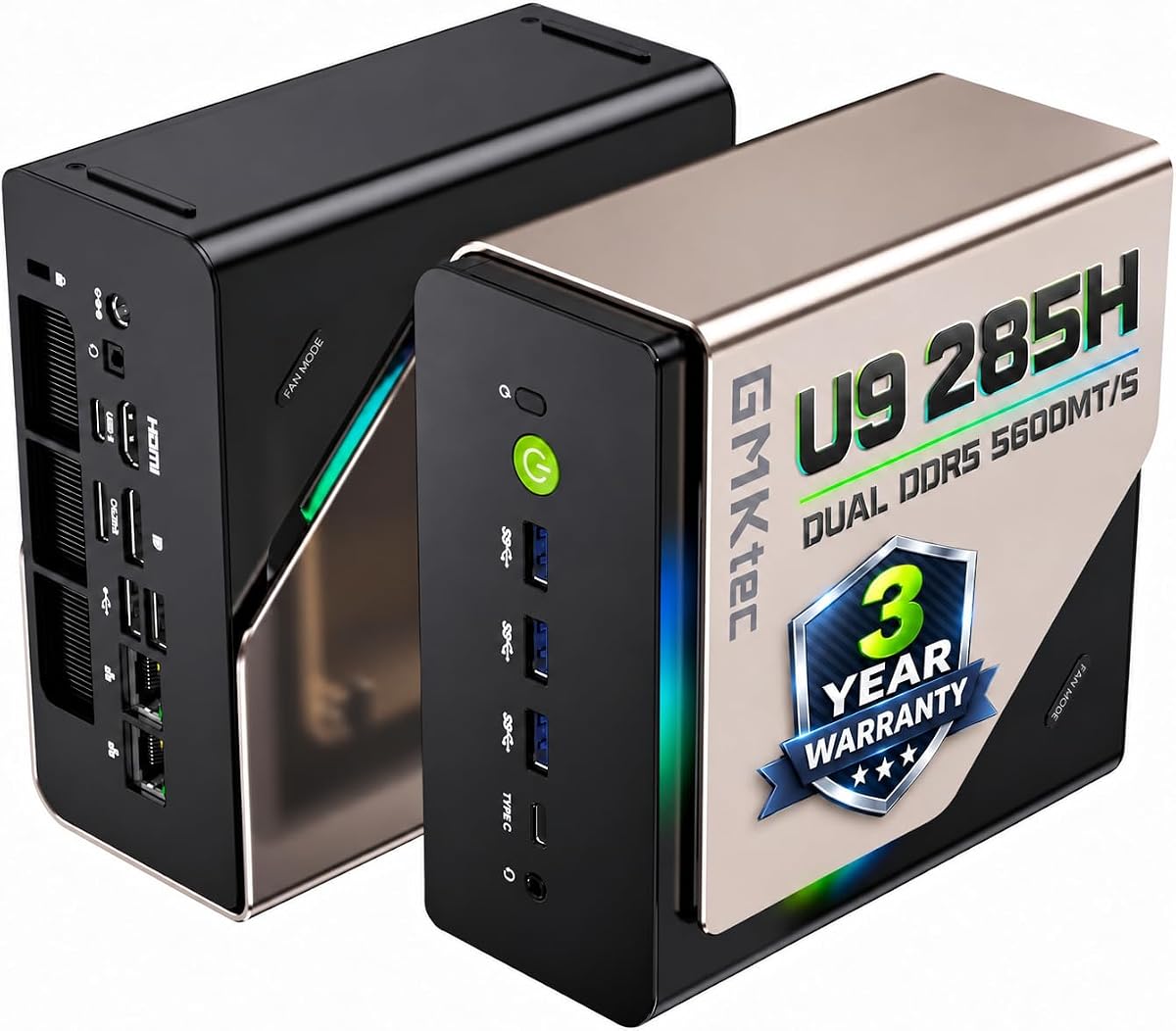
The GMKtec T1 AI Mini PC excels in AI-accelerated tasks with its Core Ultra 9 285H and NPU capabilities. Rated 4.4 stars, it delivers strong performance for gaming and creative workloads. The Intel Arc 140T GPU supports modern DirectX 12, enabling capable handling of titles like Cyberpunk at high settings.
We may earn a commission when you buy through this link, at no additional cost to you.
Key strengths include 13 TOPS AI computing power and 32GB DDR5 memory, speeding up rendering and fine-tuning. The Oculink port provides PCIe x4 speeds for better frame rates in eGPU setups. Quad 8K display support via HDMI 2.1 ensures crisp visuals for immersive gaming.
Trade-offs involve Intel graphics requiring optimization compared to NVIDIA GPUs. These are acceptable for users valuing AI features and high bandwidth connectivity. The 2.5GbE LAN adds network stability for online play and file transfers.
Ideal for creators needing AI tools alongside gaming. The T1 AI balances performance and future-proofing with fast Ethernet and display outputs. It suits professionals seeking compact PCs for both work and Cyberpunk gaming sessions.
The 13 TOPS NPU accelerates AI tasks, improving efficiency in content creation and gaming optimization without taxing the main CPU cores excessively.
The Oculink port offers PCIe x4 speeds, reducing lag and enhancing frame rates for eGPU configurations, ideal for expanding graphics capabilities later.
We may earn a commission when you buy through this link, at no additional cost to you.
The GMKtec K12 Gaming Mini PC stands out with its expandability features like Oculink and dual NICs. With a 4.4-star rating, it handles multitasking and gaming via Radeon 780M graphics. The 32GB DDR5 RAM boosts performance for AI workloads and gaming, reducing bottlenecks in demanding titles.
We may earn a commission when you buy through this link, at no additional cost to you.
Key strengths include 5600MHz dual-channel memory and 3x M.2 expansion slots for up to 24TB storage. The Oculink port enables lower lag for external GPUs, enhancing Cyberpunk visuals. Quad 4K displays via HDMI 2.1 and USB4 support high-resolution setups.
Trade-offs involve integrated graphics limiting max settings without an eGPU. These are acceptable for users planning future upgrades. The dual cooling fans and RGB modes keep noise low while adding aesthetics to desks.
Best for tech enthusiasts wanting flexible storage and networking options. The K12 supports 2.5GbE LAN for stable connections. It suits gamers prioritizing expandability and cooling in a compact form.
Dual 5600MHz DDR5 RAM delivers massive bandwidth gains, elevating FPS and reducing stutter in open-world titles like Cyberpunk for smoother gameplay.
Dual NICs and 3 M.2 slots allow extensive network configurations and storage expansion, ideal for power users needing versatile connectivity options.
We may earn a commission when you buy through this link, at no additional cost to you.
The ASUS ROG GR70 Mini PC delivers elite gaming with Ryzen 9 9955HX3D and RTX 5070 laptop GPU. Rated 4.6 stars, it ensures ultra-smooth gameplay with high FPS. Its thermal design keeps acoustics low even under loads, making it deadly fast and silent during Cyberpunk sessions.
We may earn a commission when you buy through this link, at no additional cost to you.
Key strengths include Wi-Fi 7 and Bluetooth 5.4 for ahead connectivity, eliminating bottlenecks. The ultra-compact silver chassis is desk-friendly and travel-ready without compromising power. Every frame benefits from lightning-fast reflexes and low latency for competitive matches.
Trade-offs involve a premium cost and fewer public reviews than competitors. These are acceptable for users valuing ROG quality and thermal efficiency. The compact size makes it ideal for tight setups.
Best for gamers needing powerful, portable rigs with premium aesthetics. The GR70 dominates matches with consistent performance. We recommend it for those prioritizing reliability and sleek design.
Advanced cooling design keeps temperatures down and acoustics low under loads, ensuring silent operation even during extended Cyberpunk gaming sessions.
Wi-Fi 7 and Bluetooth 5.4 provide high-speed, low-latency connections for seamless online gaming and syncing of peripherals without interruptions.
We may earn a commission when you buy through this link, at no additional cost to you.
The BOSGAME P3 Pro Mini PC offers powerful Ryzen 9 7940HS performance with Radeon 780M graphics. Rated 4.6 stars, it handles office work and games equally well. Preinstalled Windows 11 Pro ensures smooth operation, while triple screen support enhances multitasking efficiency for creators and gamers.
We may earn a commission when you buy through this link, at no additional cost to you.
Key strengths include 16GB DDR5 RAM and expandable M.2 storage for heavy loading tasks. Oculink ports enable eGPU connections for better gaming performance. Dual LAN and WiFi 6E provide reliable data transfer for online gaming and streaming.
Trade-offs involve limited RAM for AAA gaming and integrated graphics. These are acceptable for users seeking versatility across office and home use. The 1-year warranty adds peace of mind.
Ideal for those needing a balanced PC for work and gaming. The P3 Pro supports efficient workflows and stable wireless connections. It suits users prioritizing reliability and multi-use functionality.
The Ryzen 9 7940HS reaches 5.2GHz with 8 cores, delivering low power consumption and smooth operation across diverse scenarios like gaming and office work.
WiFi 6E and Bluetooth 5.2 provide high-speed, stable connections, ensuring seamless streaming and device pairing without dropouts or latency issues.
We may earn a commission when you buy through this link, at no additional cost to you.
The GMKtec M6 Ultra Mini PC delivers solid performance for casual gaming with Ryzen 5 7640HS. Rated 4.4 stars, it excels at office work and light content creation. The Radeon 760M graphics provide 30% better performance than predecessors, handling 1080p gaming effectively.
We may earn a commission when you buy through this link, at no additional cost to you.
Key strengths include 16GB DDR5 RAM and 1TB SSD for fast app loading and boot times. USB4 supports up to 8K output for crisp visuals. Dual 2.5G LAN ports offer faster networking for stable online play.
Trade-offs involve reduced power for AAA titles compared to higher-tier models. These are acceptable for users prioritizing affordability and versatility. The VESA mount simplifies installation in home offices.
Ideal for users needing a reliable mini PC for work and light gaming. The M6 Ultra supports triple displays for productivity. It suits students and professionals balancing gaming with productivity.
Upgraded Zen 4 architecture delivers 30% better performance, making it suitable for office multitasking and casual 1080p gaming with smooth frame rates.
Dual 2.5G LAN ports provide faster wired connections, ideal for NAS access and stable online gaming without the latency of standard Ethernet.
We may earn a commission when you buy through this link, at no additional cost to you.
The GMKtec AI Mini PC EVO-T1 offers top-tier specs with Ultra 9 285H and 64GB DDR5 RAM. Rated 4.5 stars, it excels in content creation and gaming. The Arc 140T GPU handles modern games with AV1 encoding, while 13 TOPS NPU accelerates AI tasks efficiently.
We may earn a commission when you buy through this link, at no additional cost to you.
Key strengths include Quad 8K display support and Oculink for lower lag eGPU setups. The 1TB SSD provides ample space, and triple M.2 slots allow massive expansion up to 12TB. Fast 2.5GbE LAN ensures stable connections for streaming.
Trade-offs involve Intel GPU limitations for some games. These are acceptable for creators needing AI tools and high RAM. The compact design suits desks without sacrificing power.
Best for creators requiring high memory and AI capabilities. The EVO-T1 supports expansive workflows. We recommend it for users valuing performance and display versatility.
With 64GB DDR5 RAM and triple M.2 slots supporting up to 12TB total, the system handles massive creative projects and gaming libraries effortlessly.
Quad 8K display support via HDMI 2.1 ensures crisp visuals for immersive gaming and professional editing work with precise color accuracy and clarity.
We may earn a commission when you buy through this link, at no additional cost to you.
The GMKtec Gaming Mini PC K12 features Ryzen 7 H 255 and 32GB DDR5 RAM for smooth multitasking. Rated 4.5 stars, it handles gaming via Radeon 780M graphics effectively. Hardware encoding supports AV1, ensuring efficient video performance during streaming or editing.
We may earn a commission when you buy through this link, at no additional cost to you.
Key strengths include 1TB SSD storage and 3x M.2 expansion slots up to 24TB. Quad 4K display support via HDMI 2.1 allows crisp visuals. Oculink port enables better frame rates for external GPU setups for enhanced gaming.
Trade-offs involve integrated graphics limiting settings. These are acceptable for users valuing multitasking and cooling efficiency. RGB modes personalize rig vibes without noise.
Ideal for gamers needing balanced power and expandability. The K12 ensures stable performance. We recommend it for users prioritizing RAM and connectivity in a compact PC.
The 32GB DDR5 5600MHz kit delivers massive bandwidth gains, ensuring smoother multitasking and faster loading for demanding gaming and streaming tasks.
Dual cooling fans with advanced heatpipes maintain stable performance under loads, keeping noise low and system frosty for long gaming sessions.
We may earn a commission when you buy through this link, at no additional cost to you.
Choosing the right gaming mini PC for Cyberpunk requires understanding key factors like processor power, graphics capability, and cooling efficiency. This section breaks down what to consider for an immersive experience.
The processor is the brain of your mini PC, handling physics, AI, and game logic in Cyberpunk. Look for Ryzen 7 or Intel Core Ultra series with multiple cores to ensure smooth multitasking and rapid world loading.
Prioritize models with high clock speeds and advanced architectures to avoid bottlenecks during intense gameplay scenarios.
Graphics determine visual fidelity and frame rates in Cyberpunk. Dedicated GPUs like RTX 5060 or 5070 offer ray tracing, while integrated options like Radeon 780M suit lower settings. Consider DLSS support for performance boosts.
Choose graphics matching your resolution goals to balance quality and frame rates effectively.
RAM stores active game data, so 16GB minimum is recommended; 32GB or more ensures stability during heavy use. SSDs reduce load times, with NVMe drives providing speed. Expansion options allow future upgrades.
Opt for systems with high-speed DDR5 RAM and spacious SSDs to support modern gaming demands and multitasking.
Mini PCs pack heat into small chassis, so efficient cooling prevents throttling. Dual-fan designs and heatpipes maintain stable performance. Look for noise-reduction features to enjoy games without distraction.
Ensure thermal management is robust to sustain high performance during long gaming sessions.
Ports like HDMI 2.1, USB4, and Oculink support high-resolution displays and external GPUs. Wi-Fi 7 ensures fast wireless for downloads. Multiple LAN ports help network setups for gaming.
Select models with versatile connectivity to future-proof your setup and support peripheral needs.
Multiple monitors enhance productivity and gaming immersion. Check for Quad 4K or 8K output capabilities to maximize visuals. High refresh rates reduce motion blur for smoother gameplay.
Verify display outputs match your setup to fully utilize screen real estate in Cyberpunk.
Mini PCs often limit upgrades, so prioritize models with accessible slots for RAM and storage. Oculink or Thunderbolt ports enable external expansions later. Modular designs simplify maintenance.
Choose systems with accessible upgrades to extend lifespan and adapt to future needs easily.
Reputable brands offer reliable builds and support. Look for warranties covering defects and access to customer service. Community reviews help gauge long-term reliability.
Opt for brands with strong after-sales support to ensure peace of mind and help when needed.
Set up your mini PC in a well-ventilated area away from walls or enclosed shelves. Place it on a flat surface to ensure proper airflow through intake and exhaust vents. Using a stand can elevate it slightly for better cooling.
Regularly dust the exterior and vents using compressed air to prevent overheating. Check fan operation periodically and listen for unusual noises indicating potential issues. Update drivers and BIOS through manufacturer tools for optimal performance and security.
Use the provided power adapter and avoid overloading outlets. Keep firmware updated via official websites and enable automatic driver updates. Avoid extreme temperature changes and handle the chassis gently to prevent internal component damage.
Yes, many gaming mini PCs with Ryzen 7 or Intel Core Ultra processors and dedicated or high-end integrated graphics can run Cyberpunk 2077 at respectable settings. Adjusting graphics options ensures smooth performance on most models in our guide.
Absolutely, many models support triple or quad 4K outputs via HDMI, DisplayPort, and USB-C. This allows immersive multi-monitor setups for both gaming and productivity without sacrificing performance.
Most offer some upgrades like RAM and storage via accessible slots, but CPU and GPU are often soldered. Look for models with Oculink ports for external GPU support to expand capabilities later.
Cooling is critical to prevent throttling in compact enclosures. Efficient fans and heatpipes ensure stable performance during intense gaming. Models with advanced thermal designs maintain higher frame rates over time.
WiFi 7 provides faster speeds and lower latency for online gaming. While not mandatory, it future-proofs your setup and improves connection stability, especially for competitive titles like Cyberpunk online.
Most models include 1 to 2-year warranties covering defects and workmanship. Some manufacturers provide lifetime technical support for troubleshooting. Always verify terms before purchase to ensure long-term peace of mind.
This guide compared ten top gaming mini PCs, highlighting the MINISFORUM G1 Pro for raw power, ACEMAGICIAN S3A for budget-friendly versatility, and ROG NUC for premium aesthetics. Each offers unique strengths for different gaming needs.
Prioritize processor strength, graphics capability, and cooling efficiency to balance performance with space-saving design. Consider expandability and connectivity for future-proofing. Your ideal choice depends on budget, use case, and performance goals.
Verify current availability and specifications before purchasing as models and pricing evolve rapidly. Check official sites and retailers to confirm the latest features and warranty details for an informed buying decision.