
AceGamer Aurora II
4.2Editor score
Hall Effect Joysticks
Programmable Back Keys
Long Battery Life
Discover the top gaming controllers for Arc Raiders. This guide compares the best options for precision, durability, and performance in intense gameplay
Finding the right gaming controller for Arc Raiders can significantly enhance your tactical edge. You need precise inputs and reliable connectivity to succeed in high-stakes battles.
We compared ten top controllers based on build quality, responsiveness, and platform compatibility. Each option offers unique features tailored to competitive shooter requirements and comfort.
Our picks highlight standout strengths and trade-offs for different playstyles. Prices and availability change frequently, so verify current details before making your final purchase decision.
4.2Editor score

4.3Editor score

4.1Editor score
This side-by-side comparison highlights key specifications and unique selling points of each controller to help you identify the best fit for your Arc Raiders setup.




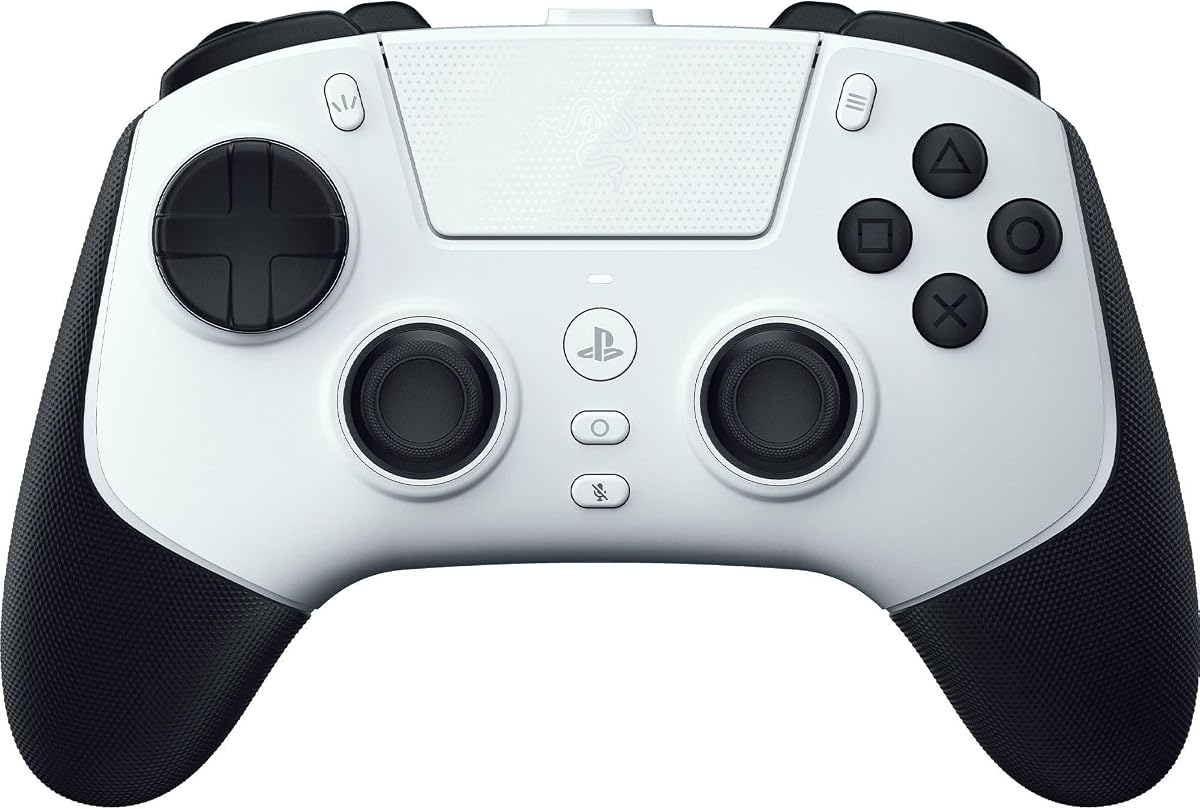


The Razer Wolverine V3 Pro is a high-end wireless controller designed specifically for PC gamers seeking competitive edge. It boasts a 8K polling rate for ultra-responsive gameplay.
We may earn a commission when you buy through this link, at no additional cost to you.
Its TMR thumbsticks prevent drift and offer precise aiming crucial for tactical shooters. The four mouse-click back buttons allow rapid access to actions without moving fingers.
While excellent for PC, it lacks console support. The price reflects its pro-grade features, which may not justify the cost for casual players.
Ideal for serious PC competitive gamers who demand the lowest latency possible. If you need maximum responsiveness and have a Windows setup, this is a top contender.
The 8K hyperpolling technology ensures inputs are registered instantly, giving you a split-second advantage in fast-paced combat.
PBT action buttons and ergonomic rubberized handles are built for long sessions without wear or fatigue.
We may earn a commission when you buy through this link, at no additional cost to you.
The AceGamer Aurora II offers exceptional value for budget-conscious gamers. It features Hall Effect joysticks to prevent drift and ensure smooth control.
We may earn a commission when you buy through this link, at no additional cost to you.
With support for PC, Android, Switch, and iOS, it is incredibly versatile. The included receiver provides stable wireless connectivity with minimal lag.
Build quality is adequate but not premium. Lack of Xbox support might be a drawback for some users relying on that ecosystem.
Perfect for players wanting reliable performance without breaking the bank. Its multi-platform support makes it a versatile choice for various setups.
Hall Effect sensors ensure accurate stick positioning and eliminate stick drift over time for consistent gameplay.
Supports multiple devices including PC and mobile allowing seamless switching between gaming environments.
We may earn a commission when you buy through this link, at no additional cost to you.
The PlayStation DualSense stands out for its advanced haptic feedback and adaptive triggers. It provides physical feedback for in-game actions enhancing immersion.
We may earn a commission when you buy through this link, at no additional cost to you.
Its comfort and intuitive layout suit many hand sizes. USB-C and Bluetooth options ensure easy connection to PC or mobile devices.
Battery life is shorter than competitors. The lack of extra programmable buttons limits customization for competitive play.
Great for gamers prioritizing immersion and comfort. If you play on PS5 or want rich sensory feedback on PC this controller is highly recommended.
Feel the terrain, weapons, and impacts in real time with precise haptic vibrations that enhance realism.
Triggers adjust resistance dynamically to match in-game situations like pulling back a bowstring or braking.
We may earn a commission when you buy through this link, at no additional cost to you.
The Xbox Elite Series 2 is designed for pro players with adjustable thumbsticks, trigger locks, and interchangeable components. It offers a premium tactile experience.
We may earn a commission when you buy through this link, at no additional cost to you.
Its robust build and 40-hour battery support extended gaming marathons. The ability to save profiles directly on the controller is convenient.
Weight and size may not suit smaller hands. The high cost can be prohibitive for casual gamers not needing extensive customization.
Best suited for competitive Xbox or PC users who value fine-tuned control. The included carrying case makes it easy to transport safely.
Swappable thumbsticks and paddles allow you to customize the controller to your specific grip and playstyle.
Save up to three profiles for quick switching between different games or play styles instantly.
We may earn a commission when you buy through this link, at no additional cost to you.
The 8Bitdo Ultimate 2 combines quality and affordability. TMR joysticks ensure precision and durability with a stable 1000Hz polling rate.
We may earn a commission when you buy through this link, at no additional cost to you.
Its ability to switch between trigger modes offers versatility across different game genres. The included dock charges it conveniently.
Lacks native Xbox wireless support. Customization software is functional but less advanced than competitors.
Ideal for Steam Deck or PC users seeking reliable performance. Its sleek design and good battery life make it a solid choice.
TMR joysticks deliver consistent inputs and prevent drift without requiring calibration or frequent maintenance.
The charging dock keeps your controller ready to play and maintains a clean gaming setup.
We may earn a commission when you buy through this link, at no additional cost to you.
The GameSir G7 Pro delivers top-tier performance via wired or 2.4G wireless. Hall Effect triggers ensure smooth analog control perfect for shooters.
We may earn a commission when you buy through this link, at no additional cost to you.
Gyro aiming adds precision for PC players. The included smart charging station simplifies battery management.
Wired use may limit range. Some prefer wireless freedom even with negligible latency differences.
Perfect for competitive gamers who prioritize performance and convenience. Its build and software support make it a strong mid-range contender.
Use built-in gyroscope for fine-tuned aiming adjustments enhancing accuracy during gameplay.
The smart dock automatically stops charging when full protecting battery health while keeping the controller ready.
We may earn a commission when you buy through this link, at no additional cost to you.
This wireless variant of the G7 Pro adds freedom to your setup. It retains TMR sticks and Hall Effect triggers for consistent performance.
We may earn a commission when you buy through this link, at no additional cost to you.
Customizable faceplates and trigger stops personalize gameplay further. The official Xbox licensing ensures broad compatibility.
Cost is higher than wired version. Dock size might be large for compact desk setups.
Ideal for those wanting wireless convenience without sacrificing performance. Its design and features make it attractive for Xbox and PC users.
Swappable faceplates let you match your controller to your setup or personal style effortlessly.
Switch between micro triggers and analog Hall triggers to adapt to different game requirements quickly.
We may earn a commission when you buy through this link, at no additional cost to you.
The Razer Raiju V3 Pro is officially licensed for PS5 and PC. It offers remappable controls and drift-free TMR sticks for pros.
We may earn a commission when you buy through this link, at no additional cost to you.
Its wireless connection delivers low latency for competitive play. The included carrying case protects it during transport.
High price and reliance on Razer software may deter some users. Build is premium but heavy.
Great for PS5 or PC esports enthusiasts. If you value official licensing and pro-grade customization this fits well.
Licensed for PS5 ensuring full feature support and reliable performance on Sony consoles.
The carrying case and accessories make it easy to take your controller to events safely.
We may earn a commission when you buy through this link, at no additional cost to you.
ASUS ROG Raikiri II is built for PC performance with 1000Hz polling and Tri-Mode connectivity. Its anti-drift TMR sticks ensure precise aiming.
We may earn a commission when you buy through this link, at no additional cost to you.
Programmable rear buttons enhance control. The textured grip offers stability during intense gameplay.
Software can be finicky. Price reflects premium features but value depends on your platform.
Best for PC players seeking responsiveness. If you use Xbox Ally or PC gaming this controller delivers solid performance.
ROG SpeedNova tech enhances wireless stability reducing interference and lag during critical moments.
Skin-friendly anti-slip grip keeps hands secure allowing confident play without fatigue.
We may earn a commission when you buy through this link, at no additional cost to you.
The Xbox Storm Breaker Special Edition blends style with standard reliability. Textured grips enhance comfort while rubberized back helps stability.
We may earn a commission when you buy through this link, at no additional cost to you.
Its 40-hour battery life supports marathon sessions. The share button simplifies capturing game moments quickly.
It lacks advanced features like remappable buttons or high polling rates. This limits competitive edge.
Perfect for casual or everyday gaming needing dependable performance. Its design and battery make it a great standard option.
Up to 40 hours of battery means fewer charges and uninterrupted gaming across multiple days.
The Storm Breaker edition offers a bold aesthetic with classic gray and black tones.
We may earn a commission when you buy through this link, at no additional cost to you.
Choosing the right controller involves balancing performance features comfort and compatibility with your specific gaming platform and style.
A high polling rate such as 8K or 1000Hz ensures your inputs are registered quickly which is vital for precise aiming in Arc Raiders. Lower latency reduces lag giving you a competitive edge.
Prioritize controllers with at least 1000Hz polling for smooth responsiveness.
Hall Effect or TMR thumbsticks prevent drift and offer durability over time. This reliability ensures consistent aiming without needing frequent recalibration.
Look for Hall Effect or TMR sticks to avoid stick drift issues.
Some controllers offer switchable triggers or analog control allowing adaptation to different gameplay styles. Hall Effect triggers provide smooth linear input essential for precision.
Consider controllers with Hall Effect triggers for better control.
Wired connections offer zero latency while wireless provides freedom. Ensure your chosen controller supports your platform via Bluetooth or USB-C properly.
Select wired or wireless based on your latency tolerance and setup.
Comfortable rubberized grips and ergonomic shapes reduce fatigue during long sessions. A controller that fits your hand improves accuracy and control.
Choose an ergonomic design with textured grips for comfort.
Additional programmable buttons or paddles enable faster access to actions without removing thumbs from sticks. This boosts your tactical flexibility significantly.
Controllers with remappable back buttons add competitive value.
Long battery life minimizes interruptions during gameplay. Aim for at least 20 to 40 hours per charge for convenience.
Prioritize controllers with extended battery life for uninterrupted play.
Ensure the controller works with your PC console or mobile device. Some models are exclusive to PC or Xbox affecting usability.
Verify platform support before purchase to avoid incompatibility issues.
Always connect the controller securely via USB-C or compatible dongle to ensure stable input. Check firmware updates regularly via manufacturer software for optimal performance.
Store your controller in a cool dry place away from direct sunlight. Avoid excessive pressure or drops that could damage internal components or sticks.
Clean buttons and grips with a soft dry cloth. If needed use a small amount of isopropyl alcohol carefully to maintain hygiene without moisture damage.
For competitive play the Razer Wolverine V3 Pro or GameSir G7 Pro offer low latency and high polling rates essential for precise aiming. Their programmable buttons enhance tactical flexibility.
Yes Hall Effect sticks prevent drift and provide consistent inputs long-term. They are more durable than traditional potentiometer sticks making them ideal for frequent use.
Many controllers like the Xbox Elite Series 2 and GameSir G7 Pro Wireless support Xbox Series X. However PC exclusive options such as Razer Wolverine V3 Pro will not work.
Use a wired connection or high-quality 2.4G wireless with low latency. Ensure your PC USB port and driver settings are optimized for performance.
Some models like the GameSir G7 Pro and ASUS ROG Raikiri II support gyroscope aiming on PC. This feature adds extra precision for aiming adjustments.
Battery life varies from 20 to 40 hours depending on model and usage. Controllers like Xbox Elite Series 2 offer up to 40 hours on a single charge.
Most premium controllers include software for remapping buttons. Budget models may lack this feature so check product specs if customization is important.
Most controllers use USB-C for charging or have included docks. Ensure you have the appropriate cable included or purchased separately for convenience.
The top picks offer diverse strengths from budget-friendly options to premium esports controllers. Select based on your platform and specific competitive needs.
Prioritize features like high polling rates Hall effect sticks and customizable buttons for maximum control. Ergonomics and battery life also play key roles in long-term satisfaction.
Always check current prices and availability before purchasing. Up-to-date info ensures you get the best value and performance for your gaming setup.