
Noctua NA-FC1
4.8Editor score
Compact PWM controller
Manual speed reduction
Three way splitter cable
Discover the top 10 front panel fan controllers comparing features, controls, and reliability to optimize your PC cooling performance.
Finding the right front panel fan controller helps you manage cooling efficiently. Good controllers offer precise speed control and temperature monitoring to keep your system stable and quiet.
This guide compares ten top rated models based on reliability, features, and ease of use. We evaluated each unit for display quality, channel count, and safety alerts.
Each pick highlights key strengths and ideal use cases for your build. Note that prices and availability may change so verify details before purchase.
4.8Editor score

5.0Editor score

4.2Editor score
This side by side comparison helps you evaluate each model quickly. We list key specs and features to highlight differences in control and safety.
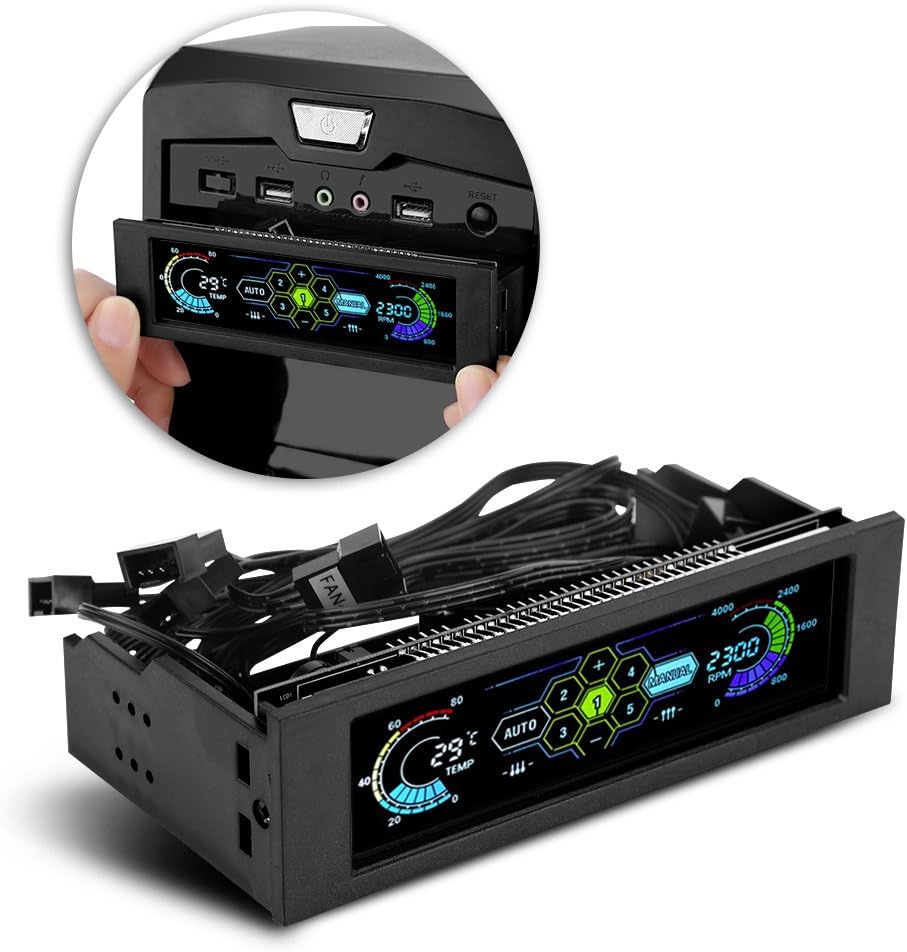


The STW‑6041 is a standout fan controller that delivers reliable performance and clear monitoring. It earns a top rating for its robust build quality and comprehensive display features.
We may earn a commission when you buy through this link, at no additional cost to you.
It features a wide LCD screen that shows four sets of fan speeds and temperatures simultaneously. The PWM circuit reduces high frequency noise while the safety system alarms at sixty degrees Celsius.
Installation requires an optical drive bay and careful wiring but the result is a stable setup. Users may find the panel large for smaller cases but it fits standard chassis well.
This controller is ideal for users who need precise thermal management and clear status updates. It balances advanced features with durability making it a top recommendation for PC builders.
The LCD display provides instant access to four fan speeds and temperatures without needing software.
High temp alarms and fan anti-seize protection prevent hardware damage from overheating issues.
We may earn a commission when you buy through this link, at no additional cost to you.
This Thermaltake controller brings advanced control and RGB styling to high end builds. It supports six channels and integrates seamlessly with LED strips for a polished look.
We may earn a commission when you buy through this link, at no additional cost to you.
Users can adjust each fan independently using dedicated knobs while monitoring temperatures. The warning alarm ensures safety during overclocking or heavy workloads.
The main trade-off is the higher cost and the need for a dedicated 5.25 inch bay. It may be overkill for basic builds but excels in enthusiast setups.
Choose this if you want maximum control and visual customization. It delivers premium performance for users who value aesthetics and precise tuning.
Compatible with up to two Lumi LED strips for enhanced visual appeal.
Six voltage knobs allow detailed tuning for different fan zones.
We may earn a commission when you buy through this link, at no additional cost to you.
The Noctua NA-FC1 offers simple yet effective control for PWM fans without needing a complex panel. It works as a manual reducer or in tandem with motherboard control.
We may earn a commission when you buy through this link, at no additional cost to you.
Its No Stop mode prevents BIOS errors by keeping fans above 300 RPM. The included splitter supports up to three fans making it versatile for compact builds.
This model lacks a front panel display so users rely on software or physical checks. It is best suited for quiet operation rather than detailed monitoring.
Buy this if you value reliability and low noise over visual stats. The six year warranty underscores its build quality and long term value.
Prevents BIOS errors by ensuring fans stay above 300 RPM at all times.
Works as a manual speed reducer or with automatic motherboard controls.
We may earn a commission when you buy through this link, at no additional cost to you.
This model provides practical cooling control with a clear LCD panel. It supports up to five fans and offers both automatic and manual modes for flexibility.
We may earn a commission when you buy through this link, at no additional cost to you.
Users can set alarm temperatures from 40 to 90 degrees and receive alerts if fans fail. The hard disk state display adds useful system insight.
The main limitation is the need for a drive bay and manual configuration. It is a solid choice for users who want monitoring without software dependency.
Choose this for reliable hardware monitoring and flexible control modes. It delivers good value for mid range builds needing temperature tracking.
Switch between automatic temperature control and manual speed adjustment easily.
Shows fan speed temperatures and hard disk state on one screen.
We may earn a commission when you buy through this link, at no additional cost to you.
This controller offers clear monitoring and independent fan control for up to four fans. Its wide LCD displays RPM and four temperature values at a glance.
We may earn a commission when you buy through this link, at no additional cost to you.
The double safety function includes a 60 degree alarm and fan standstill detection. PWM circuitry reduces noise while maintaining performance during operation.
It requires a 5.25 inch bay and careful setup but the build is robust. Users may prefer the aluminum panel for durability and heat resistance.
Buy this if you need reliable hardware monitoring and noise reduction. It suits users who prioritize system stability and visible stats.
Four separate controllers allow quick manual adjustments per fan zone.
Blinks temperature symbol and sounds alarm when thresholds are exceeded.
We may earn a commission when you buy through this link, at no additional cost to you.
This controller focuses on centralized software management rather than a front panel. It offers individual PWM control for up to 10 fans with strong driver support.
We may earn a commission when you buy through this link, at no additional cost to you.
Users can manage airflow efficiently using Windows or Linux tools. The magnetic mounting allows placement outside the drive bay for better cable management.
It lacks a physical display so monitoring relies on software. It is ideal for builders who prefer OS level control over panel readouts.
Choose this for high fan counts and software based tuning. It is a modern solution for custom builds needing flexible fan control.
Works with Windows and Linux kernels for broad software compatibility.
Eliminates Y-splitter cables by grouping connections at one controller.
We may earn a commission when you buy through this link, at no additional cost to you.
This controller is part of a DIY kit designed for flexible cooling setups. It supports up to 2 fans with precise temperature and speed control.
We may earn a commission when you buy through this link, at no additional cost to you.
The digital display switches between temperature and RPM data and offers power-off memory. Protection features ensure safe operation across different voltage levels.
Installation is straightforward with included adhesives and adapters but it lacks a standard bay fit. It is ideal for cases without optical drives.
Buy this for versatile non-standard PC cooling. It offers strong protection and control for DIY and small form factor builds.
Switch between real time temperature and fan speed readings instantly.
Built-in over-voltage and reverse polarity protection for long term use.
We may earn a commission when you buy through this link, at no additional cost to you.
This model provides basic monitoring and control at an entry level price. It includes a large screen displaying temperature and fan speed clearly.
We may earn a commission when you buy through this link, at no additional cost to you.
Users can set alarm temperatures to prevent overheating and detect fan jams. It supports three groups of fans with a standard bay fit.
Performance may vary with limited advanced features. It is suitable for budget builds that need essential temperature tracking.
Choose this for low cost thermal monitoring. It works for users who want basic control without premium features.
Sounds alert immediately when a fan fails or stops cooling.
Shows current date and time alongside temperature data.
We may earn a commission when you buy through this link, at no additional cost to you.
This controller offers essential monitoring and control in an alloy panel. It displays four sets of temperatures and fan speeds on a wide screen.
We may earn a commission when you buy through this link, at no additional cost to you.
The system includes high temp alarms and PWM circuits to manage noise. It is suitable for standard 5.25 inch bay installations.
Reviews are mixed regarding build consistency and feature depth. It works for users who want basic control without high costs.
Buy this if you need simple thermal monitoring on a budget. It provides basic functionality for standard cooling setups.
Multiple matte treatments provide durability and a clean aesthetic.
Flashes temperature symbol and sounds alarm when threshold is exceeded.
We may earn a commission when you buy through this link, at no additional cost to you.
This controller supports up to five groups of fans with a clear LCD display. It offers both auto and manual modes for flexible temperature management.
We may earn a commission when you buy through this link, at no additional cost to you.
The big screen shows hard disk state and alarm temperatures. Users can set alarm ranges and detect fan breakdowns quickly.
It works for builds needing higher fan capacity but lacks advanced features. It is a basic tool for multi fan setups.
Choose this for multi-fan systems on a budget. It offers basic control without complex electronics.
Controls five groups of fans to manage complex cooling setups.
Designed for standard 5.25 inch optical drive bays.
We may earn a commission when you buy through this link, at no additional cost to you.
Selecting the right controller depends on your build size and cooling needs. We outline key factors to help you make an informed decision.
Controllers come in 5.25 inch sizes to fit optical drive bays. Ensure your case has a free bay and enough space for cabling before buying.
Check your case dimensions and available drive bays to confirm the unit fits. Some models also offer adhesive or magnetic mounting for flexibility.
Determine how many fans you need to control based on your cooling requirements. Units range from three to ten channels depending on the model.
Choose a controller that matches your fan count and includes extra channels if you plan to expand your setup later.
Look for clear LCD or LED screens that show temperatures and RPM values accurately. Bright displays are easier to read in low light cases.
Prioritize models with multi-function displays that show fan status hard disk state and alarms in one view.
Auto modes adjust fan speeds based on temperature probes while manual modes let you set speeds directly. Decide which suits your workflow better.
Some controllers switch between modes when probes are disconnected offering flexibility during maintenance or testing.
Effective controllers include high temperature alarms and fan failure alerts to prevent hardware damage. These features protect your system from overheating.
Verify that the unit supports short circuit protection and voltage monitoring for reliable long term operation.
Ensure the controller supports PWM fans for efficient speed control without noise issues. PWM circuits reduce high frequency hum during operation.
Choose a unit that allows precise control to balance cooling performance with acoustic comfort.
Alloy panels and high specification capacitors extend the lifespan of your controller. Durable materials handle heat and vibration better than plastic.
Look for products with strong warranties and reputable brands to ensure reliability over time.
Some units offer software support for monitoring and control without a physical display. This suits users who prefer OS level management.
Check compatibility with your operating system to ensure stable drivers and features.
Install the controller in a free 5.25 inch drive bay using the included screws. Connect the power and fan cables to the labeled ports on the unit.
Power on the system and check the display. calibrate temperature probes if needed. Set alarm thresholds to warn when temperatures exceed safe limits.
Regularly clean dust from fans and probes to maintain accurate readings. Update firmware or drivers if supported to ensure optimal performance.
It is a device installed in the case front panel that lets you control fan speeds manually or automatically. It monitors temperatures and alerts you to cooling issues.
You need one if your motherboard lacks sufficient fan ports or precise control. It helps manage noise and heat in multi fan builds.
Remove an optical drive from your case and insert the controller. Connect power from the PSU and fan headers to the controller ports using provided cables.
Yes many controllers work standalone via physical knobs or displays. Software support is optional and found on advanced units.
Most use a 5.25 inch bay for optical drives. Some models offer adhesive mounting for cases without available slots.
Enter the controller menu and select the alarm option. Set your desired threshold and save the settings.
PWM controllers offer precise speed control and reduce noise. They are ideal for modern fans with four pin headers.
Check power connections and verify the PSU is working. Ensure the unit is receiving 12V power as specified.
We reviewed ten top models ranging from budget options to premium solutions with RGB displays. Each offers unique features for temperature monitoring and fan control.
Prioritize build quality safety alarms and channel count to match your cooling needs. Balance physical displays with software support based on your workflow.
Always verify current prices and availability before buying. Use this guide to find a controller that ensures stable and quiet performance for your system.