
Protectli Vault FW4B
4.6Editor score
Compact fanless design
Quad Core processor
Open source compatible
This guide compares the top firewall appliances for businesses and home networks, evaluating performance, security features, and ease of management for 2026.
Selecting the right firewall appliance is crucial for protecting your network from modern cyber threats. A good appliance combines robust hardware with advanced software features to inspect traffic and block attacks efficiently.
We evaluated ten leading models based on throughput, port availability, security capabilities, and ease of setup. Our analysis focuses on real-world performance and the specific needs of small businesses and power users.
Each pick highlights key strengths and trade-offs to help you match hardware to your infrastructure. Keep in mind that pricing and availability can fluctuate, so verify current details before purchasing.
4.6Editor score

4.4Editor score

4.7Editor score
The following table provides a side-by-side comparison of the top firewall appliances available today, highlighting key specifications and capabilities for informed decision making.


The FortiGate-60F stands out as a top performer in the mid-range enterprise category. It offers robust hardware designed to handle significant traffic loads while maintaining security integrity.
We may earn a commission when you buy through this link, at no additional cost to you.
Its 10 Gigabit Ethernet ports provide exceptional flexibility for connecting diverse devices. The built-in security processor ensures high speed inspection without slowing down network operations.
While the hardware is powerful, note that advanced threat protection requires a separate subscription. This cost should be factored into your total budget for ongoing protection.
Ideal for businesses needing reliable security without enterprise complexity. If you value performance and port density, this appliance delivers strong results.
The dedicated security processor handles SSL inspection efficiently, ensuring encrypted traffic is monitored without latency.
With multiple internal and WAN ports, you can segment networks easily for better organization and security.
We may earn a commission when you buy through this link, at no additional cost to you.
The Protectli Vault FW4B is an excellent choice for users who prefer open-source firewall software. It provides a reliable hardware foundation for custom network setups.
We may earn a commission when you buy through this link, at no additional cost to you.
Its fanless design ensures silent operation which is perfect for office environments. The quad-core processor handles standard routing and firewall tasks with ease.
You will need to install your own operating system which requires some technical knowledge. This adds flexibility but demands more setup time than proprietary solutions.
Choose this if you want maximum control over your firewall software. It offers great value for budget-conscious users comfortable with DIY configuration.
Tested with major platforms like pfSense and OPNsense, ensuring compatibility and community support.
Small enough to fit on a desk or shelf, saving space while protecting your network.
We may earn a commission when you buy through this link, at no additional cost to you.
The SonicWall TZ280 brings next-generation security features to the small business market. Its patented inspection engine ensures deep visibility into network traffic.
We may earn a commission when you buy through this link, at no additional cost to you.
The inclusion of 2.5 Gigabit ports future-proofs your network for faster bandwidth. This is ideal for environments with high data transfer requirements.
Like many enterprise devices, full protection relies on an active service subscription. Ensure you budget for ongoing fees to utilize advanced threat prevention.
This appliance is best for those needing robust security and high throughput. If you require advanced sandboxing and TLS decryption, it is a strong candidate.
Reassembly-Free Deep Packet Inspection allows for rapid analysis without slowing down network speeds.
Integrated SD-WAN and SSL VPN ensure secure connections for remote workers across distributed sites.
We may earn a commission when you buy through this link, at no additional cost to you.
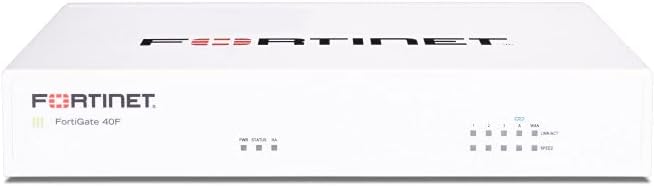
The FortiGate-40F is designed for small to mid-sized businesses needing reliable security. Its compact design fits easily into limited office spaces without sacrificing performance.
We may earn a commission when you buy through this link, at no additional cost to you.
It provides essential connectivity with five Gigabit ports for efficient network segmentation. The built-in processor handles encryption and threat detection effectively.
While powerful, its throughput is lower than the 60F model. This makes it suitable for networks with moderate traffic demands rather than heavy enterprise use.
If you have a small team and need enterprise-grade security, this unit is a solid choice. Ensure you plan for the necessary service subscription for updates.
Fanless design ensures quiet performance making it suitable for open office environments.
Zero Touch Integration with the Security Fabric allows for quick and streamlined setup.
We may earn a commission when you buy through this link, at no additional cost to you.
The Ubiquiti Unifi Security Appliance is perfect for users already invested in the Unifi ecosystem. It allows centralized management of all your network devices.
We may earn a commission when you buy through this link, at no additional cost to you.
Its interface is intuitive, making it easy for non-technical users to configure settings. The device supports essential VLANs and QoS for smooth voice calls.
Performance is decent but not class-leading compared to dedicated firewall rivals. It serves well as a gateway for small networks with basic security needs.
Choose this if simplicity and ecosystem integration are your priorities. It balances cost and functionality well for standard home or small office use.
Integration with the Unifi Controller lets you manage firewall and Wi-Fi from a single dashboard.
Built-in QoS ensures clear voice and video calls by prioritizing traffic on the network.
We may earn a commission when you buy through this link, at no additional cost to you.
The Netgate 1100 offers a hassle-free way to run pfSense without installing software yourself. It comes ready out of the box with all necessary tools.
We may earn a commission when you buy through this link, at no additional cost to you.
Its compact design allows it to run silently on a desk or wall mount. This makes it ideal for locations where noise is a concern.
While the ARM processor is efficient, it may not handle heavy enterprise traffic. It is best suited for small businesses or home labs needing reliable security.
If you want a supported pfSense solution with minimal effort, this is a great pick. The included technical support adds significant value for new users.
PfSense software updates are included for the product lifetime ensuring long-term viability.
TAC Lite technical support is available 24/7 to assist with setup and troubleshooting.
We may earn a commission when you buy through this link, at no additional cost to you.
The FORTINET FG-100E is engineered to provide comprehensive network security for demanding environments. It focuses heavily on identifying threats across application layers.
We may earn a commission when you buy through this link, at no additional cost to you.
Its ability to detect unknown attacks and known exploits adds a vital layer of protection. This makes it effective against both common and emerging cyber risks.
Detailed specifications for this model are not fully available in the listing. Verify specific port counts and speeds with the vendor before purchasing for your needs.
Select this appliance if you prioritize deep threat intelligence and detection. It is a robust choice for networks requiring advanced security protocols.
Leverages global threat data to identify and block both known and unknown attacks effectively.
Identifies thousands of applications to enforce usage policies and improve network security.
We may earn a commission when you buy through this link, at no additional cost to you.
The Palo Alto PA-220 brings enterprise-grade security features to smaller network footprints. It is known for its advanced threat prevention capabilities and detailed traffic visibility.
We may earn a commission when you buy through this link, at no additional cost to you.
Its compact design saves space while maintaining high performance standards. The platform supports application-based policies to control how users interact with the network.
While highly capable, the cost can be higher compared to other models. It is best suited for organizations that prioritize security depth over raw hardware price.
If you need a trusted Next Gen firewall with strong management tools, consider this option. Verify the exact specifications to ensure it meets your port requirements.
Granular visibility into applications allows you to control traffic based on real usage not just ports.
Real-time threat intelligence prevents known and unknown malware from entering your network.
We may earn a commission when you buy through this link, at no additional cost to you.
The Protectli Vault FW4C stands out by offering 2.5 Gigabit ports at an accessible price point. This makes it ideal for home labs or small offices with faster internet speeds.
We may earn a commission when you buy through this link, at no additional cost to you.
Its hardware supports AES-NI acceleration ensuring efficient encryption performance. The silent fanless chassis ensures it does not add noise to your workspace.
The included RAM is lower than other models which may limit heavy virtualization. However, for standard firewall duties, it provides ample power and throughput.
If you need faster ports without spending on enterprise gear, this is a great pick. It balances modern networking needs with open-source flexibility well.
Four 2.5 Gigabit ports allow for higher throughput on networks with high speed connections.
AES-NI support ensures that traffic inspection does not slow down your CPU performance.
We may earn a commission when you buy through this link, at no additional cost to you.
This bundle combines the FortiGate-60F hardware with essential service subscriptions for immediate protection. It saves the hassle of configuring and purchasing licenses separately.
We may earn a commission when you buy through this link, at no additional cost to you.
The included FortiCare Premium support ensures you have access to expert help when needed. This adds peace of mind for organizations without dedicated IT staff.
The total cost is higher upfront but covers the first year of security services. It is a cost-effective way to ensure your device is fully operational from day one.
Choose this if you want a complete solution without managing subscriptions manually. It is ideal for medium businesses needing reliable protection and support.
Unified Threat Protection secures against advanced online threats with comprehensive web filtering.
FortiCare Premium ensures high-quality support and service continuity for your business network.
We may earn a commission when you buy through this link, at no additional cost to you.
Selecting the right firewall appliance involves evaluating several key factors to ensure it meets your specific security and performance needs.
Network throughput refers to the amount of data that can be processed securely by the firewall. Look for IPS and threat protection speeds that match your internet bandwidth to avoid bottlenecks.
Ensure the appliance can handle your maximum traffic load without slowing down your connection.
The number and type of ports determine how many devices you can connect directly. Consider whether you need standard Gigabit Ethernet or faster 2.5G connections for internal segments.
Check that the appliance has enough ports for your WAN, LAN, and DMZ requirements.
Modern firewalls offer advanced features like intrusion prevention, malware protection, and application control. These features are often dependent on software updates and threat intelligence feeds.
Verify that the device supports regular updates and includes the necessary security services.
Some appliances come with pre-installed software like pfSense or FortiOS while others are bare metal. Decide whether you want a proprietary system or the flexibility of open-source options.
Choose a system that matches your technical expertise and management preferences.
Your network will grow over time so the appliance should allow for future expansion. Check if the device supports adding modules or upgrading licenses for additional services.
Select a model that can handle your anticipated traffic growth without needing immediate replacement.
Effective management tools simplify configuration and monitoring of your security policies. Look for user-friendly interfaces or cloud-based dashboards that fit your workflow.
A good interface reduces the time needed to configure and maintain network security.
Physical size and design impact where you can install the device. Desktop units are common for small offices while rack-mount options suit larger server rooms.
Ensure the form factor fits your available space and cooling requirements.
Reliable customer support and warranty coverage protect your investment. Check if technical assistance is included or available as an add-on service.
Opt for a provider that offers responsive support to resolve issues quickly.
Start by connecting the appliance to your network modem and internal switches. Power on the device and access the administrative interface using the default credentials provided.
Configure your network settings including IP addresses and firewall rules. Ensure you update the firmware immediately to secure the device against known vulnerabilities.
Regularly monitor logs and traffic reports to detect anomalies. Keep the appliance in a well-ventilated area to maintain optimal performance and hardware longevity.
Many appliances offer basic routing without one but advanced threat protection and updates require a subscription. Always check the specific model to confirm ongoing service costs.
A router directs traffic between networks while a firewall appliance focuses on inspecting and securing that traffic. Many modern devices combine both functions into one unit.
Small businesses usually need lower throughput models while enterprises require higher speeds and more ports. Consider your internet speed and the number of devices connected.
Some appliances allow this while others run proprietary software. Check compatibility lists if you plan to install custom open-source systems like pfSense.
Yes most modern appliances support VLANs to segment network traffic securely. This is essential for organizing different departments or guest networks.
IPS stands for Intrusion Prevention System which blocks malicious traffic in real time. Threat protection includes blocking malware and filtering unsafe websites.
Hardware can last five to seven years but software support may end sooner. Plan for replacement when the vendor stops providing critical security updates.
Yes you typically connect the modem to the WAN port of the firewall. The appliance then manages the connection to your internal network devices.
The ten models reviewed offer a range of options for different needs from budget open-source solutions to enterprise-grade bundles. Each brings unique strengths in performance and security capabilities.
Prioritize throughput and security features that align with your specific network demands. Consider whether you prefer proprietary systems or open-source flexibility for long-term management.
Always check current pricing and subscription requirements before purchasing to ensure the total cost fits your budget. Selecting the right appliance today protects your data tomorrow.