
Replacement TV Remote for All Fire Series
4.3Editor score
Compatible with Fire Stick Lite
Voice control enabled
Easy pairing process
Works with smart TVs
Includes user manual
This guide compares the top 10 Fire Stick Replacement Remote options available in October 2026 to help you find the perfect voice control solution for your
Finding a reliable Fire Stick Replacement Remote is essential when your original controller loses functionality or simply goes missing. A good remote should offer seamless voice control, responsive buttons, and broad compatibility across different Fire TV models. Whether you need budget-friendly options or premium features like backlit keys, there is a solution tailored to your specific needs and streaming habits today.
We have evaluated ten top-rated replacement remotes based on user feedback, compatibility ranges, and feature sets. Our comparison focuses on voice activation quality, battery life expectations, pairing ease, and overall build durability. This list covers both official Amazon replacements and trusted third-party alternatives that deliver exceptional performance without compromising on essential streaming controls or smart home integration capabilities.
Each product pick includes detailed specifications, pros and cons, and expert insights to guide your purchase decision effectively. While we aim to provide accurate information, remember that manufacturer specifications and availability can change over time. Always verify your specific device model before ordering to ensure full compatibility and optimal user experience with your chosen Fire Stick Replacement Remote device.
4.3Editor score
4.5Editor score
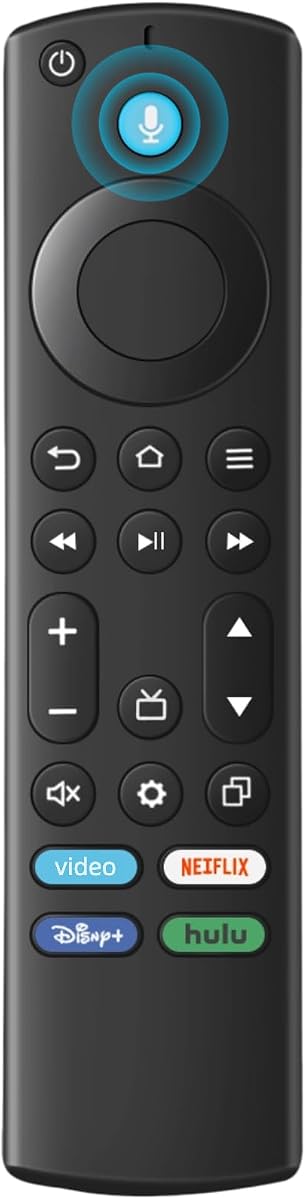
4.2Editor score
This side-by-side comparison highlights the key specifications and unique features of each replacement remote to help you make an informed decision for your streaming needs.


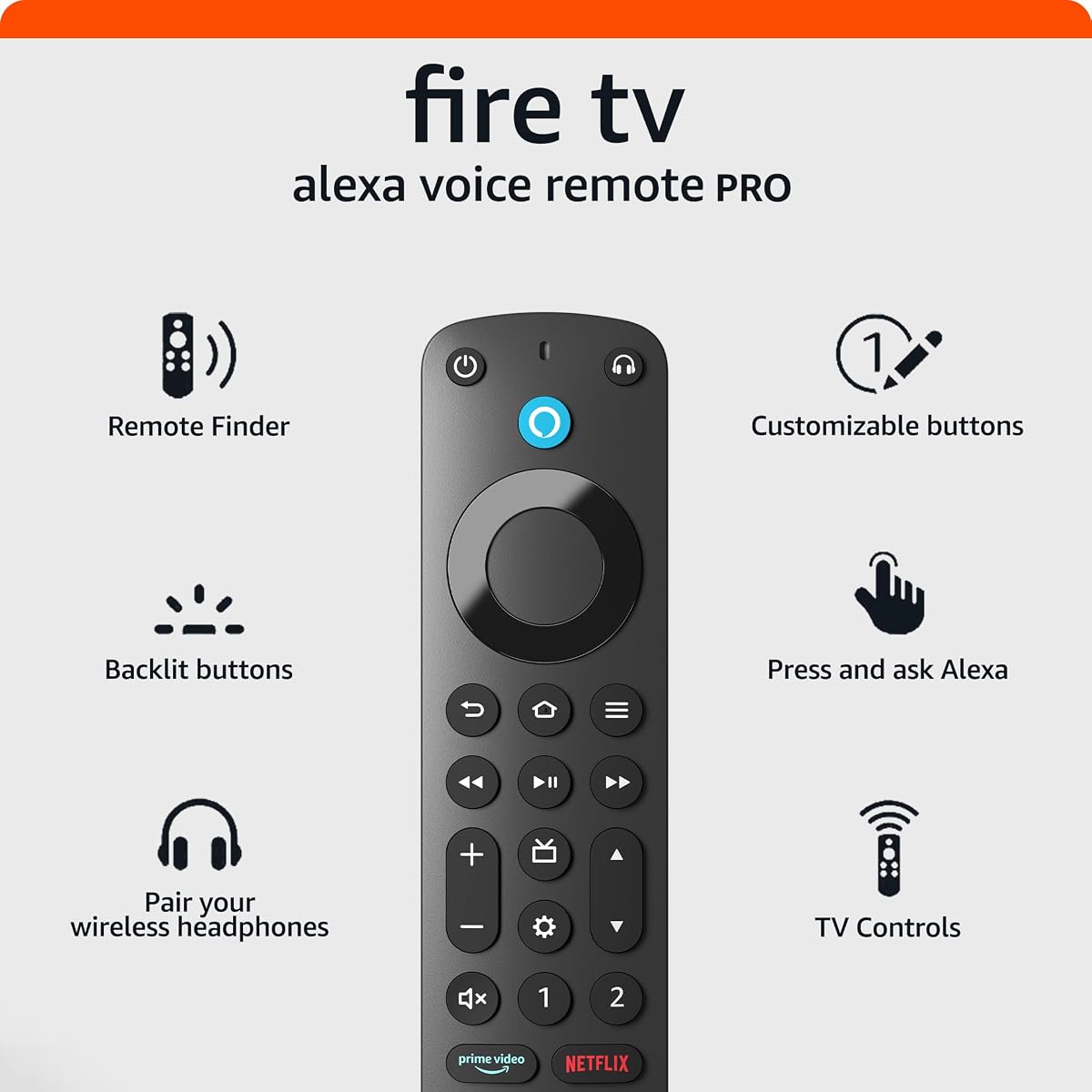
This premium replacement remote offers the most advanced features available for Fire TV users seeking a top-tier streaming experience. With a strong rating, it stands out for its motion-activated backlight and dedicated remote finder capabilities. The design prioritizes convenience and usability in dimly lit environments.
We may earn a commission when you buy through this link, at no additional cost to you.
The standout feature is the motion-activated backlight that illuminates buttons when you pick it up, making navigation easier at night. Additionally, the remote finder function allows you to locate the device using Alexa or the Fire TV app if it gets lost in your couch cushions. Two customizable buttons let you create shortcuts for your favorite apps.
While the functionality is excellent, the price is higher than third-party alternatives. It also has compatibility restrictions excluding older Fire TV generations. However, the improved user experience and convenience features justify the investment for users with compatible newer devices.
Buy this if you value premium features like backlighting and remote finding. It is ideal for users who want the official Amazon experience with enhanced functionality for modern Fire TV streaming media players and smart TVs.
The motion-activated backlight ensures you can navigate menus without needing a light source, perfect for late-night streaming.
Customizable buttons allow instant access to apps, reducing navigation steps and streamlining your daily viewing routine.
We may earn a commission when you buy through this link, at no additional cost to you.
This replacement remote delivers essential functionality at an accessible price point, making it an ideal choice for budget-conscious buyers. It supports voice control and works with a wide range of Fire TV Stick and Cube models. Users appreciate its straightforward pairing process.
We may earn a commission when you buy through this link, at no additional cost to you.
Key strengths include compatibility with Fire TV Stick 4K Max, 4K, and Lite versions. The voice control feature allows hands-free content searching and smart home management. It also supports standard navigation for quick scene jumping. The remote includes a user manual to guide setup.
However, the build quality is not as robust as premium options. Voice activation might require following instructions carefully to ensure proper pairing. These trade-offs are acceptable given the low cost and reliable basic performance for everyday streaming tasks.
Choose this remote if you need a reliable replacement without spending much. It fits users with compatible Fire devices looking for core features like voice search and standard playback controls.
Supports multiple generations of Fire TV Stick and Cube, ensuring broad usability across different streaming devices.
Voice function enables easy content searching and device control without typing or navigating complex menus manually.
We may earn a commission when you buy through this link, at no additional cost to you.
This replacement remote balances affordability with essential features like voice control and broad compatibility with Fire Stick and Cube devices. It is designed to work seamlessly with smart TVs and various Fire TV generations. Users value its straightforward setup.
We may earn a commission when you buy through this link, at no additional cost to you.
The remote supports 4K Max, 4K, and Lite models. Its voice function helps find content quickly and control smart home devices. It also integrates with Omni and Toshiba smart TVs. The package includes a user manual for pairing guidance.
Limitations include lack of support for older 1st Gen devices and the need for separate AAA batteries. Despite these constraints, the remote offers solid performance for most users seeking a functional replacement without premium extras.
Buy this remote if you want a reliable voice-enabled option at a fair price. It suits users with compatible Fire TV devices who need hands-free control and basic smart TV integration.
Works with Fire Stick 4K, Cube, and various smart TV brands, ensuring flexibility for different streaming setups.
Hands-free content discovery allows quick access to shows and apps using simple voice prompts for convenience.
We may earn a commission when you buy through this link, at no additional cost to you.
This replacement remote offers versatile shortcut options and strong compatibility with Fire TV Stick and Cube models. It features customizable buttons that streamline access to favorite apps. Users appreciate its support for smart TV models from Insignia and Amazon.
We may earn a commission when you buy through this link, at no additional cost to you.
Key strengths include four shortcut buttons and two customizable buttons for instant access. Voice control helps launch content and navigate menus. It supports Fire TV Stick 4K Max and Cube 1st and 2nd Gen. The voice activation requires following the manual.
Trade-offs include incompatibility with Roku devices and potential voice setup challenges. However, the customization options and wide compatibility make it a strong contender for users seeking convenience and app accessibility.
Choose this remote if you prioritize app shortcuts and customization. It fits users with compatible Fire devices who want to reduce navigation steps and access content quickly.
Customizable buttons allow personalized shortcuts to apps, enhancing convenience and reducing time spent navigating menus.
Compatible with a wide range of Fire TV devices and smart TVs, ensuring usability across different streaming environments.
We may earn a commission when you buy through this link, at no additional cost to you.
This remote provides a long operating range and robust voice functionality for Fire TV Stick users. It includes four shortcut buttons and a 60-day satisfaction guarantee. Users appreciate its compatibility with Fire TV Cube and smart TV brands.
We may earn a commission when you buy through this link, at no additional cost to you.
Key features include precise control from up to 12 meters and built-in voice commands. It supports Fire TV Stick Select, Plus, and Max models. The shortcut buttons speed up app access. Pairing requires disconnecting power for 15 seconds.
Limitations include the need to manually pair voice functions and incompatibility with older devices. However, the range and support guarantee offer peace of mind. These trade-offs are acceptable for users seeking reliable remote operation.
Buy this remote if you need extended range and assurance of product satisfaction. It suits users with compatible Fire devices wanting strong performance and support.
Control your device from up to 12 meters, allowing flexibility in seating arrangements and room layouts.
60-day satisfaction guarantee provides confidence in your purchase, ensuring support if issues arise after setup.
We may earn a commission when you buy through this link, at no additional cost to you.
This remote simplifies setup with automatic syncing capabilities for Fire TV Stick and Cube. It includes four pre-programmed buttons and voice control features. Users like its seamless integration with smart TVs like Insignia and Toshiba.
We may earn a commission when you buy through this link, at no additional cost to you.
Key strengths include auto-sync without complex configuration and voice control for content search. It supports Fire TV Stick 4K Max and Lite versions. The pre-programmed buttons offer instant access to popular apps. Setup just requires installing batteries.
Trade-offs include lack of included batteries and incompatibility with soundbars. Despite these minor issues, the auto-sync feature makes it user-friendly. It fits users seeking a straightforward replacement remote with essential voice functions.
Choose this remote if you want a hassle-free pairing experience. It suits users with compatible Fire devices who value automatic syncing and basic smart TV compatibility.
Automatic syncing eliminates manual pairing steps, allowing quick setup right after inserting batteries.
Pre-programmed buttons provide direct access to apps, reducing the need for multiple menu navigations.
We may earn a commission when you buy through this link, at no additional cost to you.
This remote targets Fire smart TV owners with compatible voice control and broad Fire Series support. It offers reliable voice control for searching and smart home management. Users value its simplicity and quick LED-based pairing process.
We may earn a commission when you buy through this link, at no additional cost to you.
Key features include compatibility with Fire TV 3rd Gen and Cube models. The voice function allows hands-free control of content and compatible smart home devices. LED indicators simplify the pairing process. It includes a user manual for guidance.
Limitations include lack of support for 1st Gen TVs and separate battery purchase. However, its focus on Fire smart TVs ensures tailored performance. These trade-offs are acceptable for users owning compatible smart devices.
Buy this remote if you have a Fire TV smart TV. It suits users needing a replacement with direct voice controls and straightforward setup.
Designed specifically for Fire smart TVs, ensuring optimal integration and feature availability.
LED indicator pairing makes the setup process transparent and easy to follow for all users.
We may earn a commission when you buy through this link, at no additional cost to you.
As an official Amazon product, this remote ensures reliable compatibility with most Fire TV devices. It includes 2 AAA batteries and preset app buttons. Users appreciate its guide button and dedicated TV controls for power and volume.
We may earn a commission when you buy through this link, at no additional cost to you.
Key features include compatibility with Fire TV Stick 3rd Gen and Cube 2nd Gen. The guide button shows live TV listings. It also offers direct TV power and volume controls. The remote comes ready to use with batteries included.
Trade-offs include higher cost and incompatibility with older generations. However, the official support and battery inclusion add value. These trade-offs are acceptable for users wanting guaranteed compatibility and quality.
Choose this remote if you prioritize official support and included accessories. It suits users with compatible Fire devices wanting a reliable, ready-to-use replacement.
Included batteries mean you can start using the remote immediately after pairing without extra purchases.
Guide button provides quick access to channel listings, improving the live TV viewing experience.
We may earn a commission when you buy through this link, at no additional cost to you.
This remote offers straightforward pairing and solid voice functionality for Fire TV devices. Users appreciate the clear LED indicator during setup. It supports Fire TV Cube and smart TVs with 3rd Gen compatibility.
We may earn a commission when you buy through this link, at no additional cost to you.
Key strengths include voice commands for easy navigation and standard playback controls. It supports TV Stick Lite and 4K models. The LED indicator ensures you know when pairing is successful. Manual matching is required but simple.
Limitations include lack of included batteries and need to manually pair. However, the simple setup and voice features work well for daily use. These trade-offs are acceptable for users seeking budget reliability.
Buy this remote if you need a simple pairing experience. It suits users with compatible Fire devices wanting voice control without complex setup.
LED indicator provides clear visual confirmation during pairing, ensuring you know when the remote is connected.
Voice commands simplify searching and launching, making daily use intuitive and efficient for all users.
We may earn a commission when you buy through this link, at no additional cost to you.
This remote emphasizes quick app access with 4 dedicated shortcut buttons and voice support. It works well with Fire TV Cube and various smart TVs. Users appreciate its compatibility with Hisense and Insignia models.
We may earn a commission when you buy through this link, at no additional cost to you.
Key features include preset app buttons for instant access and voice commands for content. It supports Fire Stick 4K Max and Lite versions. LED indicators help with pairing. It includes a user manual for guidance.
Trade-offs include incompatibility with Samsung TVs and need for careful pairing. However, the app shortcuts and voice control enhance usability. These trade-offs are acceptable for users seeking efficient streaming navigation.
Choose this remote if you prioritize quick app access. It suits users with compatible Fire devices wanting streamlined app launching and voice features.
Preset app buttons allow instant access to favorite services, saving time and effort in daily streaming.
Compatible with multiple smart TV brands beyond Amazon, offering broader utility for mixed home setups.
We may earn a commission when you buy through this link, at no additional cost to you.
This remote offers extensive support and compatibility for Fire TV users. It includes 4 dedicated shortcut buttons and voice functions. Users value its support for Omni and Pioneer smart TVs. The dedicated support team adds reliability.
We may earn a commission when you buy through this link, at no additional cost to you.
Key features include compatibility with Fire TV Stick 4K and Lite. It offers 4 shortcut buttons for apps. The LED blinking indicates pairing status. Manual pairing is required but supported by clear instructions and dedicated support staff.
Limitations include lack of included batteries and incompatibility with older TVs. However, the support team and wide compatibility ensure satisfaction. These trade-offs are acceptable for users needing assistance during setup.
Buy this remote if you want reliable support. It suits users with compatible Fire devices who value accessible customer service and app shortcuts.
Dedicated support ensures help is available for any setup or compatibility issues, improving user confidence.
Supports multiple Fire TV models and brands, ensuring wide usability across different devices and TVs.
We may earn a commission when you buy through this link, at no additional cost to you.
Selecting the right replacement remote requires understanding your device model and desired features to ensure seamless integration and performance.
Ensure the remote supports your exact Fire TV Stick or Cube generation. Older 1st and 2nd Gen devices often require specific models while newer remotes may not work with them. Check the product description carefully to confirm your device matches the listed compatible models.
Always verify compatibility before purchasing to avoid returns and ensure your replacement remote will function correctly with your streaming setup.
Voice control allows hands-free searching and smart home management. Look for remotes with built-in microphones and clear voice activation. Ensure voice commands work with your specific Fire TV device to enable intuitive content discovery.
Prioritize voice-enabled remotes if you want to streamline your streaming experience with simple voice commands for apps and content.
Many replacement remotes do not include batteries so check if AAA batteries are required. Some official Amazon remotes include batteries while third-party options often do not. Factor in the cost of separate batteries when comparing total prices.
Check if batteries are included to avoid unexpected costs and ensure you have power sources ready upon delivery.
Shortcut buttons allow one-tap access to favorite apps and channels. Look for remotes with customizable or preset shortcuts like Netflix or Prime Video. These buttons reduce navigation steps and improve daily streaming convenience.
Choose remotes with shortcut buttons if you want faster access to your most-used streaming services and apps.
Remotes with TV controls manage power volume and mute directly. This feature eliminates the need for a separate TV remote and simplifies your setup. Ensure compatibility with your TV brand for reliable volume and power control.
Prioritize remotes with integrated TV controls to consolidate device management and reduce clutter in your living space.
Durability affects how long your remote will last with daily use. Look for remotes made with sturdy plastics and reliable button mechanisms. Higher quality build ensures consistent performance and reduces wear and tear over time.
Invest in remotes with solid build quality to ensure reliable operation and longevity for your streaming device.
Easy pairing ensures quick setup without technical hassles. Many remotes require disconnecting power and holding buttons to initiate pairing. Follow the included instructions carefully to connect the remote successfully with your Fire device.
Look for remotes with straightforward pairing instructions to minimize setup time and frustration when you receive your device.
Compare prices against features like backlighting and remote finding. Premium remotes may cost more but offer enhanced convenience features. Balance budget constraints with the specific features you need for your daily streaming habits.
Evaluate whether premium features justify higher costs based on your personal usage needs and streaming preferences.
Begin by inserting two AAA batteries into the battery compartment at the back of the remote. Ensure the batteries are properly aligned according to the polarity markings. Replace batteries when the LED indicator blinks weakly or buttons stop responding.
Pair the remote by disconnecting your Fire TV Stick power for fifteen seconds. Reconnect power and hold the Home button for ten to fifteen seconds until the LED flashes amber rapidly. Wait thirty to sixty seconds for automatic pairing to complete.
Clean the remote surface with a dry soft cloth regularly. Avoid using chemical cleaners that may damage the plastic or buttons. Store the remote in a dry place away from direct sunlight and heat sources to maintain its condition.
Check your Fire TV device model number in the settings menu. Compare this with the compatible models listed in the product description. Ensure the remote explicitly supports your generation such as 3rd Gen Stick or 2nd Gen Cube before ordering.
Most modern replacement remotes support voice control but some budget models may lack this feature. Verify that the remote includes a built-in microphone and supports Alexa commands in its specifications before purchasing.
Almost all Fire Stick Replacement Remotes require two AAA batteries. These are typically not included in the package unless specified. Purchase high-quality AAA batteries to ensure reliable performance and longer usage times.
Ensure your old remote batteries are removed to prevent interference. Disconnect Fire TV power for at least fifteen seconds. Hold the Home button for fifteen seconds until the LED flashes amber rapidly. Recheck your model compatibility if pairing fails.
Remotes with TV controls can manage power volume and mute on compatible TVs. Check if the remote supports your specific TV brand and HDMI-CEC protocols. Some remotes may not control power for all TV models.
Official remotes often include batteries and offer guaranteed compatibility but cost more. Third-party remotes are cheaper and may offer more customization but require careful compatibility checks. Official remotes usually have better build quality.
Follow the pairing steps and then hold the voice button when prompted by your device. Some remotes require enabling voice services in the Fire TV settings menu. Ensure internet connection is active for voice commands to work properly.
Many sellers offer limited warranties or satisfaction guarantees on replacement remotes. Official Amazon products typically include standard manufacturer warranties. Check the product details for specific warranty terms and return policies before buying.
Choosing the right Fire Stick Replacement Remote depends on your specific device model and desired features. The top picks range from premium options with backlighting to budget-friendly remotes with essential voice functions. Each listed remote offers distinct benefits tailored to different streaming needs.
Prioritize compatibility and voice control capabilities when selecting your replacement remote. Additional features like shortcut buttons and TV controls can enhance your viewing experience significantly. Consider how often you use voice commands or quick app access to guide your choice.
Always verify your current device model before purchasing to ensure seamless integration. Prices and availability may vary so check the latest offers on the product pages. Select the remote that best matches your streaming habits and technical requirements.