
ACEMAX 4K@60Hz Offline Media Player with HDD Enclosure
3.5Editor score
2-in-1 media player and enclosure
Supports 4K@60Hz output
Auto play and loop features
This guide compares the top external hard drive media players for 4K playback, digital signage, and home entertainment to help you choose the right device.
Choosing the right external hard drive media player can transform your viewing experience by allowing you to play high-resolution files directly from storage without streaming. These devices bridge the gap between local storage and your display, offering support for various formats and codecs.
We evaluated ten leading models based on playback quality, format support, connectivity options, and ease of use. Our analysis focused on real-world performance for home theaters, offices, and commercial signage applications to ensure you find a reliable solution.
Each pick highlights specific strengths like 4K output, HDD enclosure integration, or digital signage features. Note that availability and pricing may vary over time, so always check the latest details before making your final decision for your setup.
3.5Editor score

4.1Editor score

5.0Editor score
This side-by-side comparison highlights the key specifications and capabilities of each model to help you decide which device best fits your storage and display needs.



The Micca 4K Ultra-HD stands out as a reliable choice for users seeking a straightforward way to play local media files on their television. With a rating of 4.1 stars, it offers solid performance for home entertainment and digital signage applications alike.
We may earn a commission when you buy through this link, at no additional cost to you.
Its ability to handle 4K content via HDMI ensures sharp visuals, while the dual USB and MicroSD readers provide versatile connectivity. You can connect drives up to 8TB and enjoy smooth playback of various video codecs including H.265.
While the interface is simple, it may lack advanced customization options for power users. Additionally, using the standard remote requires line of sight, though wireless air mouse options can bypass this limitation effectively.
This player is ideal for anyone wanting to turn any TV into a smart media hub without complex setups. It balances performance and ease of use well, making it a top recommendation for general household use.
The dual USB ports and MicroSD slot allow you to connect multiple storage types easily, ensuring you can access your media library regardless of how files are stored.
Features like automatic playback, looping, and resume functionality make this device suitable for professional displays in restaurants or lobbies where unattended operation is key.
We may earn a commission when you buy through this link, at no additional cost to you.
Designed for mobility, this mini media player fits easily in your hand and is perfect for travelers who want to watch their own movies on different TVs. Its aluminum alloy body ensures it stays protected during transit.
We may earn a commission when you buy through this link, at no additional cost to you.
It supports a wide range of video formats and offers both HDMI and AV outputs, making it compatible with older analog televisions as well as modern ones. You can connect drives up to 8TB for ample storage.
The main limitation is its maximum resolution of 1080p, which may not satisfy those looking for 4K clarity. Additionally, file management on the drive requires specific partitioning to work correctly with the device.
For frequent travelers or those with older TV setups, this player provides a reliable and durable solution. It excels in portability and format compatibility, making it a strong budget-friendly option for general viewing.
The small form factor allows you to slip it into a pocket or bag, ensuring you can enjoy your media library wherever you go without carrying bulky equipment.
Inclusion of an AV cable means you can still use this device with older televisions, extending the life of your existing hardware while enjoying digital playback features.
We may earn a commission when you buy through this link, at no additional cost to you.
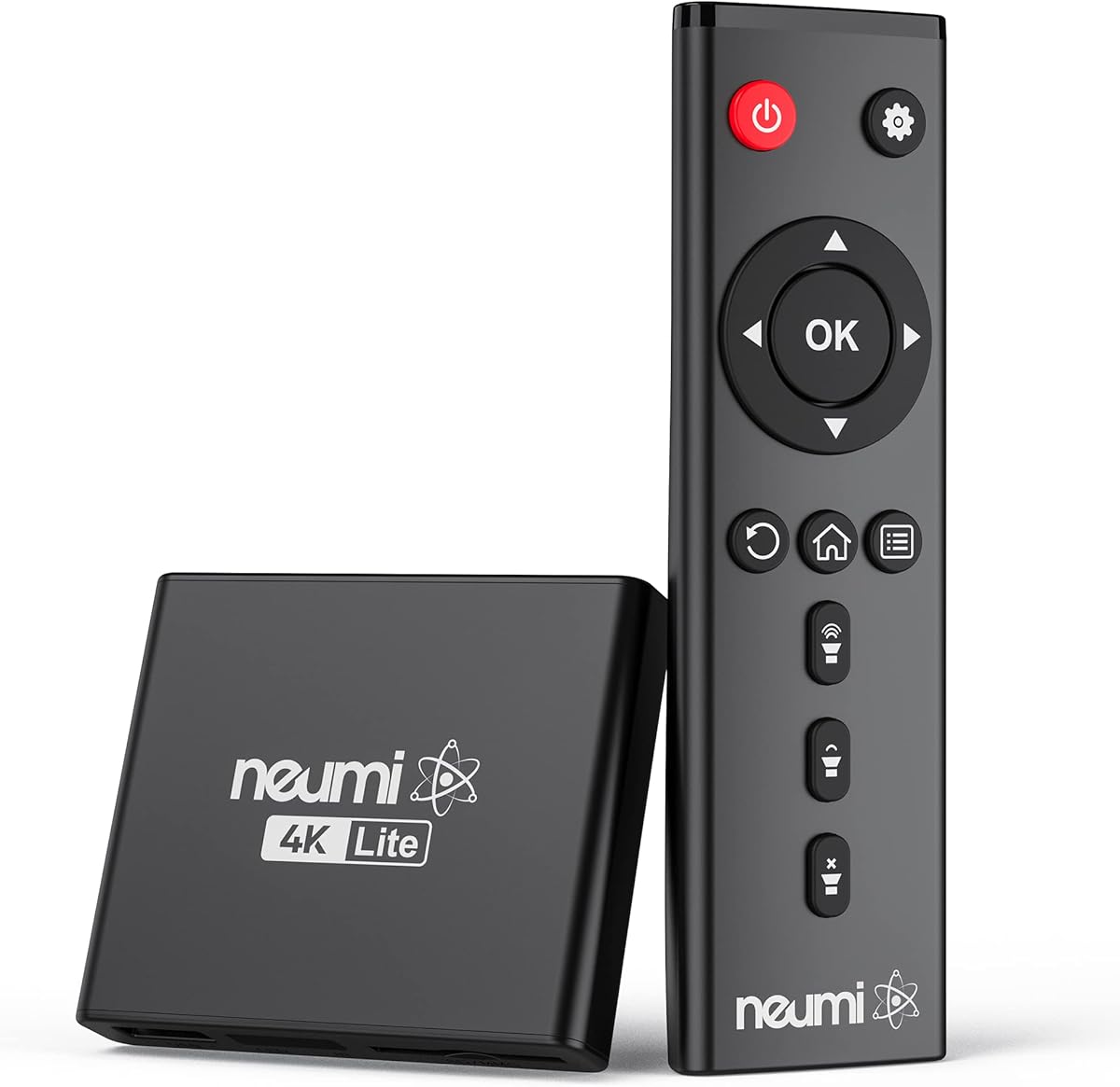
The NEUMI Atom 4K Lite is designed for users who want simple, powerful playback in a compact package. With a rating of 4.3 stars, it delivers smooth video performance and unique interactive features for signage.
We may earn a commission when you buy through this link, at no additional cost to you.
Its standout feature is the trigger sensor input, which allows videos to play automatically when motion or a button is detected. This makes it perfect for museums, art galleries, or automated home displays.
While it handles 4K content well and supports popular codecs, the interactive features require purchasing optional sensors separately. The interface is basic, which might not appeal to those wanting deep customization.
If you need a small device for an interactive display or a simple way to play 4K files, this model is an excellent choice. It balances functionality with size, fitting easily behind any monitor or TV.
The trigger input enables automated playback events, allowing you to create engaging experiences where content starts only when someone approaches the display.
Smaller than a deck of cards, the Atom 4K Lite remains discreet when placed behind a TV, ensuring it does not interfere with your aesthetic setup.
We may earn a commission when you buy through this link, at no additional cost to you.
For users on a budget looking for combined storage and playback solutions, this ACEMAX model offers a 2-in-1 design. It combines a media player with a hard drive enclosure, saving space and cost.
We may earn a commission when you buy through this link, at no additional cost to you.
It supports 4K@60Hz output and includes an aluminum enclosure to help dissipate heat during long playback sessions. The device is ready for offline media, meaning no internet connection is needed for streaming.
However, users may need to reformat hard drives to ensure compatibility, and the overall rating is lower than some other options. It requires careful setup to avoid recognition issues with certain drives.
If you need a cost-effective way to store and play large files directly without extra adapters, this is a practical choice. It is best suited for those comfortable with basic drive management tasks.
The integrated enclosure means you can install a drive inside and connect directly to the player, simplifying the setup process for digital signage or personal libraries.
By focusing on local playback, this device ensures reliable operation even without network access, making it ideal for secure or isolated environments.
We may earn a commission when you buy through this link, at no additional cost to you.
This media player excels in audio quality, supporting up to 7.1 surround sound and optical output for high fidelity listening. It is a great option for home theaters where sound matters as much as video.
We may earn a commission when you buy through this link, at no additional cost to you.
It includes dual USB ports, though it can read only one at a time, and supports various formats including PPT documents for business presentations. The H.265 decoding ensures efficient file playback with less buffering.
One limitation is the maximum refresh rate of 30Hz for 4K, which might not be ideal for fast motion content. Additionally, you cannot connect two drives simultaneously to switch between them easily.
For those prioritizing audio performance and presentation capabilities, this device stands out. It offers strong connectivity and format support, making it versatile for both entertainment and professional use.
With optical and AV outputs plus surround sound decoding, you can connect high-quality speakers or receivers to enjoy cinema-like audio from your local files.
Support for PPT files allows you to display slides directly from a USB drive, making this player useful for business meetings or educational sessions.
We may earn a commission when you buy through this link, at no additional cost to you.
This player is noted for its ability to handle Blu ray 4K file structures, allowing direct playback of high-quality rips without conversion. It offers a good range of output options including HDMI and optical.
We may earn a commission when you buy through this link, at no additional cost to you.
It supports a wide array of video and audio formats, making it flexible for various media collections. The HUB connectivity allows you to add peripherals like a mouse or keyboard for easier navigation.
To work correctly with Blu ray files, content must be placed in the first file directory, which can be a slight inconvenience. The remote is standard and may require line of sight for operation.
If you have a library of high-resolution Blu ray rips and want a cost-effective way to play them, this model is a strong contender. It balances format support and connectivity well for the price.
The device supports direct decoding of Blu ray disc file structures, meaning you can play high-quality content without the need for file conversion or re-encoding.
Adding a USB hub allows you to connect a mouse or keyboard, making menu navigation and file browsing much smoother than using a remote alone.
We may earn a commission when you buy through this link, at no additional cost to you.
While not a player itself, this WD Elements drive is a popular companion for media players due to its reliability and plug-and-play functionality. It works seamlessly with many USB media players for local storage.
We may earn a commission when you buy through this link, at no additional cost to you.
The drive offers high capacity options and fast USB 3.2 transfer speeds, making it easy to move large 4K video files. It supports both Windows and Mac systems without requiring additional software.
It is essential to note that this device requires a separate media player to function as a source. However, its robust build and broad compatibility make it a trusted choice for storage needs.
For users needing a reliable drive to store movies and music for their media player, this model is an excellent option. It provides the necessary capacity and speed without complicating your setup.
This drive works with both Windows and Mac, allowing you to prepare files on one system and plug into a media player without format conversion issues.
No special drivers are needed to get started, ensuring you can connect it to your player and begin watching content almost immediately.
We may earn a commission when you buy through this link, at no additional cost to you.
This model stands out with a perfect 5.0 rating, reflecting strong user satisfaction with its reliability and features. It combines a media player with a 2.5-inch HDD enclosure for a streamlined setup.
We may earn a commission when you buy through this link, at no additional cost to you.
The inclusion of a Type-C cable allows easy data transfer to laptops, and it supports MAC-formatted drives which is rare in budget players. The 2-in-1 design reduces clutter on your desk or entertainment center.
It is a premium option compared to cheaper alternatives, and you must purchase the drive separately. However, the performance and ease of data management justify the extra cost for many users.
If you want a highly rated device that handles both storage and playback efficiently, this is a top choice. It is ideal for users seeking a polished experience without compromising on connectivity or format support.
Few players support MAC-formatted drives natively, making this a convenient choice for Mac users who want to plug in their external storage directly.
The included Type-C cable ensures modern connectivity, allowing you to quickly transfer files between your computer and the player's internal enclosure.
We may earn a commission when you buy through this link, at no additional cost to you.
Offering a mix of affordability and integrated storage capabilities, this player supports 4K@60Hz and includes a Type-C cable for data transfer. It is a solid option for those who want a built-in enclosure.
We may earn a commission when you buy through this link, at no additional cost to you.
It includes a one-year warranty and supports various file systems, making it versatile for different types of drives. The 200Mbps data rate ensures smooth playback of high-bitrate 4K content.
User reviews are mixed, with some reporting setup complexities regarding drive recognition. However, for the price, the feature set remains competitive with more expensive models.
If you are looking for a budget-friendly way to integrate storage and playback, this model offers good value. It is suitable for users willing to spend a little time on initial setup for better long-term results.
The included Type-C cable supports fast data speeds, making it easier to move large video files between your computer and the player enclosure.
A one-year warranty provides peace of mind, protecting your investment in case of hardware issues or failures during normal use.
We may earn a commission when you buy through this link, at no additional cost to you.
This device offers unique video rotation features, allowing you to turn your display by 90, 180, or 270 degrees to suit vertical signage needs. It is designed with digital signage in mind.
We may earn a commission when you buy through this link, at no additional cost to you.
It supports large USB drives and MicroSD cards, making it easy to load content on various media. The compact design ensures it can be mounted discreetly behind screens for professional presentations.
User ratings are lower than other models, suggesting potential reliability or feature limitations. It may lack the polish of higher-end devices, but it covers basic playback needs well.
For businesses needing vertical displays or simple playback solutions on a budget, this player is a functional option. It provides essential features without extra complexity, fitting into tight spaces easily.
Configurable video rotation allows you to mount screens vertically without rotating the physical display, ideal for digital signage in tight spaces.
The inclusion of a MicroSD card slot gives you flexibility in how you load content, allowing for small footprint storage options.
We may earn a commission when you buy through this link, at no additional cost to you.
Selecting the right media player depends on your display needs, storage capacity, and desired features. Use this guide to understand the key factors that affect performance and compatibility.
Ensure the player supports the resolution of your display, such as 4K at 60Hz for smooth motion. Some budget models may be limited to 1080p or 30Hz, which affects visual quality.
Look for H.265/HEVC support to ensure you can play modern high-bitrate files without buffering.
Check how large of a hard drive or USB stick the device can support. Many models handle up to 8TB, which is crucial for large media libraries.
Verify file system compatibility like NTFS or exFAT to ensure you can read your existing drives without formatting issues.
If you plan to use the player for commercial displays, look for auto-play, loop, and resume features. These allow unattended operation and continuous content cycling.
Consider players with trigger inputs for interactive displays where content starts only when motion is detected.
Evaluate the available ports such as HDMI, AV, and optical audio. Some models offer VGA or multiple USB ports for greater flexibility.
Check if the device supports wireless remotes or USB keyboards for easier navigation in complex setups.
Some players include a hard drive enclosure, which simplifies setup and saves space. Look for metal housings that help dissipate heat during long playback sessions.
Ensure the power supply is stable and the unit does not require additional adapters for your region or device.
A simple interface with intuitive menus is key for daily use. Complex setups may require technical knowledge to configure file structures or drive formats.
Look for plug-and-play capabilities that allow you to connect your drive and start watching immediately.
If sound quality matters, choose a player with optical or HDMI audio pass-through. This ensures your surround sound system gets the best signal possible.
Check support for codecs like Dolby or DTS to avoid silent or distorted audio playback.
A warranty provides peace of mind, especially for hardware that will be running for long periods. Check if the manufacturer offers responsive support for technical issues.
Read user reviews to gauge long-term reliability and whether the device is prone to common failure points.
To get started, connect the media player to your TV using an HDMI cable and power it on. Insert your USB drive or SD card into the designated port and wait for the device to recognize the files.
Use the remote control to navigate the file menu and select the content you want to play. Adjust settings like aspect ratio or audio output if needed to match your display and sound system.
Regularly keep the device and its ports clean from dust to prevent connection issues. If the player overheats, ensure it is in a well-ventilated area or consider a fan for longer playback sessions.
Yes, most modern media players support 4K playback if you have a hard drive formatted correctly. Ensure your player supports the H.265 codec and your files are stored in a supported file system like NTFS.
Not all players support MAC-formatted drives natively. Some models like the 4K@60Hz H.265 support them, while others may require reformatting to exFAT for compatibility.
Many of the players in this guide support up to 8TB external hard drives. This ensures you can store large collections of high-resolution videos without worrying about storage limits.
Yes, several models feature auto-play and loop functions designed specifically for digital signage. You can set them to run content continuously for restaurants or offices without manual intervention.
While most come with a remote, some players support USB mice or keyboards for easier navigation. Wireless air mouse remotes can also be used for non-line-of-sight control in some cases.
Some players include AV outputs that connect to older analog TVs via composite cables. However, the video quality may be limited to standard definition depending on the model.
No, these devices are designed for offline local playback. There are no monthly subscription fees or streaming service costs associated with using them to play your own media files.
For best compatibility, format your drive using a computer to exFAT or NTFS. Ensure the file structure is simple, with content at the root level to avoid navigation issues on the player.
Our top picks like the Micca 4K Ultra-HD and NEUMI Atom 4K Lite offer excellent balance for home and commercial use. They provide reliable 4K playback and essential features for most users.
When choosing, prioritize your specific needs such as resolution, storage capacity, and ease of use. Consider whether you need built-in storage or just a simple way to play files from a drive.
Always check the latest availability and details before making your purchase to ensure the best fit for your current setup. Prices and stock may vary, so acting quickly ensures you get the right device.