
EPOMAKER x Aula F75 MAX Wireless Mechanical Keyboard with TFT Screen and Knob
4.6Editor score
Compact 75 percent layout
Gasket mount structure
Customizable RGB backlight
Discover the top Epomaker keyboards for gaming and work with detailed comparisons of features, wireless connectivity, and customizable options.
Finding the right mechanical keyboard can transform your daily computing experience significantly. Epomaker offers a diverse range of options tailored for gamers and professionals alike.
This guide compares ten standout models based on build quality, connectivity features, and user feedback. We analyzed specifications like battery life, switch types, and layout preferences to help you decide.
Each pick highlights unique strengths to match specific needs whether you prioritize sound or compact design. Please note that pricing fluctuates so always verify current rates before purchasing.
4.6Editor score
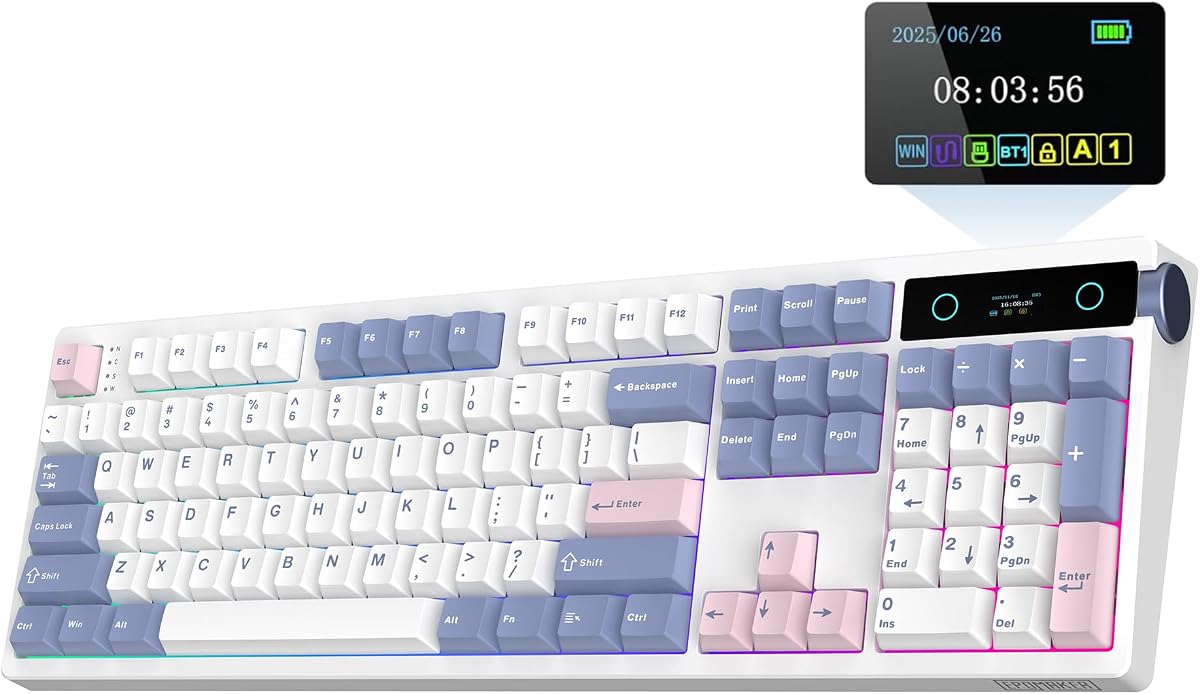
4.7Editor score
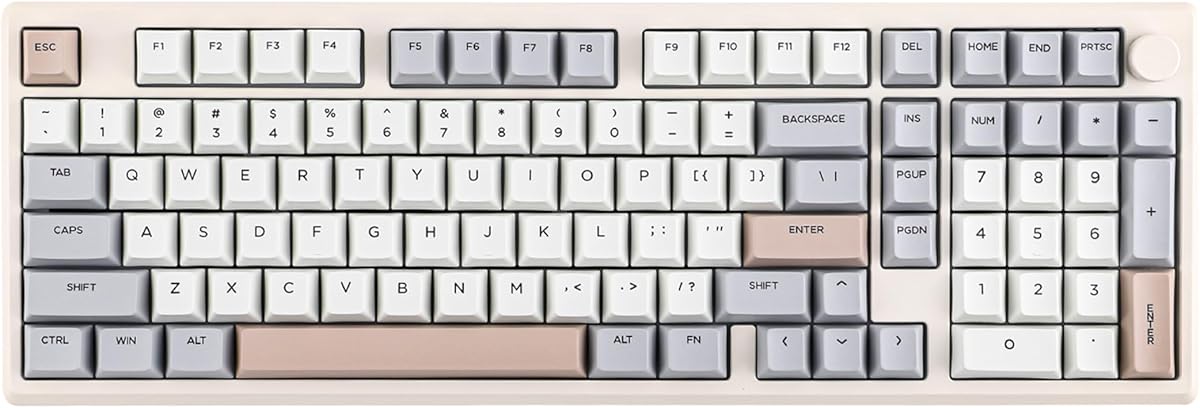
4.5Editor score
The following table offers a side-by-side view of key specifications across all ten models to help you quickly identify the right fit for your setup.


The TH108 PRO stands out as the most comprehensive offering in the lineup with its full-size layout and premium features. It achieves a high user rating thanks to its robust build and innovative smart screen.
We may earn a commission when you buy through this link, at no additional cost to you.
Key strengths include a massive 10000mAh battery that ensures weeks of use without recharging. The gasket mount design paired with five layers of foam provides a satisfyingly creamy acoustic profile that reduces typing fatigue.
While the keyboard is quite heavy which adds stability it might be difficult for frequent travelers. The large footprint requires ample desk space but this is a fair trade-off for the included numpad and media controls.
This model is ideal for users who want a do-it-all solution without sacrificing audio quality or battery endurance. It remains our top recommendation for general productivity and gaming on a dedicated desk setup.
The integrated screen allows users to display custom GIFs or real-time battery status adding a unique flair to the workspace.
With support for up to 200 hours of usage on a single charge this keyboard minimizes interruptions during long work or gaming sessions.
We may earn a commission when you buy through this link, at no additional cost to you.
The F75 MAX delivers premium features at a more accessible price point making it a strong contender for budget-conscious buyers. Its 75% layout strikes a balance between compactness and functionality.
We may earn a commission when you buy through this link, at no additional cost to you.
Users appreciate the TFT screen which adds personality to the desk while providing useful status updates. The gasket mount structure ensures a soft typing feel that competes with much more expensive boards.
The absence of a numpad may be a drawback for those who frequently input numbers. Additionally the battery life while sufficient is not as enduring as the full-sized models in the lineup.
We recommend this keyboard for gamers and typists who value desk space and sound quality over numeric entry. It is an excellent entry point into the world of custom mechanical keyboards.
The 75% layout retains essential function keys and arrow keys while freeing up significant room for mouse movement during gaming.
The TFT display lets you upload custom images and animations making your setup unique and engaging without breaking the bank.
We may earn a commission when you buy through this link, at no additional cost to you.
The Galaxy100 targets enthusiasts who demand deep customization and a premium build feel. Its aluminum shell and QMK/VIA support set it apart as a professional-grade tool for advanced users.
We may earn a commission when you buy through this link, at no additional cost to you.
The ability to remap keys and create complex macros via open-source software provides unparalleled flexibility. The gasket mount design combined with sound-dampening foam creates a refined acoustic experience that is both pleasant and precise.
The software interface might be intimidating for casual users who prefer plug-and-play simplicity. Furthermore the price is higher than other options which might not appeal to entry-level buyers.
This keyboard is perfect for power users and developers who need specific keymaps and a durable chassis. It justifies the cost with its long-term programmability and robust hardware construction.
Open-source firmware support allows you to create unlimited keymaps and macros tailored to specific workflows without needing manufacturer software.
The all-metal construction provides a stable and high-quality feel that resists flex and adds a touch of elegance to any desk setup.
We may earn a commission when you buy through this link, at no additional cost to you.
The TH108 V2 PRO refines the original model with added focus on multi-device compatibility and workflow efficiency. It is built to handle the needs of users who switch between PC and Mac frequently.
We may earn a commission when you buy through this link, at no additional cost to you.
Features like dedicated Mac modifier keys and quick switching shortcuts make it a versatile tool for hybrid work environments. The screen and knob remain useful for controlling volume and checking battery status without software.
While highly capable the reliance on software for deep customization might be a hurdle for those who prefer hardware-only adjustments. The lack of physical battery LEDs on the side is a minor omission given the digital screen.
This model is highly recommended for professionals who need a reliable main keyboard that adapts to different operating systems seamlessly. It balances gaming performance with office functionality very well.
Switch between up to three devices effortlessly using function keys allowing you to maintain productivity across PC Mac and mobile devices.
The upgraded firmware makes it easier to access settings and macros through the web-based driver ensuring smooth operation on all systems.
We may earn a commission when you buy through this link, at no additional cost to you.
The TH99 PRO offers a unique solution for gamers who need a numpad but still want to save desk space. Its 96% layout includes all necessary keys in a more condensed footprint.
We may earn a commission when you buy through this link, at no additional cost to you.
The inclusion of a smart screen and knob adds a layer of modern utility to a traditional layout. Users report that the acoustic profile is smooth and consistent thanks to the multi-layer sound dampening.
The unit is heavier than typical 96% keyboards due to the battery and internal structure which might limit portability. The screen is functional but small so complex GIFs may lose detail.
This keyboard is ideal for gamers who require number pad functionality for specific software or games but want to minimize mouse travel distance. It is a solid choice for those seeking efficiency.
The 96% layout keeps the arrow keys and numpad close together allowing for faster data entry and easier navigation during complex tasks.
With a 10000mAh battery you can enjoy days of use on a single charge even with RGB lighting enabled ensuring fewer interruptions.
We may earn a commission when you buy through this link, at no additional cost to you.
The TH108 focuses on core mechanical keyboard qualities without extra frills like a smart screen. It provides a robust typing experience driven by high-quality materials and a stable wireless system.
We may earn a commission when you buy through this link, at no additional cost to you.
The factory-lubed switches offer a consistent and smooth feel out of the box which is appreciated by many users. The PBT keycaps resist shine and wear ensuring the keyboard looks new for a long time.
It lacks the visual flair of models with screens which might be a downside for those who want a highly personalized desk aesthetic. The driver software is functional but less intuitive than web-based alternatives.
This model is a great choice for traditionalists who want a reliable and durable full-size keyboard. It serves well for both office work and gaming without requiring frequent maintenance.
Heavy-duty plastic construction and PBT keycaps ensure that this keyboard can withstand years of heavy daily use without significant wear.
The internal layering dampens hollow sounds effectively resulting in a deep thocky sound that is pleasing during long typing sessions.
We may earn a commission when you buy through this link, at no additional cost to you.
The G84 HE is a specialized tool designed for competitive gamers who need the fastest possible response times. Its Hall Effect technology allows for adjustable actuation which is rare in wireless keyboards.
We may earn a commission when you buy through this link, at no additional cost to you.
The 8K polling rate ensures that every keystroke is registered instantly giving players an edge in fast-paced games. The magnetic switches also offer a smoother travel experience without the friction of traditional mechanical switches.
Setting up the actuation points requires some time and technical knowledge which might not suit casual users. The higher price point reflects the specialized technology but may not be necessary for non-gamers.
This keyboard is the top pick for serious esports players or enthusiasts who want to experiment with custom actuation points. It represents the cutting edge of current mechanical keyboard technology.
Hall Effect switches use magnets to detect key presses eliminating physical contact and allowing for precise adjustment of actuation depth.
With an 8K polling rate the keyboard updates its status 8000 times per second ensuring zero input lag during critical gaming moments.
We may earn a commission when you buy through this link, at no additional cost to you.
The TH99 is designed to maximize productivity with a compact 96% layout that keeps number pad keys close to the main typing area. It is a practical tool for office environments.
We may earn a commission when you buy through this link, at no additional cost to you.
Users benefit from a long battery life that supports continuous work without frequent charging. The gasket mount provides a softer typing feel that reduces wrist fatigue during long shifts.
The keycaps are durable but might feel slightly less smooth compared to premium lubricated options. The lack of a display limits customization options for users who prefer visual feedback.
We recommend this model for professionals who need a reliable numpad keyboard that saves space. It is a cost-effective solution for daily data entry and general computing tasks.
By combining a numpad with a compact form factor the TH99 keeps your hands closer together improving typing speed and ergonomics.
An 8000mAh battery ensures weeks of productivity work on a single charge making it ideal for busy schedules away from a power outlet.
We may earn a commission when you buy through this link, at no additional cost to you.
The Ajazz AK820 Pro offers an affordable entry into the world of customizable keyboards with a functional screen and rotary knob. It balances features and price exceptionally well for budget shoppers.
We may earn a commission when you buy through this link, at no additional cost to you.
The gasket mount design is a premium feature often found in more expensive boards providing a satisfying typing feel. The screen allows for battery monitoring and simple visual customization which adds value.
The battery life is decent but requires more frequent charging compared to the larger models in this list. The RGB lighting is effective but lacks the complexity of dedicated software solutions.
This is an excellent choice for students or those seeking a feature-rich compact keyboard without spending too much. It proves you do not need a high budget to get a good typing experience.
The TFT screen provides a high level of visual customization at a price point that is accessible to most keyboard enthusiasts and casual users.
Its 75% layout is small enough to fit in a backpack making it a great option for students or professionals who work from multiple locations.
We may earn a commission when you buy through this link, at no additional cost to you.
The F99 combines a compact 96% layout with a large battery and hot-swap capability making it a versatile choice for travelers. It packs a lot of features into a portable package.
We may earn a commission when you buy through this link, at no additional cost to you.
The single-key slotted PCB enhances the typing feel by isolating each key switch reducing vibration and noise. This design choice results in a cleaner and more satisfying sound compared to standard PCBs.
It lacks a rotary knob or screen which limits the ways you can interact with the keyboard beyond typing. The software is functional but not as advanced as other models in the lineup.
This model is best for those who want a balance between portability and full-size functionality. It is a strong contender for anyone needing a reliable backup keyboard for travel.
The single-key slotted PCB design ensures that each key is individually cushioned improving the acoustic and tactile feedback of every keystroke.
Support for Bluetooth 2.4GHz and wired modes ensures you can connect to any device whether you are at a desk or on the go.
We may earn a commission when you buy through this link, at no additional cost to you.
Selecting the right keyboard depends on your specific needs regarding layout size features and budget.
Epomaker offers full-size 96% and 75% layouts. Full-size boards have a full numpad which is essential for data entry but take up more desk space. The 96% layout keeps the numpad but in a more compact form making it ideal for gamers who need mouse room. The 75% layout removes the numpad entirely for maximum portability and space efficiency.
Choose a layout that matches your workflow. If you rarely use numbers a 75% board will save space. If you need a numpad often look for 96% or full-size options.
The TH108 PRO and TH99 PRO offer hot-swappable switches allowing you to change mechanical switches without soldering. This lets you experiment with linear tactile or clicky switches to find your preferred feel. Most models come with factory-lubed switches for a smooth and quiet experience.
Consider your noise tolerance. Linear switches are generally quieter and smoother while tactile switches provide a bump. Hot-swap capabilities give you the flexibility to upgrade switches later.
All models support tri-mode connectivity allowing you to use Bluetooth 2.4GHz wireless or wired USB-C connections. This ensures compatibility with PCs Macs tablets and phones. Low latency modes are crucial for gaming to prevent lag during intense moments.
Check if the keyboard supports seamless device switching. This feature is helpful if you work across multiple devices and need to switch input sources quickly.
Battery capacity varies significantly across models. Larger keyboards like the TH108 PRO have 10000mAh batteries that can last for weeks. Compact models like the Ajazz AK820 Pro have smaller batteries around 4000mAh which may require more frequent charging.
For heavy users or those who forget to charge often prioritize a higher mAh rating. Ensure the keyboard supports efficient power management modes when RGB is turned off.
Many Epomaker keyboards feature PBT keycaps which are more durable and resistant to shine than ABS caps. Some premium models like the Galaxy100 use aluminum shells for a sturdier feel and better heat dissipation.
Look for a gasket mount design if you prefer a softer and more cushioned typing feel. This construction method isolates the PCB from the case to reduce noise and vibration.
Advanced users may prefer keyboards with QMK/VIA support like the Galaxy100 which allows for deep customization via open-source software. Others rely on browser-based drivers for remapping and macros which are easier to set up but less flexible.
If you plan to create complex macros or custom keymaps verify that the software supports your operating system. Windows and macOS compatibility is standard across most models.
Some models like the TH108 PRO and F75 MAX include smart screens and rotary knobs. These allow you to display time battery status or custom images adding a unique flair to your setup.
While these features are fun they are not essential. If you prioritize functionality over aesthetics you might save money by choosing a model without a screen.
Prices range from budget-friendly options like the Ajazz AK820 Pro to premium models like the Galaxy100. Determine your budget early to narrow down your options effectively.
Consider the long-term value. A keyboard with hot-swap switches and a durable build might cost more upfront but save money by allowing future upgrades.
To set up your keyboard connect it via USB-C or pair it through Bluetooth settings on your device. Press the shortcut keys like FN+Q or FN+W to toggle between connected devices efficiently.
Keep the keyboard clean by using a soft brush or compressed air to remove dust from between keycaps. Avoid using liquids directly on the device to prevent internal damage.
Charge the battery periodically even if you are not using it often to maintain battery health. Use the official USB-C cable for fastest charging and best performance results.
Yes most Epomaker keyboards support both Windows and Mac operating systems. They often include dedicated Mac modifier keys or a switch to toggle between modes for proper functionality.
Many models like the TH108 PRO and F99 feature hot-swappable PCBs. This allows you to replace switches without soldering giving you the freedom to customize the typing feel.
Battery life varies by model and usage. Larger models with 10000mAh batteries can last up to 200 hours with RGB off while smaller models may need charging every few weeks depending on settings.
Most models come with software or web-based drivers to remap keys and create macros. Advanced options like QMK/VIA support are available on specific models like the Galaxy100.
PBT keycaps are more durable resistant to shine and have a textured feel compared to ABS. Most Epomaker keyboards use PBT keycaps which ensures they look new for a longer period.
Many models include gasket mounting and sound dampening foam to reduce noise. Linear switches are generally quieter than clicky ones but no mechanical keyboard is completely silent during typing.
We have explored ten top models ranging from the feature-rich TH108 PRO to the compact F75 MAX. Each offers unique strengths tailored to specific user needs and preferences.
Prioritize features like battery life and layout based on your daily usage. Gamers might prefer wireless models with low latency while office users may value a numpad or ergonomic design.
Prices for keyboards and accessories change frequently so always check the latest rates on Amazon before making your final purchase decision to ensure the best value.