
DESOBRY Mini DVD Player for TV with HDMI, Region Free, 1080P Upscaling
4.2Editor score
Ultra Compact Design
Breakpoint Memory Function
HDMI and AV Output
Discover the top DVD players for projectors in October 2026. We compare ten models for upscaling, region freedom, and HDMI connectivity to enhance your home
Finding a reliable DVD player for projectors can transform your home entertainment experience into a cinematic journey. Modern projectors need high-quality video sources to display sharp images on large screens. Choosing the right player ensures your classic discs look their best.
We evaluated ten top-rated DVD players based on video upscaling, region compatibility, and connectivity options. Our analysis focuses on performance metrics like 1080p upscaling, HDMI output quality, and disc handling capabilities to help you make an informed decision.
Each selection in this guide highlights specific strengths like compact design or robust audio support. Please note that product availability and pricing fluctuate frequently. We recommend checking current listings before purchasing to ensure you get the best deal available today.
4.2Editor score

4.4Editor score

4.4Editor score
This comparison table provides a quick overview of key specifications across all ten selected DVD players. Use this side-by-side view to identify which model best matches your specific projector setup and media needs without scrolling through detailed reviews.




This GEGATEK model stands out as a top choice for projector setups due to its robust upscaling capabilities. With a solid 4.4 rating, users appreciate the clear picture quality it delivers on large screens. It bridges the gap between older DVD collections and modern display technology seamlessly.
We may earn a commission when you buy through this link, at no additional cost to you.
The standout feature is its ability to upscale standard definition content to 1080p using progressive scan technology. This ensures that your classic movies look crisp on projectors rather than pixelated. The region-free capability is another massive advantage, allowing playback of DVDs from anywhere in the world without restrictions.
While it lacks Blu-ray support, this unit excels at handling various disc formats like DVD+R and CD-RW. The USB port adds versatility by allowing you to play JPEG and MP3 files directly. However, users should note the USB drive limitation to FAT32 format which may require reformatting larger drives.
This player is ideal for families who have a large collection of DVDs and want to project them in high definition. The included HDMI cable simplifies setup with most modern projectors. For those seeking reliable performance without breaking the bank, this is a strong recommendation.
Advanced picture enhancement and progressive scan technology deliver a clearer viewing experience on large projector screens.
Play DVDs from all regions one to six and supports both PAL and NTSC video standards for worldwide compatibility.
We may earn a commission when you buy through this link, at no additional cost to you.
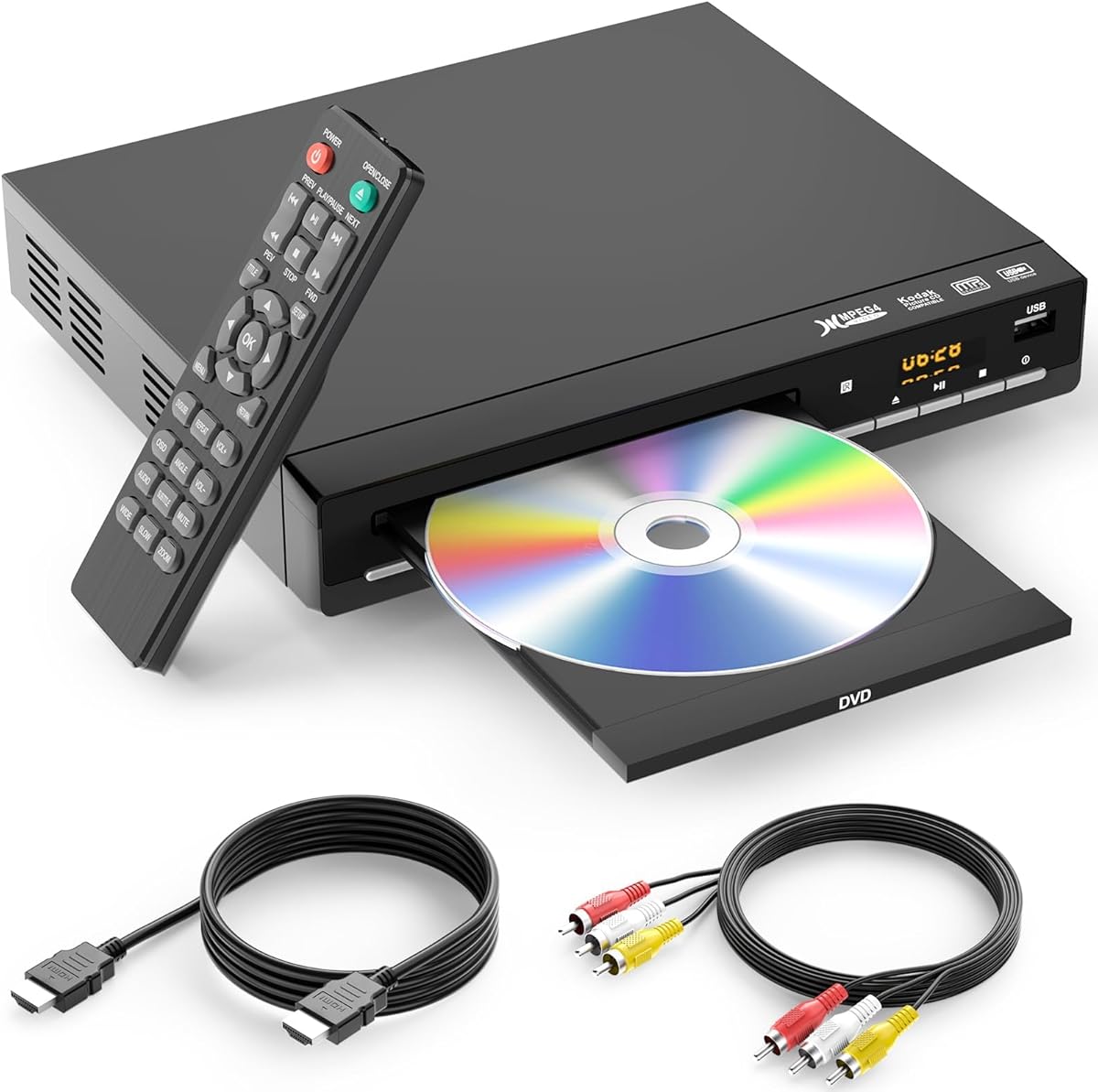
The DESOBRY Mini DVD Player is perfect for users with limited space who still want high-quality output for their projector. Its compact design measures only 6.1 inches wide, making it easy to hide behind a screen or on a small shelf. A 4.2 rating reflects its consistent performance in daily use.
We may earn a commission when you buy through this link, at no additional cost to you.
One key strength is the breakpoint memory function which saves your place when power is lost. This is incredibly useful for movies that are too long to watch in one sitting. The upgraded drive core ensures quick loading times and handles scratched discs better than older models.
Although it does not support Blu-ray discs, it covers all standard DVD formats including DVD±R and VCD. The full HD upscaling helps projectors display images with better clarity. Just ensure your USB drives are formatted to FAT32 to avoid playback issues.
For travelers or dorm students using portable projectors, this player is an excellent affordable option. It comes with all necessary cables including HDMI and RCA. The lifetime customer service promise adds peace of mind for budget-conscious buyers.
Breakpoint Memory function makes it always start from where it left off for convenient viewing sessions.
Only 6.1 by 5.9 by 1.2 inches save space and make it easy to carry on trips or to small rooms.
We may earn a commission when you buy through this link, at no additional cost to you.
Sony continues to be a leader in home entertainment with this versatile player. It supports both Blu-ray and DVD discs, giving you access to higher quality content for your projector. With a 4.3 rating, it is trusted for its reliability and sharp video output on big screens.
We may earn a commission when you buy through this link, at no additional cost to you.
The quick start mode allows the unit to boot up in less than a second, reducing wait time before you enjoy your film. Upscaling DVDs to near HD quality ensures that older discs look good alongside modern Blu-rays. The interface is designed to be simple for all users.
While it offers great performance, note that it is region locked for Blu-ray discs. If you have a mix of regions, this might be a limitation. However, the region one DVD support covers most North American releases. The included HDMI cord simplifies setup.
This model is suitable for households wanting to upgrade to Blu-ray content without replacing their projector. The combination of speed and quality makes it a solid investment. For those who value brand reliability and fast performance, this is a top tier choice.
Boot up in less than a second with super quick start mode for instant access to your media.
Upscale your DVDs to near HD quality for improved clarity on large projection screens.
We may earn a commission when you buy through this link, at no additional cost to you.
This model is designed to integrate seamlessly with modern setups including projectors and smart TVs. Its 1080P HD video output ensures that your movies look sharp on large displays. With a 4.1 rating, it offers reliable performance for everyday viewing needs without complicated features.
We may earn a commission when you buy through this link, at no additional cost to you.
The region free feature allows you to play discs from anywhere which is great for collectors. The LCD display provides clear information on track numbers and playback status. It handles a wide array of media formats from DVD to USB files with ease.
While it lacks Blu-ray support, it does well with standard DVDs and CDs. The fast loading speeds mean less waiting between titles. You get all necessary cables including HDMI and RCA which adds convenience to the packaging.
This player is a strong contender for those needing a simple and effective connection for their projector. The slim design fits easily into media cabinets. If you need a straightforward device to play DVDs on a big screen, this model delivers value.
This robust HDMI DVD player offers extensive compatibility and handles DVD and CD formats effortlessly.
A vibrant LCD screen shows status and playback information for easy monitoring during use.
We may earn a commission when you buy through this link, at no additional cost to you.
This DVD player focuses on versatility by supporting a vast array of media formats for your projector. It handles CD, DVD, VCD, and JPEG files with high definition picture quality. Users rate it 4.3 for its reliable performance and ease of use in home theater environments.
We may earn a commission when you buy through this link, at no additional cost to you.
The imported movement ensures fast reading and error correction which is vital for older discs. You can play files from a USB flash drive up to 128GB which adds great flexibility. The 1080P technology enhances the visual experience on large projection screens significantly.
While it does not support Blu-ray discs, it covers all standard DVD formats well. The region free feature allows for global disc playback without restrictions. Cables like HDMI and RCA are included to get you started immediately.
If you have a mixed media collection including photos and audio, this player is a versatile choice. It connects easily to your projector for a cinematic experience. With strong customer support and a warranty, it is a reliable option for home users.
Adopts 1080P technology allowing you to experience higher definition picture quality and perfect sound.
Upgraded to support up to 128GB FAT32 format flash drives for extensive file playback options.
We may earn a commission when you buy through this link, at no additional cost to you.
Sony delivers a refined experience with this ultra-slim DVD player suitable for projector connections. It upscales video to 1080P ensuring sharp images on large screens. With a 4.4 rating, it is known for its durability and clean performance in home setups.
We may earn a commission when you buy through this link, at no additional cost to you.
The design is mid-size yet ultra slim, making it easy to place behind a projector or in tight spaces. HDMI output is standard for direct connection to your display device. Energy Star rating means it consumes less power while idling.
While it is region locked for DVDs, it handles most standard formats including DVD-RW. The multi disc resume feature allows you to jump back to previous scenes easily. This is ideal for binge watching or reviewing multiple clips from your collection.
This model is perfect for users prioritizing a sleek look and reliable Sony quality. The 1080P upscaling is effective for enhancing DVD quality. If you have a standard North American DVD collection and a projector, this device fits the bill well.
New mid size design with an ultra slim profile that fits into any media cabinet seamlessly.
Energy Star certification ensures low power consumption while maintaining high performance standards.
We may earn a commission when you buy through this link, at no additional cost to you.
This mini DVD player redefines portability with a footprint of just 6.1 inches by 5.4 inches. It is ideal for small apartments or travel kits used with portable projectors. A 4.0 rating highlights its functionality as a lightweight solution for media playback.
We may earn a commission when you buy through this link, at no additional cost to you.
One unique feature is the headphone jack which allows private listening without speakers. This makes it versatile for quiet environments. The ability to copy CDs to USB directly adds utility for creating backups of your music collection on the go.
While it does not support H.264/MPEG-4 AVC on USB, it handles MP3 and JPEG files well. The anti-shock mechanism ensures smooth playback even if the device moves slightly. This reliability is great for use in non-stationary settings.
If you need a tiny player that connects easily to a projector via HDMI, this is a strong pick. The region free support broadens your disc options. For those valuing portability and audio versatility, this model offers unique benefits.
Dedicated headphone output jack allows you to enjoy immersive sound directly from your CDs privately.
Built-in recording function lets you convert CDs to digital files without needing a computer.
We may earn a commission when you buy through this link, at no additional cost to you.
For projectors capable of displaying higher resolution, this 4K Ultra HD player offers stunning visual clarity. It plays almost any disc format including DVDs with 4K upscaling. A 4.4 rating reflects its top-tier performance and build quality in premium home theater systems.
We may earn a commission when you buy through this link, at no additional cost to you.
The dual HDMI outputs allow for A/V separation which can improve sound quality on external systems. You can listen to music from multiple formats effortlessly. The stunning picture quality ensures that content looks vibrant on large projection surfaces.
While it carries a higher price, the versatility it offers is unmatched. It supports a wide range of files and discs for a seamless experience. Region Code A for Blu-ray is a consideration for international users.
This player is recommended for serious home theater enthusiasts who want the best image quality. The 4K upscaling brings out details in content that might otherwise be lost. If budget allows and quality is paramount, this is the premium choice.
Stunning picture with 4K upscaling up to 60p for smooth and detailed motion on your projector.
Dual HDMI outputs allow for A/V separation and clearer sound by separating audio and video signals.
We may earn a commission when you buy through this link, at no additional cost to you.
This model is a classic choice for those who appreciate high-quality audio playback like SACD. It upscales video to 1080i and connects via HDMI for modern display compatibility. A 4.2 rating indicates its enduring popularity among audiophiles and collectors.
We may earn a commission when you buy through this link, at no additional cost to you.
The Precision Drive 3 System simplifies dealing with warped discs for accurate error correction. This ensures stable playback even with older or damaged media. Cinema Progressive Technology optimizes the picture to reduce motion artifacts significantly.
While it is an older model, its focus on audio quality remains valuable. It supports MP3 playback for versatile audio options. The region locks may be a constraint for some users depending on their collection.
If you have a collection of SACDs or care deeply about audio fidelity, this player is essential. It bridges the gap between audio and video for projector setups. For sound-focused users, this Sony model provides the quality you expect.
Simplifies the process of dealing with warped discs for faster and more accurate error correction.
Detects image changes at the pixel level to optimize the picture using special algorithms.
We may earn a commission when you buy through this link, at no additional cost to you.
This Toshiba player is unique for its ability to play HD DVD discs which are rare in modern stores. It supports 1080p resolution and HDMI with Deep Color for rich video quality. A 3.8 rating reflects its niche status but functional reliability for collectors.
We may earn a commission when you buy through this link, at no additional cost to you.
The Deep Color support enhances the vibrancy of colors on compatible displays. HDMI CEC support allows for easier control of connected devices via your projector remote. It serves as a bridge for those with specific legacy media collections.
While less common than standard Blu-ray players, it serves a specific need. If you have HD DVDs this device ensures they work with your projector. The CD playback adds extra value for audio tracks.
This model is best for collectors maintaining legacy HD DVD libraries. It offers specific features like Deep Color that enhance image quality. For a general user it may not be necessary, but for collectors it is a key device.
HDMI Out with Deep Color Support ensures vibrant and accurate color reproduction on your display.
Supports HD DVD and standard DVD formats for comprehensive compatibility with older media.
We may earn a commission when you buy through this link, at no additional cost to you.
Choosing the right DVD player for projectors requires balancing connectivity, upscaling, and media format needs. Use this guide to identify the features that matter most for your specific setup and viewing preferences.
Video upscaling is critical when projecting DVDs because original discs are standard definition. A player with 1080p upscaling converts these older signals to match modern projector capabilities ensuring sharper images.
Look for players that explicitly mention progressive scan or advanced picture enhancement to get the best results from your discs.
HDMI is the standard connection for most modern projectors providing both audio and video in one cable. Ensure the player has a dedicated HDMI output to simplify your setup.
If you have an older projector, check for composite or component outputs but HDMI is preferred for reliability.
Region free players allow you to watch DVDs from any country which is useful for international travelers or collectors. Most budget models now support this feature so check the product specs before buying.
Region locked players limit your options so a region free model offers more flexibility for your collection.
Ensure the player supports the disc formats you own such as DVD-R or CD-RW. Most players support standard DVD but some may exclude Blu-ray or HD DVD formats.
If you have physical media collections verify that the player reads all the specific disc types you possess.
Many modern players allow you to play files directly from USB drives which adds convenience beyond discs. This feature lets you play photos and music without burning them to a disc.
Check the maximum storage size and file system support to ensure your drives are compatible.
Compact players are easier to integrate into tight spaces or portable setups with travel projectors. A slim design helps hide the player behind equipment or in small cabinets.
Consider the weight and dimensions if you plan to move the player frequently for different events.
Look for features like coaxial digital audio or headphone jacks if you have specific audio needs. Good audio support enhances the overall experience when paired with a projector.
A player with good audio output options ensures your sound system performs well without extra gear.
Electronic devices can fail so a warranty provides peace of mind for your investment. Manufacturers like Sony often offer strong support services.
Check for customer service hours and warranty length to ensure you are covered if issues arise.
Connect the HDMI cable from the player to the projector and power both devices to begin setup. Use the remote to navigate menus and select your input source on the projector display.
Regularly clean the laser lens with a soft dry cloth to prevent reading errors on your discs. Dust accumulation can cause playback interruptions or poor image quality on the screen.
Keep the unit in a well ventilated area to prevent overheating during extended use. Allow the player to cool down after long movie sessions to maintain its internal components.
Most DVD players work with projectors that have HDMI inputs. If your projector is older it might require RCA cables which many players support.
Upscaling helps make standard DVD content look sharper on large projection screens. Without it images may appear pixelated or blurry.
Only the specific Blu-ray models listed support Blu-ray discs. Standard DVD players cannot read Blu-ray discs.
Many players include RCA outputs which connect to older projectors with composite inputs. Check your projector ports before buying.
Region free players allow you to watch DVDs from any country. Standard players may block discs from certain regions.
Most DVD players support up to 1080p. Only specific Blu-ray players offer 4K upscaling for higher resolution content.
You can connect the player to external speakers using the digital audio outputs if the projector lacks sound.
Yes most players require FAT32 format for USB drives. Check the product specs for size limits before connecting.
We have reviewed ten reliable DVD players for projectors ranging from budget-friendly mini units to high-end premium models. Each offers unique features like upscaling or region free playback to fit different needs.
Prioritize upscaling and HDMI compatibility to ensure your projector displays high-quality images. A good player bridges the gap between your discs and a large screen experience.
Prices and availability change frequently so check current listings before purchasing. We hope this guide helps you find the perfect player for your home theater.