
Ducky OK-M
5.0Editor score
Gasket-mount design
Five-layer dampening
Multi-device connectivity
This guide compares the top Ducky keyboards for gaming and typing, highlighting features like switch types, connectivity, and build quality to help you choose.
Ducky keyboards are renowned for their superior build quality, premium keycaps, and exceptional typing experience. Whether you are a competitive gamer or a professional typist, finding the right mechanical keyboard can transform your daily workflow and entertainment setup significantly.
We have carefully evaluated ten distinct Ducky models based on their switch mechanisms, connectivity options, acoustic performance, and overall value. Our analysis focuses on real-world usability, durability, and the unique features that define the Ducky brand in the crowded peripheral market today.
Each pick in this list showcases specific strengths tailored to different user needs and budget constraints. Please note that product availability and pricing can fluctuate frequently, so always verify the latest details before making your final purchasing decision online.
5.0Editor score

4.8Editor score

3.8Editor score
The following comparison table provides a side-by-side overview of all ten Ducky keyboards featured in this guide. We highlight key specifications for each model to help you quickly identify the differences in switches, connectivity, and design philosophies.

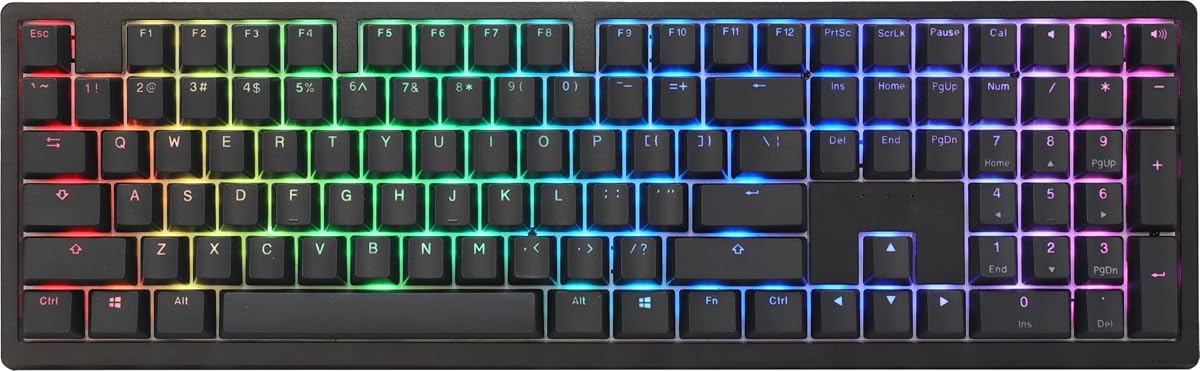


The Ducky Origin stands out as a top-tier mechanical keyboard with its Cherry MX Red switches and slim, narrow bezel design. Boasting an impressive rating, this keyboard delivers exceptional typing and gaming performance with high-quality double shot PBT keycaps that resist wear over time.
We may earn a commission when you buy through this link, at no additional cost to you.
Its standout features include Kailh yellow hotswap sockets on critical stabilizer keys like Enter and Space, allowing for easy customization without soldering. The south-facing switches ensure better compatibility with Cherry profile keycaps, while the detachable braided USB-C cable adds convenience for portability.
While it lacks wireless options and advanced software features, these trade-offs are acceptable for users prioritizing pure hardware quality and tactile feedback. The random color bonus enter key adds a fun, unique touch to an otherwise sleek and professional-looking keyboard.
We recommend the Ducky Origin for gamers and typists who want a reliable, high-performance wired keyboard with premium build quality. Its combination of durability, aesthetic appeal, and switch customization makes it a versatile choice for any desktop setup.
The use of OEM profile double shot PBT keycaps ensures legends never fade and the surface remains textured and comfortable for years.
Hotswap sockets on stabilizers let you swap switches on common keys without tools, offering a personalized feel for your typing style.
We may earn a commission when you buy through this link, at no additional cost to you.
The Ducky OK-M offers a premium mechanical typing experience at a highly accessible price point, earning it a perfect 5.0 rating. Its gasket-mount design and five-layer acoustic dampening create a quieter, more comfortable typing experience by reducing pinging and echoes effectively.
We may earn a commission when you buy through this link, at no additional cost to you.
Connectivity is a major strength here, as the keyboard supports USB-C wired, Bluetooth, and 2.4GHz wireless for seamless multi-device switching. VIA support unlocks full key and macro customization through a web-based interface, giving users deep control over their layout and functions.
The only minor drawbacks are the compact 65% form factor, which lacks a numpad, and the use of Baby switches that may take time to get used to. However, these are minor trade-offs for the value and feature set provided in this budget-friendly package.
This keyboard is ideal for budget-conscious users who want wireless flexibility and high-end acoustic performance. Whether for work or gaming, the OK-M delivers exceptional value and a refined typing feel that rivals much more expensive options.
Switch between devices instantly with its tri-mode connectivity, supporting up to three devices simultaneously via Bluetooth or 2.4GHz dongle.
Five layers of acoustic dampening reduce hollow sounds, making every keystroke feel solid and professional without excessive noise.
We may earn a commission when you buy through this link, at no additional cost to you.
The Ducky Origin Vintage combines a unique vintage aesthetic with the reliable performance of Cherry MX Brown switches, ideal for typists seeking tactile feedback. With a 4.6 rating, it maintains the high build quality of the Origin series while offering a distinct look that stands out on any desk.
We may earn a commission when you buy through this link, at no additional cost to you.
Its slim and narrow bezel design saves space while maximizing key size, and the OEM profile double shot PBT keycaps ensure durability and comfort during long sessions. The Kailh yellow hotswap sockets on stabilizers allow for easy customization of the Space and Enter keys without soldering.
The main limitation is its wired-only connectivity, which may not suit users requiring mobility. However, the vintage design and robust construction justify this for stationary setups. The random color bonus enter key adds a personalized touch to the keyboard's aesthetic.
We recommend this model for professionals or enthusiasts who value tactile feedback and distinctive design. It is perfect for those who prioritize typing comfort and build quality over wireless features, making it a solid choice for a dedicated workstation.
Cherry MX Brown switches provide a gentle tactile bump without the loud click, making them comfortable for extended writing sessions.
The vintage colorway and slim bezels create a minimalist, retro look that complements classic or modern desk setups beautifully.
We may earn a commission when you buy through this link, at no additional cost to you.
The Ducky Zero 6108 is a compact 60% keyboard designed for mobility and speed, featuring Cherry MX2A Red switches for smooth linear action. While its rating is moderate, its tri-mode connectivity offers flexibility for users needing to switch between wired and wireless seamlessly.
We may earn a commission when you buy through this link, at no additional cost to you.
Key strengths include 45g actuation force for reduced finger fatigue and full N-Key Rollover to ensure every keypress is registered during intense gaming. The vibrant RGB backlighting allows for extensive customization to match your personal style and setup theme effectively.
However, the compact layout lacks dedicated function keys, requiring layer combinations for common shortcuts, which can be tricky for some users. The lower rating may indicate inconsistent quality control or unmet expectations compared to other models in the lineup.
This keyboard is best suited for gamers or travelers with limited desk space who want wireless versatility in a small package. Just ensure you are comfortable with the 60% layout before committing to this compact mechanical option for your daily tasks.
The 60% layout minimizes footprint, leaving more room for mouse movement or other peripherals while maintaining core functionality.
Tri-mode connectivity ensures you can connect via Bluetooth, 2.4GHz, or USB-C for maximum flexibility across different devices.
We may earn a commission when you buy through this link, at no additional cost to you.
The Ducky One X introduces next-generation analog inductive switches that offer greater accuracy and power efficiency than traditional mechanical switches. Its QUACK Mechanics+ design with seven-layer dampening provides an unprecedented typing feel and acoustics that appeal to enthusiasts seeking premium quality.
We may earn a commission when you buy through this link, at no additional cost to you.
The keyboard features tri-mode connectivity for versatile use across multiple devices, while high-density PBT doubleshot keycaps offer unrivaled shine resistance for long-term aesthetics. Intuitive web-based software allows easy settings adjustments without consuming computer resources or space on your hard drive.
Despite its premium features, the lower rating suggests some users may find the learning curve for analog switches steep or the price too high for their needs. These trade-offs are acceptable for those prioritizing cutting-edge technology and superior build quality over budget or simplicity.
We recommend the One X for tech enthusiasts and gamers who want the latest innovation in keyboard design. Its combination of rapid trigger support, analog precision, and premium construction makes it a top choice for serious users willing to invest in the best.
Inductive switches detect variable actuation points, allowing for finer control and rapid trigger support in fast-paced gaming scenarios.
Seven-layer dampening combined with gasket-mounting creates a soft, thocky sound profile that elevates the overall typing experience.
We may earn a commission when you buy through this link, at no additional cost to you.
The Ducky Origin Blue delivers the classic clicky experience of Cherry MX Blue switches, perfect for writers who enjoy audible tactile feedback. With a 4.5 rating, it shares the robust construction of the Origin series, featuring OEM profile double shot PBT keycaps that resist shine and wear.
We may earn a commission when you buy through this link, at no additional cost to you.
Its slim and narrow bezel design maximizes typing surface while saving desk space, and Kailh yellow hotswap sockets on stabilizers allow for customization. The vintage colorway adds a unique aesthetic appeal that stands out from standard black or white keyboard options.
The main drawback is the loud clicking sound, which may disturb others in shared environments. However, for solo typists, this auditory feedback can improve accuracy and enjoyment. Wired-only connectivity limits mobility but suits stationary writing desks perfectly.
This model is ideal for writers and programmers who prefer traditional clicky switches for error reduction. Its premium build quality and distinctive vintage design make it a standout choice for those who value feedback and aesthetics over modern wireless features.
The clicky Blue switches provide a distinct sound and tactile bump that helps confirm every keystroke during fast typing sessions.
The unique colorway and slim bezels offer a retro look that appeals to enthusiasts seeking a keyboard with character and style.
We may earn a commission when you buy through this link, at no additional cost to you.
The Ducky One 2 Pro Mini White Edition offers a clean, minimalist look with its all-white design and Cherry Brown switches for tactile feedback. A 4.6 rating reflects its solid build quality, featuring QUACK Mechanics and true PBT keycaps that ensure long-term durability and a premium feel.
We may earn a commission when you buy through this link, at no additional cost to you.
Its 60% compact size saves valuable desk space, making it ideal for gamers or users with limited room. The RGB LED backlighting adds customizable flair, while the high-quality PBT keycaps resist wear and provide a textured typing surface that feels great.
The only downsides are the compact layout lacking dedicated arrow keys and the white case which may require more maintenance to keep clean. However, these are minor issues for those who prioritize aesthetics and portability in their mechanical keyboard setup.
We recommend this keyboard for users seeking a stylish, compact option with reliable performance. Its combination of tactile switches, premium materials, and unique colorway makes it a great choice for personalizing your desk with elegance and function.
The all-white case offers a clean and modern look that stands out and complements minimalist or light-colored desk setups.
Cherry Brown switches provide a gentle tactile bump for feedback without the loud click of Blue switches, suitable for various users.
We may earn a commission when you buy through this link, at no additional cost to you.
The Ducky One 3 Matcha features a unique Matcha colorway with Cherry MX Blue switches for a satisfying clicky typing experience. With a 4.7 rating, it leverages QUACK Mechanics and dual-layer hotswap PCB with Kailh yellow sockets for extensive customization and reliability.
We may earn a commission when you buy through this link, at no additional cost to you.
Dual-layer high-grade silicone and EVA foam sound dampeners reduce noise, while thick PBT seamless keycaps ensure durability. The improved V2 stabilizers and remapped macro layout enhance usability, and the detachable USB-C cable with adjustable feet adds practical convenience.
While the Cherry Blue switches may be too loud for some environments, the overall build quality and acoustic improvements make it a strong contender. The Matcha design is exclusive and appealing for enthusiasts who want something visually distinctive and high-performance.
This keyboard is ideal for enthusiasts who value customization and unique aesthetics. Its blend of advanced dampening, hotswap features, and striking design makes it a worthy investment for those seeking a refined and personalized typing experience.
The Matcha colorway offers a fresh, vibrant look that stands out in a market saturated with standard black or white options.
Dual-layer dampeners create a deeper, more consistent sound profile that reduces ping and hollow echoes during typing.
We may earn a commission when you buy through this link, at no additional cost to you.
The Ducky One 3 TKL Matcha offers an 80% TKL layout with Cherry MX Brown switches, balancing compact design with essential keys. With a 4.3 rating, it inherits QUACK Mechanics and dual-layer hotswap PCB for customization, along with sound dampeners for a refined typing experience.
We may earn a commission when you buy through this link, at no additional cost to you.
Thick PBT seamless keycaps provide durability, while improved V2 stabilizers and a remapped macro layout enhance functionality. The detachable braided USB-C cable and 3-level adjustable feet ensure ergonomic comfort and convenient portability for desktop setups.
While it lacks wireless connectivity, this model excels as a reliable wired TKL option for users needing number pad functionality. The Matcha aesthetic remains unique and appealing, though the weight and price may be considerations for budget-conscious buyers.
We recommend this keyboard for users who need a compact TKL layout with premium features. Its build quality, acoustic tuning, and unique design make it a solid choice for both gaming and productivity workloads.
The 80% layout retains essential function keys while remaining compact enough for gaming setups that need mouse space.
Three-level adjustable feet allow you to find the perfect typing angle, reducing strain during extended use sessions.
We may earn a commission when you buy through this link, at no additional cost to you.
The Ducky One 2 80% delivers solid performance with Cherry MX Red switches and full RGB support at an accessible price point. With a 4.3 rating, it features a dual-layer PCB and supports the newest RGB software for extensive customization of lighting effects and patterns.
We may earn a commission when you buy through this link, at no additional cost to you.
The detachable 1.5-meter USB-C cable offers convenience, and the inclusion of 10 additional colorful PBT keycaps allows for personalization. Three-level adjustable feet provide ergonomic flexibility, making this model versatile for various desk setups and typing preferences.
While it is an older model compared to the One 3 series, its value proposition remains strong for users seeking standard features without paying premium prices. The lack of wireless options is expected at this tier, but the build quality remains reliable.
We recommend this keyboard for budget-conscious users who want a reliable RGB gaming keyboard. It offers excellent value, customizable aesthetics, and durable construction, making it a great starting point for those new to mechanical keyboards.
Full RGB backlighting allows you to customize your setup's look without needing expensive third-party lighting accessories.
Ten extra colorful keycaps let you personalize your keyboard immediately without needing to purchase additional aftermarket parts.
We may earn a commission when you buy through this link, at no additional cost to you.
Selecting the right Ducky keyboard depends on understanding your specific needs, budget, and preferred features. This guide outlines key factors to consider before making your final decision.
Switches determine the typing feel and sound of your keyboard. Cherry MX Red switches are linear and smooth, ideal for gaming. Cherry MX Brown switches offer tactile feedback without loud clicking, suitable for typing. Cherry MX Blue switches provide audible clicks for confirmation, favored by writers. Inductive switches offer analog precision for rapid trigger support. Choose based on whether you prioritize speed, feedback, or quiet operation.
Evaluate your primary use case. Gamers often prefer linear switches for rapid input, while typists may prefer tactile or clicky switches for accuracy. Consider noise levels if you share your workspace.
Keyboard layout impacts the available keys and desk footprint. Full-size keyboards include numpads, while TKL (Tenkeyless) removes them for space. 60% or 65% layouts omit function keys and arrows, relying on layers. 80% TKL models offer a balance between compactness and functionality. Select a size that fits your desk and workflow.
Choose full-size for data entry, TKL for gaming, or compact sizes for portability. Ensure you are comfortable with layer combinations if opting for smaller layouts.
Connectivity determines how your keyboard connects to devices. Wired USB-C offers the lowest latency and reliability. Wireless options include Bluetooth for multi-device pairing and 2.4GHz for gaming performance. Tri-mode keyboards support all three, offering maximum flexibility. Consider if you need to switch between devices frequently.
Prioritize wired connectivity for competitive gaming to avoid input lag. Wireless is ideal for clean setups or multi-device users.
Keycap material affects durability and texture. PBT (Polybutylene Terephthalate) keycaps are thick, textured, and resistant to shine and wear. ABS keycaps are smoother but can develop a glossy shine over time. Ducky typically uses PBT keycaps for premium models. Look for double-shot legends to prevent fading.
Always choose PBT keycaps for long-lasting texture and print durability. Double-shot legends ensure your lettering stays visible for years of use.
Build quality impacts comfort and acoustic performance. Gasket-mount designs allow the PCB to flex for a softer feel. Sound dampening layers, like foam or silicone, reduce hollow noises. Stabilizers should be well-lubricated for smooth long keypresses. Consider if you prefer a thocky or crisp sound profile.
Look for models with acoustic dampening if you value a quiet, solid typing experience. Gasket mounts enhance comfort by absorbing impact.
Software affects how you customize macros and lighting. Some keyboards use dedicated software like Ducky's RGB suite, while others use VIA for web-based key remapping. Hotswap PCBs allow you to change switches without soldering. Consider how much control you want over macros and layout.
Prioritize VIA support if you want extensive key remapping without installing apps. Hotswap sockets offer future flexibility for switch upgrades.
Budget ranges vary across Ducky models. Entry-level models like the OK-M offer excellent value with premium features. Premium models like the One X cost more but offer advanced analog switches. Determine your budget to find a balance between features and cost. Check for included accessories like keycaps or cables.
Set a realistic budget to avoid overspending on features you won't use. Entry-level Ducky keyboards often provide near-premium build quality at lower prices.
Aesthetics play a role in personal satisfaction. Ducky offers unique colorways like Matcha and Vintage. Slim bezels save space and modernize the look. RGB lighting adds vibrancy. Ensure the design complements your existing setup style, whether minimalist, colorful, or retro.
Choose a design that matches your desk theme for a cohesive look. Unique colorways can make your keyboard a standout piece.
To ensure optimal performance, always connect your keyboard securely to a USB port or pair it via Bluetooth following the on-screen instructions. For wireless models, charge the internal battery regularly to avoid interruptions during use. Keep the USB-C cable tidy to prevent tripping or accidental disconnection.
Clean your keyboard regularly using a soft brush or compressed air to remove dust and debris from under the keycaps. For deeper cleaning, remove the PBT keycaps carefully and wipe them with a damp cloth, then dry thoroughly before reassembly. Avoid harsh chemicals that might damage the plastic or paint.
Store your keyboard in a cool, dry place when not in use to protect it from humidity and heat damage. If you do not use it for extended periods, disconnect the cables and keep it in a protective case or box. Periodically update firmware if available to maintain compatibility with your operating system.
Yes, most Ducky keyboards work seamlessly with Mac systems when using the standard layout. Some models offer dedicated Mac keycaps or switchable OS modes. Ensure you check the product page for specific compatibility notes to confirm full functionality with macOS shortcuts.
Many modern Ducky models feature hotswap PCBs, allowing you to replace switches without soldering. Check the specific product specifications for hotswap support. Older models may require soldering for switch changes, so review the manual before attempting modifications.
Most newer Ducky models include RGB backlighting with customizable effects. However, some vintage or budget models may have limited or no RGB options. Verify the product details to ensure the lighting features match your aesthetic preferences.
Yes, Ducky uses high-quality PBT double-shot keycaps that resist wear, shine, and fading. These materials ensure the keycaps last longer than standard ABS alternatives. This makes them ideal for heavy users who type or game for extended periods daily.
Wireless Ducky keyboards often use Fn key combinations or physical toggles to switch between Bluetooth devices. Some models support up to three devices simultaneously. Refer to the keyboard manual for the specific key combination required to pair or disconnect devices efficiently.
Yes, Ducky offers RGB software for lighting customization on most models. Newer models support VIA for web-based key remapping and macros. The software is lightweight and designed to be intuitive without consuming excessive system resources on your computer.
We have explored ten excellent Ducky keyboards ranging from compact wireless options to premium tactile models. Whether you need the budget-friendly OK-M for versatility or the high-end One X for analog precision, there is a model suited to every preference and requirement.
Prioritize factors such as switch type, layout size, and connectivity to find a keyboard that enhances your workflow. Build quality and acoustic performance are also critical for long-term satisfaction. Balancing these features with your budget ensures you get the best value for your investment.
Remember to verify current availability and pricing before making your final purchase. Product details may change over time, so always check the latest information. With the right Ducky keyboard, you can elevate your daily computing and gaming experience significantly.