
Ducky OK-M
4.4Editor score
Gasket mount design
Five layer dampening
Tri mode connectivity
This guide compares the best Ducky Keyboard options for gaming and typing, evaluating build quality, switch types, connectivity, and keycap materials to help
Finding the right mechanical keyboard can transform your daily computing experience significantly. Ducky has established itself as a premier brand known for durability and excellent build quality across their diverse lineup of options.
We have carefully analyzed ten distinct models to provide a comprehensive overview of what each offers. Our evaluation focuses on switch performance, connectivity options, and the overall typing feel that enthusiasts expect from premium hardware.
Each selection highlights specific strengths to match different user needs and preferences effectively. Please note that availability and pricing can fluctuate over time so verify current details before making your final purchasing decision today.
4.4Editor score

4.7Editor score

3.8Editor score
This side by side comparison breaks down the key specifications and features of every model listed to help you identify the perfect fit for your specific workflow and gaming needs quickly.


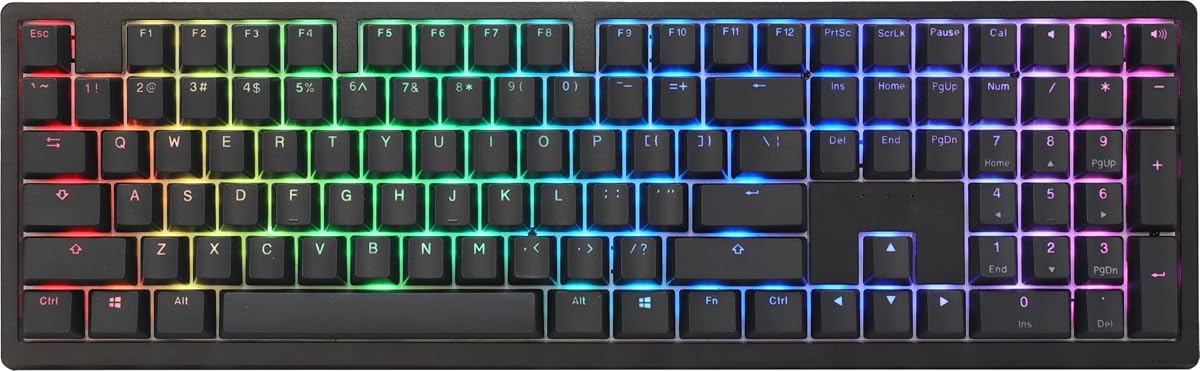


The Ducky OK-M stands out as an affordable entry point into the mechanical keyboard market while maintaining high build standards. With a rating of 4.4 stars it offers a gasket mount design that delivers a premium typing experience typically found in more expensive models.
We may earn a commission when you buy through this link, at no additional cost to you.
Its five layer acoustic dampening system significantly reduces ping and echo making for a quieter and more comfortable environment during long work or gaming sessions. The inclusion of VIA support allows users to unlock full key and macro customization through web based software ensuring flexibility without needing bulky drivers.
While the side RGB lighting is subtle rather than full panel illumination it adds a touch of flair without overwhelming the user. The only minor trade-off is the limited color selection compared to other models but the value proposition remains strong for those prioritizing function over extensive customization.
This keyboard is ideal for users seeking a reliable wireless mechanical keyboard that supports multiple devices via Bluetooth and 2.4GHz. If you want a solid foundation for customization and comfort without breaking the bank the OK-M is a highly recommended choice for your setup.
Supports USB-C Bluetooth and 2.4GHz wireless for flexible multi-device use across your workspace efficiently.
Five layer acoustic dampening reduces pinging and echoes for a quieter more comfortable feel during typing.
We may earn a commission when you buy through this link, at no additional cost to you.
The Ducky Origin Brown combines a vintage aesthetic with modern reliability making it a standout choice for users who appreciate classic design. With a 4.6 star rating this keyboard features Cherry MX Brown switches that offer a tactile bump without the loud click of blues perfect for shared spaces.
We may earn a commission when you buy through this link, at no additional cost to you.
Its exceptionally slim and narrow bezel design maximizes desk space while the detachable braided USB-C cable ensures easy transport and replacement. The inclusion of Kailh yellow hotswap sockets on stabilizer keys enhances longevity and allows for future switch customization on specific keys that endure heavy use.
OEM profile Double Shot PBT keycaps provide durability and a textured feel that resists shine over time. The bonus enter key in a random color adds a unique touch of personality though users may need to wait to see which color arrives with their unit.
This model is best suited for typists and gamers who value a quiet tactile experience in a compact footprint. If you prefer a retro look with reliable performance and durable keycaps the Origin Brown is a dependable investment for your daily driving setup.
Kailh yellow hotswap sockets on stabilizer keys allow for easier maintenance and replacement of high use keys.
Exceptionally slim and narrow bezel design saves desk space while maintaining a vintage aesthetic appeal.
We may earn a commission when you buy through this link, at no additional cost to you.
The Ducky Origin Blue is designed for those who crave the distinctive click and tactile feedback of mechanical switches. Rating at 4.5 stars it features Cherry MX Blue switches that provide audible confirmation of every keystroke which many typists find satisfying and rhythmically engaging.
We may earn a commission when you buy through this link, at no additional cost to you.
Like its siblings it shares the slim bezel design and detachable braided USB-C cable ensuring both style and practicality. The Kailh yellow hotswap sockets on stabilizer keys ensure that heavy use keys remain smooth over time while the Double Shot PBT keycaps resist wear and fading.
The loud click can be a double-edged sword as it may disturb others in quiet environments or open offices. However for personal setups where noise is not a concern the feedback is incredibly rewarding for fast typing and gaming precision tasks.
This keyboard is perfect for solo users who prioritize tactile feedback and acoustic satisfaction. If you enjoy the classic mechanical feel and want a durable compact keyboard the Origin Blue delivers a robust typing experience that stands the test of time.
Cherry MX Blue switches offer distinct tactile and auditory feedback for a satisfying typing rhythm and experience.
OEM profile Double Shot PBT keycaps ensure long-lasting durability and resistance to shine from heavy use.
We may earn a commission when you buy through this link, at no additional cost to you.
The Ducky Zero 6108 brings wireless freedom to a compact layout ideal for gamers and users with limited desk space. With a rating of 4.1 stars it supports tri-mode connectivity allowing seamless switching between wired USB 2.4GHz wireless and Bluetooth for versatile usage across devices.
We may earn a commission when you buy through this link, at no additional cost to you.
Cherry MX2A Red switches ensure a consistent smooth keystroke with a 45g actuation force making it ideal for rapid key presses and high-speed gaming sessions. This reduces finger fatigue during marathon sessions and ensures every command is registered with full N-key rollover support.
The RGB LED backlighting allows users to customize the look to match their setup though it lacks the complexity of per-key lighting found on higher-end models. Premium PBT keycaps provide durability ensuring the keyboard looks and feels great for years even after intense daily usage.
This keyboard is best suited for users seeking a balance between portability and performance. If you want a compact wireless keyboard with reliable switches and decent customization options the Zero 6108 is a practical choice for your gaming or work station.
Tri-mode connectivity allows switching between USB wired 2.4GHz wireless and Bluetooth for versatile flexible usage.
Cherry MX2A Red switches ensure a consistent smooth keystroke ideal for rapid key presses and high-speed gaming.
We may earn a commission when you buy through this link, at no additional cost to you.
The Ducky Origin Vintage offers a unique blend of retro styling and modern mechanical performance with a strong 4.5 star rating. It features Cherry MX Blue switches that deliver the classic clicky feel favored by many typists who enjoy tactile feedback and audible confirmation.
We may earn a commission when you buy through this link, at no additional cost to you.
The slim narrow bezel design maximizes efficiency while the detachable braided USB-C cable adds durability and portability to the package. Bonus enter key in a random color adds a touch of personality though the specific shade is unpredictable upon arrival of the product.
OEM profile Double Shot PBT keycaps are robust and resist shine ensuring the keyboard maintains its fresh look over time. While the sound may be loud for quiet offices the satisfaction of typing on a mechanical keyboard is unmatched for many users.
This model is ideal for those who appreciate the traditional feel of mechanical switches. If you want a durable keyboard with a vintage look and reliable performance the Origin Vintage is a solid pick for daily typing tasks and gaming sessions.
Features a vintage design aesthetic that complements classic setups while offering modern mechanical reliability and feel.
Kailh yellow hotswap sockets on stabilizer keys allow for easier maintenance and replacement of high use keys.
We may earn a commission when you buy through this link, at no additional cost to you.
The Ducky One 2 Pro Mini White Edition is a compact powerhouse that brings high-quality materials to a small form factor. With a 4.6 star rating it features true PBT keycaps that are renowned for their durability and resistance to shine ensuring longevity over time.
We may earn a commission when you buy through this link, at no additional cost to you.
Cherry Brown switches provide a tactile bump that is quiet enough for office environments while still offering mechanical feedback. The mini layout saves significant desk space making it ideal for users who prefer a minimalist setup or limited physical workspace areas.
While the RGB lighting is present it is managed through built-in controls rather than complex software which simplifies usage for some. The white edition offers a clean and professional look that stands out against typical black mechanical keyboards on the market today.
This keyboard is perfect for users who prioritize portability and build quality over extensive macro features. If you want a reliable compact keyboard with solid materials and a pleasing aesthetic the One 2 Pro Mini is a smart choice for your daily use.
QUACK Mechanics uses only the finest materials including true PBT keycaps for durability and resistance to shine.
Compact mini layout saves desk space while retaining essential functionality for everyday typing and gaming tasks.
We may earn a commission when you buy through this link, at no additional cost to you.
The Ducky One X Wireless represents the pinnacle of mechanical keyboard technology with its next-gen analog inductive switches. Rating at 3.8 stars it offers greater accuracy consistency and power efficiency over traditional analog switches making it a strong contender for competitive gaming needs.
We may earn a commission when you buy through this link, at no additional cost to you.
Its seven-layer dampening design combined with gasket-mount architecture provides an unprecedented typing feel and acoustics that feel luxurious under the fingers. Web-based software takes up no space on your computer allowing easy and intuitive setting adjustments across different platforms seamlessly.
While the price point is higher than standard options the features justify the cost for enthusiasts seeking cutting-edge performance. The high-density PBT keycaps resist shine ensuring the premium look remains intact even after extended usage in heavy daily environments.
This keyboard is best for users who demand the highest level of performance and precision. If you want a wireless mechanical keyboard with rapid trigger and superior build quality the One X Wireless is a top-tier investment for your setup.
Next-Gen Analog Switch offers greater accuracy consistency and power efficiency over traditional analog switches.
Seven-layer dampening design together with gasket-mount design gives you unprecedented typing feel and acoustics.
We may earn a commission when you buy through this link, at no additional cost to you.
The Ducky One 3 Matcha earns its spot as a top contender with a 4.7 star rating and exceptional build quality. It features Ducky's QUACK Mechanics design philosophy which prioritizes sound and feel resulting in a keyboard that feels and sounds incredible during typing sessions.
We may earn a commission when you buy through this link, at no additional cost to you.
Dual layer hotswap PCB with exclusive Kailh yellow hotswap sockets ensures flexibility for customization while thick PBT Double-shot seamless keycaps provide a premium tactile experience. Dual-layer high-grade silicone and EVA foam sound dampeners reduce ping and hollow sounds for a solid acoustic profile.
The 3-level adjustable feet and detachable USB-C cable add practical touches that improve ergonomics and transportability. Improved PCB design and V2 stabilizers ensure every keystroke is registered with precision and minimal rattle on larger keys.
This keyboard is ideal for users who want a balance of style sound and performance. If you seek a high-quality mechanical keyboard with robust features and a pleasing design the One 3 Matcha is a fantastic choice for any desk.
Dual-layer high-grade silicone and EVA foam sound dampeners reduce ping and hollow sounds for a solid profile.
Dual layer hotswap PCB with exclusive Kailh yellow hotswap sockets ensures flexibility for customization.
We may earn a commission when you buy through this link, at no additional cost to you.
The Ducky One 3 TKL Matcha brings the premium features of the full-size model to a tenkeyless form factor. With a 4.3 star rating it features the same QUACK Mechanics design philosophy and high-grade sound dampeners that make typing feel and sound exceptional.
We may earn a commission when you buy through this link, at no additional cost to you.
Cherry MX Brown switches offer a tactile bump that is perfect for both typing and gaming without the loud noise of clicky switches. Dual layer PCB with Kailh yellow hotswap sockets allows for easy switch replacement and customization over the lifespan of the keyboard.
Thick PBT Double Shot seamless keycaps ensure durability and a smooth surface that resists wear over time. Improved PCB design V2 stabilizers and remapped macro layout enhance functionality and stability for a superior overall user experience.
This keyboard is perfect for users who need a balance of space and functionality. If you want a compact layout with premium materials and sound dampening the One 3 TKL is an excellent choice for modern setups.
TKL layout saves space while retaining essential keys for gaming and typing workflows efficiently and effectively.
Improved PCB design V2 stabilizers and remapped macro layout enhance functionality and stability for typing.
We may earn a commission when you buy through this link, at no additional cost to you.
The Ducky One 2 80% offers a sleek gaming focused design with robust features for daily use. With a 4.3 star rating it features Cherry MX Red switches which provide a smooth linear action perfect for fast gaming and comfortable typing over long periods of time.
We may earn a commission when you buy through this link, at no additional cost to you.
Support for Ducky's newest RGB software allows for vibrant lighting customization that matches your setup's aesthetic and vibe. The detachable 1.5 meter USB-C cable ensures convenience and easy replacement if needed during regular usage scenarios.
10 additional PBT Double Shot colorful keycaps are included to let you personalize the look of your setup further. These extra keycaps add value and fun allowing you to change up colors without buying a full replacement set for your keyboard.
This keyboard is ideal for gamers who want a compact layout with reliable linear switches and vibrant lighting. If you prioritize speed and customization the One 2 80% provides a solid foundation for your competitive or casual gaming sessions.
Supports Ducky's newest RGB software for vibrant lighting customization that matches your setup's aesthetic and vibe.
10 additional PBT Double Shot colorful keycaps included allow for personalization without buying a full replacement set.
We may earn a commission when you buy through this link, at no additional cost to you.
Selecting the right mechanical keyboard depends on your specific needs regarding switches layout and connectivity options.
Mechanical switches are the heart of any keyboard. Cherry MX Brown and Black are tactile and linear respectively while Blue is clicky. Linear switches like Red are best for gaming while tactile or clicky are better for typing. Choose based on whether you prefer quiet smooth strokes or distinct feedback and sound.
Always test or read reviews about the feel of the switches before buying to ensure they suit your typing style and environment preferences.
Keyboard layouts range from full size to TKL 65% and smaller. Full size includes a numpad which is useful for data entry. TKL and smaller layouts save desk space and are preferred by gamers who need more room for mouse movement. Consider how much desk space you have and if you need a numpad regularly.
Opt for a layout that matches your workflow; gamers often prefer smaller sizes while office workers may need full size for productivity.
Connectivity options include wired USB Bluetooth and 2.4GHz wireless. Wired offers the lowest latency which is crucial for competitive gaming. Wireless provides flexibility and a cleaner desk setup but may have slight latency. Some models offer tri-mode connectivity allowing you to switch between options easily.
Choose wireless if you value a clutter-free desk or need to connect to multiple devices frequently for better flexibility.
Keycaps determine the feel and longevity of your typing experience. PBT keycaps are textured and resist shine better than ABS which can become shiny and worn over time. Double-shot keycaps ensure legends never fade because the plastic is molded rather than printed.
Look for PBT double-shot keycaps if you want durability and a premium feel that lasts years without looking worn.
Sound dampening layers like silicone or foam reduce hollow sounds and ping. This makes the keyboard sound more premium and less cheap. If you work in a quiet environment or prefer a deep thocky sound invest in models with gasket mounting and internal dampening.
Prioritize acoustic dampening if noise levels are a concern or you want a more refined and professional sound profile.
Hot-swappable sockets allow you to replace switches without soldering. This gives you the freedom to try different switches later or fix broken ones easily. It adds significant value and longevity to your keyboard since you can upgrade it instead of buying a new one.
Choose a hot-swappable keyboard if you plan to tinker or want the ability to change switches in the future.
Build quality includes the case material and stability. Aluminum or sturdy plastic cases prevent flexing and ensure the keyboard stays in place during intense use. A sturdy build often correlates with better typing feel and durability over the long term.
Check for sturdy construction and non-slip feet to ensure the keyboard remains stable during heavy gaming or typing sessions.
Software allows you to customize lighting macros and key bindings. Some models use web-based software which is convenient and lightweight. RGB customization and macro support are essential if you want to personalize your keyboard for gaming or specific workflow needs.
Ensure the software is intuitive and supports the customization options you need without being resource-heavy on your computer.
To keep your keyboard performing at its best clean the keycaps regularly with a soft cloth or brush to remove dust and debris. Using a keycap puller safely allows you to deep clean underneath the switches if necessary.
For wireless models keep the battery charged and pair the device correctly before use. Store your keyboard in a dry environment to prevent any potential electrical or moisture damage over time.
Use the provided cable management clips to keep your desk organized and prevent wear on the detachable cable. Avoid applying excessive force to the switches to maintain their tactile feel and structural integrity.
Yes Ducky keyboards are excellent for gaming. Models like the Zero 6108 and One 3 TKL feature low latency switches and high-quality keycaps that respond quickly during intense gaming sessions. Most also include anti-ghosting for accurate input.
Most Ducky keyboards come with a standard manufacturer warranty. It is recommended to check the specific retailer's policy as warranties can vary slightly by region. Generally they cover defects in materials and workmanship for a set period.
Many models like the OK-M and Origin series support hot-swappable switches. This means you can easily remove and replace switches without soldering. Check the product details to confirm hot-swap compatibility before purchasing.
PBT keycaps are textured and resistant to shine while ABS keycaps are smoother and can become glossy over time. Ducky generally uses PBT keycaps in their modern lines for better durability and a premium feel.
Ducky keyboards generally work with Mac systems as they follow standard USB input protocols. However some keys like Windows may not map exactly to Mac shortcuts. You may need to remap keys via software for a better experience.
No the software is not required for basic typing. However it is needed for customizing RGB lighting and macros. Some models support web-based software which is lightweight and easy to access without installing heavy programs.
Most modern Ducky keyboards support onboard memory. This allows you to save your custom lighting and macro settings directly to the device. This is useful for using your settings on different computers without needing to reinstall software.
Choosing a Ducky Keyboard comes down to your specific needs whether that is wireless connectivity tactile feedback or compact design. The OK-M offers a budget-friendly entry point while the One X Wireless provides premium features for enthusiasts.
Prioritize factors like switch type and keycap material to ensure long-term satisfaction. A keyboard is an investment in your comfort so choose one that feels right for your daily work and play sessions.
Always check current availability and verify specifications before purchasing. Prices and features may vary by retailer so ensure you are getting the exact model you intend to buy for your specific setup needs.