
Digital Calendar 10.1" Touchscreen
4.4Editor score
No subscription fees
Meal planning tools
Compact 10 inch size
Modern households struggle to keep track of busy schedules, chores, and memories all in one place. A digital touchscreen organizer solves this by combining calendars, task lists, and photo displays into a single smart device for the whole family.
We evaluated ten leading models based on screen quality, sync capabilities, ease of use, and value. Our analysis focuses on features that truly help families stay coordinated without hidden fees or complicated setups.
Each pick below highlights unique strengths from budget-friendly options to premium displays. Prices and availability change frequently, so check the latest details before deciding which organizer fits your home best.
4.4Editor score

4.4Editor score

4.6Editor score
As an Amazon Associate we earn from qualifying purchases.
The following table compares all ten models side by side to help you find the perfect fit for your household needs and budget.


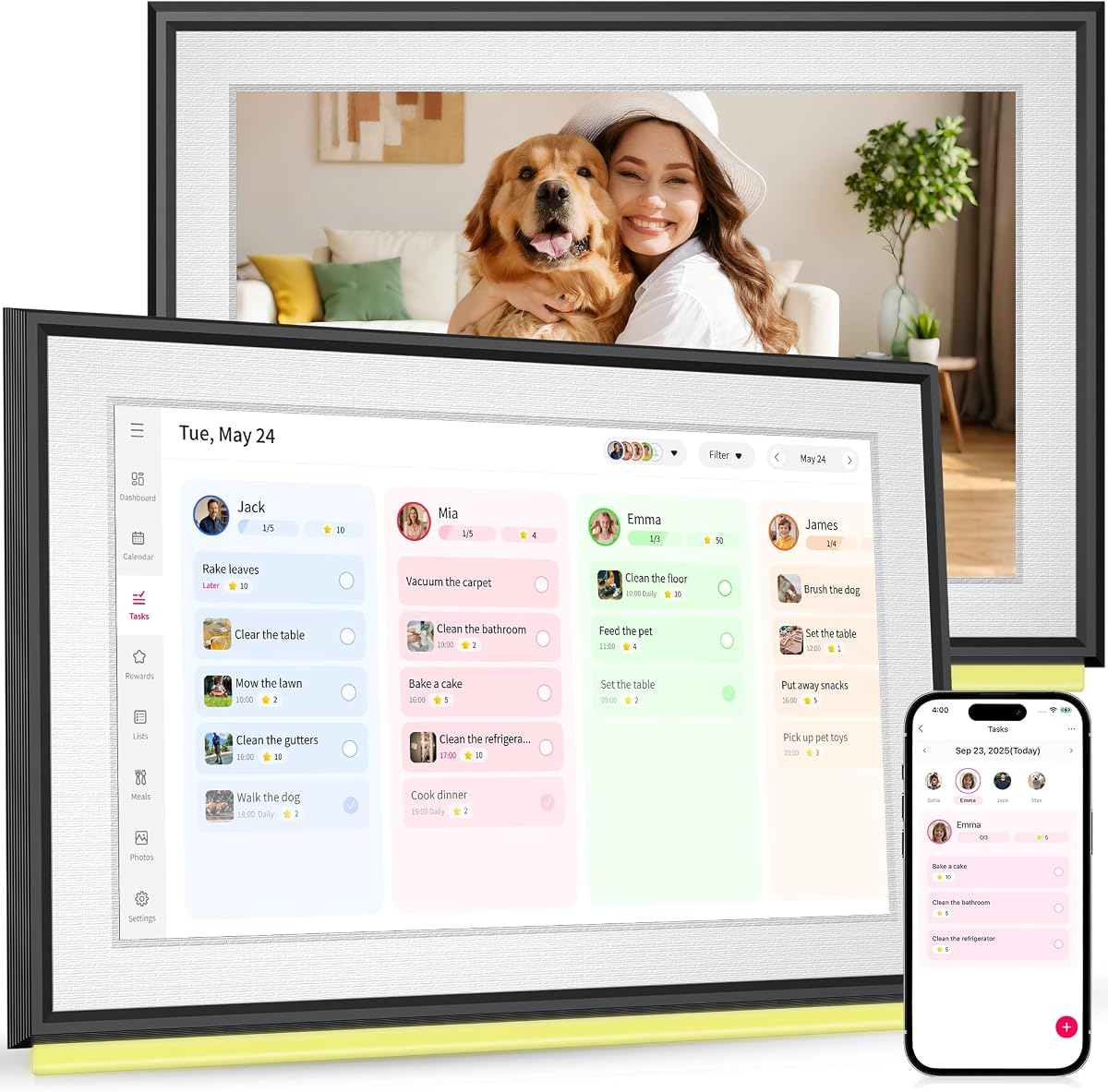

This 15.6-inch digital calendar stands out as a top choice for families needing a central command center. It features a high-definition touchscreen that displays schedules, chores, and photos clearly without lag or glare.
We may earn a commission when you buy through this link, at no additional cost to you.
Its standout feature is the real-time synchronization with major platforms like Google and Outlook without requiring a monthly fee. Families can assign chores with a built-in reward system that motivates kids to complete tasks enthusiastically.
While the device requires a power source and lacks included batteries for remote use, the trade-off is worth the reliability and cost savings over time. The photo frame mode adds warmth to any room when the calendar is idle.
Buyers looking for a comprehensive, subscription-free organizer will find this model highly reliable. It balances functionality and ease of use well, making it suitable for multi-generational households.
Centralizes schedules and chores to reduce household clutter and missed events.
Gamifies daily tasks with points and rewards to encourage responsibility.
We may earn a commission when you buy through this link, at no additional cost to you.
The Skylight Calendar offers a premium experience with a clean design and engaging features for kids. Its Disney mode adds a unique touch that encourages children to participate actively in family planning.
We may earn a commission when you buy through this link, at no additional cost to you.
This model excels in ease of use, syncing effortlessly with major platforms and offering a straightforward app for remote updates. The HD screen ensures all text and images are crisp and visible from across the room.
Users should note that some advanced features like Magic Import require a subscription, which adds to the overall cost. However, the base functionality remains robust and useful without extra fees.
Families seeking a stylish and child-friendly organizer will appreciate this device. It combines practical scheduling with fun elements that keep everyone engaged in daily routines.
Adds interactive characters and animations to make planning exciting.
Keeps everyone updated instantly across multiple devices and platforms.
We may earn a commission when you buy through this link, at no additional cost to you.
This 10.1-inch model provides all essential smart organizer features at a budget-friendly price. It syncs calendars, manages chores, and plans meals without hidden costs or monthly subscriptions.
We may earn a commission when you buy through this link, at no additional cost to you.
The device stands out for its recipe upload tool which simplifies grocery planning by generating automatic shopping lists. Kids love the interactive chore feature that turns daily tasks into a fun game.
While the screen is smaller than premium options, it remains clear and easy to read. This makes it ideal for kitchens or desks where space is limited but functionality is key.
Budget-conscious buyers seeking a reliable organizer will find this model excellent value. It delivers core smart features effectively without the high cost of larger screens.
Delivers smart features at a price accessible to most families.
Simplifies grocery shopping and weekly meal planning seamlessly.
We may earn a commission when you buy through this link, at no additional cost to you.
This 10.1-inch organizer combines clarity and storage in a compact package. Its 1080P screen ensures sharp visuals for calendars and photos alike.
We may earn a commission when you buy through this link, at no additional cost to you.
With 32GB of storage, it can hold thousands of family memories for seamless viewing. The AI-powered imports make uploading photos from devices quick and easy.
The to-do lists are straightforward and intuitive, helping families track daily priorities without complexity. The ability to mount on walls or sit on desks adds versatility to placement.
Those prioritizing photo display alongside scheduling will find this model ideal. It balances visual quality with practical organization tools effectively.
Accommodates thousands of photos for rich memory sharing.
Offers both wall and desk flexibility to fit any space.
We may earn a commission when you buy through this link, at no additional cost to you.
This model earns top marks for its intuitive interface and color-coded task system. Each family member gets a distinct color, making schedules easy to parse at a glance.
We may earn a commission when you buy through this link, at no additional cost to you.
The device supports seamless syncing with multiple platforms without monthly fees. Sleep and wake modes help conserve energy while ensuring the calendar is ready when needed.
Its larger screen provides ample space for weekly planning without clutter. The universal plug simplifies setup for users in different regions.
Families needing clear visual separation of tasks will find this tool highly effective. It offers reliability and simplicity for daily organization.
Color codes tasks by person to avoid scheduling conflicts.
Smart sleep modes reduce power use without losing access.
We may earn a commission when you buy through this link, at no additional cost to you.
This planner excels at connecting distant family members through remote photo sharing. Grandparents can view daily growth photos effortlessly, strengthening bonds across distances.
We may earn a commission when you buy through this link, at no additional cost to you.
The built-in recipe checker helps streamline meal planning and shopping. It supports both vertical and horizontal mounting to match any home decor.
The one-year warranty provides peace of mind for reliability. While the app is simple, it covers all essential scheduling needs without complexity.
Users valuing family connection and practical meal tools will find this device ideal. It bridges distances with visual updates seamlessly.
Allows distant relatives to share and view photos instantly.
Supports both orientations to fit various wall spaces.
We may earn a commission when you buy through this link, at no additional cost to you.
The Apolosign 21.5-inch model offers the largest display with unique Android mode for app customization. It transforms into a fully functional smart home hub.
We may earn a commission when you buy through this link, at no additional cost to you.
Voice assistant integration allows quick checks for weather or schedules. The dual mode system balances simple scheduling with advanced app functionality.
While expensive, it delivers unmatched versatility and screen real estate. Ideal for tech-savvy families wanting a central home control panel.
Buyers seeking maximum customization and large visual space will appreciate this premium device.
Lets you install thousands of apps directly on the device.
Hands-free voice commands for quick schedule checks.
We may earn a commission when you buy through this link, at no additional cost to you.
This model comes with a sturdy stand making it perfect for desk placement. It features auto-brightness adjustment for comfortable viewing at any time.
We may earn a commission when you buy through this link, at no additional cost to you.
The dual mode system offers both simple calendars and customizable dashboards. The included help center ensures easy setup for new users.
Its compact 15.6-inch size balances usability with space-saving design. Ideal for home offices where productivity and planning intersect.
Families wanting desktop versatility without losing smart features will find this option robust.
Includes a stand for immediate countertop use.
Adjusts screen lighting based on ambient conditions.
We may earn a commission when you buy through this link, at no additional cost to you.
The BIGASUO model focuses on visual coordination with color-coded tasks for family members. Updated software enhances chores and photo sharing capabilities.
We may earn a commission when you buy through this link, at no additional cost to you.
It syncs automatically with calendar platforms to keep schedules current. The screensaver mode creates a dynamic display of family memories.
Note that wall mounting is not supported, limiting placement options. Setup requires patience for the system to process data fully.
Users prioritizing task visuals over wall mounting will find this model functional.
Regular updates add new features for chores and photos.
Turns idle screens into rotating photo memories.
We may earn a commission when you buy through this link, at no additional cost to you.
This model offers a massive 21.5-inch display that is easy to read from anywhere in the room. High resolution ensures all text and images are sharp.
We may earn a commission when you buy through this link, at no additional cost to you.
Themes can be customized to match home decor preferences easily. It includes wall and desk hardware for flexible placement.
24/7 support and free updates add value for long-term use. The interface is designed to be intuitive for all ages.
Families needing a commanding presence for scheduling will find this device impactful.
Reads easily from across the kitchen or living room.
Switch between business family styles to match mood.
We may earn a commission when you buy through this link, at no additional cost to you.
Selecting the right digital organizer involves assessing screen size, connectivity, and special features that match your household needs.
Larger screens provide better visibility for detailed schedules and photos but require more space. A 10-inch model suits smaller counters, while 21-inch displays excel in open spaces.
Prioritize 1080P or higher resolution to ensure text remains crisp and photos vibrant on the display.
Ensure the device syncs with your existing calendar platforms like Google, iCloud, or Outlook to avoid manual data entry.
Check for real-time syncing capabilities to keep everyone's schedules updated instantly across all devices.
Some models charge monthly fees for advanced features, so verify if all core functions are free.
Look for organizers with no subscription requirements to save money over the long term.
Interactive chore charts with reward systems encourage kids to participate in daily household tasks actively.
Choose models with color-coding options to separate tasks by family member clearly and easily.
A digital photo frame mode allows your device to display memories when not in use for scheduling.
Opt for devices with remote photo sharing apps to update your slideshow instantly from your phone.
Decide whether you prefer wall mounting for a command center look or desktop use for portability.
Verify included hardware ensures both vertical and horizontal mounting options are available for flexibility.
Premium models offer voice assistants and smart home controls to manage lights or music from the screen.
Consider whether these advanced features justify the higher price for your specific needs.
Choose devices that offer easy plug-and-play setup with clear instructions to minimize installation time.
Check for warranty coverage and customer support availability to handle any future issues smoothly.
Begin by connecting the device to a stable Wi-Fi network and syncing your existing calendar accounts to populate initial schedules automatically.
Assign daily tasks to family members using color-coded labels and enable the reward system to foster positive habits through interactive feedback.
Clean the touchscreen gently with a soft microfiber cloth to avoid scratches and update the software regularly for optimal performance and security.
Most standard organizers do not require subscriptions for core calendar and photo features. However, premium models may charge for advanced apps or cloud storage.
No, most features like syncing and photo updates require an internet connection. Some local functions may work offline but limited capabilities apply.
Yes, they are designed with child-friendly interfaces and parental controls. Ensure the device is placed securely to avoid accidental falls or damage.
All models require a standard power outlet. Some include adapters but check product details for specific plug types before purchasing.
Android-based models allow app installations while standard calendar organizers do not. Verify app support before purchasing if this is a priority.
Most devices take 10 to 15 minutes to connect to Wi-Fi and sync calendars. Following step-by-step guides ensures a quick start.
Yes, most models support multi-user views. Different family members can access their own schedules and tasks through individual profiles.
The screen turns off until power returns. Any unsaved changes may be lost but synced data remains safe on your online accounts.
The 15.6-inch Digital Calendar Wall Touch Screen leads as the top pick for its balance of features and usability.
Prioritize models with no subscription fees and reliable syncing to ensure long-term value and smooth household coordination.
Remember to check current pricing and availability before purchasing since deals change frequently across retailers.