
CORSAIR Vengeance SODIMM 16GB
4.8Editor score
Affordable 16GB option
5600MHz frequency
Easy installation process
This guide compares the top 10 DDR5 Laptop RAM kits for performance and compatibility to help you choose the right memory upgrade for your laptop.
Upgrading your laptop memory is one of the most effective ways to boost performance for gaming and multitasking. DDR5 Laptop RAM offers faster speeds and better efficiency than previous generations. Choosing the right kit ensures your system runs smoothly under heavy workloads and demanding applications.
We evaluated ten top DDR5 Laptop RAM options based on speed, capacity, compatibility, and reliability. Our analysis focuses on real-world performance metrics and manufacturer specifications to help you make an informed decision. Each product was selected to represent different needs from budget-conscious users to power users.
Each pick below highlights key features pros pros, and cons to guide your selection process. Remember that pricing fluctuates frequently due to market demand and supply chain factors. Always verify compatibility with your specific laptop model before purchasing to ensure a successful upgrade experience today.
4.8Editor score

4.8Editor score

4.5Editor score
This side-by-side comparison highlights the key specifications and features of the top ten DDR5 Laptop RAM kits available today. Use this table to quickly identify which module matches your speed capacity and compatibility needs.




This Crucial kit leads our list with its 32GB capacity and 5600MHz speed. It boasts an impressive 4.8 rating from users who value reliability and performance in their mobile workstations. The dual channel design ensures efficient data transfer rates for demanding tasks.
We may earn a commission when you buy through this link, at no additional cost to you.
Its compatibility with Intel 12th Gen and AMD Ryzen 7000 series makes it a versatile choice for modern laptops. The included XMP 3.0 profiles allow easy overclocking to achieve maximum throughput without manual BIOS tweaking. Rigorous testing at component and module levels ensures long term stability.
While the cost is higher than single stick options the performance gains justify the investment for power users. The non ECC design is standard for consumer laptops but still provides robust error handling via on die ECC features in DDR5 architecture. It balances speed and capacity effectively.
Buyers seeking a substantial upgrade to handle heavy workloads should consider this kit first. It offers a perfect balance of speed capacity and brand reputation. Ensure your laptop supports DDR5 before purchasing to maximize the benefits of this high speed memory solution.
The 32GB total capacity allows you to run multiple heavy applications simultaneously without slowdowns.
Backed by Microns 42 years of memory expertise this kit is tested for long term reliability.
We may earn a commission when you buy through this link, at no additional cost to you.
This CORSAIR module offers an excellent entry point into DDR5 technology with its affordable price tag. Users appreciate the straightforward installation process requiring only a screwdriver for most laptop models. The 16GB capacity is sufficient for general use and moderate multitasking needs.
We may earn a commission when you buy through this link, at no additional cost to you.
Although marketed with desktop memory terminology this SODIMM version fits laptops perfectly. The automatic speed boost feature sets the memory to maximum performance on compatible systems without manual BIOS configuration. This makes it ideal for users who want speed without complexity or technical expertise.
The main trade off is the single stick configuration which might limit dual channel performance compared to kits. However the cost savings make it a smart choice for those upgrading a single slot or building on a tight budget. Compatibility with Intel and AMD systems is broad and reliable.
Choose this if you need a reliable speed upgrade without spending a lot of money. It brings DDR5 efficiency and speed to a wider audience. Just ensure your system supports DDR5 to take full advantage of the 5600MHz potential available in this module.
Installation is simple and the memory automatically configures to maximum speed on supported systems.
This module provides a budget friendly way to get high speed DDR5 performance for laptops.
We may earn a commission when you buy through this link, at no additional cost to you.
The G.SKILL Ripjaws kit stands out for its premium performance characteristics including tight CL40 timings. This dual channel 32GB configuration is designed to deliver maximum throughput for gaming and professional workloads. The 4.5 rating reflects its solid performance among enthusiasts who demand high reliability.
We may earn a commission when you buy through this link, at no additional cost to you.
G.SKILL ensures each kit is matched so both modules run in perfect sync. This eliminates instability issues that can arise from mixing random memory sticks. The included XMP 3.0 profile allows for easy overclocking to reach top speeds when supported by your motherboard CPU combination.
While it costs more than standard options the performance gain justifies the expense for serious users. The non ECC design suits consumer laptops while still benefiting from DDR5 architectural improvements like on die ECC. It is a high end choice for those who refuse to compromise on speed.
Invest in this kit if you need the best possible speed for competitive gaming or heavy content creation. Ensure your hardware supports the specific speeds and timings to avoid bottlenecks. It represents the top tier of mobile memory performance available in the current market.
Tight CL40 latencies ensure faster response times for high speed data access and gaming.
Sold as a matched set to guarantee stable dual channel performance without compatibility conflicts.
We may earn a commission when you buy through this link, at no additional cost to you.
TEAMGROUP offers a robust 32GB kit with 5600MHz speed and a 4.6 rating for general reliability. This module supports on die ECC for enhanced system stability which is crucial for long uptime workloads. The energy efficient 1.1V design helps reduce overall power consumption in mobile devices.
We may earn a commission when you buy through this link, at no additional cost to you.
A standout feature is the lifetime warranty provided by the manufacturer. This long term support offers peace of mind for professional users who rely on their systems daily. The new structural composition improves performance over previous generations without adding unnecessary complexity to the installation.
The CL46 latency is standard for this speed class and performs well across most applications. While it lacks the aggressive tuning of premium kits it delivers consistent results for everyday multitasking and creative tasks. It is a solid choice for those seeking value and reliability.
Consider this kit if you prioritize stability and warranty support over extreme overclocking potential. It is ideal for laptops used in professional environments where downtime is not an option. The capacity and speed combination fits well with modern computing requirements for heavy users.
Supports on die ECC technology to maintain system stability during intensive operations.
Includes a lifetime warranty that guarantees long term support and product quality assurance.
We may earn a commission when you buy through this link, at no additional cost to you.
GIGASTONE provides a high performance 32GB kit with integrated power management for efficiency. The DDR5 architecture includes a power management integrated circuit which provides better power efficiency than previous generations. This feature helps extend battery life while maintaining high throughput during heavy usage sessions.
We may earn a commission when you buy through this link, at no additional cost to you.
The 5600MHz speed ensures that data transfer rates are optimized for modern applications and games. With a 4.7 rating this kit is recognized for its quality and reliability among users who have tested it. The unbuffered non ECC design is standard for consumer laptops and ensures compatibility.
Its clear specifications make it easy to verify compatibility before purchase. The dual channel kit structure maximizes bandwidth which is critical for CPU performance in gaming and rendering. It is a strong contender for those who want efficient power usage without sacrificing speed.
Buy this kit if you are looking for modern DDR5 features like PMIC support. It is well suited for laptops where battery efficiency and performance are equally important. Ensure your system supports the voltage and timing requirements to avoid any installation issues.
Includes PMIC to provide better power efficiency and optimized power delivery for mobile use.
Dual channel configuration maximizes bandwidth for improved CPU performance in games.
We may earn a commission when you buy through this link, at no additional cost to you.
This CORSAIR Vengeance kit is designed for compatibility with nearly any Intel and AMD system. It offers 32GB capacity and 5600MHz speed to tackle demanding tasks efficiently. The 4.7 rating highlights its success in providing faster load times and seamless multitasking for users.
We may earn a commission when you buy through this link, at no additional cost to you.
The SODIMM form factor ensures it fits a wide range of laptops from gaming to business models. Installation is simple requiring just a screwdriver for most systems. The XMP 3.0 compatibility allows for automatic optimization on supported hardware without complex manual setup steps.
While the price is higher than entry level options the reliability and brand support justify the cost. It delivers consistent performance across various workloads making it a safe choice for professionals and gamers alike. The dual channel setup maximizes throughput for improved system responsiveness.
Choose this module if you value broad compatibility and proven brand performance. It is a versatile choice that adapts well to different system requirements. Always check your motherboard specific support list to ensure full compatibility with this speed class.
Compatible with nearly any Intel and AMD system for versatile upgrade options.
XMP 3.0 support allows for automatic speed settings on compatible systems for ease.
We may earn a commission when you buy through this link, at no additional cost to you.
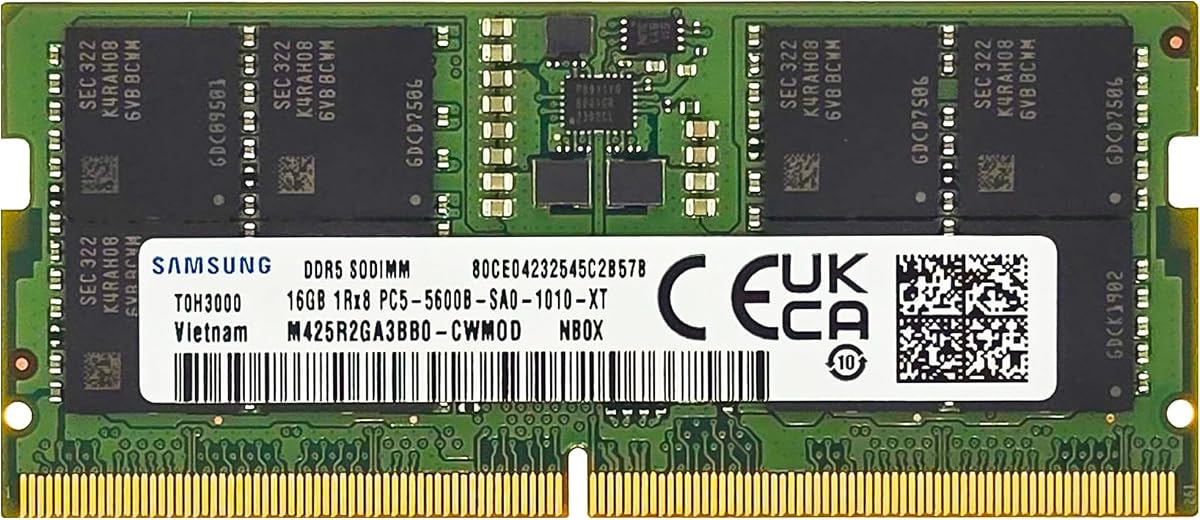
Samsung offers a single 16GB module with 5600MHz speed designed for select laptops and notebooks. As an OEM provider Samsung memory is known for reliability and standard compliance with JEDEC DDR5 specifications. The 1Rx8 single rank design ensures compatibility with various motherboard configurations.
We may earn a commission when you buy through this link, at no additional cost to you.
This module expands system memory resources to reduce bottlenecks during heavy workloads. It adheres to the standard 1.1V voltage which is typical for DDR5 memory to maintain energy efficiency. The 4.5 rating indicates that it performs well in compatible systems without compatibility issues.
Since it is a single stick it may not utilize dual channel performance unless matched with an identical module. This makes it a good upgrade for users needing to fill a single empty slot. Ensure your laptop supports DDR5 to utilize the full speed potential of this stick.
Opt for this module if you need a reliable OEM quality upgrade for a single slot. It is well suited for users who prioritize stability over dual channel bandwidth. Check your system requirements before purchasing to confirm support for the speed and voltage.
Samsung memory is known for reliability and compliance with standard JEDEC DDR5 specs.
1Rx8 single rank design ensures broad compatibility with various motherboard configurations.
We may earn a commission when you buy through this link, at no additional cost to you.
This Samsung kit offers two 16GB modules to provide a total of 32GB capacity. It is designed for select laptops notebooks and all in one computers ensuring broad compatibility. The 5600MHz speed meets standard DDR5 requirements for high performance data transfer rates.
We may earn a commission when you buy through this link, at no additional cost to you.
As an OEM product this memory is built to strict manufacturing standards for stability. The 1Rx8 single rank design ensures it works with many motherboard configurations. This is a solid option for users who prefer original manufacturer quality over third party brands.
The module reduces bottlenecks and expands system resources for heavy workload capacity. It adheres to standard 1.1V voltage for energy efficiency and thermal performance. While reviews are limited the brand reputation ensures high reliability for professional and personal use.
Buy this kit if you value OEM quality and standard compliance. It is well suited for users who want a reliable upgrade without custom profiles. Always verify system compatibility before purchase to ensure full utilization of the speed capabilities.
Built to strict manufacturing standards for high stability and long term reliability.
32GB total capacity allows handling of heavy workloads without performance loss.
We may earn a commission when you buy through this link, at no additional cost to you.
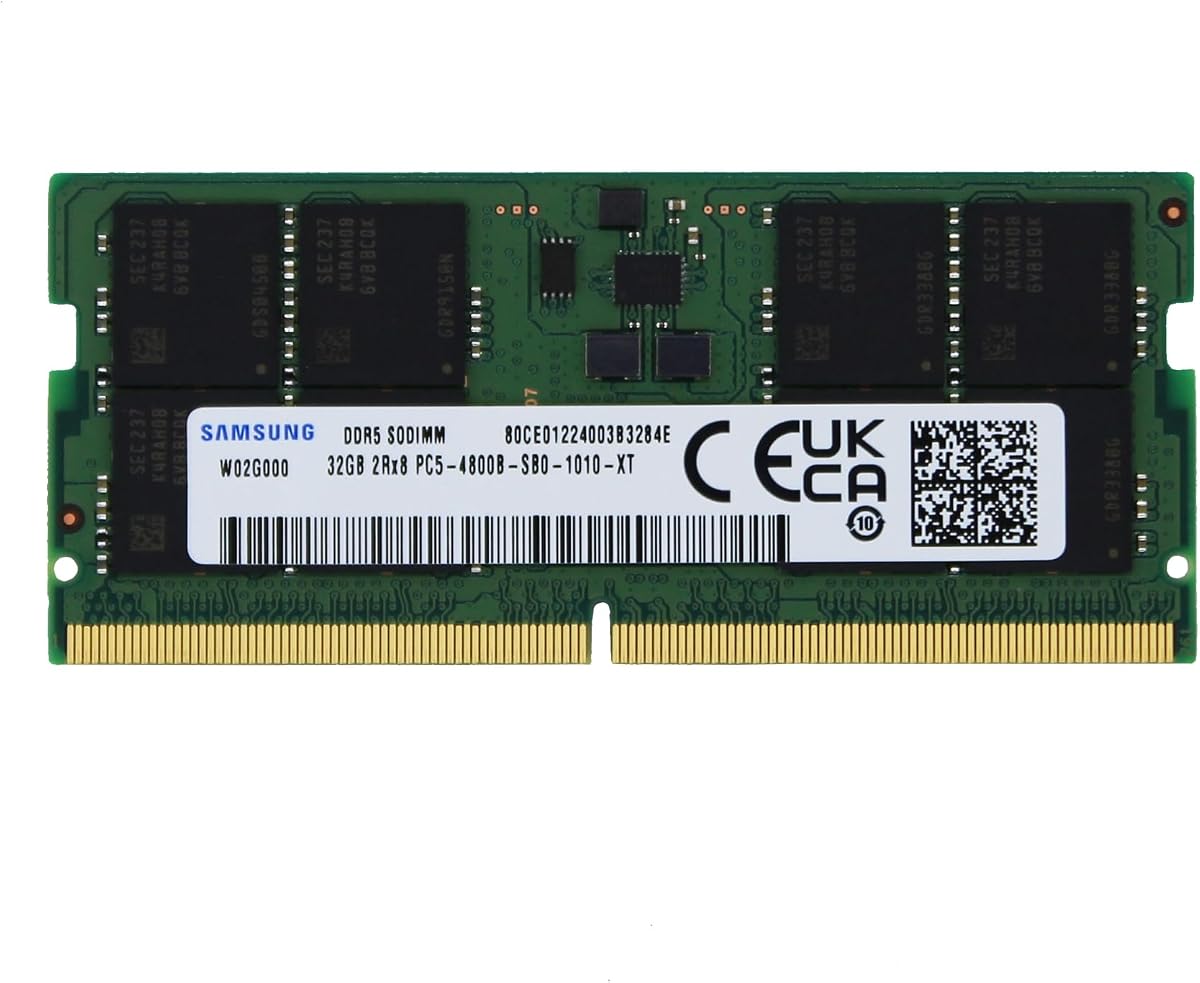
Samsung offers a single 32GB module with 4800MHz speed for select laptop systems. This dual rank design provides better performance in specific system configurations compared to single rank. The 5.0 rating from users highlights its effectiveness and stability in compatible environments.
We may earn a commission when you buy through this link, at no additional cost to you.
The module adheres to standard 1.1V voltage to maintain energy efficiency. It is designed for select laptops notebooks and all in one computers ensuring compatibility. This single module option simplifies installation by reducing the number of sticks to manage.
While the speed is lower than 5600MHz options it balances well with power savings. It is ideal for systems that prioritize battery life or specific workload capacities. The OEM quality ensures reliability and standard compliance with DDR5 architectural requirements.
Consider this for users needing a single stick upgrade with high capacity and efficiency. It is best for systems where lower latency is more important than peak speed. Check system requirements to ensure support for the specific speed and rank configuration.
2Rx8 dual rank design provides better performance in specific system configurations.
32GB single module simplifies installation and expands system resource capacity.
We may earn a commission when you buy through this link, at no additional cost to you.
This Samsung kit includes two 8GB modules to create a 16GB dual channel setup. It operates at 5600MHz to deliver high performance for laptops and notebooks. The 1Rx16 single rank design ensures compatibility with select DDR5 laptop and AIO systems.
We may earn a commission when you buy through this link, at no additional cost to you.
The compact design allows for better heat dissipation and fits tight internal spaces. It adheres to standard 1.1V voltage to maintain energy efficiency and thermal performance. This is an ideal choice for users who need a balanced performance upgrade for general computing tasks.
While the capacity is lower than 32GB options it provides enough room for multitasking. The OEM quality ensures reliable operation without complex configurations. Dual channel bandwidth improves overall system responsiveness for everyday applications.
Choose this kit if you need a reliable 16GB upgrade for a compatible system. It is well suited for users who prioritize stability and OEM quality. Verify your system supports the specific speed and module size before purchasing to ensure compatibility.
Two 8GB modules create a dual channel setup for improved bandwidth.
Compact module design fits tight internal spaces and dissipates heat efficiently.
We may earn a commission when you buy through this link, at no additional cost to you.
Choosing the right DDR5 Laptop RAM requires understanding compatibility speed and capacity needs. This guide outlines the essential factors to consider for a successful upgrade.
Ensure your laptop supports DDR5 memory by checking the processor generation and motherboard specifications. Most modern Intel 12th Gen and AMD Ryzen 7000 Series processors are compatible. Verify the form factor is SODIMM which is standard for laptops.
Always check your manufacturers official support list before purchasing to avoid installation issues.
Choose a capacity that matches your workload requirements. 16GB is suitable for general use while 32GB is better for gaming and content creation. Dual channel kits provide better performance than single sticks.
Higher capacity ensures smoother multitasking and future proofing for demanding software.
Look for speeds of 5600MHz or higher to maximize performance gains. DDR5 memory supports higher frequencies than previous generations. Ensure your motherboard supports the specific speed you choose.
Higher speeds improve data transfer rates and overall system responsiveness.
Lower CL numbers indicate lower latency and faster response times. Look for CL40 to CL48 timings for optimal performance. Tighter timings improve gaming and application loading speeds.
Prioritize lower latency for competitive gaming and professional workloads.
DDR5 memory typically uses 1.1V which is energy efficient. Ensure your motherboard supports the voltage requirements. Lower voltage helps with thermal management and battery life.
Standard 1.1V ensures compatibility with most modern laptop power management systems.
Select brands with a proven track record like Crucial Samsung or Corsair. Reliable brands offer better quality control and warranty support. Trusted memory ensures stability over long term use.
Invest in reputable brands to avoid stability issues and ensure long term performance.
Check the warranty length offered by the manufacturer. Lifetime warranties are common for high quality memory. Strong warranty terms protect your investment against defects.
A lifetime warranty provides peace of mind for long term system reliability.
Consider if you can upgrade further. Buy in matched kits to avoid compatibility issues. Single sticks may not enable dual channel performance unless paired correctly.
Always buy matched kits to ensure consistent performance and stability in dual channel mode.
Begin by shutting down your laptop and removing the power source completely. Ground yourself to prevent static electricity from damaging sensitive components during installation.
Open the laptop panel carefully and locate the existing memory slots. Align the notch on the new RAM module with the slot guide and press down firmly until the clips click into place.
After installation restart the laptop and enter the BIOS to verify the system recognizes the new capacity. Ensure settings are optimized for dual channel performance if using two modules.
No, DDR5 laptop RAM is only compatible with laptops that have DDR5 support processors such as Intel 12th Gen or AMD Ryzen 7000 Series. Older systems use DDR4 or DDR3 and cannot accept DDR5 modules due to physical notch differences.
It is not recommended to mix different modules as it can cause stability issues. Always buy matched kits designed to run together as a set. Mixing kits may result in system instability or failure to boot correctly.
32GB offers better capacity for heavy multitasking and gaming. It reduces bottlenecks when running multiple applications. If you use resource intensive software 32GB ensures smoother performance.
Yes, DDR5 uses more efficient power management circuits. The standard 1.1V voltage and on-die ECC reduce overall power consumption. This helps extend battery life during moderate use.
Most kits automatically set to default speeds. For max speed use XMP 3.0 or EXPO profiles. Some systems may require manual BIOS adjustment for overclocking to full speed.
Most brand warranties are limited to the original purchaser. Samsung and Crucial often transfer warranties if you provide proof of purchase. Always keep your receipt for any warranty claims.
We reviewed ten top DDR5 Laptop RAM kits offering a range of speeds capacities and brand reliability. The Crucial 32GB kit leads our picks for its balance of performance and compatibility.
Prioritize compatibility and capacity to ensure your system runs smoothly. Always verify your motherboard supports the specific speed and timing to avoid issues.
Remember that prices fluctuate so check current listings before purchasing. Verify compatibility with your laptop model to guarantee a successful upgrade.