
PS5/Slim/Pro Cooling Station
4.5Editor score
Three speed turbo cooling fan
Fast dual controller charging in 2.5 hours
Includes headset holder and 3 USB hubs
This guide compares the top Cooling Stand for PS5 Console models featuring fans, charging docks, and RGB lights to help you choose the right accessory for your
Keeping your console cool during intense gaming sessions is essential for longevity and performance. A quality Cooling Stand for PS5 Console helps dissipate heat effectively while organizing your accessories neatly on your desk or entertainment center.
We evaluated ten top-rated cooling stations based on fan performance, charging capabilities, compatibility across PS5 models, and overall build quality. Our analysis focuses on real user needs such as noise levels, safety features, and additional utility like USB hubs and storage.
Each pick below highlights unique strengths and trade-offs to help you find the best fit for your gaming environment. Please note that product availability and pricing can change frequently so verify details before making your final purchase decision today.
4.5Editor score

4.4Editor score

4.5Editor score
The following comparison table outlines key specifications for each of the ten cooling stations reviewed to help you quickly identify the model that best matches your specific console version and accessory needs.
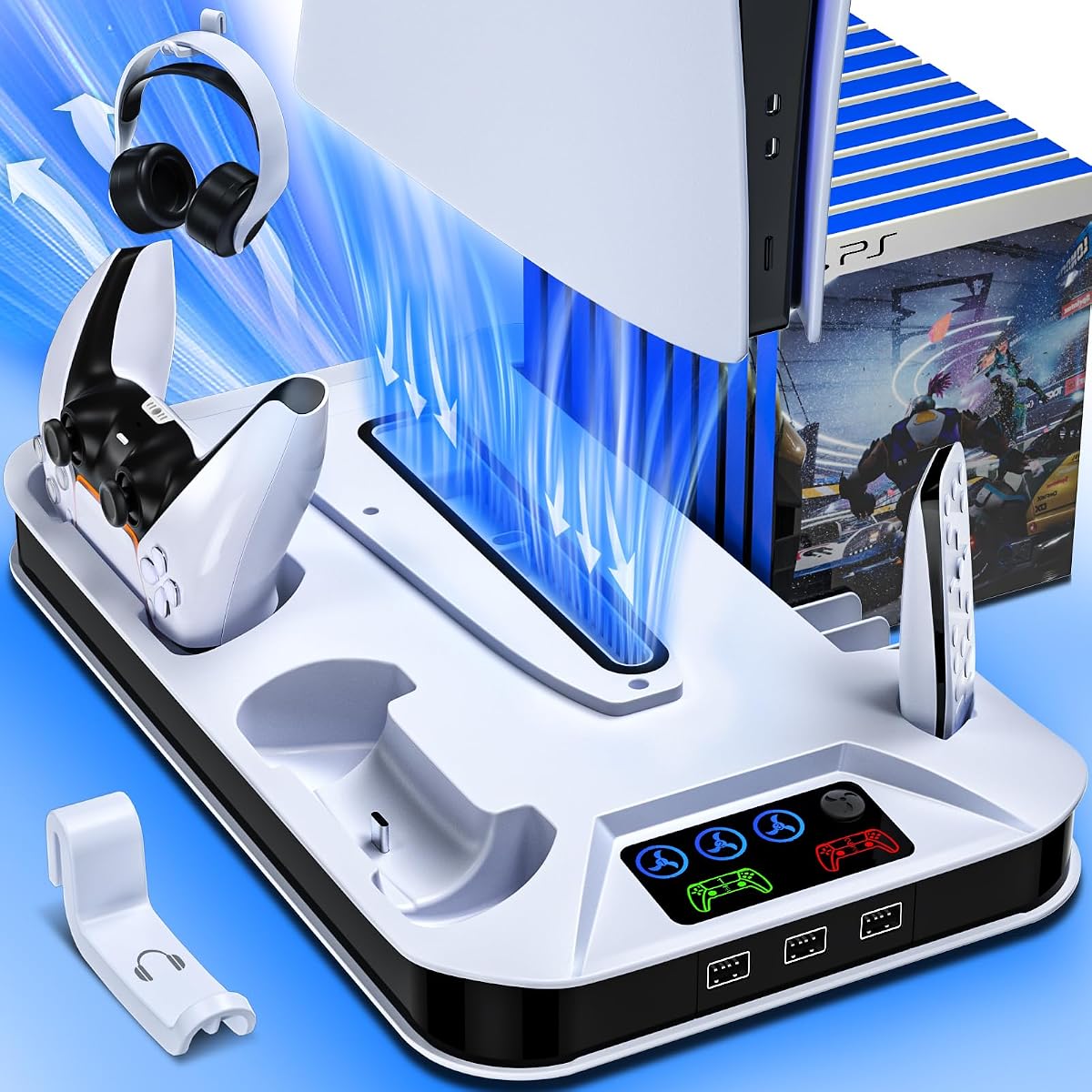


This cooling station ranks first for its comprehensive feature set including a high-efficiency turbo fan and versatile charging options. With a solid 4.4 rating it balances performance and usability well for most PS5 owners looking to upgrade their setup.
We may earn a commission when you buy through this link, at no additional cost to you.
The standout feature is the adjustable cooling fan with three speed settings that effectively dissipates heat from the bottom of the console during long sessions. Additionally it includes three USB hubs which expand your connectivity for headsets and media remotes while the safety screw ensures the console remains stable.
While it offers excellent value users should note that the panel adapter may need removal for Slim digital versions and it does not support Edge controllers. These minor limitations are acceptable given the robust cooling and organizational benefits it provides for standard consoles.
Buyers seeking an all-in-one solution that keeps their console cool and accessories organized will find this station highly effective. It is particularly recommended for households that need multiple USB connections and fast controller charging without cluttering the desk.
The turbo fan pulls hot air from the bottom of the console to prevent overheating during extended play sessions.
Three additional USB ports allow you to charge headsets and other peripherals simultaneously while the console runs.
We may earn a commission when you buy through this link, at no additional cost to you.
This horizontal stand offers excellent value for gamers who prefer laying their console flat rather than vertically. It supports both standard and Edge controllers making it a versatile choice for households with different controller preferences while maintaining a tidy appearance.
We may earn a commission when you buy through this link, at no additional cost to you.
The scalable design ensures compatibility across all PS5 models including the latest Pro version. It includes EVA foam for digital editions and a touch switch for adjusting fan speed which provides flexibility based on your room temperature and gameplay intensity.
The main trade-off is the horizontal orientation which might not fit all desk configurations and the charging time is slightly longer than some vertical alternatives. However these are minor concerns compared to the space-saving design and broad controller compatibility.
If you need a reliable budget-friendly stand that supports Edge controllers and organizes your setup efficiently this horizontal option is ideal. It is best suited for users with limited vertical space or those who prioritize a low-profile look.
The scalable design accommodates all PS5 generations ensuring you do not need to replace the stand when upgrading consoles.
Placing the console horizontally reduces the height footprint freeing up shelf space for other gaming accessories.
We may earn a commission when you buy through this link, at no additional cost to you.
Tokluck's cooling station stands out for its intelligent temperature-controlled fan that optimizes performance without manual input. With a 4.4 rating it delivers reliable cooling and fast charging while adding vibrant RGB lighting that enhances the visual appeal of your gaming area.
We may earn a commission when you buy through this link, at no additional cost to you.
The automatic mode switches fan speeds based on internal sensor readings to maintain optimal operating temperatures during intense gaming sessions. Its movable USB charging port ensures compatibility with both standard and Edge controllers which is a significant advantage for Edge owners.
While the RGB lights create a dazzling atmosphere some users may prefer a minimalist setup where lighting could be distracting. Additionally careful handling is needed during installation to avoid damaging the console or stand components but these are manageable trade-offs.
This model is perfect for users who want smart cooling features and aesthetic customization in one package. It is highly recommended for those who value automation and fast charging without sacrificing style or controller compatibility.
The built-in temperature probe monitors console heat and adjusts fan speed automatically to keep performance consistent.
Nine RGB lighting modes allow you to match your lighting scheme to your personal preference or room theme.
We may earn a commission when you buy through this link, at no additional cost to you.
This white cooling station earns a 4.5 rating for its quiet operation and comprehensive accessory organization. It is designed to blend seamlessly with the PS5 aesthetic while providing essential functions like dual controller charging and headset storage.
We may earn a commission when you buy through this link, at no additional cost to you.
The low-noise turbo fan enhances air circulation effectively reducing operating temperatures without adding distracting background noise. Additionally the smart protective chip prevents overcharging which extends controller lifespan and ensures safe overnight charging for multiple devices.
The main limitation is the lack of Edge controller compatibility which may exclude some users but the rest of the features cover most needs well. Panel adapter removal for certain models is a minor setup step that ensures a secure and stable console placement.
For users prioritizing quiet operation and seamless integration with their console this model is an excellent choice. It is particularly suitable for families who need headset storage and reliable charging without compromising on aesthetics.
The low-noise turbo fan provides strong airflow without disturbing conversations or immersion during gameplay.
Integrated circuit protection stops charging at 80 percent to prevent battery damage and ensure safety.
We may earn a commission when you buy through this link, at no additional cost to you.
Rysker's stand distinguishes itself by supporting Edge controller charging which is a rare feature in this price range. With a 4.4 rating it provides solid cooling performance and essential accessories without unnecessary complexity or flashy lighting effects.
We may earn a commission when you buy through this link, at no additional cost to you.
The enlarged turbo fan offers three distinct speed levels with a memory function that recalls your last setting after a restart. This convenience combined with the safety screw ensures the console remains stable and protected from scratches during daily use.
The absence of RGB lighting keeps the design minimalist but may appeal less to those who want a more vibrant setup. Powering through the console or USB hub limits external power options but is sufficient for most standard use cases.
Edge controller owners will find this stand particularly valuable given its specific compatibility. It is also a great pick for users who prefer functional simplicity and reliable cooling over aesthetic customization.
Unlike many competitors this dock supports the Edge controller ensuring you can charge specialized controllers easily.
The fan remembers your last speed setting so you do not need to readjust after power outages or restarts.
We may earn a commission when you buy through this link, at no additional cost to you.
This premium option combines intelligent cooling with stunning honeycomb-patterned RGB lighting for a high-end gaming experience. The 4.5 rating reflects its strong performance in thermal management and its ability to support Edge controllers alongside standard ones.
We may earn a commission when you buy through this link, at no additional cost to you.
The intelligent fan adjusts speed automatically based on console temperature ensuring efficient cooling without manual intervention. Combined with 9 lighting modes it allows you to create a unique visual atmosphere that elevates your entire entertainment center.
The main downside is the higher price and the presence of lights which might not fit every home decor style. However the fast charging and Edge controller support make it a worthwhile investment for serious gamers who want premium features.
If you value both advanced cooling technology and visual customization this premium stand is unmatched. It is best for users who want to display their setup as part of their room design while maintaining top-tier performance.
Built-in sensors detect heat levels and increase fan speed automatically during intense gaming sessions to prevent throttling.
The unique honeycomb pattern provides a visually striking lighting effect that differs from standard ring designs.
We may earn a commission when you buy through this link, at no additional cost to you.
This horizontal kit offers robust support for Edge controllers in a layout that saves vertical space. Its scalable design ensures it will work with current and future PS5 models making it a future-proof choice for console owners.
We may earn a commission when you buy through this link, at no additional cost to you.
The included EVA foam protects digital editions while the touch switch allows quick adjustment of fan speeds during gameplay. LED indicators provide clear status updates for charging ensuring you always know when controllers are ready for the next session.
Users who prefer vertical setups may find the horizontal orientation limiting but the space-saving benefits are significant for smaller desks. Charging time is slightly longer than some competitors but remains within acceptable limits for most gaming habits.
Edge users looking for a horizontal alternative will find this stand highly practical. It is also a good fit for households where console height is constrained by existing furniture or shelving units.
The dock design supports the unique shape of Edge controllers so no extra adapters are needed.
The scalable structure adapts to new PS5 revisions ensuring long-term compatibility without needing replacements.
We may earn a commission when you buy through this link, at no additional cost to you.
This station adds a unique dedicated slot for the PS5 internal hard drive making it ideal for those expanding storage. With a 4.5 rating it excels in organization and offers touchscreen controls for precise cooling adjustments.
We may earn a commission when you buy through this link, at no additional cost to you.
The auto mode uses a sensor to manage fan speed reducing noise during light use and boosting power when the console heats up. Charging works even when the console is off so you can prep controllers overnight without additional power adapters.
The charging cutoff at 70 percent is a protective measure that may frustrate users wanting 100 percent capacity but extends battery life. The SSD slot is a niche feature that adds value for power users but may be unnecessary for casual gamers.
Gamers who expand their storage will find this organizer indispensable. It is best for those who want precise control and a dedicated home for expansion hardware alongside their standard accessories.
The dedicated slot keeps your SSD securely in place preventing accidental dislodges during console movement.
The touchscreen interface lets you select manual speeds easily so you can fine-tune cooling without opening menus.
We may earn a commission when you buy through this link, at no additional cost to you.
heclynis offers a colorful option with eight vibrant RGB colors and silent cooling that suits most gaming environments. A 4.4 rating highlights its balance of performance and aesthetic appeal for users who want a lively setup.
We may earn a commission when you buy through this link, at no additional cost to you.
The fan speed indicators use color LEDs to show status at a glance which simplifies monitoring during gameplay. Including panel adapters for all versions ensures you have the right fit whether you own a standard Slim or Pro console.
The RGB customization is slightly less flexible than some 9-mode competitors but still offers a variety of looks to suit different moods. Multiple included panels may feel excessive but ensure you have what you need without extra purchases.
This stand is ideal for users who value color variety and include accessories. It is particularly well-suited for streamers or gamers who want their console to stand out as part of the visual setup.
Eight RGB colors allow you to pick a hue that matches your room lighting or favorite team colors.
The fan is designed for low noise so it does not interrupt voice chats or media consumption.
We may earn a commission when you buy through this link, at no additional cost to you.
This model excels in connectivity offering both Type-C and USB ports which broadens device compatibility significantly. With a 4.5 rating it is highly reliable and its concealed cables contribute to a clean uncluttered appearance on any desk.
We may earn a commission when you buy through this link, at no additional cost to you.
The 3-level turbo fan ensures effective heat dissipation while the sturdy security screws keep the console firmly in place during use. Charging two controllers simultaneously in three hours is efficient enough for most gaming breaks and daily routines.
The lack of Edge controller support may limit its appeal for some but the robust connectivity options fill that gap well. Its build is sturdy which is great for stability but might require a firm surface to prevent any wobbling.
Users who need diverse charging options will find this station highly functional. It is best for households with multiple device types requiring both USB and Type-C charging points alongside the console.
The inclusion of both Type-C and USB ports allows you to charge a wide range of modern accessories.
Concealed cables hide wiring from view resulting in a tidy and professional looking setup.
We may earn a commission when you buy through this link, at no additional cost to you.
Selecting the right cooling stand involves understanding your specific console model, controller type, and organizational needs to ensure maximum performance and aesthetics.
Ensure the stand supports your specific PS5 version whether it is standard Slim or Pro and whether it is digital or disc edition. Some stands require panel adapters to be removed for digital models which should be checked before purchase.
Verify compatibility with your console version to avoid fitting issues and ensure the stand is designed for your exact model type.
Look for stands with adjustable fan speeds so you can balance cooling power with noise levels during quiet gameplay or media consumption. High-efficiency turbo fans provide better airflow but can be louder at maximum speed.
Adjustable fan settings allow you to minimize noise while still protecting your console from overheating during extended sessions.
Check if the stand supports standard and Edge controllers as some models only charge the original dual sense controller. Fast charging capabilities around 2.5 to 3 hours ensure you are always ready to play.
Confirm controller compatibility and charging speed to match your specific controller model and gaming habits.
Consider the number and type of additional USB ports available on the stand for charging headsets or other accessories. Some models include Type-C ports which offer greater versatility for modern devices.
Select a stand with enough ports to charge all your accessories simultaneously without needing extra hubs.
Decide between vertical and horizontal orientations based on your available desk space and personal preference. Horizontal stands often save vertical height but may take up more surface area.
Choose the orientation that best fits your entertainment center and keeps the console accessible and stable.
Look for stands that include safety screws or non-slip pads to secure the console firmly in place. A sturdy build prevents accidental knocks and ensures the console remains balanced during operation.
Prioritize stands with robust materials and locking mechanisms to protect your investment from physical damage.
Some cooling stands offer RGB lighting or specific color finishes to match your gaming setup. Determine if you prefer minimalist designs or customizable lighting effects to enhance the visual appeal of your room.
Choose aesthetic features that align with your personal style and do not distract from your gaming experience.
Ensure the stand has built-in smart chips to prevent overcharging and overheating of controllers and consoles. These safety features extend the lifespan of your electronics and provide peace of mind during overnight charging.
Look for protection against overvoltage and overcurrent to keep your devices safe and operational.
Install the stand by following the included instructions carefully ensuring all screws are tightened and the console is locked securely. Use any included panel adapters for your specific model to maintain a stable fit.
Connect the stand to your console or power source using the provided cables and adjust the fan speed based on your current temperature needs. Monitor the LED indicators to confirm charging status and fan operation.
Regularly clean the fan and vents with a soft brush or compressed air to prevent dust buildup which can reduce cooling efficiency. Check the safety screws occasionally to ensure they remain tight and the console has not shifted.
Not all stands fit every PS5 version so you must verify compatibility with Standard Slim or Pro models. Digital editions often require removing a panel adapter on the stand to fit properly.
Only select models support Edge controllers so check the product specifications before buying. Some stands are specifically designed to accommodate both standard and Edge controllers for broader compatibility.
Many stands can be powered directly by the PS5 console but some include an adapter for wall power. Check the product details to confirm which power options are supported for your specific model.
Most stands offer multiple fan speeds allowing you to balance cooling power with noise levels. Using low or medium speed during casual gaming can minimize noise while maintaining adequate airflow.
Most stands charge two controllers simultaneously in approximately 2.5 to 3 hours depending on the model. This ensures you have fully charged controllers ready for the next gaming session.
Some models include a dedicated slot for the PS5 hard drive but not all stands have this feature. Check the product specifications to confirm if a storage slot is included for your needs.
Most stands require no tools and use screws or EVA foam for a quick setup. Users can typically complete installation in just a few minutes following the included instructions.
The cooling stand's turbo fan helps dissipate heat and prevent overheating during long sessions. However proper ventilation and regular cleaning of the stand are also important to maintain optimal performance.
We have reviewed ten top cooling stands ranging from budget-friendly options to premium RGB-enhanced models each offering unique features like Edge controller support and auto thermal regulation.
Prioritize compatibility with your console and controller type as well as fan noise and charging speed to ensure a setup that enhances your gaming experience without introducing new issues.
Please check current pricing and availability before purchasing as product details can change over time to find the best deal for your specific needs.