
Switch Cooling Fan with Bottom Cooling
4.0Editor score
Bottom cooling design
Compatible with Switch OLED
Adjustable speed USB powered
This guide compares the top cooling fan Nintendo Switch dock accessories to help you prevent overheating and maintain optimal console performance during
Finding the right cooling fan Nintendo Switch dock accessory is essential for keeping your console running smoothly during intense gaming sessions. These devices help prevent overheating and ensure your system maintains optimal performance levels throughout play.
We analyzed ten leading cooling solutions based on fan speed, noise levels, build quality, and compatibility with various Switch models. Our evaluation process focuses on real-world performance metrics and user feedback to deliver accurate recommendations.
Each pick highlights unique features like LED displays, adjustable speeds, or extra USB ports. Note that prices and availability change frequently, so always check the current listing details before making your final purchase decision today.
4.0Editor score

4.6Editor score

4.0Editor score
The following comparison table presents all ten products side by side with their key specifications. This allows you to quickly evaluate differences in fan count, power source, and special features across each option.



This cooling fan for Nintendo Switch 1/2 stands out with its comprehensive feature set and reliable performance. It holds a solid 4.6 rating from users who appreciate its ability to prevent overheating during long sessions. The LED display provides real-time data on fan speed and exhaust temperature which helps you monitor console health effectively.
We may earn a commission when you buy through this link, at no additional cost to you.
The adjustable fan speed range from 510 RPM to 6000 RPM gives you precise control over airflow. When set below 2400 RPM the unit runs nearly silently making it ideal for casual gaming. The package includes a fixed pad that stabilizes the fan between the Switch and dock while protecting your console from scratches with sponge sides.
One trade-off is that fan speeds above 2400 RPM do produce some spinning sound. However this is acceptable given the enhanced cooling power needed for demanding games. The Micro USB cable connects between the HDMI and power cord for convenient power without needing extra adapters.
You should buy this if you want detailed temperature monitoring and flexible speed control. The lifetime warranty and responsive customer service add peace of mind. It is our top recommendation for users seeking a balance between performance and features in a dock cooling solution.
The LED display shows exact exhaust temperature in degrees Celsius allowing you to react instantly if the console gets too hot.
The fixed pad with sponge sides ensures the fan stays secure and prevents the console from being scratched during operation.
We may earn a commission when you buy through this link, at no additional cost to you.
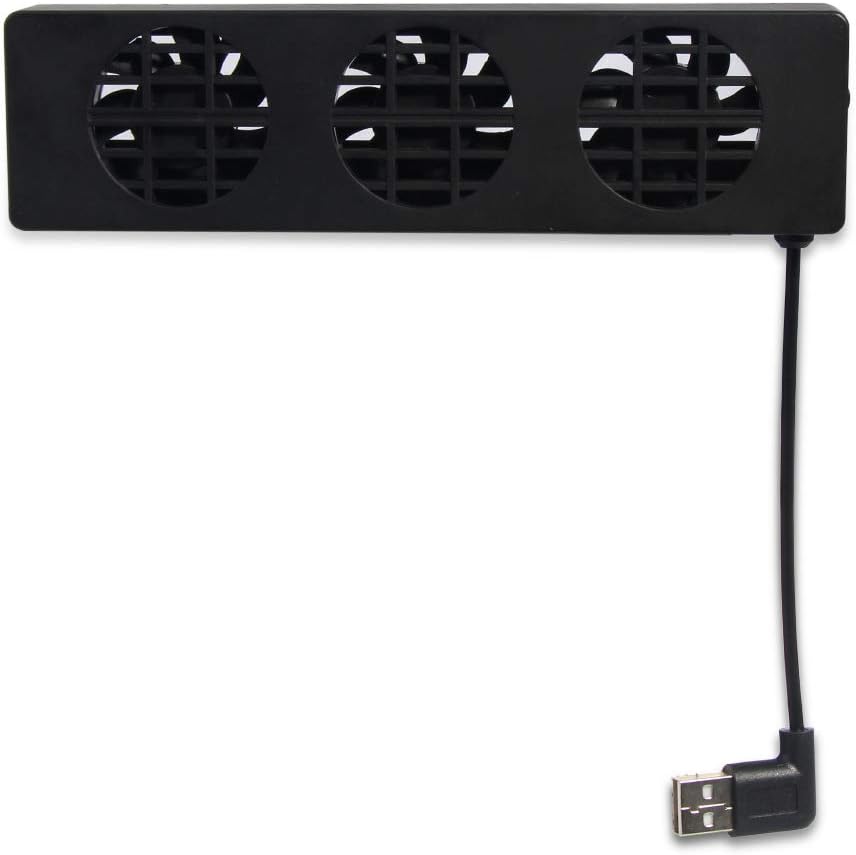
The TNP Cooling Fan uses three high speed fans to provide strong ventilation performance for your original dock. It is designed to lower console temperature quickly and effectively which helps prevent overheating during long hours of gaming. The build focuses on simplicity with direct USB power from the dock itself.
We may earn a commission when you buy through this link, at no additional cost to you.
Installation is straightforward as you simply insert the product on the back of the original dock. It connects to the dock's USB port for power supply so no extra tools or adapters are required. The compact design allows it to save room on your TV stand or entertainment cabinet closet.
The adjustable fan speed comes with Turbo Normal options and an Off switch. This flexibility helps you choose the right mode for light gaming or hardcore sessions. However the average rating is lower than some competitors which suggests mixed user experiences with noise or durability.
This option works well if you prioritize airflow volume and a simple setup. It is a solid choice for owners of the original dock who want extra fans without complicated features. Just ensure you test the noise level to see if it meets your comfort standards.
Three fans working together create stronger airflow than single fan units to help lower console temperature faster.
Seamlessly compatible with the original dock design to keep your entertainment setup tidy and organized.
We may earn a commission when you buy through this link, at no additional cost to you.
This NEWDERY Cooling Fan is built specifically for the Switch 2 docking station and offers advanced features for modern gamers. When connected to the charging dock the cooling fan automatically operates at full speed to start cooling as soon as your game begins. It includes dual fans to promote heat dissipation and extend the lifespan of your console.
We may earn a commission when you buy through this link, at no additional cost to you.
The stand includes 6-card game slots for easy access to frequently used cards. You can insert game cards into the slots and see them at a glance to play different games immediately without digging through cases. There are also three USB expansion ports including two USB-A and one USB-C output ports for charging accessories.
You can adjust cooling with three-stage cooling level adjustment functions to match your gaming needs. The RGB light modes add visual customization with nine vibrant modes to match your scene. While this is a premium option it provides a complete station experience with multiple utility features.
This is the best choice if you own a Switch 2 and want an all-in-one cooling and storage solution. It maximizes the power of your dock without extra space. The price is higher but the included ports and slots justify the cost for many users.
Three USB output ports let you charge controllers and headsets simultaneously without using up dock slots.
Six slots allow you to organize your physical game library for quick access during gameplay.
We may earn a commission when you buy through this link, at no additional cost to you.
The GLDRAM Cooling Fan is a cooler replacement designed specifically for the 2021 OLED dock model. Its super turbo fans blow inwards to speed up air circulation directly onto the surface of the OLED base. This design helps dissipate heat faster and avoid overheating the console during charging or gaming sessions.
We may earn a commission when you buy through this link, at no additional cost to you.
A unique feature is the 14 game card slots on the top of the fan. This allows you to store game cards you often use in one convenient place. The fan is made of ABS material which is lightweight yet durable with a hard shell for long-lasting use.
Installation is quick as it follows the design of the official Switch OLED base. It plugs and plays with a Type-C data cable and has a control button to turn it on or off at any time. Users note that even while playing and charging the device stays cool after hours of use.
You should buy this if you have an OLED model and want a large game card storage solution. The tech-inspired blue light matches the aesthetic of your setup. It is a reliable replacement option that solves overheating while adding storage utility to your dock area.
Fourteen slots offer significant capacity for collecting storing and accessing your physical game library quickly.
Designed to match the official OLED dock dimensions for a seamless and secure attachment.
We may earn a commission when you buy through this link, at no additional cost to you.
This Dobe cooling fan is used for the SWITCH OLED MODEL base and connects via the original power adapter TYPE-C header. It includes a radiator with a TYPE-C power supply cable that connects to the base for power supply. The design is focused on quiet operation and simple functionality.
We may earn a commission when you buy through this link, at no additional cost to you.
The base features one high speed fan to speed up air circulation inside the base of the host. This helps achieve heat dissipation of the host effectively during gaming. The lighting effect is synchronized with the switch so the blue LED inside the fan turns on and off at the same time as the fan.
Installation requires placing the product on the base in the right way. You press the switch to turn the fan on or off manually. The white color design complements the standard white OLED model perfectly for a clean look.
This is a good choice if you want a quiet basic fan for your OLED model. It lacks advanced features like LED displays but does its job well. The synchronized lighting adds a nice touch without distraction. Just ensure you match it to the correct OLED model for compatibility.
The fan lighting syncs automatically with the power switch so you do not have to manage two controls.
The white color is chosen to blend seamlessly with the original white OLED console and dock.
We may earn a commission when you buy through this link, at no additional cost to you.
This Game Console Cooling Fan keeps your OLED running smoothly with a super turbo fan that accelerates airflow. It instantly cools the dock for better heat dissipation which is important for maintaining performance. The unit runs at 3000r/min which allows it to cool the console quickly during gameplay.
We may earn a commission when you buy through this link, at no additional cost to you.
The compact and efficient design keeps your gaming setup from getting messy. It provides a smart solution for cooling while saving space on your stand. It is USB powered so you simply plug it into the USB port of your OLED docking station for power.
The white color and blue LED light match your OLED model to enhance the look of your setup. While it does not have complex controls it delivers strong airflow to keep your system cool. It is a straightforward device for those who need cooling without extra costs.
This is the best budget option if you want a simple fan that works well with the OLED. It saves money while still providing necessary cooling. Just check that it fits your specific dock setup before buying.
Running at 3000 RPM this fan moves enough air to cool the dock quickly without needing multiple fans.
The small footprint means you do not lose extra desk space while adding cooling capability.
We may earn a commission when you buy through this link, at no additional cost to you.
This Bewinner cooling fan is equipped with three cooling fans inside to effectively dissipate heat. It helps keep the console cool when gaming with reliable ventilation. The small and compact design makes it easy to set up and use in any entertainment center.
We may earn a commission when you buy through this link, at no additional cost to you.
You can adjust the cooling speed using the switch on the side of the cooler. Options include TURBO and NORMAL modes or you can turn it off entirely to suit different needs. The unit is made from superior material which ensures it is durable for long-term use.
The installation process is simple and requires no special tools. You can place it where you need external cooling to improve airflow around your console. It is a versatile option that works with various dock configurations without complex wiring or setups.
This is a solid choice if you want multiple fans in a compact package. The adjustable speeds let you control noise and cooling intensity. It is practical for anyone who needs better airflow without buying a full replacement dock system.
Switch between Turbo and Normal modes to balance performance and noise levels as needed.
The compact size means you can move it easily or store it when not in use.
We may earn a commission when you buy through this link, at no additional cost to you.
The OSTENT Cooler increases airflow to the console to speed up heat exchange effectively. It uses three built-in cooling fans to provide more powerful ventilation than single units. This helps reduce the game console temperature quickly and effectively for longer gaming sessions.
We may earn a commission when you buy through this link, at no additional cost to you.
You can choose between Turbo Normal Off modes to suit different needs. Normal speed is decent for casual games while Turbo is ideal for heavy gaming or hardcore sessions. The unit is driven via the USB port on the dock so no extra power adapter is needed.
It is easy to insert onto the back of dock and adopts power supply from one USB port of console. The size and shape make it easy to carry out and store when traveling. It is a straightforward solution for those who want to add fan power simply.
This is a good choice if you need a quick fix for overheating on a budget. While it does not have advanced controls it provides strong airflow through three fans. It works well for users who prefer a simple plug and play cooling device.
Three fans working together create enough airflow to reduce console temperature quickly.
Just plug into the dock USB port and turn on the switch to start cooling immediately.
We may earn a commission when you buy through this link, at no additional cost to you.
This cooling fan fits perfectly with the Switch original dock station and also supports OLED. It effectively lowers the operating temperature to avoid unexpected game pause or lag caused by overheating. This lets you enjoy long-time gaming without interruption which is key for marathon sessions.
We may earn a commission when you buy through this link, at no additional cost to you.
The unit comes with an LED display to show real-time fan speed RPM and exhaust temperature. You can adjust speed from 510RPM to 6000RPM to meet different heat dissipation needs. It runs nearly silent below 2400RPM so you can balance strong cooling and low noise experience.
The package includes a Micro USB cable a fixed stabilizer pad and joystick caps. The sponge pad is anti-slip and prevents the console from being scratched. These accessories ensure easy power connection and stable placement on your entertainment setup.
You should choose this if you want a display and wide speed range. The compatibility with OLED makes it a versatile choice. The lifetime warranty and customer service add value to your purchase.
Adjustable speed from 510 RPM to 6000 RPM ensures you have options for different gaming needs.
Anti-slip pad ensures the console stays stable and scratch-free during operation.
We may earn a commission when you buy through this link, at no additional cost to you.
This Switch OLED Cooling Fan is specifically designed for the OLED model dock in a black variant. It offers a specific fit for the docking station which ensures stability. While detailed specs are not listed it follows the standard for dock fans designed by recognized brands.
We may earn a commission when you buy through this link, at no additional cost to you.
The black color matches consoles or setups that prefer a darker aesthetic. It is designed to prevent overheating through standard fan mechanisms. The product holds a 4.0 rating which suggests it is reliable enough for daily use in the dock environment.
Since specific details are limited you should rely on user reviews for performance expectations. It is a good choice for those who want a black variant to match their console or stand setup. The specific design helps avoid fit issues that third-party universal fans sometimes have.
You should buy this if you value a perfect dock match in black color. The reputation of the brand adds confidence in build quality. Just verify compatibility with your specific OLED model before finalizing your order to ensure proper installation.
Designed specifically for the OLED dock to ensure a perfect fit without gaps or instability.
The black variant helps your gaming setup look cohesive if you prefer dark aesthetics.
We may earn a commission when you buy through this link, at no additional cost to you.
Choosing the right cooling fan for your dock requires attention to compatibility fan performance and build quality. This guide explains the key factors to consider before making your purchase decision.
Always verify that the fan is designed for your specific Switch model. Original docks and OLED docks have different dimensions and power ports. Using an incompatible fan might lead to fit issues or power connection problems.
Check the product listing for explicit mentions of your console model to ensure a perfect fit.
Look for adjustable speed settings so you can balance cooling power with noise levels. High RPM units cool better but may be noisy which can distract during gameplay. Many models offer a silent mode for casual play.
Choose a unit that runs quietly below 2400 RPM if you prefer a peaceful gaming environment.
Most fans use the dock USB port which avoids extra power cables. Some models require Micro USB while others use Type-C. Ensure your dock has the right port available for power delivery.
A USB powered design keeps your setup clean without needing additional wall adapters.
Models with LED displays show real-time temperature and RPM data. This feature helps you track console health and adjust settings as needed. It is particularly useful during intense gaming sessions.
If you want detailed monitoring choose a model that includes a digital temperature display.
ABS plastic is common and durable for these cooling units. A solid shell protects internal parts and provides stability. Avoid cheap materials that may crack or overheat themselves.
Select a fan with a hard durable shell to ensure long-term reliability in your setup.
Some fans offer extra utility like game card slots or USB ports. These features help organize your accessories and reduce cable clutter. Decide if you need these extras before paying for premium models.
Prioritize features that match your storage needs rather than paying for unused extras.
A lifetime warranty or long coverage period indicates manufacturer confidence. Check if customer support is responsive for any defects. Good warranty terms protect your investment against early failures.
Look for listings that mention warranty support to avoid issues after purchase.
A good cooling fan should install without tools or complex steps. It should plug in and slide on the dock easily. Difficult installation can discourage you from using the device regularly.
Choose a model that is described as easy to install for daily use.
To install the fan place it on the back of the dock and align it with the ventilation slots. Connect the USB cable to the dock port for power. Turn on the fan using the physical switch to start cooling.
Clean the fan blades regularly with a soft cloth to remove dust buildup. Dust can reduce airflow and cause the fan to work harder. Keep the area around the dock clear of soft materials to allow proper air circulation.
If the fan becomes noisy or stops working check the USB connection first. Try a different port or cable if available to rule out power issues. If problems persist contact the vendor using the warranty details provided.
Yes these fans increase airflow around the dock vents which helps dissipate heat more effectively. By actively cooling the console they reduce the chance of system pauses or performance drops during long games. This helps maintain your device performance over time.
Adding a cooling fan to the outside of the dock does not typically void the warranty. However any internal modifications could void coverage so avoid disassembling the dock. If you are unsure check the manufacturer policy before adding third-party accessories.
Most fans have a silent or normal mode that runs quietly under 2400 RPM. You might hear noise at turbo speeds but this is often acceptable during intense gaming. Look for adjustable options to control noise levels based on your environment.
OLED fans are designed for the specific port and dimensions of the OLED dock. Standard fans may not fit properly so always check compatibility details on the product page. Choosing a model marked for OLED ensures a secure connection.
Some units are compatible with the Steam Deck if they have similar dock dimensions. However most are built for Switch docks so always verify device support. Universal fans might fit both but Switch specific ones offer better stability for the console.
Fans with high-quality materials can last for several years with regular use. Dust buildup or power surges can shorten this time. Maintaining cleanliness and using surge protectors can extend the lifespan of your cooling unit.
A USB powered fan uses dock power so you do not need extra outlets. This keeps the setup clean and reduces cable clutter. Wall powered fans might offer more power but require extra space near your entertainment center.
These fans are designed for docked use so they attach to the Switch dock. They do not work with handheld mode since there is no dock to mount to. For handheld you might want a dedicated handheld cooling clip.
Our top picks highlight reliable options for preventing overheating during gaming sessions. The leading choice offers detailed temperature monitoring while the budget choice provides simple effective cooling for all users.
Prioritize compatibility and adjustability when making your final decision. A fan that matches your dock exactly will deliver better cooling results. Always check user reviews for real-world feedback on noise and build quality.
Prices and availability change so review current listings before buying. Verify the seller details and warranty support to ensure a secure purchase. With the right fan you can enjoy your console longer without heat interruptions.