
RAINYEAR 14 Inch Laptop Sleeve
4.6Editor score
EPE padding protection
Smooth zipper closure
Universal 14 inch fit
This guide compares the top Chromebook Sleeve Case options for protection and portability. We review features, compatibility, and durability to help you choose
Protecting your Chromebook from daily wear and tear is essential for longevity. A high-quality sleeve case offers cushioning against bumps while keeping your device organized. Finding the right fit ensures your laptop stays secure during travel or commuting.
We analyzed ten popular models based on material quality, storage options, and user ratings. Each product was evaluated for compatibility with various Chromebook sizes and brands. Our goal is to highlight sleeves that balance affordability with robust protection features.
Every pick includes detailed specifications and real-world performance insights. You will see pros and cons to help you decide quickly. Prices and availability change frequently, so check current listings before making your final purchase decision today.
4.6Editor score

4.7Editor score

4.6Editor score
The following table provides a side-by-side comparison of all ten reviewed sleeves. It highlights key specifications such as dimensions, materials, and unique features to help you identify the best match for your device needs quickly.



The Lacdo Chromebook Case stands out as our top choice for its combination of sustainable materials and robust protection. With a 4.7 rating, users appreciate its soft velvet lining that guards against scratches. It is designed for many 11-inch Chromebooks and Surface devices, making it versatile.
We may earn a commission when you buy through this link, at no additional cost to you.
This sleeve uses recycled textiles to minimize environmental impact, certified by GRS standards. The anti-static barrier prevents electrical damage, while the high-density velvet provides physical cushioning. Front pockets are well-organized for chargers and cables, ensuring your accessories stay secure and accessible during travel.
While the gray color is stylish, it may show dirt more easily than darker options. Some users reported occasional zipper snags, though this is rare. These minor trade-offs are acceptable given the strong protection and ethical design principles that define this product in the market.
If you value eco-conscious manufacturing and superior cushioning, this sleeve is ideal for daily use. It balances practicality with social responsibility, making it a smart investment for students and professionals alike. We recommend measuring your device to ensure a perfect fit before purchasing today.
Recycled polyester reduces waste while maintaining durability and strength for long-term daily use.
Microscopic static shielding prevents electrical discharge that could harm sensitive internal laptop components.
We may earn a commission when you buy through this link, at no additional cost to you.
The RAINYEAR 14 Inch Laptop Sleeve offers exceptional value for budget-conscious buyers seeking reliable protection. It features high resilience EPE padding that shields against bumps and extrusion. The outer polyester layer keeps dust out, while the smooth zipper ensures easy access to your device.
We may earn a commission when you buy through this link, at no additional cost to you.
This model is designed as a universal option for most 14-inch devices, including Chromebooks. Its simple black design blends well with any bag, and the lack of extra bulk makes it easy to slide into backpacks. Users praise its durability despite the low cost point.
However, it lacks a dedicated carrying handle, so you must rely on a separate bag. The design is very basic, which may not appeal to those seeking style. These limitations are minor given the protective capabilities and the significant savings compared to premium alternatives.
For students or anyone needing a no-frills protective layer, this sleeve is an excellent choice. It provides essential shock protection without breaking the bank. We suggest checking your device dimensions carefully to confirm a snug fit before ordering.
Designed to fit most standard 14 inch laptops ensuring broad usability across various brands.
Strong top-loading zipper stays closed securely and operates smoothly for quick device access.
We may earn a commission when you buy through this link, at no additional cost to you.
The FINPAC Hard Laptop Sleeve Case delivers premium protection through its semi-hard EVA shell and 1600D polyester exterior. It is built to withstand significant shock and water exposure, making it ideal for rugged travel. The 360-degree padding ensures your Chromebook remains safe from drops and scratches.
We may earn a commission when you buy through this link, at no additional cost to you.
This sleeve includes a convenient hand strap for easy carrying without needing a backpack. The premium zippers are durable and secure, keeping contents locked inside. While it lacks external pockets for accessories, the internal space is optimized to fit 11.6-inch laptops snugly without rattling.
The rigid shell adds some weight compared to soft sleeves, which might be a downside for ultra-light travelers. Additionally, there are few external pockets for storage. These trade-offs are justified for those prioritizing maximum physical protection over lightweight convenience or extra storage space.
If you frequently travel or need maximum defense against drops, this hard shell is a great investment. Its water resistance and shockproof features provide peace of mind in various environments. We recommend it for users who want the highest level of safety for their device.
Rigid exterior structure prevents crushing and absorbs heavy impacts better than soft fabric.
High-density polyester fabric repels water and resists wear for better durability.
We may earn a commission when you buy through this link, at no additional cost to you.
The amCase Chromebook Case features a seamless neoprene wrap that offers top-to-bottom protection for your device. Its integrated carrying handle makes it convenient to transport alone, removing the need for a larger bag. The front storage space allows you to keep cables and adapters organized and close by.
We may earn a commission when you buy through this link, at no additional cost to you.
Constructed with impact foam padding, this sleeve protects against bumps and shocks effectively. The material is soft to the touch, providing a comfortable grip while holding your laptop. Users appreciate its straightforward design and the convenience of having a handle on a standard sleeve.
One limitation is that neoprene can absorb heat, which might not be ideal for long-term storage in hot cars. Additionally, it comes in a standard black color, limiting aesthetic choices. These are minor concerns for a product focused on practicality and everyday use.
If you want a simple case that can be carried easily, this sleeve is a solid option. It balances protection with portability for commuters and students. We recommend checking your laptop dimensions to ensure it fits within the 11 to 12-inch range.
Built-in handle enables easy transport without needing a backpack or shoulder strap.
Additional storage space keeps small items like cables and adapters organized.
We may earn a commission when you buy through this link, at no additional cost to you.
The Arvok 11 11.6 12 Inch Sleeve is designed for portability with a slim and lightweight build. Made from water-resistant neoprene, it shields your laptop from spills and dust. The quick top-loading zipper allows for easy access to your device without struggling with tight closures.
We may earn a commission when you buy through this link, at no additional cost to you.
This sleeve offers multi-dimensional protection, guarding against dust, scratches, and minor shocks. Its slim design makes it easy to slide into briefcases or backpacks, adding minimal bulk. Users appreciate the stylish light green color that stands out from typical black sleeves.
However, the light color may show dirt more easily over time, requiring regular cleaning. The padding is relatively thin, which may not provide as much cushioning as thicker alternatives. These trade-offs are acceptable if you prioritize lightweight portability and water resistance.
For those who want a slim case that fits into tight spaces, this sleeve is a good choice. It offers essential protection without adding weight to your bag. We suggest measuring your device carefully to confirm compatibility before purchasing today.
Minimal bulk allows easy integration into existing bags without increasing weight.
Material offers protection against accidental spills and daily moisture exposure.
We may earn a commission when you buy through this link, at no additional cost to you.
The Voova 13.3 to 13 Inch Sleeve offers versatile features with its retractable top handle and front storage pockets. Designed with rugged Oxford fabric and a velvet lining, it provides excellent protection against bumps and scratches. This model is highly rated for its practical design and ease of use.
We may earn a commission when you buy through this link, at no additional cost to you.
The top handle makes it easy to extract your laptop from a backpack without dropping it. Two front zipper pockets hold chargers, phones, and cables securely. The interior border helps shield your device from damage, ensuring comprehensive protection for your Chromebook or tablet.
While the handle is convenient, it may feel narrow for some users who prefer a wider grip. There is no shoulder strap included, so you must carry it by hand or inside another bag. These limitations are minor given the high protection and organizational features.
If you need a sleeve that can also function as a small bag, this is a great choice. Its combination of pockets and handle adds significant utility. We recommend measuring your laptop width to ensure a proper fit within the 13-inch range.
Handle placement makes extracting devices from bags easier and safer.
Front pockets offer organized storage for cables and accessories.
We may earn a commission when you buy through this link, at no additional cost to you.
The Ferkurn Laptop Case Sleeve focuses on organization with two dedicated pockets for accessories like mice and cables. Made from water-repellent fabric, it protects against spills and moisture. The anti-static inner lining reduces the risk of electrical damage, providing a safe environment for your device.
We may earn a commission when you buy through this link, at no additional cost to you.
This sleeve is ultra-slim and lightweight, making it easy to carry alone or within a backpack. The gray color offers a professional look suitable for business or school. Users appreciate the extra storage space that helps keep small items from getting lost inside the bag.
However, the pockets are not sealed, so water could enter if heavily exposed to rain. Over time, the lining may show signs of wear with frequent use. These issues are manageable for the price and functionality offered by this well-designed sleeve.
For users who need to keep cables organized along with their laptop, this case is excellent. Its slim profile ensures it fits easily into existing bags. We recommend checking the internal dimensions to ensure your Chromebook fits snugly.
Prevents static electricity buildup to protect sensitive electronics from damage.
Extra pockets hold mouse, cables, and phone securely.
We may earn a commission when you buy through this link, at no additional cost to you.
The CCPK 11.6 inch Laptop Case provides a tailored fit specifically designed for many standard 11.6-inch devices. It features heavy-duty custom zipper pulls and closed-seam construction to ensure durability. The padded layer insulates your laptop from bumps and scratches effectively.
We may earn a commission when you buy through this link, at no additional cost to you.
This sleeve prioritizes protection and simplicity with a clean, minimalist design. The closed-seam construction adds strength to the seams, reducing wear and tear. Users appreciate the secure zipper quality, which prevents the sleeve from accidentally opening during travel.
The lack of extra pockets means you will need a separate bag for accessories. Its basic appearance may not appeal to those seeking style. These constraints are acceptable for users focused purely on secure and affordable protection for their device.
If you prefer a no-frills option that fits your device precisely, this case is ideal. It offers essential protection without unnecessary features. We recommend confirming your device dimensions before ordering to ensure the tailored fit matches your needs.
Custom pulls ensure smooth operation and long-lasting zipper durability.
Reinforced seams reduce the risk of splitting or tearing under pressure.
We may earn a commission when you buy through this link, at no additional cost to you.
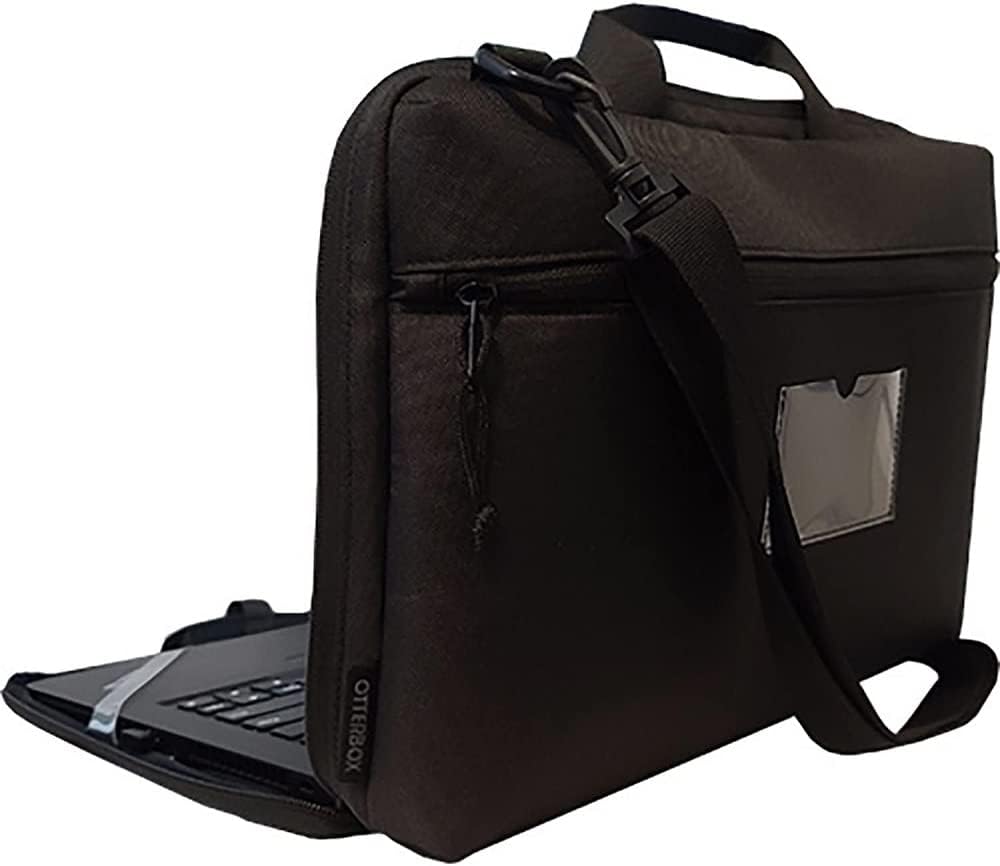
The OtterBox OTTERSHELL Series brings trusted brand reliability with a limited lifetime warranty for peace of mind. It is splash-proof and includes a zippered pocket for accessories. The asset tag window allows for displaying device or student details easily.
We may earn a commission when you buy through this link, at no additional cost to you.
This portfolio includes both a handle and a shoulder strap, making it versatile for different carrying styles. The material is durable and easy to clean, suitable for students or business users. It offers solid protection against spills and minor bumps.
While the rating is lower than other top picks, it still provides reliable protection. The non-retail packaging might be less appealing for gift buyers. These are minor drawbacks compared to the brand reputation and warranty coverage that comes with this product.
If you value brand trust and warranty support, this sleeve is a strong option. It offers practical features for daily use without compromising on durability. We recommend checking shipping packaging details before purchasing if this is a gift.
Material and workmanship defects are covered to ensure exceptional customer service.
Prominent display area for device or student identification details.
We may earn a commission when you buy through this link, at no additional cost to you.
The LANDICI 11.6 Inch Protective Sleeve offers functional design with multiple storage pockets for everyday items. It features a spill-resistant outer layer and shockproof soft inner velvet lining. This ensures your device is protected from both bumps and liquid accidents.
We may earn a commission when you buy through this link, at no additional cost to you.
Two main pockets allow you to store an iPad or phone separately from your laptop. The slim design fits perfectly into backpacks and saves space on your desk. Users appreciate the versatile storage options that help organize various office supplies efficiently.
However, the velvet lining may attract dust over time, requiring occasional cleaning. The zipper quality can vary, potentially affecting long-term reliability. These issues are common in many sleeves and are minor compared to the benefits of versatile storage.
If you need a sleeve that doubles as a small storage bag, this is a great choice. Its design prioritizes functionality and easy access to your accessories. We recommend checking the size guidelines to ensure your laptop fits well.
Separate pockets hold devices and accessories for better organization.
Outer polyester fabric protects against accidental liquid spills.
We may earn a commission when you buy through this link, at no additional cost to you.
Selecting the right sleeve requires considering several factors to ensure optimal protection and convenience. This guide outlines key elements to evaluate before making your final choice.
Always measure your Chromebook's exact width, depth, and thickness before purchasing a sleeve. Manufacturers often list compatibility based on screen size, but physical dimensions vary across brands and models. A sleeve that is too tight may scratch the device, while one that is too loose offers little protection against movement.
Check the internal dimensions provided in the product details to ensure a snug fit. Aim for a case that allows easy insertion and removal without forcing the laptop inside.
The outer material determines durability and water resistance, while the inner lining protects against scratches. Neoprene, polyester, and nylon are common outer fabrics, each with different wear characteristics. For maximum safety, look for anti-static linings like velvet or high-density foam to prevent electrical damage.
Choose materials that suit your environment. If you work in rainy or dusty conditions, prioritize water-resistant and sealed-seam construction for long-term use.
Effective padding absorbs impact from drops and bumps during travel. Look for sleeves with thick padding layers such as EPE or shock-absorbent buffers. Hard-shell cases offer extra protection against crushing forces, while soft sleeves provide flexibility and lighter weight for daily commuting.
Assess where your laptop is most likely to face damage. If you carry your device in a backpack with heavy items, prioritize thicker padding to prevent internal screen damage.
Some sleeves include external pockets for accessories like chargers, cables, and mice. This can reduce the need for an additional bag and keep everything organized. Consider whether you need these compartments or prefer a minimal design to reduce bulk and weight.
Front pockets are most accessible, but ensure they have zippers to prevent items from falling out. Verify the pocket depth to confirm it fits your adapters and cables comfortably.
Handles, straps, or retractable grips make carrying the sleeve easier. If you often carry your device without a backpack, a handle is essential. Some models also include shoulder straps for hands-free transport, which is beneficial for long walks or travel.
Evaluate how often you will carry the sleeve alone versus inside another bag. A lightweight design is crucial if you carry the sleeve daily over long distances.
The look and feel of the sleeve can reflect your personal taste or professional needs. Colors and textures range from sleek black to vibrant shades. While style is secondary to function, a design you enjoy using can improve overall satisfaction with the product.
Choose colors that match your device or work environment. Neutral tones tend to hide dirt better, while lighter shades may require more frequent cleaning.
Reputable brands often offer warranties covering defects in materials or workmanship. A good warranty ensures you are protected if the zipper fails or seams split early. Read reviews to understand how well the product holds up over time under regular use.
Prioritize products with strong construction details like closed-seam stitching and reinforced stress points. These features extend the lifespan of the sleeve significantly.
Sleeves range from budget-friendly to premium priced, reflecting material quality and added features. Determine your budget based on the protection level you need. Sometimes a slightly more expensive model offers better longevity, saving money in the long run.
Avoid the cheapest options if they lack basic padding or sturdy zippers. Investing in a reliable sleeve can prevent costly damage to your expensive Chromebook.
Insert your Chromebook gently into the sleeve, ensuring it sits flat against the lining. Close the zipper completely and check that the corners are snug before transporting. This simple step prevents internal sliding and reduces the risk of scratches on the device surface.
Store the sleeve in a cool, dry place when not in use to prevent material degradation. Avoid leaving it in direct sunlight or hot cars, as heat can damage padding and fabric integrity. Regularly shake out dust and debris to keep the interior clean and safe for your laptop.
Clean the outer surface with a damp cloth and mild soap to remove dirt and stains. Do not submerge the sleeve in water, even if it is water-resistant. If it gets wet, let it air dry completely before storing your device inside to prevent mold or mildew growth.
Measure your laptop's exact width and thickness before purchasing. Sleeves are often labeled by screen size, but physical dimensions vary. Always check the internal dimensions listed in the product details to ensure a snug fit without forcing the device inside.
Many models feature water-resistant outer fabrics like polyester or neoprene. While they can handle light spills, they are not fully waterproof. Check the product specifications for water resistance ratings if you expect to use the sleeve in rainy conditions regularly.
Yes, most sleeves are designed to fit inside backpacks, briefcases, or luggage. They provide an extra layer of protection against bumps and scratches. Ensure the sleeve dimensions allow it to slide easily into your bag without adding too much bulk.
Soft sleeves use fabric and padding for cushioning, offering flexibility and lightweight protection. Hard sleeves have a rigid shell that defends against crushing and heavy impacts. Choose based on your travel habits and the level of physical protection needed for your device.
Wipe the outside with a damp cloth and mild soap. Let it air dry completely before inserting your Chromebook. Do not machine wash or submerge it in water, as this can damage the padding and inner lining over time.
Most sleeves offer some protection against minor bumps and drops due to padding. However, they are not designed to replace rugged cases for heavy impacts. For frequent travelers, consider a hard-shell sleeve for maximum shock absorption.
Static electricity can harm sensitive internal components of your laptop. An anti-static inner lining prevents buildup and ensures safe handling of the device. This is especially important in dry environments where static discharge is more likely.
Many sleeves have front pockets designed to hold chargers, cables, and accessories. Check the pocket size to ensure your adapter fits. This feature helps keep essential items organized and easily accessible when traveling.
Our top recommendations include the Lacdo Chromebook Case for its eco-friendly design, the RAINYEAR sleeve for budget-friendly options, and the FINPAC hard case for maximum protection. Each offers unique benefits suited to different needs and preferences.
When choosing a sleeve, prioritize fit and material quality over style. A well-protecting device that fits properly will save you from costly damage in the long run. Consider your daily environment and how you carry your device to find the ideal match.
Prices and availability change frequently, so always verify current listings before buying. Check the latest user reviews for any recent updates or issues. Investing in the right protection now ensures your Chromebook stays in great condition for years to come.