
CRUA 34 Inch 165Hz UWQHD IPS Ultrawide Gaming Monitor
4.2Editor score
165Hz refresh rate
IPS panel technology
Built-in speakers included
Finding an affordable ultrawide monitor can transform your workspace without breaking the bank. These displays offer expansive screens that enhance multitasking and immersion for a fraction of the cost of premium models.
We evaluated ten standout options based on performance, build quality, and feature sets. Our analysis focuses on refresh rates, panel types, connectivity, and ergonomic designs to ensure you get the best value.
Each pick highlights specific strengths and ideal use cases for different users. Please note that pricing and availability fluctuate frequently, so verify current deals before making your final purchase decision today.
4.2Editor score

4.4Editor score

4.6Editor score
As an Amazon Associate we earn from qualifying purchases.
This side-by-side comparison highlights the key specifications and strengths of each monitor to help you decide which model fits your specific needs and budget constraints best.


The SANSUI 34-inch monitor stands out with its impressive 200Hz refresh rate and UWQHD resolution, making it an excellent choice for competitive gamers and multitaskers alike.
We may earn a commission when you buy through this link, at no additional cost to you.
Its built-in AI features, including AI Blue light reduction and AI PQ, enhance visual comfort and image quality without requiring manual calibration or complex software settings.
While it lacks speakers, the VESA compatibility and wide viewing angles ensure flexibility in mounting and viewing from various positions during extended work or gaming sessions.
Buyers seeking a high-performance ultrawide under budget constraints will find this model delivers exceptional value with its robust feature set and reliable performance.
AI Blue light reduction and Sniper Scope features tailor the display for prolonged use and gaming precision respectively.
The 200Hz refresh rate paired with 1ms response time ensures smooth motion and minimal input lag for fast-paced games.
We may earn a commission when you buy through this link, at no additional cost to you.
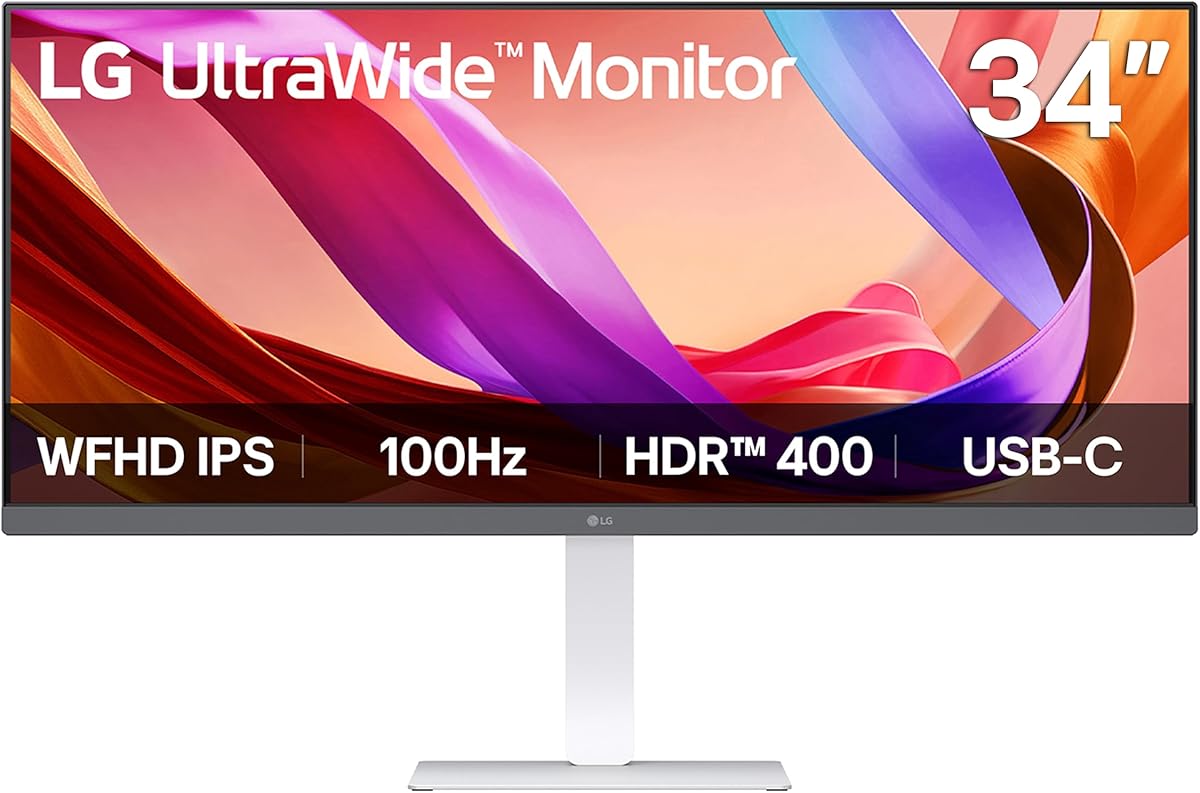
This LG UltraWide monitor delivers a solid WFHD IPS experience, ideal for office work and creative tasks where color accuracy and connectivity are paramount.
We may earn a commission when you buy through this link, at no additional cost to you.
USB Type-C support simplifies desk setups by allowing single-cable connection for display and data transfer, significantly reducing clutter for laptop users.
Although it features a lower resolution than UWQHD, the 21:9 aspect ratio still provides ample space for multitasking and splitting screens efficiently.
Professionals needing reliable multitasking tools and ergonomic adjustments will appreciate this model's balanced feature set and user-friendly design.
The 21:9 widescreen and Switch app allow effortless window management and layout customization for enhanced productivity.
USB Type-C, HDMI, and DisplayPort options ensure versatile device support while the adjustable stand fits various desk setups.
We may earn a commission when you buy through this link, at no additional cost to you.
The MSI PRO MP341CQ combines UWQHD resolution with a 120Hz refresh rate at an entry-level price, making it one of the most affordable premium-feeling monitors available.
We may earn a commission when you buy through this link, at no additional cost to you.
Certified flicker-free and low blue light features protect eye health during long work sessions, while Adaptive-Sync ensures smooth visuals during gaming.
Its VA panel offers deep blacks and good contrast, ideal for media consumption, though viewing angles are slightly narrower than IPS alternatives.
Users prioritizing resolution and refresh rate on a tight budget will find this monitor delivers impressive performance without compromising essential features.
TUV Rheinland certification ensures minimal flicker and reduced blue light to decrease strain during extended viewing periods.
Adaptive-Sync syncs refresh rates with GPUs to eliminate tearing, while VESA mountability allows flexible installation options.
We may earn a commission when you buy through this link, at no additional cost to you.
LG's 34WR55QK-B delivers a premium curved WQHD experience with HDR10 support and high color accuracy, perfect for content creators and professionals seeking top-tier visuals.
We may earn a commission when you buy through this link, at no additional cost to you.
USB Type-C with power delivery simplifies setups for laptops, enabling charging and data transfer through a single cable while reducing desk clutter.
The onScreen Control software enhances workflow with picture-by-picture and screen splitting tools, allowing seamless management of multiple apps and inputs.
Buyers looking for excellent color reproduction and connectivity will find this monitor stands out as a sophisticated choice for creative and office use.
HDR10 and 99% sRGB coverage ensure vibrant, accurate colors for creative work and enhanced media viewing experiences.
OnScreen Control enables efficient window management and multitasking, making this monitor ideal for professionals and power users.
We may earn a commission when you buy through this link, at no additional cost to you.
This LG IPS ultrawide offers exceptional color consistency and wide viewing angles, making it a favorite for creative professionals who require precise color reproduction.
We may earn a commission when you buy through this link, at no additional cost to you.
USB-C connectivity supports up to 96W charging, allowing seamless integration with laptops and reducing cable clutter significantly on modern desks.
The subtle 3800R curve complements the IPS panel by providing immersion without distorting visuals, enhancing the overall experience for both work and play.
Users prioritizing color fidelity and robust connectivity will appreciate this model's high-end specifications tailored for professional creative workflows.
Up to 99% sRGB coverage and HDR10 ensure that creative projects maintain accurate and vibrant colors across devices.
USB-C with power delivery and integrated speakers allow for streamlined setups without needing external audio or charging bricks.
We may earn a commission when you buy through this link, at no additional cost to you.
Samsung's ViewFinity series emphasizes eye health with ambient light sensing and Eye Saver Mode, making it a top choice for users working long hours.
We may earn a commission when you buy through this link, at no additional cost to you.
AMD FreeSync ensures smooth visuals during gaming, while HDR10 support enhances media consumption with improved brightness and contrast levels.
Picture-by-Picture allows simultaneous viewing of two inputs, ideal for comparing documents or monitoring multiple data streams efficiently.
Buyers concerned about eye strain and needing reliable multitasking features will find this model offers practical solutions for daily office tasks.
Flicker Free and ambient light sensor adjust brightness automatically to reduce eye fatigue during extended viewing sessions.
PBP and AMD FreeSync enhance productivity and gaming smoothness, ensuring versatile usage across different work and entertainment scenarios.
We may earn a commission when you buy through this link, at no additional cost to you.
Samsung's S50GC features a borderless design and 21:9 ratio, maximizing screen real estate for multitasking and immersive viewing without distracting borders.
We may earn a commission when you buy through this link, at no additional cost to you.
Eye care features including ambient light adjustment minimize strain, while HDR10 ensures dynamic visuals for media and creative tasks.
PBP and PIP modes enable viewing content from two sources simultaneously, significantly boosting productivity for professionals managing multiple workflows.
Those seeking a visually seamless multitasking solution with reliable performance and comfort will find this monitor a strong contender for office use.
Virtually bezel-free design enhances immersion and enables smooth multi-monitor setups without distracting gaps between screens.
Split screen modes and eye care tech optimize workflow efficiency while protecting vision during long working hours.
We may earn a commission when you buy through this link, at no additional cost to you.
CRUA offers exceptional value with a 165Hz refresh rate and 120% sRGB coverage, delivering smooth, vivid visuals ideal for budget-conscious gamers and streamers.
We may earn a commission when you buy through this link, at no additional cost to you.
Dual HDMI and DisplayPort inputs provide versatile connectivity, while Picture-in-Picture modes allow monitoring multiple inputs like a stream and game simultaneously.
Built-in speakers save space, and wall mount compatibility offers flexibility for setups where desk space is limited or minimalism is preferred.
Gamers seeking high refresh rates and vibrant colors without premium costs will find this model delivers strong performance and essential features.
165Hz refresh rate paired with FreeSync ensures fluid motion and eliminates tearing for competitive and immersive gameplay.
Multiple HDMI and DP ports plus PIP/PBP modes support diverse setups for streaming, gaming, and multitasking efficiently.
We may earn a commission when you buy through this link, at no additional cost to you.
The Acer Nitro ED300C X1 boasts a rare 200Hz refresh rate in an ultrawide form factor, delivering ultra-smooth visuals ideal for competitive shooters and racing sims.
We may earn a commission when you buy through this link, at no additional cost to you.
With AMD FreeSync Premium and a 1ms response time, this monitor minimizes input lag and motion blur for precise, responsive gameplay experiences.
Its 1800R curve wraps around the user for immersion, though the lower resolution makes it better suited for gaming than high-detail creative work.
Competitive gamers needing fast refresh rates on a budget will appreciate this model's performance-first design and rapid motion handling capabilities.
200Hz refresh rate and 1ms response time reduce motion blur, ensuring crisp visuals even in fast-paced gaming scenarios.
The 1800R curvature enhances focus and immersion, making it a compelling choice for gamers seeking competitive advantages.
We may earn a commission when you buy through this link, at no additional cost to you.
KTC delivers a powerful curved experience with 180Hz refresh rate and high contrast HVA panel, offering deep blacks and immersive visuals for media and gaming.
We may earn a commission when you buy through this link, at no additional cost to you.
Ergonomic adjustments including height and pivot allow for comfortable long sessions, ensuring the monitor adapts to various desk setups and user heights.
The 1500R curvature enhances immersion and reduces eye movement fatigue, making it ideal for single-user workstations focused on productivity or entertainment.
Users wanting a high refresh rate curved monitor with strong contrast and ergonomic flexibility will find this model offers excellent value and performance.
HVA panel provides 4000:1 contrast ratio for deep blacks and vivid HDR, ideal for cinematic and dark-themed media.
Height, tilt, swivel, and pivot adjustments ensure the screen can be positioned for maximum comfort during extended use.
We may earn a commission when you buy through this link, at no additional cost to you.
Selecting the right monitor requires balancing resolution, refresh rate, and panel type to meet your specific workflow and budget needs effectively.
Ultrawide monitors typically offer 21:9 aspect ratios with resolutions like WFHD (2560×1080) or UWQHD (3440×1440). Higher resolutions provide sharper text and more screen real estate for multitasking.
Prioritize UWQHD for creative work or gaming clarity, while WFHD is adequate for general office tasks and budget-conscious buyers.
Refresh rates above 100Hz ensure smoother motion, especially crucial for gaming and video editing. Lower response times like 1ms minimize ghosting and blur during fast movement.
Gaming users should look for 144Hz or higher, whereas standard office work is comfortable at 60Hz to 75Hz.
IPS panels offer superior color accuracy and viewing angles, ideal for creative professionals. VA panels provide better contrast and deeper blacks, suitable for media consumption.
Choose IPS for color-critical tasks and VA for immersive viewing in dark environments where contrast matters more.
Adjustable stands with height, tilt, and swivel features help reduce neck strain during long sessions. VESA compatibility allows mounting on arms if desk space is limited.
Look for stands that offer full adjustability or VESA mounts to ensure long-term comfort and flexibility in your setup.
USB Type-C ports simplify connections by supporting display, data, and power delivery for laptops. Multiple HDMI and DisplayPort inputs allow simultaneous device connections.
Prioritize USB-C for laptop users and ensure your GPU matches the required HDMI or DisplayPort version for desired refresh rates.
Flicker-free technology and low blue light modes reduce eye strain during extended use. Ambient light sensors adjust brightness based on surroundings automatically.
These features are essential for professionals working long hours and anyone concerned about eye comfort during extended viewing.
Curved screens enhance immersion by matching natural human vision, reducing eye movement fatigue. Flat screens are better for multi-monitor setups or precise vertical alignment.
Choose curved if you prioritize immersion and single-user focus, while flat is better for multitasking across multiple devices.
Solid build quality ensures longevity, while comprehensive warranties protect against defects. Check for support response times and inclusions like dead pixel policies.
Invest in brands with reliable customer service and warranty terms that align with your usage patterns and duration expectations.
Begin by calibrating your display settings using built-in tools or software to match your specific workflow needs and color accuracy requirements accurately.
Use ergonomic adjustments to position the monitor at eye level and appropriate distance to minimize neck strain and maintain good posture during long sessions.
Regularly clean the screen with a microfiber cloth and avoid harsh chemicals to protect the panel coating and maintain image quality over time.
UWQHD resolution (3440×1440) is ideal for multitasking as it offers more horizontal space than WFHD. It allows you to keep multiple windows open side-by-side without zooming.
Yes, many budget ultrawide monitors support gaming with high refresh rates and adaptive sync technologies. Models with 144Hz or higher and low response times deliver competitive experiences.
Curved screens offer better immersion and reduce eye movement fatigue for single users. Flat screens are preferable if you plan to use multiple monitors side-by-side.
USB Type-C supports display output, data transfer, and laptop charging through a single cable. This simplifies setups by reducing cable clutter on your desk.
Enable low blue light modes and flicker-free technology. Also adjust brightness to match ambient lighting and maintain proper viewing distance during work sessions.
Built-in speakers provide basic audio for media and video calls without external hardware. For high-quality sound, dedicated speakers or headphones are recommended.
Most ultrawide monitors include standard VESA mounting holes. This allows you to use monitor arms or wall mounts for cleaner desk setups and better ergonomics.
IPS panels offer better color accuracy and wider viewing angles. VA panels have higher contrast, making them suitable for media consumption in darker rooms.
The SANSUI, LG, and MSI models reviewed here offer standout features balancing performance and affordability for various needs.
Prioritize resolution and refresh rate based on whether you prioritize gaming, creative work, or general productivity tasks daily.
Always check current pricing and warranty terms before purchasing since deals fluctuate frequently and availability changes over time.