
ASUS Prime AP201 Micro-ATX PC Case
4.7Editor score
Mesh panels increase airflow
Supports 360mm radiators
Tool-free side panels
This guide compares the top ten ASUS PC Case models for 2026, evaluating airflow, build quality, and features to help you find the perfect chassis for your
Choosing the right chassis is crucial for any computer build. An ASUS PC Case offers robust protection, superior airflow, and sleek aesthetics. These cases support various components while ensuring your hardware runs cool and looks great on your desk.
We evaluated ten leading models based on cooling performance, build quality, and user features. Our analysis covers everything from budget-friendly options to premium full-tower designs. Each product was assessed for compatibility, cable management, and overall value for money.
Every pick in this list highlights specific strengths for different builder needs. You will find detailed insights into fan support, GPU clearance, and special features. Please note that prices and availability can change frequently over time.
4.7Editor score

4.8Editor score

4.6Editor score
The following table provides a side-by-side overview of all ten models. Compare key specifications like form factor support, radiator clearance, and included features to decide which case fits your specific system requirements best.


The ASUS TUF Gaming GT501 stands out as a top choice for enthusiasts. With a rating of 4.8, it delivers excellent performance and durability. Its full-tower design ensures room for high-end components.
We may earn a commission when you buy through this link, at no additional cost to you.
This case supports E-ATX motherboards, making it ideal for custom builds. The included fans and mounting points allow for efficient cooling. You can install large radiators for liquid cooling setups without issues.
Some users may find the price point steep compared to smaller cases. The weight is also significant due to the robust construction. However, these trade-offs are acceptable for the build quality provided.
If you need space for large hardware, this is a great pick. It balances aesthetics with practical features like the vertical GPU slot. We highly recommend it for serious gamers and power users.
The design ensures cool temperatures even under heavy load. Fan placement is optimized for maximum efficiency.
Sturdy materials protect your expensive components. The chassis feels solid and well-constructed.
We may earn a commission when you buy through this link, at no additional cost to you.
The ASUS Prime AP201 offers incredible value for budget-conscious builders. It earns a 4.7 rating for its smart design. This case proves you do not need to spend a fortune for quality.
We may earn a commission when you buy through this link, at no additional cost to you.
The quasi-filter mesh panels boost airflow significantly. Despite its compact size, it supports large radiators and ATX PSUs. Tool-free side panels make building and maintenance a breeze.
It is limited to Micro-ATX boards which might restrict upgrades. Some premium features are missing compared to higher-end models. However, for compact builds, these limits are often acceptable.
Choose this if you want a sleek, efficient small build. It handles heat well and keeps things tidy. It is an excellent starting point for new PC enthusiasts.
Maximizes space without sacrificing cooling. Perfect for smaller desks.
Mesh ensures air moves freely. Components stay cool under load.
We may earn a commission when you buy through this link, at no additional cost to you.
The ROG Hyperion GR701 is a flagship option for high-end systems. With a 4.6 rating, it excels in build quality. This case is designed for those who demand the best performance and style.
We may earn a commission when you buy through this link, at no additional cost to you.
Its semi-open structure supports huge 420mm radiators for cooling. The aluminum frame is incredibly sturdy and durable. Features like the drawer add a unique touch to your workspace.
The cost is significant compared to other options available. It also takes up a lot of desk space. These factors should be weighed carefully against your specific needs.
Ideal for luxury gaming rigs and professional setups. It offers unmatched flexibility for custom loops. If budget is not a concern, this is a stunning choice.
Supports extreme cooling solutions. Ideal for overclocking.
Premium materials and thoughtful details. Elevates your setup.
We may earn a commission when you buy through this link, at no additional cost to you.
The GT502 Horizon brings a fresh design to mid-tower cases. It rates 4.5 for its balanced features and style. This model focuses on visual appeal and functional separation.
We may earn a commission when you buy through this link, at no additional cost to you.
Its dual-chamber design isolates heat sources effectively. The panoramic glass offers a clear view of your build. Type-C ports ensure modern connectivity for peripherals.
Glass panels can attract smudges easily. The unit is heavier due to the extra glass. Yet these issues are minor compared to the aesthetic gain.
Perfect for builders who prioritize looks and airflow separation. It is a strong middle-ground option for gaming rigs. We suggest it for style-conscious enthusiasts.
Separates GPU and CPU heat. Improves overall system temps.
Glass offers immersive viewing. Showcase your RGB lighting.
We may earn a commission when you buy through this link, at no additional cost to you.
The A31 PLUS is tailored for motherboards with hidden connectors. It holds a 4.1 rating for its specialized design. This case helps achieve a clutter-free cable management system easily.
We may earn a commission when you buy through this link, at no additional cost to you.
Four ARGB fans come installed for immediate use. The angled base enhances airflow and viewing angles. It supports 360mm radiators for good cooling options.
Some users might find the rating lower than expected. It also works best with specific new motherboards. These factors may limit its appeal for older hardware.
Great for those seeking clean aesthetics out of the box. It works well with modern boards. If you want invisible cables, this is a strong choice.
Hidden connectors remove cable clutter. Setup looks professional.
Improves airflow and view. Adds a stylish touch.
We may earn a commission when you buy through this link, at no additional cost to you.
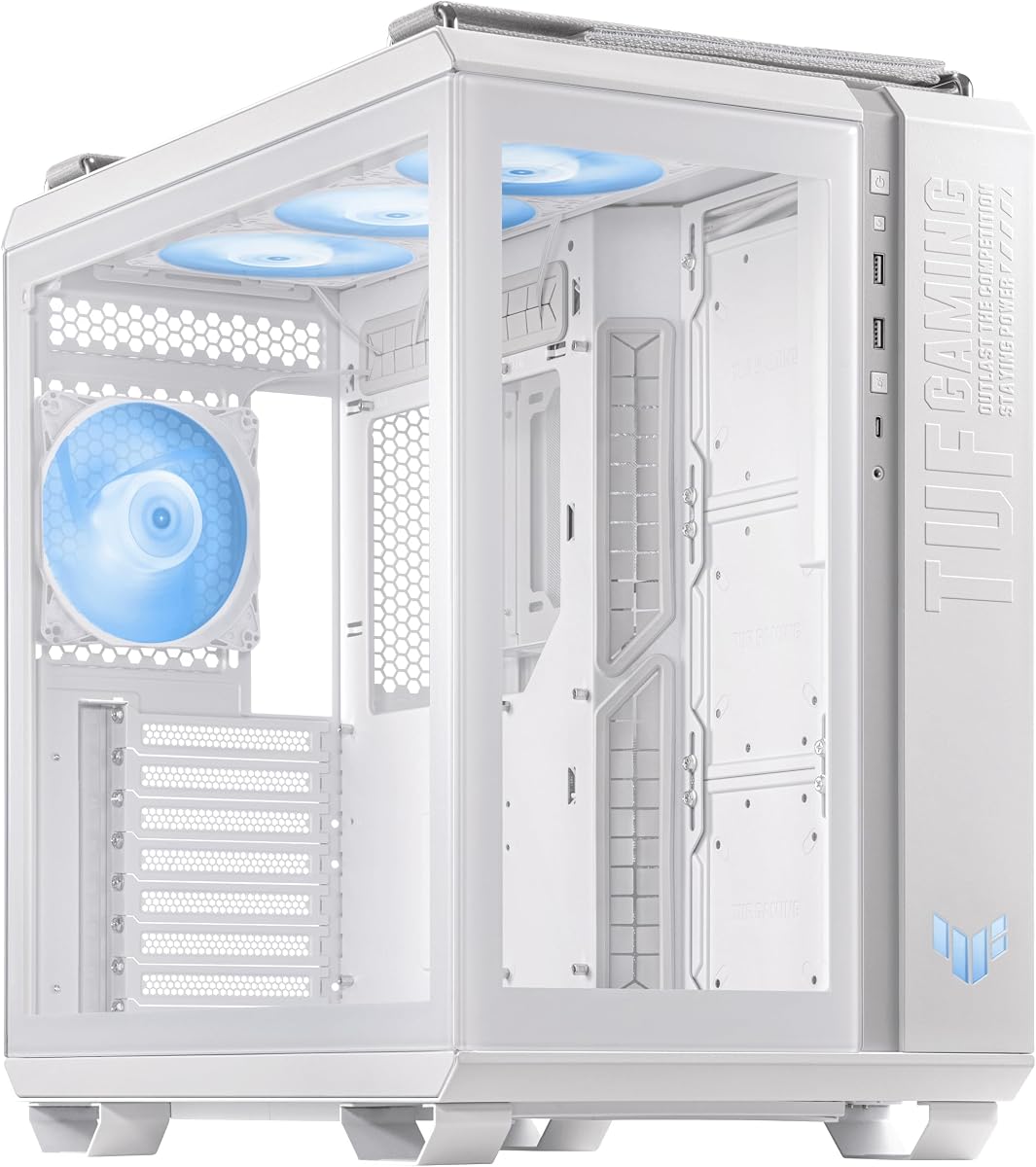
This white edition of the GT501 is a visual standout. With a 4.7 rating, it matches performance with aesthetics. It is perfect for creating a cohesive white PC build.
We may earn a commission when you buy through this link, at no additional cost to you.
It includes the same robust specs as the black version. Fans and cooling options remain top-tier. The woven-cotton handles make moving easier despite the weight.
White surfaces can show dust more than darker cases. The price might be higher due to demand. These downsides are minor for white builders.
Ideal for white theme enthusiasts who want quality. It offers reliability and style. We recommend it for those prioritizing looks.
White finish matches components. Creates a unified look.
Same great specs as standard. Reliable for heavy loads.
We may earn a commission when you buy through this link, at no additional cost to you.
The GT301 emphasizes airflow with its honeycomb design. It rates 4.6 for performance and practicality. This case offers a clean look with functional features for gamers.
We may earn a commission when you buy through this link, at no additional cost to you.
Pre-installed fans help start your build quickly. The RGB hub simplifies lighting control. A headphone hanger adds convenience for desk setup.
Design is simpler than premium options. Tool-free panels are limited. Still, it delivers excellent value for the price.
Great for builders focused on cooling and utility. It is reliable and straightforward. We suggest it for practical gaming setups.
Honeycomb lets air in easily. Keeps hardware cool.
Headphone hanger saves space. Built-in lighting control.
We may earn a commission when you buy through this link, at no additional cost to you.
This white dual-chamber model offers excellent modularity. It holds a 4.7 rating for its versatile features. The design supports a clean white aesthetic with strong performance.
We may earn a commission when you buy through this link, at no additional cost to you.
ARGB fans are pre-installed for instant visual appeal. USB-C provides fast transfer speeds. Modular panels simplify installation and customization.
Cost is higher than standard options. It also requires significant space. Yet for white builders, this is a top contender.
Perfect for white setups needing advanced airflow. It combines function and style well. We recommend it for dedicated white builders.
Panels are removable. Easier customization and cleaning.
USB-C ensures high speed. Great for modern peripherals.
We may earn a commission when you buy through this link, at no additional cost to you.
The A31 Plus holds a 4.9 rating. It is praised for its design and cooling. This model is an excellent choice for black builds with a modern twist.
We may earn a commission when you buy through this link, at no additional cost to you.
Its 8-degree angled base improves viewing and airflow. Concealed ports support cleaner cable setups. It accommodates large graphics cards easily.
It is similar to other A31 models. Some sellers may charge more. However, the rating reflects high user satisfaction.
Choose this for a sleek black build. It balances looks and function. We highly recommend it for style and performance.
Angled base improves sightlines. Better RGB display.
High customer approval. Reliable performance.
We may earn a commission when you buy through this link, at no additional cost to you.
The GT502 Plus offers a modern white dual chamber case. It rates 4.6 for its user-friendly features. This model is great for building and maintaining with ease.
We may earn a commission when you buy through this link, at no additional cost to you.
Tool-free panels allow quick access without tools. Independent cooling zones help thermal efficiency. USB-C provides fast data transfer.
Weight and price are slightly higher. Still, these are acceptable for the convenience offered. It is a solid all-rounder.
Ideal for users valuing ease of access. It keeps your PC clean and cool. We suggest it for white modular builds.
Quick access without tools. Simplifies maintenance.
Separates CPU and GPU. Boosts thermal efficiency.
We may earn a commission when you buy through this link, at no additional cost to you.
Selecting the right PC case involves evaluating multiple factors to ensure compatibility and performance. This guide outlines the critical elements to consider for your specific build.
Ensure the case supports your motherboard size. Options range from Micro-ATX to E-ATX full-towers. Matching dimensions avoids installation issues.
Check the product specs to confirm motherboard support. This prevents mismatched builds and ensures physical fit.
Good airflow prevents overheating during intense use. Look for mesh panels and multiple fan mounts. Consider radiator support for liquid cooling.
Prioritize cases with ample mounting points. Efficient airflow keeps hardware stable and cool.
Organized cables improve airflow and aesthetics. Look for tool panels and space behind trays. Hidden connector support simplifies this process.
Check cable routing features before buying. Clean management enhances overall build quality.
Sturdy materials protect components during transport. Steel and aluminum are durable options. Glass panels offer style but add fragility.
Inspect material choices for durability. A solid case ensures long-term protection.
Your case reflects your personal style. Choose between minimalist, RGB-focused, or industrial looks. Color options like black or white matter for theme.
Consider visual impact alongside function. The right design enhances your setup.
Modern ports are essential for peripherals. USB Type-C offers high-speed data transfer. Check available USB versions and audio jacks.
Verify port types match your devices. Fast connectivity improves daily usability.
Ensure space for graphics cards and extra GPUs. Long GPUs need adequate clearance. Vertical slots are available in some models.
Measure GPU size against case specs. Proper clearance avoids installation problems.
Tool-free panels simplify building and cleaning. Look for clips or latches for side doors. Modular parts allow flexible adjustments.
Choose features that aid installation. Ease of access saves time.
When assembling your system, start by installing the motherboard tray. Secure all screws tightly to prevent rattling. Use the provided cable ties for neat routing.
Regularly clean dust filters to maintain airflow. Use compressed air for fans and components. Ensure panels are closed to keep dust out.
Check cable tightness every few months. Loose cables can interfere with fans. Maintain a tidy interior to ensure optimal cooling.
The ASUS ROG Hyperion GR701 and GT501 models offer ample clearance for massive GPUs. Always check GPU length specs against case data. This ensures your card fits comfortably without bending.
Yes, many models support radiators up to 360mm or even 420mm. Verify the front and top mounting points. This allows for efficient custom loop or AIO setups.
The GT501 is a full-tower standard while GT502 offers dual-chamber airflow. GT502 features panoramic glass for better visuals. Both are strong but differ in airflow logic.
Most models include multiple ARGB or PWM fans. The GT501 and A31 PLUS typically come with three or four. Check individual listings for exact counts.
The Prime AP201 is designed for compact Micro-ATX builds. It balances small footprint with good cooling. Larger models are better for full-tower needs.
Open the side panels and use compressed air carefully. Remove filters and rinse them under water. Regular cleaning keeps airflow optimal.
Most cases require basic screwdrivers for motherboards and drives. Side panels are often tool-free. Having a magnetic screwdriver set is helpful.
The A31 PLUS supports hidden connectors for cleaner setups. GT502 models also have ample cable space. Look for deep trays and tie points.
We reviewed ten top ASUS PC Case models ranging from budget to premium. The GT501 and AP201 stood out for value and versatility. Each offers unique features for different builders.
Prioritize cooling and size when making your choice. A well-ventilated case ensures long-term system health. Balance your budget with specific feature needs.
Always check current prices before purchasing. Prices and stock fluctuate regularly online. Choose the one that best fits your vision.