
GIGABYTE X470 AORUS ULTRA GAMING
4.4Editor score
Dual Graphics Support
Front Type C USB
Durable Construction Design
This guide compares the top Amd Ryzen Gen 2 X470 Motherboards for performance, connectivity, and value to help you choose the right board for your build.
Choosing the right motherboard is crucial for any build focusing on AMD Ryzen processors. The X470 chipset offers a balance of features and performance that remains relevant for many users today.
We evaluated ten top models based on power delivery, connectivity options, and user feedback. Each product was compared to ensure it meets the demands of modern gaming and workstation tasks effectively.
Every pick highlights specific strengths and trade-offs to guide your decision. Keep in mind that availability and pricing can fluctuate frequently, so always check current listings before purchasing your components.
4.4Editor score

4.6Editor score

4.3Editor score
The following table provides a side-by-side overview of key specifications and features across all ten selected models to help you identify the best fit for your specific needs.


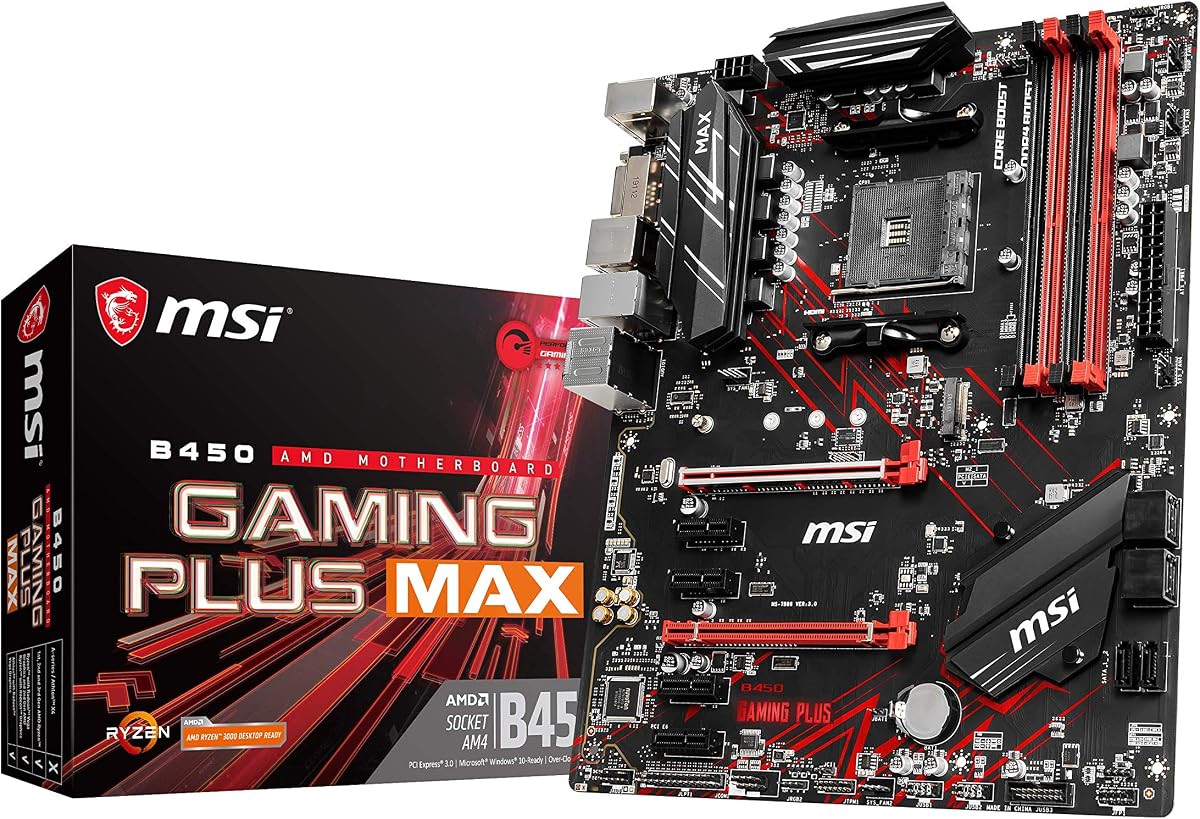
This board is a solid choice for Ryzen 2nd and 3rd gen builds. It boasts a high rating for reliability and offers robust features for everyday computing tasks.
We may earn a commission when you buy through this link, at no additional cost to you.
The SafeSlot PCIe design ensures your graphics card stays securely in place. Audio is handled by a premium codec that delivers clear sound for media and gaming.
While it lacks some advanced RGB sync without extra hubs, its stability and build quality make up for it. This is a great option for those who value function over flash.
If you need a dependable motherboard for a Ryzen system without breaking the bank, this model is highly recommended. It delivers consistent performance for both work and play.
The SafeSlot technology uses injection molding to anchor the PCIe slot firmly preventing damage from heavy graphics cards.
Realtek S1220A codec ensures high fidelity audio with reduced background noise for an immersive listening experience.
We may earn a commission when you buy through this link, at no additional cost to you.
This premium board offers extensive features including integrated WiFi and robust power delivery. It supports Ryzen 2nd generation processors effectively for high performance tasks.
We may earn a commission when you buy through this link, at no additional cost to you.
The Fins-Array heatsink manages heat well under load ensuring stable performance during long sessions. Digital PWM design provides clean power to the CPU for overclocking potential.
While the price is higher than budget options the included features justify the cost. You save on needing a separate WiFi adapter and get better thermal management.
Enthusiasts looking for a complete solution with wireless connectivity should consider this model. It balances high-end specs with practical daily usage needs effectively.
Direct touch heatpipes transfer heat away from critical VRM components faster than standard aluminum heatsinks.
Intel Wave 2 WiFi allows for fast wireless networking without the need for extra expansion cards.
We may earn a commission when you buy through this link, at no additional cost to you.
This model offers excellent value with key features like front USB Type C and support for multiple GPUs. It is designed for gamers who need reliability on a budget.
We may earn a commission when you buy through this link, at no additional cost to you.
The hybrid digital PWM design ensures efficient power delivery to the processor. Ultra Durable construction means the board can withstand typical build and usage stresses well.
Although it lacks some premium audio features, it delivers solid performance for gaming and multitasking. The inclusion of dual graphics support is a plus for expandability.
For those building a mid-range system this board hits a sweet spot. You get essential modern connectivity without paying for unnecessary extras.
Front panel USB 3.1 Gen 2 Type C offers fast data transfer speeds for modern peripherals.
Supports 2 Way CrossFire and SLI allowing for increased graphical performance in supported titles.
We may earn a commission when you buy through this link, at no additional cost to you.
This compact board supports Ryzen 5000 series processors offering modern PCIe 4.0 speeds. It is an ideal choice for small form factor builds where space is limited.
We may earn a commission when you buy through this link, at no additional cost to you.
The 3+3 power phase design is sufficient for standard processors but may limit heavy overclocking. Dual M.2 slots provide ample storage options for fast NVMe drives.
While not designed for extreme power draw it handles daily tasks and gaming efficiently. The Q-Flash feature makes BIOS updates easy without needing a CPU installed.
Small PC builders will appreciate the layout and features. It brings modern connectivity to a smaller footprint without a significant price hike.
Two M.2 slots allow for fast storage installation and easy system upgrades.
Q-Flash allows firmware updates using a USB drive even if the system is not fully assembled.
We may earn a commission when you buy through this link, at no additional cost to you.
This board offers a solid balance of features including dual M.2 slots and WiFi 5. It supports 3rd Gen Ryzen CPUs effectively for general computing needs.
We may earn a commission when you buy through this link, at no additional cost to you.
Cooling is well addressed with VRM and chipset heatsinks ensuring stable operation. The USB Type C support both front and rear adds convenience for modern peripherals.
While WiFi 6 would be better, the included wireless is still reliable for most home networks. The CEC Tier II ready feature allows for energy efficient standby modes.
A balanced choice for users who want reliability without excessive cost. It covers the essentials well for an ATX build.
Dedicated VRM and PCH heatsinks keep critical components cool under load.
CEC Tier II compliance helps reduce power consumption when the system is idle.
We may earn a commission when you buy through this link, at no additional cost to you.
This board features a strong power delivery system suitable for Ryzen processors. It includes G-Flash Plus for hassle free BIOS upgrades without needing a CPU.
We may earn a commission when you buy through this link, at no additional cost to you.
RGB Fusion allows for customizable lighting effects matching your build aesthetic. Front USB-C ensures easy access for high speed peripherals like drives and controllers.
The GigE LAN provides stable connectivity though it is not multi gigabit. Overall the features are well tailored for a standard gaming setup.
Gamers who need reliable power and easy maintenance will find this board useful. It balances build convenience with performance capabilities.
Q-Flash Plus allows BIOS updates via USB port even if the computer is not fully assembled.
RGB Fusion sync allows lights to match with other compatible components for a unified look.
We may earn a commission when you buy through this link, at no additional cost to you.
This Micro-ATX board stands out with built in WiFi 6 for faster wireless speeds. It supports ECC memory and HDMI 2.1 for high quality display output.
We may earn a commission when you buy through this link, at no additional cost to you.
The layout is compact yet functional allowing for smaller PC cases. SafeSlot Core technology ensures your GPU remains secure during transport or vibration.
While it may lack some lanes compared to full ATX boards it serves most single GPU builds well. The inclusion of WiFi 6 is a significant advantage.
Perfect for small builds that need modern wireless connectivity. It delivers efficient performance in a space-saving design.
WiFi 6 provides improved throughput and lower latency in busy networks.
HDMI 2.1 supports 4K at 60Hz ensuring smooth visuals for media and work.
We may earn a commission when you buy through this link, at no additional cost to you.
This board supports AMD Ryzen 1st, 2nd, and 3rd Gen processors providing broad compatibility. It is an excellent choice if you are using older hardware.
We may earn a commission when you buy through this link, at no additional cost to you.
Audio Boost delivers studio grade sound quality enhancing gaming immersion. StoreMI technology allows faster storage performance by combining SSD and HDD storage.
While it lacks PCIe 4.0 the Turbo M.2 slot still offers fast speeds for most users. It is a proven board for budget builds relying on previous gen CPUs.
If you need to reuse an existing processor this board is a solid pick. It offers reliable features without requiring expensive new hardware.
StoreMI accelerates storage by combining slow HDD space with fast SSD cache.
Compatible with Ryzen 1200 through Ryzen 3000 series for wide upgrade paths.
We may earn a commission when you buy through this link, at no additional cost to you.
This variant offers similar features to the previous model at a potentially different price point. It remains a strong contender for budget focused gaming systems.
We may earn a commission when you buy through this link, at no additional cost to you.
It supports CrossFire for dual GPU setups which is rare in budget boards. The layout includes all standard connectors needed for a basic build.
Connectivity is adequate with USB 3 and DVI HDMI ports for older displays. It delivers reliable performance for entry to mid-level gaming.
For users prioritizing value over cutting edge speeds this board is a great choice. It provides all the basics needed for a working PC.
CrossFire support allows two GPUs to work together for increased graphical power.
Includes DVI and HDMI to support a wide range of monitor types.
We may earn a commission when you buy through this link, at no additional cost to you.
This board brings the latest connectivity options including WiFi 6E and 2.5Gb Ethernet. It is an ideal choice for those needing future proof features.
We may earn a commission when you buy through this link, at no additional cost to you.
The robust power solution supports high core count CPUs with ease. BIOS Flashback allows for easy updates without needing a compatible CPU installed.
While it costs more than X470 boards the speed and features justify the investment. It is a great option for gamers wanting the fastest local speeds.
If you need the latest standards and reliable networking this board is highly recommended. It balances performance with connectivity effectively for modern setups.
WiFi 6E offers improved bandwidth and lower latency than previous standards.
Flashback allows updating firmware using a USB drive without booting the system.
We may earn a commission when you buy through this link, at no additional cost to you.
Selecting the right motherboard requires understanding your specific needs and budget constraints. Here are key factors to consider.
Ensure the board supports your specific AMD Ryzen processor generation. Most X470 boards support Ryzen 2000 and 3000 series but checking the manufacturer list is vital.
Always verify CPU support on the manufacturer website before purchasing to avoid boot issues.
Look for robust VRM phases especially if you plan to overclock. More phases generally mean better stability under load.
Prioritize boards with strong VRM designs for reliable performance.
Check supported memory speeds to maximize processor performance. X470 boards often support high DDR4 frequencies out of the box.
Select a board with high supported speeds to get the most out of your kit.
Determine if you need PCIe 4.0 or specific GPU configurations. While X470 offers solid options newer boards may offer more lanes.
Ensure there are enough slots for your graphics cards and storage needs.
Evaluate USB ports and rear I/O for your peripherals. Look for USB Type C or enough Type A ports for your setup.
Check rear panel ports to ensure all your devices can be connected easily.
Review heatsinks on the chipset and VRM to prevent throttling. Better cooling means longer component life and stable performance.
Choose boards with substantial heatsinks for consistent operation.
Decide if built in wireless is necessary. Models with WiFi offer flexibility but wired Ethernet often provides better stability.
Consider if you need integrated wireless or prefer a wired connection.
Look for BIOS Flashback or easy update tools. These allow updating firmware without a working CPU which simplifies upgrades.
Prioritize boards with BIOS Flashback for easier maintenance.
Install the board carefully into your case ensuring standoff screws match the motherboard mounting holes. This prevents short circuits and damage to the PCB.
Apply thermal paste correctly on the CPU and mount the cooler securely. Proper contact ensures heat is transferred efficiently from the processor to the cooler.
Keep your system clean by removing dust from fans and heatsinks regularly. This maintains airflow and prevents overheating which can degrade performance.
Yes most X470 motherboards support Ryzen 3000 series processors but you may need to update the BIOS first. Check your motherboard manual for the specific update steps.
No PCIe 4.0 is generally not supported on X470 chipsets. It was introduced with B550 and X570 boards for faster SSD and GPU speeds.
Yes AMD X470 boards support CPU overclocking. They provide the necessary VRM stability for most users looking to push their Ryzen CPU performance.
X470 boards typically support DDR4 speeds up to 3600 MHz or higher via XMP. Always verify exact supported speeds with your CPU model.
Most X470 boards support CrossFire or SLI depending on the model. Check the specific product page to confirm multi GPU support before buying.
No not all X470 boards come with built in WiFi. Some models require a separate card or USB adapter for wireless connectivity.
You can update the BIOS via USB using the built in tool provided by the manufacturer. If your board supports BIOS Flashback you can do this without a CPU.
Yes for budget and mid range builds they offer solid performance for Ryzen 2000 and 3000 series. They are cost effective options if you already have compatible hardware.
These ten models offer a wide range of options for building a Ryzen system. Whether you need budget value or premium features there is a board here for you.
Focus on power delivery and connectivity to ensure your system runs smoothly for years. Prioritize features that match your specific use case.
Always check current listings for pricing and stock before making a purchase. Availability can change quickly depending on market conditions.