
Thrustmaster T-Flight Hotas X
4.4Editor score
Detachable throttle for flexible setup
Programmable buttons and axes
Adjustable resistance for comfort
This guide compares the top airplane controllers for PC to help you choose the best flight stick or yoke for realistic simulation and immersive gaming
Finding the right airplane controllers for PC can transform your simulation experience from simple gaming into a deeply immersive journey. Whether you are training for virtual flight or enjoying combat sims, the right hardware brings realism to your desktop setup.
We evaluated ten top-rated flight sticks and yoke systems based on build quality, precision, programmability, and compatibility with major flight simulators. Our analysis focuses on features that matter most for serious pilots and enthusiasts seeking professional-grade control.
Each pick in this list highlights unique strengths tailored to different budgets and cockpit setups. Please note that availability and pricing may vary over time, so always check the latest details before making your final purchase decision.
4.4Editor score

4.0Editor score
4.6Editor score
This side-by-side comparison outlines the key specifications and features of each flight controller to help you identify the model that best fits your simulation needs and desk space.





The Logitech G X56 H.O.T.A.S stands out as a top choice for serious flight sim enthusiasts seeking high precision and extensive programmability. With its robust build and Hall-effect sensors, it delivers accurate inputs that are crucial for realistic simulation experiences.
We may earn a commission when you buy through this link, at no additional cost to you.
Its standout features include over 189 programmable controls and an advanced four-spring system that allows users to adjust stick force for personalized comfort. The twin throttles with friction adjusters provide additional realism, while the RGB lighting adds a stylish touch to your cockpit setup.
While the X56 excels in performance, it does require a substantial amount of desk space and may need careful calibration to function optimally with all software titles. Some users report occasional software updates are needed to ensure full compatibility with newer flight sim versions.
If you are looking for a professional-grade HOTAS system that balances durability with advanced customization, the X56 is a strong recommendation. It is particularly well-suited for VR users and those who demand fine-grained control over their virtual aircraft.
Hall-effect sensors ensure consistent accuracy without physical contact wear, allowing for long-term reliable performance in demanding simulation scenarios.
The four-spring system lets you tailor stick resistance to match your flying style, reducing fatigue during extended simulation sessions.
We may earn a commission when you buy through this link, at no additional cost to you.
The Logitech G PRO Flight Yoke System offers a realistic yoke setup ideal for both new and experienced pilots looking to build muscle memory. Its stainless steel shaft provides smooth, accurate control that closely mimics real aircraft handling characteristics.
We may earn a commission when you buy through this link, at no additional cost to you.
Features like the 54 programmable controls and 3-position mode switch give you comprehensive access to aircraft functions without needing a keyboard. The included desk clamps ensure a secure mounting force, keeping your controls stable during intense maneuvering.
Although powerful, the system requires optional software for full functionality with major simulators, which might add a step to setup. Additionally, the desk clamp mechanism may not be suitable for all desk types or sizes, so check compatibility before purchasing.
For pilots prioritizing authentic yoke handling and durable construction, this system delivers solid performance. It is a great choice for those who want to invest in a reliable setup that supports both civil aviation and professional simulation needs.
The robust steel shaft ensures smooth rotation and resistance that feels natural, enhancing the immersion of flight simulator sessions.
With over 50 programmable options, most aircraft functions are accessible at your fingertips, streamlining your in-flight management.
We may earn a commission when you buy through this link, at no additional cost to you.
The Thrustmaster T-Flight Hotas X is a fantastic entry-level controller that offers comfort and flexibility without breaking the bank. Its ergonomic design allows for extended use without fatigue, making it suitable for both casual and semi-serious flight enthusiasts.
We may earn a commission when you buy through this link, at no additional cost to you.
Key strengths include a detachable throttle that gives you flexibility in setup configuration and adjustable resistance to fine-tune the stick tension. The preconfigured controls and built-in memory save custom programming, ensuring you are ready to fly immediately after connecting.
While it lacks some of the advanced features found in premium models, the T-Flight Hotas X provides reliable performance for most popular flight simulators. Users may find the software less robust than higher-end alternatives, but it covers essential mapping needs effectively.
This controller is ideal for beginners or those with limited budget who still want a quality HOTAS experience. Its ease of use and comfortable layout make it a strong starting point for anyone entering the world of flight simulation.
The ability to detach the throttle allows you to configure the controller based on your available space and personal preference.
Plug-and-play functionality with preset buttons lets you skip complex setup and focus on flying right away.
We may earn a commission when you buy through this link, at no additional cost to you.
The Logitech G Saitek X52 Pro Flight Control System stands out for its integrated LCD multi-function display that provides immediate feedback on programmed commands. This feature enhances gameplay by allowing you to check commands before activation, adding a layer of convenience.
We may earn a commission when you buy through this link, at no additional cost to you.
Its progressive throttle with detents and resistance adjustment helps simulate real aircraft afterburners and idle settings accurately. The five-position handle adjustment ensures ergonomic comfort for various hand sizes, while illuminated buttons assist in low-light cockpit environments.
However, the technology dates back several years, so it may lack some of the newer features like magnetic sensors found in modern alternatives. The software used for programming is powerful but can be complex for users who prefer simpler setup processes.
For those who value display feedback and robust software customization, the X52 Pro remains a viable option. It is a good choice for simulators that still fully support its features and for users who appreciate detailed control adjustments.
The LCD screen displays all programmed commands clearly, reducing the need to look away from the simulation screen.
Multiple handle positions allow you to find the most comfortable grip, reducing strain during long flights.
We may earn a commission when you buy through this link, at no additional cost to you.
The PXN 2113PRO is a budget-friendly controller designed for casual flight sim users who want a straightforward experience without advanced features. It supports 12 programmable buttons and four axes, offering sufficient control for many popular flight and simulation games.
We may earn a commission when you buy through this link, at no additional cost to you.
One of its notable features is the vibration function, which adds a tactile layer to your flight experience when properly configured. The compact design makes it suitable for smaller desk setups, and its plug-and-play nature simplifies initial use.
Users should note that compatibility is limited to Windows systems, and vibration may require specific driver adjustments to function correctly. Additionally, the build quality is more basic compared to premium models, which might affect longevity for heavy users.
This controller is best for those new to simulation or those with minimal requirements. It provides a cost-effective way to enter the hobby without the need for extensive investment in high-end peripherals.
Most users can connect and start playing immediately without complex driver installations, making it accessible for everyone.
Vibration adds immersion by simulating turbulence or engine feedback, provided settings are configured in the driver.
We may earn a commission when you buy through this link, at no additional cost to you.
The Logitech G X52 Flight Control System is designed for enthusiasts who need extensive command options and precision. Its magnetic non-contact sensors enhance longevity and provide pinpoint accuracy for flight controls, ensuring consistent performance over time.
We may earn a commission when you buy through this link, at no additional cost to you.
With 282 programmable commands across three modes, you can manage complex scenarios in games like Elite Dangerous or Star Citizen without switching to a keyboard. The multifunction LCD display allows you to verify commands and timing, adding operational realism.
However, utilizing the full potential of this system requires familiarization with the Smart Technology software, which may be daunting for new users. It is also best suited for those who already have some experience with simulation controls.
For gamers and pilots who demand high customization and reliable inputs for complex simulations, the X52 is a strong contender. It bridges the gap between consumer and professional grade equipment with its robust feature set.
Magnetic sensors eliminate physical contact wear on axes, ensuring consistent precision throughout the product's lifespan.
Over 280 programmable commands ensure all your most used functions are accessible directly from the controller.
We may earn a commission when you buy through this link, at no additional cost to you.
The Thrustmaster TCA Yoke & Quadrant Boeing Edition offers an officially licensed 1:1 scale replica of Boeing 787 controls, transforming your setup into a realistic cockpit. Its pendulum mechanism replicates the aircraft's natural movement, delivering smooth and responsive inputs.
We may earn a commission when you buy through this link, at no additional cost to you.
Built with a 100% metal internal structure, this yoke is durable and balanced, ensuring long-lasting performance. The quadrant includes iconic Boeing autopilot functions, and extra axes provide total control for complex maneuvers like aerobatics and landing.
While the realism is unmatched, the price point is significantly higher than standard flight sticks, and it requires a large desk or dedicated space for optimal use. Additionally, the design focuses heavily on commercial aviation, which may not appeal to combat sim pilots.
If you are an enthusiast dedicated to airliner simulation or professional training, this system provides an authentic experience. It is a premium investment that brings the feel of a real Boeing cockpit directly to your home.
The pendulum mechanism mimics the physical feedback of a real airliner yoke, enhancing immersion during takeoffs and landings.
Metal construction ensures stability and durability, making it a long-term investment for serious simmers.
We may earn a commission when you buy through this link, at no additional cost to you.
The Thrustmaster TCA Sidestick Airbus Edition is an officially licensed replica of the Airbus A320 sidestick, offering a precise and ergonomic cockpit experience. Its drift-free magnetic precision technology ensures that your inputs remain calibrated even after thousands of hours of use.
We may earn a commission when you buy through this link, at no additional cost to you.
Featuring 17 action buttons with braille-style identification and a built-in throttle axis, it provides a comprehensive solution without needing extra peripherals. The integrated thrust reverser mechanism adds another layer of realism for commercial pilots.
While excellent for Airbus fans, the design is specific to Airbus cockpits, which might not suit those who prefer Boeing or general aviation setups. However, for its target audience, it delivers unmatched authenticity and precision.
This stick is ideal for simmers who prioritize realism and brand accuracy in their setup. The ease of setup and durable construction make it a reliable choice for daily flying sessions.
Contactless magnetic sensors eliminate wear and calibration drift, ensuring consistent performance over time.
An integrated throttle axis saves space and provides a complete control solution in one compact unit.
We may earn a commission when you buy through this link, at no additional cost to you.
The Turtle Beach VelocityOne Flightstick is designed for versatility, supporting both Xbox and PC platforms with high-precision non-contact main axes. It features an integrated OLED display for flight management and a touchpad for cursor control, offering modern conveniences.
We may earn a commission when you buy through this link, at no additional cost to you.
With 27 programmable buttons and an intuitive configuration wheel, it allows for quick adjustments to your control scheme. The ambidextrous design ensures comfort for both left and right-handed users, making it a user-friendly option for various setups.
While it lacks the bulk of professional yoke systems, its compact nature and cross-platform compatibility make it a flexible choice for gamers who play multiple simulators. However, power users might find its customization options less extensive than premium competitors.
This controller is an excellent choice for those who want a portable, multi-platform solution without sacrificing core simulation features. It offers a balanced mix of features and usability for casual to intermediate pilots.
Compatibility with both Xbox and PC expands the reach of your controller across different gaming systems.
The OLED display and touchpad provide modern control methods that enhance your overall user experience.
We may earn a commission when you buy through this link, at no additional cost to you.
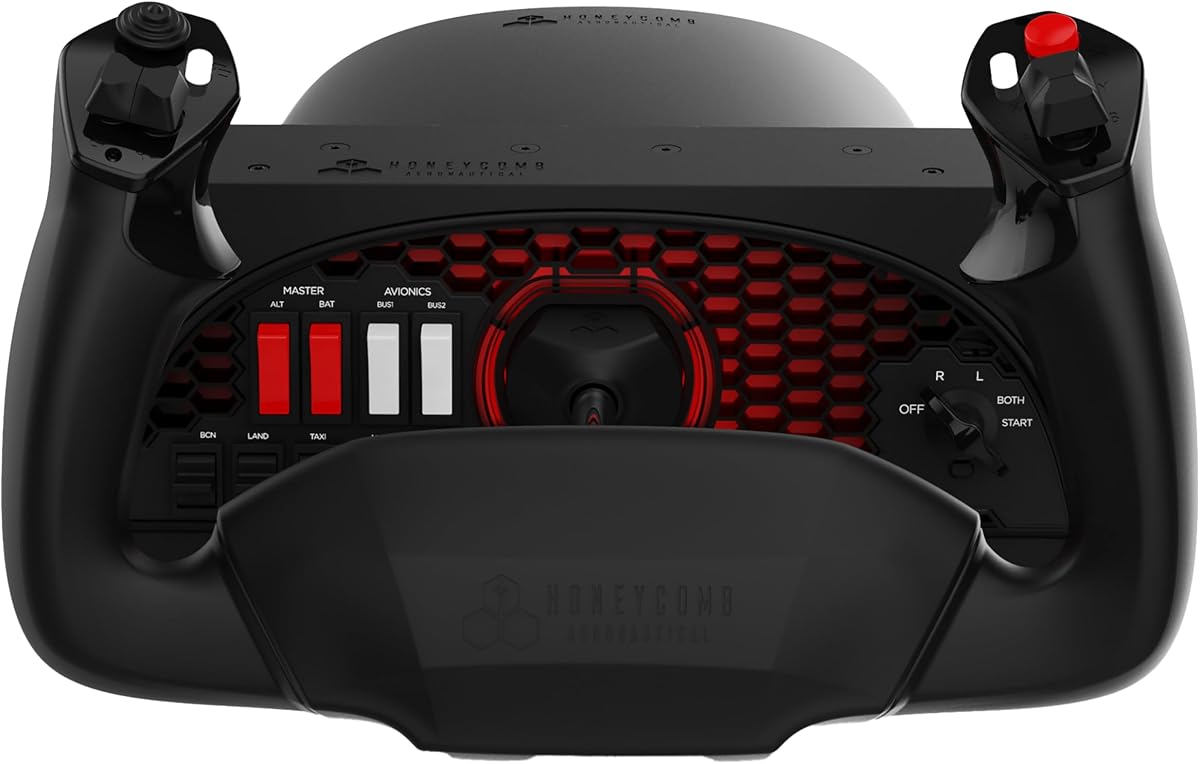
The Honeycomb Alpha Flight Controls Yoke & Switch Panel delivers an immersive simulation experience with true-to-life controls and a solid steel shaft. Its self-centering mechanism ensures minimal dead zones for accurate maneuvers that feel authentic.
We may earn a commission when you buy through this link, at no additional cost to you.
The included switch panel integrates essential cockpit functions like avionics and ignition switches, complete with red LED backlighting for night flight realism. Dual mounting solutions provide flexibility, allowing for clamp-free or clamp-based installation depending on your table.
While the premium quality comes at a high cost, the durability and detailed engineering justify the investment for serious aviation enthusiasts. It requires a significant amount of desk space, so check your layout before committing to this setup.
If you are building a high-fidelity simulator and value quality construction, the Alpha Yoke is a top-tier choice. It offers a premium feel and functionality that closely mirrors real-world aviation hardware.
The switch panel adds essential cockpit functions without needing extra peripherals, streamlining your setup.
Crafted with durable materials like steel, this yoke is built to withstand years of regular simulation use.
We may earn a commission when you buy through this link, at no additional cost to you.
Selecting the right flight controller involves understanding your simulation goals, desk space, and budget. This guide outlines the essential factors to consider before making your purchase.
The first decision is choosing between a yoke and a joystick. Yokes offer realistic handling for civil aviation and airliners, while sticks are versatile for both combat and general aviation sims.
Choose a yoke if you prioritize realism for airline simulation. Choose a stick if you need flexibility across multiple game genres.
Look for controllers with metal or high-quality plastic construction. Steel shafts and robust materials ensure longevity and reduce wear on moving parts.
Prioritize durable materials if you plan to use the controller frequently for long sessions.
A good controller should offer a high number of programmable buttons and axes. This allows you to map complex commands without switching to your keyboard.
Ensure the software allows for intuitive mapping and saving profiles for different games.
Verify that the controller is compatible with your primary flight simulator software. Most support Microsoft Flight Simulator and X-Plane, but some have exclusive partnerships.
Check for specific plugin support or driver requirements for your chosen software.
Since you may fly for hours, ergonomics are vital. Look for adjustable grips, comfortable handles, and designs that minimize strain on your wrists and shoulders.
Test the grip if possible or choose products with strong ergonomic reviews from similar users.
Some systems allow you to add pedals, throttles, or switch panels later. Consider whether the controller can grow with your needs.
Look for modular designs that let you expand your cockpit setup over time.
Quality software is essential for configuring your controller. Reliable drivers ensure smooth communication with your PC and prevent glitches during gameplay.
Check for updates and community support if the software is complex.
Flight controllers range from affordable entry-level sticks to expensive pro-grade yokes. Determine how much you are willing to invest based on your simulation frequency.
Balance cost against features to ensure you get the best value for your specific use case.
Start by connecting your controller to a USB port and installing the necessary drivers. Follow the manufacturer's instructions to calibrate the axes and ensure all buttons are recognized by your PC.
Customize your control scheme within the controller software or your flight simulator settings. Assign critical functions like throttle, rudder, and camera views to physical buttons for efficient gameplay.
To maintain performance, keep the controller clean and dry. Store it in a safe place when not in use to prevent damage to moving parts and ensure it remains calibrated over time.
Most modern controllers support major simulators like Microsoft Flight Simulator and X-Plane. However, some may require specific software or plugins to function fully. Always check the manufacturer's compatibility list before purchasing.
HOTAS stands for Hands On Throttle And Stick, typically featuring a joystick and a separate throttle. A yoke mimics the control wheel found in airliners. HOTAS is versatile for combat, while yokes offer realism for civil aviation.
Flight sticks themselves do not require high specs, but running simulation software does. Ensure your PC meets the game's requirements. The controller is low power and works with standard USB ports.
Yes, most controllers plug directly into a laptop via USB. Just ensure your laptop has a free USB port. Wireless models are rare but exist, though wired options offer the most reliability for simulation.
Yes, several controllers like the Turtle Beach VelocityOne support both PC and Xbox. Verify the product specifications for cross-platform compatibility if you play on multiple systems.
Use a soft, dry cloth to wipe down the surfaces. Avoid liquids that could damage electronics. Keep dust away from joints and buttons to ensure smooth movement and prevent sticking.
We have reviewed ten top airplane controllers for PC that cater to various needs from budget-friendly sticks to premium yoke systems. Each offers unique features to enhance your simulation experience and provide realistic control.
When making your choice, prioritize build quality and compatibility with your preferred simulator. Consider your desk space and whether you need a versatile stick or a dedicated yoke for specific aircraft types.
Prices and availability may change over time, so check current listings and reviews before buying. This ensures you get the best value and product performance for your specific flying goals.