
Air Mouse Remote MX3 Pro
3.8Editor score
2.4G wireless connection
Built-in mini keyboard
IR learning for 5 keys
This guide compares the top 10 air mouse for Android TV Box options available in October 2026 based on features, compatibility, and user ratings.
Finding the right air mouse for Android TV Box can transform your streaming experience. These devices combine cursor control with typing capabilities. making navigation smoother. Whether you are watching movies or managing files. the right remote adds convenience.
We evaluated ten popular models based on connectivity. motion sensors, and keyboard layout. Each product was assessed for ease of setup and device compatibility. Our goal is to help you find a reliable tool that fits your specific setup needs.
Each pick below highlights key strengths and potential limitations. We include detailed specs and real user feedback to guide your decision. Please note that prices and availability change frequently. so check current listings before purchasing.
3.8Editor score

4.2Editor score

4.5Editor score
This side-by-side comparison highlights the key specifications and unique features of each model. Use this table to quickly identify which device matches your connectivity and control needs.
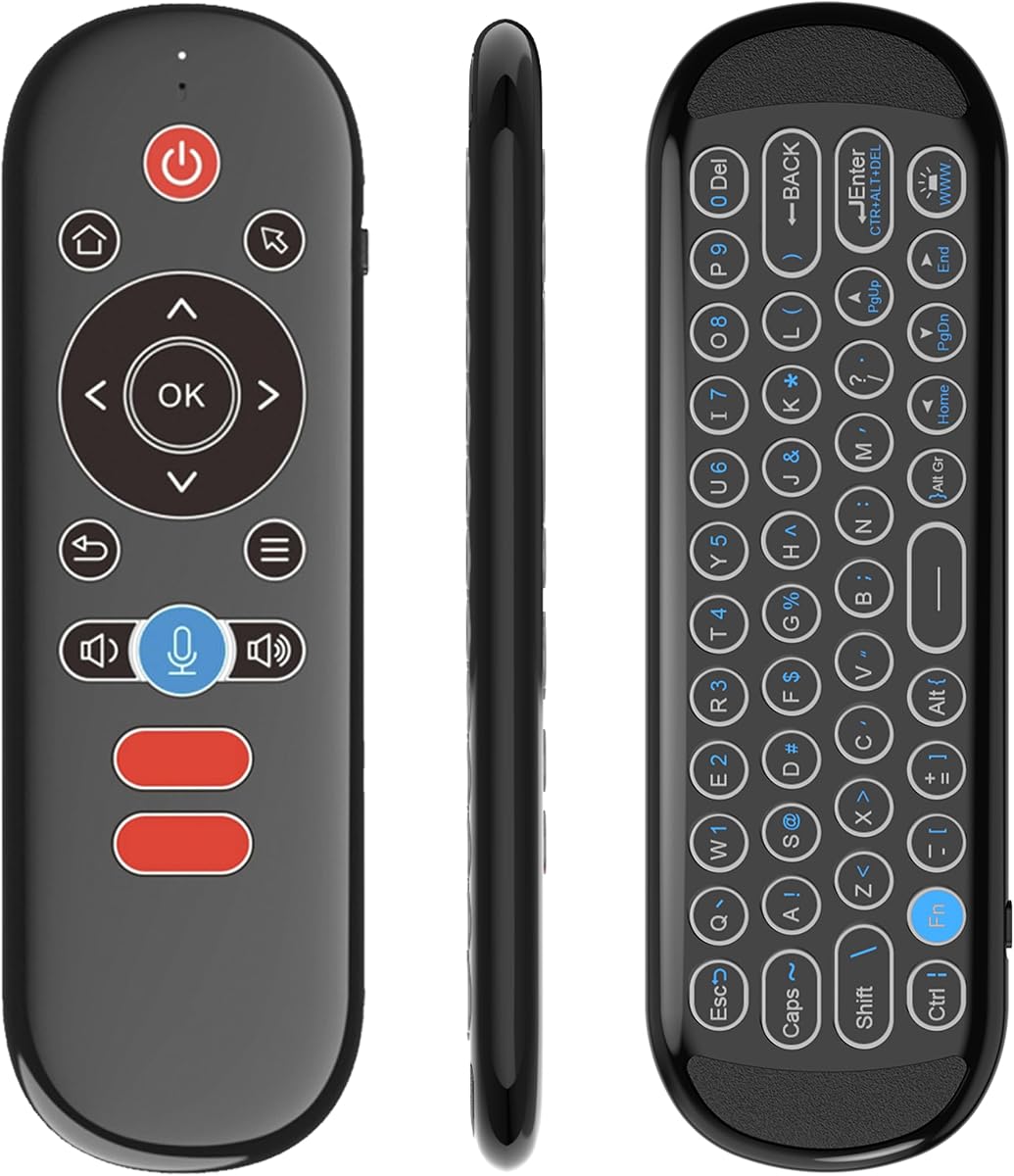


This model offers a basic set of features at a budget friendly price. It uses 2.4G wireless connectivity for reliable signal transmission. The 6-axis somatosensory sensor allows for intuitive cursor movement during navigation.
We may earn a commission when you buy through this link, at no additional cost to you.
The mini keyboard on the back is convenient for typing searches or login credentials. Five keys can be programmed to learn commands from your existing TV remote. This reduces the need to switch devices while watching content.
While functional, the build quality and sensor precision may not match premium models. Users should expect standard performance without advanced voice features. It is best suited for entry level users seeking simple control.
Consider this remote if you need a basic solution for your Android TV Box. It provides essential navigation and typing tools without complexity. Verify your specific device compatibility before purchase to ensure proper function.
The 2.4G USB wireless connection requires no drivers. Just plug the receiver in and it works immediately with your device.
Built-in 6-Axis Somatosensory technology lets you control the cursor by moving the remote. This makes browsing menus faster than using arrow keys.
We may earn a commission when you buy through this link, at no additional cost to you.
This remote stands out for its dual connectivity options and voice control capabilities. It supports both Bluetooth and 2.4G RF modes for flexibility. The built-in voice assistant helps search for programs quickly without typing.
We may earn a commission when you buy through this link, at no additional cost to you.
The 6-axis gyroscope sensor ensures smooth and accurate cursor control. You can switch between standard and PC firmware modes easily. The IR learning function covers most buttons allowing you to control multiple devices.
Note that compatibility is limited for some popular streaming sticks. Always check the device list before buying. The USB receiver ensures stable connection when using 2.4G mode for PC monitor control.
Choose this remote if you want versatile control options and voice search. It balances price and performance well for most Android TV users. The firmware switch feature adds extra utility for computer users.
Easily search TV programs with the built-in voice assistant. This works in supported apps allowing smooth control via voice commands.
The remote comes with two firmware versions for TV and PC. You can switch modes by pressing specific button combinations to change function.
We may earn a commission when you buy through this link, at no additional cost to you.
This model earns a high rating for its reliable performance and support features. It works with most Android TV boxes and streaming devices. The IR learning chip supports all buttons on your existing remotes for easy control.
We may earn a commission when you buy through this link, at no additional cost to you.
The exclusive electronic manual on the back of the remote helps with setup. It includes instant updates and troubleshooting tips directly on the device. The USB 2.0 receiver ensures stable plug-and-play wireless control up to ten meters.
While it offers great compatibility with Android AOSP devices, it may require firmware updates for PC use. The voice control feature works within supported apps. This makes it a strong choice for smart TV environments.
Invest in this remote for a comprehensive solution with strong support. The electronic manual is a unique touch that aids long term use. It balances advanced features with practical design for daily entertainment.
The universal remote control chip supports IR learning on all buttons. Four blue TV buttons allow you to control an additional device simultaneously.
An electronic manual on the back helps with instant setup and updates. This unique design ensures long-term support and troubleshooting help.
We may earn a commission when you buy through this link, at no additional cost to you.
This remote features a full QWERTY keyboard with 7-color backlighting for night use. The dual mode connectivity allows flexible pairing with various devices. It includes voice control and 6-axis gyroscope for precise movement.
We may earn a commission when you buy through this link, at no additional cost to you.
The rechargeable battery eliminates the need for constant battery replacements. The IR learning function stores 100% of functions from your original remotes. This makes it a true universal solution for home entertainment setups.
Users may find the unit slightly heavier than standard mini remotes. The backlight feature is bright but can be turned off to save power. Ensure your device supports the required protocols for voice activation.
This is an excellent pick for those who type frequently on their TV. The backlight helps when navigating in low light conditions. It combines typing convenience with motion control for a rich experience.
Bright LED backlit keys allow quick searching and typing in the dark. You can cycle colors or turn off the light easily.
The dual-sided rechargeable mini keyboard runs on a built-in battery. This reduces waste and saves money on battery replacements over time.
We may earn a commission when you buy through this link, at no additional cost to you.
This remote offers 2.4GHz wireless connectivity and built-in voice input capabilities. It works across multiple operating systems including Windows and Linux. The 17-key layout provides easy access to volume and page controls.
We may earn a commission when you buy through this link, at no additional cost to you.
The high-fidelity microphone allows for voice commands and input. However, voice search only works within built-in voice boxes. It also supports somatosensory games for interactive entertainment on your screen.
The setup is straightforward with a simple USB receiver connection. No software installation is needed to start using the mouse. It is a practical tool for general device control and media playback.
Consider this remote for a reliable voice option on a budget. The wide system support makes it versatile for different environments. Ensure your TV box supports voice input for full functionality.
The USB universal remote features a built-in high fidelity microphone. You can chat or input words via voice on supported apps.
Built-in 6-axis gyroscope helps you move the mouse pointer accurately. You can also use it to play somatosensory games easily.
We may earn a commission when you buy through this link, at no additional cost to you.
This compact remote pairs seamlessly with Android TV Boxes and PCs. It uses both Bluetooth and 2.4GHz dual modes for flexible connection. The vibrant 7-color backlight makes typing visible in dark environments.
We may earn a commission when you buy through this link, at no additional cost to you.
A blank button allows you to learn basic functions from your TV remote. The device is powered by a long-lasting built-in rechargeable battery. It serves as a reliable USB air mouse remote for daily tasks.
Compatibility with proprietary systems like LG or Samsung TVs may be limited. Always test with a wired keyboard first to confirm functionality. The design is portable and ideal for storage in small spaces.
Pick this model if you want a small and rechargeable option. The backlight feature enhances usability at night. Check your specific device compatibility to ensure proper operation.
Vibrant 7-Color backlight ensures clear key visibility. You can cycle colors or turn off via specific button combinations.
Type-C port rechargeable battery ensures long-lasting performance. It works as a reliable bluetooth remote control without disposable batteries.
We may earn a commission when you buy through this link, at no additional cost to you.
This model functions as a 2.4G wireless keyboard and mouse combined. It supports Google Android Smart TV and IPTV devices well. The motion sensor allows control by waving the remote for easy menu navigation.
We may earn a commission when you buy through this link, at no additional cost to you.
You can learn up to five keys from your existing TV remote. This includes power and color keys for convenience. The 3-Gyro and 3-G sensor system makes operating games and typing simple.
Some keys might not be applicable to every specific device. Ensure your TV remote supports NEC protocol for the learning feature. Customer service support is available for troubleshooting issues.
Choose this remote for a solid universal control option. It is designed for horizontal and vertical modes to suit games and typing. Verify your device compatibility to avoid key function issues.
Motion sensor allows mouse to be controlled by waving. The remote. This enables convenient operation in games and typing modes.
It can learn up to 5 keys on your TV IR remote. You can repeat the process until all keys are learned successfully.
We may earn a commission when you buy through this link, at no additional cost to you.
This remote features a backlight design for typing in dark rooms. It connects via stable 2.4GHz RF technology with up to ten meters range. The mini wireless keyboard offers easy character entry and punctuation access.
We may earn a commission when you buy through this link, at no additional cost to you.
Five programmable IR learning keys help control common TV functions. You can switch between punctuation and letters easily. The 3-Gyro and 3-G sensor allow accurate motion sensing game control.
It is not compatible with most Samsung or LG smart TVs. Check the system support list before purchasing to avoid issues. The product does not include batteries so plan accordingly.
Use this remote for a reliable backlight experience on PCs. The lifetime after-sales service adds value to the purchase. It works well for Android TV Box and HTPC setups.
LED backlight double-faced design makes it easy to type in dark. You can input the correct information accurately at night.
3-Gyro + 3-G sensor allows accurate motion sensing game control. This makes operating games and typing modes simple and precise.
We may earn a commission when you buy through this link, at no additional cost to you.
This replacement remote features a gyro core compensation algorithm for precision. It identifies gestures in movement to reduce shake. The single-sided design makes it simple to use in any setting.
We may earn a commission when you buy through this link, at no additional cost to you.
Permanent wear resisting buttons ensure long term durability. You can use Bluetooth mode by pairing without the USB receiver. The device is suitable for many scenes without lines or shackles.
Bluetooth mode currently only supports Android system devices. You may need to disconnect the receiver to enable pairing. The button particles are designed for clear and function arrangement.
Consider this remote if you need a stable cursor without shake. It offers a simple design that reduces complexity. Check system support before switching to Bluetooth mode for use.
Equipped with gyroscope core compensation algorithm to identify gesture. This ensures anti-tremor and anti-shake movement for better control.
Single-sided design offers ultimate simplicity and wear resistance. Best button particles and function arrangement make it easy to use.
We may earn a commission when you buy through this link, at no additional cost to you.
This remote offers 2.4G wireless control and motion sensor support. It is compatible with Android Windows and Mac OS systems. You can learn up to five keys from your old TV remote.
We may earn a commission when you buy through this link, at no additional cost to you.
The 3-Gyro sensor makes moving the cursor convenient for selecting movies. You can operate it in both horizontal and vertical modes. It supports Android TV Box Smart TV and Game Player devices.
You must let the remote learn the power key to turn on your TV. This ensures you can control the device completely with one remote. One year no-reason return and exchange offers peace of mind.
Choose this remote for a versatile and portable control tool. It works well across multiple systems including Xbox and Raspberry Pi. Learn the power key first to ensure full control access.
Can learn up to 5 Keys from your TV old remote. This makes it much easier to control Android tv box and tv.
Compatible with Android Windows Linux Mac OS systems widely. It supports Android TV Box Smart TV and HTPC easily.
We may earn a commission when you buy through this link, at no additional cost to you.
Selecting the right air mouse requires understanding your specific needs for connectivity and control. This guide breaks down the most important factors to consider.
Look for remotes that support both Bluetooth and 2.4G RF modes. Dual connectivity allows you to switch between devices like PCs and TVs. Ensure the USB receiver is included for plug-and-play setup.
Choose models that offer both Bluetooth and 2.4G RF for maximum flexibility.
High quality 6-axis gyroscopes provide smooth cursor movement. Sensors detect wrist rotation to guide the cursor on screen. This improves navigation speed compared to traditional buttons.
Opt for remotes with 6-axis gyros for better pointing accuracy.
Decide between a mini keyboard and full QWERTY layout. Mini keyboards save space but may take longer to type. Full layouts offer speed but add weight to the remote.
Pick a keyboard style that fits your typing frequency and comfort.
IR learning allows you to program buttons from your existing TV remote. This centralizes control of power and volume functions. Check how many keys are supported for custom commands.
Ensure the remote supports enough IR keys for your needs.
Some models use disposable batteries while others recharge via USB-C. Rechargeable options save money over time but require charging. Consider your usage habits when deciding between power types.
Select a power source that matches your usage preferences.
Verify that the remote supports your specific TV box model. Some devices like Fire Stick may not work with certain units. Check lists for Smart TVs or PCs you plan to use.
Always verify device compatibility before purchasing.
Voice input can speed up searches without typing. Check if the remote supports voice apps like Google Assistant. Not all models have this feature enabled for all regions.
Look for voice support if you want quick search access.
Backlit keys are useful for viewing in dark rooms. Some remotes offer multi-color options for customization. This feature is common on models with full keyboards.
Consider backlighting for use in low-light environments.
Connect the USB receiver to your device or use Bluetooth pairing. Follow the pairing instructions on screen to establish a link. Ensure the batteries are installed correctly if applicable.
Hold the remote comfortably to use the motion sensor. Tilt your wrist to move the cursor across the screen. Use arrow keys for fine adjustments if motion is too sensitive.
Keep the device clean with a soft dry cloth. Avoid exposing it to moisture or extreme heat. Store it in a safe place when not in use to prevent damage.
Most air mice work with standard Android TV boxes and IPTV devices. However, specific models may not support Fire Stick or Roku. Always check compatibility lists before purchasing to avoid issues.
Enter the learning mode by pressing and holding specific buttons like OK and TV. Point your original remote at the new remote and press the key to learn. Repeat for each button you want to program.
Many air mice support Windows and Linux operating systems. Some models allow you to switch to PC firmware for better cursor control. Check the product description to confirm PC support.
Most models offer a wireless range of up to ten meters. Signal strength can be affected by walls or interference. Keep the receiver close to your device for best performance.
Disposable batteries can last several months depending on usage. Rechargeable models typically offer a full charge for a long period. Always check specifications for power estimates.
This may be due to sensor calibration or interference. Try recalibrating the device by following instructions. Ensure the surface is stable and there are no obstructions blocking the signal.
Voice search usually works within supported apps and system settings. It may not function in every third-party application. Check if your specific apps allow voice input before relying on it.
Some models require holding buttons to enter pairing mode for Bluetooth. Others switch automatically based on the USB receiver state. Refer to the user manual for specific mode instructions.
We have reviewed ten top models including budget and premium options. The BOXPUT BPR1S Plus and Android Universal Remote offer strong features. The MX3 Pro provides a cost-effective solution for basic needs.
Prioritize connectivity and sensor quality for the best experience. Check that your specific device is supported before making a purchase. A good remote enhances your streaming and typing efficiency greatly.
Remember to verify current prices and stock before buying. Features may change or vary by region for different models. Use this guide to find the right fit for your setup today.