
Amazon Basics AC-Powered Computer Speakers
4.3Editor score
Direct wall outlet power
Simple front volume control
Built-in headphone jack
Finding the right audio solution for your workspace is essential for productivity and entertainment. AC powered computer speakers offer consistent power and robust sound without draining your device battery. This guide explores the best options available to enhance your listening experience.
We evaluated each model based on audio clarity, connectivity options, build quality, and ease of use. Our team analyzed specifications, user feedback, and performance metrics to compile this definitive list. Whether you need budget-friendly options or premium sound, this guide covers it all.
Each pick highlights key features, pros, and cons to help you make an informed decision quickly. Note that prices and availability change frequently so verify current details before purchasing. We aim to provide honest insights to save you time and money on your next upgrade.
4.3Editor score

4.6Editor score

4.6Editor score
As an Amazon Associate we earn from qualifying purchases.
This side-by-side comparison breaks down the core specifications and unique attributes of each model. We focus on power output, connectivity, design, and special features to highlight differences clearly.




The Amazon Basics AC-Powered Computer Speakers offer an affordable entry point for desktop audio. With a 4.3 rating, users appreciate the straightforward design and reliable performance for everyday tasks.
We may earn a commission when you buy through this link, at no additional cost to you.
These speakers plug directly into a wall outlet ensuring consistent power without draining your laptop battery. The front volume control makes adjustments quick and the headphone jack allows for private listening sessions.
While the sound quality is functional it lacks the depth found in premium models. Bass is minimal and high volumes may introduce slight distortion making them better suited for calls or media than critical listening.
Ideal for students or office workers needing basic audio enhancement. If you prioritize cost and simplicity over audiophile grade sound this is a solid choice for your workspace setup.
Plug in the power adapter and connect the 3.5mm jack to your device for immediate use.
Small dimensions fit easily on crowded desks without consuming valuable workspace.
We may earn a commission when you buy through this link, at no additional cost to you.
The Bose Companion 2 Series III delivers the clarity that Bose is known for in a desktop package. Rated 4.6 by users these speakers provide reliable performance for music and video playback.
We may earn a commission when you buy through this link, at no additional cost to you.
You can connect your computer and additional devices like phones through the auxiliary input. The front volume control and headphone jack make daily use convenient without needing software adjustments.
These speakers excel at midrange clarity but may lack deep bass compared to systems with subwoofers. They are best for listeners who prioritize voice and instrument fidelity over heavy low-end rumble.
Recommended for professionals and casual listeners seeking trusted audio quality. The design complements most modern desks and the performance holds up well over years of use.
Connect multiple audio sources easily using the auxiliary input for seamless switching.
Adjust volume and switch inputs quickly with controls located on the right speaker.
We may earn a commission when you buy through this link, at no additional cost to you.
The Bose Companion 2 Series II focuses on delivering a realistic sound experience for desktop use. With a 4.1 rating it remains a dependable option for those who value consistent audio output.
We may earn a commission when you buy through this link, at no additional cost to you.
Dual inputs allow you to connect your PC and another audio source simultaneously. The elegant appearance fits well in home offices where aesthetics matter alongside performance.
Compared to newer models it lacks some modern conveniences like remote control or enhanced bass response. However the core audio quality remains strong for general multimedia consumption and video conferencing.
Suitable for users seeking a balance of style and function. If you prefer a traditional look and reliable sound without extra bells and whistles this system serves well.
Sleek design integrates smoothly with various interior styles and desktop setups.
Maintain connections to two devices at once for effortless audio source switching.
We may earn a commission when you buy through this link, at no additional cost to you.
The Bose Companion 20 offers full natural sound in a sleek two-piece system. Rated 4.6 it is a top choice for users seeking high fidelity without a bulky subwoofer.
We may earn a commission when you buy through this link, at no additional cost to you.
Bose TrueSpace technology creates a wide two-channel soundstage perfect for listening at your computer. The control pod lets you adjust volume connect headphones and add another audio device easily.
While it commands a premium price the audio performance justifies the cost for critical listeners. The design is space-saving and the sound fills the room without distortion at high volumes.
Best for professionals and enthusiasts who want desktop audio that rivals larger systems. If budget allows this is a long-term investment in quality listening.
TrueSpace stereo digital processing creates a wide soundstage from just two speakers.
The convenient control pod centralizes volume and headphone access on your desk.
We may earn a commission when you buy through this link, at no additional cost to you.
The Edifier R1280T is a near field studio monitor designed for home and desktop use. With a 4.6 rating it is praised for its natural sound reproduction and classic aesthetic.
We may earn a commission when you buy through this link, at no additional cost to you.
Two AUX inputs allow you to connect multiple devices simultaneously without switching cables. The side panel controls let you adjust bass and treble while the remote control adds convenience.
These speakers offer a rich sound profile thanks to the silk dome tweeter and full range unit. The MDF wood build minimizes resonance ensuring clear audio across all frequencies.
Ideal for home office setups and music enthusiasts on a budget. The wood finish adds elegance and the performance competes with much pricier speakers.
Natural sound reproduction from silk dome tweeter and full range unit.
Connect two devices at once via AUX without needing to plug and switch.
We may earn a commission when you buy through this link, at no additional cost to you.
The Edifier R980T offers 24W of power in a compact wooden enclosure. With a 4.6 rating it delivers immersive audio suitable for movies and gaming sessions.
We may earn a commission when you buy through this link, at no additional cost to you.
Universal power supply and included RCA and 3.5mm cables make setup straightforward. The 4 inch units provide rich mids and a flared bass reflex port enhances low-end response.
While not as adjustable as the R1280T these speakers offer consistent performance. The wooden build reduces acoustic resonance ensuring clean sound at higher volumes.
Great for users wanting a blend of power and style at a moderate price. If you need versatile connectivity and solid volume output this is a strong contender.
24W RMS total power output ensures loud and clear sound filling your space.
100% wooden enclosures minimize resonance for cleaner audio performance.
We may earn a commission when you buy through this link, at no additional cost to you.
The Cyber Acoustics CA-2014 is a compact speaker system designed for small spaces. With a 4.2 rating it offers clear sound for music and voice applications without taking up room.
We may earn a commission when you buy through this link, at no additional cost to you.
Simple wired connection via 3.5mm audio jack ensures compatibility with most devices. The front panel includes power volume control and a headphone jack for private listening.
These speakers are best for low volume listening in shared environments. While not powerful enough for large rooms they serve well for personal desktop use.
Suitable for dorm rooms or cubicles where desk space is limited. If you need basic stereo sound and easy controls this is a practical choice.
Compact design fits on desks and workstations without consuming much room.
Front panel controls allow easy access to power and volume adjustment.
We may earn a commission when you buy through this link, at no additional cost to you.
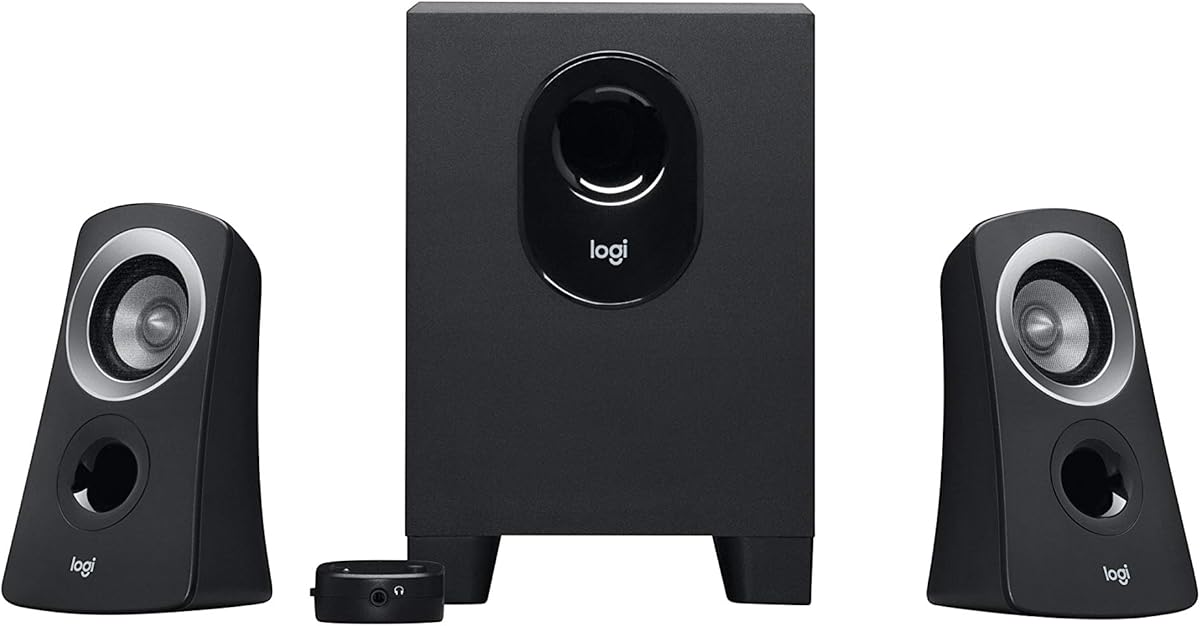
The Logitech Z313 brings a 2.1 system to the desktop with a dedicated subwoofer. With a 4.4 rating users enjoy 25 watts of power for dynamic audio during gaming and movies.
We may earn a commission when you buy through this link, at no additional cost to you.
The compact subwoofer delivers punchy bass while the satellite speakers handle mids and highs. The control pod on your desk makes volume and bass adjustments quick and accessible.
While the bass is powerful it can sometimes overpower vocals at high volumes. The plastic construction is durable but feels less premium than wood finishes.
Ideal for gamers and movie enthusiasts wanting more impact than standard stereo speakers. If you need deep bass without a large footprint this system delivers.
Compact subwoofer adds depth to music and movie soundtracks effectively.
Convenient control pod on desk lets you adjust volume and bass easily.
We may earn a commission when you buy through this link, at no additional cost to you.
The Nylavee speakers combine 14W RMS power with modern Bluetooth connectivity and RGB lighting. With a 4.2 rating they offer a versatile solution for gaming and casual listening.
We may earn a commission when you buy through this link, at no additional cost to you.
You can switch between two EQ modes with a dedicated button for different content types. The RGB lights add atmosphere but can be turned off for focused work sessions.
While wired connection provides stability Bluetooth 5.0 offers wireless freedom for mobile devices. The four speaker units deliver cleaner highs and fuller mids than typical laptop speakers.
Great for younger users or gamers wanting a customizable desk setup. If you like visual flair and flexible connectivity these speakers meet modern expectations.
Bluetooth 5.0 support allows easy connection to phones and tablets wirelessly.
RGB lights enhance setup atmosphere and can be customized or turned off.
We may earn a commission when you buy through this link, at no additional cost to you.
The LITTOAK speakers deliver robust audio with 30W total power and customizable RGB lighting. With a 4.2 rating they aim to provide a complete gaming and media experience out of the box.
We may earn a commission when you buy through this link, at no additional cost to you.
Dedicated EQ presets for music movie and gaming ensure optimal sound for different scenarios. The six lighting modes add a vibrant touch to your desk setup without software.
All controls are accessible on the front panel making adjustments easy during use. The package includes cables and adapter so you are ready to use right away.
Suitable for gamers wanting powerful sound and visual flair. If you need an all-in-one solution with multiple inputs and high output this is a compelling choice.
Tailor audio instantly with dedicated EQ presets for music movies and gaming.
Includes power adapter audio cable and speaker cable for immediate use.
We may earn a commission when you buy through this link, at no additional cost to you.
Selecting the right speakers requires balancing power design and connectivity to fit your needs.
Power output determines loudness and clarity especially at high volumes. Look for speakers with sufficient RMS wattage to fill your room without distortion.
Higher wattage ensures better performance for movies and gaming. Check RMS ratings rather than peak power for accurate performance.
Speakers should support your devices through 3.5mm AUX or Bluetooth. Some models offer RCA inputs for broader compatibility.
Ensure the chosen input matches your PC or laptop ports. Wireless options add flexibility for mobile devices.
Evaluate frequency response to ensure clear mids and highs. Subwoofers enhance bass for a richer audio experience.
Consider whether a 2.0 or 2.1 system suits your preferences. Natural sound reproduction is key for long listening sessions.
Wood enclosures reduce resonance better than plastic for clearer audio. Design should fit your desk space and aesthetic.
Check dimensions before buying to avoid clutter. Durable materials ensure longevity of your investment.
Front panel or remote controls make volume adjustments convenient. Look for dedicated headphone jacks for private listening.
Ease of use impacts daily satisfaction. Simple controls reduce setup time and frustration.
Balance your budget with expected performance. Midrange options often provide the best value for features.
Avoid overly cheap models that compromise durability. Investing slightly more can yield better long term results.
Features like RGB lighting or multiple EQ modes add customization. Consider if these benefits outweigh potential distractions.
Extra functions can enhance gaming setups but keep simplicity in mind. Choose features that improve rather than distract.
Established brands often deliver reliable support and quality. Check warranty terms to protect your purchase.
Good customer service helps resolve issues quickly. Trusted manufacturers tend to maintain consistent quality standards.
Place speakers at ear level and equidistant from your seating for balanced sound. Avoid placing them too close to walls to prevent muffled audio.
Connect the power adapter to a stable outlet and use quality audio cables to reduce interference. Adjust EQ settings based on your preferred listening content.
Regularly dust the drivers with a soft cloth to maintain clarity. Avoid extreme temperatures and humidity to prolong speaker life.
Yes AC powered speakers generally deliver more consistent power and louder sound. They do not rely on device battery or USB bus power which limits performance.
For most desks 10W to 20W total power is sufficient. Higher wattage benefits larger rooms but may be unnecessary for close listening.
Most models work with laptops via 3.5mm jack or Bluetooth. Ensure your laptop has the necessary output port for wired connections.
No these speakers are powered and do not require an external amplifier. They plug directly into power and audio sources.
Check cables for damage and ensure they are fully inserted. Try a different power outlet and reduce electronic interference sources nearby.
Many models support HDMI or optical via adapters. Use the 3.5mm output if your TV has one for direct connection.
We explored ten diverse models ranging from budget basics to premium systems. Each offers unique strengths for different desktop needs and preferences.
Prioritize sound quality and connectivity that match your daily tasks. A balanced choice ensures long term satisfaction and better audio performance.
Check current pricing and availability before buying as these change often. Your ideal pair is out there ready to enhance your computing experience.