
ARCTIC P9 PWM PST
4.5Editor score
Wide PWM speed range
High static pressure design
Includes cable splitter
This guide compares the top 92mm case fans for cooling and noise, reviewing performance, build quality, and features to help you choose the right model.
Finding the right 92mm case fans is crucial for compact builds and efficient airflow. These small fans must balance performance with noise to keep systems cool without disturbance.
We analyzed ten top models based on speed, static pressure, and build quality. Each product offers unique features for specific cooling needs and case constraints.
Each pick highlights key strengths and ideal use cases for you. Prices and availability change frequently, so check current listings before making your final decision.
4.5Editor score

4.8Editor score

4.8Editor score
This side-by-side comparison highlights the key specifications and features of all ten selected 92mm fans to help you find the ideal match.


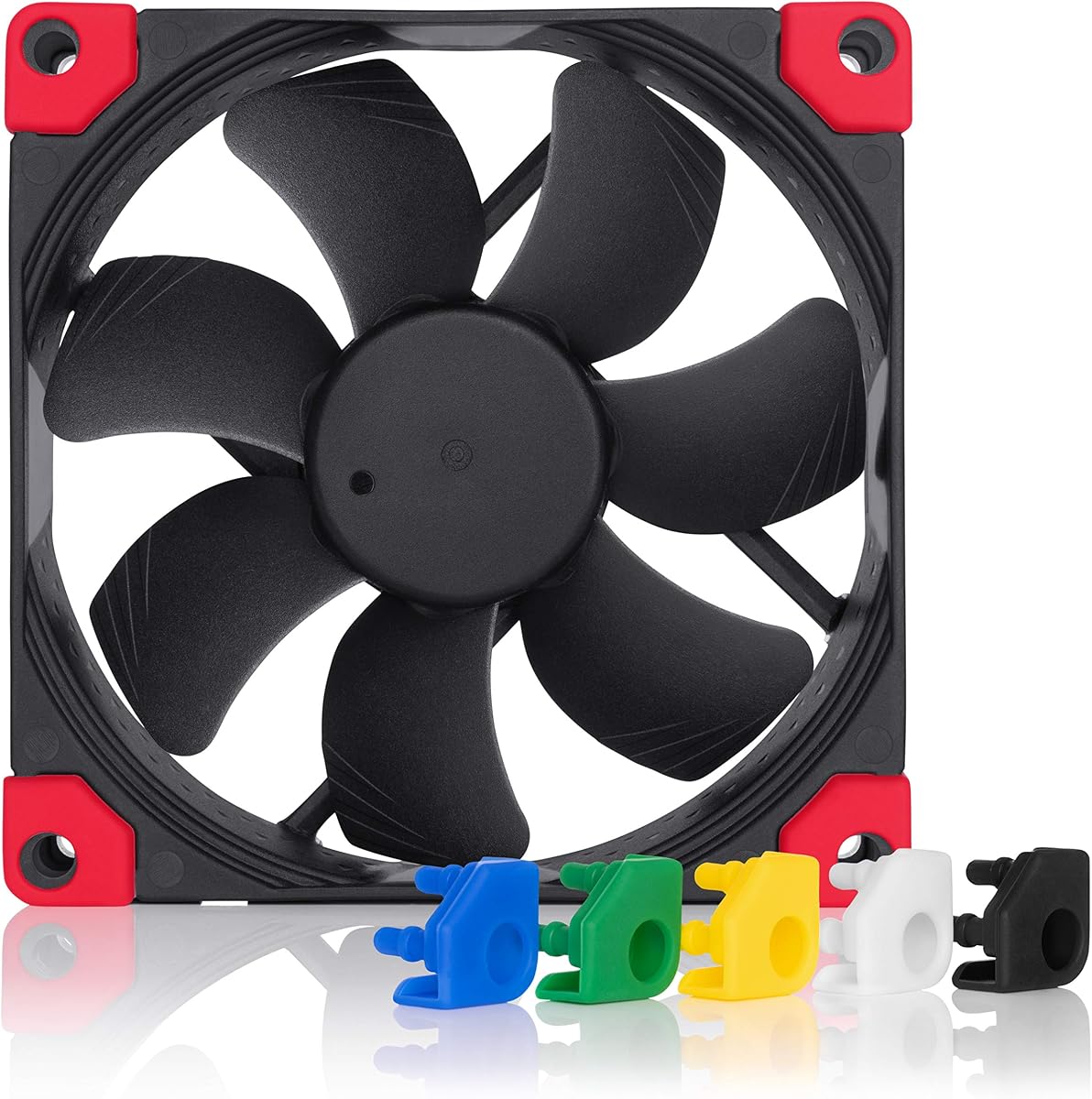


The Noctua NF-A9 PWM stands as a top choice for users prioritizing quiet performance. With a 4.8 rating, it delivers reliable cooling with minimal noise disturbance.
We may earn a commission when you buy through this link, at no additional cost to you.
Its Flow Acceleration Channels and Advanced Acoustic Optimisation frame ensure efficient airflow while maintaining low decibel levels. The 4-pin PWM allows precise speed control.
The premium price reflects its high-grade materials and longevity. While budget options exist, this fan justifies its cost through superior noise management and reliability.
Ideal for HTPCs and compact builds, it pairs well with 9cm coolers. The included Low-Noise Adaptor adds flexibility for silent operation when needed.
The Advanced Acoustic Optimisation frame minimizes air turbulence, ensuring the fan runs silently even at higher speeds.
With a mean time to failure exceeding 150,000 hours, this fan is built to last through years of continuous operation.
We may earn a commission when you buy through this link, at no additional cost to you.
The ARCTIC P9 PWM PST offers impressive performance for its price. It provides a wide speed range and includes a splitter for daisy-chaining fans easily.
We may earn a commission when you buy through this link, at no additional cost to you.
Its high static pressure makes it suitable for radiators or dense heatsinks. The 4-pin connector supports PWM control for automatic motherboard adjustment.
While it may not be as whisper-quiet as premium models, it balances cost and function well. The included splitter reduces cable clutter in tight cases.
Best for budget builders needing efficient cooling. It suits standard cases or setups where airflow resistance is moderate but cost is a priority.
The high static pressure design ensures effective cooling even when airflow is restricted by radiators or dense filters.
The included 4-pin socket allows connecting multiple fans to one header, simplifying your PC build.
We may earn a commission when you buy through this link, at no additional cost to you.
This ultra-thin fan excels in low-profile builds where space is limited. Its 14mm thickness fits coolers like the NH-L9 series perfectly.
We may earn a commission when you buy through this link, at no additional cost to you.
The HS-PWM version stops at 0% PWM for semi-passive operation, enhancing silence during light loads. The chromax.black.swap edition offers aesthetic customization.
While thinner fans move less air, this model compensates with high speed and optimized blade design. It suits small form factor PCs needing specific dimensions.
Buyers seeking compact cooling with premium silence should consider this. The included swappable pads allow color matching for a polished internal look.
The 14mm thickness allows installation in tight cases where standard 25mm fans simply cannot fit.
At low loads, the fan stops completely, ensuring near-silent operation when full cooling power is not needed.
We may earn a commission when you buy through this link, at no additional cost to you.
Similar to the chromax version but with standard brown finish, this fan offers trusted Noctua quality in a slim form. It fits 9cm low-profile coolers well.
We may earn a commission when you buy through this link, at no additional cost to you.
The A-series blades and SO2 bearing ensure smooth airflow and durability. It maintains the signature quietness expected from the brand.
Ideal for those who prefer classic aesthetics over black customization. It is a straightforward choice for ITX cases or compact chassis.
Users needing reliable cooling in tight spaces will appreciate its balance. The PWM header ensures automatic speed adjustments based on system temperature.
Noctua's A-series fan design is renowned for balancing airflow and acoustic performance effectively.
We may earn a commission when you buy through this link, at no additional cost to you.
The Thermalright TL-P9 provides strong performance at a competitive price. Its vibration damping pads reduce noise caused by motor friction.
We may earn a commission when you buy through this link, at no additional cost to you.
The 7-blade design and soft silicone feet enhance heat dissipation while lowering operational noise. It is suitable for CPU coolers and general case use.
While not as refined as premium brands, it offers excellent value. The PWM control allows it to match motherboard temperature signals accurately.
Good for budget-conscious builders seeking quiet cooling. It serves well in standard cases or as a replacement for older noisy fans.
Four vibration damping pads around the fan frame reduce physical contact noise significantly.
We may earn a commission when you buy through this link, at no additional cost to you.
This model runs at a fixed 1900 RPM, offering predictable cooling performance. The high static pressure ensures air moves through dense components efficiently.
We may earn a commission when you buy through this link, at no additional cost to you.
Its bearing uses a German-developed alloy lubricant to minimize friction and heat. The operation is extra-quiet even under continuous load.
Without PWM, users may need voltage control to adjust speed. It fits cases where simple plug-and-play is preferred over complex control.
Suitable for steady-state cooling needs. If you prefer a consistent RPM rather than variable speeds, this fan is a solid choice.
The fixed speed ensures consistent cooling without relying on motherboard PWM signals.
We may earn a commission when you buy through this link, at no additional cost to you.
This is the all-black version of the classic NF-A9. It maintains the same superior performance but fits black-themed builds perfectly.
We may earn a commission when you buy through this link, at no additional cost to you.
The chromax.black.swap edition includes pads in multiple colors to allow customization. It offers the same 2000 RPM speed and whisper-quiet operation.
Ideal for users wanting a cohesive black interior. The premium price is justified by the aesthetic options and proven Noctua engineering.
A great choice for modern gaming or workstation builds. Ensure your case complements the all-black look for maximum visual impact.
The swappable pads let you match the fan to your case or component colors easily.
We may earn a commission when you buy through this link, at no additional cost to you.
This ultra-thin fan delivers high speed in a 15mm profile. It reaches up to 2700 RPM for aggressive cooling in limited spaces.
We may earn a commission when you buy through this link, at no additional cost to you.
The 42.58 CFM airflow helps dissipate heat efficiently. Vibration pads reduce noise, ensuring low-noise operation at moderate speeds.
It fits cases where thickness is strictly limited. The 4-pin PWM allows speed control to manage noise versus performance balance.
Best for high-performance small systems. If space is tight but cooling demands are high, this fan offers a strong solution.
The 2700 RPM capacity ensures even thin fans can deliver significant cooling power when needed.
We may earn a commission when you buy through this link, at no additional cost to you.
This model uses a 3-pin connector, making it compatible with older boards. It runs at fixed speeds but includes adaptors to lower RPM further.
We may earn a commission when you buy through this link, at no additional cost to you.
At 1050 RPM, it is nearly silent, perfect for passive-like cooling. The 3-pin design simplifies connections without complex headers.
Ideal for legacy builds or users preferring analog control. It offers excellent silence but lacks automatic variable speed features.
Choose this for stable, quiet operation. The included adaptors give flexibility to tune the fan for specific noise targets.
The 3-pin Molex design ensures it works with a wide range of older and modern motherboards.
We may earn a commission when you buy through this link, at no additional cost to you.
The P9 Max offers the highest speed in this list. It reaches 4300 RPM, delivering brute force cooling for high-performance systems.
We may earn a commission when you buy through this link, at no additional cost to you.
Its Fluid Dynamic Bearing ensures long life and smooth operation. The 0dB mode allows it to stop at low PWM values for silence.
Best for users needing maximum airflow. It suits radiators or enclosures where resistance is high and cooling power is critical.
Consider this for intense thermal loads. The wide RPM range gives full control from silent idle to aggressive cooling.
The 6.17 mmH2O static pressure ensures air moves even through tightly packed components.
We may earn a commission when you buy through this link, at no additional cost to you.
Selecting the right 92mm fan involves balancing size, noise, and performance. Consider these factors to match your build needs.
Standard 92mm fans are 25mm thick, but slim options exist for tight spaces. Check your case clearance before buying.
Choose a slim profile if installing on low-profile CPU coolers or inside small form factor enclosures.
RPM determines how fast air moves. Higher RPM increases cooling but also noise. Look for CFM ratings for total airflow.
Aim for higher CFM if you need maximum cooling, or lower RPM for quiet operation.
Static pressure measures how well a fan pushes air through resistance. High pressure is key for radiators and dust filters.
Prioritize static pressure if the fan is facing a dense obstruction or heatsink.
Noise is measured in decibels. Lower dB means quieter operation. Some fans stop completely at low speeds.
Check the maximum dB rating to ensure it fits your noise tolerance.
4-pin PWM offers automatic speed control via motherboard. 3-pin connectors run at fixed speeds.
Choose PWM for flexibility and silence; choose 3-pin if your motherboard lacks PWM headers.
Fluid Dynamic Bearings offer longer life and less noise compared to sleeve bearings.
Invest in Fluid Dynamic or SSO2 bearings for better longevity and reliability.
Many fans come in black or brown. Chromax models offer black finishes and customizable accents.
Match the fan color to your case build for a polished, uniform look.
Some fans include anti-vibration mounts, screws, or adaptors. These simplify installation and reduce vibration noise.
Look for kits that include necessary hardware to avoid extra purchases.
Install the fan securely using the included screws or anti-vibration mounts to ensure stable operation.
Connect the fan to a compatible motherboard header to enable automatic speed control based on temperature.
Periodically clean the blades with compressed air to prevent dust buildup and maintain cooling efficiency.
Not necessarily. 92mm fans often spin faster to move equivalent air, which can generate more noise. However, high-quality models can be quite silent with optimized blade designs.
PWM fans use 4-pin connectors for automatic speed control. FLX fans use 3-pin connectors and run at fixed speeds determined by adaptors.
No, the size mismatch prevents proper mounting. Use adapters or a proper 120mm fan for those slots.
High-quality fans often exceed 150,000 hours of operation. Bearings like Fluid Dynamic ensure longevity compared to standard sleeve types.
Yes, they reduce noise transmission from the motor to the case frame. Most premium models include these in the box.
RPM below 1000 is usually very quiet. Look for fans with Low-Noise Adaptors or wide PWM ranges for silent settings.
We highlighted top options ranging from budget-friendly picks to premium performers. Each model offers unique strengths for specific use cases.
Prioritize factors like noise, airflow, and dimensions to match your build requirements. The right fan ensures stability without disruption.
Prices and stock vary, so review current listings before purchasing to secure the best deal available.