
10Gtek 10Gb Dual RJ45 Port Network Card with X540 Controller
4.1Editor score
Intel X540 Controller Chip
Dual RJ45 Copper Ports
Windows and Linux Compatible
This guide compares the top 10GB Ethernet Card options for 2026, evaluating performance, compatibility, and features to help you choose the right network
Finding a reliable 10GB Ethernet Card is essential for high-speed networking needs in 2026. Whether you manage a home lab or enterprise server, the right adapter ensures smooth data transfer and low latency for demanding applications.
We analyzed ten top-rated models based on chipset quality, compatibility, and real-world performance. Our comparison covers PCIe and USB options, highlighting key specs like auto-negotiation, heat management, and OS support to guide your decision effectively.
Each pick showcases specific strengths like budget value or premium features. Prices and availability change frequently, so verify current details before purchasing. This expert guide helps you navigate the market with confidence and technical accuracy for your setup.
4.1Editor score

4.2Editor score

4.6Editor score
The following table provides a side-by-side comparison of all ten products evaluated in this guide. Each entry highlights core specifications and links to detailed reviews for informed purchasing decisions.




The TP-Link TX401 is a top-rated 10GB Ethernet card with a 4.2 rating. It offers reliable 10Gbps speeds for home labs and workstations. Its included cable and brackets simplify setup.
We may earn a commission when you buy through this link, at no additional cost to you.
This card uses 10GBase-T technology to ensure compatibility with existing cabling. It supports multiple speeds like 5Gbps and 2.5Gbps for flexible networking. QoS technology helps prioritize gaming traffic.
While it lacks advanced management features, it suits basic high-speed needs. The included CAT6A cable is a great value add. Most users find installation straightforward on standard towers.
Buy this if you need a simple upgrade for NAS or file sharing. It balances cost and performance well. Check your PCIe slot availability before purchasing.
It guarantees smooth data transmission for internet access and local files.
It auto-negotiates speeds to work with older routers and switches.
We may earn a commission when you buy through this link, at no additional cost to you.
The 10Gtek card offers an affordable way to get dual 10Gbps ports. It uses the Intel X540 controller known for stability in servers. Users praise its value for home labs.
We may earn a commission when you buy through this link, at no additional cost to you.
With two RJ45 ports, you can bond connections or separate traffic easily. It supports Windows Server 2019 and Linux distributions like Ubuntu. The included low-profile bracket fits small cases.
Note that Windows 11 support requires manual driver setup. It is not hot-swappable which limits maintenance options. Despite this, it remains a budget favorite.
Choose this if you need multiple ports for a low cost. It is ideal for virtualization setups. Verify driver availability for your OS version first.
It comes with an original Intel X540 controller chip for stability.
Dual copper ports let you connect to Category-6A cables easily.
We may earn a commission when you buy through this link, at no additional cost to you.
This Synology adapter is purpose-built for their NAS systems. It features two 10GbE ports for high-performance storage. The 4.6 rating reflects strong user satisfaction.
We may earn a commission when you buy through this link, at no additional cost to you.
It works specifically with DSM 7.1.1 and above. Automatic negotiation ensures smooth links at 10Gbps or 1Gbps. The five-year warranty adds significant peace of mind.
The main trade-off is exclusivity to Synology hardware. It is not a general-purpose card for other servers. But for Synology users, it is unmatched.
Buy this if you own a Synology NAS needing more bandwidth. It simplifies setup compared to third-party options. Ensure your NAS model is on the compatibility list.
It supports high-performance storage applications with two ports.
It is backed by a robust five-year warranty.
We may earn a commission when you buy through this link, at no additional cost to you.
The VIMIN card offers dual 10Gbps ports with Intel reliability. Its 4.5 rating indicates strong performance stability. The heat sink ensures cool operation during heavy loads.
We may earn a commission when you buy through this link, at no additional cost to you.
It supports Windows Server and VMware environments well. Flexible PCIe compatibility allows use in various slot types. The heat sink design helps maintain stability under load.
However, it lacks support for 2.5G or 5G speeds. If you have mixed network speeds, this might be a limitation. It focuses purely on 10G and 1G.
Select this for server upgrades needing dual ports. The cooling design is a plus for 24/7 uptime. Verify your PCIe slot type matches x8 or x16.
It features a heat sink to maintain optimal temperature levels.
It works with Windows, Linux, and VMware systems.
We may earn a commission when you buy through this link, at no additional cost to you.
This Asus card provides reliable 10Gbps speeds for desktops. It supports full compatibility with current standards like 10/5/2.5G. QoS helps prioritize critical data streams.
We may earn a commission when you buy through this link, at no additional cost to you.
It works well with Linux Kernel 4.4 and above. The RJ45 port uses standard copper cables for easy connection. Quality-of-Service technology prioritizes bandwidth efficiently.
The main trade-off is the higher price compared to others. It offers a single port instead of dual. Consider if you need that specific brand reputation.
Buy this for a straightforward desktop upgrade. It is good for gamers using QoS. Check your Linux kernel version before installing.
It delivers up to 10x-faster data-transfer speeds.
It works with 10/5/2.5/1Gbps and 100Mbps standards.
We may earn a commission when you buy through this link, at no additional cost to you.
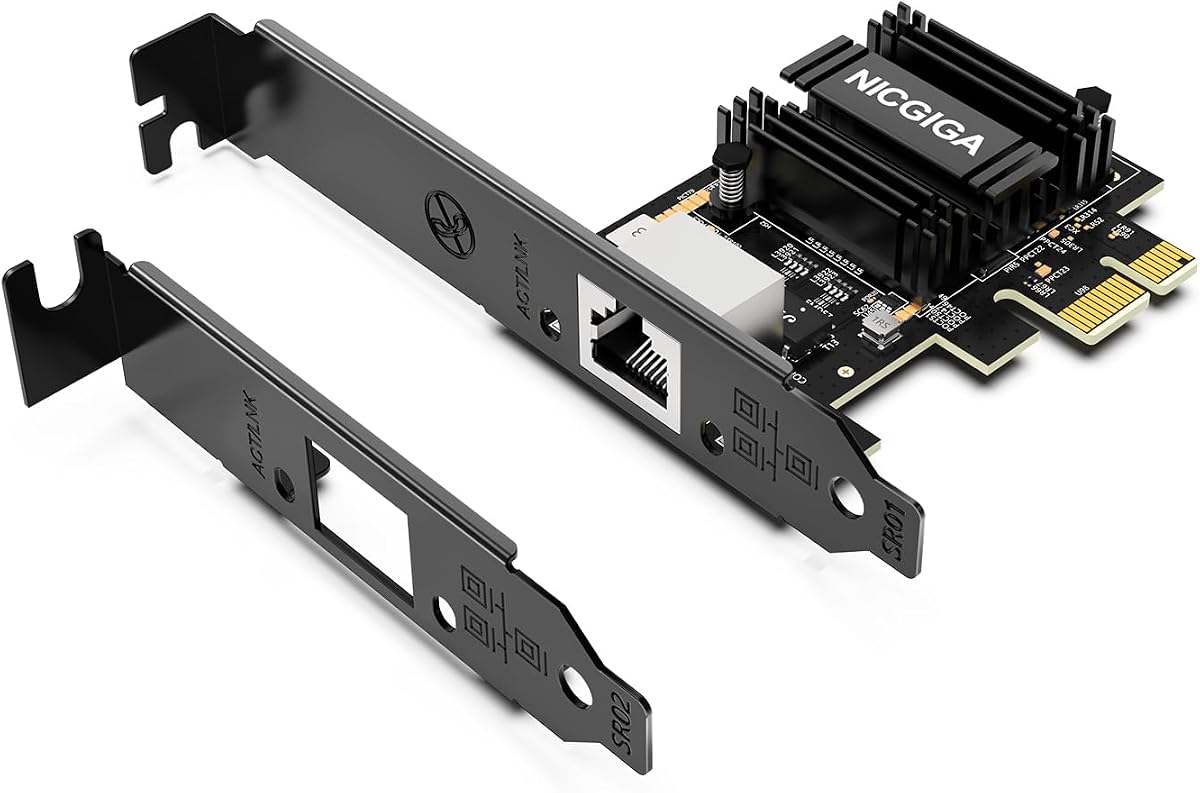
The NICGIGA card is ideal for compact PCs like Mini PCs. It uses the latest Realtek RTL8127 for fast speeds. The PCIe 4.0 x1 interface saves space.
We may earn a commission when you buy through this link, at no additional cost to you.
It auto-negotiates speeds to match routers or NAS systems. This flexibility is great for modern networks. Support for Windows 11 ensures future readiness.
Older Linux kernels may require manual driver installation. The heat output is low due to the efficient chipset. Installation is easy with included brackets.
Choose this for Mini PCs or ITX builds. It maximizes slot efficiency effectively. Verify Linux kernel support if using open-source systems.
It features a PCIe 4.0 x1 interface that fits standard x1 slots.
It provides extreme stability for local data transmission.
We may earn a commission when you buy through this link, at no additional cost to you.
This VunLink card supports multi-gig speeds for flexible use. It uses the RTL8127AT chipset for reliability. The PCIe 4.0 x1 interface ensures bandwidth efficiency.
We may earn a commission when you buy through this link, at no additional cost to you.
It automatically negotiates speeds like 5Gbps for better integration. Support for Windows Server makes it versatile. The design focuses on low power consumption.
Drivers may be needed depending on OS version. It is a great option for NAS and workstations. Verify hardware compatibility for virtualization setups.
Buy this for home labs needing multi-gig options. It balances performance and energy well. Check your OS compatibility list before purchase.
It supports 10Gbps, 5Gbps, and 2.5Gbps speeds.
It is engineered for lower power consumption.
We may earn a commission when you buy through this link, at no additional cost to you.
This Asus adapter supports fiber optic technology for speed. It features an SFP+ cage for flexible connections. The aluminum heatsink keeps it cool during use.
We may earn a commission when you buy through this link, at no additional cost to you.
It delivers blazing 10Gbps speeds over greater distances. Auto prioritization boosts bandwidth for important streams. It is a solid choice for pro setups.
It requires purchasing SFP modules separately for fiber. The price is higher than copper options. It is best for users needing optical connectivity.
Select this for distance or noise immunity needs. It is reliable for enterprise-like home labs. Ensure you have compatible fiber equipment.
It carries high speed transmissions over greater distances.
An aluminum heatsink keeps the card cool.
We may earn a commission when you buy through this link, at no additional cost to you.
This TRENDnet adapter is compliant with NDAA and TAA rules. It offers 10Gbps speeds over Cat5e cables. Support for 2.5G and 5G is included.
We may earn a commission when you buy through this link, at no additional cost to you.
It works with Windows Server and modern versions. The 3-year protection offers security. Tech support is available during business hours.
Compliance is ideal for government customers. It is a bit pricier for standard use. It is reliable for regulated environments.
Buy this for compliance or government projects. It provides secure networking solutions. Verify your OS version for driver support.
It meets NDAA and TAA standards for government customers.
It supports 2.5G over standard Cat5e cables.
We may earn a commission when you buy through this link, at no additional cost to you.
This USB C adapter is great for laptops without PCIe. It uses the Realtek RTL8159 controller. The aluminum housing helps dissipate heat effectively.
We may earn a commission when you buy through this link, at no additional cost to you.
It supports 10G/5G/2.5G speeds automatically. It is compatible with Thunderbolt ports on Macs. Setup is plug-and-play on modern systems.
Real-world speeds may be lower on Macs. It depends on the USB port speed. The design is compact and durable.
Choose this for laptops needing quick upgrades. It is portable for travel kits. Ensure your USB-C port supports USB 3.2 Gen 2×2.
It is compatible with Thunderbolt 3/4/5 ports.
The aluminum housing and heat sink help dissipate heat.
We may earn a commission when you buy through this link, at no additional cost to you.
Selecting the right network adapter involves balancing performance, compatibility, and features. This guide covers key factors to consider before buying.
The chipset determines stability and driver support. Intel and Realtek are common choices with strong track records. Look for controllers known for low latency and heat management.
Prioritize controllers that match your OS needs for consistent performance.
Ensure your motherboard has the required slot size like x1 or x16. PCIe 4.0 is ideal for bandwidth but 2.0 may suffice for some use cases. Check physical space for brackets.
Match the slot to the card to avoid bottlenecks or installation issues.
Verify driver availability for your specific OS version. Linux users should check kernel support as some cards need manual drivers. Windows 11 often requires newer controllers.
Confirm OS compatibility to avoid installation headaches after purchase.
Decide between single or dual ports based on your setup. Dual ports allow bonding or traffic separation for servers. Single ports work well for basic home upgrades.
Choose the port count that aligns with your network topology.
High speeds like 10Gbps require Cat6a cabling for optimal performance. Some cards support 2.5G over older cables. Ensure your existing cables match the card's capabilities.
Check cable ratings to ensure you get the advertised speeds.
High-performance cards generate heat requiring good airflow or heatsinks. Look for low-profile designs if you have compact cases. Energy efficiency matters for 24/7 servers.
Select a model that fits your cooling and power constraints.
Quality of Service helps prioritize gaming or critical traffic. Some cards offer basic management tools. Advanced users might want VLAN support.
Check features like QoS if you manage diverse network loads.
Manufacturers offer varying warranty periods from one to five years. Good support ensures help with driver issues. Longer warranties protect against hardware failures.
Prioritize brands with clear support channels for long-term reliability.
Install the card in a powered-off PC by aligning it with the PCIe slot. Secure the bracket screw and connect a Cat6a Ethernet cable to the port. Ensure the case has enough airflow to cool the adapter during operation.
Install necessary drivers if they are not detected automatically. Use the manufacturer website for the latest versions to ensure stability. Reboot the system to finalize the network configuration.
Regularly update drivers to maintain compatibility with new OS versions. Keep the card free from dust using compressed air. Monitor system temperatures to ensure the adapter remains cool under load.
To get full 10Gbps speeds, you need a router or switch that supports 10GbE. However, the card will auto-negotiate to lower speeds like 5Gbps or 1Gbps if the network device is older. This ensures you can use it with standard equipment without issues.
For reliable 10Gbps performance, Cat6a is recommended over standard Cat6. Cat6 may support 10Gbps but only at shorter distances like 55 meters. Cat6a supports it up to 100 meters. Check your specific cabling needs for best results.
Many cards support Linux Ubuntu, but driver support depends on the chipset. Realtek cards often work out of the box on newer kernels. Intel chips are well-supported but may require manual setup on older versions. Check compatibility lists before buying.
Some models use USB-C instead of PCIe for portability. These USB adapters can reach high speeds but depend on your port type like Thunderbolt. PCIe cards are more stable for desktops while USB is better for laptops.
Most 10GB Ethernet cards draw power from the PCIe slot and do not need extra connectors. Ensure your power supply is adequate for the whole system. High-performance cards might generate heat needing better airflow.
Quality of Service technology prioritizes data packets for specific apps like gaming. This prevents congestion during heavy downloads. It helps ensure smooth performance for critical network tasks.
Yes if you handle large file transfers or home server backups. It speeds up local network traffic significantly. For simple web browsing it may not be necessary but it prepares your setup for future needs.
Check if you have an available PCIe x1 or x16 slot on your motherboard. Measure the case height to see if a low-profile bracket is needed. Most cards come with both standard and low-profile options.
We reviewed ten top models including the TP-Link TX401 for ease of use and Synology's dual-port option for NAS users. Budget choices like 10Gtek offer value while premium cards ensure long-term reliability.
Prioritize chipset quality and OS compatibility for smooth integration. Check your PCIe slots and cabling to ensure you get the advertised speeds. These steps help you avoid common setup pitfalls.
Prices and availability change so verify current deals before buying. Use our buying guide to weigh features against your needs. The right card boosts your network performance significantly.