
ASUS RT-AX1800S
4.3Editor score
WiFi 6 with OFDMA
AiProtection Classic Security
Four Gigabit LAN Ports
This comprehensive guide compares the top ASUS WiFi routers for home and business, evaluating speed, coverage, security, and mesh capabilities to help you
ASUS has established itself as a leading manufacturer in the networking industry, offering a wide range of WiFi routers that cater to everyone from casual users to hardcore gamers. Their devices are known for robust performance, advanced security features, and intuitive software interfaces that make network management accessible. Selecting the right router is crucial for ensuring your home or office network can handle modern bandwidth demands without interruption or latency issues.
In this detailed roundup, we have analyzed ten distinct ASUS models ranging from budget-friendly entry-level options to high-end gaming and business-grade solutions. We evaluated each router based on technical specifications such as WiFi generation, antenna design, port availability, and proprietary software capabilities like AiMesh and AiProtection. Our goal is to provide you with a clear understanding of how each model performs in real-world scenarios.
Each product selection includes a breakdown of key features, pros, cons, and specific use cases to help you match a device with your unique connectivity needs. Please note that availability and pricing can fluctuate frequently due to market conditions and promotional events, so always check the current listings before making a final purchase decision to ensure you get the best value available today.
4.3Editor score

4.5Editor score

4.3Editor score
The following table provides a side-by-side comparison of all ten ASUS WiFi routers featured in this guide, highlighting their core specifications and capabilities to help you quickly identify the model that best fits your network requirements and budget constraints.
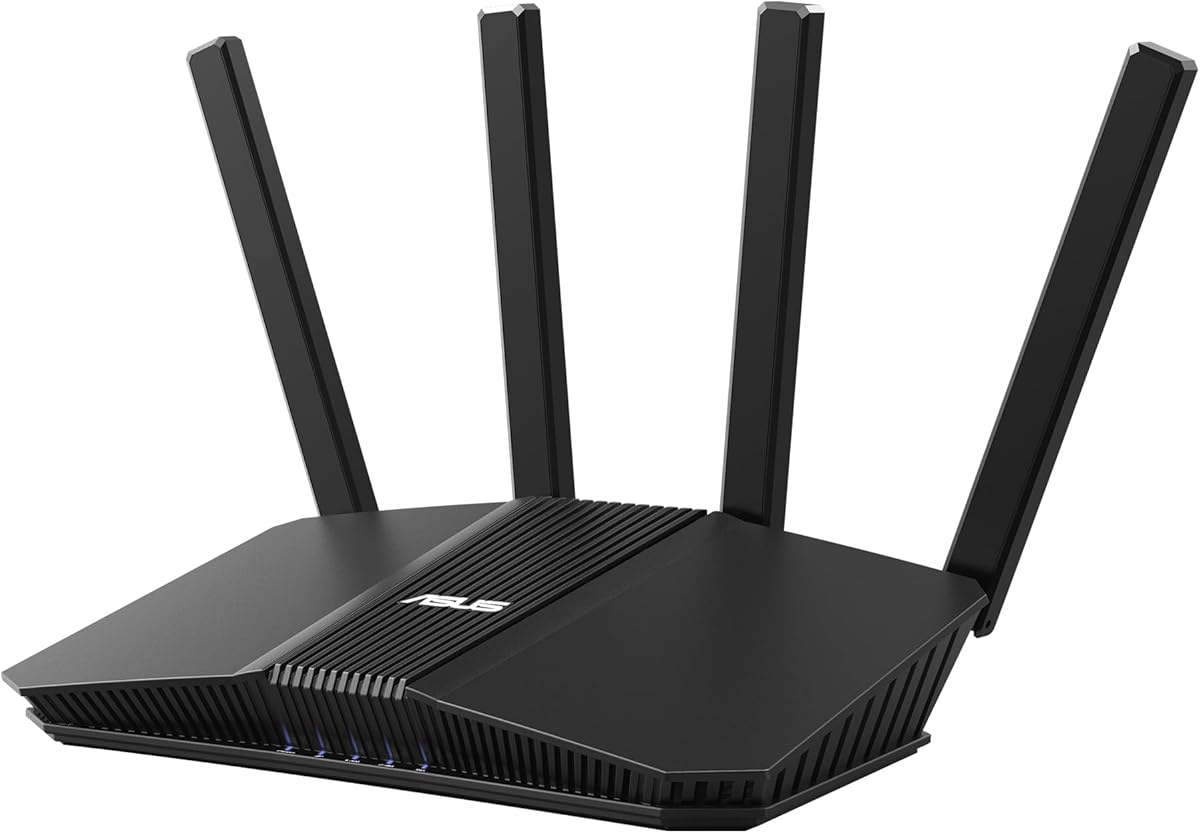




The ASUS RT-AX1800S stands out as an exceptional budget-friendly option for users seeking to upgrade to the latest WiFi 6 standard without breaking the bank. With a solid user rating and robust feature set, it delivers reliable performance for streaming, gaming, and general smart home connectivity. This router is designed to handle modern network demands efficiently while keeping costs manageable.
We may earn a commission when you buy through this link, at no additional cost to you.
Key strengths include its support for MU-MIMO and OFDMA technology which allows for better channel allocation and simultaneous communication with multiple devices. The built-in AiProtection Classic powered by Trend Micro ensures that your network remains secure from malware and intrusions without requiring a subscription. Additionally, the four Gigabit LAN ports provide ample wired connectivity for stationary devices like desktop PCs or smart TVs.
While this model offers impressive value, it does have limitations compared to higher-end units. The dual-band configuration may struggle in extremely congested environments where tri-band or WiFi 7 options could offer less interference. However, for most average households, the efficiency gains from WiFi 6 are sufficient to maintain smooth performance across connected gadgets.
This router is ideally suited for small to medium-sized homes looking to establish a secure and efficient network foundation. Its compatibility with AiMesh allows you to expand coverage later by adding more ASUS nodes. If you prioritize essential next-gen features over raw maximum throughput, the RT-AX1800S is a highly recommended choice.
AiProtection Classic provides real-time protection against online threats using commercial-grade security protocols from Trend Micro to keep your data safe.
AiMesh compatibility lets you connect multiple ASUS routers to create a whole-home mesh network without complex configurations or separate networks.
We may earn a commission when you buy through this link, at no additional cost to you.
The ASUS RT-BE58U brings the cutting-edge benefits of WiFi 7 technology to a wider audience with its dual-band design and impressive throughput capabilities. It is rated well for those looking to future-proof their home network against increasingly bandwidth-intensive applications and devices. The router supports Multi-link Operation to ensure stable connections even when multiple devices are active simultaneously.
We may earn a commission when you buy through this link, at no additional cost to you.
Performance highlights include 4096-QAM which boosts transmission speed by 1.2 times on a single frequency band compared to previous standards. The versatile WAN configuration options allow you to establish always-on internet through AI WAN detection and a USB port for mobile tethering. This makes it a reliable choice for remote work or critical business applications where downtime is not an option.
However, users should consider that fully utilizing WiFi 7 features requires compatible client devices which may not be common yet. The investment is higher than older WiFi 6 models but pays off in raw speed and efficiency. If your hardware is ready for the upgrade, this router offers a significant leap in performance potential.
This model is perfect for tech enthusiasts and power users who need maximum speed and advanced configuration flexibility. The Smart Home Master feature simplifies IoT device management by allowing you to set up to three SSIDs for different device categories. For those ready to embrace the future of wireless networking, the RT-BE58U is an excellent contender.
WiFi 7 with 4096-QAM and Multi-link Operation prepares your network for upcoming high-bandwidth applications and devices.
Dual-WAN and USB tethering provide backup internet options ensuring your connection remains stable even if your primary ISP fails.
We may earn a commission when you buy through this link, at no additional cost to you.
The ASUS ROG Rapture GT-BE98 Pro represents the pinnacle of consumer router technology with its quad-band WiFi 7 design and staggering speeds up to 30Gbps. It is engineered for competitive gamers and power users who demand zero latency and maximum throughput for large data transfers. The advanced antenna system boosts coverage significantly to ensure strong signal strength throughout large properties.
We may earn a commission when you buy through this link, at no additional cost to you.
One of its standout features is the Triple-Level Game Acceleration which optimizes PC gaming traffic from the router port all the way to the game server. This ensures that your gaming packets are prioritized over other background network traffic to prevent lag spikes during critical moments. Additionally, the dual 10G and quad 2.5G ports provide unmatched wired connectivity options for high-speed NAS or gaming rigs.
Given its premium price, this router is not necessary for every household. Most users will not notice a significant difference compared to high-end WiFi 6 models unless they have specific high-bandwidth needs. However, if budget is not a constraint and you want the absolute best performance available, this device delivers exceptional reliability and speed.
This router is the ultimate choice for serious gaming setups and professional streaming environments where every millisecond counts. The ability to scale via AiMesh means you can maintain this high performance across multiple access points if needed. For enthusiasts who want top-tier hardware, the GT-BE98 Pro is a benchmark for what modern routers can achieve.
Prioritizes gaming traffic across all network levels to reduce latency and prevent lag during competitive online sessions.
Dual 10G and quad 2.5G ports ensure you can utilize high-speed wired devices without bottlenecks.
We may earn a commission when you buy through this link, at no additional cost to you.
The ASUS RT-BE92U offers a balanced blend of high performance and practical features for those looking to adopt WiFi 7 technology without the extreme cost of top-tier gaming routers. It delivers speeds up to 9.7 Gbps through its tri-band configuration which effectively manages bandwidth heavy households. The inclusion of commercial-grade AiProtection Pro ensures that security remains a priority without needing extra subscriptions.
We may earn a commission when you buy through this link, at no additional cost to you.
Key performance aspects include the ability to utilize 320MHz channels in the 6 GHz band for significantly increased network capacity and throughput. The Smart Home Master feature makes it easy to establish up to three SSIDs which simplifies the management of IoT devices versus your main network. This segmentation enhances security by isolating less secure smart home gadgets from sensitive data.
Potential buyers should be aware that this router is an investment in future technology. Without compatible devices, you may not see the full benefit of the WiFi 7 speeds immediately. However, it is a forward-thinking purchase that ensures your network infrastructure is ready for the next wave of wireless devices. The robust antenna design and heat dissipation system help maintain reliability over time.
This model is ideal for growing families or home offices that need to support dozens of connected devices simultaneously. The versatile WAN options including USB mobile tethering provide a reliable backup for critical internet needs. If you want WiFi 7 performance without the gaming aesthetic or extreme costs, the RT-BE92U is a strong and practical choice.
Smart Home Master allows you to create separate networks for IoT devices to keep your main network secure and organized.
AiProtection Pro includes a one-tap security scan to check your network for vulnerabilities and infected devices instantly.
We may earn a commission when you buy through this link, at no additional cost to you.
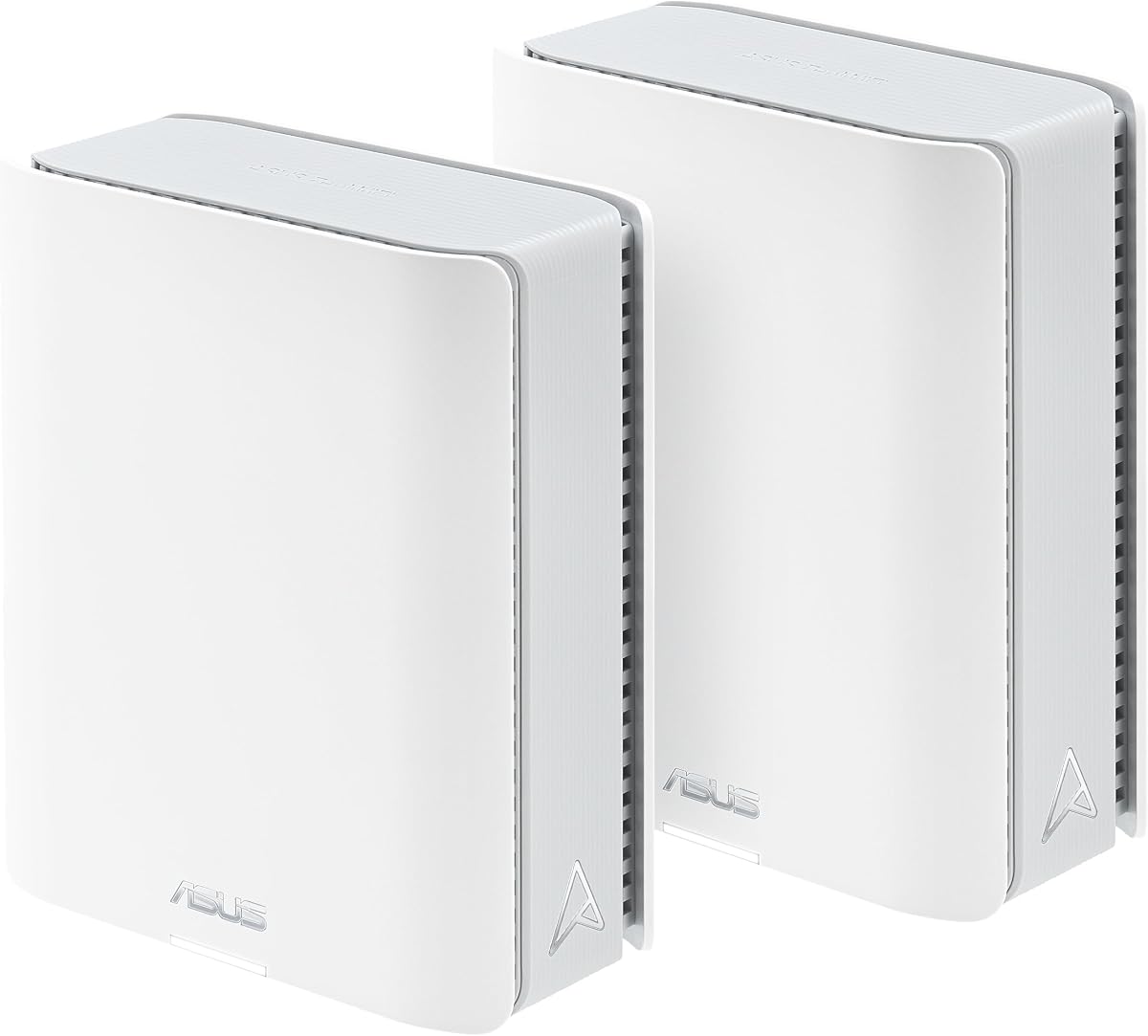
The ASUS ZenWiFi BT10 is a powerful mesh system designed to blanket large homes in high-speed WiFi 7 connectivity. With a capacity to cover up to 6,000 square feet using just two nodes, it eliminates dead zones effectively in sprawling properties. The system is powered by AI to deliver robust backhaul connections which maintain high throughput even when nodes are communicating with each other wirelessly.
We may earn a commission when you buy through this link, at no additional cost to you.
Features include eight internal antennas and ten high-power front-end modules which help eliminate WiFi dead zones in all directions. The inclusion of dual 10 Gigabit Ethernet ports on each unit means you can connect high-speed devices like NAS systems or gaming consoles with ease. This wired backhaul capability adds flexibility to how you deploy the mesh nodes for optimal performance.
While the system is impressive, users have noted mixed experiences leading to a lower average rating compared to some single router models. Setup can be complex for those unfamiliar with mesh network configurations. However, once properly configured, the performance and stability provided by this system are hard to match for large spaces. It is a significant investment but offers a comprehensive solution for whole-home coverage.
This mesh system is best suited for owners of large homes who have experienced persistent connectivity issues in certain rooms. The scalability with other ASUS extendable routers means you can expand the network further if your needs grow. If you need reliable WiFi 7 across a large property, the ZenWiFi BT10 offers a premium and effective solution.
Designed to cover up to 6000 square feet with a two-pack setup ensuring consistent WiFi 7 speeds in every room.
The AI-powered AiMesh system allows you to add more nodes or routers to the network without creating separate networks.
We may earn a commission when you buy through this link, at no additional cost to you.
The ASUS RT-AX82U combines high performance gaming features with a distinctive design that includes customizable Aura RGB lighting effects. This router supports ultrafast speeds up to 5400 Mbps and is equipped with dedicated gaming modes to minimize latency. It is a great choice for gamers who want their network hardware to match the aesthetic of their gaming setup without sacrificing functionality.
We may earn a commission when you buy through this link, at no additional cost to you.
Key strengths include the Mobile Game Mode which allows you to minimize lag and latency for mobile gaming with just a tap on the app. This feature ensures that your phone or tablet gets priority bandwidth during gaming sessions for a smoother experience. The commercial-grade home network security offers lifetime free protection against threats so you do not have to pay for security updates.
While this unit is excellent for gaming, it lacks some of the advanced capabilities of newer tri-band or WiFi 7 models. However, for standard home networks where speed and reliability are key, it remains a powerful tool. The renewed condition option makes it accessible at a lower price point for budget-conscious gamers looking for premium features.
This router is perfect for gaming enthusiasts who value visual customization and performance optimization. The support for AiMesh allows you to extend your network easily if you move to a larger home. If you want a stylish router that actively optimizes your gaming traffic, the RT-AX82U is a standout option in the mid-range category.
Optimizes your network settings specifically for mobile gaming to reduce latency and improve connection stability.
Includes lifetime free AiProtection Pro powered by Trend Micro to keep your home network safe from malware.
We may earn a commission when you buy through this link, at no additional cost to you.
The ASUS ZenWiFi BT8 is a versatile mesh node that brings WiFi 7 speeds to smaller areas or serves as an expandable part of a larger network. It delivers tri-band speeds up to 14 Gbps which is sufficient for most streaming and gaming needs. The seven internal antennas and high-power modules are designed to eliminate dead zones effectively even in a single pack configuration.
We may earn a commission when you buy through this link, at no additional cost to you.
AI-powered Smart AiMesh boosts coverage to up to 3000 square feet and makes it easy to extend the network with compatible routers. This flexibility means you can start with one node and add more later as your needs change. The 24/7 end-to-end protection ensures that your network remains secure from various online threats at all times.
Users may find that while it performs well alone, pairing it with another node offers the best mesh experience. The single unit can be pricey compared to traditional routers but you get the benefit of mesh technology. If you have a home with specific dead zones that need filling, this node is a powerful tool to solve that problem.
This router is ideal for apartments or smaller homes that want the reliability of a mesh system in a compact package. It is also a great choice for adding to existing networks to ensure seamless coverage across all rooms. For those looking to future-proof their network with WiFi 7 capabilities, the BT8 is a solid and reliable option.
Uses AI to optimize mesh connections ensuring stable and secure whole home WiFi as you add more nodes.
Easy setup for IoT devices with multiple SSIDs and VPN options managed directly through the app.
We may earn a commission when you buy through this link, at no additional cost to you.
The ASUS RT-AX3000 offers an exceptional balance of performance and value making it a top choice for general home networking needs. It supports the next gen WiFi 6 technology providing speeds up to 3000 Mbps which is sufficient for most high-speed internet plans. The router ensures secure connectivity with AiProtection Pro powered by Trend Micro keeping your family's data safe without extra costs.
We may earn a commission when you buy through this link, at no additional cost to you.
Key strengths include Adaptive QoS which prioritizes traffic for smoother streaming and gaming experiences. The router supports AiMesh allowing you to establish a stronger mesh system with other compatible units easily. Its maximum range of 3000 square feet ensures solid coverage for most standard-sized homes without requiring additional nodes immediately.
While it does not offer the raw speeds of newer 7 models, it remains a highly efficient workhorse for typical usage. The USB 3.0 port allows for sharing storage or printers over the network which adds versatility. For households looking for a reliable router that handles daily demands without fuss, this model is a standout.
This router is recommended for families who need a stable and secure network for work, study, and entertainment. The AiMesh compatibility means you can start small and expand as your home grows. With its strong performance and reasonable price, the RT-AX3000 is widely considered the best overall value in the current market.
Prioritizes bandwidth for important tasks like video calls and gaming to prevent lag during peak hours.
Compatible with other ASUS routers to create a unified mesh network for larger homes without new setups.
We may earn a commission when you buy through this link, at no additional cost to you.
The ASUS RT-AC68U is a classic router that has stood the test of time with a proven track record for reliability and performance. Although it uses the older AC standard it still offers combined speeds up to 1900 Mbps which are sufficient for moderate home use. Its 1GHz dual-core CPU enables smart multitasking by dedicating separate lanes for Wi-Fi and USB data to prevent slowdowns.
We may earn a commission when you buy through this link, at no additional cost to you.
A key advantage is the five Gigabit LAN ports which provide ample wired connections for devices that do not need to be wireless. The AiProtection security powered by Trend Micro offers multi-stage protection from vulnerability detection to protecting sensitive data. This security suite ensures that your connected devices remain safe from common online threats effectively.
While it lacks the efficiency of newer WiFi 6 standards this router remains a solid choice for those with older devices. The setup is effortless with the ASUSWRT web-based interface making it easy to manage settings without technical expertise. It is a great option for users who prioritize stability and wired connectivity over the latest wireless speed gains.
This model is best suited for homes that do not have high-speed internet plans or many wireless devices. It provides a reliable backbone for a small network and includes all essential features like parental controls and guest networks. If you need a sturdy router that just works without complex configuration, the RT-AC68U is a trusted choice.
The 1GHz dual-core CPU handles multiple tasks efficiently to ensure smooth performance across all connected devices.
AiProtection provides comprehensive threat detection and prevention to keep your data and devices secure online.
We may earn a commission when you buy through this link, at no additional cost to you.
The ASUS ExpertWiFi EBR63 is designed specifically for business environments that require robust security and customized guest access features. It offers up to five SSIDs to separate and prioritize devices for different business scenarios which is essential for keeping business data secure from public access. The router supports SDN and VLANs providing flexible network management for office setups.
We may earn a commission when you buy through this link, at no additional cost to you.
A key feature is the Custom Guest Portal which allows you to customize the SSID and templates to fit your business style. This adds a professional touch to your guest network and allows for branded login pages. The all-in-one ExpertWiFi app provides easy setup and hassle-free management remotely which is vital for IT administrators managing multiple locations.
Backup WAN capabilities ensure stable connectivity even if your primary internet connection fails. The USB port can connect to a mobile phone with hotspot to maintain a reliable internet connection. This redundancy is critical for businesses where downtime can lead to significant financial losses. The inclusion of free commercial-grade security makes it a safe investment.
This router is ideal for small to medium businesses that need enterprise-grade features without complex setups. It is scalable with ExpertWiFi AIMesh allowing you to expand coverage as your business grows. For office environments requiring secure guest access and reliable remote management, the EBR63 is a powerful and efficient solution.
Tailor the guest network login page to match your brand and provide a professional experience for visitors.
Includes free subscription to AiProtection Pro to secure your business WiFi environment from potential threats.
We may earn a commission when you buy through this link, at no additional cost to you.
Selecting the right router requires considering factors like speed, coverage, and features tailored to your specific usage patterns.
The WiFi generation of your router determines the maximum speed and efficiency you can achieve. WiFi 6 and WiFi 7 offer significant improvements over older standards with better handling of multiple devices and higher throughput. If your internet plan exceeds 1 Gbps or you have many high-bandwidth devices, opting for WiFi 6 or WiFi 7 ensures you are not bottlenecked by your hardware.
Always match your router speed to your ISP plan and device capabilities to ensure you get the best value for your money.
Coverage depends on the physical space of your home and the design of the router's antennas. External antennas often provide better range and adjustable signal direction whereas internal antennas offer a cleaner look. For larger homes, consider mesh systems or routers with high-gain antennas to eliminate dead zones effectively.
Prioritize models with robust antenna configurations if you have a large or multi-story home to ensure consistent signal strength.
Security is critical for protecting personal data and smart home devices. ASUS routers often come with AiProtection which provides real-time threat detection and malware protection. Subscription-free security is a huge plus as it saves you from ongoing monthly fees while keeping your network safe from intrusions.
Look for routers that offer built-in security features like WPA3 and regular firmware updates to maintain strong protection.
If you need to cover a large area or plan to expand your network later, mesh compatibility is essential. ASUS AiMesh allows you to combine multiple routers to create a single seamless network without complex setups. This feature future proofs your investment by allowing you to scale up as your connectivity needs grow over time.
Check if the router supports AiMesh if you anticipate needing expanded coverage beyond a single unit in the future.
The number and speed of Ethernet ports affect your wired connectivity options. Most routers offer Gigabit LAN ports but some newer models include 2.5G or 10G ports for high-speed wired devices. Ensure you have enough ports for stationary devices like gaming consoles or NAS systems to reduce wireless congestion.
Prioritize models with high-speed ports if you rely heavily on wired connections for desktop PCs or storage devices.
For gamers, features like Adaptive QoS and Game Acceleration can significantly improve online performance by prioritizing gaming traffic. This ensures that your game packets are sent before other background traffic reducing lag and latency. Look for specific gaming models if you play competitive titles where response time is critical.
Invest in gaming specific routers if you experience frequent lag spikes during online gaming sessions.
A user-friendly interface simplifies network management and troubleshooting. ASUS provides intuitive mobile apps and web interfaces that allow you to monitor traffic and set parental controls easily. Remote management capabilities are useful for IT admins or users who need to manage settings while away from home.
Choose a router with an app that fits your management style to ensure you can control your network settings effortlessly.
To get the best performance, place your router in a central and elevated location away from thick walls and electronic interference like microwaves or cordless phones. This placement ensures the WiFi signals travel unobstructed to all parts of your home providing consistent coverage.
Regularly update your router's firmware through the ASUS app or web interface to benefit from the latest security patches and performance improvements. Keeping your firmware current protects your network from vulnerabilities that could be exploited by malicious actors over time.
Monitor your network traffic and connected devices periodically using the app to identify any unusual activity or bandwidth hogs. Adjusting QoS settings can help prioritize essential traffic ensuring smooth performance for critical tasks like video calls or gaming.
WiFi 7 offers significantly faster speeds and lower latency than WiFi 6. It supports wider channels and Multi-link Operation which allows devices to connect to multiple bands simultaneously for a more stable connection. WiFi 7 is designed to handle much higher bandwidth demands of future devices.
No, basic AiProtection Classic is free and subscription-free on most ASUS routers. However, AiProtection Pro offers advanced features but some business models include it for free while home models may require a subscription for premium features.
Yes, many ASUS routers support AiMesh which allows you to connect multiple units to form a seamless whole-home network. This feature enables you to scale your network easily by adding more compatible nodes as needed.
Gaming enthusiasts should look for routers with Triple-Level Game Acceleration like the ROG Rapture GT-BE98 Pro. These models prioritize gaming traffic to reduce latency and ensure smooth performance during competitive online sessions.
You can extend your WiFi range by using an ASUS router compatible with AiMesh to create a mesh system. This allows you to add nodes that communicate wirelessly with the main router to eliminate dead zones throughout your home.
Mesh routers are better for larger homes because they provide seamless coverage across multiple rooms without signal drops. Single units are sufficient for smaller spaces but may struggle to maintain consistent speeds in large or complex layouts.
We have reviewed ten distinct ASUS models ranging from budget-friendly entry-level units to high-end gaming and business solutions. Each model offers unique strengths whether you need raw speed, extensive coverage, or advanced security features to protect your network effectively.
When choosing a router, prioritize factors like your home size, internet plan speed, and specific usage needs such as gaming or smart home integration. Balancing these elements will help you select a device that delivers the best performance for your lifestyle.
Remember that prices and availability can change frequently so check current listings before making a purchase. Investing in the right ASUS router today ensures your home network remains fast secure and ready for future technologies.