
Thermalright Assassin X120 Refined SE
4.7Editor score
Four heat pipes
TL-C12C PWM fan
AGHP gravity tech
Discover the best CPU Air Cooler Fan Heatsink options for your build. We compare top models for performance, noise, compatibility, and value.
Choosing the right CPU Air Cooler Fan Heatsink is critical for maintaining system stability and longevity. A quality unit prevents thermal throttling during intense workloads while ensuring your computer remains quiet and efficient.
We evaluated ten leading models based on cooling capacity, build quality, noise levels, and mounting compatibility. Our analysis focuses on real-world performance data and user feedback to help you make an informed decision.
Each selection highlights specific strengths like budget value or premium silence. Please note that availability and pricing fluctuate frequently, so verify current listings before purchasing to ensure you get the best deal available.
4.7Editor score

4.8Editor score
4.7Editor score
This side-by-side comparison highlights key specifications across all ten selected models. Use this table to quickly assess size, fan count, and specific features that match your case and motherboard requirements.


The Thermalright Assassin X120 Refined SE establishes itself as the top budget pick for CPU Air Cooler Fan Heatsink solutions. With a 4.7 rating, it delivers reliable cooling for standard workloads without breaking the bank. Its single tower design fits well in most mid-tower cases.
We may earn a commission when you buy through this link, at no additional cost to you.
Key strengths include the four heat pipes and AGHP technology which ensures consistent performance regardless of case orientation. The TL-C12C PWM fan maintains low noise levels even when pushing air through the aluminum fins. This makes it ideal for office builds or quiet home theaters.
Trade-offs involve the lack of RGB lighting which some users might prefer for aesthetics. Additionally, installation requires checking specific mounting brackets for your socket type which adds a minor step. These are acceptable given the aggressive pricing and robust thermal performance.
You should buy this if you need efficient cooling on a strict budget. It is perfect for standard gaming rigs where noise and temperature control matter more than visual flair. Final recommendation confirms it as a value champion.
This technology ensures consistent cooling regardless of heatsink orientation by using capillary action in the heat pipes.
By focusing on raw thermal performance over extra features this cooler keeps costs low without sacrificing reliability.
We may earn a commission when you buy through this link, at no additional cost to you.
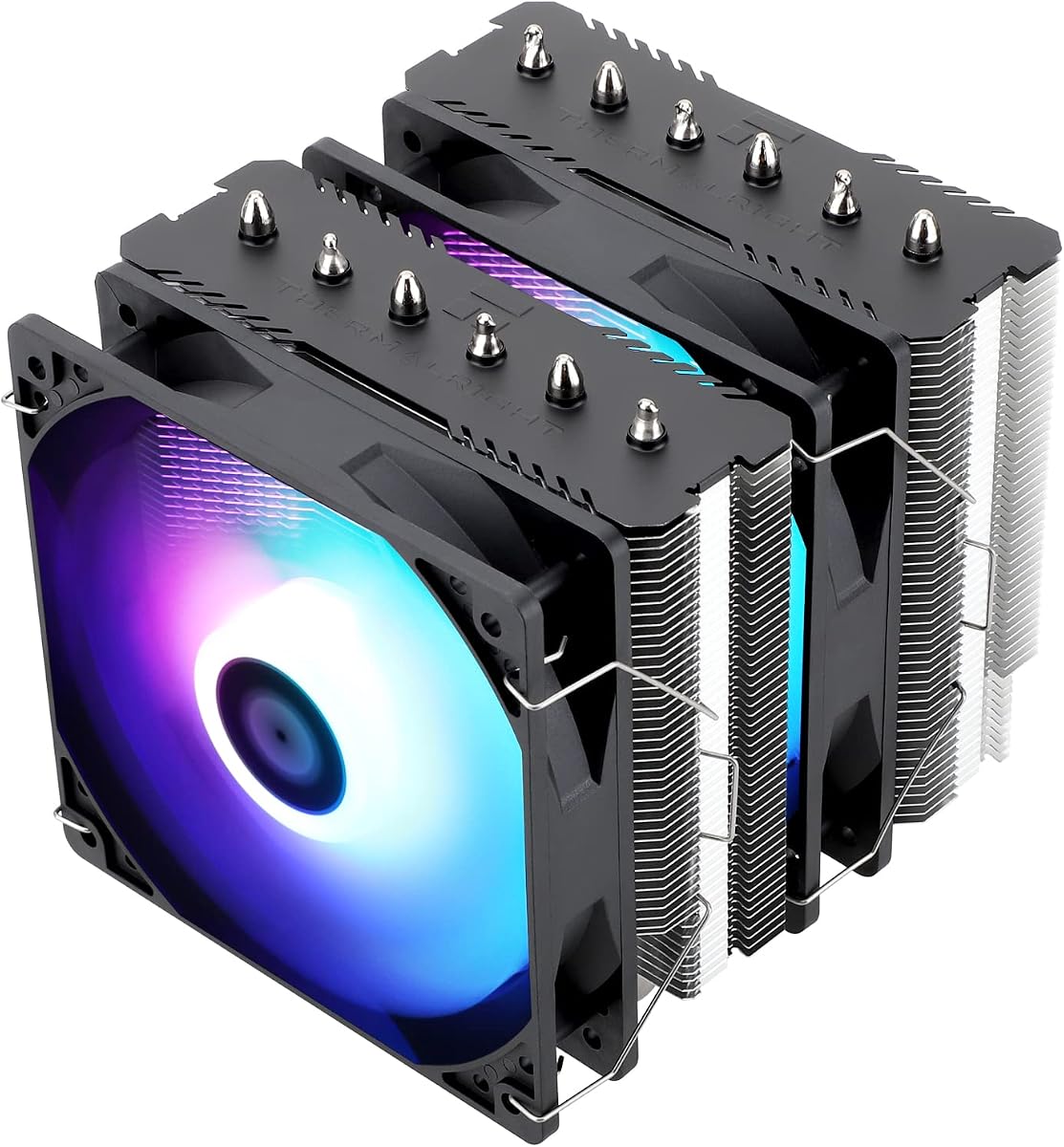
The Thermalright Peerless Assassin 120 SE ARGB stands out as a premium option with robust cooling capabilities. Its 4.7 rating reflects strong performance on high end CPUs that generate significant heat. The dual tower design maximizes surface area for efficient heat dissipation.
We may earn a commission when you buy through this link, at no additional cost to you.
Strengths include six sintered heat pipes and dual PWM fans that work together to maintain low temperatures. The ARGB lighting adds a customizable aesthetic touch that syncs with motherboard controllers. This model handles overclocking scenarios better than single tower competitors.
Trade-offs involve the substantial size which may conflict with tall RAM modules or large cases. Installation can be tricky on smaller motherboards due to the wide spread of the heatsink. These factors are acceptable for users prioritizing raw thermal performance over space constraints.
Buy this if you run high TDP processors and want premium cooling with style. It suits enthusiast builds where temperature headroom is critical. Final recommendation highlights its balance of performance and visual customization.
The dual tower layout provides double the fins for heat exchange allowing cooler air intake on both sides.
Customizable lighting effects let you match the cooler to your case theme via standard 5V 3pin headers.
We may earn a commission when you buy through this link, at no additional cost to you.
The Noctua NH-D15 chromax.Black earns our Editor's Choice award for its proven track record of reliability. With a 4.8 rating it represents the gold standard for air cooling in enthusiast circles. The dual tower design paired with two 140mm fans offers class leading thermal performance.
We may earn a commission when you buy through this link, at no additional cost to you.
Key strengths include the NF-A15 fans which deliver high static pressure while remaining incredibly quiet. The all black chromax finish integrates seamlessly into dark case builds without clashing with other components. It includes high quality thermal paste and a robust mounting system.
Trade-offs involve the higher cost compared to budget brands and the massive physical size. It requires careful case selection to avoid blocking RAM slots or PCIe ports. These are acceptable given the superior cooling and long term reliability offered.
You should buy this if silence and top tier performance are your main priorities. It is perfect for silent workstations or high end gaming rigs. Final recommendation confirms it as the best overall choice.
These fans use advanced aerodynamics to move more air at lower speeds reducing noise significantly.
The mounting system ensures even pressure across the CPU for optimal thermal transfer without bending.
We may earn a commission when you buy through this link, at no additional cost to you.
The Noctua NH-U12A chromax.Black offers a perfect balance of size and performance. With a 4.8 rating it proves that 120mm cooling can be highly effective. Its design ensures it does not overhang RAM slots which is a common pain point with larger coolers.
We may earn a commission when you buy through this link, at no additional cost to you.
Key strengths include the two NF-A12 fans which provide excellent airflow in a compact form factor. This makes it suitable for cases with limited width or strict RAM clearance requirements. The all black finish matches the premium build quality Noctua is known for.
Trade-offs involve slightly lower cooling capacity compared to dual 140mm designs. You might struggle with extreme overclocking but for standard high end use it is sufficient. The price is higher than budget options but justified by the quality.
Buy this if you need reliable cooling that fits standard tower cases. It is ideal for users who prioritize RAM compatibility. Final recommendation highlights its smart form factor design.
The slim design prevents overhang allowing you to use high profile memory without obstruction.
Two fans move air through the fins more efficiently than a single fan unit of similar size.
We may earn a commission when you buy through this link, at no additional cost to you.
The Thermalright Assassin X 120R Digital ARGB brings modern aesthetics to cooling. With a 4.7 rating it appeals to users who want visual feedback on system health. The digital screen top cover allows you to monitor CPU temperature directly on the cooler.
We may earn a commission when you buy through this link, at no additional cost to you.
Key strengths include the high speed fan that ensures robust heat dissipation even in tight environments. The ARGB lighting supports synchronization with motherboard controllers for a cohesive look. This model merges technical utility with desktop gaming aesthetics effectively.
Trade-offs involve the requirement for software to customize the display data. Some users prefer hardware level feedback without installing extra tools. The height might be an issue in very small cases. These are acceptable for the unique visual appeal.
Buy this if you want a cooler that looks unique and functional. It is great for streaming setups where visuals matter. Final recommendation highlights its innovative screen feature.
The digital screen displays live system stats so you can track thermal loads without opening software.
Fan lighting matches your system theme allowing you to control colors via standard motherboard headers.
We may earn a commission when you buy through this link, at no additional cost to you.
The Noctua NH-D15 classic version remains a top performer in the industry. With a 4.8 rating it has earned its reputation through years of consistent results. The original color scheme offers a distinct look for those who prefer brand standard aesthetics.
We may earn a commission when you buy through this link, at no additional cost to you.
Key strengths include the two NF-A15 fans that offer superior airflow with minimal noise. The inclusion of NT-H1 thermal paste ensures optimal contact right out of the box. This model handles demanding thermal loads with ease.
Trade-offs involve the tan and brown color scheme which may not match modern all black builds. Installation requires checking dimensions to avoid PCIe interference. These are minor issues given the legendary performance and support.
Buy this if you want the proven reliability of the original champion. It suits professional workstations where looks are secondary. Final recommendation affirms its status as a reliable workhorse.
The classic design has been refined over time to deliver maximum cooling efficiency without noise.
An offset mounting option is available to clear tall RAM modules and maximize compatibility.
We may earn a commission when you buy through this link, at no additional cost to you.
The Noctua NH-D15S chromax.Black optimizes the classic design for better compatibility. With a 4.8 rating it balances performance and case constraints effectively. The asymmetrical single fan design ensures RAM clearance without sacrificing thermal capacity.
We may earn a commission when you buy through this link, at no additional cost to you.
Key strengths include the 65mm RAM clearance which allows for high profile memory installation. It uses a single NF-A15 fan which maintains the quiet operation Noctua is famous for. The all black finish integrates well into modern systems.
Trade-offs involve the single fan configuration which may limit peak cooling compared to dual fan setups. Height may still be an issue in compact cases. These are acceptable for the massive compatibility gains.
Buy this if you need strong cooling that respects RAM dimensions. It is ideal for mixed builds with tall memory. Final recommendation highlights its smart single fan layout.
Moving the fan forward creates space for tall memory modules while keeping cooling performance high.
One large fan moves air efficiently at lower speeds reducing noise compared to dual smaller fans.
We may earn a commission when you buy through this link, at no additional cost to you.
The Noctua NH-D9L is designed specifically for smaller form factor builds. With a 4.7 rating it proves you do not need massive coolers for effective cooling. Its compact design fits HTPC and ITX cases that standard towers cannot.
We may earn a commission when you buy through this link, at no additional cost to you.
Key strengths include the dual tower layout which provides significant surface area in a small footprint. The height ensures it never blocks RAM or PCIe slots on modern motherboards. This makes it a unique solution for mini PC enthusiasts.
Trade-offs involve the smaller fan which can be audible under load compared to 140mm fans. It is generally more expensive per millimeter of cooling than full size models. These are acceptable for the specialized size.
Buy this if you are building a compact system with thermal constraints. It is perfect for silent home theater PCs. Final recommendation highlights its compact efficiency.
This cooler is optimized for small cases providing dual tower power without the bulk of full size units.
At just 110mm it fits in cases where standard coolers would physically not close the panel.
We may earn a commission when you buy through this link, at no additional cost to you.
The Noctua NH-U12S offers a classic single tower design for broad case compatibility. With a 4.8 rating it delivers solid performance without excessive bulk. Its slim profile ensures it fits in cases with tight width limitations.
We may earn a commission when you buy through this link, at no additional cost to you.
Key strengths include the NF-F12 fan which provides focused airflow through the fins. It does not overhang RAM slots making it a safe choice for most motherboards. The build quality ensures long term stability.
Trade-offs involve lower capacity compared to dual tower solutions. It may struggle with very high TDP CPUs under sustained load. These are acceptable for users prioritizing compatibility over extreme cooling.
Buy this if you need a reliable cooler that fits most cases. It is perfect for standard gaming builds. Final recommendation confirms its status as a versatile option.
The narrow width allows installation in compact cases where wider coolers would fail.
Focused flow technology directs air efficiently through the heatsink for better cooling.
We may earn a commission when you buy through this link, at no additional cost to you.
The Thermalright Peerless Assassin 120 SE offers dual tower power at a competitive price. With a 4.8 rating it delivers performance that rivals more expensive models. Its design focuses on efficient heat transfer through soldered technology.
We may earn a commission when you buy through this link, at no additional cost to you.
Key strengths include the nickel-plated pipes that prevent corrosion and improve longevity. The dual fans provide massive airflow ensuring low CPU temps even under load. This model supports the latest Intel and AMD sockets reliably.
Trade-offs involve the large footprint which may limit RAM clearance. You must check case dimensions before purchasing to avoid fit issues. These are acceptable given the aggressive pricing and high performance.
Buy this if you want high end cooling without the premium price tag. It is perfect for enthusiasts on a budget. Final recommendation highlights its value proposition.
The base uses soldering to improve contact with the CPU for faster heat transfer.
The layout helps improve compatibility with graphics cards and motherboard components.
We may earn a commission when you buy through this link, at no additional cost to you.
Selecting the right CPU Air Cooler Fan Heatsink requires evaluating size, performance, and noise. This guide breaks down the key factors to ensure your choice matches your specific build needs.
Cooling performance is measured by the maximum heat dissipation power (TDP) the unit can handle. High TDP CPUs require larger coolers with more heat pipes and fans. Ensure the rated TDP exceeds your processor's output to avoid thermal throttling during heavy workloads.
Choose a unit with a TDP rating that comfortably exceeds your CPU's needs for headroom.
The height of the heatsink is critical to fit your PC case. Many dual tower coolers exceed 150mm and require mid to full tower cases. Check your case's maximum CPU cooler height specification before buying to avoid physical installation issues.
Always verify your case's height limit to ensure the cooler fits properly.
Large heatsinks often overhang RAM slots blocking high profile memory. Asymmetrical designs or models with offset mounting options help avoid this conflict. Verify the cooler's RAM clearance specs if you plan to use tall RGB modules.
Look for models that guarantee clearance for high profile memory modules.
Noise levels are measured in decibels (dB) and vary by fan speed. PWM fans allow automatic speed control which reduces noise at idle. Models with larger fans (140mm) generally move more air at lower speeds than smaller ones.
Prioritize models with larger PWM fans for quieter operation.
Modern coolers support current sockets like Intel LGA 1700 and AMD AM5. However, some require specific mounting brackets that may not be included. Always confirm the listing includes hardware for your specific motherboard socket to save installation effort.
Ensure your specific socket is supported before making a purchase.
High quality coolers use aluminum fins with copper heat pipes and nickel-plated bases. These materials improve corrosion resistance and thermal conductivity. A sturdy build ensures the cooler withstands shipping and long term vibration without damage.
Look for copper pipes and nickel plating for long-term reliability.
Many premium coolers come with high quality thermal paste like Noctua NT-H1. This ensures optimal contact between the CPU and the base. If paste is not included you must buy it separately adding cost and setup time.
Choose a model that includes high quality thermal paste.
Reputable manufacturers offer long warranties like Noctua's six-year coverage. This signals confidence in product longevity and durability. Check the warranty terms to ensure you are protected against defects or fan failures.
Prioritize brands with multi-year warranties for peace of mind.
Install the cooler on a clean CPU surface with a thin layer of thermal paste. Ensure the mounting brackets are tightened evenly to prevent warping. Verify the fan is connected to the CPU_FAN header on your motherboard for proper control.
Regularly clean dust from the heatsink fins using compressed air. Accumulated dust reduces airflow and increases temperatures. Clean every three to six months depending on your environment to maintain peak performance.
If you upgrade your CPU you may need to reinstall the cooler with fresh paste. Check fan speeds in your BIOS to ensure the PWM system is working. Monitor temperatures after installation to confirm the unit is functioning correctly.
Air coolers are generally more reliable and easier to install. They do not carry the risk of leaks and require no pump maintenance. For most users air cooling provides sufficient performance for gaming and daily tasks.
Most modern models support AM5 but some require specific brackets. Always check the product description to confirm AM5 compatibility before purchasing. Using the correct mounting parts is essential for stability.
Typical dual tower coolers need around 160mm of vertical clearance. Ensure your case supports this height. Some compact cases only fit low profile units under 100mm.
Asymmetrical designs move the fan forward to avoid blocking RAM slots. This improves compatibility with tall memory modules without reducing cooling performance significantly. It is a smart trade-off for modern motherboards.
Most premium models include high quality paste. Budget models might not. Check what is included to avoid extra costs. A good paste ensures optimal heat transfer between components.
High performance air coolers can handle moderate to high overclocks. Models with dual fans and six pipes are best for this. They provide enough headroom to keep temps safe during stress tests.
Most high quality units run under 25dB at idle. Under load they might reach 30dB but remain quiet. PWM control helps reduce noise when full speed is not needed.
AGHP stands for Anti-Gravity Heat Pipe. It uses capillary action to move heat regardless of orientation. This ensures consistent performance whether the case is vertical or horizontal.
Our top picks offer options for every budget and case size. The Thermalright Assassin X120 Refined SE leads in value while the Noctua NH-D15 chromax.Black remains the king of silence. Each model delivers reliable cooling for standard modern processors.
Prioritize case compatibility and TDP needs over aesthetics to ensure long term performance. A cooler that fits your case properly will serve you better than one with flashy lights. Ensure you have enough clearance for RAM and graphics cards.
Always check current prices and availability before buying to get the best deal. Prices change frequently due to demand and stock levels. Investing in a quality CPU Air Cooler Fan Heatsink protects your valuable hardware.