
8mm & Super 8 Film to Digital Converter
3.7Editor score
32GB Card Included
2.4 Inch Display
Easy Frame Conversion
Preserving family history is essential in our digital age. These devices turn old film reels into modern files easily. Choosing the right tool ensures your memories stay safe and shareable for years to come without technical hassle.
We compared ten leading converters based on features and ease of use. Our analysis focuses on image quality, screen size, and compatibility with various reel sizes. Each option offers unique benefits for different needs and budgets.
Each pick highlights key strengths and potential trade-offs for buyers. You will see how each model handles frame conversion and storage. Please note that product availability and pricing may change over time.
3.7Editor score

4.1Editor score

4.0Editor score
As an Amazon Associate we earn from qualifying purchases.
This side-by-side comparison helps you visualize key differences across all ten models. We highlight specific capabilities like screen size and sensor resolution to guide your final selection.




This Kodak digitizer stands out for its user-friendly design and high-resolution output. With a 4.1 rating, it offers a solid solution for preserving old film reels quickly.
We may earn a commission when you buy through this link, at no additional cost to you.
The 8MP sensor captures detailed frames, converting them into 1080p MP4 files. The large 5 inch touchscreen allows you to adjust settings like exposure and sharpness directly.
While it lacks audio output, the visual quality is impressive. The universal supply reel accommodates various sizes, making it versatile for different collections.
It is ideal for families wanting a standalone solution without software. The included accessories ensure you can start converting right out of the box.
Converts film into clear 1080p video files that preserve detail well.
Touch buttons and on-screen prompts make operation simple for everyone.
We may earn a commission when you buy through this link, at no additional cost to you.
This budget-friendly option provides essential features without a high cost. It converts reels directly to SD cards, eliminating the need for a computer connection.
We may earn a commission when you buy through this link, at no additional cost to you.
The 2.4 inch screen allows for basic review, but the included 32GB card is a major plus. It supports a wide range of reel sizes up to 9 inches.
Video quality is decent at 1080p, though frame rates are standard. It is best for those prioritizing cost over premium features or larger screens.
Overall, it is a practical choice for casual users wanting to digitize archives efficiently. The TV cable enables sharing on larger displays easily.
Offers core digitization features at a competitive price point for most users.
Comes with a 32GB card so you can start saving files immediately.
We may earn a commission when you buy through this link, at no additional cost to you.
The Magnasonic scanner focuses on delivering a vibrant viewing experience. Its built-in screen is bright, making it easy to review converted clips instantly.
We may earn a commission when you buy through this link, at no additional cost to you.
You can adjust brightness and framing directly on the device. This flexibility ensures your digital files look their best before saving. It accepts multiple reel sizes without extra adapters.
While it does not capture sound, the visual conversion is sharp. The RCA output allows for direct connection to televisions for family viewing sessions.
It suits users who want a reliable device with good visual quality. The compact design makes storage and setup straightforward for home use.
The vibrant screen ensures you can see details clearly during review.
Includes RCA cable for easy viewing on external screens or monitors.
We may earn a commission when you buy through this link, at no additional cost to you.
This model features a responsive touch interface for intuitive navigation. It supports a 5MP sensor that captures clear images from old film strips.
We may earn a commission when you buy through this link, at no additional cost to you.
The device converts reels directly to SD cards without software. You get a full set of accessories including power adapters and cleaning cloths.
A two-year warranty provides peace of mind for long-term use. However, the screen remains compact compared to larger premium options available.
It is a solid choice for those who prefer touch controls over physical buttons. The inclusion of a memory card simplifies the initial setup process.
Uses touch buttons to adjust settings quickly without complex menus.
Comes with a one-year warranty and responsive technical support.
We may earn a commission when you buy through this link, at no additional cost to you.
This fully automated digitizer handles the heavy lifting for you. It supports very large reels up to 9 inches for extended sessions.
We may earn a commission when you buy through this link, at no additional cost to you.
Video is converted into 1080p MP4 files at a standard frame rate. The included screen allows you to check progress without external tools.
While the rating is lower, the functionality meets standard needs well. It works across various operating systems once files are transferred to a PC.
Choose this if you want a set-and-forget approach to digitization. The automated nature reduces manual effort significantly during the process.
Accommodates reels up to 9 inches for longer movies or collections.
Files work seamlessly on Windows, Mac, and Linux systems.
We may earn a commission when you buy through this link, at no additional cost to you.
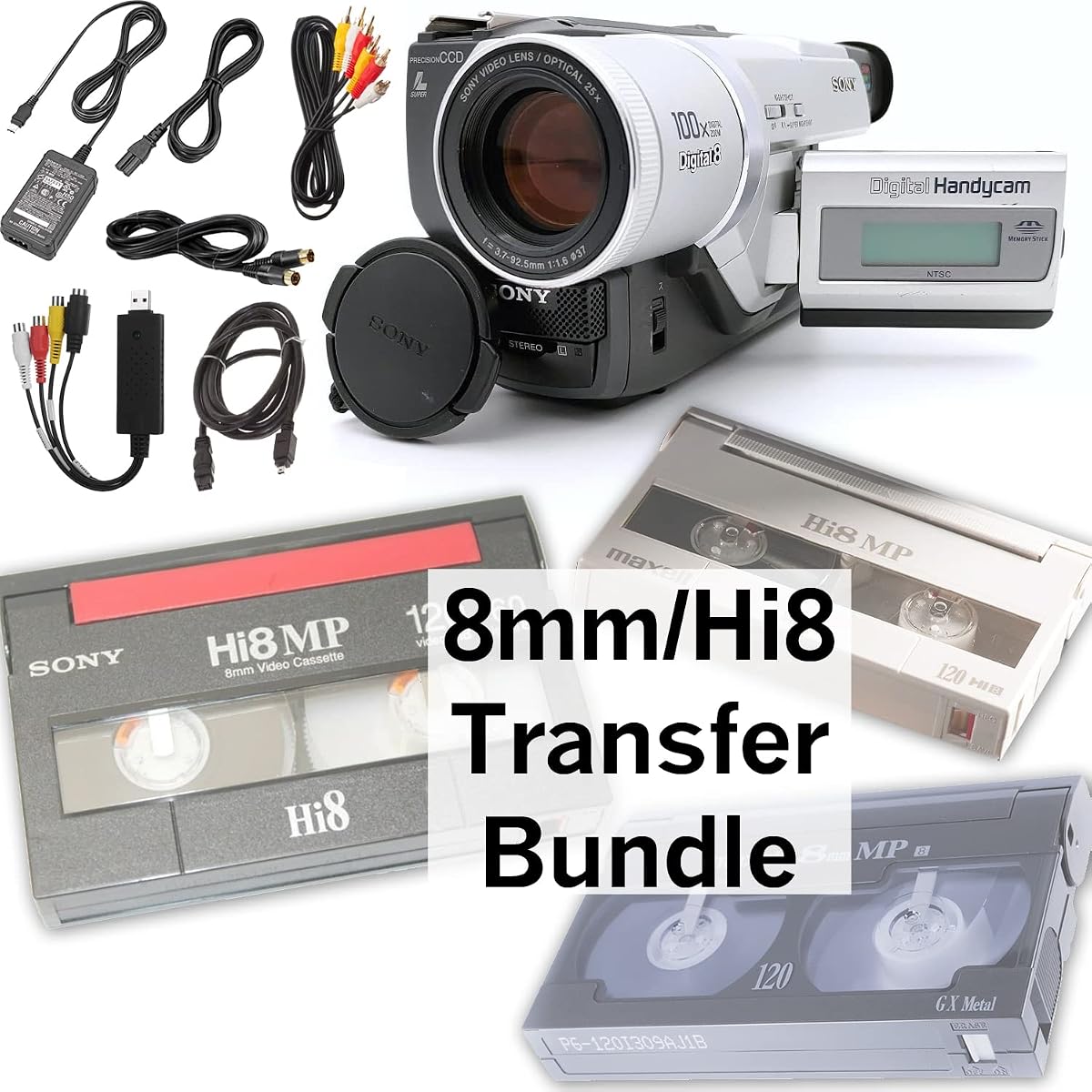
This bundle is ideal if you have cassette tapes instead of film reels. It includes a camcorder specifically for playing back Hi8 and Digital8 tapes.
We may earn a commission when you buy through this link, at no additional cost to you.
The USB adapter helps transfer footage directly to a computer for editing. AV cables are included to allow TV playback for immediate viewing.
It guarantees functionality with a free return policy if issues arise. However, it does not handle traditional film reels or strips directly.
Choose this set if your archive consists mainly of magnetic tapes. It bridges the gap between old formats and modern digital storage.
Designed specifically for 8mm Hi8 and Digital8 magnetic tape formats.
Includes camcorder and cables so you have everything needed.
We may earn a commission when you buy through this link, at no additional cost to you.
Similar to the previous bundle, this option focuses on tape transfers. It adds a blank tape to help with immediate transfer tasks without extra cost.
We may earn a commission when you buy through this link, at no additional cost to you.
The camcorder plays back tapes while the capture device saves them digitally. This combination ensures you can digitize old memories efficiently.
It is perfect for those needing a quick solution for video tapes. Just note it does not support film reels or projectors directly.
The battery included ensures you can start using it right away. It is a convenient package for preserving magnetic media formats.
Comes with blank tape and battery for ready-to-use functionality.
USB device transfers content to computers for safe digital storage.
We may earn a commission when you buy through this link, at no additional cost to you.
This scanner supports both film strips and digital negatives for versatile conversion. The display is bright enough to check results instantly without a PC.
We may earn a commission when you buy through this link, at no additional cost to you.
It saves directly to SD cards and does not require drivers. This makes it accessible even for those not comfortable with technical settings.
While it lacks a card in the box, the functionality remains robust. The high resolution ensures photos and videos look sharp on digital frames.
It is an excellent gift for grandparents wanting to share memories easily. The simplicity of use is its biggest selling point for non-tech users.
Handles slides and film negatives in addition to standard movie reels.
No drivers needed so you can start scanning immediately.
We may earn a commission when you buy through this link, at no additional cost to you.
This device focuses on converting film to JPEG images instead of video. It is useful if you want static shots from your old movie reels.
We may earn a commission when you buy through this link, at no additional cost to you.
The display lets you verify images before saving them. It uses a universal reel to accommodate different sizes and formats easily.
No drivers are needed, simplifying the setup process significantly. However, it is pricier than other models that output video files.
Choose this if your goal is to frame specific moments from films. It preserves individual frames effectively for digital albums.
Converts movie frames into JPEG images for still photo albums.
Built-in screen allows you to see scans instantly after capture.
We may earn a commission when you buy through this link, at no additional cost to you.
This model emphasizes stable and consistent frame conversion. It includes a full kit of accessories to support immediate use upon arrival.
We may earn a commission when you buy through this link, at no additional cost to you.
The TV cable allows you to display results on larger screens easily. A cleaning cloth ensures your film remains free of dust during scanning.
It operates without drivers for quick compatibility with most systems. The high cost reflects the premium build and included accessories.
It is best for collectors needing reliable performance for valuable footage. The included kit ensures you do not need to buy extra tools.
Engineered for fast and stable digitization of sensitive film strips.
Includes everything from power to cables for full readiness.
We may earn a commission when you buy through this link, at no additional cost to you.
Selecting the right converter depends on your specific needs and existing media formats.
Higher resolution like 1080p ensures your old movies look clear on modern TVs. Check the sensor rating to ensure it captures enough detail for future viewing.
Prioritize devices that output at least HD quality for lasting preservation of your memories.
Ensure the device supports the sizes of reels you own. Some models handle up to 9 inches while others may be limited to 5 inches.
Verify the adapter kit includes the size you need to avoid extra purchases later.
A larger screen makes it easier to review your work during conversion. Devices with touch screens offer better user interfaces than physical buttons.
Choose a screen that allows comfortable viewing if you plan to use it as a preview monitor.
Most budget converters do not capture sound. If audio is important to you, look for models that explicitly mention audio capabilities.
Be aware that many standalone devices focus solely on video for simplicity and cost savings.
Check if the device uses SD cards or internal storage. Cards are preferable for easy transfer to computers and phones.
Confirm the maximum card capacity supported to ensure you can store all your files.
Look for standalone units that do not require computer drivers. This reduces setup time and technical issues for non-tech users.
Devices with on-screen prompts and simple menus are generally more user-friendly for families.
Decide if you want video files or still images. Some specialized scanners focus on converting frames into JPEGs rather than continuous video.
Select based on whether you want to watch movies or view individual pictures from your collection.
A good bundle includes cables, power adapters, and cleaning tools. This saves you from buying extra items to get started.
Check reviews to confirm all listed accessories are actually included in the package you receive.
Start by inserting your film reel into the universal supply slot. Follow the on-screen instructions to load the film strip correctly into the sensor path.
Ensure the film is clean before scanning to avoid dust artifacts in your videos. Use the included cloth to gently wipe the film strip during operation.
After conversion, transfer files via USB or SD card to your computer. Store backups in multiple locations to ensure your memories remain safe.
Most modern converters work standalone without needing a computer. They save files directly to SD cards for later transfer to any device.
Most standalone units focus on video only and do not capture sound. Some specialized bundles might include audio capabilities but they are less common.
No, most devices are designed specifically for 8mm and Super 8 formats. Using larger film types could damage the internal mechanism.
1080p is considered the ideal standard for high-definition preservation. It balances detail retention with manageable file sizes.
No, the output files are typically standard MP4s that play on any device. You can watch them on phones, TVs, or computers easily.
Use a soft cloth provided in the kit to gently wipe dust off the film. Ensure the film is dry before inserting it into the scanner.
The Kodak REELS converter stands out as the top choice for ease of use and display quality. Its features make it suitable for most families wanting quick results.
Budget models like the generic converters offer essential functionality without breaking the bank. Consider these if you just need basic digitization capabilities.
Prices may fluctuate so please check current listings before finalizing your purchase. Choose the model that best fits your budget and media requirements.