
RedThunder One Handed Gaming Keyboard RGB Backlit 35 Keys Portable Mini Gaming Keypad
4.4Editor score
35 anti-ghosting keys
RGB backlight with modes
Plug and play setup
This guide compares the best left handed gaming keyboards for 2026, evaluating ergonomic design, switch types, and performance for gamers seeking comfort and
Left handed gaming keyboards offer a unique advantage for users who prefer operating the mouse with their right hand while keeping their dominant hand free for complex keybindings. These specialized devices prioritize ergonomic layouts and high response speeds to enhance performance during intense gaming sessions.
We evaluated ten top models based on build quality, switch technology, programmability, and overall user comfort. Each product was analyzed for its ability to support various gaming genres, from fast-paced shooters to complex role-playing games requiring extensive macro usage.
Our picks highlight standout features like magnetic switches, hall effect technology, and customizable layouts. Prices and availability may change over time, so we recommend checking current listings before making a final purchase decision for your setup.
4.4Editor score

4.6Editor score

4.6Editor score
The following comparison table highlights the core specifications and unique selling points of each model to help you identify the right fit for your gaming needs and desk space requirements.



The RK ROYAL KLUDGE L98 stands out as a top contender for left handed gamers seeking a full-featured mechanical keyboard. With a strong rating, it delivers on comfort and versatility by moving the numpad to the left side for better mouse access.
We may earn a commission when you buy through this link, at no additional cost to you.
Its gasket-mounted structure and five-layer sound dampening ensure a premium typing feel that reduces fatigue. The massive battery life allows for days of use without charging, while the hot-swappable PCB lets you tailor switches to your preference.
While the layout requires a short adjustment period, the ergonomic benefits are significant for long sessions. The south-facing RGB adds visual appeal without obstructing the view of your hands during play.
This keyboard is ideal for users who want a complete solution that balances work and gaming. Its combination of wireless options and robust build quality makes it a reliable choice for any setup.
Relocating the numpad to the left frees up desk space on the right for mouse movement, reducing strain during extended play.
The gasket mount and sound dampening layers work together to minimize noise and vibration for a smoother typing experience.
We may earn a commission when you buy through this link, at no additional cost to you.
The RedThunder keypad offers an accessible entry point for those wanting a dedicated one-handed setup. Its simple design focuses on essential keys and RGB effects, making it a practical choice for budget-conscious gamers.
We may earn a commission when you buy through this link, at no additional cost to you.
With 35 keys and anti-ghosting, it handles most gaming tasks well. The macro recording feature allows you to automate complex commands using the function keys, enhancing gameplay efficiency without needing extra software.
The portable size means it fits easily on smaller desks or when traveling. However, the lack of advanced customization means it is best suited for straightforward gaming needs rather than complex setups.
This model is perfect for users who need a secondary device for quick access to frequent commands. Its ease of use and low cost make it a solid recommendation for beginners.
The small footprint saves desk space and makes it easy to transport between locations without losing functionality.
Built-in macro recording lets you bind multiple actions to single keys for faster execution during gameplay.
We may earn a commission when you buy through this link, at no additional cost to you.
The AZERON Keyzen represents the pinnacle of one-handed gaming peripherals. With a robust rating, it combines mechanical precision with advanced analog control for a highly immersive experience.
We may earn a commission when you buy through this link, at no additional cost to you.
The 360-degree hall effect joystick provides smooth, drift-free movement that is essential for games requiring analog input. Paired with 32 mappable keys, it allows for extensive control customization and macro usage.
Its adjustable ergonomic design ensures it fits various hand sizes comfortably, reducing strain over time. The modular construction means you can replace parts or upgrade features as your needs change.
This device is best for serious gamers who demand high performance and flexibility. The investment in quality and features makes it a top choice for dedicated setups.
The magnetic joystick eliminates physical contact wear and allows for precise, smooth movement without stick drift.
A 3D printed chassis with replaceable components ensures longevity and the ability to upgrade parts over time.
We may earn a commission when you buy through this link, at no additional cost to you.
The AZERON Cyborg II offers advanced adjustability and ergonomics that cater to specific user needs. It is designed to replace the keyboard for left-hand use while keeping the mouse on the right for balanced control.
We may earn a commission when you buy through this link, at no additional cost to you.
Its hall effect thumbstick supports analog movement, which is rare in keypads. This allows for nuanced input in compatible games and adds a layer of depth to your control scheme.
The exclusive software enables fine-tuned settings for sensitivity and mapping. You can store multiple layouts on the device itself, allowing for quick switches between different game profiles.
This model is great for players who need analog control in a one-handed setup. The modular design ensures it can evolve with your gaming preferences and future software updates.
Software allows for detailed mapping and sensitivity adjustments to tailor the device to your exact preferences.
Adjustable parts ensure the device fits your hand size comfortably, reducing fatigue during long play sessions.
We may earn a commission when you buy through this link, at no additional cost to you.
The AJAZZ AK029 is engineered for competitive FPS gaming where every millisecond counts. Its magnetic switches deliver rapid trigger functionality for instant key resets and precise movement control.
We may earn a commission when you buy through this link, at no additional cost to you.
With an 8KHz polling rate, input latency is minimized to near zero. This ensures your commands register instantly on screen, giving you a competitive edge in fast-paced matches.
The compact 29-key layout leaves room for wide mouse movements, which is crucial for aiming accuracy. The aluminum build provides durability and a stable feel during intense play.
This keypad is ideal for competitive players who need speed and precision. The ergonomic wrist rest and acoustic dampening further enhance comfort and experience quality.
Instant key reset allows for faster strafing and reaction times without needing to fully release the key.
8KHz polling ensures minimal delay between your input and the game's response for superior performance.
We may earn a commission when you buy through this link, at no additional cost to you.
This keyboard is designed to relieve strain and improve posture for left-handed professionals. The patented key structure reduces back and shoulder strain, making it ideal for long work hours.
We may earn a commission when you buy through this link, at no additional cost to you.
Eight multimedia hotkeys provide quick access to common functions, increasing productivity without disrupting workflow. It supports both USB and ps/2 connections for compatibility with older systems.
While it is not built for gaming, the ergonomic benefits are significant for anyone who spends all day typing. The layout allows for a natural hand position that minimizes repetitive strain injuries.
This model is recommended for users seeking health-focused input devices. Its simple plug and play design ensures it works immediately without complex setup steps.
The design specifically targets common ergonomic issues to help prevent long-term strain on wrists and shoulders.
Dedicated multimedia keys streamline access to frequently used functions for a more efficient workflow.
We may earn a commission when you buy through this link, at no additional cost to you.
The Keychron C0 HE delivers competitive-grade performance tailored for high-level FPS gameplay. With hall effect switches, it offers adjustable actuation and instant key reset for precise movement control.
We may earn a commission when you buy through this link, at no additional cost to you.
Its web-based configurator eliminates the need to install heavy software. You can customize key mappings and actuation settings directly in your browser on both Windows and macOS.
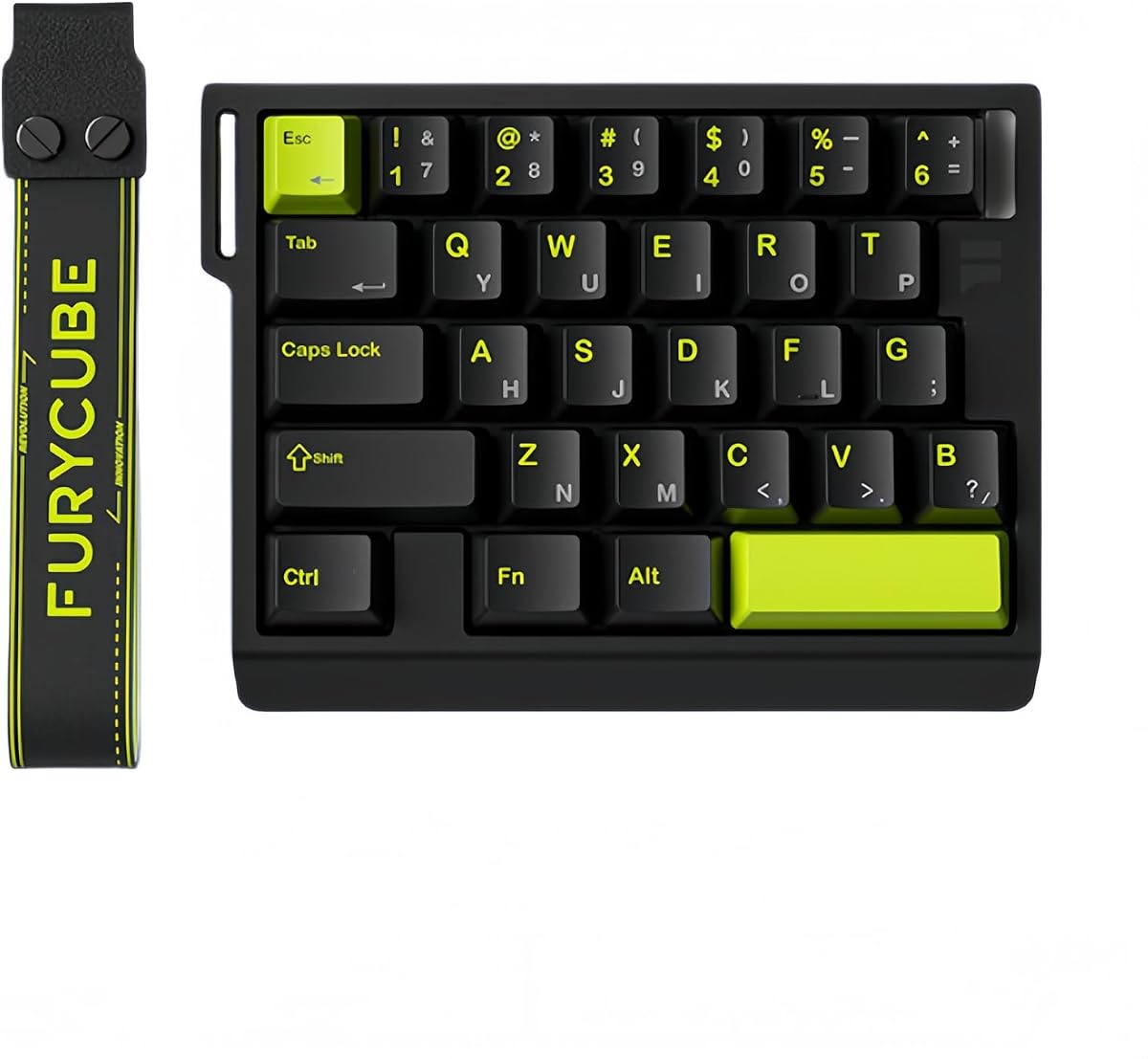
The 35-key layout provides enough room for essential commands while keeping the footprint small. RGB lighting adds visual flair and you can create profiles for different tasks.
This device is perfect for multi-system users who value convenience and performance. It serves well for gaming and content creation alike with flexible shortcut support.
Browser-based settings allow quick customization without software installation across different operating systems.
Hall effect switches offer durability and adjustable actuation points for a tailored feel and response.
We may earn a commission when you buy through this link, at no additional cost to you.
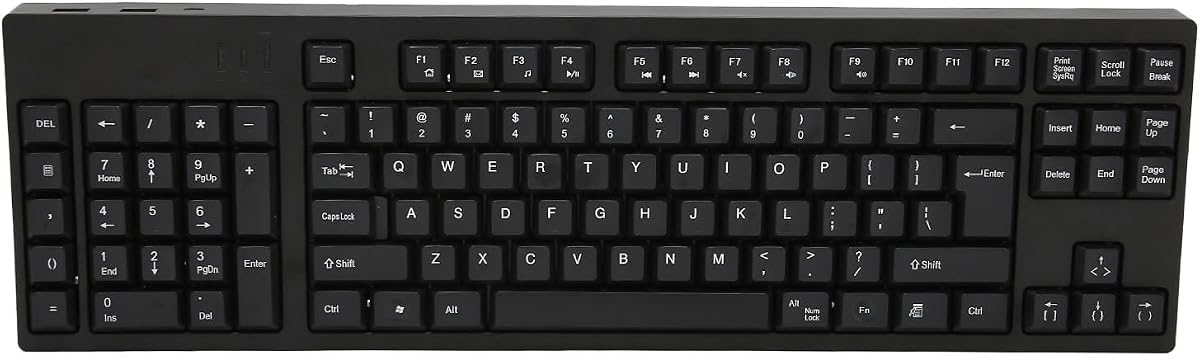
This keyboard offers a full 109-key layout with a left-sided numpad for comprehensive functionality. It is designed to relieve right hand fatigue by allowing the left hand to handle numeric input and navigation.
We may earn a commission when you buy through this link, at no additional cost to you.
The ergonomic key layout improves efficiency by keeping essential keys within reach for the left hand. Micro USB connection ensures a stable wired link, and additional USB interfaces allow peripheral connections.
Made of premium ABS material, it provides a sturdy build for accurate typing. The plug and play design means no drivers are needed, making it ready to use out of the box.
It is an excellent choice for users needing a complete keyboard replacement in a left-handed configuration. The simplicity and full feature set make it reliable for daily tasks.
With 109 keys, you get all standard typing and navigation features plus a dedicated left-sided numpad.
Extra USB interfaces allow you to connect mice or drives directly to the keyboard for cleaner cable management.
We may earn a commission when you buy through this link, at no additional cost to you.
The FKZ M30HE brings rapid trigger performance to one-handed gaming with magnetic switches. Adjustable actuation allows you to set trigger points down to 0.01 mm for precise control.
We may earn a commission when you buy through this link, at no additional cost to you.
A web driver enables easy remapping and macro setup without installing apps. You can also create DIY lighting effects and adjust actuation points through your browser.
With 30 keys and NKRO, every input is registered accurately. The RGB backlight offers a million colors and north-facing LEDs for better visibility during gameplay.
This model suits gamers who want a mix of performance and customization. The hot swap feature lets you change switches easily to find your preferred feel.
Set trigger points to match your touch style for faster response and reduced accidental presses.
One key can perform multiple operations based on how hard or how fast you press it for extra utility.
We may earn a commission when you buy through this link, at no additional cost to you.
The A4tech keyboard is built to improve posture and reduce strain for left-handed users. Its ergonomic design and natural keycaps help eliminate RSI and carpal tunnel risks over time.
We may earn a commission when you buy through this link, at no additional cost to you.
Eight multimedia hotkeys provide convenient access to volume and media controls. This simplifies workflow and adds value for office tasks without extra devices.
The layout is optimized for business and accounting use, allowing the left hand to manage data entry efficiently. It connects via USB and requires no drivers for immediate use.
This is a solid option for professionals focused on health and productivity. While not designed for gaming, its ergonomic benefits are significant for daily typing.
The ergonomic design encourages a natural hand position to reduce shoulder and back strain during work.
Hotkeys allow quick adjustments to audio and media playback without leaving your current task.
We may earn a commission when you buy through this link, at no additional cost to you.
Choosing the right left handed gaming keyboard requires understanding your specific needs and preferences. This guide breaks down key factors to consider before making a purchase.
The arrangement of keys determines how well the device fits your desk space and gaming style. Compact layouts like 30 to 35 keys save room for mouse movement but may limit macros. Full 109 key options provide traditional functionality but occupy more space.
Consider how many keys you need for your games to balance convenience and desk freedom.
Mechanical switches offer tactile feedback and durability while magnetic switches provide rapid trigger for faster resets. Linear switches are smooth and quiet whereas tactile ones give a bump on actuation.
Select switch types that match your preference for feedback and noise levels during gameplay.
Ergonomic designs reduce strain on wrists and hands by aligning keys with natural hand positions. Look for adjustable stands and wrist rests to maintain good posture.
Comfort is essential for long sessions so prioritize models with supportive features.
Wireless options provide freedom from cables but wired models offer lower latency. Dual or tri-mode connectivity lets you switch between Bluetooth and wired connections easily.
Choose based on whether you prioritize mobility or consistent connection stability.
Macro support allows complex commands to be executed with a single keypress. Software should let you remap keys and save profiles for different games.
Advanced customization is vital for MMOs and MOBAs where quick access to skills is necessary.
Materials like aluminum or ABS plastic affect longevity and stability. A sturdy build ensures keys do not wobble or break under heavy use.
Invest in durable construction to ensure your device lasts through intense gaming sessions.
RGB lighting adds visual appeal and helps locate keys in low light. Per-key customization allows for unique patterns that match your setup.
Look for adjustable lighting modes to enhance your gaming environment without distraction.
Ensure the keyboard works with your operating system and supports all necessary drivers. Some models work seamlessly across Windows and macOS while others are system specific.
Check compatibility lists to avoid issues with software and functionality on your device.
Start by connecting the keyboard to your computer via USB or Bluetooth and verify it is recognized. Configure key mappings using any included software to suit your gaming needs and save preferred layouts.
Clean the keyboard regularly by gently removing dust with a soft brush or compressed air to maintain smooth key function. Avoid using liquids directly on the surface to prevent internal damage.
Store the device in a dry place when not in use and use a protective cover if traveling. Periodically check for firmware updates to ensure optimal performance and access new features.
Most models are designed to work with standard operating systems and require no special drivers. Some advanced units come with software for customization but basic functions work out of the box. Check product specs to ensure compatibility with your OS.
Yes, right handed users may enjoy the ergonomic advantages such as extra space for mouse movement. The layouts free up the right side of the desk which can help with comfort. It is not a strict requirement to be left handed to use them.
Many are optimized for PCs but some support cross-platform use. Check if the model has console compatible drivers or specific modes. Always verify with the manufacturer before planning to use with a console.
Magnetic switches allow for rapid trigger which resets keys instantly when released. This reduces actuation points and increases response speed for faster movement. It is particularly useful in competitive FPS games.
Most models support remapping and macro creation through software or web config tools. You can assign new functions to keys to suit your play style. This flexibility allows for personalized setups across different games.
Wireless models often offer hundreds of hours on a single charge depending on usage. Battery life may decrease if RGB lighting is used constantly. Always check specs for estimated hours before purchase.
The top picks in this guide offer a range of features from budget-friendly options to premium ergonomic solutions. Each model addresses specific needs such as speed, comfort, or customization.
Prioritize layout, switch type, and ergonomic features that align with your gaming habits. Investing in a device that matches your play style can enhance performance and reduce strain.
Always review current pricing and availability before buying as offers may change. Select the keyboard that best supports your comfort and performance goals for long-term satisfaction.