
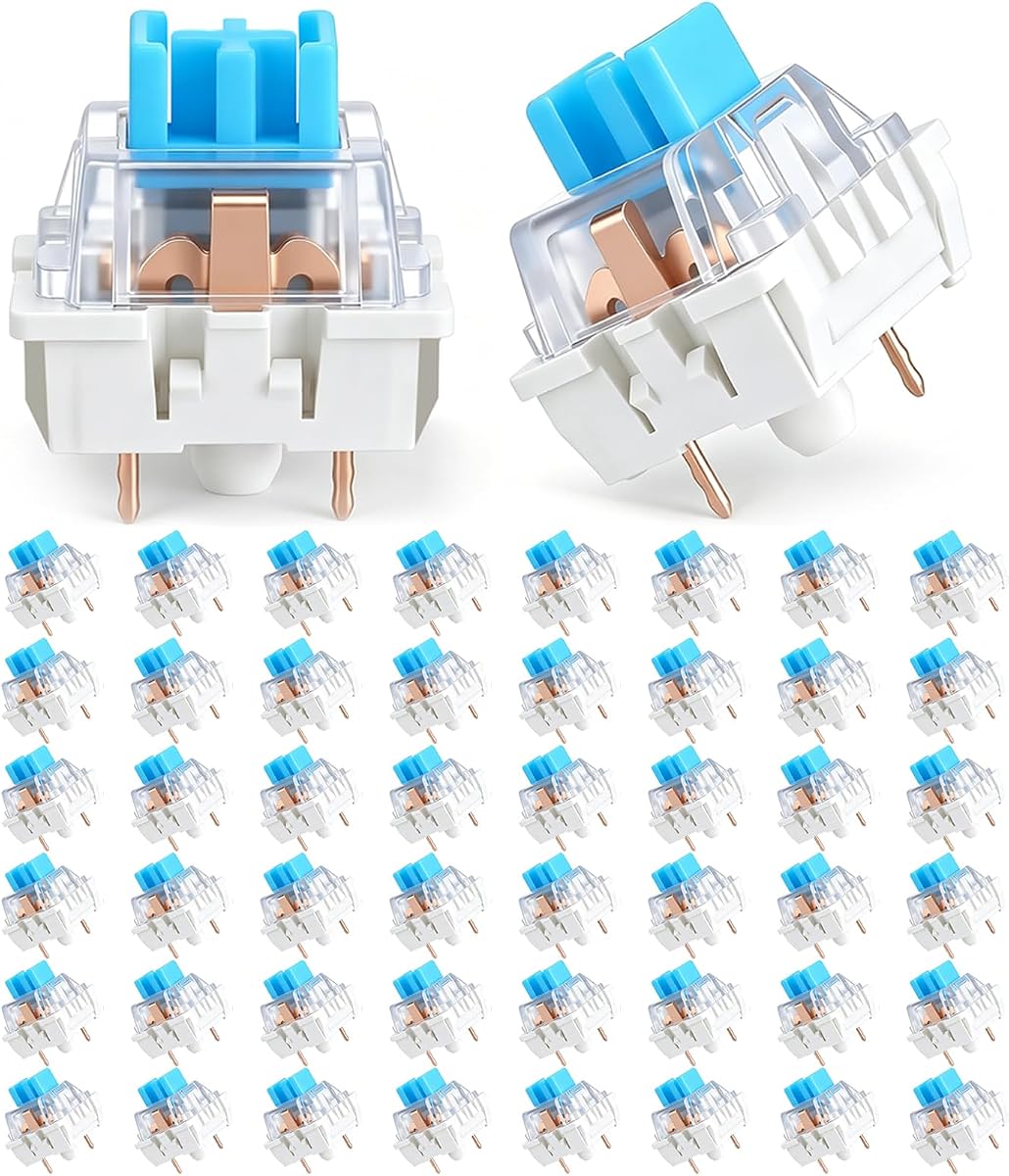
ZhouWang 108PCS Blue Click Switch
4.5Editor score
High durability cycle life
Tactile click feedback
Suitable for gaming
This guide compares the top automated keyboard clicker devices for gaming and office use, highlighting features like speed control and physical design.
Automated keyboard clickers are essential tools for gamers and professionals who need to keep systems active without constant manual input. These devices simulate human touch to prevent timeouts and automate repetitive tasks efficiently.
We evaluated ten physical clicker models based on their build quality, speed customization, and ease of use. Each product was assessed for reliability and compatibility with various keyboard and mouse setups.
Every pick below showcases specific strengths for different use cases. Please note that prices and availability change frequently, so verify current details before making your final purchase decision online.
4.5Editor score

5.0Editor score

4.3Editor score
The following table provides a side-by-side comparison of all ten products included in this guide. Review the specifications to determine which device best fits your specific automation needs and budget constraints.




This Physical Click Auto Keyboard Clicker stands out as a top-rated tool with a perfect five-star rating. It operates without software installation making it a secure choice for various platforms.
We may earn a commission when you buy through this link, at no additional cost to you.
The device mimics human behavior with random click intervals which ensures your game or application does not detect inactivity. Its adjustable height feature allows you to position the clicker precisely on different keyboard layouts.
While it is a physical tool requiring manual setup, the trade-off is significant security and simplicity compared to software alternatives. Users appreciate the low noise operation which prevents distractions during focused sessions.
This tool is ideal for gamers or remote workers who need reliable offline prevention without compromising system security. We recommend it for anyone seeking a simple and effective automated solution.
Using a physical device means no software conflicts or security risks are introduced to your system.
Random intervals make it difficult for software to detect automated clicking patterns effectively.
We may earn a commission when you buy through this link, at no additional cost to you.
The Auto Keyboard Clicker with adjustable height offers premium features for users needing precise control over click placement. Its wide range time settings allow for intricate automation schedules.
We may earn a commission when you buy through this link, at no additional cost to you.
A rubberized cover protects your keyboard during operation which is essential for maintaining the condition of your expensive hardware. The device simulates manual clicking with realistic timing to ensure natural operation.
The main drawback is the higher price compared to basic models but the durability and features justify the cost for serious users. If you need a device that adapts to different laptop or desktop setups this is a strong candidate.
Consider this model if you value build quality and customization over cost savings. It is particularly suitable for professional environments where hardware longevity is a priority.
The rubberized cover prevents damage to keys during the clicking process ensuring long-term device safety.
Wide range time settings give you control over how long the device runs and when it stops.
We may earn a commission when you buy through this link, at no additional cost to you.
This product is a bulk pack of blue mechanical switches rather than a full device. It is perfect for enthusiasts building custom clickers or repairing existing keyboards with high durability.
We may earn a commission when you buy through this link, at no additional cost to you.
The switches offer distinct tactile feedback with a high cycle life of 80 million clicks. They are waterproof and built to withstand extensive use in gaming or typing environments.
As a component rather than a finished tool it requires assembly which may not suit casual users looking for a plug-and-play solution. However for those who enjoy customization it provides excellent value.
If you need reliable parts for a mechanical build or prefer creating your own automation setup this pack is a cost-effective choice. It serves well for hobbyists who value mechanical quality.
With a service life of 80 million cycles these switches are built to last even under heavy use.
The blue switch provides a satisfying mechanical click that many users find enjoyable for stress relief.
We may earn a commission when you buy through this link, at no additional cost to you.
The Pankia Auto Keyboard Clicker offers a wide selection of random click speeds with fifteen different options to choose from. This variety allows you to find a speed that suits your specific activity.
We may earn a commission when you buy through this link, at no additional cost to you.
It features three ports for independent speed adjustments which adds flexibility for complex setups. The physical clicking tool is easy to set up and operates with simple button presses.
Despite its features the user rating is somewhat lower than other models which might indicate inconsistencies in performance. However for those needing a cheap physical solution with speed options it is viable.
This model is best for users who prioritize speed customization over advanced programmability. It serves well for basic automation tasks where cost is a primary factor.
Fifteen different random speeds allow you to fine-tune the clicking rate for any situation.
Three ports let you control multiple input devices simultaneously or independently as needed.
We may earn a commission when you buy through this link, at no additional cost to you.
This Physical Keyboard Clicker is highly programmable allowing you to define loop times and click intervals precisely. It offers a high degree of customization for diverse clicking needs.
We may earn a commission when you buy through this link, at no additional cost to you.
You can adjust clicking speed independently on different ports and set timed operation with rest periods. The device supports rapid consecutive clicks making it efficient for automation tasks.
Be mindful not to exceed five clicks per second as high speeds may cause heat damage to the device. This limitation ensures the physical arm remains safe and functional over time.
It is a solid choice for users who need specific timing parameters and programmable logic. The hands-free operation makes it suitable for long gaming sessions or data entry tasks.
Define precise loop times and rest periods to match your exact workflow requirements.
Each port can have its clicking speed adjusted to fit different device inputs.
We may earn a commission when you buy through this link, at no additional cost to you.
The Pankia Box Physical Click is designed to keep computers and laptops active during long sessions. It acts as a simulated finger tapper for game assistance and screen click needs.
We may earn a commission when you buy through this link, at no additional cost to you.
All three ports can adjust speed separately to meet different clicking requirements. The device is built with a clicking arm that is easy to position on keyboards.
Do not exceed five clicks per second to avoid heat damage as noted in the usage instructions. Despite this limit it remains a useful tool for basic automation and game assist.
This model is best for casual users who want a simple device to prevent inactivity. It provides a straightforward solution for keeping systems running without complex configuration.
Designed specifically to prevent your computer or laptop from going idle or inactive.
The product includes a commitment to quality with a satisfaction guarantee policy.
We may earn a commission when you buy through this link, at no additional cost to you.
This Physical Click Auto Keyboard Clicker features a digital display that clearly shows click speeds in numbers. It allows you to arrange timing and executing clicks with specific logic.
We may earn a commission when you buy through this link, at no additional cost to you.
The device supports fixed and random time combinations with a wide range of delays. Configurable content lets you set click head travel distance and running speed effectively.
While powerful the configuration logic might be complex for beginners but the host settings make it easier than programming. It requires a USB power source which is standard for most devices.
Choose this if you need precise control over click timing and logic groups. It is suitable for tasks requiring specific click patterns or sequential operations.
A digital display ensures you can see the exact click speed in numbers at all times.
Group logic allows for complex click sequences without external software.
We may earn a commission when you buy through this link, at no additional cost to you.
This item is the clicking arm only which must be used with a Pankia Box to function. It allows you to replace or upgrade your existing arm if the original is damaged.
We may earn a commission when you buy through this link, at no additional cost to you.
It meets your screen click needs when attached to the box allowing you to release your hands from manual tasks. The design supports keyboards and mice across a wide range of applications.
Since it cannot be used alone it is only suitable for those who already own the compatible box. This modular approach can be cost-effective for repairs or upgrades.
Consider this part if you need a replacement arm for your current setup. It ensures you can continue using your automation device without buying a new unit.
Designed as a replacement or upgrade component for existing Pankia Box systems.
Supports a variety of clicking applications with its adaptable design.
We may earn a commission when you buy through this link, at no additional cost to you.
These Keyboard Clickers are mechanical switches intended for 3D prints or replacement in gaming keyboards. They offer crisp clicky feedback with a service life of up to 50 million cycles.
We may earn a commission when you buy through this link, at no additional cost to you.
The switches are made of premium materials including copper washers and precision steel springs. They are waterproof and dustproof which ensures durability even in demanding conditions.
They are not complete clicker tools but rather components for DIY builds or repairs. The transparent blue casing adds style and complements LED backlighting on compatible keyboards.
If you are into custom building or need reliable switches for a project these are a great choice. They provide excellent tactile feedback and value in a 50-pack set.
Made with copper washers and precision springs for a satisfying tactile experience.
A service life of 50 million cycles ensures long-term reliability for your projects.
We may earn a commission when you buy through this link, at no additional cost to you.
This 2-pack offers both a quiet and a clicky fidget keyboard for stress relief. It provides tactile pressing feel for adults in work office or travel settings.
We may earn a commission when you buy through this link, at no additional cost to you.
One profile is quiet for discreet pressing while the other is audible for feedback. Each includes a keychain clip for easy carrying during commutes or breaks.
Unlike system automation tools this device is designed purely for personal stress management. It does not automate tasks but offers a mechanical feel that can help reduce anxiety.
Choose this if you need a portable toy to relieve stress during the day. It is a thoughtful gift for coworkers or keyboard enthusiasts who enjoy tactile feedback.
Includes both a quiet pink option and a clicky green option for different needs.
The clip-on keychain makes it easy to carry with you anywhere you go.
We may earn a commission when you buy through this link, at no additional cost to you.
Choosing the right automated keyboard clicker requires evaluating your specific needs for automation, build quality, and ease of use. This section covers the most important factors to consider.
Physical devices operate independently of your computer's software which reduces security risks and installation hassles. Software solutions may offer more complex features but require system integration and permissions.
Choose a physical clicker if you prioritize security and simplicity for basic tasks like keeping a game active.
Look for devices that allow you to adjust click speed and timing intervals. Random timing features help mimic human activity more closely which is crucial for avoiding detection.
Ensure the speed range suits your use case such as gaming or automated testing tasks.
The materials used in the clicker arm affect its lifespan and performance. High-quality metals and durable plastics prevent heat damage and ensure long-term reliability.
Check product specifications for cycle life or warranty information before purchasing.
If you travel or work on different machines a compact and lightweight design is essential. Devices that are too bulky may not fit well under all desk setups.
Portable models with keychain or small form factors are ideal for frequent movers.
A good clicker should be easy to set up without complex programming. Simple button controls or physical dials are preferred for quick adjustments.
Choose models with clear instructions and intuitive interfaces for hassle-free operation.
Ensure the device is compatible with your specific keyboard and mouse models. Some clickers work better with mechanical keyboards while others may require specific mounting.
Verify product listings for supported device types before finalizing your purchase.
Some clickers include features to prevent overheating or excessive wear. Look for models that limit maximum clicks per second to protect both the device and your hardware.
Safety mechanisms extend the life of the tool and prevent accidental damage.
Prices vary based on features and build quality. Determine your budget range and prioritize essential features over unnecessary extras to get the best value.
Higher priced models often offer better durability and more precise controls.
To start using your automated keyboard clicker place the device securely on the key you wish to automate. Adjust the height or angle so the arm presses firmly without wobbling during operation.
Set your desired speed and timing intervals using the device controls or physical switches. Always test the settings briefly to ensure the click rate matches your requirements before leaving it unattended.
Regularly check the device for signs of wear or overheating during long sessions. Clean dust from the clicker arm and ensure it remains stable on the keyboard surface for consistent performance.
An automated keyboard clicker is used to automate repetitive keyboard inputs and prevent systems from timing out. It helps gamers stay active during long sessions and assists professionals with data entry tasks.
Yes physical clickers do not require software installation or system permissions which reduces security risks. They operate independently on the hardware level making them less likely to trigger antivirus flags.
Most physical clickers are compatible with standard keyboards and mice. However some models may require specific mounting or adjustment for unique keyboard layouts or laptop setups.
When used properly they should not damage keyboards. It is important to adjust the pressure and height so the arm does not exert excessive force on key switches.
Avoid setting click speeds higher than the device limits such as five clicks per second. Give the device periodic breaks during long sessions to allow it to cool down.
Physical automated clickers generally do not need software for setup. You configure them using physical buttons or dials on the device itself.
Durable physical clickers can last for years with proper care. Components like springs may wear out eventually but most units are built for extended use.
Yes many clickers are compact and portable. Look for models with a small form factor or included travel cases for easier transport.
In this guide we reviewed ten top automated keyboard clickers including the Physical Click Auto Keyboard Clicker Device for overall reliability and the ZhouWang Blue Click Switch for modular builds.
Prioritize features like random timing and adjustable speed to ensure your device fits your specific automation needs. Consider build quality to ensure long-term durability in your workflow.
Prices and availability may change so always check the latest product details on Amazon before buying. Verify compatibility with your current hardware to ensure a smooth setup process.