
Cooler Master HAF II 500 ATX PC Case, High Airflow Dual 220mm + 180mm Fans
4.8Editor score
Oversized cooling system
Dual 220mm front fans
Split-level cable management
MasterRail mounting system
This guide compares the top industrial PC cases for reliability, airflow, and expansion to help you choose the right chassis for your hardware needs.
Choosing the right industrial PC case is critical for ensuring your hardware runs reliably under demanding conditions. A robust chassis protects components from dust, vibration, and heat while providing essential airflow for sustained performance in any environment.
We evaluated ten top-rated cases based on build quality, thermal performance, expandability, and user feedback. Our analysis focuses on features that matter most for industrial and professional applications, including rackmount options, silent operation, and versatile storage layouts.
Each pick highlights specific strengths for different use cases, from compact workstations to massive server racks. Please note that prices and availability change frequently, so verify current details before purchasing to ensure you get the best value for your setup.
4.8Editor score

4.6Editor score

4.3Editor score
This side-by-side comparison highlights the key specifications and unique features of each industrial PC case to help you identify the best fit for your specific hardware requirements and workspace constraints.
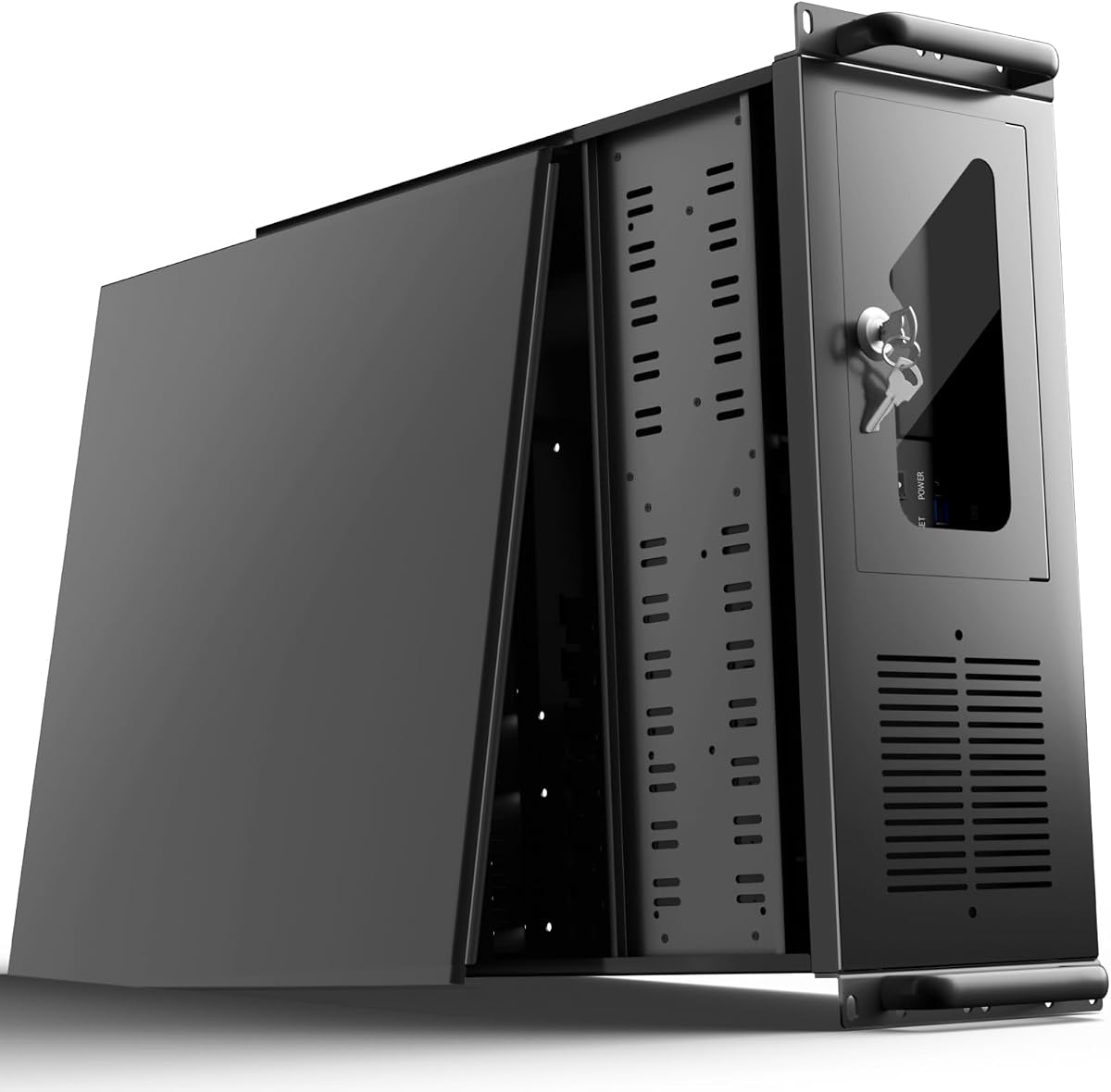


The UTLGAMENG 4U Rackmount Server Case offers exceptional scalability for growing storage needs at an affordable price point. With a 4.0 rating, it stands out for its ability to house critical data and media files in home servers or data centers.
We may earn a commission when you buy through this link, at no additional cost to you.
Its most significant feature is the massive storage capacity with 12 dedicated hard drive bays. The chassis also includes seven PCI slots for seamless integration of graphics cards or network adapters. Front-panel USB 3.0 ports ensure rapid data transfer for maintenance tasks.
While it lacks premium aesthetics, the case provides a secure lock mechanism to protect against unauthorized access. Dust filters on side panels help maintain a cleaner internal environment. The trade-off is primarily in the assembly process and basic finish.
This case is ideal for users needing high expandability without breaking the budget. It fits ATX power supplies and supports various motherboard sizes. We recommend it for technical users who prioritize storage density and rack-ready performance over looks.
With 12 drive bays, this chassis easily handles large-scale storage requirements for media servers or data backups.
Key locks and dedicated air filters ensure your valuable hardware remains safe from theft and dust accumulation.
We may earn a commission when you buy through this link, at no additional cost to you.
The Fractal Design Define 7 XL is a top-rated full tower that combines silence with massive expandability. Its 4.6 rating reflects excellent build quality and thoughtful design for users prioritizing acoustic comfort and capacity.
We may earn a commission when you buy through this link, at no additional cost to you.
It easily accommodates large motherboards up to E-ATX and supports installing up to 18 HDDs alongside five SSD mounts. The modular storage layout allows you to convert to an open layout for custom water loops with radiators up to 480mm.
The brushed aluminum front door with magnetic latching adds a refined look while maintaining the case's reputation for silence. However, the weight and size make it less portable. The price is higher but justified for premium features and materials.
Ideal for workstations needing high capacity without noise, this case is a powerful tool. It converts easily for complex cooling setups. We recommend it for professionals needing robust storage and thermal options in a quiet environment.
Default layouts support up to 18 hard drives, making it perfect for NAS or archival storage applications.
Sound-dampening materials and optimized airflow keep noise levels low even under heavy load.
We may earn a commission when you buy through this link, at no additional cost to you.
The Zalman T6 provides a solid foundation for home workstations at an accessible price. With a 4.3 rating, it delivers reliable performance for basic office or gaming builds where cost matters most.
We may earn a commission when you buy through this link, at no additional cost to you.
Its hairline pattern front and side mesh design work with the preinstalled 120mm rear fan to ensure optimal air circulation. The high-strength steel chassis is powder-coated for corrosion resistance and durability against daily wear and tear.
Versatile layouts support ATX, mATX, and Mini-ITX boards, though you must note that side-facing SATA ports are not supported. While I/O includes USB 3.0, it lacks modern extras like Type-C. Still, the build quality remains robust.
Best for budget-conscious builders needing reliable cooling, this case handles heat well. We recommend it for users who prioritize durability and airflow over modern connectivity features. It is a workhorse for essential computing needs.
Mesh panels and preinstalled fans allow air to flow freely, keeping internal temperatures manageable.
High-strength steel with powder coating ensures the case lasts years without rusting or bending.
We may earn a commission when you buy through this link, at no additional cost to you.
The Cooler Master HAF II 500 is a top-rated powerhouse designed for high-performance computing. With a 4.8 rating, it excels in thermal management, making it ideal for intensive workloads or gaming.
We may earn a commission when you buy through this link, at no additional cost to you.
Its oversized Mighty40 cooling system uses two 220mm intake fans and one 180mm exhaust fan to maximize throughput. Low airflow resistance design with large openings ensures heat is expelled efficiently. Cable management is split-level to optimize routing space.
A dual-mode GPU holder clamps single GPUs for stability or supports two GPUs up to 3.6 slots thick. The MasterRail system supports various fan sizes. While expensive, the performance justifies the cost for demanding setups.
Ideal for creators needing peak thermal performance, this case handles heat exceptionally well. We recommend it for users prioritizing airflow and GPU support. It offers premium features that justify its investment.
Extra-large fans and ventilation reduce resistance, allowing cool air to reach components instantly.
Stable holders accommodate thick cards, ensuring multi-GPU setups remain secure during intense tasks.
We may earn a commission when you buy through this link, at no additional cost to you.
The Antec VSK4000E-U3_US offers a no-nonsense approach to PC building. With a 4.1 rating, it provides essential functionality for users needing a straightforward case for general computing tasks.
We may earn a commission when you buy through this link, at no additional cost to you.
Constructed from SGCC steel, this mid-tower supports five internal HDD bays and three external drive bays. Front ports include USB 3.0 for decent transfer speeds. The design focuses on utility rather than aesthetics.
While it lacks advanced cooling features or modern I/O options, the build quality remains reliable. It serves well for office setups or backups. The limitation is mostly in thermal performance compared to mesh-front designs.
Best for those needing basic storage expansion on a budget, this case delivers solid utility. We recommend it for simple builds where advanced features are not critical. It remains a dependable choice for standard setups.
SGCC steel provides structural integrity that protects components from impact or wear over time.
Multiple drive bays allow straightforward expansion for file storage or backup redundancy.
We may earn a commission when you buy through this link, at no additional cost to you.
The Fractal Design North XL enhances gaming stations with sleek wood and alloy details while maintaining high performance. Its 4.7 rating highlights excellent build quality and aesthetic appeal alongside functional design.
We may earn a commission when you buy through this link, at no additional cost to you.
It supports E-ATX motherboards and allows GPUs up to 413mm in length. With three included 140mm Aspect PWM fans, cooling is effective out of the box. Compatibility with radiators up to 420mm at the front ensures strong thermal potential.
While the wood finish adds elegance, it may not suit industrial environments. The high price reflects premium materials. The limited front access for cables or filters is a minor trade-off for the design.
Ideal for users prioritizing aesthetics and cooling, this case blends form and function. We recommend it for custom PCs in office or home settings. It provides a premium experience for visually focused builds.
Natural wood and alloy accents create a sophisticated look suitable for professional office environments.
Preinstalled fans and radiator support ensure components stay cool without extra purchases.
We may earn a commission when you buy through this link, at no additional cost to you.
The Silverstone FLP02 combines retro-inspired styling with high-performance cooling capabilities. Its 4.7 rating reflects a successful balance of aesthetics and functionality for users wanting something different.
We may earn a commission when you buy through this link, at no additional cost to you.
Features include a unique turbo button for instant full-speed cooling and support for 360mm liquid radiators. Three front 5.25 inch bays support hot-swap adapter cages. Front I/O includes a USB Type-C port for modern connectivity.
The retro design limits some airflow paths compared to mesh panels. It is also priced higher than standard cases. However, the mix of classic looks and modern performance makes it a unique option.
Best for those wanting visual uniqueness without sacrificing power, this case stands out. We recommend it for enthusiasts looking for a standout piece. It provides strong cooling within a unique chassis design.
The turbo button instantly ramps up fans to handle peak loads or heavy workloads efficiently.
Classic styling meets modern tech like USB-C, appealing to vintage enthusiasts and gamers.
We may earn a commission when you buy through this link, at no additional cost to you.
The Rosewill 4U Rackmount Server Chassis is engineered for high-performance computing and virtualization. With a 4.3 rating, it is a solid foundation for AI training or rendering workloads.
We may earn a commission when you buy through this link, at no additional cost to you.
It supports E-ATX motherboards for multi-GPU setups and directly supports a 360mm radiator for extreme CPU cooling. Front-access USB 3.2 Gen Type-C delivers up to 10 Gbps transfer speeds. Pre-installed quiet PWM fans ensure optimal airflow.
Storage accommodates up to two 3.5-inch hard disk drives and four 2.5-inch solid-state drives. While versatile, the storage is limited compared to pure NAS units. It remains professional and rack-ready.
Ideal for technical users needing server-grade power, this chassis fits standard racks. We recommend it for rendering or virtualization servers. It provides professional features without unnecessary complexity.
Standard 4U form factor and SSI-EEB compatibility ensure seamless integration in data center environments.
Direct AIO support and PWM fans keep processors cool under sustained heavy computational loads.
We may earn a commission when you buy through this link, at no additional cost to you.
The CORSAIR 4000D RS ARGB offers modular customization for those wanting a frame that grows with needs. Its 4.7 rating reflects its balanced mix of airflow, aesthetics, and build quality.
We may earn a commission when you buy through this link, at no additional cost to you.
The revolutionary FRAME system allows swapping components like the motherboard tray or I/O panel. Preinstalled RS ARGB PWM fans support daisy-chainable connections. The InfiniRail mounting system offers unmatched flexibility in fan configuration.
A 3D Y-Pattern airflow panel provides low-obstruction paths for cool air. While side panels can be removed for added cooling, the cable cover is optional. It suits users who value clean lines.
Ideal for enthusiasts wanting customization, this case supports future upgrades. We recommend it for high-airflow builds requiring clean aesthetics. It offers nearly limitless options for tailored performance.
Swap parts like the motherboard tray or I/O panel to match evolving build needs easily.
The steel front panel uses a Y-pattern to ensure air reaches components with minimal resistance.
We may earn a commission when you buy through this link, at no additional cost to you.
The NZXT H5 Flow delivers exceptional GPU cooling in a compact ATX mid-tower. With a 4.6 rating, it balances size and thermal performance efficiently for small-footprint builds.
We may earn a commission when you buy through this link, at no additional cost to you.
Its perforated PSU shroud enables optimal intake from two 120mm fans. Ultra-fine mesh panels maximize airflow and filter dust while maintaining a clean aesthetic. It supports 360mm radiators at the front for liquid cooling.
Two quiet airflow fans are pre-installed for out-of-the-box performance. Cable management channels are wide for effortless routing. The trade-off is limited drive bays due to the smaller form factor.
Best for users needing strong cooling in limited space, this case performs well. We recommend it for gamers wanting compact builds without thermal issues. It ensures components stay cool in small areas.
Perforated shrouds direct air efficiently to the GPU for stable performance during heavy use.
Mesh panels hide dust filters effectively while maintaining high airflow and a sleek look.
We may earn a commission when you buy through this link, at no additional cost to you.
Selecting the right industrial PC case requires evaluating several technical factors to ensure compatibility and reliability.
Ensure the case supports your motherboard size, whether ATX, Micro-ATX, or E-ATX. Industrial setups often require E-ATX for advanced expansion.
Always verify the motherboard form factor matches the case specifications before purchasing.
Industrial environments generate heat. Choose cases with mesh panels or pre-installed fans to maintain optimal component temperatures.
Look for cases supporting large radiators or multiple fans for sustained cooling under heavy loads.
Assess your storage needs. Rackmount cases often support more drive bays than mid-towers. Check for PCI slots if you need extra cards.
Prioritize cases with dedicated drive cages and PCIe slots for future expansion.
Industrial cases should be built from high-strength steel to withstand vibration and impact. Powder coating adds durability against corrosion.
Choose steel chassis with robust hinges and durable finishes for long-term reliability.
Modern industrial setups require fast data transfer. Look for front USB 3.0 or Type-C ports to speed up maintenance tasks.
Ensure front ports include at least USB 3.0 or Type-C for efficient file management.
If your case will be in an office or living space, sound dampening is crucial. Look for insulated panels or silent designs.
Check for sound insulation features if noise levels are a priority in your workspace.
Rackmount or server cases often include locks to prevent unauthorized access. Dust filters are essential in environments with particulate matter.
Verify the presence of key locks and air filters to protect your hardware.
Modular cases allow you to change layouts for different components. This is useful if your needs evolve over time.
Consider cases with removable drive cages or adjustable mounting systems for flexibility.
Always install the motherboard onto the standoff screws before mounting to avoid short circuits. Ensure all screws are tightened properly to maintain structural integrity.
Regularly clean dust filters using a soft brush or compressed air to prevent airflow restriction. This simple maintenance step can significantly improve thermal performance.
Monitor fan health and temperatures periodically. If fans stop spinning or become noisy, replace them promptly to ensure components remain cool and functional.
An industrial PC case typically features robust steel construction to withstand physical stress. It includes effective cooling solutions to manage heat in continuous operation. Dust filters and secure locking mechanisms are common features to protect sensitive electronics.
Choose rackmount cases if you need to install multiple units in a server cabinet for space efficiency. Tower cases are better for single-user workstations or environments without rack infrastructure. Consider your physical workspace and maintenance needs.
Most industrial cases support standard ATX power supplies. However, some server models may require specific wattage for heavy component loads. Always check the PSU compatibility section in the product specifications before buying.
Industrial PCs often run 24/7, generating significant heat over time. Without proper airflow, components can overheat, leading to performance throttling or failure. Optimized airflow ensures consistent performance under long-term loads.
Many industrial cases support liquid cooling but check radiator mounting options. Some racks are designed for AIO liquid coolers while others rely on air cooling. Verify the maximum radiator size before planning a liquid build.
Dust filters are highly recommended, especially in environments with dirt or fabric fibers. They prevent dust from settling on components, which can cause overheating. Cleaning filters regularly extends the lifespan of your system.
Measure your available space carefully. Rackmount cases require specific rack depth and width. Tower cases need clearance for ventilation. Consider airflow requirements to ensure your workspace accommodates the size safely.
High-quality industrial cases made from durable steel can last 10 years or more with proper maintenance. Regular dusting and fan replacement help maintain functionality. Choosing well-reviewed models ensures you get long-term value.
Our top picks include the Fractal Design Define 7 XL for its silent versatility, the Cooler Master HAF II 500 for premium airflow, and the Zalman T6 for budget-conscious builders.
Prioritize airflow and build quality to protect your hardware in demanding environments. Features like dust filters, secure locks, and modular layouts add significant value to your investment.
Always check current availability and pricing on Amazon before purchasing to ensure you get the best deal. Select the case that aligns with your specific performance and space requirements.