
CENMATE Aluminum 4 Bay
4.3Editor score
Aluminum alloy build with cooling fan
Supports up to 80TB total capacity
USB 3.0 with 5Gbps transfer speed
Direct attached storage provides a simple way to expand your computer without using a network. These enclosures hold multiple drives and connect via USB or Thunderbolt for fast access.
We compared ten top models based on speed, capacity, build quality, and features like hot swapping. Our list covers various needs from budget friendly to high performance.
Each pick shows key specs and real world benefits for different users. Prices change often so check current offers before buying to ensure you get the best value available.
4.3Editor score

4.2Editor score

5.0Editor score
As an Amazon Associate we earn from qualifying purchases.
This side-by-side comparison highlights the key specifications and unique features of each top ranked direct attached storage enclosure to help you choose the right model for your workflow.




The TERRAMASTER D4-320 is a top choice for users needing fast external storage. It supports four drives and offers speeds up to 10Gbps via USB 3.2 Gen2.
We may earn a commission when you buy through this link, at no additional cost to you.
Its standout features include tool-free drive bays and hot swappable support. The intelligent fan ensures drives stay cool without being too loud during normal use.
While it lacks hardware RAID, this keeps the price lower and setup simpler. Most users will prefer the simplicity of individual drive access for backups.
Buy this if you need reliable high-speed storage for video editing or large file transfers. It works well with Windows Mac and Linux systems seamlessly.
The USB 3.2 Gen2 interface delivers up to 10Gbps bandwidth for rapid file access and reduced wait times during large transfers.
Push-lock drive trays allow you to install or remove drives without tools ensuring quick upgrades or replacements when needed.
We may earn a commission when you buy through this link, at no additional cost to you.
The CENMATE Aluminum 4 Bay offers great value for basic storage needs. It supports up to 80TB and includes a fan to keep drives cool during use.
We may earn a commission when you buy through this link, at no additional cost to you.
Its aluminum build provides durability and better heat dissipation than plastic. The tool-free design makes it easy to swap drives quickly without extra equipment.
Speed is limited to 5Gbps which is slower than newer USB-C options. For general backups this is acceptable but high performance work may need faster hardware.
This is ideal for budget conscious users or home office setups. It handles daily file storage well and keeps costs low without sacrificing reliability.
At a competitive price this enclosure provides four bays for large storage capacity without breaking the bank for home users.
A built-in fan activates to prevent overheating during heavy usage ensuring your data remains safe and drives run efficiently.
We may earn a commission when you buy through this link, at no additional cost to you.
The TERRAMASTER D8 Hybrid 2 is a powerhouse for professionals needing both speed and capacity. It combines four HDDs for storage and four NVMe SSDs for speed.
We may earn a commission when you buy through this link, at no additional cost to you.
It delivers speeds up to 10Gbps and supports up to 152TB total capacity. The TPM power management optimizes energy use while maintaining fast wake times.
The cost is higher due to the hybrid design and premium features. However for video editors this flexibility justifies the investment in a workflow.
Buy this if you need a unified solution for cold and hot data. It simplifies your desk while delivering top-tier performance for demanding tasks.
Store frequently used files on fast NVMe SSDs and archive data on high capacity HDDs for optimal performance and cost efficiency.
Proprietary TPM technology switches between power save and active modes to balance energy efficiency with quick data access needs.
We may earn a commission when you buy through this link, at no additional cost to you.
The QNAP TR-004 is designed for users who want hardware RAID without building a full NAS. It supports RAID 0 1 and 5 via USB Type-C.
We may earn a commission when you buy through this link, at no additional cost to you.
It allows you to expand your QNAP NAS capacity directly. The lockable drive bays provide extra security for valuable data in shared environments.
It cannot run NAS apps independently so it is purely storage. Some older NAS models may not be fully compatible with this expansion unit.
Choose this if you already have a QNAP NAS and need more space. It offers reliable redundancy and easy integration into existing systems.
Hardware RAID options protect your data from drive failure without relying on slower software solutions on your host computer.
Seamlessly add storage to compatible QNAP NAS units for larger pool capacity without needing complex network configuration.
We may earn a commission when you buy through this link, at no additional cost to you.
The TERRAMASTER D8 Hybrid offers a unique mix of traditional HDD storage and fast NVMe speeds. It supports four HDDs and four M.2 SSDs together.
We may earn a commission when you buy through this link, at no additional cost to you.
It is great for separating hot and cold data. The intelligent fan adjusts speed based on temperature to maintain stability during heavy workloads.
Setup is straightforward with tool-free trays. However managing two drive types may require more planning than a standard single type enclosure.
This is best for users with mixed data needs. It provides speed for active projects and volume for archives in a single box.
An intelligent fan adjusts speed based on drive temperature ensuring quiet operation when idle and full cooling when needed.
After unexpected power loss the device automatically reboots helping to restore access to data without manual intervention.
We may earn a commission when you buy through this link, at no additional cost to you.
The SABRENT 5-Bay supports five 3.5 inch drives with a dedicated controller for each. This ensures stable independent connections for every disk.
We may earn a commission when you buy through this link, at no additional cost to you.
It features per-bay power switches for easy management of individual drives. The internal power supply removes the need for an external power brick.
Without RAID you manage files manually which suits JBOD users. The daisy-chain port allows you to connect a second dock for even more space.
Buy this if you need many drives in one unit. It is reliable for high capacity needs and works well with professional setups.
Each bay has its own controller and power switch allowing you to power drives on or off without affecting others.
Use the rear USB-C port to daisy-chain another dock or connect peripherals for a streamlined workspace.
We may earn a commission when you buy through this link, at no additional cost to you.
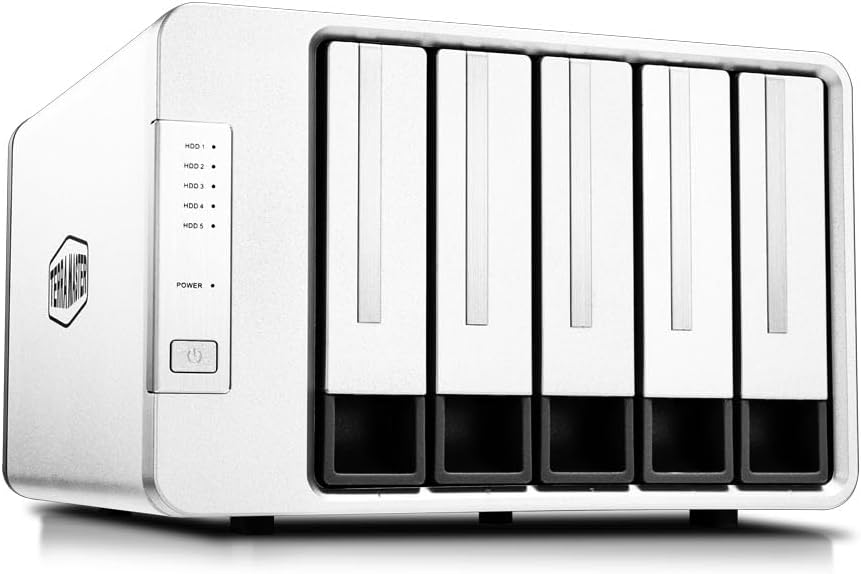
The TERRAMASTER D5-310 uses a physical knob to switch between RAID modes like 0 1 5 and 10. This makes setup simple without software.
We may earn a commission when you buy through this link, at no additional cost to you.
It supports up to 120TB and includes a hot spare feature for RAID 5 10. This minimizes data loss risk if a drive fails.
Speed is limited to 5Gbps so it is not for fast transfers. However it offers solid redundancy for backup and archive purposes.
Choose this if you want hardware RAID without a network box. It provides protection and capacity for users who prefer physical controls.
A dedicated knob on the back lets you change RAID modes instantly without navigating complex menus on your computer.
A hot spare drive automatically takes over if another fails ensuring your data stays safe without manual intervention.
We may earn a commission when you buy through this link, at no additional cost to you.
The WAVLINK 4-Bay adds HDMI video output to a storage dock. This lets you connect displays directly to it when your host supports video.
We may earn a commission when you buy through this link, at no additional cost to you.
It offers 10Gbps speeds and supports up to 88TB. Dual fans activate automatically to keep drives cool during heavy use.
Video features depend on host capability so check before buying. However it is still a great storage dock with solid build quality.
Buy this if you want a dock that handles both video and storage. It simplifies cables for workstations needing extra display options.
The HDMI port supports 4K 60Hz video allowing you to connect displays directly if your host allows video over USB-C.
Dual temperature controlled fans activate at 48 degrees to ensure your drives stay cool during intensive operations.
We may earn a commission when you buy through this link, at no additional cost to you.
The ORICO 5 Bay uses magnetic chips for tool-free cover access. This makes installing drives quick and easy without needing screws.
We may earn a commission when you buy through this link, at no additional cost to you.
It supports up to 110TB and includes multiple protection features like anti-over voltage. The 60mm fan with honeycomb vents helps cooling.
Linux systems may only read one drive at a time which is a known limit. Otherwise it offers solid performance for basic expansion.
This is a great choice for users wanting easy access. It is simple to use and provides plenty of space for backups.
The cover uses magnetic chips for quick screwless access saving time when installing or removing hard drives.
Built-in safety features like anti-over voltage protect your data and hardware from unexpected power surges.
We may earn a commission when you buy through this link, at no additional cost to you.
The QNAP TR-002 is a compact solution for two drives. It supports hardware RAID 0 and 1 via USB Type-C for basic redundancy.
We may earn a commission when you buy through this link, at no additional cost to you.
It is great for expanding QNAP NAS systems or storing essential files. The lockable drive bays add a layer of physical security.
With only two bays it is not for large archives. However it is perfect for light users needing a reliable backup unit.
Choose this if you need simple redundancy without bulk. It fits easily on a desk and integrates well with QNAP systems.
A small footprint with RAID 0 and 1 support makes this ideal for users who need basic data protection in a small box.
Lockable drive bays prevent accidental removal or unauthorized access to your hard drives when in a shared space.
We may earn a commission when you buy through this link, at no additional cost to you.
Choosing the right direct attached storage requires evaluating speed capacity and features that fit your workflow needs.
Connection speed is determined by the USB or Thunderbolt interface. Look for USB 3.2 Gen2 for 10Gbps speeds if you handle large files.
Faster connections reduce wait times during transfers and improve overall system performance for daily use.
Capacity depends on the number of bays and max drive size each bay supports. Ensure the enclosure supports large drives if you plan to expand later.
A higher max capacity means you can use larger hard drives without replacing the enclosure in the future.
RAID support offers redundancy or performance but adds complexity. Hardware RAID is faster than software RAID and does not rely on your computer.
If data safety is a priority consider a model with RAID 1 or 5 for built-in redundancy.
Hot swapping allows you to replace drives without powering off the device. This is useful for users who need to swap drives frequently.
Without this feature you must shut down and unplug the device which interrupts workflow.
Metal builds dissipate heat better than plastic and are more durable. Look for enclosures with active cooling fans for high capacity setups.
Good ventilation is essential to prevent drive overheating and prolong the life of your hardware.
Ensure the enclosure supports your operating system like Windows Mac or Linux. Plug and play support avoids the need for extra drivers.
Check if the device is recognized automatically by your system to avoid driver headaches.
External power supplies ensure stability for multiple drives. Internal power options can be convenient but may be limited on some models.
A stable power supply prevents crashes during high load operations and protects your drives.
Tool-free designs save time when installing drives. Simple interfaces and clear status lights help you monitor drive health effectively.
Choose a model that makes maintenance quick and easy to keep your storage running smoothly.
Start by installing drives carefully using the tool-free trays or brackets. Ensure each drive clicks into place securely to avoid disconnection issues.
Connect the enclosure to your computer via the recommended cable and let the system recognize it. Check the status lights to confirm drives are active.
Regularly back up your data and monitor temperature during use. Keep the enclosure ventilated to prevent overheating during long sessions.
Direct attached storage is an external device that connects directly to your computer via USB. It holds multiple drives for fast access without a network.
Direct attached storage is faster and simpler for single computer use. NAS allows network access for multiple users but is more complex to set up.
New drives often need formatting to work with your OS. Most enclosures do not format drives automatically so plan this step during setup.
Yes most enclosures support both SATA HDDs and SSDs. Just ensure the interface matches the drive type for best performance.
Keep the enclosure in a well ventilated area and avoid blocking fans. Active cooling models handle high loads better than passive designs.
Without RAID data loss occurs if a drive fails. With RAID models like RAID 1 you may recover data from the other drive.
Some smaller models are portable but most 4-bay units are desktop sized. They are easy to move but not designed for travel like flash drives.
Quality enclosures last many years if maintained well. The lifespan largely depends on the drives inside rather than the enclosure itself.
The TERRAMASTER D4-320 CENMATE 4 Bay and D8 Hybrid 2 offer top value for different needs. They cover speed budget and hybrid storage needs.
Prioritize speed and capacity based on your workflow. For heavy video work prioritize 10Gbps speed and large capacity.
Check current prices before buying since costs fluctuate. This ensures you get the best deal for your specific storage requirements today.