
4K AI-Powered Conference Webcam with Microphones Speakers
4.1Editor score
120° Wide Angle
Presenter Tracking
Privacy Protection
Discover the top auto tracking conference camera models for seamless meetings. This guide compares features, video quality, and AI tracking to help you choose.
In modern business environments, clear communication is vital. An auto tracking conference camera ensures every speaker stays in focus without manual adjustments. These devices use advanced AI to follow movement, making hybrid meetings smoother and more professional for all participants involved.
We evaluated ten top models based on video resolution, tracking accuracy, and audio integration. Each product offers unique strengths for different room sizes and budgets. Our analysis highlights key specifications to help you find the right system for your specific conference or streaming needs effectively.
Every pick includes detailed insights on setup, compatibility, and real-world performance. Prices may fluctuate based on market demand and seasonal promotions. Check current listings before purchasing to ensure you get the best value for your investment in high quality conferencing technology today.
4.1Editor score

4.8Editor score

4.6Editor score
This side by side comparison highlights the core capabilities of each ranked product. We focus on resolution, zoom capabilities, connectivity options, and included audio features to show how they differ for various meeting scenarios and room setups effectively.




This all-in-one system delivers exceptional video and audio performance for conference rooms. With a 4.8 rating, it stands out for its sharp 4K resolution and intelligent tracking capabilities that follow speakers smoothly.
We may earn a commission when you buy through this link, at no additional cost to you.
The camera offers 3x optical zoom and wide field of view to capture the room clearly. Audio is handled by a dedicated Bluetooth speakerphone with four microphones, ensuring voices are heard across the space without distortion.
While the 4K output requires an HDMI connection, USB handles high definition streaming. The setup is straightforward, making it accessible for non technical users seeking professional results quickly and efficiently.
Ideal for small to medium meeting spaces, this kit simplifies hybrid collaboration. Its reliable tracking and clear audio make it a top choice for teams needing consistent presentation quality.
Advanced AI algorithms track subjects accurately, maintaining focus on speakers during movement for uninterrupted meetings.
Omnidirectional mics and a wireless speaker provide balanced sound pickup, reducing the need for separate conferencing hardware.
We may earn a commission when you buy through this link, at no additional cost to you.
Designed for small spaces, this webcam offers 4K clarity and auto framing at an affordable price. It ensures participants are visible without manual adjustments, making it suitable for daily team check-ins.
We may earn a commission when you buy through this link, at no additional cost to you.
The 120-degree field of view captures the entire table, while AI tracking follows active presenters. Audio is decent for its size, though it may lack the range of dedicated speakerphones.
A physical lens cover adds security for shared office environments. The plug-and-play design works with major platforms, requiring no driver installation or complex configuration steps.
This model is perfect for startups or remote teams on a tight budget. It delivers essential features for professional video calls without unnecessary extras or high costs.
Its compact form factor fits easily on monitors or desks, ideal for limited workspace setups.
USB connection enables instant use with Zoom or Teams, saving time for quick meetings.
We may earn a commission when you buy through this link, at no additional cost to you.
This system prioritizes smooth motion with 60fps video output, making it great for active meetings. AI tracking keeps speakers centered, while a Bluetooth speakerphone handles audio clearly across the room.
We may earn a commission when you buy through this link, at no additional cost to you.
The camera supports both USB and HDMI outputs for flexible connectivity. Installation is easy via desk or wall mounts, adapting well to various office layouts without extensive cabling or tools.
While it uses HD resolution instead of 4K, the 60fps rate ensures fluid visuals. The included audio device reduces external hardware needs, creating an all-in-one conferencing experience.
Best for users needing high frame rates and simple audio integration. It balances performance and convenience effectively for everyday business communication.
60fps capture minimizes motion blur during fast-paced discussions or presentations.
A wireless speakerphone simplifies cabling, making the setup cleaner for meeting tables.
We may earn a commission when you buy through this link, at no additional cost to you.
Unique gesture controls allow hands-free operation, enabling users to start tracking or zoom via simple motions. This innovation enhances convenience during presentations or when hands are busy managing materials.
We may earn a commission when you buy through this link, at no additional cost to you.
The camera delivers 4K video and includes a speakerphone for balanced audio. Tracking is precise, following speakers across the room with smooth pan and tilt movements.
Remote control provides preset options for quick framing adjustments. The 120-degree view ensures full room visibility, reducing the need to reposition hardware frequently during sessions.
This model suits tech-savvy users wanting interactive controls. Its blend of gesture features and reliable performance makes it a standout for modern conferencing needs.
Gestures enable tracking adjustments without interrupting the meeting flow or needing physical contact.
An IR remote offers traditional control options for quick camera resets or preset changes.
We may earn a commission when you buy through this link, at no additional cost to you.
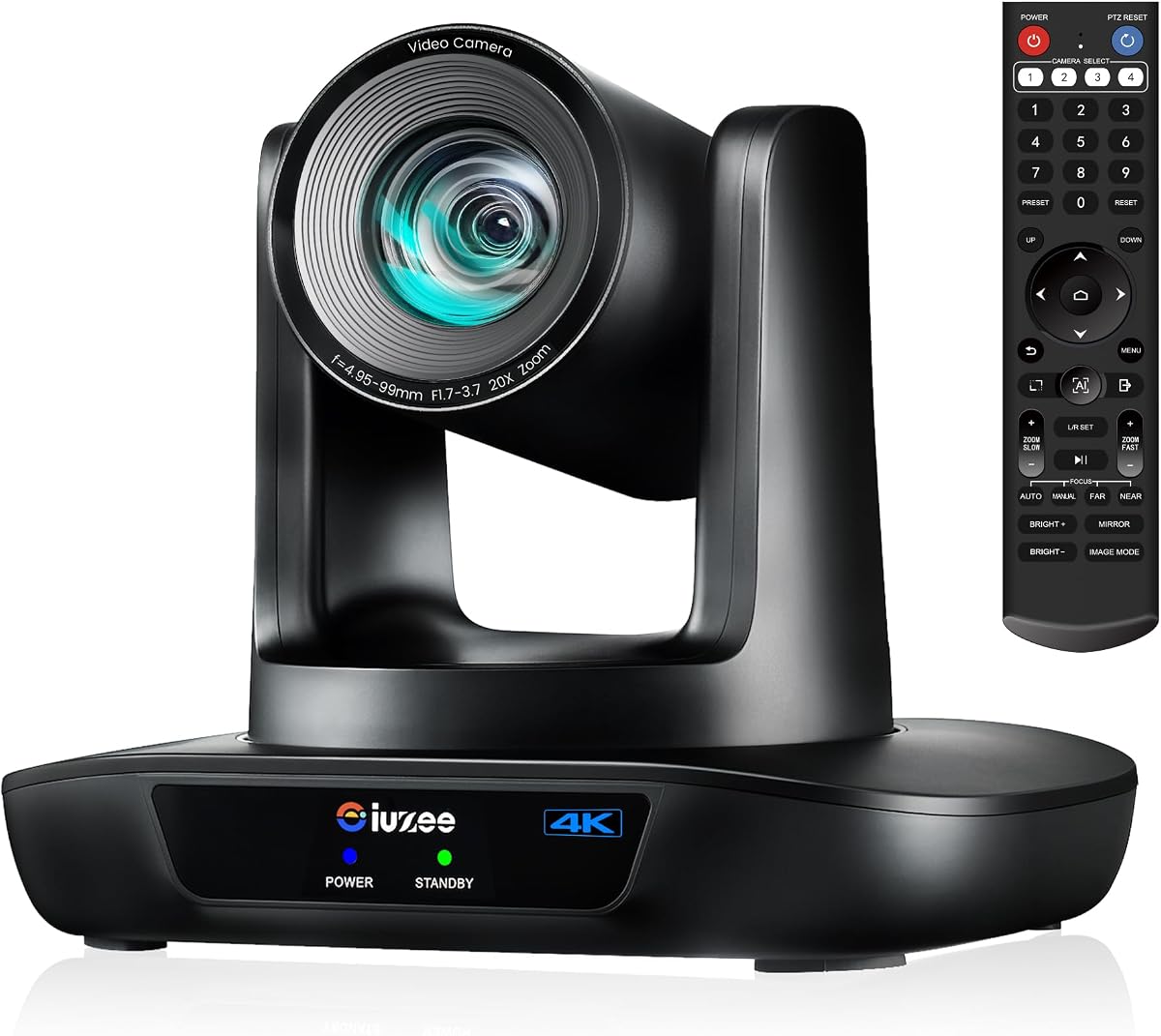
Equipped with a powerful 20x optical zoom, this camera excels in large spaces like auditoriums. AI tracking ensures speakers remain clear even from a distance, maintaining professional visual quality.
We may earn a commission when you buy through this link, at no additional cost to you.
It supports Power over Ethernet for simplified cabling, reducing clutter in technical setups. The Bluetooth speakerphone complements the camera by providing reliable audio without extra devices.
Multiple connection options like USB, HDMI, and LAN offer flexibility. This versatility makes it suitable for both live streaming and standard conference calls.
Ideal for churches or conference halls needing reach. The combination of zoom and tracking simplifies capturing details across vast rooms.
Optical zoom retains detail at long distances, avoiding the pixelation common in digital zooms.
Single cable power and data simplify installation, cutting costs on additional wiring.
We may earn a commission when you buy through this link, at no additional cost to you.
This camera focuses on professional streaming capabilities with robust IP and RTMP support. It delivers 4K resolution and 20x zoom for crisp visuals suitable for broadcast-grade events.
We may earn a commission when you buy through this link, at no additional cost to you.
Tracking accuracy is high, using advanced algorithms to keep subjects in frame. However, it lacks a built-in microphone, requiring external audio for complete conferencing solutions.
PoE support simplifies installation, making it easy to mount in ceilings or high locations. Remote control allows precise adjustments for varied presentation needs.
Best for streaming or events needing video fidelity. Its streaming features and high rating make it a reliable tool for producers.
IP streaming protocols allow direct connection to streaming servers without a computer intermediary.
PoE enables placement anywhere on a network, reducing cable management for ceiling installs.
We may earn a commission when you buy through this link, at no additional cost to you.
This model stands out with official NDI licensing and SDI outputs for professional workflows. It delivers true 4K over HDMI, suitable for high-end productions or large event broadcasting.
We may earn a commission when you buy through this link, at no additional cost to you.
AI tracking combines facial and body recognition for smooth subject following. The camera supports web control and joystick inputs for precise operation in complex setups.
Despite higher pricing, the versatility justifies the cost for advanced users. It integrates seamlessly with vMix or OBS, offering unmatched flexibility.
Ideal for studios or organizations needing broadcast features. Its comprehensive interface options provide the highest level of control available.
Official NDI support allows lossless video transmission over local networks efficiently.
SDI and HDMI outputs accommodate professional switchers, expanding production possibilities.
We may earn a commission when you buy through this link, at no additional cost to you.
Offering 4K resolution and 20x zoom, this camera balances quality with flexibility. It supports HDMI, USB, and PoE connections for various environments, making it adaptable for different uses.
We may earn a commission when you buy through this link, at no additional cost to you.
AI tracking follows speakers smoothly, ensuring clear visuals during presentations. The interface allows control via browser or remote, providing ease for both IT and non-IT staff.
Since it lacks built-in audio, external speakers are needed. This makes it more focused on video, requiring planning for sound systems in larger rooms.
A solid option for educational or church settings prioritizing video. Its connectivity range and tracking make it reliable for streaming meetings.
Multiple ports allow integration with existing infrastructure, simplifying upgrades.
Consistent AI performance ensures speakers stay in focus without intervention.
We may earn a commission when you buy through this link, at no additional cost to you.
This system emphasizes group visibility with AI auto-framing to center participants. It includes integrated speakers and a mic array for clear audio without extra devices.
We may earn a commission when you buy through this link, at no additional cost to you.
The 4K resolution ensures sharp visuals, while 5x digital zoom allows flexibility. Tracking adapts to meetings, keeping faces visible without manual adjustment.
While digital zoom lacks optical detail, the wide angle compensates. It is designed for medium to large conference rooms needing plug-and-play simplicity.
Best for teams wanting a simple all-in-one setup. Its focus on framing and audio makes it great for collaborative meetings.
Automatic framing adjusts to group size, ensuring no participant is cut off.
Built-in speakers and mics reduce hardware needs, streamlining setup.
We may earn a commission when you buy through this link, at no additional cost to you.
Ideal for personal desks, this webcam includes 4K video, a speaker, and mic. It adjusts FOV based on need, using voice tracking to center the speaker automatically.
We may earn a commission when you buy through this link, at no additional cost to you.
The privacy cover protects the lens when not in use. Remote control simplifies zoom and volume adjustments, making it user-friendly for individual work.
While lacking optical zoom, digital 5x zoom works for close-ups. It suits single-user environments where room size is not a factor.
Best for home offices or private meetings. Its compact design and privacy features make it secure and effective.
The included privacy cover adds security, ensuring the lens is physically blocked when idle.
Compact design fits monitor tops easily, freeing up limited desk space.
We may earn a commission when you buy through this link, at no additional cost to you.
Choosing the right camera depends on room size, budget, and technical needs. We outline key factors to help you compare models effectively.
Higher resolution like 4K ensures sharp details in presentations. Look for cameras that support 4K30fps for smooth streaming.
Prioritize 4K for professional settings.
Optical zoom maintains clarity at distance, unlike digital zoom. For large rooms, 10x to 20x optical zoom is ideal.
Check for optical over digital zoom.
Advanced tracking algorithms follow speakers smoothly without lag. Facial recognition ensures accurate framing during movement.
Ensure AI tracking is responsive.
Integrated speakerphones reduce cabling. Verify mic range matches room size.
Check audio pickup range.
USB simplifies plug-and-play. HDMI and LAN offer advanced streaming. PoE helps in larger setups.
Match ports to your setup.
Ensure support for Zoom and Teams. Check OS requirements for drivers.
Confirm software compatibility.
Remote control and preset options help with ease. Look for intuitive controls for non-technical users.
Look for presets and remotes.
Reliable brands offer multi-year support. Check for remote assistance options for setup.
Review support terms.
Install the camera on a flat surface or mount. Connect cables like HDMI or USB to your computer.
Calibrate AI settings via the menu or web interface. Use remotes to set presets for common meeting scenarios.
Clean the lens with a microfiber cloth. Avoid extreme temperatures to maintain performance longevity.
AI auto tracking uses software to detect faces or bodies and adjust camera angles automatically. It keeps speakers in focus during meetings, reducing manual adjustments and ensuring clear visuals for remote attendees.
Most cameras work plug-and-play with Zoom or Teams. Some advanced models may need web interfaces for settings. Check OS compatibility before purchase.
Yes, many models support HDMI or IP streaming. Look for RTMP or NDI support for professional broadcasting without a computer.
If the camera lacks mics, pair a speakerphone via Bluetooth. Ensure the audio range covers the room effectively.
Optical zoom maintains image quality at distance. Digital zoom crops the image, which may look pixelated.
If the camera supports PoE, you need a compatible switch or injector. This simplifies cabling by delivering power and data together.
These ten models cover a range of needs, from budget webcams to premium NDI systems. Each offers unique strengths in video, audio, and tracking.
Prioritize resolution and zoom if space is large. For small rooms, look for integrated audio and ease of setup.
Always check current listings for updated features. Our guide ensures you find a system that elevates your meetings and presentations.