
Redragon K618 PRO
4.1Editor score
Tri-mode connectivity
Macro zone included
Ultra-slim design
This guide compares ten top low profile mechanical keyboards for speed, comfort, and customization to help you choose the perfect slim typing solution.
Low profile mechanical keyboards offer a sleek alternative to traditional mechanical boards, combining quick actuation with a minimalist aesthetic. They reduce wrist strain while maintaining the satisfying tactile feedback users love from mechanical switches.
We evaluated ten leading models based on switch feel, build quality, connectivity options, and customization features. Our analysis includes budget-friendly picks and premium options designed for both gaming and professional productivity workflows.
Each selection highlights specific strengths like wireless versatility, hot-swappable switches, or unique design elements. Prices and availability change frequently so verify current listings before making your final purchase decision for your setup.
4.1Editor score

4.3Editor score

4.7Editor score
The following table provides a side-by-side comparison of key specifications and features across all ten selected low profile mechanical keyboards to help you identify the best fit for your needs.



The Redragon K618 PRO is an affordable entry into the low profile mechanical market. It offers tri-mode connectivity and a dedicated macro zone that appeals to gamers needing quick access to commands without complex software setup.
We may earn a commission when you buy through this link, at no additional cost to you.
Its linear red switches provide smooth keystrokes suitable for both typing and gaming. The ability to switch between USB-C, Bluetooth, and 2.4GHz wireless ensures compatibility across multiple devices like tablets and laptops with minimal lag.
While the build materials are mostly plastic and software options are limited compared to premium brands, the value proposition is strong. The lack of deep customization is acceptable given the price point and focus on core functionality.
Budget-conscious users looking for a wireless low profile keyboard with macro support should consider this model. It balances essential features well enough to be a daily driver for casual gamers and office workers alike.
The 4×5 macro zone allows recording combos without external software, making it ideal for quick workflows or in-game macros.
Tri-mode support means you can connect to three different devices and switch between them instantly without re-pairing.
We may earn a commission when you buy through this link, at no additional cost to you.
The Keychron K3 Version 2 stands out as a versatile option for users who value customization and build quality. Its QMK firmware support allows for endless remapping possibilities, making it a favorite among developers and power users.
We may earn a commission when you buy through this link, at no additional cost to you.
The compact 75% layout saves desk space while keeping essential function keys. Bluetooth 5.1 connectivity ensures stable connections across multiple devices, and the aluminum body provides a sturdy feel that justifies the premium pricing.
Battery life is shorter than some competitors, and the price is higher than budget options. However, the tactile typing experience and software freedom make these trade-offs worthwhile for those who prioritize performance and ergonomics.
Whether you use Mac or Windows, this keyboard delivers a premium typing experience. It is highly recommended for professionals seeking a reliable wireless keyboard with deep customization features.
Open-source QMK firmware allows complex layer mapping and macros, providing unmatched flexibility for personal workflows.
Includes dedicated Mac keys and a physical switch to toggle between Mac and Windows layouts effortlessly.
We may earn a commission when you buy through this link, at no additional cost to you.
The Keychron K1 Ultra 8K pushes the boundaries of low profile performance with its 8K polling rate and hot-swappable design. This model targets enthusiasts who demand speed and customization without compromising on aesthetics or build quality.
We may earn a commission when you buy through this link, at no additional cost to you.
Features like the programmable knob and ZMK firmware allow for highly tailored control over functions and layers. The aluminum side panels and sound-dampening layers ensure a premium tactile and acoustic experience during long typing sessions.
The high price and potentially complex firmware setup may deter casual users. However, for gamers and developers who need the fastest response times and deep key configuration, this is a top-tier investment.
Choose this keyboard if you want a cutting-edge wireless mechanical board that combines speed with high-end build materials. It is a premium choice for those who appreciate engineering excellence.
Supports 8000Hz wired polling for ultra-low latency, ideal for competitive gaming scenarios.
Allows easy switch replacement without soldering, letting you test different profiles effortlessly.
We may earn a commission when you buy through this link, at no additional cost to you.
The Cherry MX 10.0N is a minimalist choice focused on delivering genuine low profile speed switches in a compact form factor. It is perfect for users who prioritize brand authenticity and a clean, slim design over extra software features.
We may earn a commission when you buy through this link, at no additional cost to you.
The aluminum housing gives it a durable, premium feel that resists flexing. The ultra-thin profile at 0.87 inches saves significant desk space while maintaining a high-quality typing experience that feels consistent across all keys.
It lacks wireless options and extensive RGB customization compared to competitors. However, for a dedicated wired setup where performance and build quality are paramount, this keyboard delivers a straightforward and reliable solution.
Ideal for professionals who want a no-frills mechanical keyboard from a trusted name. Its simplicity and solid construction make it a great addition to a clean, efficient workspace.
Features authentic Cherry MX Low Profile Speed switches known for quick actuation and durability.
We may earn a commission when you buy through this link, at no additional cost to you.
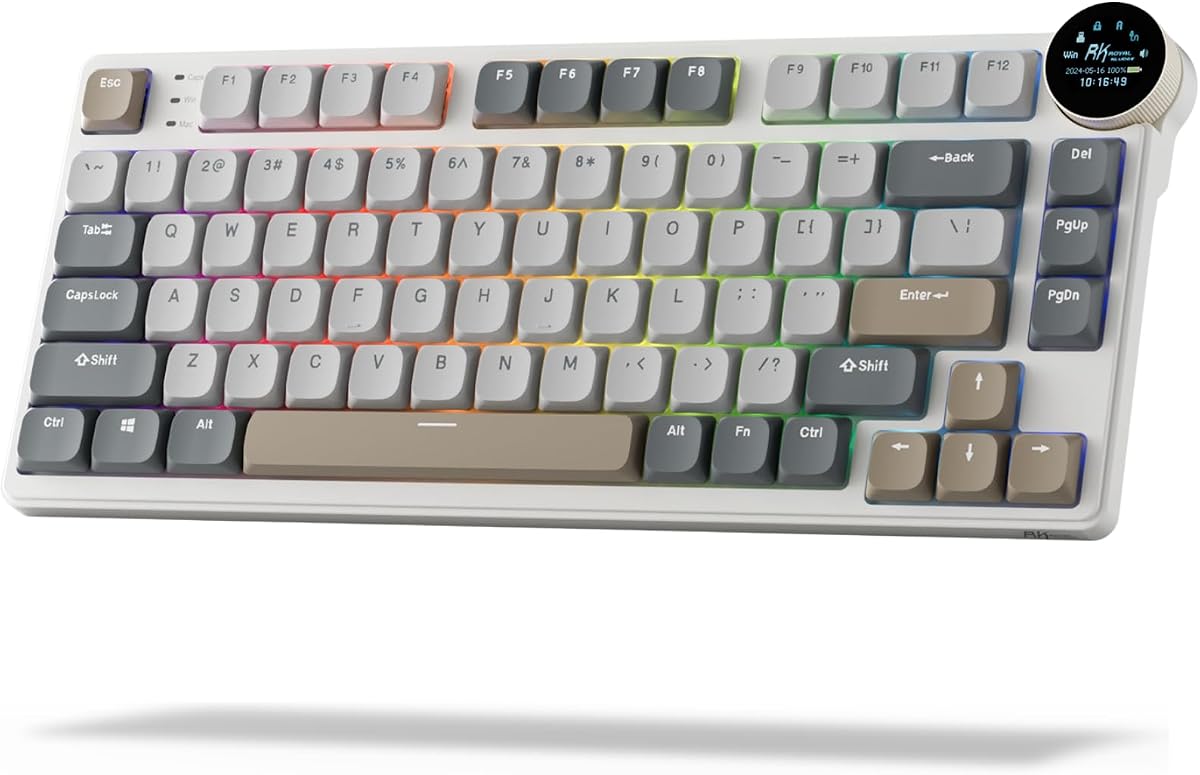
The RK ROYAL KLUDGE N80 stands out with its unique smart display screen that shows dates, connection modes, and custom GIFs. This feature adds a playful element to your desk setup while providing quick visual access to keyboard status.
We may earn a commission when you buy through this link, at no additional cost to you.
Tri-mode connectivity ensures you can connect to multiple devices wirelessly or via cable. The top-mount design and sound-absorbing layers help reduce noise and hollow sounds, resulting in a quieter and smoother typing experience.
The screen and knob are convenient but can drain battery faster. Software stability may vary depending on updates. Despite these minor issues, the visual customization and solid build make it a fun and functional choice.
Best for users who want to add personality to their desk without sacrificing performance. It is a strong contender for those who value unique features and a stable wireless connection.
Screen displays battery, time, and custom GIFs via app for added personalization.
We may earn a commission when you buy through this link, at no additional cost to you.
The Flow Lite 84 Keys is designed for comfort and portability, featuring a gasket mount that reduces strain during long typing sessions. Its lightweight construction makes it ideal for travelers or those with limited desk space.
We may earn a commission when you buy through this link, at no additional cost to you.
Specter linear switches offer a soft touch with reduced force to minimize fatigue. PBT double-shot keycaps ensure durability and texture retention. The 80-hour battery life supports extensive use without frequent recharging.
The body material is ABS rather than aluminum, which feels less premium. However, the ergonomic design and sound-dampening layers provide a comfortable typing experience that justifies the build compromises for portability.
This keyboard is perfect for mobile professionals who need a reliable and comfortable mechanical option on the go. Its balance of weight and performance makes it a versatile tool for various environments.
Gasket mount and low profile reduce wrist strain for extended typing comfort.
We may earn a commission when you buy through this link, at no additional cost to you.
The Keychron K17 Max delivers a compact 96% layout that retains a number pad, making it perfect for productivity tasks that require frequent numeric entry. Its slim profile ensures it fits easily on most desks without compromising functionality.
We may earn a commission when you buy through this link, at no additional cost to you.
Gateron Brown switches provide a tactile bump that is satisfying without being too loud. QMK firmware support allows for deep customization and macro creation via the launcher app. The tactile feedback aids in faster data entry and general typing.
The numpad can crowd the main keys slightly, and the weight is higher than ultra-slim models. However, for accountants or professionals needing number input, this trade-off is well worth it for the added efficiency.
Ideal for office workers who need a number pad but want to save desk space. Its slim design and reliable switches make it a practical daily driver for business environments.
96% layout includes a number pad without taking up extra desk space.
We may earn a commission when you buy through this link, at no additional cost to you.
The Flow Lite 100 Keys offers a full-size layout with the ergonomic benefits of a low profile design. This model is perfect for users who need a traditional number pad but want a softer, quieter typing experience.
We may earn a commission when you buy through this link, at no additional cost to you.
Specter linear switches are lightweight and smooth, reducing finger fatigue during long sessions. The gasket mount design ensures a cushioned feel, while the aluminum volume roller adds intuitive control for media tasks.
Its large footprint requires more desk space compared to compact models. Despite the bulk, the battery life and sound-dampening features provide a premium experience that rivals desktop mechanical keyboards.
Choose this if you need a full keyboard for data entry but prefer a softer touch. It is a great home office option for those who value comfort and media controls.
Dedicated aluminum roller provides smooth volume adjustment without reaching for keys.
We may earn a commission when you buy through this link, at no additional cost to you.
The Keychron K3 Max SE combines QMK customization with hot-swappable switches in a sleek 75% package. This model offers exceptional flexibility for users who want to tailor every aspect of their typing experience.
We may earn a commission when you buy through this link, at no additional cost to you.
It features advanced acoustic foam for a quiet and cushioned sound profile. The Milk POM switches are 31% slimmer than traditional ones, and the redesigned stabilizers reduce wobble on larger keys like Spacebar.
The software may require a learning curve to unlock full potential. However, the ability to hot-swap and fine-tune layers makes this a future-proof investment for enthusiasts.
Best for users who want the ultimate balance of wireless convenience and deep customization. It is a solid choice for those who enjoy tweaking their keyboard to perfection.
Hot-swap support lets you change switches easily without soldering for custom feel.
We may earn a commission when you buy through this link, at no additional cost to you.
The Razer Ornata V3 brings the convenience of low profile keys to a hybrid mecha-membrane design. This keyboard targets gamers who want mechanical feedback with the quietness and durability of a membrane keyboard.
We may earn a commission when you buy through this link, at no additional cost to you.
The slim keys reduce wrist strain during long sessions. UV-coated keycaps resist wear and fade over time. A magnetic soft-touch wrist rest provides added comfort and support for extended gaming marathons.
It lacks the distinct mechanical feel of traditional switches, which may disappoint enthusiasts. However, its durable construction and integrated media controls make it a solid choice for casual gamers.
Ideal for those who prioritize comfort and quiet operation over pure mechanical feedback. It is a reliable gaming keyboard for home use where noise is a concern.
Mecha-membrane switches offer snappy feedback with quieter operation than mechanical.
We may earn a commission when you buy through this link, at no additional cost to you.
Selecting the right low profile mechanical keyboard depends on your specific needs regarding ergonomics, layout, and connectivity.
Low profile switches come in linear, tactile, or clicky variants. Linear switches are smooth and quiet, ideal for gaming. Tactile switches offer feedback for typing accuracy. Consider your preference for sound and resistance.
Choose tactile or linear based on whether you prioritize feedback or silence in your daily tasks.
Sizes range from full-size with numpads to 60% compact designs. A 75% or TKL layout saves desk space while retaining essential keys. Consider if you need a number pad for data entry.
Select a layout that balances desk footprint with necessary functionality for your workflow.
Wireless options include Bluetooth for multitasking and 2.4GHz for low-latency gaming. Wired USB-C ensures stability. Tri-mode keyboards offer maximum flexibility to switch between devices seamlessly.
Prioritize 2.4GHz for gaming and Bluetooth for office setups with multiple devices.
Aluminum housings provide durability and a premium feel compared to ABS plastic. Check for stabilizer quality to prevent wobble on larger keys. Solid construction ensures long-term reliability.
Invest in metal frames and good stabilizers for better durability and comfort.
QMK firmware and hot-swap sockets allow deep remapping and switch changes. RGB lighting and programmable keys add personalization. Look for open-source support for future-proofing.
Choose QMK support if you value long-term customization and advanced macro features.
Low profile designs reduce wrist strain by minimizing travel distance. Built-in wrist rests or adjustable stands help maintain neutral posture. Comfort is key for long typing sessions.
Look for low front heights and wrist support to prevent fatigue during work.
Wireless keyboards vary significantly in battery performance. Some offer 80 to 100 hours on a single charge. Consider usage patterns to ensure you are not tethered to a charger.
Aim for at least 50 hours of battery life for wireless setups to avoid frequent charging.
Prices range from budget options to premium models. Higher cost often brings better materials and features. Balance your budget with the features that matter most to you.
Decide if you need premium build quality or if a budget model meets your functional needs.
To ensure longevity, keep your keyboard clean by regularly brushing out debris from switches. Use a compressed air canister gently to dislodge particles that may accumulate in the low profile housing.
Avoid exposing the keyboard to liquids or humidity. If spills occur, disconnect it immediately and allow it to dry completely before reconnecting to prevent internal damage to the circuitry.
Utilize software features to update firmware regularly. This ensures compatibility and access to bug fixes. Proper care and regular updates will keep your keyboard performing smoothly for years.
Yes, low profile keyboards offer faster actuation distances and reduced latency which is ideal for competitive gaming. Many models come with specific switches designed for speed and responsiveness.
While not strictly required, their low height naturally positions hands closer to the desk. A wrist rest can still help maintain a neutral wrist angle for extended comfort during typing sessions.
QMK is open-source firmware allowing deep customization of every key and layer. Standard firmware is limited to preset macros. QMK is ideal for power users needing total control.
Yes, many models feature Bluetooth connectivity or USB-C options that connect seamlessly to laptops. Ensure the layout matches your operating system for full functionality.
Generally yes, due to shorter travel distance and dampening materials. However, sound depends on the specific switch type. Linear switches are the quietest options available.
Not all models include wireless. While many modern options do, some are designed as wired-only for zero latency. Check product specifications before purchasing.
Use a soft brush to dust off debris and a slightly damp cloth for surface cleaning. Avoid soaking the keyboard or using harsh chemicals that might damage legends.
The ten keyboards listed above offer diverse options catering to different needs from budget-friendly to premium performance. Each brings unique strengths whether it is macro support, ergonomic design, or connectivity.
Prioritize the factors that matter most to your daily routine. If you type extensively, focus on ergonomics and switch feel. If you game, look for speed and wireless stability.
Always check current pricing and availability before purchasing as models and deals change frequently. Invest in a keyboard that aligns with your workflow for the best long-term value.